What to Learn Before (and Alongside) Cloud - the Six Non-Cloud Skills Every DevOps, SRE and Cloud Engineer Uses Daily: Code and Git, Scripting, CI/CD, Automation, Infrastructure as Code, Networking and Security

TL;DR
- Six skills, none of them cloud-specific, all of them used every day: 1) one programming language you can read the documentation of, plus Git and an editor; 2) scripting in bash first and Python second; 3) a CI/CD tool, Jenkins, GitHub Actions or GitLab; 4) automation with Ansible, with bash as the fallback; 5) infrastructure as code with Terraform or Pulumi; 6) networking and security: VPC, load balancers, proxies, DNS, SSL certificates, SSH keys.
- Why bash first: 99% of the servers you will touch are Linux, and a utility script in bash works everywhere without installing anything. Python comes next for automation that outgrows a script.
- Why networking last on the list and first in trouble: it is the one people skip, and the one they struggle on in every DevOps, SRE and cloud role, because every cloud service is a networking service underneath.
- Learn them in parallel with a cloud, not before it. The video's title says before; the content says in parallel. Pick one small project and let it pull all six in.
- All six are free to learn here: the Git and GitHub course, the Ansible course, the Terraform index, the Jenkins pipeline posts and the CIDR explainer that starts the networking series.
- Not your exact case? If you are deciding between this list and an exam, read should you do a cloud certification first; if you want the one project that uses all six, it is the Terraform, Jenkins and Flask project.
Table of Content
- The cloud is the smaller half of the job
- The six skills and the tools I named
- In what order
- One project that uses all six
- Lessons from the two years since the video
- Conclusion
1. The cloud is the smaller half of the job
Every week someone asks me which cloud to start with, as if the choice of AWS, Azure or Google Cloud were the hard part. It is not. In 13 minutes in September 2024 I tried to explain why: the foundation under every cloud role is a set of tools that are not cloud at all, and the people who struggle with cloud services are almost always missing one of them, usually networking. This is the written version of that video, with the same six items and the places on this site where each is taught.
These are the six, in my words from the recording, so you can see the list is the video's and not a rewrite:
 11  "the backbone of any computing is the code ... you should be able to read the documentation
 2    of that programming language" - plus Git ("push, pull, raising a pull request, merging")
 3    and an editor ("the most popular one is Visual Studio Code")
 42  "scripting is something like a Swiss knife for a cloud expert ... 99% of the time you need
 5    to work with the Linux machine, you need to know the bash scripting" - then Python
 63  "CI/CD ... Jenkins, which is an open-source tool ... GitHub Actions, GitLab"
 74  "automation ... the most important one, whether you are doing DevOps, SRE or cloud, is Ansible"
 85  "infra as code ... Terraform is a quite popular tool ... and Pulumi"
 96  "networking and security ... VPC, load balancers, proxy, reverse proxy, DNS, the SSL
10    certificate, SSH keys ... if you have not read these topics you are going to struggle"
2. The six skills and the tools I named
| # | Skill | Tools from the video | Why it matters on day one | Where to start here |
|---|---|---|---|---|
| 1 | Code and version control | one language (Python, Java, Go, JavaScript); Git and GitHub; Visual Studio Code | you will read and patch other people's code before you write your own; everything you make lives in Git | Git and GitHub blueprint course |
| 2 | Scripting | bash, then Python | the fastest way to check, fix and automate on a Linux box; Python when the script needs an API or data | the bash and Python in every tutorial on this site |
| 3 | CI/CD | Jenkins, GitHub Actions, GitLab CI | a commit should build, test and deliver without a human; Jenkins runs on your laptop | Jenkins pipeline on AWS and Kubernetes |
| 4 | Automation | Ansible, bash as fallback | no manual releases to test or production; Ansible is free, agentless and readable | Ansible full course, real-world Ansible project |
| 5 | Infrastructure as code | Terraform, Pulumi | nobody clicks a console to create production resources; code can be reviewed, repeated and destroyed | Terraform index |
| 6 | Networking and security | VPC, subnets, load balancers, proxies, DNS, SSL, SSH keys | every cloud service sits on a network; this is where most outages and most interview failures live | What is CIDR, then the AWS, Azure and Google Cloud VPC series |
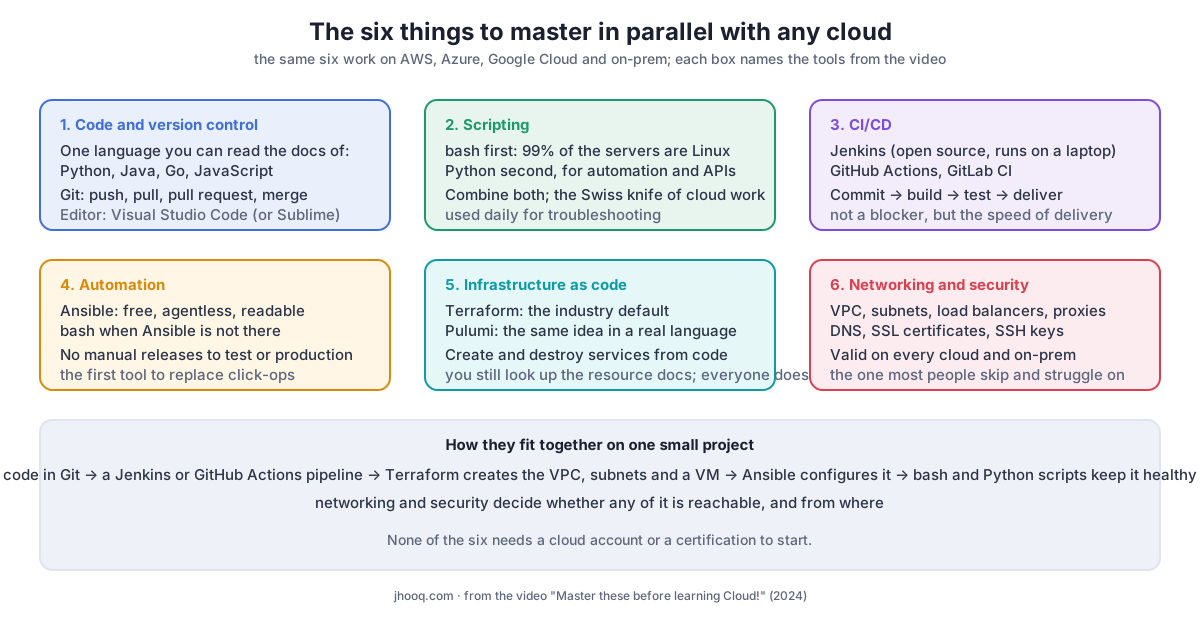
On the language. I do not care which one. The video says Python is the usual pick for DevOps and cloud work, but Java, Go, JavaScript and React all came up, and the skill underneath is the same: read the documentation, write a small program, run it. Languages change release by release, so the person who can read the docs keeps up and the person who memorised one version does not.
On scripting. bash comes first because it is already on the machine. When a bash script turns into 200 lines of string handling, that is the sign to move it to Python; combining the two is normal. I use scripting more for troubleshooting than for building, which is why it is the Swiss knife in the video.
On CI/CD. The video is careful here: you are not blocked from delivering to a cloud without a pipeline, you are just slow and error-prone. Jenkins is the one I teach because it is open source and you can run it locally; GitHub Actions and GitLab CI are the ones you will meet at work.
On automation versus infrastructure as code. People mix these up. Terraform creates the server; Ansible configures what runs on it. You need both, and the video names Ansible as the single most important tool for the role.
On networking. Everything in the list above is learnable in a week each. Networking is the one that takes a year to become comfortable with, and it is also the one that transfers without change from on-prem to every cloud: a VPC is a network, a subnet is a subnet, a load balancer, a reverse proxy, DNS and TLS behave the same way everywhere. It is the reason this site has the CIDR explainer, the usable IP addresses post and the VPC Subnet Planner.
3. In what order
The video says "in parallel", and that is the honest answer, but people want an order. This is the one I give:
- Linux and bash, in the first 7 days. Open a terminal, learn to move around, read a log, and write a 10-line script; the first one should take you 30 minutes, not an evening. Everything else runs on this.
- Git, the same week. Put the script in a repository. From now on nothing lives outside Git.
- One language, over the next 30 days, by building something small that calls an API and writes a file. Keep each session to 60 minutes and keep the project in Git from the first line.
- Terraform and Ansible, as soon as you have a cloud account. Create a VPC and a VM with Terraform; install something on it with Ansible. The Terraform index and the Ansible course are built for this.
- A pipeline that does step 4 for you when you push, in Jenkins or GitHub Actions.
- Networking throughout. Every time a step fails with "connection refused" or "timeout", stop and understand why. That is the networking course, and it never ends.
The cloud itself comes in at step 4. That is the point of the title: the first three steps need no cloud account at all.
4. One project that uses all six
The project I point people to is the Terraform, Jenkins and Flask REST API on AWS: code in Git, a Jenkins pipeline, Terraform for the VPC and the instance, a script that configures the application, and a security group and subnet layout that decide whether any of it is reachable. For the Ansible side, the real-world Ansible project runs three playbooks against four servers in Docker on a laptop, with the real output of the run in the post.
If you finish one of those and can explain every line of it, you have all six, and no exam asks for more than that.
5. Lessons from the two years since the video
1. The title says before; the content says in parallel. Read literally, "before" suggests finishing Python before touching AWS. No. Step 4 in section 3 is where the cloud enters, which is weeks in, not months. The list is what to learn alongside a cloud, and the video says so in its first minute.
2. I put networking last and it should be in every sentence. It is item six in the video, introduced with "if you have not read these topics you are going to struggle", and that warning deserved the top of the list. Of the six, it is the only one I would call a prerequisite in the strict sense, because without it the cloud documentation does not make sense. It is the reason the networking series on this site is the one I have spent the most time on since.
3. The tool names aged; the categories did not. Jenkins is still what I teach because it runs on a laptop; GitHub Actions is the one the video mentions second and the one most new repositories start with. Pulumi is still the alternative to Terraform, and OpenTofu has joined the conversation since the recording. None of that changes the six categories, which is why the post is organised by skill, not by tool.
4. "Read the documentation" was the most useful sentence in the video. It was aimed at programming languages, and it applies to all six. Every tutorial on this site links the official page it was checked against, for the same reason: the tool changes, and the person who reads the source keeps up.
6. Conclusion
To summarise:
- The six skills under every cloud role are code and Git, scripting, CI/CD, automation, infrastructure as code, and networking and security.
- bash first because 99% of your servers are Linux; Python when the script outgrows bash.
- Terraform creates, Ansible configures; you need both.
- Networking is the one you cannot skip and the one that transfers everywhere.
- Learn them in parallel with one small project, and no certification is required to start.
Did this save you a debugging session? Stay in the loop -
- Subscribe on YouTube - every post here has a screen-recorded companion video.
- Code on GitHub - the repositories, Terraform and scripts behind these posts.