What is NAT (Network Address Translation)? How It Works, Static NAT vs Dynamic NAT vs PAT, the Translation Table, and Where NAT Shows Up in AWS
Your laptop has the address 192.168.1.10. So does your neighbour's. So do roughly a hundred million other laptops in the world right now - and yet every one of them can open this page. The trick that makes that possible is NAT, network address translation, and it is also the trick behind the AWS NAT Gateway that lets private subnets reach the internet. This post explains NAT the way the networking series on my channel does - the problem it solves, what happens to one packet, the three types, the side effects - and then maps each idea onto what you see in AWS.
If you have read what is CIDR you know the private ranges; NAT is what happens at the edge of them.
Table of Content
- The problem - 4.3 billion addresses for 20 billion devices
- Private addresses inside, one public address outside
- What happens to a packet - the translation table
- Static NAT - one to one
- Dynamic NAT - a pool
- PAT (NAT overload) - many to one with ports
- Side effects - no inbound connections, port forwarding, port exhaustion, broken protocols
- NAT in AWS - Internet Gateway, Elastic IP, NAT Gateway, private NAT, NAT64
- Does IPv6 end NAT?
- See it yourself - from your laptop and from an EC2 instance
- Common NAT problems and how to recognise them
- Conclusion
1. The problem - 4.3 billion addresses for 20 billion devices
An IPv4 address is 32 bits, so there are 2^32 - about 4.3 billion - of them, and a good share are reserved or unusable. The regional registries handed out the last free blocks in 2011-2019. Meanwhile the number of connected devices passed 20 billion. Without a fix, the internet would have stopped growing in the late 1990s.
Two fixes exist. The long-term one is IPv6 (128 bits, effectively unlimited). The one that actually kept the lights on for thirty years is NAT - defined in RFC 3022 - which lets a whole network hide behind one public address.
2. Private addresses inside, one public address outside
Inside your home or office, devices use addresses from the private ranges - 192.168.x.x, 10.x.x.x, 172.16-31.x.x (RFC 1918). These are not routable on the internet: no router out there has a route to 192.168.1.10, and millions of networks use the same numbers. Your router has two sides -
- Inside - a private address,
192.168.1.1, the default gateway of your devices. - Outside - one public address from your ISP, say
85.1.2.3, which the whole internet can route to.
NAT lives on that router and rewrites addresses as packets cross between the two sides. Every device in the house appears to the internet as 85.1.2.3.
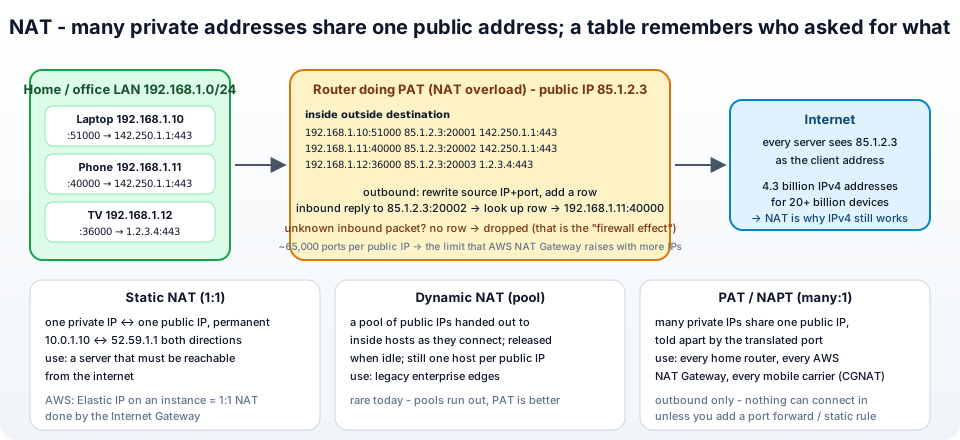
3. What happens to a packet - the translation table
Your laptop (192.168.1.10) opens https://jhooq.com (3.70.1.2, port 443). The operating system picks a random source port, say 51000, and sends -
1src 192.168.1.10:51000 → dst 3.70.1.2:443
The router -
- Rewrites the source to its public address and a port it chooses:
85.1.2.3:20001. - Writes a row in its translation table:
192.168.1.10:51000 ⇄ 85.1.2.3:20001 ⇄ 3.70.1.2:443. - Forwards the packet. The server sees a request from
85.1.2.3:20001and has no idea192.168.1.10exists.
The reply comes back -
1src 3.70.1.2:443 → dst 85.1.2.3:20001
- The router looks up
85.1.2.3:20001in the table, finds192.168.1.10:51000, rewrites the destination and delivers it to the laptop. - When the connection closes or idles for a while (minutes; 350 seconds on the AWS NAT Gateway) the row is removed.
A packet arriving from the internet for which no row exists has nowhere to go and is dropped. That single fact is the whole security story of NAT and the reason your laptop is not directly attackable from the internet - and the reason you cannot host a game server at home without extra work (section 7).
4. Static NAT - one to one
Static NAT maps one private address to one public address, permanently, in both directions: 10.0.1.10 ⇄ 52.59.1.1. Anything sent to 52.59.1.1 is delivered to 10.0.1.10, and anything 10.0.1.10 sends appears as 52.59.1.1. No ports involved, no table rows created on the fly - the mapping is configuration.
Use it for a server that must be reachable from the internet but whose real address is private. It does not save any addresses - every inside host still needs its own public one - so it is about hiding and re-addressing, not about IPv4 exhaustion. In AWS this is exactly what an Elastic IP on an EC2 instance is (section 8).
5. Dynamic NAT - a pool
Dynamic NAT has a pool of public addresses - say 85.1.2.10 to 85.1.2.20. When an inside host starts talking to the internet, the router grabs a free public address from the pool for it, and releases it when the host goes idle. Still one inside host per public address at a time, so eleven addresses serve eleven simultaneous hosts; the twelfth waits or fails. It was a stepping stone in enterprise networks in the 1990s and is rare today, because the next type does everything it does with a single address.
6. PAT (NAT overload) - many to one with ports
PAT - port address translation, also called NAPT, NAT overload or just "NAT" in everyday speech - is what the walkthrough in section 3 showed and what every home router and the AWS NAT Gateway do. It maps many private addresses to one public address by using the source port as the distinguishing key -
1inside                outside           destination
2192.168.1.10:51000  → 85.1.2.3:20001  → 142.250.1.1:443   (laptop → Google)
3192.168.1.11:40000  → 85.1.2.3:20002  → 142.250.1.1:443   (phone → Google)
4192.168.1.12:36000  → 85.1.2.3:20003  → 3.70.1.2:443      (TV → jhooq.com)
Two devices talking to the same server on the same port are told apart only by the outside port the router assigned (20001 vs 20002). A TCP/UDP port is 16 bits, so one public address offers about 65,000 simultaneous translations (less, after reserved ports) - per destination, in careful implementations. That is the ceiling behind the AWS NAT Gateway's "55,000 connections per IP per destination" limit, and why it lets you add more IPs (Part-14).
Mobile carriers run the same thing one level up - carrier-grade NAT (CGNAT), using the 100.64.0.0/10 range - so your phone is often behind two layers of NAT.
7. Side effects - no inbound connections, port forwarding, port exhaustion, broken protocols
NAT was a hack, and hacks have side effects -
- Nothing can connect in. No table row, no delivery. Good for security, bad for hosting. Port forwarding is the manual fix - a static rule "anything to
85.1.2.3:25565goes to192.168.1.50:25565" - which is what a home router's "port forwarding" page and an AWS NAT instance'siptablesDNAT rule do. The managed NAT Gateway does not support it at all. - Port exhaustion. Thousands of clients to one destination run the 65,000 ports dry. Symptoms: new connections fail while old ones work;
ErrorPortAllocationon the NAT Gateway. - The server sees the wrong address. Logs, rate limits and geo-blocks see the NAT's public IP - a whole office looks like one very busy user (WAF rate rules and a shared office IP do not mix). Protocols that need the client address inside the payload carry it separately -
X-Forwarded-For, proxy protocol. - Protocols that embed addresses break. Old FTP, SIP/VoIP, and IPsec (whose integrity check covers the header NAT rewrites) need helpers - ALGs, STUN/TURN for WebRTC, NAT-Traversal (NAT-T, UDP 4500) for IPsec. The AWS NAT Gateway supports TCP, UDP and ICMP only - IPsec must use NAT-T.
- Idle timeouts drop long-quiet connections (350 s on the NAT Gateway); use TCP keepalives.
- Peer-to-peer is hard. Two hosts both behind NAT cannot open connections to each other without a rendezvous server - the reason video calls need STUN/TURN infrastructure.
8. NAT in AWS - Internet Gateway, Elastic IP, NAT Gateway, private NAT, NAT64
Every one of the concepts above has a name in the VPC console -
| Concept | AWS implementation |
|---|---|
| Static NAT (1:1) | a public IP or Elastic IP on an instance. The instance only knows its private 10.0.1.10; the Internet Gateway performs the one-to-one translation to 52.59.1.1 both ways. ip addr on the instance never shows the public address - that is NAT. |
| PAT (many:1) | the NAT Gateway - a managed PAT device in a public subnet with an Elastic IP; private subnets route 0.0.0.0/0 to it; up to 8 IPs for more ports; outbound only. A NAT instance is the same thing on an EC2 box you manage. |
| NAT between private networks | a private NAT Gateway (no Elastic IP) that hides one VPC's range behind a single address so two networks with overlapping CIDRs can talk through a Transit Gateway. |
| NAT64 | the NAT Gateway translating IPv6-only subnets to IPv4 destinations, with DNS64 on the Route 53 Resolver synthesising addresses. |
| Port forwarding / inbound | not NAT at all on AWS - you use a load balancer (ALB, NLB) or a public IP; the NAT Gateway cannot do it. |
| The "no inbound" security effect | the reason a private subnet behind a NAT Gateway is unreachable from the internet even with permissive security groups - there is no path in. |
The full build - public and private subnets, Internet Gateway and NAT Gateway, and testing that the private instance's traffic leaves with the NAT's IP - is Part-5 of the AWS series.
9. Does IPv6 end NAT?
In theory yes - with 2^128 addresses every device gets a globally unique one and no translation is needed. In practice, two things remain: the "outbound only" behaviour that people liked about NAT is provided by stateful firewalls - in AWS the egress-only Internet Gateway does exactly that for IPv6 without any translation; and IPv6-to-IPv4 communication still needs translation (NAT64) because much of the internet is still IPv4-only. So NAT shrinks from "how every network works" to "a bridge during the transition". For the foreseeable future you will keep meeting it on every home router, every mobile network and in every private subnet on AWS.
10. See it yourself - from your laptop and from an EC2 instance
 1# your private address (inside)
 2ip addr show | grep "inet "          # Linux
 3ipconfig                             # Windows
 4# → 192.168.1.10
 5
 6# the address the internet sees (outside) - the NAT's public IP
 7curl -s https://checkip.amazonaws.com
 8# → 85.1.2.3   (not 192.168.1.10)
 9
10# the ports your machine is using - compare with what the server would see
11ss -tn state established | head      # Linux
12netstat -an | findstr ESTABLISHED    # Windows
On a private EC2 instance behind a NAT Gateway, curl https://checkip.amazonaws.com prints the NAT Gateway's Elastic IP; on a public instance it prints that instance's own public IP (static 1:1 NAT by the Internet Gateway); run ip addr on either and you see only 10.0.x.x. Open a few connections and watch the NAT Gateway's ActiveConnectionCount metric in CloudWatch tick up - that is the translation table, counted.
11. Common NAT problems and how to recognise them
1. "I can browse but nobody can reach my server at home / in the private subnet" - NAT is outbound-only. Add a port forward on a home router; on AWS, put the service behind a load balancer or give it a public IP in a public subnet.
2. New connections start failing under load, old ones fine - Port exhaustion. More public IPs on the NAT (secondary IPs on the NAT Gateway), more NAT devices, or fewer connections per destination.
3. A vendor's allow-list blocks you although "we allowed your IP" - They allowed an instance's private IP, or the NAT's address changed (a NAT instance rebooted without an Elastic IP). Give them the Elastic IP of the NAT Gateway, which never changes.
4. The web server's logs show every user as the same IP - NAT on the client side (office) or your load balancer. Read X-Forwarded-For / proxy protocol instead of the socket address.
5. VPN (IPsec) will not connect from behind the router - IPsec without NAT-T. Enable NAT-Traversal on both ends (UDP 4500).
6. Long-running connections die after a few minutes of silence - The NAT idle timeout (350 s on the NAT Gateway). TCP keepalive below that.
7. Video calls or game lobbies fail between two home networks - Double NAT / CGNAT without a relay. The application needs STUN/TURN; nothing you can fix on AWS.
8. "Why does my EC2 instance not know its own public IP?" - Because it does not have one - the Internet Gateway holds the 1:1 mapping. Ask the metadata service (/latest/meta-data/public-ipv4) or checkip.amazonaws.com.
9. The private instance can reach the internet from AZ-a but not AZ-b - Not a NAT concept problem but a NAT Gateway placement one - one gateway per AZ, per-AZ route tables (Part-14).
12. Conclusion
To summarise -
- NAT rewrites addresses at the edge of a private network so that many private addresses can share one public address - the reason IPv4 still works.
- The router keeps a translation table; outbound packets get a row, replies are matched against it, and anything without a row is dropped - which is why NAT blocks inbound connections.
- Static NAT is a permanent 1:1 mapping (an Elastic IP on AWS); dynamic NAT hands out addresses from a pool (rare today); PAT uses ports to put thousands of hosts behind one address (every home router, the AWS NAT Gateway).
- Side effects - no inbound, port exhaustion, the server seeing the NAT's IP, broken address-embedding protocols, idle timeouts - each have a standard workaround.
- On AWS: the Internet Gateway does 1:1 NAT for public IPs, the NAT Gateway does PAT for private subnets, private NAT bridges overlapping networks and NAT64 bridges IPv6 to IPv4.
The definitive text is RFC 3022, and the AWS side is the NAT gateway guide. To see the address ranges NAT hides, read what is CIDR; to run a NAT Gateway properly, Part-14 of the AWS series.
AWS step by step series -
- Part-1 : AWS IAM user - create a user, group, policy, access keys and MFA
- Part-2 : AWS Organizations - multi-account setup, OUs and SCPs
- Part-3 : AWS assume IAM role - trust policy, switch role in console and CLI
- Part-4 : How to launch an EC2 instance - key pair, security group, SSH
- Part-5 : AWS VPC - public and private subnets, Internet Gateway, NAT Gateway, route tables
- Part-8 : EC2 launch template - versions, default version, source template, SSM parameter AMI
- Part-10 : EC2 Auto Scaling - launch template, Auto Scaling group, target tracking, ALB
- Part-11 : AWS WAF - web ACL, managed rules, rate limiting, geo blocking
- Part-12 : AWS VPC Peering - connect two VPCs, routes, security groups, DNS
- Part-13 : AWS Transit Gateway - hub-and-spoke for many VPCs and on-premises
- Part-14 : AWS NAT Gateway deep dive - public vs private, limits, cost, troubleshooting
- Part-15 : Amazon Route 53 - hosted zones, records, alias, routing policies, health checks
- Part-16 : AWS security groups - inbound and outbound rules, stateful, referencing, quotas
- Part-16 : AWS Certificate Manager - free TLS certificates for ALB, CloudFront and API Gateway
- Part-17 : AWS Lambda - function URLs, environment variables and layers
- Part-18 : Network Load Balancer - setup, and ALB vs NLB
- Part-19 : VPC endpoints - gateway and interface endpoints (PrivateLink) instead of NAT
- Part-20 : AWS PrivateLink - publish your own service with an endpoint service and NLB
- Part-20 : Amazon EBS volumes - types, attach, mount, resize, snapshots, encryption
- Part-21 : VPC Flow Logs - CloudWatch Logs, S3, record format, Logs Insights, Athena
- Part-21 : EC2 Spot Instances - pricing, interruptions, mixed instances groups
- Part-24 : AWS Control Tower - landing zone, controls, Account Factory, Identity Center
Networking fundamentals -
- What is a VPC and a subnet? AWS networking in five minutes
- What is CIDR? Calculate IP ranges for VPCs and subnets
- What is NAT? Static NAT, dynamic NAT and PAT explained
More AWS guides -
- What is AWS CloudFormation? Templates, stacks, change sets, drift, StackSets
- Learn AWS S3 - the complete course
- AWS API Gateway - REST API with Lambda, authorizers, Terraform
- AWS Advanced Networking Specialty (ANS-C01) - course companion
- AWS ECS and Fargate - how to deploy a Docker container
- AWS S3 - how to host a static website
- Terraform create EC2 instance on AWS
- Terraform AWS IAM - users, roles and policies
- Terraform and AWS multi-account setup
- Terraform - setting up an ALB and SSL
Posts in this series
- Amazon EBS Volumes Step by Step - Volume Types Compared (gp3, gp2, io2 Block Express, st1, sc1), Create, Attach, Format and Mount a Volume, Resize Without Downtime, Snapshots, Encryption, Multi-Attach, Pricing and Troubleshooting (AWS Part-20)
- Amazon Route 53 Step by Step - Hosted Zones, Record Types, Alias Records, Point a Domain at an ALB, Routing Policies (Weighted, Latency, Failover, Geolocation), Health Checks, Private Zones and Pricing (AWS Part-15)
- AWS Advanced Networking - Free 8-Hour Full Course Companion (VPC, NAT Gateway, Bastion, ALB, NLB, WAF, VPC Peering, Transit Gateway, VPC Endpoints and PrivateLink, Route 53, ACM) with Timestamps and the ANS-C01 Exam Facts
- AWS Assume IAM Role Step by Step - Trust Policy vs Permissions Policy, Switch Role in the Console, aws sts assume-role, CLI Profiles, Cross-Account Access, MFA and External ID (AWS Part-3)
- AWS Certificate Manager (ACM) Step by Step - Request a Free TLS Certificate, DNS Validation with Route 53, Attach It to an ALB HTTPS Listener, Redirect HTTP to HTTPS, CloudFront and API Gateway, Auto-Renewal, Exportable Certificates and ACME (AWS Part-16)
- AWS Control Tower Step by Step - Set Up a Landing Zone, Security OU with Log Archive and Audit Accounts, Controls (Guardrails), Region Deny, IAM Identity Center, Account Factory and Enrolling Existing Accounts (AWS Part-24)
- AWS EC2 Auto Scaling Step by Step - Launch Template, Auto Scaling Group Across Two AZs, Target Tracking Policy, Application Load Balancer, Health Checks and Instance Refresh (AWS Part-10)
- AWS EC2 Launch Template Step by Step - Create a Template, Versions and the Default Version, Source Template, Create From a Running Instance, Systems Manager Parameter Instead of an AMI ID, Launch Templates vs Launch Configurations, IAM Guardrails, CLI and Terraform (AWS Part-8 and Part-17)
- AWS EC2 Spot Instances Step by Step - How Spot Pricing Works, Launch a Spot Instance, Interruptions and the Two-Minute Notice, Rebalance Recommendations, Stop vs Hibernate vs Terminate, Spot in Auto Scaling Mixed Instances Groups, Billing Rules, Best Practices, CLI and Terraform (AWS Part-21)
- AWS IAM User Step by Step - Create a User, User Group, Attach Policies, Access Keys, MFA and Sign-in URL (AWS Part-1)
- AWS Lambda Step by Step - Create a Function, Function URL (HTTPS Endpoint Without API Gateway), Environment Variables, Lambda Layers for Python Dependencies, Versions and Aliases, Limits, Pricing and Errors (AWS Part-17)
- AWS NAT Gateway Deep Dive - How It Works, Public vs Private NAT Gateway, Setup Step by Step, Limits (55,000 Connections, 100 Gbps), CloudWatch Metrics, Cost Optimisation, NAT Instance Comparison and Troubleshooting (AWS Part-14)
- AWS Network Load Balancer Step by Step - Create an NLB with Static IPs, Target Groups, TCP and TLS Listeners, Security Groups, Client IP Preservation, Cross-Zone Load Balancing, and ALB vs NLB Explained (AWS Part-18)
- AWS Organizations Step by Step - Multi-Account Setup, Organizational Units, Service Control Policies (SCPs), Consolidated Billing and Identity Center (AWS Part-2)
- AWS PrivateLink Step by Step - Publish Your Own Service with a VPC Endpoint Service and Network Load Balancer, Allow Consumers, Accept Connections, Private DNS Name, Cross-Account and Cross-Region, Pricing and Troubleshooting (AWS Part-20)
- AWS Security Groups Step by Step - Inbound and Outbound Rules, Stateful Behaviour, Referencing Security Groups, the Three-Tier ALB-Web-DB Pattern, Quotas, Security Group vs Network ACL, CLI and Terraform (AWS Part-16)
- AWS Transit Gateway Step by Step - Connect Many VPCs and On-Premises Through One Hub, VPC Attachments, Transit Gateway Route Tables, Associations and Propagations, Isolation, Peering, Pricing (AWS Part-13)
- AWS VPC Endpoints Step by Step - Gateway Endpoints for S3 and DynamoDB, Interface Endpoints (PrivateLink) for SSM, ECR and Other Services, Private DNS, Endpoint Policies, Security Groups, Cost vs NAT Gateway, and Troubleshooting (AWS Part-19)
- AWS VPC Flow Logs Step by Step - Enable Flow Logs for a VPC, Subnet or Network Interface, Publish to CloudWatch Logs or S3, Read a Flow Log Record Field by Field, Custom Formats, Query with Logs Insights and Athena, Find Rejected Traffic, Pricing and Limitations (AWS Part-21)
- AWS VPC Peering Step by Step - Connect Two VPCs (Same or Different Account and Region), Accept the Request, Add Routes, Security Groups, DNS Resolution, Test with EC2, and the Limits (AWS Part-12)
- AWS VPC Step by Step - Create a VPC with Public and Private Subnets, Internet Gateway, NAT Gateway and Route Tables (and Test It with EC2) (AWS Part-5)
- AWS WAF Step by Step - Create a Web ACL, Attach It to an ALB or API Gateway, AWS Managed Rules, Rate-Based Rules, Geo Blocking, IP Sets, Count Mode and Logging (AWS Part-11)
- How to Launch an EC2 Instance on AWS Step by Step - AMI, Instance Type, Key Pair, Security Group, Connect with SSH or EC2 Instance Connect, Stop vs Terminate (AWS Part-4)
- What is an AWS VPC and a Subnet? Virtual Private Cloud Explained in Five Minutes (Region, Availability Zones, Public vs Private Subnets, Gateways, Route Tables)
- What is AWS CloudFormation? Templates, Stacks and Change Sets Explained, Template Anatomy Section by Section, Create Your First Stack Step by Step, Update With a Change Set, Drift Detection, Nested Stacks and StackSets, Quotas, Pricing, CLI, and CloudFormation vs Terraform
- What is CIDR (Classless Inter-Domain Routing)? How to Calculate IP Ranges for VPCs and Subnets, with Examples (/8, /16, /24, /28, /32)
- What is NAT (Network Address Translation)? How It Works, Static NAT vs Dynamic NAT vs PAT, the Translation Table, and Where NAT Shows Up in AWS
- AWS API Gateway Tutorial - REST API with Lambda Proxy and Non-Proxy Integration, Request Validation, HTTP API vs REST API, Resource Policies, Lambda Authorizers and Terraform
- Learn AWS S3 - The Complete Course (Buckets, Objects, Storage Classes, Lifecycle, Versioning, Security Defaults, Bucket Policies, Static Hosting, CLI and Terraform)
- How to release(delete) Elastic IP from AWS?
- Fix docker login 'error saving credentials: error storing credentials - err: exit status 1' (AWS ECR on macOS, Windows, Linux and WSL)