What is CIDR (Classless Inter-Domain Routing)? How to Calculate IP Ranges for VPCs and Subnets, with Examples (/8, /16, /24, /28, /32)
Every network tutorial on this blog - the AWS VPC, VPC peering, Transit Gateway, the GCP VPC posts, even the Kubernetes setup - starts with something like 10.0.0.0/16. If that slash-sixteen has always been a thing you copy rather than a thing you understand, this post fixes it in ten minutes. CIDR - Classless Inter-Domain Routing - is simply the notation for "an IP address range", and once you can read it you can size a VPC, split it into subnets, write a security group rule and spot an overlap before AWS throws an error at you.
This is the written version of my CIDR video (and of the one-minute short on the same topic); the examples are the ones I use in the AWS series.
Table of Content
- The problem CIDR solved - classful addresses
- An IPv4 address is 32 bits
- The slash - how many bits are the network
- The formula and the table - from /8 to /32
- Reading a CIDR block - first address, last address, mask
- Private ranges you may use anywhere - RFC 1918
- Carving a VPC into subnets without overlaps
- The five addresses AWS reserves in every subnet
- CIDR in route tables and security groups - 0.0.0.0/0 and /32
- Calculating and checking from the command line
- Common CIDR mistakes and the errors they cause
- Conclusion
1. The problem CIDR solved - classful addresses
Until 1993 IPv4 addresses were handed out in classes by the first bits of the address: Class A blocks of 16.7 million addresses (a /8 in today's terms), Class B blocks of 65,536 (/16), Class C blocks of 256 (/24). A company with 300 computers was too big for a Class C and got a Class B - and wasted 65,000 addresses. With 4.3 billion addresses in total and the internet growing, that could not last. CIDR, defined in RFC 4632, threw the classes away - classless - and let a block be any power-of-two size, written as the address plus a prefix length: 203.0.113.0/23 is 512 addresses, exactly what that company needed. The same notation describes a whole ISP's /12 and a single server's /32, and routers can aggregate many small blocks into one route - the "inter-domain routing" half of the name.
2. An IPv4 address is 32 bits
10.0.1.0 is a human-friendly way of writing 32 bits - four groups (octets) of 8 bits, each 0-255 -
1  10        .  0         .  1         .  0
2  00001010  .  00000000  .  00000001  .  00000000
32 bits give 2^32 ≈ 4.3 billion possible addresses. Every CIDR calculation is just "how many of those 32 bits are fixed, and how many are free".
3. The slash - how many bits are the network
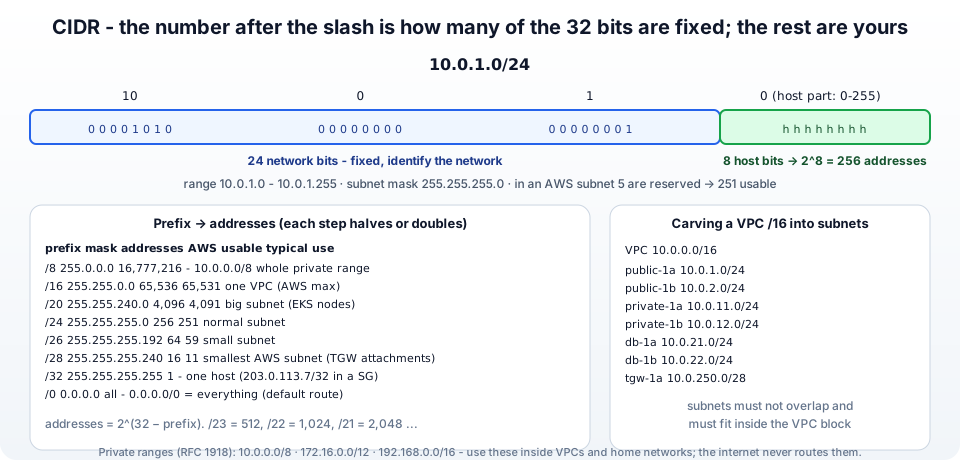
In 10.0.1.0/24, the /24 says: the first 24 bits are the network part and are fixed; the remaining 32 − 24 = 8 bits are the host part and may vary.
1network bits (24)                     host bits (8)
200001010 . 00000000 . 00000001   .   hhhhhhhh
310       . 0        . 1          .   0 - 255
So 10.0.1.0/24 is every address from 10.0.1.0 to 10.0.1.255 - 2^8 = 256 addresses. The old way of writing the same thing is the subnet mask 255.255.255.0 - 24 ones followed by 8 zeros in binary. CIDR and the mask carry identical information; CIDR is just shorter, which is why AWS, Google Cloud, Kubernetes and every firewall use it.
A smaller prefix number means fewer fixed bits and a bigger block - /16 is 256 times larger than /24. That inversion trips up beginners every time: /8 is huge, /32 is one address.
4. The formula and the table - from /8 to /32
addresses = 2^(32 − prefix). Each step down in the prefix doubles the block, each step up halves it -
| Prefix | Subnet mask | Addresses | Usable in an AWS subnet | Typical use |
|---|---|---|---|---|
| /8 | 255.0.0.0 | 16,777,216 | - | the whole 10.0.0.0/8 private range, a summary route to a Transit Gateway |
| /12 | 255.240.0.0 | 1,048,576 | - | 172.16.0.0/12 private range |
| /16 | 255.255.0.0 | 65,536 | 65,531 | one VPC (the largest AWS allows) |
| /20 | 255.255.240.0 | 4,096 | 4,091 | a big subnet (EKS node pools eat IPs) |
| /22 | 255.255.252.0 | 1,024 | 1,019 | a medium subnet |
| /24 | 255.255.255.0 | 256 | 251 | the everyday subnet |
| /26 | 255.255.255.192 | 64 | 59 | a small subnet |
| /28 | 255.255.255.240 | 16 | 11 | the smallest AWS subnet - Transit Gateway attachment subnets |
| /32 | 255.255.255.255 | 1 | - | exactly one host - 203.0.113.7/32 in a security group |
| /0 | 0.0.0.0 | all | - | 0.0.0.0/0 = every address - the default route |
The in-between values follow the same rule: /23 = 512, /21 = 2,048, /19 = 8,192, /17 = 32,768. You do not need to memorise them - remember /24 = 256 and double or halve from there.
5. Reading a CIDR block - first address, last address, mask
For a block that does not fall on an octet boundary, work in the octet where the prefix ends. Take 10.0.16.0/20 -
- /20 means 20 fixed bits - the first two octets (16 bits) plus 4 bits of the third octet.
- The third octet's fixed 4 bits cover values in steps of 2^4 = 16: 0, 16, 32, 48 ... so the block starting at 16 runs from 16 to 31 in that octet.
- The fourth octet is fully free: 0-255.
- Range:
10.0.16.0to10.0.31.255, 2^12 = 4,096 addresses, mask255.255.240.0(240 = 11110000).
Another: 192.168.1.64/26 - 26 bits fixed means 2 bits of the last octet are fixed, steps of 64: 0, 64, 128, 192. Block 192.168.1.64 to 192.168.1.127, 64 addresses, mask 255.255.255.192.
A block address must be the start of its range (its host bits all zero). 10.0.1.37/24 is not a valid block - the block is 10.0.1.0/24, and AWS will tell you so (InvalidParameterValue: ... is not a valid IPv4 CIDR block).
6. Private ranges you may use anywhere - RFC 1918
Three blocks are reserved by RFC 1918 for private networks - never routed on the internet, so everybody can reuse them -
| Block | Addresses | Where you meet it |
|---|---|---|
10.0.0.0/8 | 16.7 million | VPCs, corporate networks, Kubernetes pod and service ranges |
172.16.0.0/12 (172.16.0.0 - 172.31.255.255) | 1 million | the AWS default VPC 172.31.0.0/16, Docker's default bridge 172.17.0.0/16 |
192.168.0.0/16 | 65,536 | home routers, small offices, Minikube/Vagrant labs |
Everything outside these (plus a few special ranges like 127.0.0.0/8 loopback, 169.254.0.0/16 link-local - where the EC2 metadata service 169.254.169.254 lives - and 100.64.0.0/10 for carrier NAT) is public address space you do not own. A VPC can technically be created with a public range, but then your instances can never reach the real owners of those addresses. Use private ranges, and plan them so that networks you may later connect (peering, VPN, Transit Gateway) do not overlap - the one thing that cannot be fixed afterwards.
7. Carving a VPC into subnets without overlaps
A VPC gets a block between /16 and /28 (VPC CIDR blocks); subnets are smaller blocks inside it that must not overlap each other. The clean way is to pick a subnet size and count up in that size. For 10.0.0.0/16 with /24 subnets, the third octet is the subnet number -
| Subnet | CIDR | Range |
|---|---|---|
| public-1a | 10.0.1.0/24 | 10.0.1.0 - 10.0.1.255 |
| public-1b | 10.0.2.0/24 | 10.0.2.0 - 10.0.2.255 |
| private-1a | 10.0.11.0/24 | 10.0.11.0 - 10.0.11.255 |
| private-1b | 10.0.12.0/24 | 10.0.12.0 - 10.0.12.255 |
| db-1a | 10.0.21.0/24 | 10.0.21.0 - 10.0.21.255 |
| db-1b | 10.0.22.0/24 | 10.0.22.0 - 10.0.22.255 |
| tgw-1a | 10.0.250.0/28 | 10.0.250.0 - 10.0.250.15 |
| tgw-1b | 10.0.250.16/28 | 10.0.250.16 - 10.0.250.31 |
Mixing sizes is fine as long as blocks start on their own boundary - the two /28s above share the 10.0.250.0/24 space without colliding. Leave gaps (10.0.3 to 10.0.10 are free) for growth; /16 is 256 /24s and you will not run out. Across VPCs, use a different second octet per environment or team - 10.0.0.0/16 prod, 10.1.0.0/16 dev, 10.2.0.0/16 shared - and keep a spreadsheet (or VPC IP Address Manager, which does exactly this across accounts and regions). The subnet sizing page has the same reasoning from the AWS side.
8. The five addresses AWS reserves in every subnet
In 10.0.1.0/24 you can use 251 addresses, not 256 - AWS keeps five -
| Address | Reserved for |
|---|---|
10.0.1.0 | the network address |
10.0.1.1 | the VPC router |
10.0.1.2 | the DNS resolver (the "plus two" address, also known as 169.254.169.253) |
10.0.1.3 | reserved for future use |
10.0.1.255 | the broadcast address (VPCs do not support broadcast, but it is reserved anyway) |
That is why a /28 gives 11 usable addresses and why the console shows Available IPv4 addresses: 251 on a fresh /24. Load balancers, interface endpoints, NAT Gateways and Lambda functions in a VPC each consume addresses from the subnet too - another reason not to go below /24 for anything but attachment subnets.
9. CIDR in route tables and security groups - 0.0.0.0/0 and /32
0.0.0.0/0- zero fixed bits, so every IPv4 address. In a route table it is the default route ("everything not matched more specifically goes here" - to the Internet Gateway in a public subnet, to the NAT Gateway in a private one). In a security group it means from anywhere, which is right for a public website on port 443 and wrong for SSH on port 22. The IPv6 equivalent is::/0.203.0.113.7/32- all 32 bits fixed, one address. This is how "SSH from My IP" appears in a security group.- Longest prefix wins - when a packet to
10.0.11.20matches both10.0.0.0/16 → localand0.0.0.0/0 → nat, the router uses the more specific/16. That single rule explains how public and private subnets coexist in one VPC and how a peering route for10.1.0.0/16overrides the default route. - Prefix lists - AWS bundles many CIDRs under one ID (
pl-6ea54007for S3 in a region) so a route or a security group rule can reference "all of S3" or "all of CloudFront" without listing hundreds of blocks.
10. Calculating and checking from the command line
 1# ipcalc (apt install ipcalc / brew install ipcalc)
 2ipcalc 10.0.16.0/20
 3# Address:   10.0.16.0            Netmask:   255.255.240.0 = 20
 4# HostMin:   10.0.16.1            HostMax:   10.0.31.254
 5# Hosts/Net: 4094
 6
 7# Python, no install needed
 8python3 -c "import ipaddress as i; n=i.ip_network('10.0.16.0/20'); print(n.network_address, n.broadcast_address, n.num_addresses)"
 9# 10.0.16.0 10.0.31.255 4096
10
11# does an address fall in a block?
12python3 -c "import ipaddress as i; print(i.ip_address('10.0.20.5') in i.ip_network('10.0.16.0/20'))"
13# True
14
15# do two blocks overlap?  (the question peering and TGW ask)
16python3 -c "import ipaddress as i; print(i.ip_network('10.0.0.0/16').overlaps(i.ip_network('10.0.128.0/17')))"
17# True
18
19# split a /16 into /24s
20python3 -c "import ipaddress as i; print(list(i.ip_network('10.0.0.0/16').subnets(new_prefix=24))[:4])"
21
22# Terraform does the same with cidrsubnet(prefix, newbits, netnum)
23# cidrsubnet("10.0.0.0/16", 8, 11) = "10.0.11.0/24"
Terraform's cidrsubnet and cidrsubnets functions are how a module carves subnets automatically - cidrsubnet("10.0.0.0/16", 8, count.index) gives /24 number count.index; I use it in the ALB and SSL guide.
11. Common CIDR mistakes and the errors they cause
1. InvalidSubnet.Range: The CIDR '10.0.1.0/24' is invalid - The subnet block is not inside the VPC block (VPC is 10.1.0.0/16), or the prefix is outside /16-/28. Full write-up.
2. InvalidSubnet.Conflict: The CIDR '10.0.1.0/24' conflicts with another subnet - Overlap with an existing subnet - 10.0.0.0/23 already covers 10.0.1.0/24. List the subnets and pick a free block.
3. The CIDR block ... overlaps with the CIDR block of the peer VPC - Both VPCs use the same or overlapping ranges; peering is impossible. Re-create one VPC with a different range - this is the mistake that costs the most, which is why section 7 exists.
4. ... is not a valid IPv4 CIDR block - The address is not the start of the block (10.0.1.37/24), or a typo (10.0.1.0/33).
5. Everything in the default VPC is 172.31.x.x and now the office VPN with 172.31.0.0/16 cannot connect - Overlap with the default VPC. Build your own VPC on 10.x for anything that will connect to other networks.
6. SSH from My IP stopped working - Your public IP changed; the /32 in the security group is now wrong. Update the rule (or use Session Manager and close port 22).
7. "I gave the subnet a /24 but only 251 addresses are available" - The five reserved addresses (section 8).
8. EKS or Lambda in a VPC runs out of IP addresses - Pods and function ENIs each take an address; /24 subnets are too small for clusters. Use /20 or larger subnets for node pools, or add a secondary CIDR to the VPC.
9. A /16 route to the Transit Gateway "does nothing" - A more specific route (the /16 local route, or a /24 to a peering) wins. Check the longest prefix.
10. Thinking /8 is small - It is the biggest. Lower number, bigger block.
12. Conclusion
To summarise -
- CIDR writes an IP range as
address/prefix; the prefix is the number of fixed network bits out of 32, and addresses = 2^(32 − prefix). - /24 = 256, double or halve from there; /16 is a VPC, /28 the smallest AWS subnet, /32 one host, /0 everything.
- Use the RFC 1918 private ranges, plan VPCs and subnets on power-of-two boundaries so nothing overlaps, and remember AWS keeps five addresses per subnet.
- In routing, the longest prefix wins - which is how
0.0.0.0/0and specific routes coexist. - When in doubt,
ipcalcor three lines of Python will tell you the range and whether two blocks overlap - before AWS does.
The official references are the VPC CIDR blocks and subnet sizing pages, RFC 4632 for CIDR itself and RFC 1918 for the private ranges. To put it into practice, build the VPC in Part-5 of the AWS series, and for the other half of "how do private addresses reach the internet", read what is NAT.
More videos on this topic - the one-minute CIDR short, what an IP address is, and subnetting vs supernetting -
AWS step by step series -
- Part-1 : AWS IAM user - create a user, group, policy, access keys and MFA
- Part-2 : AWS Organizations - multi-account setup, OUs and SCPs
- Part-3 : AWS assume IAM role - trust policy, switch role in console and CLI
- Part-4 : How to launch an EC2 instance - key pair, security group, SSH
- Part-5 : AWS VPC - public and private subnets, Internet Gateway, NAT Gateway, route tables
- Part-8 : EC2 launch template - versions, default version, source template, SSM parameter AMI
- Part-10 : EC2 Auto Scaling - launch template, Auto Scaling group, target tracking, ALB
- Part-11 : AWS WAF - web ACL, managed rules, rate limiting, geo blocking
- Part-12 : AWS VPC Peering - connect two VPCs, routes, security groups, DNS
- Part-13 : AWS Transit Gateway - hub-and-spoke for many VPCs and on-premises
- Part-14 : AWS NAT Gateway deep dive - public vs private, limits, cost, troubleshooting
- Part-15 : Amazon Route 53 - hosted zones, records, alias, routing policies, health checks
- Part-16 : AWS security groups - inbound and outbound rules, stateful, referencing, quotas
- Part-16 : AWS Certificate Manager - free TLS certificates for ALB, CloudFront and API Gateway
- Part-17 : AWS Lambda - function URLs, environment variables and layers
- Part-18 : Network Load Balancer - setup, and ALB vs NLB
- Part-19 : VPC endpoints - gateway and interface endpoints (PrivateLink) instead of NAT
- Part-20 : AWS PrivateLink - publish your own service with an endpoint service and NLB
- Part-20 : Amazon EBS volumes - types, attach, mount, resize, snapshots, encryption
- Part-21 : VPC Flow Logs - CloudWatch Logs, S3, record format, Logs Insights, Athena
- Part-21 : EC2 Spot Instances - pricing, interruptions, mixed instances groups
- Part-24 : AWS Control Tower - landing zone, controls, Account Factory, Identity Center
Networking fundamentals -
- What is a VPC and a subnet? AWS networking in five minutes
- What is CIDR? Calculate IP ranges for VPCs and subnets
- What is NAT? Static NAT, dynamic NAT and PAT explained
More AWS guides -
- What is AWS CloudFormation? Templates, stacks, change sets, drift, StackSets
- Learn AWS S3 - the complete course
- AWS API Gateway - REST API with Lambda, authorizers, Terraform
- AWS Advanced Networking Specialty (ANS-C01) - course companion
- AWS ECS and Fargate - how to deploy a Docker container
- AWS S3 - how to host a static website
- Terraform create EC2 instance on AWS
- Terraform AWS IAM - users, roles and policies
- Terraform and AWS multi-account setup
- Terraform - setting up an ALB and SSL
Posts in this series
- Amazon EBS Volumes Step by Step - Volume Types Compared (gp3, gp2, io2 Block Express, st1, sc1), Create, Attach, Format and Mount a Volume, Resize Without Downtime, Snapshots, Encryption, Multi-Attach, Pricing and Troubleshooting (AWS Part-20)
- Amazon Route 53 Step by Step - Hosted Zones, Record Types, Alias Records, Point a Domain at an ALB, Routing Policies (Weighted, Latency, Failover, Geolocation), Health Checks, Private Zones and Pricing (AWS Part-15)
- AWS Advanced Networking - Free 8-Hour Full Course Companion (VPC, NAT Gateway, Bastion, ALB, NLB, WAF, VPC Peering, Transit Gateway, VPC Endpoints and PrivateLink, Route 53, ACM) with Timestamps and the ANS-C01 Exam Facts
- AWS Assume IAM Role Step by Step - Trust Policy vs Permissions Policy, Switch Role in the Console, aws sts assume-role, CLI Profiles, Cross-Account Access, MFA and External ID (AWS Part-3)
- AWS Certificate Manager (ACM) Step by Step - Request a Free TLS Certificate, DNS Validation with Route 53, Attach It to an ALB HTTPS Listener, Redirect HTTP to HTTPS, CloudFront and API Gateway, Auto-Renewal, Exportable Certificates and ACME (AWS Part-16)
- AWS Control Tower Step by Step - Set Up a Landing Zone, Security OU with Log Archive and Audit Accounts, Controls (Guardrails), Region Deny, IAM Identity Center, Account Factory and Enrolling Existing Accounts (AWS Part-24)
- AWS EC2 Auto Scaling Step by Step - Launch Template, Auto Scaling Group Across Two AZs, Target Tracking Policy, Application Load Balancer, Health Checks and Instance Refresh (AWS Part-10)
- AWS EC2 Launch Template Step by Step - Create a Template, Versions and the Default Version, Source Template, Create From a Running Instance, Systems Manager Parameter Instead of an AMI ID, Launch Templates vs Launch Configurations, IAM Guardrails, CLI and Terraform (AWS Part-8 and Part-17)
- AWS EC2 Spot Instances Step by Step - How Spot Pricing Works, Launch a Spot Instance, Interruptions and the Two-Minute Notice, Rebalance Recommendations, Stop vs Hibernate vs Terminate, Spot in Auto Scaling Mixed Instances Groups, Billing Rules, Best Practices, CLI and Terraform (AWS Part-21)
- AWS IAM User Step by Step - Create a User, User Group, Attach Policies, Access Keys, MFA and Sign-in URL (AWS Part-1)
- AWS Lambda Step by Step - Create a Function, Function URL (HTTPS Endpoint Without API Gateway), Environment Variables, Lambda Layers for Python Dependencies, Versions and Aliases, Limits, Pricing and Errors (AWS Part-17)
- AWS NAT Gateway Deep Dive - How It Works, Public vs Private NAT Gateway, Setup Step by Step, Limits (55,000 Connections, 100 Gbps), CloudWatch Metrics, Cost Optimisation, NAT Instance Comparison and Troubleshooting (AWS Part-14)
- AWS Network Load Balancer Step by Step - Create an NLB with Static IPs, Target Groups, TCP and TLS Listeners, Security Groups, Client IP Preservation, Cross-Zone Load Balancing, and ALB vs NLB Explained (AWS Part-18)
- AWS Organizations Step by Step - Multi-Account Setup, Organizational Units, Service Control Policies (SCPs), Consolidated Billing and Identity Center (AWS Part-2)
- AWS PrivateLink Step by Step - Publish Your Own Service with a VPC Endpoint Service and Network Load Balancer, Allow Consumers, Accept Connections, Private DNS Name, Cross-Account and Cross-Region, Pricing and Troubleshooting (AWS Part-20)
- AWS Security Groups Step by Step - Inbound and Outbound Rules, Stateful Behaviour, Referencing Security Groups, the Three-Tier ALB-Web-DB Pattern, Quotas, Security Group vs Network ACL, CLI and Terraform (AWS Part-16)
- AWS Transit Gateway Step by Step - Connect Many VPCs and On-Premises Through One Hub, VPC Attachments, Transit Gateway Route Tables, Associations and Propagations, Isolation, Peering, Pricing (AWS Part-13)
- AWS VPC Endpoints Step by Step - Gateway Endpoints for S3 and DynamoDB, Interface Endpoints (PrivateLink) for SSM, ECR and Other Services, Private DNS, Endpoint Policies, Security Groups, Cost vs NAT Gateway, and Troubleshooting (AWS Part-19)
- AWS VPC Flow Logs Step by Step - Enable Flow Logs for a VPC, Subnet or Network Interface, Publish to CloudWatch Logs or S3, Read a Flow Log Record Field by Field, Custom Formats, Query with Logs Insights and Athena, Find Rejected Traffic, Pricing and Limitations (AWS Part-21)
- AWS VPC Peering Step by Step - Connect Two VPCs (Same or Different Account and Region), Accept the Request, Add Routes, Security Groups, DNS Resolution, Test with EC2, and the Limits (AWS Part-12)
- AWS VPC Step by Step - Create a VPC with Public and Private Subnets, Internet Gateway, NAT Gateway and Route Tables (and Test It with EC2) (AWS Part-5)
- AWS WAF Step by Step - Create a Web ACL, Attach It to an ALB or API Gateway, AWS Managed Rules, Rate-Based Rules, Geo Blocking, IP Sets, Count Mode and Logging (AWS Part-11)
- How to Launch an EC2 Instance on AWS Step by Step - AMI, Instance Type, Key Pair, Security Group, Connect with SSH or EC2 Instance Connect, Stop vs Terminate (AWS Part-4)
- What is an AWS VPC and a Subnet? Virtual Private Cloud Explained in Five Minutes (Region, Availability Zones, Public vs Private Subnets, Gateways, Route Tables)
- What is AWS CloudFormation? Templates, Stacks and Change Sets Explained, Template Anatomy Section by Section, Create Your First Stack Step by Step, Update With a Change Set, Drift Detection, Nested Stacks and StackSets, Quotas, Pricing, CLI, and CloudFormation vs Terraform
- What is CIDR (Classless Inter-Domain Routing)? How to Calculate IP Ranges for VPCs and Subnets, with Examples (/8, /16, /24, /28, /32)
- What is NAT (Network Address Translation)? How It Works, Static NAT vs Dynamic NAT vs PAT, the Translation Table, and Where NAT Shows Up in AWS
- AWS API Gateway Tutorial - REST API with Lambda Proxy and Non-Proxy Integration, Request Validation, HTTP API vs REST API, Resource Policies, Lambda Authorizers and Terraform
- Learn AWS S3 - The Complete Course (Buckets, Objects, Storage Classes, Lifecycle, Versioning, Security Defaults, Bucket Policies, Static Hosting, CLI and Terraform)
- How to release(delete) Elastic IP from AWS?
- Fix docker login 'error saving credentials: error storing credentials - err: exit status 1' (AWS ECR on macOS, Windows, Linux and WSL)