What is an AWS VPC and a Subnet? Virtual Private Cloud Explained in Five Minutes (Region, Availability Zones, Public vs Private Subnets, Gateways, Route Tables)
Before the full VPC build in Part-5 of the AWS series - which takes an hour and creates fifteen resources - here is the five-minute version that the short video above gives you in 27 seconds: what a VPC is, what a subnet is, and the handful of words around them. If you can explain this page to a colleague, the rest of AWS networking is details.
Table of Content
- What is a VPC?
- Region, Availability Zone, VPC, subnet - how they nest
- What is a subnet?
- Public subnet vs private subnet - it is only the route table
- The five things around a VPC
- The default VPC
- Limits worth knowing
- Where to go next
1. What is a VPC?
A VPC - Virtual Private Cloud - is your own private network inside an AWS region. The AWS definition: a virtual network dedicated to your AWS account. It is logically isolated from other virtual networks in the AWS Cloud. Think of the region as a city and the VPC as a fenced plot you rent in it. Inside the fence you decide the street numbering (the IP address range, in CIDR notation - 10.0.0.0/16), where the rooms are (subnets), which doors exist to the outside (gateways), who may knock on which door (security groups) and how traffic finds its way (route tables).
Everything with a network interface - EC2 instances, RDS databases, load balancers, Lambda functions in VPC mode, EKS nodes - lives inside a VPC. Nothing else can see into your VPC unless you deliberately connect it (peering, Transit Gateway, PrivateLink, VPN). A VPC is free; you pay only for some of the things you put in it.
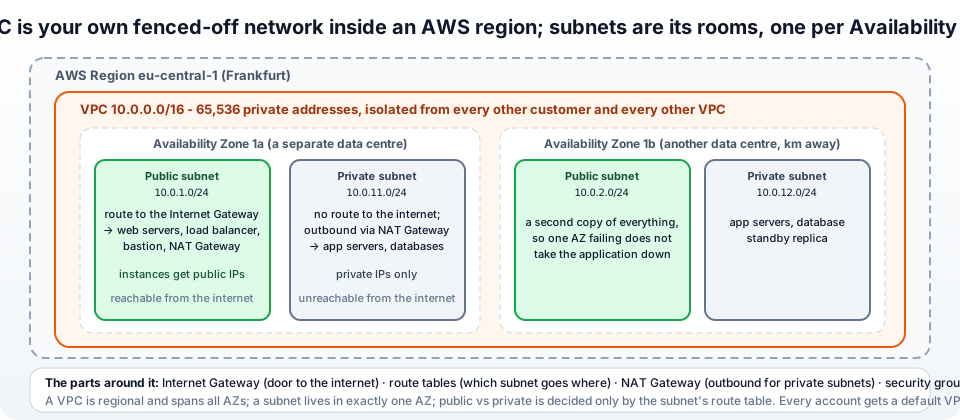
2. Region, Availability Zone, VPC, subnet - how they nest
- Region - a geographic area (
eu-central-1, Frankfurt) with several data-centre groups. - Availability Zone (AZ) - one of those groups (
eu-central-1a,1b,1c), kilometres apart with independent power and network, so one can fail while the others run. - VPC - belongs to one region and spans all its AZs.
- Subnet - a slice of the VPC that lives in exactly one AZ.
So: region ⊃ VPC ⊃ subnet ⊂ AZ. A VPC in Frankfurt cannot have a subnet in Ireland; a subnet in 1a cannot stretch into 1b. That is why every production layout has at least two subnets of each kind, in two AZs - so that losing an AZ does not take the application down.
3. What is a subnet?
A subnet is a range of IP addresses inside the VPC's range, placed in one AZ, into which you launch resources. 10.0.1.0/24 is 256 addresses (251 usable - AWS keeps five) in eu-central-1a. Subnets exist for three reasons -
- Placement - choosing a subnet is how you choose the AZ for an instance.
- Routing - each subnet is associated with a route table, which decides whether its resources can reach the internet, another VPC, or nothing.
- Blast radius and policy - web servers in one subnet, databases in another, with a network ACL per subnet if you want a second firewall layer.
Subnets must not overlap each other and must fit inside the VPC block - the planning is in the CIDR post.
4. Public subnet vs private subnet - it is only the route table
There is no "public" checkbox on a subnet. From the VPC docs: a subnet is public if its route table has a route to an Internet Gateway, private if it does not. In practice -
| Public subnet | Private subnet | |
|---|---|---|
| Route table | 0.0.0.0/0 → igw-... | 0.0.0.0/0 → nat-... (or no default route at all) |
| Public IP on instances | yes (auto-assign on) | no |
| Reachable from the internet | yes, if the security group allows | never |
| Can reach the internet | yes | only outbound, through the NAT Gateway |
| What goes here | load balancers, bastion hosts, NAT Gateways | application servers, databases, caches - almost everything |
The habit that keeps you safe: put things in private subnets by default and only move something public when a user on the internet must reach it directly - and even then, usually a load balancer rather than the server itself.
5. The five things around a VPC
- Internet Gateway (IGW) - the VPC's door to the internet; one per VPC, free, attached once. It also does the one-to-one translation between an instance's private IP and its public IP (what is NAT).
- Route tables - lists of "destination → target" rules; every subnet uses one. The
localroute for the VPC's own range is always there; you add0.0.0.0/0to a gateway and specific routes to peers. - NAT Gateway - lets private subnets start connections out (updates, API calls) while nothing can start a connection in. Lives in a public subnet, costs money per hour and per GB (Part-14).
- Security groups - stateful firewalls on each instance's network interface; allow rules only; "SSH from my IP, HTTP from the load balancer". Your main firewall.
- Network ACLs - stateless allow/deny lists on each subnet; the default allows everything; used for blunt blocks.
Everything else - VPC endpoints, peering, Transit Gateway, VPN, flow logs - is an add-on to this core.
6. The default VPC
Every region in your account comes with a default VPC - 172.31.0.0/16, one public /20 subnet per AZ, an Internet Gateway, and a main route table that sends 0.0.0.0/0 to it. It exists so that "Launch instance" works on day one without you knowing any of this. It is fine for a lab (Part-4 uses it) and wrong for anything real: every subnet is public, and its 172.31.0.0/16 range collides with many office networks when you later want a VPN. If you delete it by accident, Actions → Create default VPC brings it back.
7. Limits worth knowing
From the VPC quotas -
- 5 VPCs per region by default (adjustable), 200 subnets per VPC, 5 Elastic IPs per region.
- VPC CIDR between /16 and /28; up to five IPv4 CIDR blocks per VPC (you can add, never shrink or change).
- One Internet Gateway per VPC; 5 NAT Gateways per AZ.
- 5 security groups per network interface, 60 rules per group.
- VPC, subnets, route tables, IGW, security groups and NACLs are free; NAT Gateways, public IPv4 addresses, endpoints and data transfer are not.
8. Where to go next
- Understand the address ranges - what is CIDR - and how private subnets reach the internet - what is NAT.
- Build the real thing by hand - Part-5: VPC with public and private subnets, Internet Gateway, NAT Gateway and route tables, then test it with an EC2 instance.
- Connect VPCs - peering for two, Transit Gateway for many - and reach AWS services privately with VPC endpoints.
- Do it as code - the Terraform VPC in the ALB and SSL guide.
The one sentence to remember: a VPC is your isolated network in a region, a subnet is a slice of it in one AZ, and whether a subnet is public or private is decided only by its route table. The official overview is what is Amazon VPC.
More videos on this topic - two one-minute shorts - how to create a VPC and a subnet, and what Availability Zones are -
AWS step by step series -
- Part-1 : AWS IAM user - create a user, group, policy, access keys and MFA
- Part-2 : AWS Organizations - multi-account setup, OUs and SCPs
- Part-3 : AWS assume IAM role - trust policy, switch role in console and CLI
- Part-4 : How to launch an EC2 instance - key pair, security group, SSH
- Part-5 : AWS VPC - public and private subnets, Internet Gateway, NAT Gateway, route tables
- Part-8 : EC2 launch template - versions, default version, source template, SSM parameter AMI
- Part-10 : EC2 Auto Scaling - launch template, Auto Scaling group, target tracking, ALB
- Part-11 : AWS WAF - web ACL, managed rules, rate limiting, geo blocking
- Part-12 : AWS VPC Peering - connect two VPCs, routes, security groups, DNS
- Part-13 : AWS Transit Gateway - hub-and-spoke for many VPCs and on-premises
- Part-14 : AWS NAT Gateway deep dive - public vs private, limits, cost, troubleshooting
- Part-15 : Amazon Route 53 - hosted zones, records, alias, routing policies, health checks
- Part-16 : AWS security groups - inbound and outbound rules, stateful, referencing, quotas
- Part-16 : AWS Certificate Manager - free TLS certificates for ALB, CloudFront and API Gateway
- Part-17 : AWS Lambda - function URLs, environment variables and layers
- Part-18 : Network Load Balancer - setup, and ALB vs NLB
- Part-19 : VPC endpoints - gateway and interface endpoints (PrivateLink) instead of NAT
- Part-20 : AWS PrivateLink - publish your own service with an endpoint service and NLB
- Part-20 : Amazon EBS volumes - types, attach, mount, resize, snapshots, encryption
- Part-21 : VPC Flow Logs - CloudWatch Logs, S3, record format, Logs Insights, Athena
- Part-21 : EC2 Spot Instances - pricing, interruptions, mixed instances groups
- Part-24 : AWS Control Tower - landing zone, controls, Account Factory, Identity Center
Networking fundamentals -
- What is a VPC and a subnet? AWS networking in five minutes
- What is CIDR? Calculate IP ranges for VPCs and subnets
- What is NAT? Static NAT, dynamic NAT and PAT explained
More AWS guides -
- What is AWS CloudFormation? Templates, stacks, change sets, drift, StackSets
- Learn AWS S3 - the complete course
- AWS API Gateway - REST API with Lambda, authorizers, Terraform
- AWS Advanced Networking Specialty (ANS-C01) - course companion
- AWS ECS and Fargate - how to deploy a Docker container
- AWS S3 - how to host a static website
- Terraform create EC2 instance on AWS
- Terraform AWS IAM - users, roles and policies
- Terraform and AWS multi-account setup
- Terraform - setting up an ALB and SSL
Posts in this series
- Amazon EBS Volumes Step by Step - Volume Types Compared (gp3, gp2, io2 Block Express, st1, sc1), Create, Attach, Format and Mount a Volume, Resize Without Downtime, Snapshots, Encryption, Multi-Attach, Pricing and Troubleshooting (AWS Part-20)
- Amazon Route 53 Step by Step - Hosted Zones, Record Types, Alias Records, Point a Domain at an ALB, Routing Policies (Weighted, Latency, Failover, Geolocation), Health Checks, Private Zones and Pricing (AWS Part-15)
- AWS Advanced Networking - Free 8-Hour Full Course Companion (VPC, NAT Gateway, Bastion, ALB, NLB, WAF, VPC Peering, Transit Gateway, VPC Endpoints and PrivateLink, Route 53, ACM) with Timestamps and the ANS-C01 Exam Facts
- AWS Assume IAM Role Step by Step - Trust Policy vs Permissions Policy, Switch Role in the Console, aws sts assume-role, CLI Profiles, Cross-Account Access, MFA and External ID (AWS Part-3)
- AWS Certificate Manager (ACM) Step by Step - Request a Free TLS Certificate, DNS Validation with Route 53, Attach It to an ALB HTTPS Listener, Redirect HTTP to HTTPS, CloudFront and API Gateway, Auto-Renewal, Exportable Certificates and ACME (AWS Part-16)
- AWS Control Tower Step by Step - Set Up a Landing Zone, Security OU with Log Archive and Audit Accounts, Controls (Guardrails), Region Deny, IAM Identity Center, Account Factory and Enrolling Existing Accounts (AWS Part-24)
- AWS EC2 Auto Scaling Step by Step - Launch Template, Auto Scaling Group Across Two AZs, Target Tracking Policy, Application Load Balancer, Health Checks and Instance Refresh (AWS Part-10)
- AWS EC2 Launch Template Step by Step - Create a Template, Versions and the Default Version, Source Template, Create From a Running Instance, Systems Manager Parameter Instead of an AMI ID, Launch Templates vs Launch Configurations, IAM Guardrails, CLI and Terraform (AWS Part-8 and Part-17)
- AWS EC2 Spot Instances Step by Step - How Spot Pricing Works, Launch a Spot Instance, Interruptions and the Two-Minute Notice, Rebalance Recommendations, Stop vs Hibernate vs Terminate, Spot in Auto Scaling Mixed Instances Groups, Billing Rules, Best Practices, CLI and Terraform (AWS Part-21)
- AWS IAM User Step by Step - Create a User, User Group, Attach Policies, Access Keys, MFA and Sign-in URL (AWS Part-1)
- AWS Lambda Step by Step - Create a Function, Function URL (HTTPS Endpoint Without API Gateway), Environment Variables, Lambda Layers for Python Dependencies, Versions and Aliases, Limits, Pricing and Errors (AWS Part-17)
- AWS NAT Gateway Deep Dive - How It Works, Public vs Private NAT Gateway, Setup Step by Step, Limits (55,000 Connections, 100 Gbps), CloudWatch Metrics, Cost Optimisation, NAT Instance Comparison and Troubleshooting (AWS Part-14)
- AWS Network Load Balancer Step by Step - Create an NLB with Static IPs, Target Groups, TCP and TLS Listeners, Security Groups, Client IP Preservation, Cross-Zone Load Balancing, and ALB vs NLB Explained (AWS Part-18)
- AWS Organizations Step by Step - Multi-Account Setup, Organizational Units, Service Control Policies (SCPs), Consolidated Billing and Identity Center (AWS Part-2)
- AWS PrivateLink Step by Step - Publish Your Own Service with a VPC Endpoint Service and Network Load Balancer, Allow Consumers, Accept Connections, Private DNS Name, Cross-Account and Cross-Region, Pricing and Troubleshooting (AWS Part-20)
- AWS Security Groups Step by Step - Inbound and Outbound Rules, Stateful Behaviour, Referencing Security Groups, the Three-Tier ALB-Web-DB Pattern, Quotas, Security Group vs Network ACL, CLI and Terraform (AWS Part-16)
- AWS Transit Gateway Step by Step - Connect Many VPCs and On-Premises Through One Hub, VPC Attachments, Transit Gateway Route Tables, Associations and Propagations, Isolation, Peering, Pricing (AWS Part-13)
- AWS VPC Endpoints Step by Step - Gateway Endpoints for S3 and DynamoDB, Interface Endpoints (PrivateLink) for SSM, ECR and Other Services, Private DNS, Endpoint Policies, Security Groups, Cost vs NAT Gateway, and Troubleshooting (AWS Part-19)
- AWS VPC Flow Logs Step by Step - Enable Flow Logs for a VPC, Subnet or Network Interface, Publish to CloudWatch Logs or S3, Read a Flow Log Record Field by Field, Custom Formats, Query with Logs Insights and Athena, Find Rejected Traffic, Pricing and Limitations (AWS Part-21)
- AWS VPC Peering Step by Step - Connect Two VPCs (Same or Different Account and Region), Accept the Request, Add Routes, Security Groups, DNS Resolution, Test with EC2, and the Limits (AWS Part-12)
- AWS VPC Step by Step - Create a VPC with Public and Private Subnets, Internet Gateway, NAT Gateway and Route Tables (and Test It with EC2) (AWS Part-5)
- AWS WAF Step by Step - Create a Web ACL, Attach It to an ALB or API Gateway, AWS Managed Rules, Rate-Based Rules, Geo Blocking, IP Sets, Count Mode and Logging (AWS Part-11)
- How to Launch an EC2 Instance on AWS Step by Step - AMI, Instance Type, Key Pair, Security Group, Connect with SSH or EC2 Instance Connect, Stop vs Terminate (AWS Part-4)
- What is an AWS VPC and a Subnet? Virtual Private Cloud Explained in Five Minutes (Region, Availability Zones, Public vs Private Subnets, Gateways, Route Tables)
- What is AWS CloudFormation? Templates, Stacks and Change Sets Explained, Template Anatomy Section by Section, Create Your First Stack Step by Step, Update With a Change Set, Drift Detection, Nested Stacks and StackSets, Quotas, Pricing, CLI, and CloudFormation vs Terraform
- What is CIDR (Classless Inter-Domain Routing)? How to Calculate IP Ranges for VPCs and Subnets, with Examples (/8, /16, /24, /28, /32)
- What is NAT (Network Address Translation)? How It Works, Static NAT vs Dynamic NAT vs PAT, the Translation Table, and Where NAT Shows Up in AWS
- AWS API Gateway Tutorial - REST API with Lambda Proxy and Non-Proxy Integration, Request Validation, HTTP API vs REST API, Resource Policies, Lambda Authorizers and Terraform
- Learn AWS S3 - The Complete Course (Buckets, Objects, Storage Classes, Lifecycle, Versioning, Security Defaults, Bucket Policies, Static Hosting, CLI and Terraform)
- How to release(delete) Elastic IP from AWS?
- Fix docker login 'error saving credentials: error storing credentials - err: exit status 1' (AWS ECR on macOS, Windows, Linux and WSL)