VPC Subnet Planner - a Free Visual Tool to Design AWS, Azure and GCP Networks: Reserved Addresses, Aligned Multi-AZ Subnets, Overlap Check, Design Review and Terraform Export (cidrsubnet) - How I Built It and What Broke
Every time I record a VPC video the same question comes back in the comments: "how did you decide on 10.0.1.0/24 for the public subnet and 10.0.2.0/24 for the private one?" The honest answer for a demo is "it was easy to type". The honest answer for a real environment is a lot longer, and I never had a good place to send people. Subnet calculators tell you the first and last address of a block. They do not know that AWS takes five addresses out of every subnet, that an Application Load Balancer refuses a /28, that your three /20s should sit inside one /18 so that a single route can cover them, or that the /16 you are about to pick overlaps the office VPN range you will peer with in six months.
So I built the tool I wanted to link to: the VPC Subnet Planner. It is free, it runs entirely in your browser, there is no sign-up, and the whole design is encoded in the share link so you can send a colleague the exact plan. The source is on GitHub at rahulwagh/vpc-subnet-planner with the engine tests and the generated examples.
This post is the long version: what the planner actually does, the numbers behind every rule it checks (with the official pages they come from), what the Terraform export looks like and how I validated it, and the three things that broke while I was building it. The tests below are the ones that caught my own mistakes.
TL;DR
- A /24 is not 254 hosts in the cloud. AWS reserves 5 addresses per subnet (251 usable), Azure reserves 5 (251), Google Cloud reserves 4 (252). The smallest subnet is /28 on AWS and /29 on Azure and GCP. The planner applies these before it sizes anything.
- The planner packs mixed sizes largest-first on aligned boundaries, keeps each tier in one summary block (three /20s become one /18), reserves a slot for a future zone if you tick it, and lists the leftover space as clean CIDR blocks.
- It reviews the design: RFC 1918, VPC size limits (/16 to /28 on AWS), ALB minimum (/27 per zone), zone count, 95 percent headroom warning, NAT cost (about $99 per month for three zones at $0.045 per hour each), EKS node capacity, and overlap against every network you paste in, with free alternatives suggested.
- Exports validate. The Terraform output declares every subnet with cidrsubnet(), builds one NAT gateway per zone, an isolated route table for databases and a free S3 gateway endpoint; it passes terraform validate and terraform fmt on Terraform 1.16.2. CloudFormation, Azure CLI/Bicep, gcloud, Markdown, CSV and JSON are one click away.
- What broke: with three zones in contiguous mode, 25 percent of every tier block was alignment padding that the first version did not show anywhere (my own test caught it: 60,928 does not equal 65,536). The export failed terraform fmt because of comment alignment. And a headless Chrome screenshot at 430 px made me think the mobile layout overflowed when it was Chrome's minimum window width.
- Nothing leaves your browser. The plan lives in the URL fragment after the hash, which browsers never send to a server.
Table of Content
- Why another subnet calculator
- What the planner does, card by card
- The reserved addresses and the numbers behind the rules
- How the packing works
- The Terraform export and how I validated it
- What broke while I was building this
- Privacy, share links and the GitHub repository
- What is next
Why another subnet calculator
I tried the popular ones before building this. They are fine for "what is the range of 10.0.0.0/22". None of them did the job I actually have when I open a VPC design doc:
| What I need | Typical CIDR calculator | VPC Subnet Planner |
|---|---|---|
| Usable hosts after the cloud's reserved addresses | 254 for a /24 (wrong for every cloud) | 251 on AWS and Azure, 252 on GCP |
| Mixed subnet sizes (/19 for nodes, /24 for load balancers, /26 for databases) | equal split only | largest-first aligned packing |
| One subnet per tier per Availability Zone | manual | 1 to 6 zones, plus a reserved future zone |
| Tier summarisable by one route or firewall rule | no concept of tiers | contiguous tier blocks on by default |
| Does my /16 overlap the networks I will peer with? | no | paste every VPC, VNet and office range; failing review plus free alternatives |
| Size by "800 hosts plus 50 percent growth" | no | yes, reserved addresses included |
| Something I can run afterwards | copy addresses by hand | Terraform, CloudFormation, Azure CLI, gcloud, CSV, JSON |
| Explain the concepts to a junior | no | Teach-me mode with the videos and tutorials |
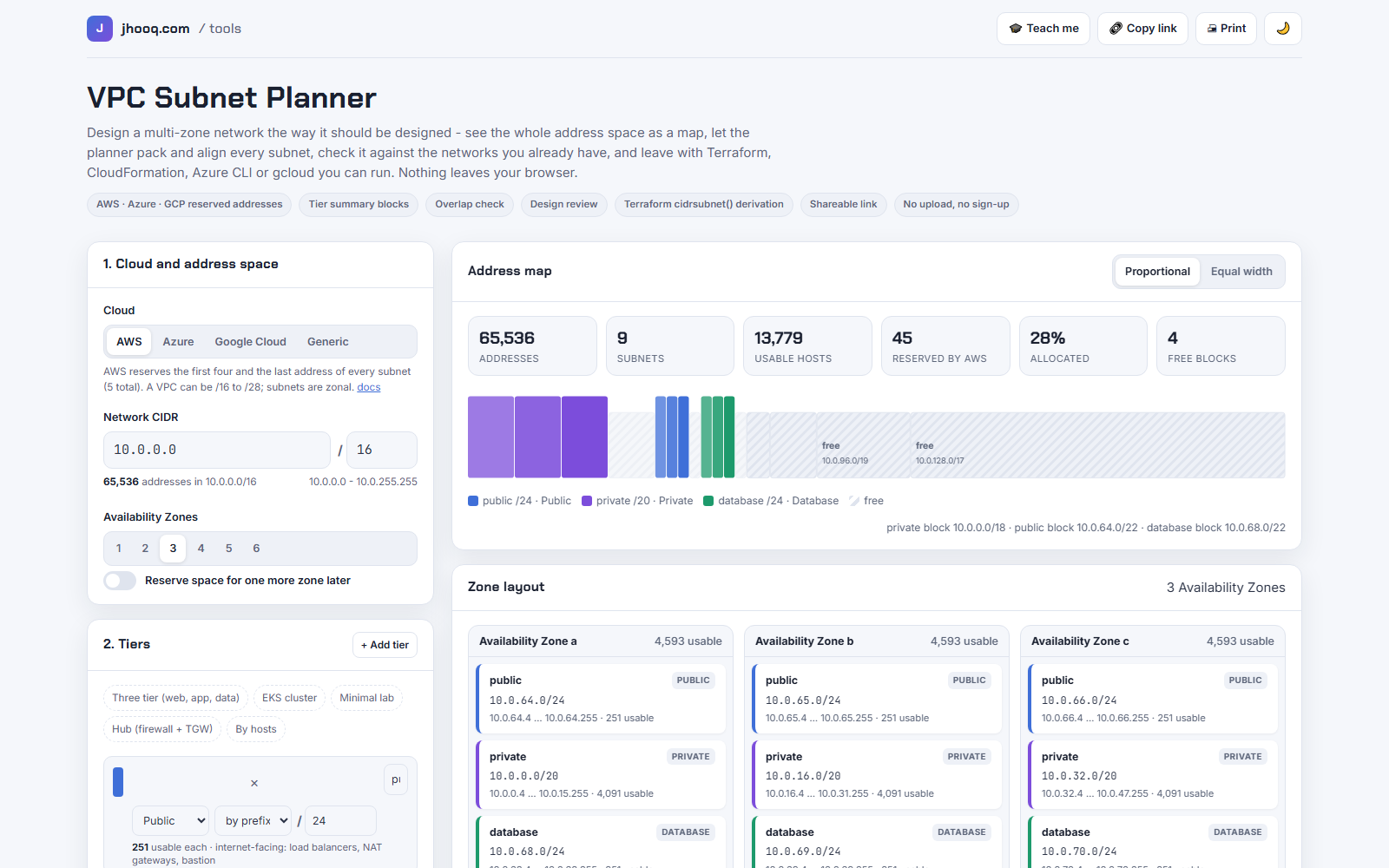
The design goal was simple: a reader lands on the page with one concrete problem, solves it in two minutes, and leaves with a file they can apply. No account, no upload, no "sign up to export".
What the planner does, card by card
1. Cloud and address space. Pick AWS, Azure, Google Cloud or generic IPv4. The choice sets the reserved addresses, the smallest subnet, the VPC size limits and whether subnets are zonal (AWS) or span the region (Azure VNets span all zones, Google Cloud subnets are regional). Type the network address and prefix and the number of zones. If you type 10.0.5.0/16, the planner snaps it to 10.0.0.0/16 and tells you so, because the cloud API would have rejected it.
2. Tiers. A tier is a role plus a size: public, private, isolated, database or transit, sized by prefix or by hosts. The presets cover the designs I use most: three tier (public /24, private /20, database /24), EKS (nodes-pods /19), minimal lab, an inspection hub with firewall and Transit Gateway /28 subnets, and "by hosts".
3. Layout rules. Keep tiers contiguous (on by default), the growth headroom for host-sized tiers (50 percent by default), and the textarea where you paste every range you already use. That textarea is the most valuable input on the page - more on it below.
Address map. The whole network as a proportional bar: every subnet, every free block, and since version 1.1 the alignment padding inside the tier blocks, hatched. Hover for the range, click to jump to the table row. Switch to equal width when a /28 next to a /17 is too thin to see.
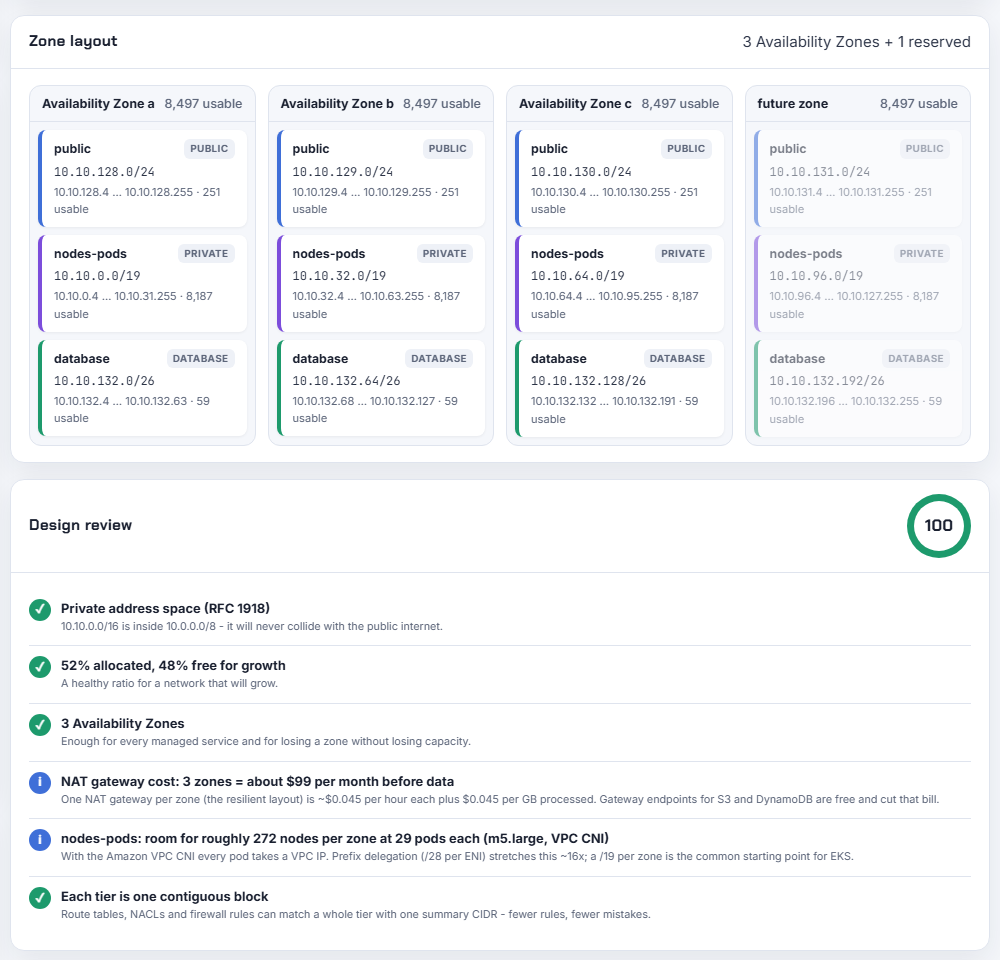
Zone layout. One card per Availability Zone with the subnets in it and the usable hosts per zone, plus a dimmed card for the reserved future zone.
Design review. The rules below, each with a one-line explanation and a score out of 100.
Subnet table. Name, CIDR, range, usable hosts, the reserved addresses of each subnet with their purpose on hover, and for AWS the cidrsubnet() call that produces it.
Export. Terraform, CloudFormation, Azure CLI / Bicep, gcloud, Markdown, CSV and JSON, with a toggle for routing resources.
The reserved addresses and the numbers behind the rules
The table every cloud engineer should have on the wall. Each number links to the page I took it from, and the planner's review text quotes the same pages.
| Cloud | Reserved per subnet | Which addresses | Smallest subnet | Usable in a /24 | Source |
|---|---|---|---|---|---|
| AWS | 5 | network, VPC router (.1), Amazon DNS (.2), future use (.3), broadcast (last) | /28 (11 usable) | 251 | Subnet sizing |
| Azure | 5 | network, default gateway (.1), Azure DNS (.2 and .3), broadcast (last) | /29 (3 usable) | 251 | Virtual network FAQ |
| Google Cloud | 4 | network, default gateway (.1), second-to-last, broadcast (last) | /29 (4 usable) | 252 | Subnets |
| Generic IPv4 | 2 | network, broadcast | /30 (2 usable) | 254 | RFC 1918 for the private ranges |
The review rules and where the numbers come from:
| Rule | Number | Source |
|---|---|---|
| AWS VPC size | /16 to /28; secondary CIDR blocks can be added later, including from 100.64.0.0/10 | VPC CIDR blocks |
| Application Load Balancer | at least 8 free addresses per subnet, in at least two zones - a /27 or larger | ALB subnets |
| NAT gateway | one per zone for resilience; the review estimates zones × $0.045 per hour × 730 hours, so about $99 per month for three zones before the $0.045 per GB processed | NAT gateways, VPC pricing |
| EKS with the Amazon VPC CNI | every pod takes a VPC address; an m5.large fits 29 pods, so a /19 per zone (8,187 usable) is roughly 270 nodes; prefix delegation hands out /28 slots per ENI and stretches that about 16 times | Increase available IP addresses |
| Terraform derivation | newbits = subnet prefix minus VPC prefix, netnum = (subnet address minus VPC address) divided by subnet size | cidrsubnet |
If you want the full prefix table (usable hosts from /16 to /30 for every cloud), it is in the repository under docs/cidr-cheatsheet.md. The CIDR basics themselves are in my What is CIDR post and the VPC and subnet post.
How the packing works
This is the part that took the most thought, and it is what makes the planner different from a splitter.
- Size every tier. By prefix, as typed. By hosts:
ceil(hosts × (1 + growth)) + reserved, rounded up to the next power of two. 50 web hosts with 50 percent growth on AWS is 75 + 5 = 80 addresses, so a /25. 800 app hosts becomes 1,200 + 5, so a /21. - Make one block per tier. In contiguous mode a tier's block is
subnet size × zones rounded up to a power of two. Three /20s need four slots, so the private tier becomes a /18. That spare fourth slot matters - see what broke. - Place blocks largest-first at the first aligned free address. Aligned means the start is a multiple of the block's own size; that is what makes it a valid CIDR. Largest-first guarantees that small blocks fill the gaps instead of fragmenting the space.
- Report the leftover as the fewest aligned CIDR blocks. For the default three-tier plan in a /16 you get
10.0.72.0/21,10.0.80.0/20,10.0.96.0/19and10.0.128.0/17: each one can go to a new tier later without renumbering anything. - Check overlap. Every line of "existing networks" is parsed and compared. On a hit, the review fails and the planner proposes up to four same-sized blocks from the RFC 1918 ranges that overlap none of them.
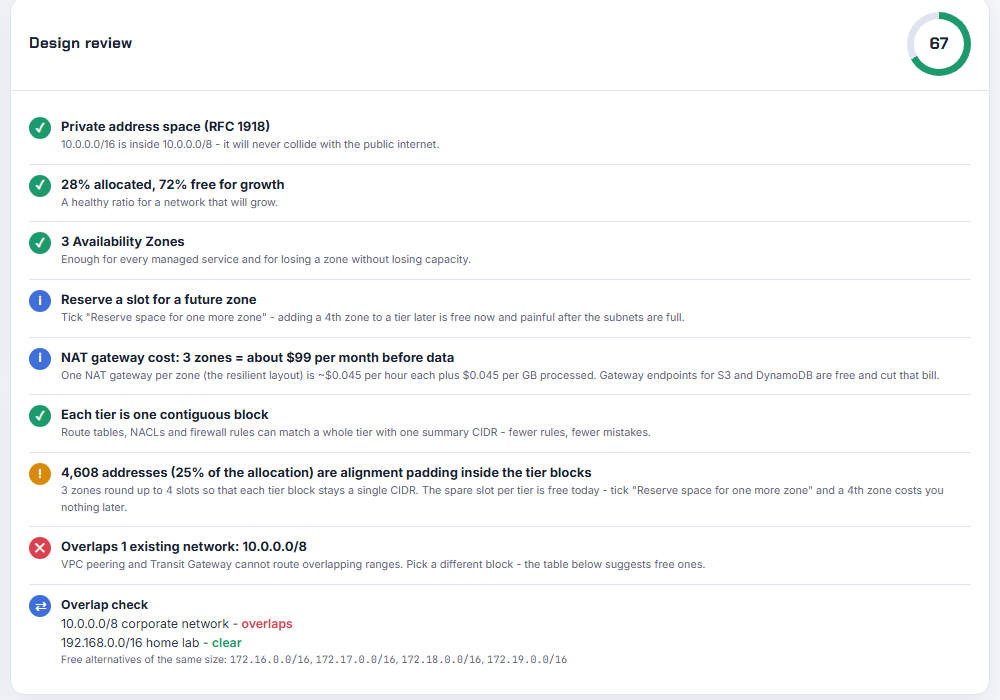
That overlap textarea is where I would start if I were designing a network tomorrow. Paste in the office range, the shared-services VPC, the partner VPN, the Docker default bridge if your developers run containers on the VPN. VPC peering, Transit Gateway and Azure VNet peering all refuse overlapping ranges, and the fix after the fact is a rebuild.
The Terraform export and how I validated it
The Terraform tab is the one people take home, so I was strict with it. Every subnet is a cidrsubnet() call with the resolved CIDR as a trailing comment, so a reviewer can check the maths from the VPC CIDR alone without running a plan:
 1locals {
 2  vpc_cidr = "10.0.0.0/16"
 3  azs      = slice(data.aws_availability_zones.available.names, 0, 3)
 4
 5  # name => { cidr, az index, tier, public }
 6  subnets = {
 7    "private-a"  = { cidr = cidrsubnet(local.vpc_cidr, 4, 0), az = 0, tier = "private", role = "private", public = false } # 10.0.0.0/20
 8    "private-b"  = { cidr = cidrsubnet(local.vpc_cidr, 4, 1), az = 1, tier = "private", role = "private", public = false } # 10.0.16.0/20
 9    "private-c"  = { cidr = cidrsubnet(local.vpc_cidr, 4, 2), az = 2, tier = "private", role = "private", public = false } # 10.0.32.0/20
10    "public-a"   = { cidr = cidrsubnet(local.vpc_cidr, 8, 64), az = 0, tier = "public", role = "public", public = true }   # 10.0.64.0/24
11    "public-b"   = { cidr = cidrsubnet(local.vpc_cidr, 8, 65), az = 1, tier = "public", role = "public", public = true }   # 10.0.65.0/24
12    "public-c"   = { cidr = cidrsubnet(local.vpc_cidr, 8, 66), az = 2, tier = "public", role = "public", public = true }   # 10.0.66.0/24
13    "database-a" = { cidr = cidrsubnet(local.vpc_cidr, 8, 68), az = 0, tier = "database", role = "data", public = false }  # 10.0.68.0/24
14    "database-b" = { cidr = cidrsubnet(local.vpc_cidr, 8, 69), az = 1, tier = "database", role = "data", public = false }  # 10.0.69.0/24
15    "database-c" = { cidr = cidrsubnet(local.vpc_cidr, 8, 70), az = 2, tier = "database", role = "data", public = false }  # 10.0.70.0/24
16  }
17}
With routing on, the file also builds an Internet Gateway and a public route table, one Elastic IP and NAT gateway per zone with a private route table per zone (so a private subnet never crosses zones to reach its NAT), an isolated route table with no default route for database, isolated and transit tiers, and an S3 gateway endpoint attached to every non-public route table, because it is free and it keeps image pulls and backups off the NAT gateway's per-GB charge. The same layout I build by hand in AWS VPC with public and private subnets, NAT and Internet Gateway, just generated.
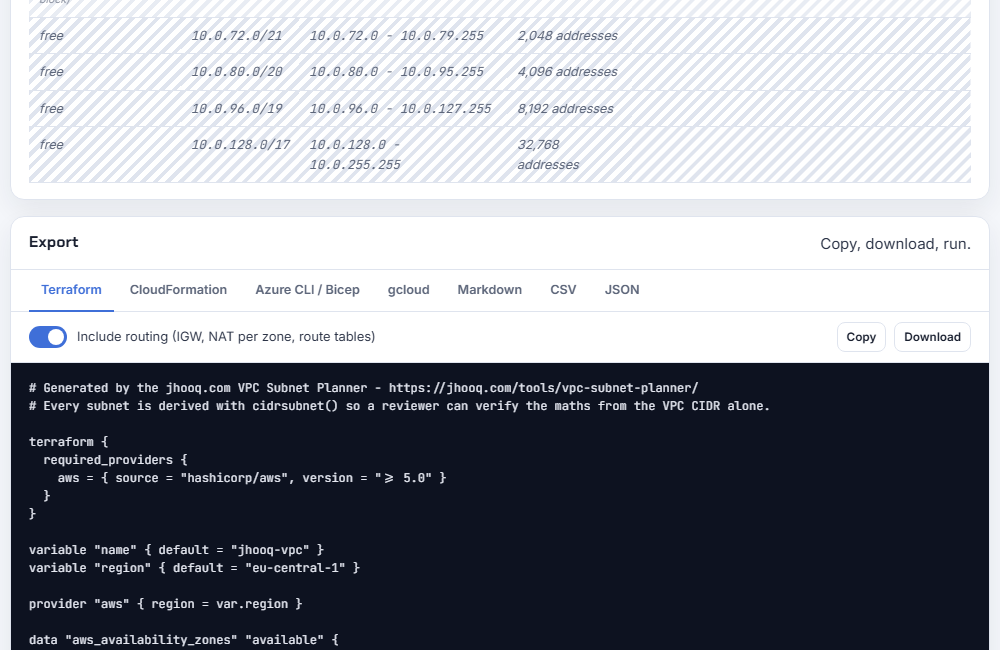
I validated the four AWS example exports with Terraform 1.16.2 and the current AWS provider on 2026-10-12. This is the real output from my laptop:
1$ cd examples/aws-three-tier
2$ terraform init -backend=false -input=false
3$ terraform validate
4Success! The configuration is valid.
5
6$ terraform fmt -check -diff main.tf
7fmt ok
And the engine tests, which run in GitHub Actions on every push to the repository, same day, Node 22.23.2:
 1$ node --test test/engine.test.js
 2ok 1 - ip helpers round-trip and reject bad input
 3ok 2 - hostsToPrefix adds growth headroom and the reserved addresses
 4ok 3 - every preset packs without overlap, on aligned boundaries, inside the network
 5ok 4 - three zones in contiguous mode leave one padding slot per tier, and a reserved 4th zone uses it
 6ok 5 - non-contiguous mode packs every subnet largest-first with no padding at all
 7ok 6 - contiguous mode keeps each tier inside one summary block
 8ok 7 - reserving a future zone adds a 4th slot but no 4th live subnet
 9ok 8 - reserved addresses follow each cloud
10ok 9 - a mistyped network address is snapped to its boundary and flagged
11ok 10 - public ranges and illegal AWS sizes fail the review
12ok 11 - overlap with an existing network is detected and free alternatives are suggested
13ok 12 - a plan that cannot fit reports which tier failed instead of silently truncating
14ok 13 - free space is reported as aligned CIDR blocks
15ok 14 - Terraform export derives every subnet with cidrsubnet() that reproduces the planned CIDR
16ok 15 - the other exporters cover every subnet
17# pass 15
18# fail 0
Test 14 is the one I care about most: it parses every cidrsubnet(local.vpc_cidr, newbits, netnum) in the export, recomputes the address, and compares it with the planned CIDR and with the comment. If the derivation ever drifts from the plan, the build goes red.
What broke while I was building this
Three things, and all three ended up in the tool or in the tests.
1. A quarter of every tier block was invisible. My first test for the packing was a simple accounting check: the addresses in all subnets plus the addresses in all free blocks must equal the whole network. It failed immediately:
1not ok 3 - every preset packs without overlap, on aligned boundaries, inside the network
2  error: |-
3    Three tier (web, app, data): used + free must equal the whole network
4
5    60928 !== 65536
4,608 addresses were missing. The cause: with three zones, contiguous mode rounds every tier up to four slots so that the block stays a single CIDR. Three /20s become a /18 (16,384 addresses) of which only 12,288 are subnets. The fourth slot per tier - 4,096 + 256 + 256 = 4,608 addresses, 25 percent of the allocation - was neither a subnet nor a free block. The map showed a gap, the KPIs said 28 percent allocated, and nothing explained where the rest went. In version 1.1 those slots are drawn hatched on the map, listed in the table as padding, and the review says it out loud: "4,608 addresses (25 percent of the allocation) are alignment padding inside the tier blocks - tick Reserve space for one more zone and a 4th zone costs you nothing later." Which is the real lesson: with three Availability Zones, the fourth-zone slot is free. Reserve it.
2. The Terraform export failed terraform fmt. terraform validate was green from the start, but I also run fmt in CI, and it wanted two things I had not thought about: no padding in single-line blocks (variable "name" { becomes variable "name" {), and trailing comments in a block aligned to one column. The real diff from the first run:
1-variable "name"   { default = "jhooq-vpc" }
2+variable "name" { default = "jhooq-vpc" }
3...
4-    "public-a"   = { cidr = cidrsubnet(local.vpc_cidr, 8, 64), az = 0, tier = "public", role = "public", public = true } # 10.0.64.0/24
5+    "public-a"   = { cidr = cidrsubnet(local.vpc_cidr, 8, 64), az = 0, tier = "public", role = "public", public = true }   # 10.0.64.0/24
The exporter now pads every entry to the longest one before adding the comment, and all four AWS examples pass terraform fmt -check. Small thing, but a generated file that fails your own pre-commit hook is the kind of thing that makes people close the tab.
3. The mobile layout looked broken, and was not. I took the screenshots for this post with headless Chrome at 1600 px wide, which worked beautifully, so I tried 430 px for a phone screenshot and got a page cut off mid-sentence on the right edge. I spent a while hunting for an overflowing element before measuring the real thing in the browser's device emulation at 375 px: document.documentElement.scrollWidth was 375, the only element wider than the viewport was the subnet table inside its own scroll container, exactly as designed. Headless Chrome simply will not open a window narrower than about 500 px, so the 430 px "screenshot" was a 500 px layout cropped. The phone screenshot below is from the emulator, and the lesson is the usual one: measure before you fix.
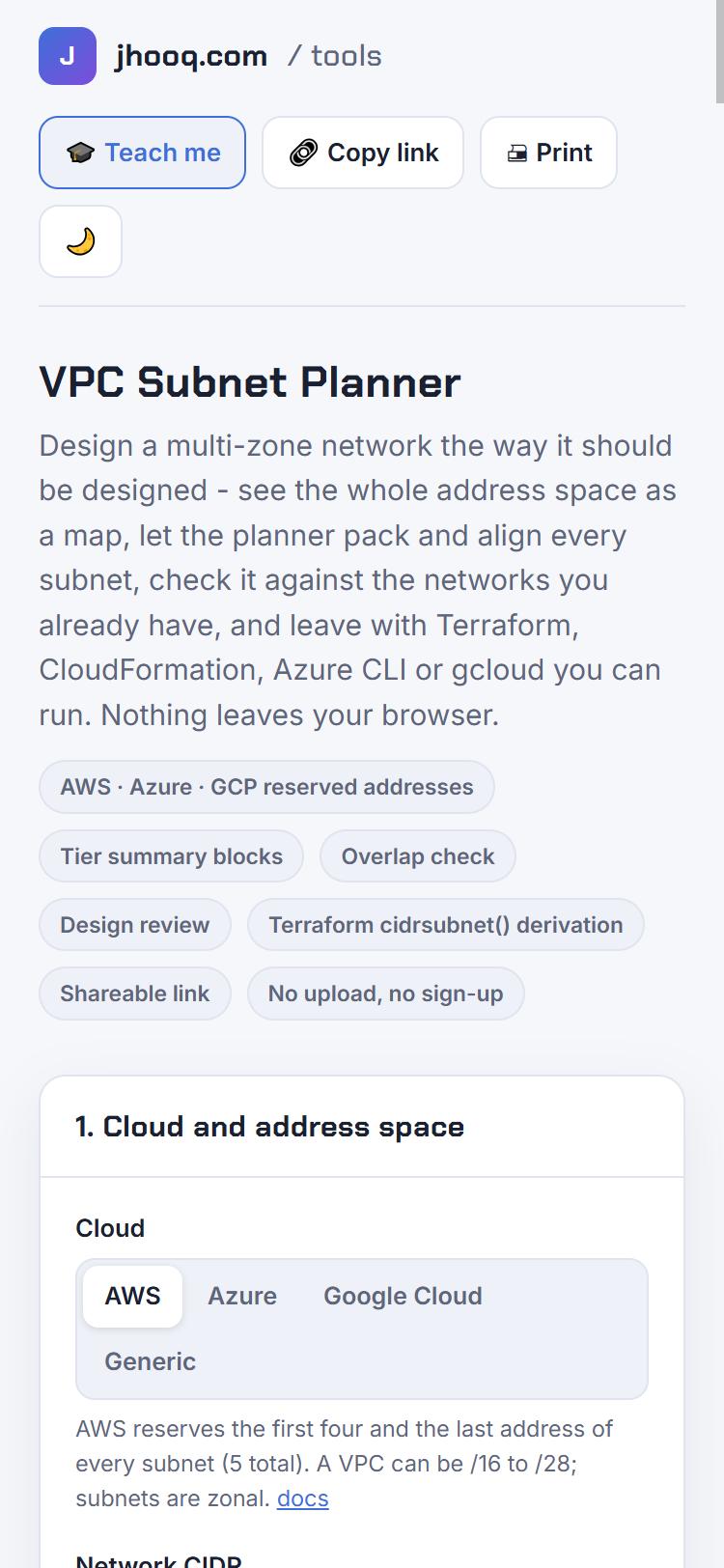
Privacy, share links and the GitHub repository
There is no server. The planner is a single HTML file; the state - cloud, network, zones, tiers, growth, existing networks - is encoded as base64 JSON in the URL fragment after the hash. Browsers never send the fragment in an HTTP request, so even the CloudFront logs for jhooq.com never see your network design. "Copy link" gives you a URL that reproduces the exact plan, which is also how I want bug reports: paste the link.
The repository at github.com/rahulwagh/vpc-subnet-planner holds:
| Path | What it is |
|---|---|
| index.html | the entire tool, the same file that is deployed at /tools/vpc-subnet-planner/ |
| docs/ | the packing algorithm explained, the reserved-address table with sources, the CIDR cheat sheet for /16 to /30, the exports and the routing choices, the share-link format |
| examples/ | generated exports for six scenarios (AWS three-tier, EKS, inspection hub, by hosts, Azure, Google Cloud), each with a README and the share link that opens it |
| test/ | the engine tests above, run against the real index.html through a Node vm context |
| .github/workflows/ci.yml | tests, "examples are up to date", terraform validate and fmt on the AWS exports, syntax checks on the Azure and gcloud scripts |
It is MIT licensed. Fork it, embed it in your internal wiki, add your company's ranges to the existing-networks preset - a link back is appreciated.
What is next
The first readers already asked for three things and they are on the roadmap in the repository: a Kubernetes pod and service range planner (VPC CNI prefix delegation, GKE secondary ranges, AKS overlay), a multi-VPC planner that hands out /16s from a /8 per environment and region with an IPAM-style inventory, and IPv6 dual-stack. If one of those would save you time next week, open an issue and say so; that is how I decide what to build next.
The walkthrough video is in the queue; subscribe below and you will see it the day it is out. Until then, the Teach-me button inside the planner links the CIDR video, the AWS VPC build and the Azure VNet build next to the card they explain.
Did this save you a debugging session? Stay in the loop -
- Subscribe on YouTube - every post here has a screen-recorded companion video.
- Code on GitHub - the repositories, Terraform and scripts behind these posts.
Posts in this series
- VPC Subnet Planner - a Free Visual Tool to Design AWS, Azure and GCP Networks: Reserved Addresses, Aligned Multi-AZ Subnets, Overlap Check, Design Review and Terraform Export (cidrsubnet) - How I Built It and What Broke
- Amazon EBS Volumes Step by Step - Volume Types Compared (gp3, gp2, io2 Block Express, st1, sc1), Create, Attach, Format and Mount a Volume, Resize Without Downtime, Snapshots, Encryption, Multi-Attach, Pricing and Troubleshooting (AWS Part-20)
- Amazon Route 53 Step by Step - Hosted Zones, Record Types, Alias Records, Point a Domain at an ALB, Routing Policies (Weighted, Latency, Failover, Geolocation), Health Checks, Private Zones and Pricing (AWS Part-15)
- AWS Advanced Networking - Free 8-Hour Full Course Companion (VPC, NAT Gateway, Bastion, ALB, NLB, WAF, VPC Peering, Transit Gateway, VPC Endpoints and PrivateLink, Route 53, ACM) with Timestamps and the ANS-C01 Exam Facts
- AWS Assume IAM Role Step by Step - Trust Policy vs Permissions Policy, Switch Role in the Console, aws sts assume-role, CLI Profiles, Cross-Account Access, MFA and External ID (AWS Part-3)
- AWS Certificate Manager (ACM) Step by Step - Request a Free TLS Certificate, DNS Validation with Route 53, Attach It to an ALB HTTPS Listener, Redirect HTTP to HTTPS, CloudFront and API Gateway, Auto-Renewal, Exportable Certificates and ACME (AWS Part-16)
- AWS Control Tower Step by Step - Set Up a Landing Zone, Security OU with Log Archive and Audit Accounts, Controls (Guardrails), Region Deny, IAM Identity Center, Account Factory and Enrolling Existing Accounts (AWS Part-24)
- AWS EC2 Auto Scaling Step by Step - Launch Template, Auto Scaling Group Across Two AZs, Target Tracking Policy, Application Load Balancer, Health Checks and Instance Refresh (AWS Part-10)
- AWS EC2 Launch Template Step by Step - Create a Template, Versions and the Default Version, Source Template, Create From a Running Instance, Systems Manager Parameter Instead of an AMI ID, Launch Templates vs Launch Configurations, IAM Guardrails, CLI and Terraform (AWS Part-8 and Part-17)
- AWS EC2 Spot Instances Step by Step - How Spot Pricing Works, Launch a Spot Instance, Interruptions and the Two-Minute Notice, Rebalance Recommendations, Stop vs Hibernate vs Terminate, Spot in Auto Scaling Mixed Instances Groups, Billing Rules, Best Practices, CLI and Terraform (AWS Part-21)
- AWS IAM User Step by Step - Create a User, User Group, Attach Policies, Access Keys, MFA and Sign-in URL (AWS Part-1)
- AWS Lambda Step by Step - Create a Function, Function URL (HTTPS Endpoint Without API Gateway), Environment Variables, Lambda Layers for Python Dependencies, Versions and Aliases, Limits, Pricing and Errors (AWS Part-17)
- AWS NAT Gateway Deep Dive - How It Works, Public vs Private NAT Gateway, Setup Step by Step, Limits (55,000 Connections, 100 Gbps), CloudWatch Metrics, Cost Optimisation, NAT Instance Comparison and Troubleshooting (AWS Part-14)
- AWS Network Load Balancer Step by Step - Create an NLB with Static IPs, Target Groups, TCP and TLS Listeners, Security Groups, Client IP Preservation, Cross-Zone Load Balancing, and ALB vs NLB Explained (AWS Part-18)
- AWS Organizations Step by Step - Multi-Account Setup, Organizational Units, Service Control Policies (SCPs), Consolidated Billing and Identity Center (AWS Part-2)
- AWS PrivateLink Step by Step - Publish Your Own Service with a VPC Endpoint Service and Network Load Balancer, Allow Consumers, Accept Connections, Private DNS Name, Cross-Account and Cross-Region, Pricing and Troubleshooting (AWS Part-20)
- AWS Security Groups Step by Step - Inbound and Outbound Rules, Stateful Behaviour, Referencing Security Groups, the Three-Tier ALB-Web-DB Pattern, Quotas, Security Group vs Network ACL, CLI and Terraform (AWS Part-16)
- AWS Transit Gateway Step by Step - Connect Many VPCs and On-Premises Through One Hub, VPC Attachments, Transit Gateway Route Tables, Associations and Propagations, Isolation, Peering, Pricing (AWS Part-13)
- AWS VPC Endpoints Step by Step - Gateway Endpoints for S3 and DynamoDB, Interface Endpoints (PrivateLink) for SSM, ECR and Other Services, Private DNS, Endpoint Policies, Security Groups, Cost vs NAT Gateway, and Troubleshooting (AWS Part-19)
- AWS VPC Flow Logs Step by Step - Enable Flow Logs for a VPC, Subnet or Network Interface, Publish to CloudWatch Logs or S3, Read a Flow Log Record Field by Field, Custom Formats, Query with Logs Insights and Athena, Find Rejected Traffic, Pricing and Limitations (AWS Part-21)
- AWS VPC Peering Step by Step - Connect Two VPCs (Same or Different Account and Region), Accept the Request, Add Routes, Security Groups, DNS Resolution, Test with EC2, and the Limits (AWS Part-12)
- AWS VPC Step by Step - Create a VPC with Public and Private Subnets, Internet Gateway, NAT Gateway and Route Tables (and Test It with EC2) (AWS Part-5)
- AWS WAF Step by Step - Create a Web ACL, Attach It to an ALB or API Gateway, AWS Managed Rules, Rate-Based Rules, Geo Blocking, IP Sets, Count Mode and Logging (AWS Part-11)
- How to Launch an EC2 Instance on AWS Step by Step - AMI, Instance Type, Key Pair, Security Group, Connect with SSH or EC2 Instance Connect, Stop vs Terminate (AWS Part-4)
- What is an AWS VPC and a Subnet? Virtual Private Cloud Explained in Five Minutes (Region, Availability Zones, Public vs Private Subnets, Gateways, Route Tables)
- What is AWS CloudFormation? Templates, Stacks and Change Sets Explained, Template Anatomy Section by Section, Create Your First Stack Step by Step, Update With a Change Set, Drift Detection, Nested Stacks and StackSets, Quotas, Pricing, CLI, and CloudFormation vs Terraform
- What is CIDR (Classless Inter-Domain Routing)? How to Calculate IP Ranges for VPCs and Subnets, with Examples (/8, /16, /24, /28, /32)
- What is NAT (Network Address Translation)? How It Works, Static NAT vs Dynamic NAT vs PAT, the Translation Table, and Where NAT Shows Up in AWS
- AWS API Gateway Tutorial - REST API with Lambda Proxy and Non-Proxy Integration, Request Validation, HTTP API vs REST API, Resource Policies, Lambda Authorizers and Terraform
- Learn AWS S3 - The Complete Course (Buckets, Objects, Storage Classes, Lifecycle, Versioning, Security Defaults, Bucket Policies, Static Hosting, CLI and Terraform)
- How to release(delete) Elastic IP from AWS?
- Fix docker login 'error saving credentials: error storing credentials - err: exit status 1' (AWS ECR on macOS, Windows, Linux and WSL)