VPC Subnet Calculators Compared - Visual Subnet Calculator, Hidekazu Konishi's VPC CIDR Planner, Towards The Cloud, 8gwifi and My Own Planner, Tested on the Same Network: Reserved Addresses, Multi-AZ Layout, Overlap Check and Export

TL;DR
- Five tools, one network: 10.0.0.0/16, public and private tiers, several Availability Zones, tested in my browser on 2026-10-19. All five run client-side and all five subtract AWS's five reserved addresses (251 usable per /24).
- Visual Subnet Calculator is the best tool for exploring an address space: split and join any block in a tree, add notes and colours, share the URL. Since v1.4.0 it has AWS, Azure and OCI modes. No zones, no overlap check, no infrastructure-as-code export, no Google Cloud mode. Open source, MIT, the successor of the davidc calculator everyone used for a decade.
- Hidekazu Konishi's VPC CIDR Subnet Planner is the leanest multi-AZ planner for AWS: 2 to 4 zones, Public, Private and Protected roles, largest-first aligned packing, an unallocated-space report and CloudFormation plus Terraform export. AWS only, no overlap check, no sizing by hosts.
- Towards The Cloud's AWS VPC Subnet Calculator is the only one that knows real Availability Zone IDs per region (use1-az1 to use1-az6) and warns about 172.17.0.0/16; it exports CSV and nothing else, and it is AWS only.
- 8gwifi's VPC Calculator covers AWS, Azure and GCP with nine topology presets, a diagram, Terraform, CloudFormation and a cost estimate, but every tier gets the same subnet size and the tool sits inside a 200-tool site.
- My VPC Subnet Planner is the one to use when the plan has to survive review: AWS, Azure and Google Cloud reserved rules (5, 5 and 4), tiers sized by prefix or by hosts with growth headroom, contiguous tier blocks, an overlap check against your inventory with free alternatives, a design score, and Terraform with cidrsubnet() and routing, CloudFormation, Azure CLI, gcloud, CSV, JSON and Markdown. It does not do IPv6, several VPCs at once, or real zone IDs.
- Not your exact case? If you only need the arithmetic for one block, what is CIDR has it; if you are checking two networks against each other, read overlapping CIDR blocks.
Table of Content
- How I tested
- The feature table
- Visual Subnet Calculator - the tree
- Hidekazu Konishi's VPC CIDR Subnet Planner - the lean layout
- Towards The Cloud - real zone IDs and CSV
- 8gwifi - three clouds and a cost estimate
- My planner - what it adds and what it lacks
- Which one for which job
- What broke when I ran this
- Conclusion
1. How I tested
Same network on every tool: 10.0.0.0/16 on AWS, a public tier of /24s and a private tier of /20s, as many zones as the tool allows. I read each tool's own output rather than its marketing text, and where a tool could not do a step I say so instead of guessing. I did not run any of them against a real account; this is about the plan, not the deployment. I am the author of one of the five, so the last section is where you should be most sceptical of me.
2. The feature table
| Capability | Visual Subnet Calculator | Konishi VPC CIDR Planner | Towards The Cloud | 8gwifi | jhooq VPC Subnet Planner |
|---|---|---|---|---|---|
| Clouds with reserved-address rules | AWS, Azure, OCI (+ standard) | AWS | AWS | AWS, Azure, GCP | AWS, Azure, GCP (+ generic) |
| Google Cloud's 4 reserved addresses | no | no | no | not stated in the output I saw | yes (252 per /24) |
| Multi-AZ layout | no, one tree | 2 to 4 zones | region's real zones, 1 to 6 | 1 to 4 zones | 1 to 6 zones, plus a reserved future zone |
| Per-tier subnet sizes | any, by splitting | per tier, /16 to /28 | per group, /16 to /28, N per zone | one size for all tiers | per tier, by prefix or by hosts + growth |
| Alignment and packing | manual | largest first, aligned | public first, then private | automatic | largest first, aligned, tier kept contiguous |
| Overlap check against existing networks | no | no | no | "IP conflict detection" within the plan | yes, against a pasted inventory, with free alternatives |
| Design review | no | /28 warning, overflow report | 172.17.0.0/16 warning | - | scored review: RFC 1918, alignment, LB minimums, zones, headroom, overlap, NAT cost |
| Export | share URL, import/export | CloudFormation, Terraform | CSV | Terraform, CloudFormation, PNG diagram | Terraform (cidrsubnet, routing), CloudFormation, Azure CLI/Bicep, gcloud, CSV, JSON, Markdown |
| Notes and colours on blocks | yes | no | no | no | tier colours only |
| Cost estimate | no | no | link to AWS calculator | yes | NAT gateways per zone in the review |
| Share link | yes | no | no | yes | yes, whole design in the URL fragment |
| Open source | yes, MIT | not stated | not stated | not stated | yes, MIT |
| Runs offline after load | yes | yes | needs the site | needs the site | yes |
3. Visual Subnet Calculator - the tree
Visual Subnet Calculator is what most of us learned subnetting on, rebuilt: you type a network, and every row has a Split button that halves it and a Join button that merges it back. Notes and colours per row, and the whole tree lives in the share URL. Version 1.4.0 added the cloud modes, and the AWS mode does the right thing with the reserved addresses. This is its own output for the test network, read from the page on 2026-10-19:
1Subnet Address  Range of Addresses         Usable IPs (AWS)           Hosts
210.0.0.0/16     10.0.0.0 - 10.0.255.255    10.0.0.4 - 10.0.255.254    65531
First usable .4, last usable .254, 65,531 hosts: the AWS rule applied exactly (the reserved addresses are explained here). The Azure mode does the same with Azure's five, and there is an OCI mode with three. There is no Google Cloud mode, so the GCP answer it gives is the standard one, 254 per /24, which is wrong by two.
What it does better than everything else here: thinking. When you do not yet know how many tiers you want, splitting and joining with notes beside each block is faster than any form. What it does not do: zones, roles, overlap checks or code. You design the tree, then type the CIDRs into Terraform yourself. The source is MIT and actively maintained.
4. Hidekazu Konishi's VPC CIDR Subnet Planner - the lean layout
Konishi's planner, first published in April 2026, is the closest in intent to mine and the leanest of the five. You give it the VPC CIDR, 2, 3 or 4 zones and a list of subnet types with a role (Public, Private, Protected) and a prefix; it packs the biggest blocks first on aligned boundaries, and recalculates 300 ms after you stop typing. The output for the test network, from the page on 2026-10-19:
1Planned 4 subnets across 2 AZs.
2VPC CIDR 10.0.0.0/16   Total IPs 65,536   Allocated 1,536   Unallocated 64,000
3Subnet Type  Role     Prefix  AZ 1                     AZ 2
4Public       Public   /24     10.0.4.0/24  251 usable  10.0.5.0/24  251 usable
5Private      Private  /23     10.0.0.0/23  507 usable  10.0.2.0/23  507 usable
Two things I like: the unallocated space comes back as the minimum set of aligned blocks, which is what you need for the next tier, and the CloudFormation uses !GetAZs so the template is region-agnostic. It also refuses /29 and warns on /28, both correct for AWS. What it lacks: anything outside AWS, any check against other networks, sizing by host count, and a share link. If you want a two-minute AWS layout with code and nothing else, this is the tool.
5. Towards The Cloud - real zone IDs and CSV
This one is built by an AWS consultancy and it shows in a good way: it is the only tool of the five that knows that us-east-1 has six zones and that their stable names are use1-az1 to use1-az6, and it lets you tick which ones to plan for. Public groups are allocated before private groups, each group can have more than one subnet per zone, and the result is a table plus a CSV download. The totals for the test network with all six zones, one public /24 and one private /20 per zone:
1TOTAL 65,536   ALLOCATED 26,112   REMAINING 39,424
2public   us-east-1a  use1-az1  10.0.0.0/24   251  public
3...
4private  us-east-1a  use1-az1  10.0.16.0/20  4,091  private
Those are the same numbers my planner produces for the same inputs (6 × 256 + 6 × 4,096 = 26,112, which is 40% of the /16), so the arithmetic agrees. It also warns about 172.17.0.0/16, the range Docker's default bridge uses and AWS documents as a conflict for some services, which none of the others mention. What it lacks: no Terraform or CloudFormation, AWS only, no overlap check, and the page is partly a funnel to the consultancy's services.
6. 8gwifi - three clouds and a cost estimate
8gwifi's VPC calculator is part of a very large tool site, and the page says so with ads, a coffee button and a book bundle around the form. The form itself is capable: AWS, Azure or GCP, 1 to 4 zones, and nine topology strategies from "public only" to "microservices (public, internal, data, mesh)" and "isolated workloads per zone". It draws a diagram, exports Terraform and CloudFormation, flags conflicts inside the plan, and estimates monthly cost. The constraint that would stop me using it for real work is that every tier gets the same subnet size, chosen once from /24 down to /28: a public tier and a database tier are rarely the same size, and a /24 is too small for a node tier. I could not exercise the calculation itself from my test session (the results render only after a button press that my text reader did not capture), so the table above reports the features the page lists rather than numbers I verified.
7. My planner - what it adds and what it lacks
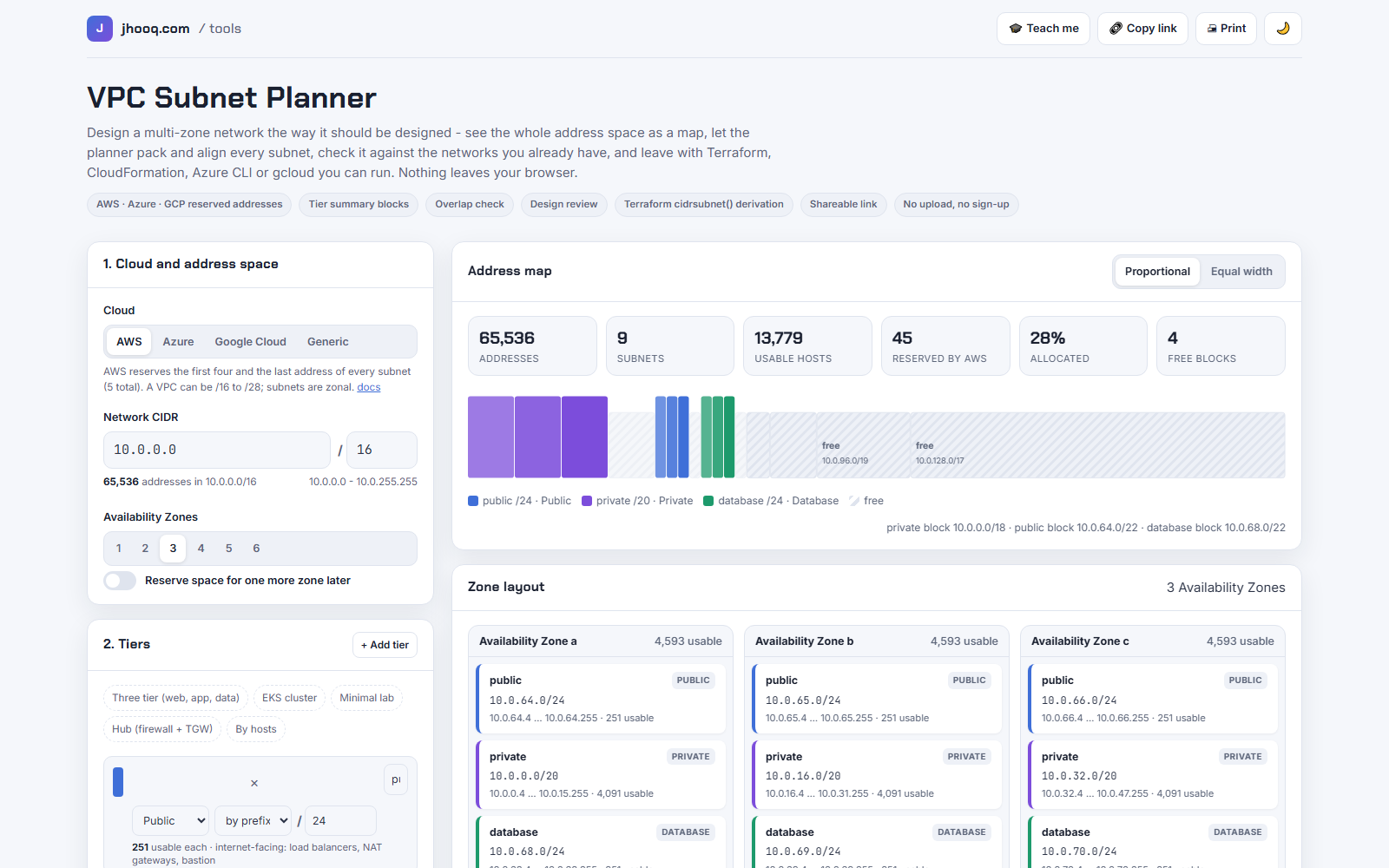
I built the VPC Subnet Planner after linking to the tools above for years and always adding the same caveats in the video. The things it does that the others do not:
- Google Cloud's rule. Four reserved addresses, not five, so a /24 is 252 usable; the other four tools either have no GCP mode or do not state it.
- Sizing by hosts. Tell it 50 web, 800 app and 20 database hosts with 50% growth and it picks the prefixes, adding the cloud's reserved addresses first.
- Contiguous tiers. All private subnets land inside one summary block so one route or firewall rule covers the tier; the padding that costs is shown in the review.
- The overlap check. Paste the networks you already have, one per line, and the review flags the hit and lists free blocks of the same size. That post is the long version.
- A scored review of the design: private range, alignment, load-balancer minimums, zone count, headroom, overlap, NAT cost at about $0.045 per hour per gateway plus $0.045 per GB processed.
- Six export formats, including Terraform that derives every subnet with cidrsubnet() so a reviewer can check it from the VPC CIDR, and a share link that carries the inventory with the design.
What it lacks, honestly: IPv6, planning several VPCs against a Transit Gateway in one view, real zone IDs per region (it says zone a, b, c), the free-form tree that Visual Subnet Calculator has, and a cost estimate beyond NAT. The Kubernetes IP Calculator covers the EKS, GKE and AKS sizing the planner's FAQ used to wave at.
8. Which one for which job
| You want to | Use |
|---|---|
| Explore an address space with notes before you know the tiers | Visual Subnet Calculator |
| A clean AWS multi-AZ layout with CloudFormation or Terraform in 2 minutes | Konishi's VPC CIDR Subnet Planner |
| Plan against the real zones of a specific region and hand a CSV to someone | Towards The Cloud |
| A quick three-cloud topology with a rough monthly cost | 8gwifi |
| A design that has to pass review: GCP rules, hosts-based sizing, overlap check, scored review, code for any of the three clouds | jhooq VPC Subnet Planner |
| Know how many addresses an EKS, GKE or AKS cluster will eat | Kubernetes IP Calculator |
9. What broke when I ran this
1. Towards The Cloud's page reports "Loading tool" to a text reader for several seconds. The calculator is rendered client-side after the page loads; my first two reads of the page saw only the placeholder. Waiting and reading the accessibility tree worked. Humans will not notice, but it means the tool's output is invisible to crawlers, which is a trade-off I made the other way: the planner is one static file.
2. Visual Subnet Calculator's Tools menu closes when the table re-renders. Switching to AWS mode took three attempts because the menu collapsed between my opening it and clicking the mode. The mode itself is correct once set, and the share URL remembers it.
3. I could not get 8gwifi's numbers. The results appear only after the Calculate button, in panels my text extraction did not capture, so section 6 describes features, not output. If you have run it on the same network, tell me in the comments and I will add the row.
4. Konishi's planner packs private first. Largest-first packing put the two /23 private subnets at 10.0.0.0 and the /24 public subnets at 10.0.4.0, which surprised me for a second and is exactly what my planner does too. It is the correct order; it only looks odd next to tutorials that always start with the public subnet.
5. My own tool was wrong about the 172.17.0.0/16 conflict, in the sense that it never mentioned it. Towards The Cloud's warning sent me to the AWS documentation, and the planner now warns when the VPC overlaps 172.17.0.0/16, quoting the two AWS pages that document it: Cloud9 and SageMaker use that range, and EKS nodes fail with "no route to host" when subnets overlap it because Docker runs there.
10. Conclusion
To summarise:
- All five tools get AWS's five reserved addresses right; only one gets Google Cloud's four.
- Visual Subnet Calculator for exploring, Konishi's planner for a lean AWS layout with code, Towards The Cloud for real zone IDs and CSV, 8gwifi for a quick three-cloud topology with cost.
- Use the planner when the plan has to pass a review: by-hosts sizing, contiguous tiers, the overlap check, the scored review and code for all three clouds.
- None of them, mine included, does IPv6 or multi-VPC planning yet.
- Whatever you pick, keep the inventory of existing ranges next to the design, because that is where the expensive mistakes come from.
Did this save you a debugging session? Stay in the loop -
- Subscribe on YouTube - every post here has a screen-recorded companion video.
- Code on GitHub - the repositories, Terraform and scripts behind these posts.
AWS step by step series -
- Part-1 : AWS IAM user - create a user, group, policy, access keys and MFA
- Part-2 : AWS Organizations - multi-account setup, OUs and SCPs
- Part-3 : AWS assume IAM role - trust policy, switch role in console and CLI
- Part-4 : How to launch an EC2 instance - key pair, security group, SSH
- Part-5 : AWS VPC - public and private subnets, Internet Gateway, NAT Gateway, route tables
- Part-8 : EC2 launch template - versions, default version, source template, SSM parameter AMI
- Part-10 : EC2 Auto Scaling - launch template, Auto Scaling group, target tracking, ALB
- Part-11 : AWS WAF - web ACL, managed rules, rate limiting, geo blocking
- Part-12 : AWS VPC Peering - connect two VPCs, routes, security groups, DNS
- Part-13 : AWS Transit Gateway - hub-and-spoke for many VPCs and on-premises
- Part-14 : AWS NAT Gateway deep dive - public vs private, limits, cost, troubleshooting
- Part-15 : Amazon Route 53 - hosted zones, records, alias, routing policies, health checks
- Part-16 : AWS security groups - inbound and outbound rules, stateful, referencing, quotas
- Part-16 : AWS Certificate Manager - free TLS certificates for ALB, CloudFront and API Gateway
- Part-17 : AWS Lambda - function URLs, environment variables and layers
- Part-18 : Network Load Balancer - setup, and ALB vs NLB
- Part-19 : VPC endpoints - gateway and interface endpoints (PrivateLink) instead of NAT
- Part-20 : AWS PrivateLink - publish your own service with an endpoint service and NLB
- Part-20 : Amazon EBS volumes - types, attach, mount, resize, snapshots, encryption
- Part-21 : VPC Flow Logs - CloudWatch Logs, S3, record format, Logs Insights, Athena
- Part-21 : EC2 Spot Instances - pricing, interruptions, mixed instances groups
- Part-23 : AWS Global Accelerator - static anycast IPs in front of ALBs in two regions, traffic dials, weights
- Part-24 : AWS Control Tower - landing zone, controls, Account Factory, Identity Center
- Part-25 : AWS Cloud WAN - global network, core network policy, dev/prod/shared segments, tag-based attachments across three regions
Networking fundamentals -
- What is a VPC and a subnet? AWS networking in five minutes
- What is CIDR? Calculate IP ranges for VPCs and subnets
- VPC Subnet Planner - the free tool I use to size the VPC and subnet CIDRs in every part of this series (AWS, Azure, GCP rules built in)
- What is NAT? Static NAT, dynamic NAT and PAT explained
More AWS guides -
- What is AWS CloudFormation? Templates, stacks, change sets, drift, StackSets
- Learn AWS S3 - the complete course
- AWS API Gateway - REST API with Lambda, authorizers, Terraform
- AWS Advanced Networking Specialty (ANS-C01) - course companion
- AWS ECS and Fargate - how to deploy a Docker container
- AWS S3 - how to host a static website
- Terraform create EC2 instance on AWS
- Terraform AWS IAM - users, roles and policies
- Terraform and AWS multi-account setup
- Terraform - setting up an ALB and SSL