How Many Usable IP Addresses in a /24, /26, /28 Subnet on AWS, Azure and Google Cloud - the Reserved Addresses, the Smallest Subnet per Cloud, and Why Your Calculator Says 254

TL;DR
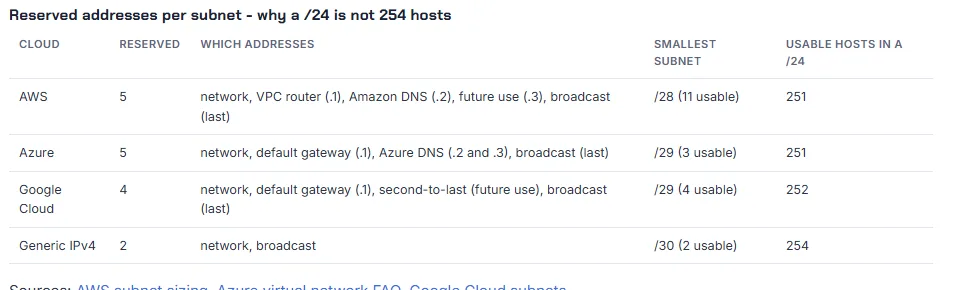
- A /24 is 256 addresses, 254 hosts in a textbook, and 251 on AWS and Azure or 252 on Google Cloud. Every cloud reserves addresses in every subnet: AWS and Azure the first four and the last (5), Google Cloud the first two and the last two (4). Subtract that number, not 2, from the block size.
- The table you came for: /24 = 251 (AWS, Azure) or 252 (GCP); /26 = 59 or 60; /27 = 27 or 28; /28 = 11 or 12; /29 = 3 or 4. Full table in section 2.
- The smallest subnet differs per cloud: /28 on AWS (16 addresses, 11 usable), /29 on Azure (8 addresses, 3 usable) and /29 on Google Cloud (8 addresses, 4 usable). A /29 on AWS is rejected outright.
- The reserved addresses are not wasted by accident. The first usable address on AWS and Azure is
.4, the VPC router answers on.1, the DNS resolver on.2, and Google Cloud keeps the second-to-last address for future use, so the last usable address there is.253. - Where it bites: a Transit Gateway attachment subnet at /28 has 11 addresses, which is plenty; a Kubernetes node pool in a /24 has 251 addresses for nodes and pods together on EKS, which is not. Size by hosts, add the reserved addresses, round up to a power of two.
- Not your exact case? If the notation itself is the question, read what is CIDR first; if you want the subnets laid out and exported, the VPC Subnet Planner does the subtraction for all three clouds.
I wrote this because "how many IP addresses in a /24 AWS" is a question I get under the VPC videos every month, and every generic subnet calculator on the internet answers 254. That number is wrong on every public cloud. Everything below was generated on 2026-10-18 with Python 3.12 and the planner's engine, and the rules are quoted from the current AWS, Azure and Google Cloud documentation.
Table of Content
- Why 254 is the wrong answer in the cloud
- Usable addresses per prefix on AWS, Azure and Google Cloud
- Which addresses are taken, and what they do
- The smallest and largest subnet per cloud
- Where the five addresses actually hurt
- Calculate it yourself - Python, Terraform and the planner
- What broke when I ran this
- Conclusion
1. Why 254 is the wrong answer in the cloud
Classic IPv4 subnetting reserves two addresses in every subnet: the first (the network address) and the last (the broadcast address). That is where the familiar "a /24 has 254 hosts" comes from, and it is what ipcalc, Python's ipaddress module and every online calculator assume.
A cloud VPC is not a classic network. There is no broadcast, but the platform needs addresses of its own in every subnet: a router, a DNS resolver, and room for things it has not built yet. So each provider reserves a fixed set at the start and end of the block, and your usable count drops by five or four, not two. The providers document it in one sentence each:
| Cloud | The rule, from the documentation | Reserved per subnet |
|---|---|---|
| AWS | "The first four IP addresses and the last IP address in each subnet CIDR block are not available for your use" (subnet sizing) | 5 |
| Azure | "Azure reserves the first four addresses and the last address, for a total of five IP addresses within each subnet" (virtual network FAQ) | 5 |
| Google Cloud | "Google Cloud uses the first two and last two IPv4 addresses in each subnet" (VPC subnets) | 4 |
2. Usable addresses per prefix on AWS, Azure and Google Cloud
The whole table, from the largest VPC AWS allows down to the smallest subnet any of the three allows. "Total" is 2^(32 - prefix); the cloud columns subtract the reserved addresses:
| Prefix | Total addresses | Classic (minus 2) | AWS | Azure | Google Cloud |
|---|---|---|---|---|---|
| /16 | 65,536 | 65,534 | 65,531 | 65,531 | 65,532 |
| /18 | 16,384 | 16,382 | 16,379 | 16,379 | 16,380 |
| /19 | 8,192 | 8,190 | 8,187 | 8,187 | 8,188 |
| /20 | 4,096 | 4,094 | 4,091 | 4,091 | 4,092 |
| /21 | 2,048 | 2,046 | 2,043 | 2,043 | 2,044 |
| /22 | 1,024 | 1,022 | 1,019 | 1,019 | 1,020 |
| /23 | 512 | 510 | 507 | 507 | 508 |
| /24 | 256 | 254 | 251 | 251 | 252 |
| /25 | 128 | 126 | 123 | 123 | 124 |
| /26 | 64 | 62 | 59 | 59 | 60 |
| /27 | 32 | 30 | 27 | 27 | 28 |
| /28 | 16 | 14 | 11 | 11 | 12 |
| /29 | 8 | 6 | not allowed | 3 | 4 |
Two things stand out. The reserved addresses are a rounding error on a /20, 0.1% of the block, and a third of a /28, 31.25% on AWS and Azure and 25% on Google Cloud, so the smaller the subnet, the more the rule matters. And the Google Cloud column is always one higher, which is why a GKE node pool and an EKS node pool in "the same size" subnet do not hold the same number of nodes.
3. Which addresses are taken, and what they do
For the subnet 10.0.1.0/24, this is what each cloud keeps. I had the planner's engine print its reserved list for each cloud rather than type it from memory:
1$ node -e 'const e=require("./test/extract-engine")("index.html"); for (const k of ["aws","azure","gcp"]) console.log(k, e.CLOUDS[k].reservedList(e.ip2n("10.0.1.0"),24).map(e.n2ip).join(", "))'
2aws   10.0.1.0, 10.0.1.1, 10.0.1.2, 10.0.1.3, 10.0.1.255
3azure 10.0.1.0, 10.0.1.1, 10.0.1.2, 10.0.1.3, 10.0.1.255
4gcp   10.0.1.0, 10.0.1.1, 10.0.1.254, 10.0.1.255
| Address in a /24 | AWS | Azure | Google Cloud |
|---|---|---|---|
.0 | network address | network address | network address |
.1 | VPC router | default gateway | default gateway |
.2 | Amazon-provided DNS (also reachable as 169.254.169.253) | maps to Azure DNS | first usable |
.3 | reserved for future use | maps to Azure DNS | usable |
.4 | first usable | first usable | usable |
.253 | usable | usable | last usable |
.254 | last usable | last usable | reserved (second-to-last, future use) |
.255 | broadcast (reserved although VPCs do not broadcast) | broadcast | broadcast |
The practical consequences: on AWS and Azure the first address you can assign is .4, so a static IP of 10.0.1.1 for "the first server" fails; on Google Cloud the last address you can assign is .253, so a script that hands out addresses from the top of the range fails one earlier than on the other two. Load balancers, interface endpoints, NAT Gateways and Lambda functions take addresses from the usable pool as well, which is a reason not to go below /24 for anything but attachment subnets.
4. The smallest and largest subnet per cloud
| AWS | Azure | Google Cloud | |
|---|---|---|---|
| Smallest subnet | /28 (16 addresses, 11 usable) | /29 (8 addresses, 3 usable) | /29 (8 addresses, 4 usable) |
| Largest subnet | /16 | /2 per the FAQ, in practice the address space | the address range you give it |
| VPC or VNet range | /16 to /28 | up to /2 | no VPC CIDR; subnets are regional ranges |
| Subnet scope | one Availability Zone | spans the region's zones | one region |
The engine enforces the first row, and this is what it says when you ask AWS for a /29 (score drops from 92 to 67 and the design gets a hard failure) while Azure and Google Cloud accept the same request:
1aws   /29  subnets 1  usable 3  score 67   bad: tiny: /29 is smaller than AWS allows - The smallest subnet on AWS is /28.
2azure /29  subnets 1  usable 3  score 92
3gcp   /29  subnets 1  usable 4  score 92
A /29 with 3 usable addresses on Azure is legal and almost never what anyone wants; the one place small subnets are the right call is dedicated attachment subnets, next.
5. Where the five addresses actually hurt
Transit Gateway and Cloud WAN attachment subnets. The pattern from Transit Gateway, Part 13 is a dedicated /28 per Availability Zone for the attachment network interfaces. A /28 gives 11 usable addresses on AWS; the attachment uses one. That is the smallest AWS subnet and it is the right size for this job, because nothing else should ever launch there.
Kubernetes node pools. This is where 251 instead of 254 turns into a real outage. With the Amazon VPC CNI on EKS every pod takes an address from the node's subnet, and EKS requires at least two subnets in different Availability Zones with at least six free addresses each just for the control plane's network interfaces. A /24 per zone is 251 addresses for nodes plus pods, which a dozen nodes at 30 pods each exhausts. The planner's EKS preset uses a /19 per zone (8,187 usable on AWS) for exactly this reason. On Google Cloud the GKE sizing table shows the same arithmetic from the other side: a /29 primary range fits 4 nodes, a /28 fits 12, a /27 fits 28, a /26 fits 60, each one the usable count of the block.
Load balancers. An AWS Application Load Balancer needs at least 8 free addresses in each of its subnets (a /27 or larger). A public /28 with 11 usable addresses that also hosts a NAT Gateway and a bastion has fewer than 8 left on day one. Public subnets also carry a bill the private ones do not: since February 2024 AWS charges $0.005 per hour for every public IPv4 address in use, about $3.65 per month each, so a public /24 with all 251 addresses assigned costs about $916 per month before any instance runs.
Anything you size "exactly". 250 web servers in a /24 is 250 of 251 on AWS, with no room for the load balancer's interfaces, and 250 of 252 on Google Cloud. Size by hosts, add the reserved addresses and the things that are not hosts, then round up to the next power of two.
6. Calculate it yourself - Python, Terraform and the planner
Python's ipaddress module gives the block arithmetic; you supply the cloud's rule (Python 3.12.10, 2026-10-18):
1$ python -c "import ipaddress as i; n=i.ip_network('10.0.1.0/24'); print('addresses', n.num_addresses, '| AWS/Azure usable', n.num_addresses-5, 'first', n[4], 'last', n[-2], '| GCP usable', n.num_addresses-4, 'first', n[2], 'last', n[-3])"
2addresses 256 | AWS/Azure usable 251 first 10.0.1.4 last 10.0.1.254 | GCP usable 252 first 10.0.1.2 last 10.0.1.253
Terraform's cidrhost() answers "which address is .2 in this subnet" without any arithmetic, and pow() gives the block size:
1> cidrhost("10.0.1.0/24", 4)
2"10.0.1.4"
3> cidrhost("10.0.1.0/24", -2)
4"10.0.1.254"
5> pow(2, 32 - 28) - 5
611
The planner applies the rule per cloud and shows the reserved addresses next to every subnet it lays out. The same three-tier layout on each cloud; note the usable column and the reserved list change with the cloud while the CIDRs do not:
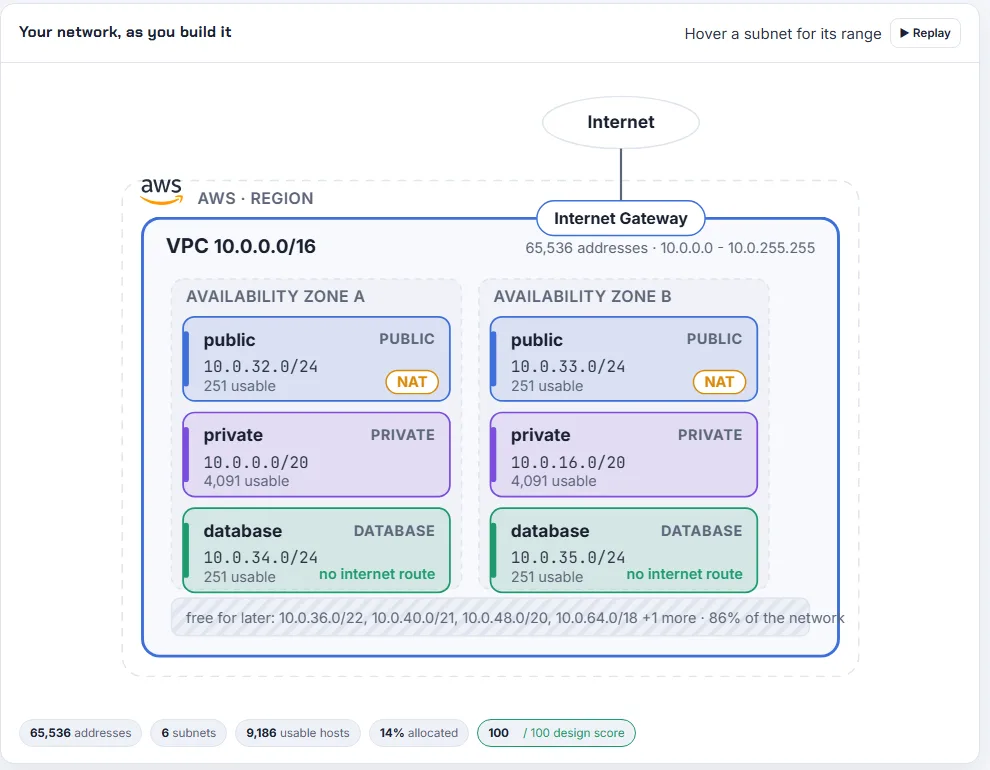
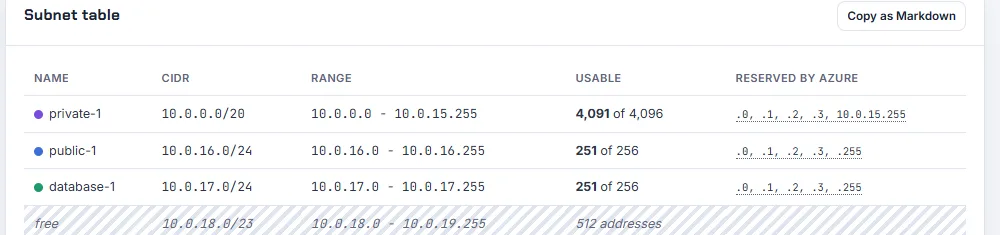
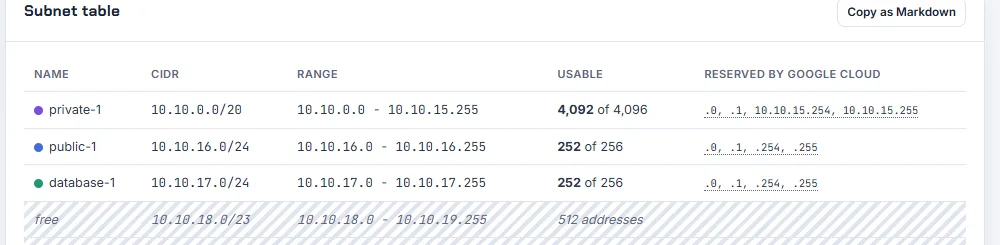
Open it pre-loaded for AWS, Azure or Google Cloud and switch the cloud card at the top to watch the numbers move. The "by hosts" mode does the whole thing in reverse: tell it 100 hosts and it picks the smallest prefix that fits 100 plus the reserved addresses plus the growth headroom you set.
7. What broke when I ran this
Everything in this post ran on my laptop on 2026-10-18 (Python 3.12.10, Terraform 1.16.2, the planner engine at version 1.2.1).
1. Python's hosts() is the 254 trap, in code. len(list(ip_network('10.0.1.0/24').hosts())) returns 254, and its first and last entries are 10.0.1.1 and 10.0.1.254. All three of those answers are wrong for every cloud in this post. The module implements RFC subnetting, not AWS; use num_addresses and subtract the cloud's number yourself, as the command in section 6 does.
2. A corrupted share link falls back to defaults without a word. My first Google Cloud screenshot showed the AWS default layout. The share link I had built in a shell script had a stray } appended, the planner could not decode it, and it silently opened its defaults instead of saying so. Correct link, correct screenshot. If a planner link someone sends you opens on the AWS card with nothing filled in, the link is damaged, not the plan. I have added "show an error for an undecodable link" to the tool's list.
3. Azure accepts a /29 that holds three machines. I expected the engine to warn. It did not, because the Azure FAQ allows /29 and the design review only fails on rules the cloud enforces. The number is in the table, 3 usable, and the planner prints it next to the subnet, but it will not stop you. Treat anything under /27 as an attachment or appliance subnet, not a place for workloads.
4. The same engine, the same CIDRs, different usable counts. Switching the cloud card from Azure to Google Cloud left every subnet CIDR unchanged and raised every usable count by one (251 to 252, 4,091 to 4,092). That is the whole post in one click, and it is the reason the planner asks for the cloud first.
8. Conclusion
To summarise:
- Subtract the cloud's reserved addresses, not 2: five on AWS and Azure, four on Google Cloud.
- /24 = 251 or 252 usable, /28 = 11 or 12, /29 = 3 or 4; AWS does not allow /29 at all.
- First usable is
.4on AWS and Azure and.2on Google Cloud; last usable is.254on AWS and Azure and.253on Google Cloud. - The rule costs 2% of a /24 and a third of a /28; it matters for attachment subnets, node pools and anything sized exactly.
- Size by hosts, add the reserved addresses and the non-host consumers, round up to a power of two, and let the planner or three lines of Python check it.
For the VPC these subnets live in, AWS VPC, Part 5 builds it by hand, and Azure VNet, Part 1 does the same on Azure.
Did this save you a debugging session? Stay in the loop -
- Subscribe on YouTube - every post here has a screen-recorded companion video.
- Code on GitHub - the repositories, Terraform and scripts behind these posts.
AWS step by step series -
- Part-1 : AWS IAM user - create a user, group, policy, access keys and MFA
- Part-2 : AWS Organizations - multi-account setup, OUs and SCPs
- Part-3 : AWS assume IAM role - trust policy, switch role in console and CLI
- Part-4 : How to launch an EC2 instance - key pair, security group, SSH
- Part-5 : AWS VPC - public and private subnets, Internet Gateway, NAT Gateway, route tables
- Part-8 : EC2 launch template - versions, default version, source template, SSM parameter AMI
- Part-10 : EC2 Auto Scaling - launch template, Auto Scaling group, target tracking, ALB
- Part-11 : AWS WAF - web ACL, managed rules, rate limiting, geo blocking
- Part-12 : AWS VPC Peering - connect two VPCs, routes, security groups, DNS
- Part-13 : AWS Transit Gateway - hub-and-spoke for many VPCs and on-premises
- Part-14 : AWS NAT Gateway deep dive - public vs private, limits, cost, troubleshooting
- Part-15 : Amazon Route 53 - hosted zones, records, alias, routing policies, health checks
- Part-16 : AWS security groups - inbound and outbound rules, stateful, referencing, quotas
- Part-16 : AWS Certificate Manager - free TLS certificates for ALB, CloudFront and API Gateway
- Part-17 : AWS Lambda - function URLs, environment variables and layers
- Part-18 : Network Load Balancer - setup, and ALB vs NLB
- Part-19 : VPC endpoints - gateway and interface endpoints (PrivateLink) instead of NAT
- Part-20 : AWS PrivateLink - publish your own service with an endpoint service and NLB
- Part-20 : Amazon EBS volumes - types, attach, mount, resize, snapshots, encryption
- Part-21 : VPC Flow Logs - CloudWatch Logs, S3, record format, Logs Insights, Athena
- Part-21 : EC2 Spot Instances - pricing, interruptions, mixed instances groups
- Part-23 : AWS Global Accelerator - static anycast IPs in front of ALBs in two regions, traffic dials, weights
- Part-24 : AWS Control Tower - landing zone, controls, Account Factory, Identity Center
- Part-25 : AWS Cloud WAN - global network, core network policy, dev/prod/shared segments, tag-based attachments across three regions
Networking fundamentals -
- What is a VPC and a subnet? AWS networking in five minutes
- What is CIDR? Calculate IP ranges for VPCs and subnets
- VPC Subnet Planner - the free tool I use to size the VPC and subnet CIDRs in every part of this series (AWS, Azure, GCP rules built in)
- What is NAT? Static NAT, dynamic NAT and PAT explained
More AWS guides -
- What is AWS CloudFormation? Templates, stacks, change sets, drift, StackSets
- Learn AWS S3 - the complete course
- AWS API Gateway - REST API with Lambda, authorizers, Terraform
- AWS Advanced Networking Specialty (ANS-C01) - course companion
- AWS ECS and Fargate - how to deploy a Docker container
- AWS S3 - how to host a static website
- Terraform create EC2 instance on AWS
- Terraform AWS IAM - users, roles and policies
- Terraform and AWS multi-account setup
- Terraform - setting up an ALB and SSL