Stop Building Stateless AI Chatbots - Build a Durable Kubernetes Incident Agent with Trigger.dev chat.agent, Next.js, the Vercel AI SDK and Human-in-the-Loop Approvals (OOMKilled Demo on minikube and EKS)
Disclosure - this post and the video are sponsored by Trigger.dev. The architecture, the code and the opinions are entirely my own - I built and tested everything shown here myself, and the parts that broke are in here too.
chat.agent API this whole post is built on, and the free tier is enough to run the demo end to end.Every AI chat tutorial I have watched this year - including a couple of my own - has the same hidden flaw. The conversation lives inside an HTTP request. The browser holds the history, posts it to /api/chat, the route streams tokens back, the request ends. Refresh the page or redeploy the app and the conversation is gone. That is fine for a demo. It is disqualifying for an agent that is halfway through your production incident and has just asked "can I restart this pod?".
So in this post I build it properly - an AI incident assistant for Kubernetes that runs as a durable background process, investigates a crashing pod on its own with read-only kubectl, and cannot delete or change anything until a human clicks Approve in the chat. Then we break a real cluster on purpose and watch the agent find the OOM kill, ask for permission, and fix it. Everything is in the repo - github.com/rahulwagh/trigger-dev-ai-agent - and runs from clone to a working agent in seven commands.
TL;DR
- A chat agent should be a session, not a request. On Trigger.dev
chat.agenteach conversation is a durable run with server-side history - it survives refreshes, redeploys, crashes and OOM kills, and the browser only ever sends the new message. - Human-in-the-loop is one line of design - a Vercel AI SDK tool without an
executefunction ends the turn and suspends the run; the UI renders Approve / Deny and answers withaddToolOutput. Suspended time is not billed. - The agent found a real OOMKilled (exit 137) pod with a 32Mi limit, proposed a memory increase, waited for my click, patched the StatefulSet and verified the rollout - from one message: "why is payments crashing?".
- Three things broke for me - OpenAI's Responses API tool-call ids go stale across a durable pause (fix:
openai.chat()), a StatefulSet will not roll a crash-looping pod on its own, andkubectl rollout status --timeout=120stimed out while the pod was stillContainerCreating. - Cost of running it - the agent runs on a micro machine at $0.0000169 per second only while it is actually working; an idle or suspended session costs $0. The whole demo fits in the free tier's $5 monthly credit.
- Stack - TypeScript, Next.js 15, Vercel AI SDK (
aiv6),@trigger.dev/sdk4.6.4, OpenAIgpt-5-mini, Kubernetes on minikube (the same code points at EKS with a kubeconfig change).
Table of Content
- The hidden flaw in every AI chat tutorial
- What we are building - one incident, a human in the loop
- How Trigger.dev runs the agent - the story in nine steps
- The cluster we are going to break on purpose
- Live demo - the agent finds the crash and asks for approval
- Proof it is durable - the Trigger.dev dashboard
- Code walkthrough - the chat UI
- Code walkthrough - wiring in Trigger.dev
- Code walkthrough - the tools and the approval gate
- What broke when I ran this
- Run it yourself - clone to running in seven commands
- Pointing it at Amazon EKS
- What it costs
- Durable agent vs API route - the comparison table
- Every Trigger.dev link from the video
- Wrap-up and takeaways
1. The hidden flaw in every AI chat tutorial
Here is the shape of the tutorial you have seen a hundred times - a React component with useChat, a Next.js route at /api/chat that calls streamText, and an LLM that streams tokens back. It works beautifully on localhost. The problem is where the state lives -
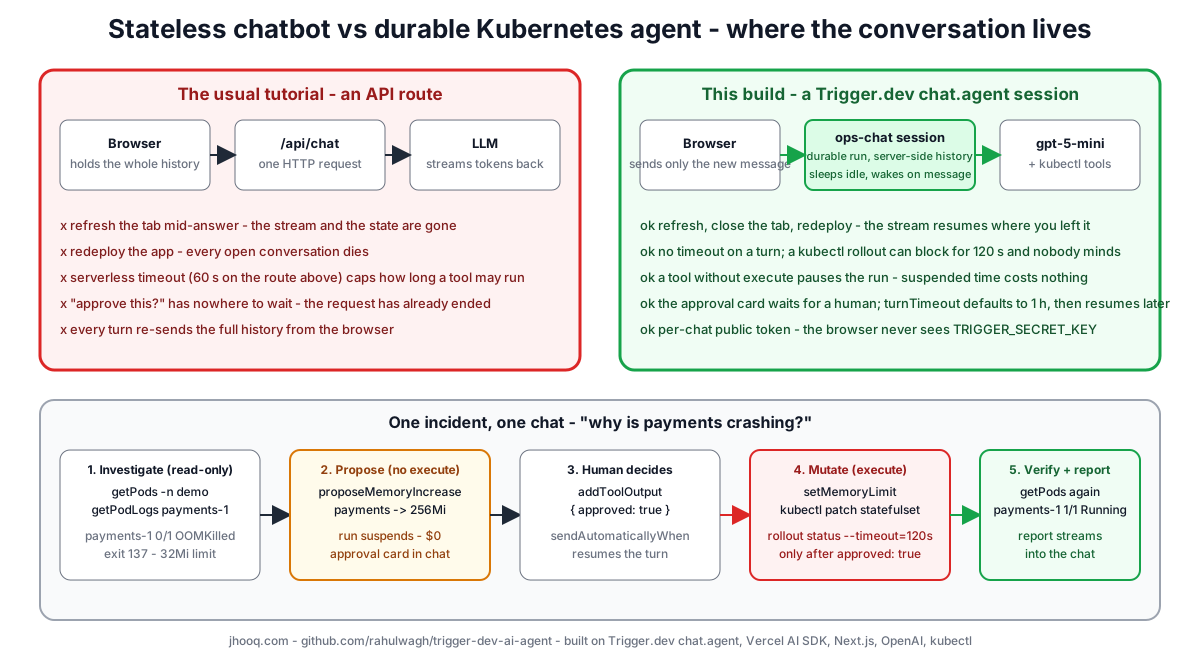
- The browser holds the whole message history and re-sends it on every turn.
- The route handler is one HTTP request. On Vercel that request has a hard limit (
maxDuration); a longkubectl rollout statuscan outlive it. - Refresh the tab mid-answer - the stream is gone and so is whatever the agent was about to do.
- Redeploy - every open conversation dies at once.
- "May I delete this pod?" has nowhere to wait. The request has to end, so the approval becomes a brand-new request that has to reconstruct everything.
For a support chatbot you can live with that. For an SRE assistant that is in the middle of touching a cluster, you cannot. The fix is not a bigger timeout - it is moving the conversation out of the request and into a durable session, which is exactly what Trigger.dev's chat.agent is - a long-running, pausable task that owns the history, wakes up when a message arrives and sleeps when none do.
2. What we are building - one incident, a human in the loop
One cluster, one chat, one incident. A small shop platform runs in a demo namespace - redis, orders and payments - and one payments replica is deliberately broken. The agent, which I call ops-chat, can -
| Capability | Tool | Executes |
|---|---|---|
| list pods | getPods | freely - read-only kubectl get pods |
| read logs | getPodLogs | freely - read-only kubectl logs --tail |
| ask to restart a pod | proposeDeletion | never - it has no execute; the human answers it |
| restart a pod | deletePod | only after an approved proposeDeletion |
| ask to raise a memory limit | proposeMemoryIncrease | never - approval card in the chat |
| raise the limit and roll the pods | setMemoryLimit | only after an approved proposeMemoryIncrease - kubectl patch plus rollout status |
The whole thing is four files that matter - the chat UI (app/components/chat.tsx), the two server actions that let the browser in safely (app/actions.ts), the agent's brain loop (trigger/chat-agent.ts) and its hands (lib/tools.ts). Everything else in the repo is configuration.
This is the Phase 2 diagram from the video - use the arrows or press A to see everything -
3. How Trigger.dev runs the agent - the story in nine steps
Before any code, here is the story of one message, the way I told it in the video. Step through it with the arrows (or open it full screen) -
- You type "why is payments crashing?" into a normal chat window.
- The Trigger.dev session wakes up - it remembers everything said so far, because the history lives server-side, not in your tab.
- It asks the AI brain (OpenAI) what to check. The answer is "look at the pods and logs".
- The agent lists pods and reads logs with its read-only tools -
payments-1is crashing, the logs say "out of memory". - Found it - Redis kept refusing connections, the retries ate all the memory, the kernel killed the pod.
- The agent asks "can I fix payments-1?" - and here the run pauses. It is waiting for a human, and while it waits it costs nothing.
- You click Approve.
- The agent raises the memory limit - the real fix, not just a restart - and the StatefulSet rolls the pod.
- The full report streams back into your chat. Close the tab or redeploy - the conversation survives.
The two words that matter in that list are pauses (step 6) and survives (step 9). Both come for free from running the loop inside a durable task instead of a request.
4. The cluster we are going to break on purpose
The demo stack is one manifest, phase1-local-cluster/demo-workloads.yaml, and it works unchanged on minikube and on EKS - only the kubeconfig differs. Three workloads in a demo namespace -
| Workload | Kind | Pods | Image | Memory limit | Behaviour |
|---|---|---|---|---|---|
redis | StatefulSet | 1 | redis:7-alpine | - | healthy |
orders | Deployment | 2 | busybox:1.36 | 64Mi | logs GET /orders 200 every 5 s |
payments | StatefulSet | 2 | busybox:1.36 | 32Mi (request 16Mi) | payments-0 healthy; payments-1 is the trap |
payments-1 is scripted to fail the way a real service fails - it logs five ECONNREFUSED redis:6379 retries, then "heap out of memory", then allocates a 100 MB retry buffer inside a 32 MiB box. The kernel OOM-kills it - exit code 137 - and Kubernetes puts it in CrashLoopBackOff. Raise the limit to 256Mi or more and the same script succeeds and starts serving. That is the whole incident, and the memory limit is the real root cause, which is what I want the agent to find.
 1# demo-workloads.yaml - the payments container, trimmed
 2resources: { limits: { memory: 32Mi }, requests: { memory: 16Mi } }
 3command:
 4  - sh
 5  - -c
 6  - |
 7    if [ "$HOSTNAME" = "payments-1" ]; then
 8      i=1; while [ $i -le 5 ]; do
 9        echo "$(date -u +%FT%TZ) ERROR payments: ECONNREFUSED redis:6379 (retry $i/15)"; sleep 1; i=$((i+1));
10      done
11      echo "$(date -u +%FT%TZ) ERROR payments: heap out of memory — allocation failed"
12      echo "$(date -u +%FT%TZ) FATAL payments: worker exiting (retry buffer exhausted memory)"
13      # ~100MB held by THIS process (peak ~2x while the shell grows the buffer):
14      # inside the 32Mi limit the kernel OOM-kills it (exit 137)
15      buf=$(head -c 100m /dev/zero | tr '\0' a)
16      [ "${#buf}" -lt 104857600 ] && { echo "FATAL payments: OOM during retry-buffer alloc"; exit 137; }
17      echo "$(date -u +%FT%TZ) INFO payments: cache warmed, redis reconnected — serving"
18      while true; do echo "$(date -u +%FT%TZ) INFO payments: POST /pay 200 (redis ok)"; sleep 5; done
19    else
20      while true; do echo "$(date -u +%FT%TZ) INFO payments: POST /pay 200 (redis ok)"; sleep 5; done
21    fi
Bringing it up is one script, up.sh - start minikube with 3 GB and 2 CPUs, apply the manifest, and wait up to two minutes for payments-1 to start crash-looping. This is what my terminal showed when I recorded the video (minikube on my laptop, September 2026) -
 1$ minikube start --memory=3g --cpus=2
 2✔  Done! kubectl is now configured to use "minikube" cluster
 3
 4$ kubectl config use-context minikube
 5Switched to context "minikube".
 6
 7$ kubectl apply -f demo-workloads.yaml
 8namespace/demo created
 9statefulset.apps/redis created
10service/redis created
11deployment.apps/orders created
12service/orders created
13statefulset.apps/payments created
14service/payments created
15
16$ kubectl get pods -n demo        # ~60 s later
17NAME                      READY   STATUS      RESTARTS
18orders-6f77d54bc5-bm5xp   1/1     Running     0
19payments-0                1/1     Running     0
20payments-1                0/1     OOMKilled   2          <- the incident, on purpose
21redis-0                   1/1     Running     0
22
23$ kubectl logs payments-1 -n demo --tail=50
24ERROR payments: ECONNREFUSED redis:6379 (retry 5/15)
25ERROR payments: heap out of memory — allocation failed
26FATAL payments: worker exiting (retry buffer exhausted memory)
27Killed
If you want to understand the mechanics of that OOMKilled, the Kubernetes docs on what happens when a container exceeds its memory limit are the reference - the container is killed by the kernel and, with the default restart policy, restarted with exponential back-off. The manifest-to-fixed-pod story diagram walks the same sequence -
5. Live demo - the agent finds the crash and asks for approval
With the cluster broken and both terminals running (npx trigger.dev@latest dev for the agent, npm run dev for the UI), I opened http://localhost:3000 and typed one line - "why is payments crashing?". This is the agent's actual answer, straight from the recording, after it had called getPods once and getPodLogs three times -
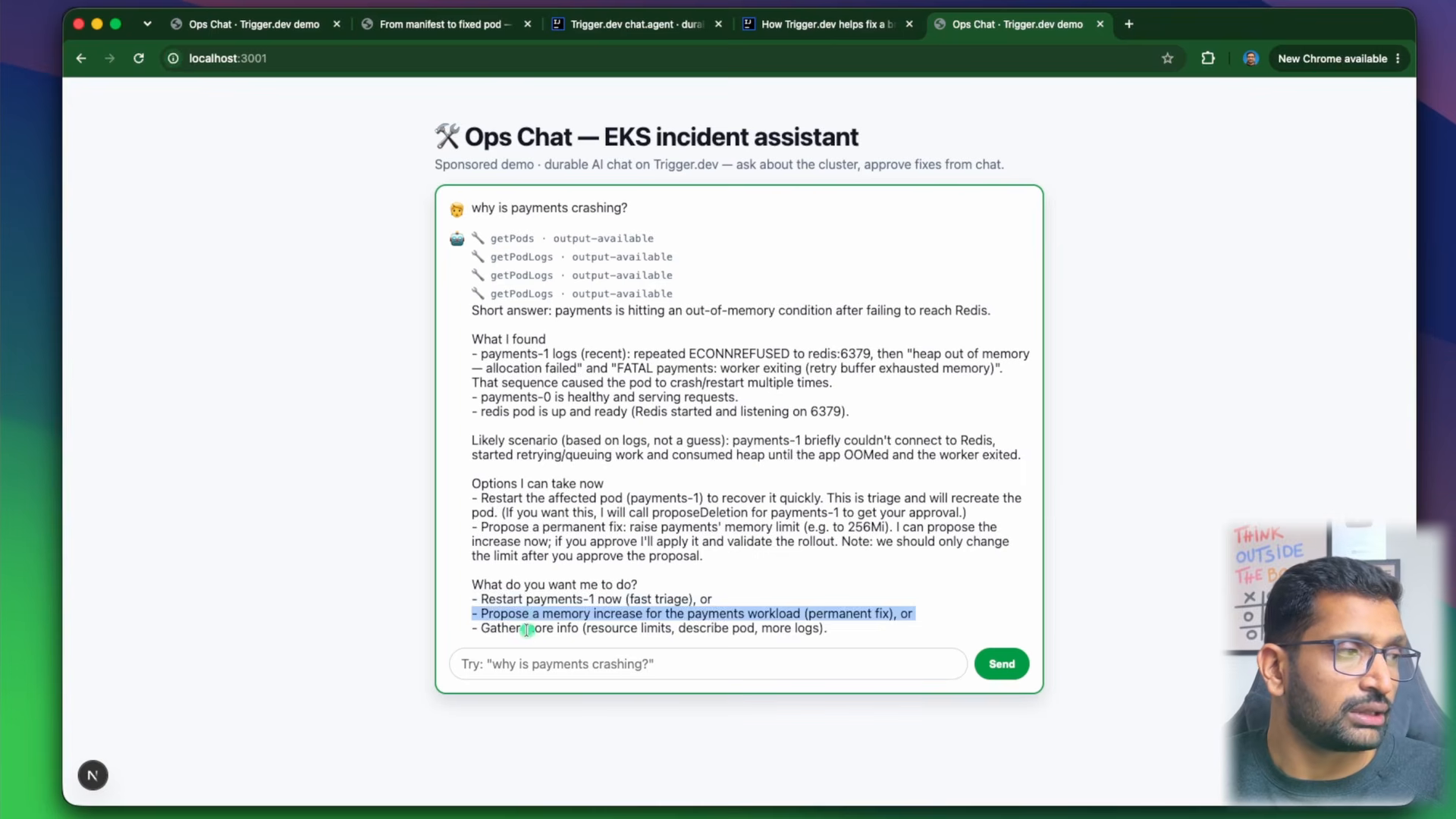
 1🔧 getPods · output-available
 2🔧 getPodLogs · output-available
 3🔧 getPodLogs · output-available
 4🔧 getPodLogs · output-available
 5
 6Short answer: payments is hitting an out-of-memory condition after failing to reach Redis.
 7
 8What I found
 9- payments-1 logs (recent): repeated ECONNREFUSED to redis:6379, then "heap out of memory
10  — allocation failed" and "FATAL payments: worker exiting (retry buffer exhausted memory)".
11  That sequence caused the pod to crash/restart multiple times.
12- payments-0 is healthy and serving requests.
13- redis pod is up and ready (Redis started and listening on 6379).
14
15Likely scenario (based on logs, not a guess): payments-1 briefly couldn't connect to Redis,
16started retrying/queuing work and consumed heap until the app OOMed and the worker exited.
17
18Options I can take now
19- Restart the affected pod (payments-1) to recover it quickly. This is triage and will recreate
20  the pod. (If you want this, I will call proposeDeletion for payments-1 to get your approval.)
21- Propose a permanent fix: raise payments' memory limit (e.g. to 256Mi). I can propose the
22  increase now; if you approve I'll apply it and validate the rollout.
23
24What do you want me to do?
25- Restart payments-1 now (fast triage), or
26- Propose a memory increase for the payments workload (permanent fix), or
27- Gather more info (resource limits, describe pod, more logs).
Three things I want you to notice. It checked before it diagnosed - the system prompt says "never guess", and the four tool calls at the top are the proof. It separated triage from the fix - restart now, or raise the limit for good. And it did not touch anything. I answered "please do increase memory for the payments workload", and instead of running kubectl patch, the agent called proposeMemoryIncrease - a tool with no execute - and the run paused with this card in the chat -
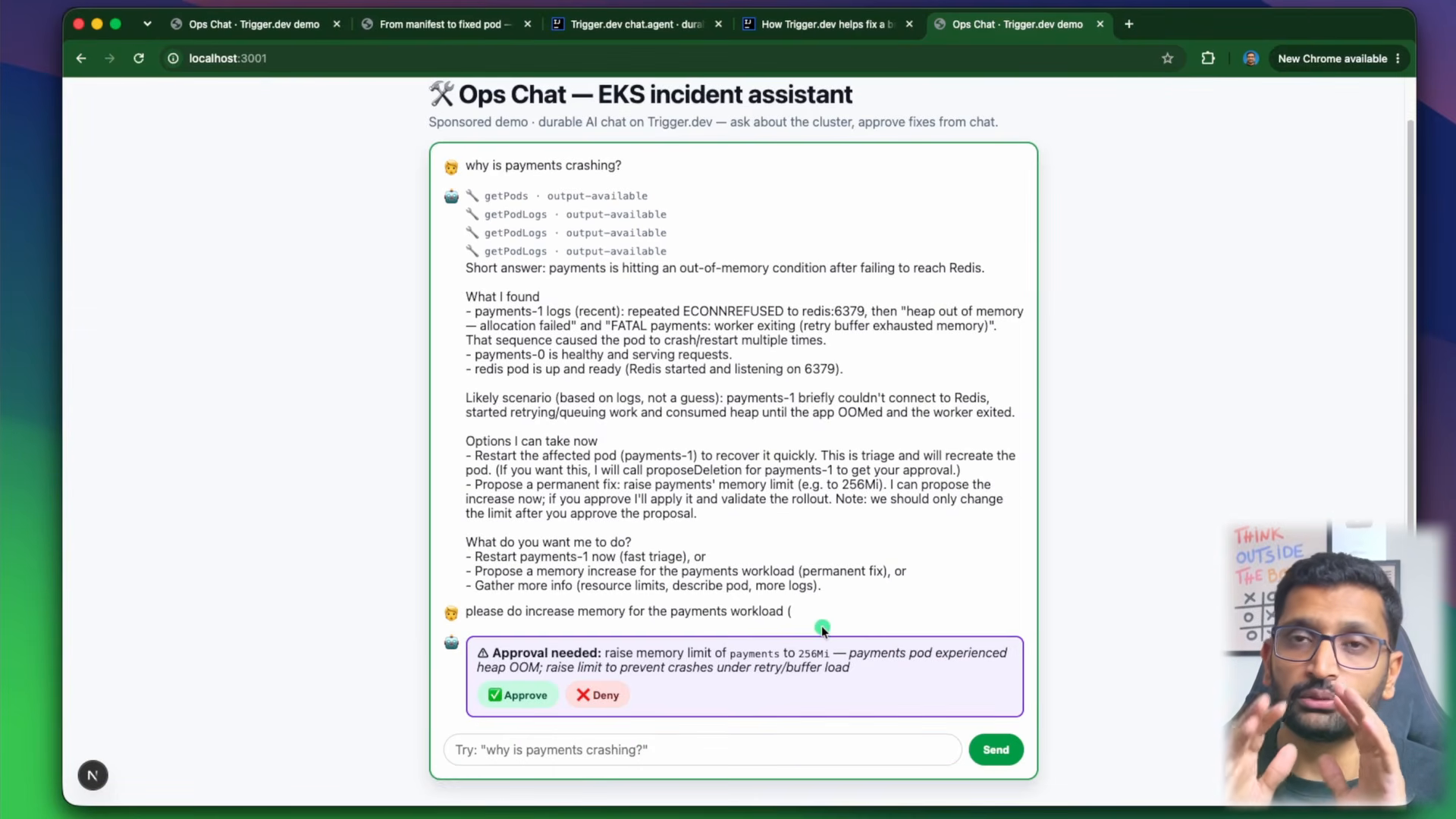
1⚠ Approval needed: raise memory limit of payments to 256Mi — payments pod experienced heap OOM;
2raise limit to prevent crashes under retry/buffer load
3[ ✅ Approve ]  [ ❌ Deny ]
I clicked Approve. The UI sent { approved: true } as that tool's output, the turn resumed, the agent called setMemoryLimit, and kubectl patched the StatefulSet and waited for the rollout. A minute later I checked the cluster by hand -
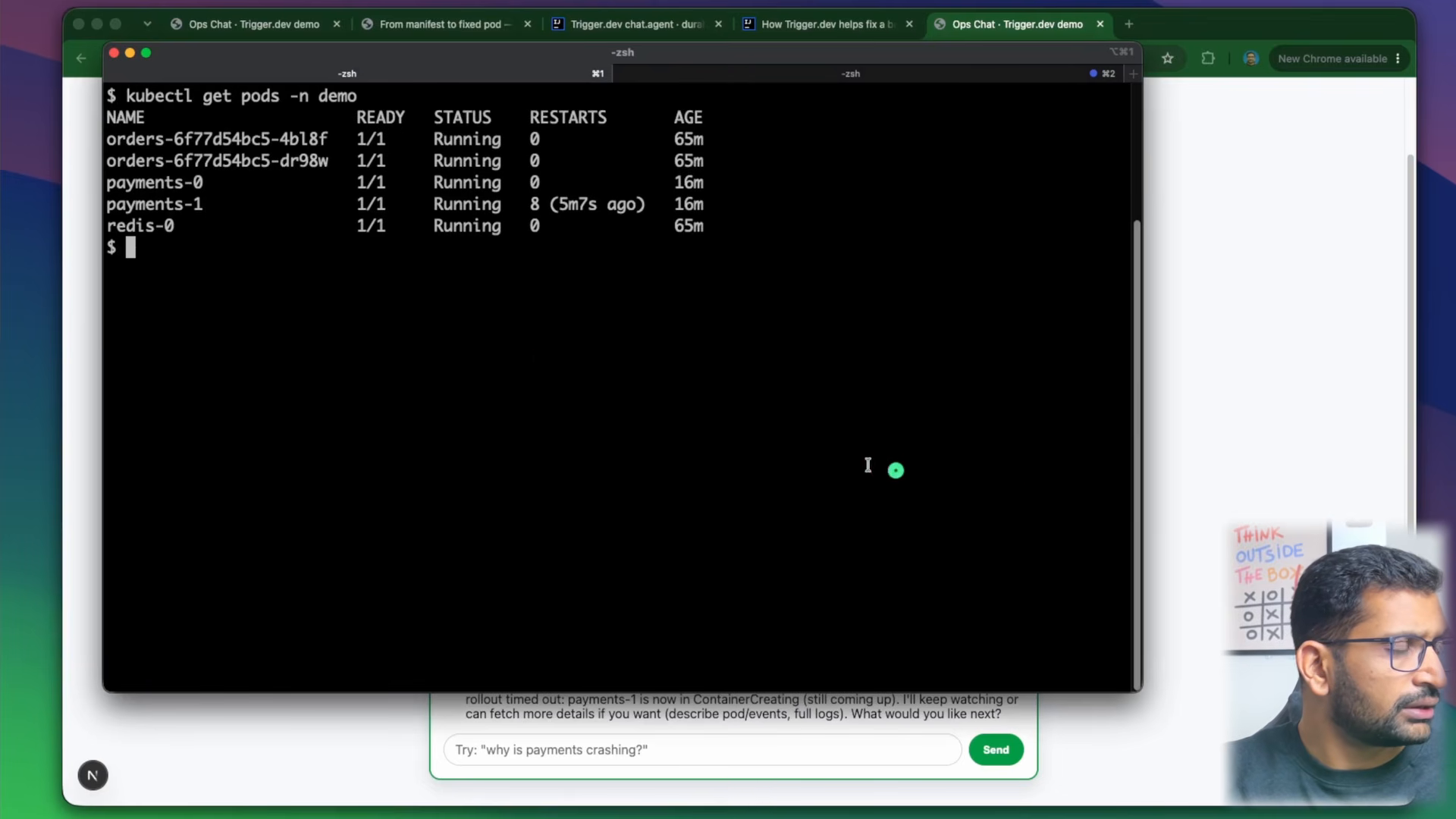
1$ kubectl get pods -n demo
2NAME                      READY   STATUS    RESTARTS       AGE
3orders-6f77d54bc5-4bl8f   1/1     Running   0              65m
4orders-6f77d54bc5-dr98w   1/1     Running   0              65m
5payments-0                1/1     Running   0              16m
6payments-1                1/1     Running   8 (5m7s ago)   16m
7redis-0                   1/1     Running   0              65m
payments-1 is Running - with eight restarts in its history as evidence of the incident. The agent had already verified the same thing with its own getPods call and streamed the report into the chat. One message, one click, one fixed pod, and at no point could the agent have done the destructive part on its own.
6. Proof it is durable - the Trigger.dev dashboard
"It survives a refresh" is a claim; the dashboard is the proof. Every conversation is a session in the Trigger.dev project, and the run that backs it is visible with its status, every tool call and every token -
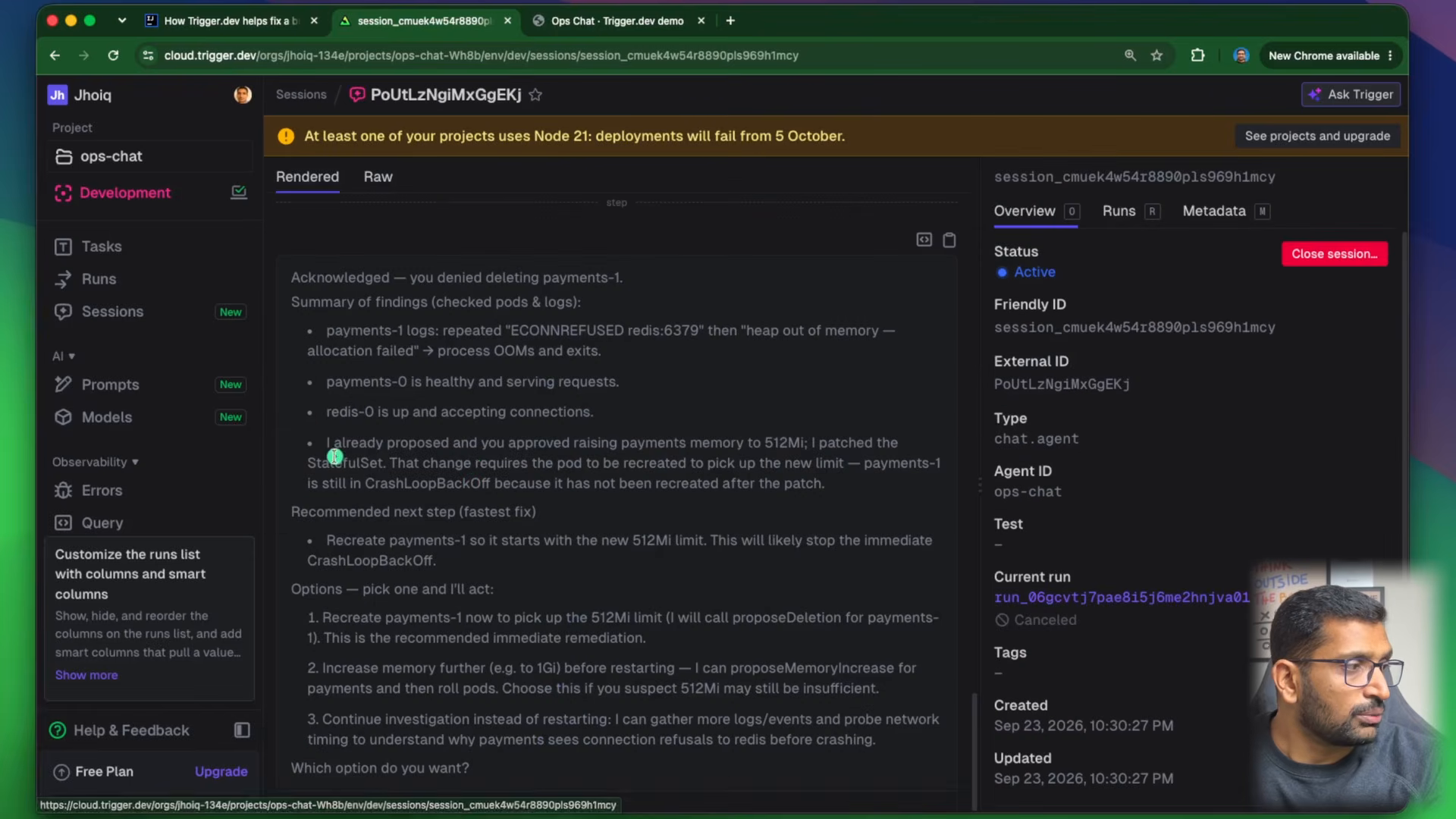
What you are looking at (from my ops-chat project, development environment, 23 September 2026) -
| Field | Value |
|---|---|
| Type | chat.agent |
| Agent ID | ops-chat |
| Status | Active - the session exists even while the run is asleep |
| Friendly ID | session_cmuek4w54s8898p1s969h1mcy |
| Tabs | Overview, Runs, Metadata - plus a Rendered view of the whole conversation |
The demo beat from the video - I refreshed the browser mid-answer, and the stream reconnected and continued from where it was, because the tokens were never owned by the tab in the first place. The overview docs describe it exactly: a chat in progress keeps streaming through a redeploy, pinned to the version it started on, and moving it to new code is a deliberate version upgrade. In the same screenshot you can also see the orange banner Trigger.dev showed me - "at least one of your projects uses Node 21: deployments will fail from 5 October" - which is a real thing to fix before you deploy (Node 21 is an odd-numbered, end-of-life release; see the Node.js release schedule).
7. Code walkthrough - the chat UI
Four files, one job each. The code map diagram from the video shows how a request travels through them -
The screen you type into is a normal useChat component from the Vercel AI SDK. The only change from every other tutorial is the transport - messages go to a durable Trigger.dev session instead of an API route, and the browser keeps no history -
 1// app/components/chat.tsx (trimmed)
 2"use client";
 3
 4import { useChat } from "@ai-sdk/react";
 5import { lastAssistantMessageIsCompleteWithToolCalls } from "ai";
 6import { useTriggerChatTransport } from "@trigger.dev/sdk/chat/react";
 7import type { opsChat } from "@/trigger/chat-agent";
 8import { mintChatAccessToken, startChatSession } from "@/app/actions";
 9
10export function Chat() {
11  const transport = useTriggerChatTransport<typeof opsChat>({
12    task: "ops-chat",                                            // the agent to talk to
13    accessToken: ({ chatId }) => mintChatAccessToken(chatId),    // per-chat public token
14    startSession: ({ chatId, clientData }) => startChatSession({ chatId, clientData }),
15  });
16
17  const { messages, sendMessage, addToolOutput, stop, status } = useChat({
18    transport,
19    // once the human answers a propose* tool call, re-send so the agent continues the turn
20    sendAutomaticallyWhen: lastAssistantMessageIsCompleteWithToolCalls,
21  });
22  // ...
23}
Rendering is where the human-in-the-loop lives. Every message is a list of parts - text parts and typed tool parts. When a part is tool-proposeDeletion or tool-proposeMemoryIncrease and its state is input-available, the agent is paused and waiting, so we draw the card -
 1if (part.type === "tool-proposeDeletion" || part.type === "tool-proposeMemoryIncrease") {
 2  const toolName = part.type.replace("tool-", "") as "proposeDeletion" | "proposeMemoryIncrease";
 3  if (part.state === "input-available") {
 4    return (
 5      <div className="approval">
 6        <strong>⚠ Approval needed:</strong> {/* pod or workload + memory, and the reason */}
 7        <button onClick={() => addToolOutput({ tool: toolName, toolCallId: part.toolCallId, output: { approved: true } })}>
 8          ✅ Approve
 9        </button>
10        <button onClick={() => addToolOutput({ tool: toolName, toolCallId: part.toolCallId, output: { approved: false } })}>
11          ❌ Deny
12        </button>
13      </div>
14    );
15  }
16  // once answered, show the decision instead of the buttons
17}
addToolOutput supplies the tool's result from the browser; sendAutomaticallyWhen then fires the next turn so the agent sees { approved: true } and continues. The state machine - input-streaming → input-available → output-available (or output-error) - is the AI SDK's own, documented in chatbot tool usage. The Stop button calls stop(), which aborts generation server-side through the signal the agent receives - another thing a plain route cannot do once the request has returned.
8. Code walkthrough - wiring in Trigger.dev
Two tiny server actions let the browser in safely. One starts or resumes the durable session for a chatId; the other mints a public token scoped to exactly that one chat, so TRIGGER_SECRET_KEY never reaches the browser -
 1// app/actions.ts
 2"use server";
 3
 4import { auth } from "@trigger.dev/sdk";
 5import { chat } from "@trigger.dev/sdk/ai";
 6
 7export const startChatSession = chat.createStartSessionAction("ops-chat");
 8
 9export async function mintChatAccessToken(chatId: string) {
10  return auth.createPublicToken({
11    scopes: { read: { sessions: chatId }, write: { sessions: chatId } },
12    expirationTime: "1h",
13  });
14}
And the agent itself - the green box in the middle of every diagram. It is chat.agent with an id, the tools, and a run function that is the loop you would write anyway: messages in, streamText out -
 1// trigger/chat-agent.ts (trimmed)
 2import { chat } from "@trigger.dev/sdk/ai";
 3import { streamText, stepCountIs } from "ai";
 4import { openai } from "@ai-sdk/openai";
 5import { clusterTools } from "../lib/tools";
 6
 7export const opsChat = chat.agent({
 8  id: "ops-chat",
 9  tools: clusterTools,            // declared here so tool outputs persist across turns
10
11  uiMessageStreamOptions: {
12    onError: (error: unknown) => {
13      console.error("[ops-chat] stream error:", error);
14      return "Something went wrong while generating a response. Please try again."; // no keys, no stack traces
15    },
16  },
17
18  run: async ({ messages, tools, signal }) => {
19    return streamText({
20      ...chat.toStreamTextOptions({ tools }),
21      model: openai.chat("gpt-5-mini"),   // .chat() on purpose - see "What broke"
22      system: SYSTEM_PROMPT,
23      messages,
24      abortSignal: signal,                 // lets "Stop" work from the UI
25      stopWhen: stepCountIs(15),
26    });
27  },
28});
The system prompt is where the safety policy lives, and it is worth reading in full in the repo. The rules that make the demo behave - investigate freely with the read-only tools; never guess, check pods and logs first; when you conclude a pod should be deleted do NOT ask in text, call proposeDeletion - that tool call IS the question; only if its result is { approved: true } may you call deletePod; restarting is triage, the permanent fix for an OOM kill is a higher memory limit via proposeMemoryIncrease then setMemoryLimit; be concise, this is an operations chat, not an essay.
The configuration is three lines - the project ref, the directory to scan for tasks, and a maxDuration of 300 seconds per step (not per conversation) -
1// trigger.config.ts
2import { defineConfig } from "@trigger.dev/sdk";
3export default defineConfig({ project: "proj_xxxxxxxxxxxx", dirs: ["./trigger"], maxDuration: 300 });
There is one more piece in the repo that I left switched off in the video - lib/chat-handler.ts, a Head Start route. It runs the first LLM step on the already-warm Next.js server while the durable run boots in parallel; Trigger.dev's own measurement is time-to-first-text dropping from about 2,800 ms to about 1,200 ms. The rules are strict - schema-only tools (no execute imports in the route bundle), the same model as the agent, and no stopWhen - which is why lib/tools.ts exports a second headStartTools map with the schemas only. I kept it off so that the direct durable path stayed the single source of truth for the demo; enabling it is one line, headStart: "/api/chat", in the transport.
9. Code walkthrough - the tools and the approval gate
The tools are the agent's only doorway into the cluster, and they come in two colours. Green tools execute freely and only read. Red tools mutate, and each one is paired with a propose tool that has no execute at all -
 1// lib/tools.ts (trimmed)
 2import { tool } from "ai";
 3import { z } from "zod";
 4import { execFile } from "node:child_process";
 5import { promisify } from "node:util";
 6
 7const exec = promisify(execFile);
 8const useRealCluster = process.env.USE_REAL_CLUSTER === "true";
 9
10async function kubectl(args: string[]): Promise<string> {
11  const { stdout } = await exec("kubectl", args, { timeout: 150_000 });
12  return stdout;
13}
14
15export const clusterTools = {
16  // ── green: read-only ──
17  getPods: tool({
18    description: "List the pods in the demo namespace (payments, orders, redis) with their status.",
19    inputSchema: z.object({ namespace: z.string().default("demo") }),
20    execute: async ({ namespace }) => (useRealCluster ? kubectl(["get", "pods", "-n", namespace]) : MOCK_PODS),
21  }),
22  getPodLogs: tool({
23    description: "Fetch recent logs for a pod to diagnose failures.",
24    inputSchema: z.object({ pod: z.string(), namespace: z.string().default("demo"), lines: z.number().default(50) }),
25    execute: async ({ pod, namespace, lines }) =>
26      useRealCluster ? kubectl(["logs", pod, "-n", namespace, `--tail=${lines}`]) : MOCK_LOGS,
27  }),
28
29  // ── the gate: NO execute - the human supplies { approved } via addToolOutput ──
30  proposeMemoryIncrease: tool({
31    description: "Ask the human to approve raising a workload's memory limit (the permanent fix for OOM kills). " +
32      "ALWAYS call this before setMemoryLimit. Only if approved is true may you call setMemoryLimit.",
33    inputSchema: z.object({
34      workload: z.string(), namespace: z.string().default("demo"),
35      memory: z.string().describe("New limit, e.g. 256Mi"), reason: z.string(),
36    }),
37  }),
38
39  // ── red: the mutation, only reachable after an approved proposal ──
40  setMemoryLimit: tool({
41    description: "Patch a workload's container memory limit/request and roll its pods. Only call after an approved proposeMemoryIncrease.",
42    inputSchema: z.object({ workload: z.string(), namespace: z.string().default("demo"), memory: z.string() }),
43    execute: async ({ workload, namespace, memory }) => {
44      if (!useRealCluster) return `${workload} memory limit set to ${memory} (mock) — pods rolling`;
45      const kind = workload === "orders" ? "deployment" : "statefulset";
46      const patch = JSON.stringify({ spec: { template: { spec: { containers: [
47        { name: workload, resources: { limits: { memory }, requests: { memory } } } ] } } } });
48      const patched = await kubectl(["patch", kind, workload, "-n", namespace, "--type=strategic", "-p", patch]);
49      // block until the pods are back so the agent's next getPods sees the healed state
50      const rolled = await kubectl(["rollout", "status", `${kind}/${workload}`, "-n", namespace, "--timeout=120s"]);
51      return `${patched.trim()}\n${rolled.trim()}`;
52    },
53  }),
54  // proposeDeletion / deletePod follow exactly the same pattern
55};
Why a no-execute tool is the right gate, and not an if (confirmed) in the prompt - from the human-in-the-loop pattern docs: a tool without execute ends the model's step with a pending tool call, the run stays active for idleTimeoutInSeconds (default 30 s) and then suspends; suspended time does not count towards compute or maxDuration. The turnTimeout (default 1 hour) decides how long the run waits for the answer, and a later answer simply starts a continuation run that restores the conversation from transcript storage. So the approval can sit there for a minute or a day, and the LLM physically cannot call setMemoryLimit first, because the prompt forbids it and the UI only ever produces { approved: true } through a human click. (Trigger.dev also supports the alternative needsApproval: true on a tool with execute, answered with addToolApprovalResponse - same idea, one fewer tool.)
Two small decisions in setMemoryLimit that came from running it, not from the docs - the kind is derived from the workload name because orders is a Deployment and the other two are StatefulSets, and the rollout status --timeout=120s is there so that the agent's next getPods sees the healed cluster instead of the middle of a rollout. Both show up again in the next section.
10. What broke when I ran this
The polished demo in the video is take three. Here is what went wrong in takes one and two, with the fixes - these are the parts the docs cannot give you.
1. The approval worked once, then the next turn failed with stale tool-call ids. With the default OpenAI provider the AI SDK uses the Responses API, which tracks the conversation by server-side item ids (fc_…, msg_…). When the durable session reconstructs the history to resume after a human approval, those ids no longer exist on OpenAI's side and the second step errors out. The fix is one method - openai.chat("gpt-5-mini") instead of openai("gpt-5-mini") - which forces the stateless Chat Completions endpoint that rebuilds everything from messages on every turn. This is the single most important line in the repo, and it is the one you would never guess from a tutorial.
2. The limit was patched - and the pod kept crash-looping. In one take I approved raising payments to 512Mi, the agent patched the StatefulSet, and payments-1 was still in CrashLoopBackOff. This is the agent's own explanation from the dashboard's rendered view -
1I already proposed and you approved raising payments memory to 512Mi; I patched the StatefulSet.
2That change requires the pod to be recreated to pick up the new limit — payments-1 is still in
3CrashLoopBackOff because it has not been recreated after the patch.
4
5Recommended next step (fastest fix):
6- Recreate payments-1 so it starts with the new 512Mi limit. This will likely stop the immediate
7  CrashLoopBackOff.
It was right. A StatefulSet's rolling update will not replace a pod that is stuck in a broken state - the Kubernetes docs call this out under forced rollback: when a pod is unhealthy after a bad or interrupted update you have to delete it so that the controller recreates it from the current spec. The agent proposed exactly that with proposeDeletion, I approved, deletePod ran, and the recreated pod came up with the new limit. Which is also the moment the human-in-the-loop design earned its keep - a one-off kubectl delete pod is the right call here, and I still wanted to be the one who said so.
3. rollout status timed out at 120 seconds. On the take with the 256Mi limit, setMemoryLimit returned with "rollout timed out: payments-1 is now in ContainerCreating (still coming up)" - you can see that sentence at the bottom of the kubectl screenshot above. minikube on a laptop takes its time pulling and starting, and 120 s was not enough on that run. The agent handled it gracefully ("I'll keep watching or can fetch more details if you want"), and because the run is durable the long wait is harmless - but if I did it again I would make the timeout a tool argument so the agent can choose a longer one on a slow cluster. This also shows why a route handler with a 60-second maxDuration could never have run this tool at all.
4. Two env files, not one. The Trigger.dev worker reads .env and Next.js reads .env.local. For ten minutes the agent had no OPENAI_API_KEY while the UI was perfectly happy. The repo's seven commands now cp both files for a reason.
5. The deprecation banner. The dashboard warned that my project used Node 21 and that deployments would fail after 5 October. Development runs were fine, but it is exactly the kind of thing you want to see before you deploy, so I am leaving it in the screenshot.
11. Run it yourself - clone to running in seven commands
You need Node.js 22, kubectl, minikube (optional - without it the tools return realistic mock data), a free Trigger.dev account and an OpenAI API key.
1git clone https://github.com/rahulwagh/trigger-dev-ai-agent.git
2cd trigger-dev-ai-agent/phase2-chat-agent
3npm install                                          # Next.js · Vercel AI SDK · @trigger.dev/sdk · @ai-sdk/openai
4cp .env.example .env.local && cp .env.local .env     # then add TRIGGER_SECRET_KEY + OPENAI_API_KEY to BOTH files
5npx trigger.dev@latest init -p <your-project-ref>    # links the folder to your Trigger.dev project
6../phase1-local-cluster/up.sh                        # optional: minikube + the demo stack with the broken payments-1
7npx trigger.dev@latest dev                           # terminal 1 — the agent (hot-reloads on save)
8npm run dev                                          # terminal 2 — the chat UI → http://localhost:3000
Then flip USE_REAL_CLUSTER=true in both env files if you brought up minikube, restart the trigger.dev dev terminal, and ask "why is payments crashing?". The two keys come from cloud.trigger.dev → your project → API keys (tr_dev_…) and platform.openai.com → API keys. The init command writes the project ref into trigger.config.ts; the CLI reference has every flag.
The .env.example in the repo is the whole contract -
1TRIGGER_SECRET_KEY=tr_dev_xxxxxxxx     # cloud.trigger.dev → project → API keys
2OPENAI_API_KEY=sk-proj-xxxxxxxx        # platform.openai.com → API keys
3USE_REAL_CLUSTER=false                 # true = tools shell out to kubectl (needs KUBECONFIG)
The repo also ships Trigger.dev's agent skills under phase2-chat-agent/.claude/skills/ (getting started, authoring tasks, authoring chat agents, realtime, cost savings) so that Claude Code or any other coding agent writes correct Trigger.dev code when you extend this - that is how I built the first version of the tools.
12. Pointing it at Amazon EKS
Nothing in the agent knows what cluster it is talking to - the tools just run kubectl, so EKS is a kubeconfig change. On the machine where trigger.dev dev runs (or in the deployed worker's environment) -
1aws eks update-kubeconfig --region eu-central-1 --name shop-cluster
2kubectl apply -f phase1-local-cluster/demo-workloads.yaml
3kubectl get pods -n demo
Three things to get right before you let an agent anywhere near a real cluster -
- Least privilege on the identity
kubectluses. Create a dedicated IAM role, map it with an EKS access entry, and bind it to a namespaced Role that allowsget/liston pods and pods/log,deleteon pods andpatchon deployments and statefulsets in thedemonamespace only (RBAC docs). The agent's prompt says "one namespace is the only place you may look"; RBAC makes it true. - Where the worker runs. In development the agent runs on your laptop through
trigger.dev dev. Deployed, it runs on Trigger.dev's managed workers (or your self-hosted instance), which need network access to the EKS API endpoint - a public endpoint with the worker's IP allow-listed, or a private endpoint reached over VPN, the same options as any CI runner; see creating a kubeconfig for EKS. - Keep the propose/execute split. Every new mutation gets a no-execute twin. The day you add
scaleDeploymentwith a directexecute, you have built an autonomous agent with cluster-admin, and that is a different (and worse) product.
If you are building the cluster side with Terraform, my EKS and Kubernetes guides and the Kubernetes cheat sheet cover the kubectl you will see the agent run, and why pods get recreated and the liveness, readiness and startup probes post explain the restart behaviour behind the demo.
13. What it costs
From the Trigger.dev pricing page at the time of writing -
| Free | Hobby | Pro | |
|---|---|---|---|
| Price | $0 | $10 / month | $50 / month |
| Monthly compute credit | $5 | $10 | $50 |
| Concurrent runs | 20 | 50 | 200+ ($10 per extra 50) |
| Log retention | 1 day | 7 days | 30 days |
| Concurrent Realtime connections | 10 | 150 | 1,000+ |
Compute is billed per second, only while a run is executing - the micro machine (0.25 vCPU, 0.25 GB) the agent uses costs $0.0000169 per second, so a full hour of the agent actively thinking and running kubectl is about $0.06, plus $0.25 per 10,000 runs on managed workers. Development runs (trigger.dev dev) are not charged at all, and a session that is asleep between messages or suspended on an approval card costs nothing. The LLM is the other line - gpt-5-mini on OpenAI's current pricing; the whole recorded demo, with its retries, stayed well under a dollar of tokens. The cluster is free on minikube; on EKS the control plane is the usual $0.10 per hour plus the nodes. Trigger.dev is Apache-2.0 open source and self-hostable if you would rather run the orchestration yourself.
14. Durable agent vs API route - the comparison table
/api/chat route handler | Trigger.dev chat.agent session | |
|---|---|---|
| Where the history lives | the browser, re-sent every turn | server-side; the client sends only the new message |
| Refresh mid-stream | stream lost | stream resumes from where the tab left off |
| Redeploy | every conversation dies | in-flight chats finish on the old version; upgrade is explicit |
| Crash or OOM in the turn | request fails, state gone | OOM retries on a bigger machine without losing the message (OOM resilience) |
Long tool (rollout status) | capped by the route's maxDuration | no timeout on a turn; maxDuration is per step |
| Human approval | a new request has to rebuild context | run suspends; turnTimeout default 1 h, then continuation |
| Stop generation | hard to do server-side | signal aborts the model call |
| Secrets in the browser | API key on the server route | per-chat public token, 1 h expiry, scoped to one session |
| Cost while idle | $0 | $0 (suspended) - active idle window 30 s by default |
| Where tools run | the route's runtime | a real Linux machine - kubectl, aws, redis-cli all work |
| Steering mid-answer, branching, sub-agents | build it yourself | pending messages, branching and sub-agent patterns built in |
| Extra moving part | none | the Trigger.dev worker (cloud or self-hosted) |
The honest trade-off is the last row - you add a worker and a dashboard to your stack. For a toy chatbot that is overhead. For anything that holds state longer than a request or is allowed to do things, it is the architecture you were going to end up re-implementing badly anyway.
15. Every Trigger.dev link from the video
Everything I referenced while building this, in one place -
- Chat Agent documentation - the page from the video description (the
chat.agentlaunch changelog) chat.agentchangelog entry - the feature announcement, generally available since July 2026- AI chat overview and how it works
- Quick start - the three files this repo mirrors
- Tools and the human-in-the-loop pattern
- Fast starts and Head Start - the
lib/chat-handler.tsoptimisation - Frontend (stop generation, transport options) and pending messages
- Sessions, backend primitives and server chat
- OOM resilience, version upgrades and compaction
- Testing chat agents and MCP
- Machines, pricing and self-hosting
- Waitpoints and Realtime - the primitives under the chat layer
- Trigger.dev on GitHub - Apache-2.0
And the rest of the stack - Vercel AI SDK tool usage and tool calling, Next.js server and client components, OpenAI gpt-5-mini, Kubernetes memory limits, StatefulSets, debugging a running pod, and minikube.
16. Wrap-up and takeaways
If you remember three things from this post -
- An AI chat is a session, not a request. The moment your agent holds state or is allowed to act, move the loop out of the route handler and into something durable.
chat.agentgave me that with the code I would have written anyway - messages in,streamTextout. - Human-in-the-loop is a tool without
execute. Not a prompt instruction, not a confirmation string - a tool call the model cannot complete on its own, rendered as a card, answered by a click, with the run suspended and unbilled in between. - The cluster will surprise you anyway. Stale tool-call ids, a StatefulSet that would not roll a crash-looping pod, a rollout that outran its timeout - the durable design is what turned each of those into a conversation instead of an outage.
ops-chat code mirrors; a free account with the $5 monthly credit covers everything in this post.The repo is yours to fork - github.com/rahulwagh/trigger-dev-ai-agent - and the obvious next steps are a describePod tool, CloudWatch log search for the EKS version, and a Slack front end using the same session (the server-chat docs show how). If you liked the "AI that acts on infrastructure, with a human in the loop" theme, my Kestra plus Gemini cloud-monitoring post does the alerting side of the same story, and the self-hosted n8n assistant is the lightweight, no-code cousin.
Did this save you a debugging session? Stay in the loop -
- Subscribe on YouTube - every post here has a screen-recorded companion video.
- Code on GitHub - the repositories, Terraform and scripts behind these posts.
Posts in this series
- Real-Time DevOps Project - Deploy a Python Flask REST API with MySQL RDS on AWS Using Terraform and Jenkins, Step by Step (Jenkins on EC2 in eu-west-1, App and Database in eu-central-1, ALB, ACM, Route 53, Custom Domain with HTTPS)
- Stop Building Stateless AI Chatbots - Build a Durable Kubernetes Incident Agent with Trigger.dev chat.agent, Next.js, the Vercel AI SDK and Human-in-the-Loop Approvals (OOMKilled Demo on minikube and EKS)
- AI Caught My Cloud Failure Before I Did