Terraform tls_private_key: Generate SSH Keys and Self-Signed Certificates with the tls Provider (Terraform 1.17)

TL;DR
TL;DR
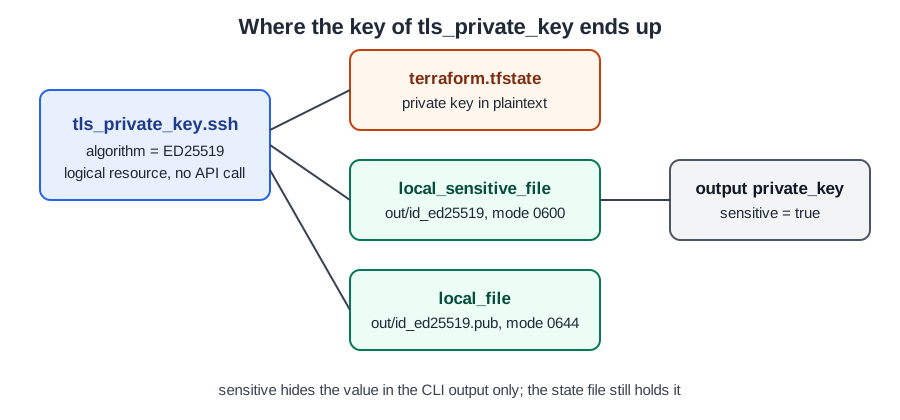
tls_private_keygenerates a key pair in Terraform itself.algorithmacceptsRSA,ECDSAorED25519;rsa_bitsdefaults to 2048 andecdsa_curvedefaults toP224.- The private key is stored unencrypted in the state file. The provider documentation says so in a security notice, and I confirmed it: the marker
BEGIN OPENSSH PRIVATE KEYappeared on 4 lines ofterraform.tfstate.sensitive = trueonly hides the value in CLI output. Without it, a root module output that refers to the key fails withOutput refers to sensitive values.local_filedefaults to file mode0777;local_sensitive_filedefaults to0700. Setfile_permission = "0600"for any private key.- Changing
algorithmreplaces the key and everything that uses it (3 to add, 3 to destroy in my run).- Not generating keys at all? Read how to generate an SSH key in Terraform or the Terraform index.
What this post covers
I wanted one lab that shows the whole story of generating keys and certificates in Terraform, with nothing but two providers and a laptop. No AWS account, no cloud credentials. The two providers are hashicorp/tls and hashicorp/local. The first one generates keys and certificates, the second one writes them to disk. If you want to use the key on an EC2 instance afterwards, the older post on SSH into an AWS EC2 instance with Terraform picks up where this one ends.
The facts in one table
| Item | Value | Source |
|---|---|---|
| Supported algorithms | RSA, ECDSA, ED25519 | tls_private_key docs |
| Default RSA size | 2048 bits | same page |
| Default ECDSA curve | P224 (also P256, P384, P521) | same page |
| Where the private key lives | unencrypted in state | same page, security notice |
| local_file default file_permission | 0777 | local_file docs |
| local_sensitive_file default file_permission | 0700 | local_sensitive_file docs |
| Certificate resource | tls_self_signed_cert | tls_self_signed_cert docs |
The two defaults for rsa_bits and ecdsa_curve matter more than they look. P224 is the default curve, and I would not leave it at that for anything real: pick P256 or better explicitly. For RSA, 2048 bits is the default, and I set 4096 when the key lives for years.
The configuration
This is the full file I ran. It makes an ED25519 SSH key, an ECDSA P256 key for a certificate authority, a self-signed CA certificate valid for 8760 hours (365 days, one year), and writes three files.
 1terraform {
 2  required_providers {
 3    tls   = { source = "hashicorp/tls", version = "~> 4.0" }
 4    local = { source = "hashicorp/local", version = "~> 2.5" }
 5  }
 6}
 7
 8resource "tls_private_key" "ssh" {
 9  algorithm = "ED25519"
10}
11
12resource "tls_private_key" "ca" {
13  algorithm   = "ECDSA"
14  ecdsa_curve = "P256"
15}
16
17resource "tls_self_signed_cert" "ca" {
18  private_key_pem       = tls_private_key.ca.private_key_pem
19  is_ca_certificate     = true
20  validity_period_hours = 8760
21  allowed_uses          = ["cert_signing", "crl_signing"]
22  subject {
23    common_name  = "jhooq-lab-ca"
24    organization = "jhooq"
25  }
26}
27
28resource "local_sensitive_file" "private_key" {
29  content         = tls_private_key.ssh.private_key_openssh
30  filename        = "${path.module}/out/id_ed25519"
31  file_permission = "0600"
32}
33
34resource "local_file" "public_key" {
35  content         = tls_private_key.ssh.public_key_openssh
36  filename        = "${path.module}/out/id_ed25519.pub"
37  file_permission = "0644"
38}
39
40resource "local_file" "ca_cert" {
41  content  = tls_self_signed_cert.ca.cert_pem
42  filename = "${path.module}/out/ca.pem"
43}
44
45output "public_key" {
46  value = tls_private_key.ssh.public_key_openssh
47}
48
49output "private_key" {
50  value     = tls_private_key.ssh.private_key_openssh
51  sensitive = true
52}
Which attribute you feed into which file is the part people get wrong. private_key_openssh is the format ssh -i wants, private_key_pem is the format TLS libraries and tls_self_signed_cert want, and public_key_openssh is what goes into authorized_keys or an EC2 key pair. Everything else is derived from the same key.
Running it
I ran terraform apply -auto-approve with Terraform v1.17.1, tls v4.4.2 and local v2.9.1 on 2026-10-30. The abbreviated output:
 1tls_private_key.ssh: Creation complete after 0s [id=7dc65a1733e4a86831daf66f05a2b957de7b6d99]
 2tls_private_key.ca: Creation complete after 0s [id=43eb41eda2b0510e87db66849637780b507f2a11]
 3local_file.public_key: Creation complete after 0s [id=60f7441dd3147dae52f416edc265683f3a72237c]
 4local_sensitive_file.private_key: Creation complete after 0s [id=606366c3f645ac299794534b34bea7193095c0a1]
 5tls_self_signed_cert.ca: Creation complete after 0s [id=8474774746165457299207386076022424982]
 6local_file.ca_cert: Creation complete after 0s [id=7fab2c3d22883a837e2e354270659265273f27ed]
 7
 8Apply complete! Resources: 6 added, 0 changed, 0 destroyed.
 9
10Outputs:
11
12private_key = <sensitive>
13public_key = <<EOT
14ssh-ed25519 AAAAC3NzaC1lZDI1NTE5AAAAIDU0c+sViHCqmz4Kccn1cymMmTRdfJ1BSxrbXgNcx6F4
15
16EOT
Six resources, zero cloud calls. Both tls_private_key resources are what the docs call logical resources: they only exist in state. A second terraform plan right after reported no differences, so no changes are needed, so the key is stable and is not regenerated on every run. It only changes when its arguments change.
Both certificate dates are 365 days apart, which is 8760 hours. Next I checked the certificate with the OpenSSL I had installed, on the same day:
1$ openssl x509 -in out/ca.pem -noout -subject -dates -ext basicConstraints
2subject=O = jhooq, CN = jhooq-lab-ca
3notBefore=Oct 30 05:07:53 2026 GMT
4notAfter=Oct 30 05:07:53 2027 GMT
5X509v3 Basic Constraints: critical
6    CA:TRUE
validity_period_hours = 8760 is 8760 hours, exactly 365 days, so the dates differ by one year, and is_ca_certificate = true produced CA:TRUE. If you need a server certificate signed by this CA instead, the provider has tls_cert_request and tls_locally_signed_cert; see the tls_cert_request docs.
What broke when I ran this
Four things surprised me, and each one is worth knowing before you copy a snippet from a blog post, including this one.
1. The private key is in the state file
The state show command hides the sensitive attributes:
 1$ terraform state show tls_private_key.ssh
 2resource "tls_private_key" "ssh" {
 3    algorithm                     = "ED25519"
 4    ecdsa_curve                   = "P224"
 5    private_key_openssh           = (sensitive value)
 6    private_key_pem               = (sensitive value)
 7    private_key_pem_pkcs8         = (sensitive value)
 8    public_key_fingerprint_sha256 = "SHA256:AO48TO9ZYdqte2vXCiuJkY94ShGWgqCuMEAEeo9oAgU"
 9    rsa_bits                      = 2048
10}
But the same value is readable in the file and through the CLI. grep -c 'BEGIN OPENSSH PRIVATE KEY' terraform.tfstate printed 4, and terraform output -raw private_key printed the key in the clear. terraform output -json shows "sensitive": true next to the full value. So sensitive is a display flag, not encryption. That means the state backend must be private and encrypted, which is why I never commit state (do not store tfstate in git) and why secure sensitive data in Terraform matters before you use this resource for anything shared. The provider docs say the same thing and recommend generating production keys outside Terraform.
Notice also that ecdsa_curve = "P224" and rsa_bits = 2048 appear in the state of an ED25519 key. They are just defaults and have no effect. In a second test I set rsa_bits = 4096 on an ED25519 key and terraform validate accepted it silently, so the argument is ignored rather than rejected. Do not read a 4096 in your code as proof that the key is 4096 bits.
2. Forgetting sensitive on the output
When I removed sensitive = true from the private_key output, terraform validate still said Success! The configuration is valid., but terraform plan failed:
1Error: Output refers to sensitive values
2
3  on main.tf line 49:
4  49: output "private_key" {
5
6To reduce the risk of accidentally exporting sensitive data that was intended
7to be only internal, Terraform requires that any root module output
8containing sensitive data be explicitly marked as sensitive, to confirm your
9intent.
The fix is the one the error says: add sensitive = true. Note that validate does not catch it, so a CI job that only runs validate will go green and your first plan will fail.
3. The local file resource is created with mode 0777
I did not set file_permission on local_file.ca_cert. The files on disk after apply:
1$ stat -c '%a %n' out/*
2755 out/ca.pem
3600 out/id_ed25519
4644 out/id_ed25519.pub
The documented default is 0777 before the umask; my umask turned it into 755. That is harmless for a certificate, but if you copy the pattern for a private key with local_file, you get a world-readable key. local_sensitive_file defaults to 0700, and I still set 0600 explicitly because SSH refuses private keys with loose permissions. Use local_sensitive_file for every private key, and always set the mode.
4. Algorithm typos fail early, but a change replaces everything
An unsupported algorithm is caught at validate time:
1Error: Invalid Attribute Value Match
2
3  on main.tf line 11, in resource "tls_private_key" "j":
4  11:   algorithm = "DSA"
5Attribute algorithm value must be one of: ["RSA" "ECDSA" "ED25519"], got:
6"DSA"
The opposite danger is a valid change. I switched the SSH key from ED25519 to RSA and ran terraform plan:
1  # local_file.public_key must be replaced
2  # local_sensitive_file.private_key must be replaced
3  # tls_private_key.ssh must be replaced
4      ~ algorithm                     = "ED25519" -> "RSA" # forces replacement
5Plan: 3 to add, 0 to change, 3 to destroy.
A new key is a new identity. If that public key is already registered on a server or in a cloud key pair, the replacement breaks the login path. Treat algorithm, rsa_bits and ecdsa_curve as immutable once the key is deployed, and read the plan before you apply.
One more note from the local_sensitive_file docs: Terraform treats the file as deleted when you apply on a machine where it is missing, so a second engineer or a CI runner will see a diff and re-create it. For generated keys on shared pipelines, that is a strong reason to keep the key in a secret store instead.
Trade-offs: when I would and would not use it
| Situation | My choice | Why |
|---|---|---|
| Throwaway lab, learning, local demo | tls_private_key | zero setup, nothing leaves the machine |
| Shared dev environment | tls_private_key plus encrypted remote state | the state holds the key, so the backend must be locked down |
| Production SSH or TLS keys | generate outside Terraform, pass a reference | the docs advise against production use of this resource |
| Certificate for real traffic | a real CA or ACM | a self-signed CA is trusted by nobody by default |
Each of the 6 resources reported creation after 0s. The cost of the lab itself is zero (0 dollars per month): no cloud resources were created, so there is nothing to bill. The cost of using it carelessly is a private key in a state file that many people can read.
Where to go from here
If your goal is an EC2 key pair, the SSH key post shows the AWS side. There is also a related video on the channel about SSH key management for EC2 with Terraform, though it predates this tls provider walkthrough and is not a recording of it. Keep the Terraform index handy for the rest of the series.
Read More - Terragrunt -
Did this save you a debugging session? Stay in the loop -
- Subscribe on YouTube - every post here has a screen-recorded companion video.
- Code on GitHub - the repositories, Terraform and scripts behind these posts.