Terraform concat strings, multiline strings and every string function - tested in terraform console (v1.16)

TL;DR
- To concatenate strings, use interpolation -
"${var.app}-${var.env}"gave"Payments-API-prod". Useformat()for a fixed pattern or padding, andjoin(",", list)for a list. concat()does not join strings. It merges lists;concat("payments", "-", "prod")fails withall arguments must be lists or tuples; got string.- Multiline strings are heredocs.
<<EOTkeeps every leading space,<<-EOTstrips the common indentation. Strip the trailing newline withchomp()when it matters. - Regex patterns need double backslashes in HCL:
"\\d{12}". A single"\d"fails withInvalid escape sequence. Wrapregex()incan()when "no match" is a normal case, becauseregex()raises an error instead of returning nothing. - For lines built in a loop,
join("\n", [for ...])beats a%{ for }directive - in my run the directive either kept 4 spaces of indentation or added blank lines. - Every result below is real output from
terraform consoleandterraform applyon Terraform v1.16.2, captured on 2026-10-14. No provider or cloud account is needed to try any of it. - Not your exact case? The closest post on this site is Terraform Templates Explained.
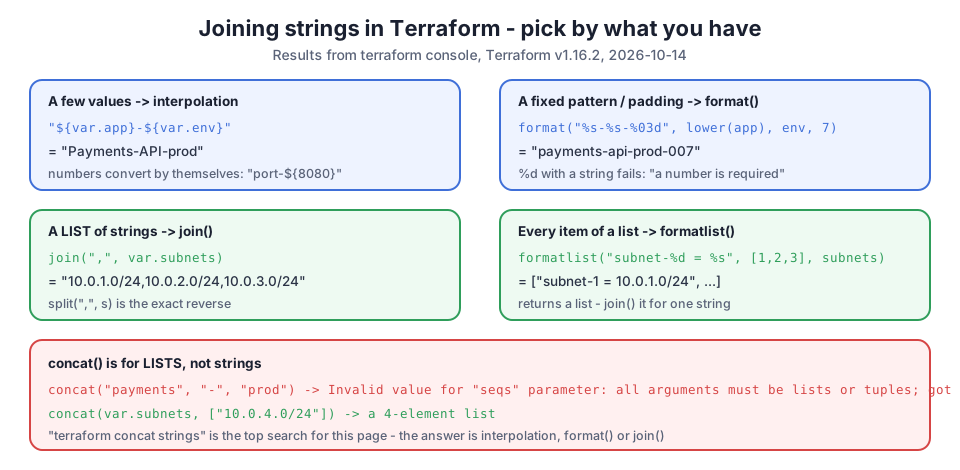
I first wrote this guide in 2023 as a list of 17 functions. When I came back to it, two things bothered me. First, the most searched question that lands here is "terraform concat strings", and the old post used concat() in a way that does not work for strings. Second, none of the examples showed real output. So I opened terraform console on Terraform v1.16.2 and ran every example in this post. Each call took between 246 ms and 317 ms, so trying a function there is faster than any plan.
Table of Content
- Every string function in one table
- Concatenate strings - interpolation, format and join
- Why concat does not work for strings
- Numbers inside strings
- Multiline strings - heredoc
- Template directives - if and for inside a string
- Split a string and turn a list into a string
- Substring - substr
- Does a string contain, start with or end with
- Replace and regex
- Upper, lower and title case
- Trim, trimprefix, trimsuffix, trimspace and chomp
- indent, strrev, length and escaping
- What broke when I ran this
- Conclusion
1. Every string function in one table
All of these were evaluated in terraform console with var.app = "Payments-API", var.env = "prod" and three subnets.
| Task | Expression | Result |
|---|---|---|
| concatenate | "${var.app}-${var.env}" | "Payments-API-prod" |
| pattern / padding | format("%s-%s-%03d", lower(var.app), var.env, 7) | "payments-api-prod-007" |
| list to string | join(",", var.subnets) | "10.0.1.0/24,10.0.2.0/24,10.0.3.0/24" |
| string to list | split(",", "10.0.1.0/24,10.0.2.0/24") | tolist(["10.0.1.0/24", "10.0.2.0/24"]) |
| each item | formatlist("subnet-%d = %s", [1, 2, 3], var.subnets) | ["subnet-1 = 10.0.1.0/24", ...] |
| substring | substr("payments-api-prod", 0, 8) | "payments" |
| contains | strcontains("Payments-API", "API") | true |
| starts with | startswith("ami-0abc123", "ami-") | true |
| ends with | endswith("logs.example.com", ".example.com") | true |
| replace text | replace("my_bucket_name", "_", "-") | "my-bucket-name" |
| replace by regex | replace("v1.2.3-beta", "/-.*$/", "") | "v1.2.3" |
| capture | regex("^arn:aws:iam::([0-9]{12}):", arn)[0] | "123456789012" |
| all matches | regexall("[0-9]+", "web-01, web-02, web-17") | ["01", "02", "17"] |
| case | upper("eu-west-1") / lower(...) / title(...) | "EU-WEST-1" |
| trim chars | trim("--name--", "-") | "name" |
| trim prefix | trimprefix("arn:aws:s3:::my-bucket", "arn:aws:s3:::") | "my-bucket" |
| trim suffix | trimsuffix("app.terraform.tfvars", ".tfvars") | "app.terraform" |
| whitespace | trimspace(" 10.0.0.0/16 \n") | "10.0.0.0/16" |
| trailing newline | chomp("token-from-file\n") | "token-from-file" |
| reverse | strrev("terraform") | "mrofarret" |
| length | length("Zürich") | 6 |
| to string | tostring(42) | "42" |
The official list lives in the Terraform functions reference - the left menu groups the string functions together.
2. Concatenate strings - interpolation, format and join
Interpolation is the answer most of the time. Anything inside ${ } is evaluated and placed into the string:
1variable "env" { default = "prod" }
2variable "app" { default = "Payments-API" }
3
4locals {
5  name_interp = "${var.app}-${var.env}"
6  name_format = format("%s-%s-%03d", lower(var.app), var.env, 7)
7  name_join   = join("-", [var.app, var.env, "eu-west-1"])
8}
1$ terraform apply -auto-approve
2...
3Outputs:
4
5format = "payments-api-prod-007"
6interpolation = "Payments-API-prod"
7join = "Payments-API-prod-eu-west-1"
format() earns its place when you need a fixed pattern: %03d padded the number 7 to 007, which is handy for names like web-001. join() is the right tool when the parts are already a list. All three are plain string operations; the string expressions documentation describes interpolation and the heredoc syntax used below.
3. Why concat does not work for strings
concat() is a list function. With strings it fails:
1> concat("payments", "-", "prod")
2
3Error: Invalid function argument
4
5  on <console-input> line 1:
6  (source code not available)
7
8Invalid value for "seqs" parameter: all arguments must be lists or tuples;
9got string.
Give it lists and it merges them:
1concat_lists = [
2  "10.0.1.0/24",
3  "10.0.2.0/24",
4  "10.0.3.0/24",
5  "10.0.4.0/24",
6]
So "add a string to a list" is concat(var.subnets, ["10.0.4.0/24"]) - note the square brackets around the new item. The concat reference only ever mentions lists.
4. Numbers inside strings
Interpolation converts numbers for you, and format() checks the type:
 1> "port-${8080}"
 2"port-8080"
 3
 4> format("%s has %d subnets", var.env, length(var.subnets))
 5"prod has 3 subnets"
 6
 7> format("%d", "seven")
 8
 9Error: Error in function call
10
11Call to function "format" failed: unsupported value for "%d" at 0: a number
12is required.
13
14> tostring(42)
15"42"
%d with a string is an error, not an empty value, which is good: the typo shows up at plan time. The full verb list (%s, %d, %f, %q, %v, widths and padding) is in the format reference.
5. Multiline strings - heredoc
"terraform multiline string" is the second biggest search for this page. Terraform uses heredocs, in two flavours:
 1locals {
 2  # <<EOT keeps every space
 3  user_data_raw = <<EOT
 4    #!/bin/bash
 5    echo "env=${var.env}"
 6EOT
 7
 8  # <<-EOT strips the common leading indentation
 9  user_data = <<-EOT
10    #!/bin/bash
11    echo "env=${var.env}"
12    echo "subnets=${length(var.subnets)}"
13  EOT
14}
 1user_data = <<EOT
 2#!/bin/bash
 3echo "env=prod"
 4echo "subnets=3"
 5
 6EOT
 7user_data_raw = <<EOT
 8    #!/bin/bash
 9    echo "env=prod"
10
11EOT
The raw version kept 4 leading spaces on every line, which breaks a shebang - #! must be the first two bytes of the file. The <<-EOT version is clean. Both values end with a newline (the blank line before the closing EOT in the output); wrap the heredoc in chomp() if the consumer cares. If the multiline text is long, move it to a file and load it with templatefile() - my post on Terraform templates and templatefile covers that, including the 16 KB EC2 user data limit.
6. Template directives - if and for inside a string
%{ } puts logic inside a string:
1locals {
2  greeting = "Deploying to %{ if var.env == "prod" }PRODUCTION%{ else }${var.env}%{ endif }"
3}
1greeting = "Deploying to PRODUCTION"
%{ for } also works, but inside an indented <<-EOT heredoc it surprised me (section 14). For building lines from a list, I now use a for expression and join():
1locals {
2  hosts = join("\n", [for i, cidr in var.subnets : "subnet-${i} ${cidr}"])
3}
1$ terraform output -json hosts_c
2"subnet-0 10.0.1.0/24\nsubnet-1 10.0.2.0/24\nsubnet-2 10.0.3.0/24"
If for expressions are new to you, Terraform for and for_each loops explains them.
7. Split a string and turn a list into a string
split() and join() are exact opposites:
1> split(",", "10.0.1.0/24,10.0.2.0/24")
2tolist([
3  "10.0.1.0/24",
4  "10.0.2.0/24",
5])
6
7> join("", ["a", "b", "c"])
8"abc"
join("", list) with an empty separator is the closest thing to "concatenate every string in a list". To convert a whole structure to one string - for a tag or an SSM parameter - jsonencode() is often better than join():
1> jsonencode({name = "api", port = 8080})
2"{\"name\":\"api\",\"port\":8080}"
8. Substring - substr
substr(string, offset, length) counts characters, not bytes:
1> substr("payments-api-prod", 0, 8)
2"payments"
3
4> substr("payments", -3, -1)
5"nts"
A negative offset counts from the end, and a length of -1 means "to the end of the string". That combination is the easiest way to take the last N characters. The substr reference documents both.
9. Does a string contain, start with or end with
1> strcontains("Payments-API", "API")
2true
3
4> startswith("ami-0abc123", "ami-")
5true
6
7> endswith("logs.example.com", ".example.com")
8true
These are perfect for validation blocks in variables, for example rejecting an AMI ID that does not start with ami-. The checks are case-sensitive; compare lower(x) if you need otherwise. How validation fits into variable files is in my post on variables.tf and terraform.tfvars.
10. Replace and regex
replace() treats the search string as plain text, unless it is wrapped in slashes - then it is a regular expression:
1> replace("my_bucket_name", "_", "-")
2"my-bucket-name"
3
4> replace("v1.2.3-beta", "/-.*$/", "")
5"v1.2.3"
regex() returns the match, or the capture groups, or a map when the groups are named:
 1> regex("^arn:aws:iam::([0-9]{12}):", "arn:aws:iam::123456789012:role/admin")[0]
 2"123456789012"
 3
 4> regex("^(?P<team>[a-z]+)-(?P<env>dev|prod)$", "payments-prod")
 5{
 6  "env" = "prod"
 7  "team" = "payments"
 8}
 9
10> regexall("[0-9]+", "web-01, web-02, web-17")
11tolist([
12  "01",
13  "02",
14  "17",
15])
Named groups are my favourite trick here: one expression splits a naming convention into a map you can use directly. Two gotchas - backslashes and non-matches - are in section 14.
11. Upper, lower and title case
1> lower("Payments-API")
2"payments-api"
3
4> upper("eu-west-1")
5"EU-WEST-1"
6
7> title("hello world from terraform")
8"Hello World From Terraform"
lower() is the one I use most, because S3 bucket names and many other resource names must be lowercase.
12. Trim, trimprefix, trimsuffix, trimspace and chomp
 1> trim("--name--", "-")
 2"name"
 3
 4> trimprefix("arn:aws:s3:::my-bucket", "arn:aws:s3:::")
 5"my-bucket"
 6
 7> trimsuffix("app.terraform.tfvars", ".tfvars")
 8"app.terraform"
 9
10> trimspace("  10.0.0.0/16 \n")
11"10.0.0.0/16"
12
13> chomp("token-from-file\n")
14"token-from-file"
trim() removes any of the given characters from both ends, trimprefix() and trimsuffix() remove one exact string. chomp() is the one to remember with file(): almost every file ends with a newline, and a token or a CIDR with \n at the end produces confusing errors.
13. indent, strrev, length and escaping
 1> indent(2, "line one\nline two\nline three")
 2<<EOT
 3line one
 4  line two
 5  line three
 6EOT
 7
 8> strrev("terraform")
 9"mrofarret"
10
11> length("Zürich")
126
indent() does not indent the first line - it is meant for text you place after an existing indent in YAML. length() counts characters, so ü is one.
To write a literal ${ or %{ in a string, double the first character:
1literal = "cost is ${var.env} and 100%{x}"
That came from "cost is $${var.env} and 100%%{x}". This matters for user data scripts that use shell variables like $${HOME}.
14. What broke when I ran this
I ran everything in this post on Terraform v1.16.2 on Windows on 2026-10-14. A full terraform apply of the example file, with no providers, took between 207 ms and 245 ms. These were the surprises.
1. \d in a regex is an HCL error, not a regex. My first ARN pattern was written the way you would in any other language:
1> regex("^arn:aws:iam::(\d{12}):", "arn:aws:iam::123456789012:role/admin")
2
3Error: Invalid escape sequence
4
5The symbol "d" is not a valid escape sequence selector.
HCL reads the string before the regex engine sees it, and \d is not a valid HCL escape. Write \\d, or avoid the backslash with [0-9]:
1> regex("^arn:aws:iam::(\\d{12}):", "arn:aws:iam::123456789012:role/admin")
2[
3  "123456789012",
4]
2. regex() throws when nothing matches. I expected an empty result:
1> regex("^ami-", "img-123")
2
3Error: Error in function call
4
5Call to function "regex" failed: pattern did not match any part of the given
6string.
7
8> can(regex("^ami-", "img-123"))
9false
Use can(regex(...)) in conditions and validations, or regexall() and check length(...) > 0.
3. A %{ for } loop inside <<-EOT did not come out the way it looked. I wrote three variants of the same loop. With ~ strip markers, every line kept 4 spaces of indentation; without them, the indentation went but a blank line appeared after every entry:
1hosts: "    subnet-0 10.0.1.0/24\n    subnet-1 10.0.2.0/24\n    subnet-2 10.0.3.0/24\n"
2hosts_a: "\nsubnet-0 10.0.1.0/24\n\nsubnet-1 10.0.2.0/24\n\nsubnet-2 10.0.3.0/24\n\n"
3hosts_c: "subnet-0 10.0.1.0/24\nsubnet-1 10.0.2.0/24\nsubnet-2 10.0.3.0/24"
Only the join("\n", [for ...]) version (hosts_c) was exactly what I wanted. For config files where indentation matters (YAML, an nginx config), I now either use that or a templatefile() with the directives at the start of the line.
15. Conclusion
For strings in Terraform, remember five things:
- Concatenate with interpolation,
format()orjoin()-concat()is for lists. - Multiline strings are heredocs;
<<-EOTstrips indentation and every heredoc ends with a newline (chomp()removes it). - Double your backslashes in regex patterns, and wrap
regex()incan()when "no match" is normal. - Build lines from a list with
join("\n", [for ...])rather than a%{ for }directive in an indented heredoc. - Try any expression in
terraform consolefirst - it needs no cloud account and answers in about a quarter of a second.
All my other Terraform posts are grouped in the Terraform index, and if your strings come from variables, Terraform input variables is the next post to read.
Did this save you a debugging session? Stay in the loop -
- Subscribe on YouTube - every post here has a screen-recorded companion video.
- Code on GitHub - the repositories, Terraform and scripts behind these posts.