How Terraform Modules Work: Write a Module, Test It with terraform test, Version It and Rename It with moved Blocks (Terraform 1.17)

TL;DR
TL;DR A Terraform module is any directory of
.tffiles; the directory you runterraform applyin is the root module, and everymoduleblock calls a child module from it.
- A module needs three files to be useful:
main.tf,variables.tfandoutputs.tf, which is the layout the Terraform docs recommend for a minimal module.terraform testneeds Terraform 1.6.0 or later and finds files ending in.tftest.hclor.tftest.json. On 2026-10-30 with Terraform 1.17.1 my test file passed 3 of 3 runs.- Renaming a
moduleblock without amovedblock plans 1 to add and 1 to destroy. With themovedblock the same plan is 0 to add, 0 to change, 0 to destroy.movedneeds Terraform 1.1 or later.- Setting
versionon a module with a local path source fails atterraform init. Only registry modules are versioned.- If your problem is a module output that another module cannot read, go to Terraform: reference a module output instead.
The first version of this post, from 2021, built two modules that installed Apache on EC2 instances. It needed an AWS account and a security group open to the world just to see a module work. I rewrote it so that every command runs on your laptop with no cloud credentials, and added the two things people actually search for after the basics: how to test a module and how to rename one safely. The EC2 version of the idea is in Terraform EC2 instance setup.
What a Terraform module is
A module is a group of resources that you manage together. Terraform treats every directory with .tf files as a module. The directory where you run the CLI is the root module. When the root module contains a module block, Terraform loads the directory named in source as a child module, passes it the arguments you wrote as input variables, and lets you read its outputs as module.<name>.<output>.
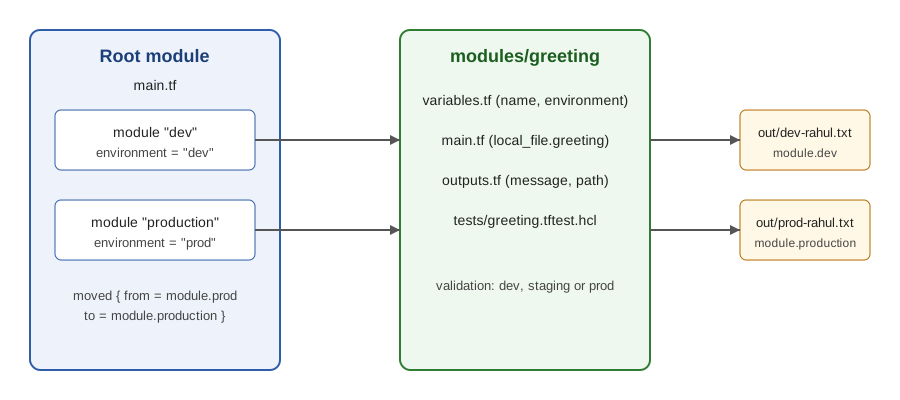
Here is the vocabulary in one table, with the facts I checked against the module development docs and the lab below.
| Term | What it is | Where you see it |
|---|---|---|
| Root module | The directory you run terraform plan in | main.tf in the working directory |
| Child module | A directory loaded by a module block | modules/greeting in this post |
| Input variable | An argument of the module block | name, environment |
| Output value | What the child exposes to the caller | module.dev.message |
| Local path source | ./modules/greeting, no version allowed | source = "./modules/greeting" |
| Registry source | namespace/name/provider, supports version | source = "hashicorp/consul/aws" |
| Test file | *.tftest.hcl or *.tftest.json, Terraform 1.6.0 or later | modules/greeting/tests/ |
moved block | Tells Terraform an address changed, Terraform 1.1 or later | root main.tf |
The lab I ran
Everything below ran with Terraform v1.17.1 (linux_amd64), the hashicorp/local provider 2.5.3 and the hashicorp/null provider 3.2.4, on 2026-10-30. The module writes one text file per call, so the lab is free, takes a second to apply and teaches the same module mechanics as an EC2 module does. The layout:
1.
2├── main.tf                      # root module: two module blocks
3└── modules
4    └── greeting
5        ├── main.tf              # local_file resource
6        ├── outputs.tf           # message and path
7        ├── variables.tf         # name and environment, with validation
8        └── tests
9            └── greeting.tftest.hcl
Step 1: the child module
The input variables go in variables.tf. I added a validation block so a bad value fails at plan time with my own message instead of producing a wrong file:
 1variable "name" {
 2  type        = string
 3  description = "Who the greeting is for"
 4}
 5
 6variable "environment" {
 7  type        = string
 8  description = "dev, staging or prod"
 9  validation {
10    condition     = contains(["dev", "staging", "prod"], var.environment)
11    error_message = "environment must be dev, staging or prod."
12  }
13}
The resource lives in main.tf. The required_providers block belongs in the module too, because a module that needs the local provider should say so itself:
 1terraform {
 2  required_version = ">= 1.6"
 3  required_providers {
 4    local = {
 5      source  = "hashicorp/local"
 6      version = "~> 2.5"
 7    }
 8  }
 9}
10
11locals {
12  message = "Hello ${var.name}, this is ${var.environment}"
13}
14
15resource "local_file" "greeting" {
16  filename = "${path.root}/out/${var.environment}-${var.name}.txt"
17  content  = local.message
18}
And outputs.tf is the module's public interface:
1output "message" {
2  value = local.message
3}
4
5output "path" {
6  value = local_file.greeting.filename
7}
Step 2: call the module twice from the root
The point of a module is reuse, so the root calls the same directory twice with different inputs:
 1module "dev" {
 2  source      = "./modules/greeting"
 3  name        = "rahul"
 4  environment = "dev"
 5}
 6
 7module "prod" {
 8  source      = "./modules/greeting"
 9  name        = "rahul"
10  environment = "prod"
11}
12
13output "dev_message" {
14  value = module.dev.message
15}
16
17output "prod_path" {
18  value = module.prod.path
19}
terraform init installs the modules (for local paths it just records them), terraform validate checks the whole tree, and terraform fmt -check -recursive confirmed my formatting. Then the apply, with Terraform 1.17.1 on 2026-10-30:
 1$ terraform apply -auto-approve
 2module.dev.local_file.greeting: Creating...
 3module.prod.local_file.greeting: Creating...
 4module.dev.local_file.greeting: Creation complete after 0s [id=2e779d3124ab1a26e7258b5f6b267bb90f702549]
 5module.prod.local_file.greeting: Creation complete after 0s [id=f9557394dcb8e3064776f7b0c133535d5b19dc15]
 6
 7Apply complete! Resources: 2 added, 0 changed, 0 destroyed.
 8
 9Outputs:
10
11dev_message = "Hello rahul, this is dev"
12prod_path = "./out/prod-rahul.txt"
Two things to notice. Each resource address is prefixed with the module call name (module.dev.local_file.greeting), which is why the same resource name can exist twice. And terraform graph for this root printed 14 lines, which is the dependency graph with both module calls and their outputs in it. If you want to feed one module's output into another module, that is the pattern in Terraform: output of one module as input of another.
Reading outputs afterwards is terraform output for humans and terraform output -json for scripts. With -json every output comes back as an object with sensitive, type and value keys, for example "type": "string" for both of mine. The outputs lab goes deeper.
How long each command took
Wall-clock times on my 4-core x86_64 Linux machine, after terraform init, measured with Terraform 1.17.1 on 2026-10-30:
| Command | Time |
|---|---|
terraform validate in the module | 0.09 s |
terraform plan in the root (2 module calls, no changes) | 0.14 s |
terraform test (3 runs, one real apply) | 0.28 s |
The whole validate, plan and test loop finished in about 0.5 s, and the apply that created both files reported "Creation complete after 0s" for each. A module test with the local provider is fast enough to run on every commit. Tests against real cloud resources are not, which is where the plan command and mocks earn their place.
Testing a module with terraform test
Terraform 1.6.0 added a built-in test framework. The testing docs state that it is available in Terraform v1.6.0 and later, that test files are discovered by the extension .tftest.hcl or .tftest.json, and that each run block can use command = plan or command = apply. Version 1.7.0 added provider mocking, which I did not need here because the local provider needs no credentials.
My test file sits in the module's own tests directory:
 1run "message_contains_environment" {
 2  command = plan
 3
 4  variables {
 5    name        = "rahul"
 6    environment = "staging"
 7  }
 8
 9  assert {
10    condition     = output.message == "Hello rahul, this is staging"
11    error_message = "unexpected message: ${output.message}"
12  }
13}
14
15run "rejects_unknown_environment" {
16  command = plan
17
18  variables {
19    name        = "rahul"
20    environment = "qa"
21  }
22
23  expect_failures = [var.environment]
24}
25
26run "writes_file" {
27  command = apply
28
29  variables {
30    name        = "rahul"
31    environment = "dev"
32  }
33
34  assert {
35    condition     = local_file.greeting.content == "Hello rahul, this is dev"
36    error_message = "file content wrong"
37  }
38}
Three different things are tested: a plan-only assertion on an output, a negative test that passes only if the validation block rejects qa (that is what expect_failures means), and a real apply whose resources Terraform destroys at the end. I ran it from the module directory after terraform init:
1$ cd modules/greeting && terraform test
2tests/greeting.tftest.hcl... in progress
3  run "message_contains_environment"... pass
4  run "rejects_unknown_environment"... pass
5  run "writes_file"... pass
6tests/greeting.tftest.hcl... tearing down
7tests/greeting.tftest.hcl... pass
8
9Success! 3 passed, 0 failed.
Adding -verbose prints the full plan for each run. For the first run it showed + filename = "./out/staging-rahul.txt" and Plan: 1 to add, 0 to change, 0 to destroy., which is a quick way to see exactly what your assertion is looking at.
What I would test in a real module
| Test | command | Why |
|---|---|---|
| Defaults and outputs have the shape callers expect | plan | Cheap, no resources are created |
Every validation block rejects what it should | plan with expect_failures | Validation messages are part of your interface |
| The resources really create and destroy cleanly | apply | Catches provider errors that plan cannot |
| Mocked cloud resources (Terraform 1.7.0 or later) | plan or apply with a mock provider | Test an AWS module without an AWS account |
Versioning modules
The version argument only exists for registry modules. I wanted to know what Terraform does if you set it on a local path anyway, so I tried it with Terraform 1.17.1 on 2026-10-30:
 1$ cat main.tf
 2module "x" {
 3  source  = "./m"
 4  version = "1.0.0"
 5}
 6$ terraform init
 7Initializing the backend...
 8
 9Initializing modules...
10
11Error: Invalid registry module source address
12
13  on main.tf line 2, in module "x":
14   2:   source  = "./m"
15
16Failed to parse module registry address: can't use local directory "./m" as a
17module registry address.
18
19Terraform assumed that you intended a module registry source address because
20you also set the argument "version", which applies only to registry modules.
So the practical rules are:
| Source type | Example | Can set version? | How you pin |
|---|---|---|---|
| Local path | ./modules/greeting | No, this error | The module changes with your commit |
| Registry | hashicorp/consul/aws | Yes | version = "~> 0.11" |
| Git | git:: URL ending in ?ref=v1.2.0 | No | ?ref= with a tag or commit |
I keep modules that are used by a single repository as local paths and modules shared between repositories in git with a tag in ref. A tag is easy to review in a pull request, a branch name is not.
Renaming a module call with a moved block
This is the one that costs people real infrastructure. Terraform identifies a resource by its address in state, and the module call name is part of that address. I renamed module "prod" to module "production" (and updated the output to module.production.path) and ran terraform plan on Terraform 1.17.1, 2026-10-30:
1$ terraform plan
2  # module.prod.local_file.greeting will be destroyed
3  # module.production.local_file.greeting will be created
4Plan: 1 to add, 0 to change, 1 to destroy.
For a file that is harmless. For a database or a VPC it is an outage. The refactoring docs say the same: by default Terraform interprets a change as an instruction to destroy the existing resource and create a new one, and a moved block updates the address without destroying it. I added the block next to the module call:
1moved {
2  from = module.prod
3  to   = module.production
4}
Same plan, same day, same version:
1$ terraform plan
2  # module.prod.local_file.greeting has moved to module.production.local_file.greeting
3Plan: 0 to add, 0 to change, 0 to destroy.
After terraform apply the state had the new address and the output was still prod_path = "./out/prod-rahul.txt". The docs note that moved needs Terraform 1.1 or later, and that removing a moved block later is a breaking change for anyone who has not applied yet, so I keep them in the code until every environment has applied them. On older Terraform the equivalent is terraform state mv, which changes state immediately and cannot be reviewed in a pull request.
What broke when I ran this
Four things went wrong or surprised me while I built the lab above, on Terraform 1.17.1 on 2026-10-30.
1. I edited main.tf and ran plan without init. After adding the module "production" block, the plan failed:
1Error: Module not installed
2
3  on main.tf line 7:
4   7: module "production" {
5
6This module is not yet installed. Run "terraform init" to install all modules
7required by this configuration.
Every new or renamed module block needs terraform init (or terraform get) even when the source is a local path, because .terraform/modules/modules.json lists every call. Afterwards that file contained entries for dev, prod and production, all pointing at modules/greeting.
2. The validation message shows up at the call site. When I changed environment to qa in the root, validate passed (the value is known only at plan time) and the plan failed with:
 1Error: Invalid value for variable
 2
 3  on main.tf line 4, in module "dev":
 4   4:   environment = "qa"
 5    ├────────────────
 6    │ var.environment is "qa"
 7
 8environment must be dev, staging or prod.
 9
10This was checked by the validation rule at
11modules/greeting/variables.tf:9,3-13.
That is the message I wrote, with the line of the caller and the line of the rule. This is exactly why I test validation blocks with expect_failures.
3. The version argument on a local source. Shown above. The error talks about a registry address, which is confusing the first time because you never wrote one.
4. terraform test wrote into the module directory. The apply run created modules/greeting/out/ because path.root resolves to the directory the test runs in. The file was destroyed at the end of the run but the empty out directory stayed behind, so add out/ to .gitignore if you copy this lab. If your module writes files, build the path from an input variable instead of path.root.
Module best practices I follow
- Keep
main.tf,variables.tfandoutputs.tfas the docs recommend, and add a README to the root module and each nested module. - Declare
required_providersandrequired_versioninside the module, not only in the root. - Give every variable a
typeand adescription, and addvalidationfor anything with a closed set of values. - Do not read from
path.rootinside a module. Take paths as inputs, or usepath.modulefor files that ship with the module. - Output only what callers need. Every output is a promise you must keep when you refactor.
- Write a test file the first time someone asks "what does this module do". If a test is hard to write, the interface is probably too big.
- For a variable that fails with "Value for undeclared variable" when you pass it to a module, read Value for undeclared variable.
- Generating SSH keys inside a module is possible, but the private key lands in state: see Terraform tls_private_key.
The lab's cost is 0 dollars and it needs no network after init, which is the main reason I prefer this style of example over an EC2 one: a mistake costs 1 s of waiting, not a cleanup of cloud resources.
Frequently asked questions
Can a module call another module? Yes. A child module can contain its own module blocks, and addresses nest, for example module.network.module.subnets.aws_subnet.this[0]. I keep nesting shallow, because every extra level makes moved blocks harder to write.
Where do I put provider blocks? I configure providers (regions, credentials) in the root module and let child modules declare only required_providers, so the caller decides how a provider is set up.
What is the difference between a module and a workspace? A module is reusable code. A workspace is a separate state for the same code. The lab here uses two module calls in one state, not two workspaces.
Does terraform test replace terraform validate? No. Validate checks syntax and internal consistency without touching providers. Tests run plans or applies against your module. I run terraform fmt -check, terraform validate and terraform test, in that order, in CI.
Official documentation
- Module development: overview
- Standard module structure
- Tests (terraform test)
- Refactoring with moved blocks
Read More - Terragrunt -
Did this save you a debugging session? Stay in the loop -
- Subscribe on YouTube - every post here has a screen-recorded companion video.
- Code on GitHub - the repositories, Terraform and scripts behind these posts.