terraform console: Evaluate Expressions, Functions and cidrsubnet Without Applying Anything (Terraform 1.17)

TL;DR
TL;DR
terraform consoleevaluates one Terraform expression at a time against your configuration and state, and never modifies state. It needs no cloud credentials for pure functions such ascidrsubnet,formatorlookup.- Non-interactive use:
echo 'cidrsubnet("10.0.0.0/16", 8, 3)' | terraform consoleprints"10.0.3.0/24". When you pipe several lines, only the output of the final line is printed unless an earlier line errors.- Flags worth knowing:
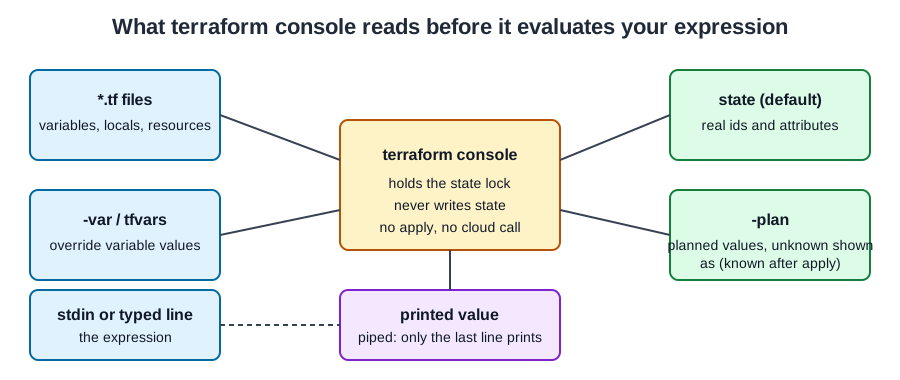
-var 'name=value'overrides a variable,-planevaluates against a fresh plan instead of the saved state,-scope=module.childevaluates inside a child module. The console also holds the state lock while it is open.- Limits you will hit:
cidrsubnetwithnewbits8 accepts anetnumfrom 0 to 255 only; 256 fails with "prefix extension of 8 does not accommodate a subnet numbered 256". Resource attributes that do not exist yet print(known after apply).- Not your exact case? If you are looping over subnets in a real configuration, read Terraform for and for_each loops; if you only need the subnet maths without writing HCL, use the VPC Subnet Planner.
Table of Content
- What terraform console is
- Quick reference
- Lab setup
- Functions: cidrsubnet, cidrhost, format and friends
- For expressions, lookup and try
- Variables, locals and -var
- templatefile
- State, -plan and unknown values
- What broke when I ran this
- Trade-offs
What terraform console is
terraform console is the REPL of Terraform. You give it an expression, it evaluates the expression in the scope of your root module and prints the value. The official command reference describes it as a place to test interpolations before using them in configurations and to inspect values saved in state. It closes with exit, Control-C or Control-D.
I use it before I commit any expression that does arithmetic on CIDR blocks, builds a map in a for expression, or renders a template. A wrong cidrsubnet in a plan means a wrong subnet in a VPC, and fixing that later costs a destroy and recreate. A wrong cidrsubnet in the console costs one second.
Quick reference
| Task | Command | Result |
|---|---|---|
| One-shot evaluation | echo 'upper("a")' | terraform console | "A" |
| Override a variable | terraform console -var 'env=prod' | expression sees var.env as prod |
| Evaluate against a plan | terraform console -plan | planned values, unknowns as (known after apply) |
| Evaluate inside a child module | terraform console -scope='module.child' | child variables, locals and resources |
| Plain output for logs | terraform console -no-color | no ANSI escape codes |
| Exit | exit, Control-C or Control-D |
Each flag is listed in terraform console -help for Terraform 1.17.1, and the scope flag and the scripting rule are documented in the console command reference.
Lab setup
Everything below ran with Terraform v1.17.1 on linux_amd64 on 2026-10-31. The lab is one file with two variables, a locals block and a terraform_data resource, so no provider needs downloading and no cloud account is involved.
 1variable "env" {
 2  type    = string
 3  default = "dev"
 4}
 5variable "vpc_cidr" {
 6  type    = string
 7  default = "10.20.0.0/16"
 8}
 9variable "ports" {
10  type    = list(number)
11  default = [80, 443, 8080]
12}
13locals {
14  subnets = { for i, az in ["a", "b", "c"] : "${var.env}-${az}" => cidrsubnet(var.vpc_cidr, 8, i) }
15  tags    = { Env = var.env, Owner = "platform" }
16}
17resource "terraform_data" "demo" {
18  input = local.tags
19}
I ran terraform init and terraform apply -auto-approve, which ended with Apply complete! Resources: 1 added, 0 changed, 0 destroyed. The apply is only there so the console has a real resource in state to read.
Functions: cidrsubnet, cidrhost, format and friends
Functions need no configuration at all, so you can run them in any empty directory. The cidrsubnet reference defines cidrsubnet(prefix, newbits, netnum): newbits extends the prefix length, and netnum must fit in newbits binary digits. A /16 with newbits 8 becomes /24 networks, numbered 0 to 255.
The following output is from Terraform 1.17.1 on 2026-10-31, each line piped into terraform console -no-color:
 1$ echo 'cidrsubnet("10.0.0.0/16", 8, 3)' | terraform console
 2"10.0.3.0/24"
 3$ echo '[for i in range(4) : cidrsubnet("10.0.0.0/16", 8, i)]' | terraform console
 4[
 5  "10.0.0.0/24",
 6  "10.0.1.0/24",
 7  "10.0.2.0/24",
 8  "10.0.3.0/24",
 9]
10$ echo 'cidrhost("10.0.3.0/24", 5)' | terraform console
11"10.0.3.5"
12$ echo 'cidrnetmask("10.0.0.0/20")' | terraform console
13"255.255.240.0"
14$ echo 'cidrsubnet("10.0.0.0/16", 4, 15)' | terraform console
15"10.0.240.0/20"
16$ echo 'pow(2, 32 - 24) - 5' | terraform console
17251
The last line is a habit of mine: a /24 has 2^8 = 256 addresses, and AWS reserves 5 of them in every subnet, which leaves 251. The same arithmetic with the three cloud providers side by side is in the usable IP addresses per subnet post. format and jsonencode are just as quick:
1$ echo 'format("%05.1f-%s", 3.14159, "z")' | terraform console
2"003.1-z"
3$ echo 'jsonencode({a=[1,2],b="x"})' | terraform console
4"{\"a\":[1,2],\"b\":\"x\"}"
For the rest of the string functions, see Terraform string handling.
For expressions, lookup and try
A for expression turns a list into a map. The for expression documentation covers the syntax; the console shows you the shape of the result, which is the part people get wrong.
 1$ echo '{for k,v in {web=80,db=5432} : upper(k) => v+1}' | terraform console
 2{
 3  "DB" = 5433
 4  "WEB" = 81
 5}
 6$ echo '[for p in var.ports : p if p > 100]' | terraform console
 7[
 8  443,
 9  8080,
10]
The second command ran inside the lab directory, so var.ports resolved to the default. lookup(map, key, default) is the safe way to read a key that may be missing; the lookup reference notes that the default argument is optional for historical reasons, and the difference is easy to see:
 1$ echo 'lookup({a=1,b=2}, "c", 99)' | terraform console
 299
 3$ echo 'lookup({a=1,b=2}, "c")' | terraform console
 4Error: Invalid function argument
 5
 6  on <console-input> line 1:
 7  (source code not available)
 8
 9Invalid value for "inputMap" parameter: the given object has no attribute
10"c".
try is the other option, and it works on attribute access, where lookup does not:
1$ echo 'try(local.tags.Missing, "fallback")' | terraform console
2"fallback"
The longer treatment of this function is in Terraform lookup function.
Variables, locals and -var
Inside a configuration directory the console loads variables with their defaults, terraform.tfvars and *.auto.tfvars. Variables and tfvars files explains the precedence; the console follows the same rules, and -var is the quickest way to try another environment:
 1$ echo 'local.subnets' | terraform console -no-color
 2{
 3  "dev-a" = "10.20.0.0/24"
 4  "dev-b" = "10.20.1.0/24"
 5  "dev-c" = "10.20.2.0/24"
 6}
 7$ echo 'local.subnets' | terraform console -no-color -var env=prod -var vpc_cidr=172.16.0.0/16
 8{
 9  "prod-a" = "172.16.0.0/24"
10  "prod-b" = "172.16.1.0/24"
11  "prod-c" = "172.16.2.0/24"
12}
That is the check I want before a plan: change one input, see the whole map. Locals work the same way; see Terraform locals for when to use them.
templatefile
Rendering a template in the console shows you the exact whitespace, which is usually the bug. I used this template file, nginx.tftpl:
1server {
2  listen ${port};
3%{ for h in hosts ~}
4  server_name ${h};
5%{ endfor ~}
6}
1$ echo 'templatefile("nginx.tftpl", {port=8080, hosts=["a.example.com","b.example.com"]})' | terraform console -no-color
2<<EOT
3server {
4  listen 8080;
5  server_name a.example.com;
6  server_name b.example.com;
7}
8
9EOT
Two things to notice. The ~ markers strip the newline after each directive, so there is no blank line between the two server_name lines. And the output ends with an empty line because the template file ends with a newline. The templatefile reference also states that recursive templatefile calls are not permitted and that the function cannot read files generated during the same run.
State, -plan and unknown values
By default the console reads the saved state, so a resource that has been applied returns its real attributes:
1$ echo 'terraform_data.demo.output' | terraform console -no-color
2{
3  "Env" = "dev"
4  "Owner" = "platform"
5}
If the state is empty, the same reference does not fail. I deleted the local state file in the lab and asked for the id again, once without flags and once with -plan. Both printed (known after apply):
1$ echo 'terraform_data.demo.id' | terraform console -no-color
2(known after apply)
3$ echo 'terraform_data.demo.id' | terraform console -no-color -plan
4(known after apply)
The -plan flag matters when you changed the configuration and want to see the effect without applying: it creates a plan as if you ran terraform plan and evaluates against the planned state, as terraform console -help describes it. The console holds a lock on the state while it runs, so a long-lived console session can block a teammate's apply on a remote backend, as the command reference warns. Close it when you are done.
Sensitive values stay masked:
1$ echo 'sensitive("hunter2")' | terraform console -no-color
2(sensitive value)
What broke when I ran this
1. Piped multi-line input printed only one answer. I piped two expressions into the console, expecting two answers:
1$ printf 'cidrsubnet("10.0.0.0/16", 8, 3)\nupper("a")\n' | terraform console -no-color
2"A"
Only "A" came back, from Terraform 1.17.1 on 2026-10-31. The scripting section says it directly: only the output of the final command is printed unless an error occurs earlier. My fix is one process per expression, in a shell loop, when I want several answers.
2. A wrong netnum is an error, not a wrap-around. cidrsubnet("10.0.0.0/16", 8, 256) fails with Call to function "cidrsubnet" failed: prefix extension of 8 does not accommodate a subnet numbered 256. The related surprise: cidrsubnet("10.0.0.0/16", 16, 1) is valid and returns "10.0.0.1/32", a single-address network, so a typo in newbits can give you a legal but useless answer.
3. Type errors name the operand. upper("x") + 1 fails with Invalid operand and Unsuitable value for left operand: a number is required., and an unknown function prints There is no function named "nonsense". Both are readable, which is the whole point of testing here.
4. Undeclared variable. var.nope fails with Reference to undeclared input variable and tells you to add a variable "nope" {} block. The console does not invent variables.
5. Colour codes in logs. Without -no-color, redirected output contained ANSI escape sequences such as [31m. Add -no-color whenever you capture output into a file or a CI log.
Trade-offs
The console is free and instant, but it is not a test. It does not remember anything between runs, so I treat it as a scratchpad and move the expression into a .tftest.hcl check when it matters; testing infrastructure as code shows that step. It reads the same state as plan, so on a remote backend it needs the same credentials and takes the same lock. For pure functions and literals none of that applies, and the cost is zero dollars a month.
Speed is not a cost either. With Terraform 1.17.1 on 2026-10-31 a one-shot cidrsubnet took 0.055 s, 0.056 s and 0.057 s over three runs, and local.subnets inside the lab directory took 0.050 s, so wrapping it in a shell loop of 100 expressions costs about 5 s. The monthly bill for all of this is $0 per month, because nothing is created in a cloud account, and a /24 holds 256 addresses of which AWS keeps 5 back.
My routine: write the expression, run it in the console with two different -var sets, paste the result into the review, then add it to the configuration.
Official documentation
- terraform console command
- cidrsubnet function
- cidrhost function
- templatefile function
- for expressions
- lookup function
- try function
Read More - Terragrunt -
Did this save you a debugging session? Stay in the loop -
- Subscribe on YouTube - every post here has a screen-recorded companion video.
- Code on GitHub - the repositories, Terraform and scripts behind these posts.