Stop Using .env Files for Secrets: Encrypt Them with sops and age Instead (Real Output, gitleaks Included)

TL;DR
- A committed
.envfile never goes away. Aftergit rmthe password is still readable withgit show <commit>:.envandgit log -p. The only real fix is to rotate the secret. - gitleaks finds it in milliseconds. In my run it scanned 105 bytes in 24 ms and reported 2 leaks (a Stripe-style key and a generic password); it exits with code 1, so a CI job or pre-commit hook can block the commit.
- sops plus age lets you commit secrets safely. The values become
ENC[AES256_GCM,...], the key names stay readable, and the diff of a changed password touches only that line plus the MAC and timestamp lines. - Decrypt at deploy time, not on disk.
sops exec-env prod.enc.env 'your-command'puts the values into the environment of one process and writes no plaintext file. - Not your case? If your secrets live in Kubernetes, read Kubernetes Secrets first; if they live in Terraform state, read why the tfstate file should not be stored in git.
Table of Content
- Why a .env file in git is a leak
- Install the tools
- Reproduce the leak and catch it with gitleaks
- Encrypt the file with sops and age
- Decrypt at deploy time
- What broke when I ran this
- Comparison of the options
- My recommendation
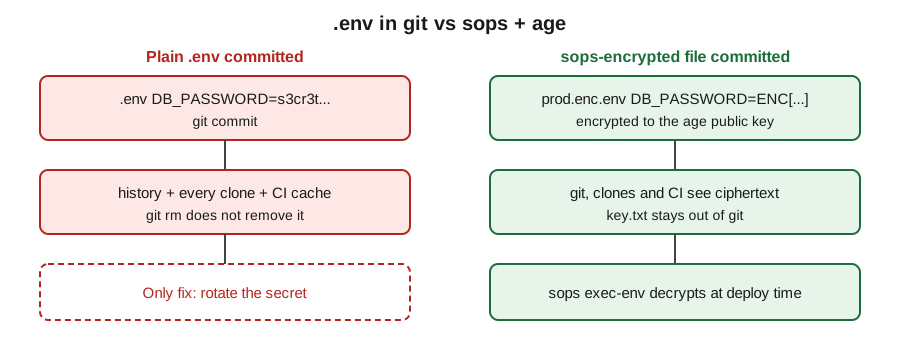
Why a .env file in git is a leak
A .env file is convenient: one KEY=value per line, every language can read it, and Docker Compose loads it with env_file. The trouble starts when the file reaches git. Git stores every version of every file, so the secret lives in the history, in every clone, and in every CI cache that fetched the repository. Deleting the file in a later commit hides it from the working tree only.
Environment variables are the usual way to hand config to a process, which is why .env files are so common, but reading config at runtime is a different thing from committing the values. If you only need local defaults, add .env to .gitignore and commit a .env.example with fake values. If the secret has to travel with the repository (deploy config, a small team, GitOps), encrypt it.
Install the tools
I used these versions on 2026-10-29. All three are single binaries.
1$ sops --version
2sops 3.9.4
3$ age --version
4v1.2.1
5$ gitleaks version
6version is set by build process
The gitleaks binary I used is the v8.24.2 tag, and it prints the placeholder above because it was built without the release flags. Every command below ran in a fresh empty repository, and the whole lab took under 5 minutes.
Reproduce the leak and catch it with gitleaks
I created a throw-away repository and committed a .env with three lines, including a fake key in the Stripe format. Then I did what most people do after noticing: removed the file and committed again.
 1$ git log -p --stat
 2commit 3690d28b460fc5f70484ae4a8055054c1b5f1cab
 3    add env
 4 .env | 3 +++
 5+DB_HOST=db.internal
 6+DB_PASSWORD=s3cr3t-Passw0rd-42
 7+STRIPE_API_KEY=sk_live_51HxYzAbCdEfGhIjKlMnOpQrStUvWx
 8
 9$ git rm --cached .env && git commit -m "remove .env"
10$ git log --oneline
118b40320 remove .env
123690d28 add env
13$ git show 3690d28:.env | head -2
14DB_HOST=db.internal
15DB_PASSWORD=s3cr3t-Passw0rd-42
The "remove" commit is there, and so is the password. Now the scan. With --redact -v, gitleaks prints each finding without showing the secret (gitleaks 8.24.2, 2026-10-29):
 1Finding:     STRIPE_API_KEY=REDACTED
 2RuleID:      stripe-access-token
 3Entropy:     5.037401
 4File:        .env
 5Line:        3
 6Commit:      3690d28b460fc5f70484ae4a8055054c1b5f1cab
 7
 8Finding:     DB_PASSWORD=REDACTED
 9RuleID:      generic-api-key
10Entropy:     3.572431
11File:        .env
12Line:        2
13
14INF 1 commits scanned.
15INF scanned ~105 bytes (105 bytes) in 24ms
16WRN leaks found: 2
The exit code was 1. The gitleaks README documents exit code 1 for "leaks or error encountered", and it describes the gitleaks git command and the pre-commit setup. I wired it as a local hook (gitleaks git --pre-commit --staged --redact), tried to commit a file with a fake token, and the commit was refused with exit code 1.
Encrypt the file with sops and age
age is a small file-encryption tool; per its README, age-keygen -o key.txt writes the secret key and prints the public key, and age-keygen -y key.txt recovers the public key from the file. sops encrypts the values of a structured file to one or more age public keys, as the sops README lists age among its supported key types.
1$ age-keygen -o key.txt
2Public key: age1tezl3zxuk3duwm4cswsc0ql8jw4xawwl5cytxk3xfdpjxlcw4pksaw2tsr
3$ chmod 600 key.txt
Never commit key.txt. I put .env and key.txt in .gitignore. Then I told sops which key to use in .sops.yaml, so nobody has to remember the flags:
1creation_rules:
2  - path_regex: \.enc\.env$
3    age: age1tezl3zxuk3duwm4cswsc0ql8jw4xawwl5cytxk3xfdpjxlcw4pksaw2tsr
I encrypted the three lines and saved the result as prod.enc.env (the encrypted file is 1357 bytes for a 105 byte input, and I show the first 90 characters of each line; sops 3.9.4, 2026-10-29):
 1$ sops encrypt --filename-override prod.enc.env plain.env > prod.enc.env
 2$ cut -c1-90 prod.enc.env
 3DB_HOST=ENC[AES256_GCM,data:DC8TKMHwkrKHEoQ=,iv:loJqCiM0YdKroT/X/eJTufkAuO5+dHrp/ZWYGhU6Ul
 4DB_PASSWORD=ENC[AES256_GCM,data:cgmymiyNTnywqT2iQfDRwMEb,iv:xgAKl/hpgFF0yig1XwNSN8Cx6d3HJD
 5STRIPE_API_KEY=ENC[AES256_GCM,data:SGguih+8FMivdyju/eABK4l7Q3U4+kDpBeyoZ6UyMsCs/zHj1hY=,iv
 6sops_age__list_0__map_enc=-----BEGIN AGE ENCRYPTED FILE-----\nYWdlLWVuY3J5cHRpb24ub3JnL3Yx
 7sops_age__list_0__map_recipient=age1tezl3zxuk3duwm4cswsc0ql8jw4xawwl5cytxk3xfdpjxlcw4pksaw
 8sops_lastmodified=2026-10-29T14:23:44Z
 9sops_mac=ENC[AES256_GCM,data:1O7yfmWJlVrdE/ZU1YMmgvBEIjodsjcc9lC/QT567Yz7RZlKsMQsmjIiuGb58
10sops_version=3.9.4
Two things to notice. The key names (DB_PASSWORD) stay in plaintext, so a reviewer can still see what changed; do not put anything sensitive into a key name. And the file carries a MAC, so edits outside sops are detected. After committing it, gitleaks scanned the 4 commits after the leak (8b40320..HEAD, about 2.9 KB) and printed no leaks found after 27 ms. The full history still reports 2 leaks, because the first commit is still there.
Decrypt at deploy time
The decrypted password is 18 characters long in my test, and exec-env passes it to the child process without writing a file. sops finds the private key through the SOPS_AGE_KEY_FILE environment variable; without it, it looks for ~/.config/sops/age/keys.txt, which is exactly the path the error message showed me below.
1$ export SOPS_AGE_KEY_FILE=key.txt
2$ sops exec-env prod.enc.env 'echo "db=$DB_HOST pw_len=${#DB_PASSWORD}"'
3db=db.internal pw_len=18
4$ EDITOR="sed -i s/db.internal/db.prod.internal/" sops edit prod.enc.env
5$ sops decrypt prod.enc.env | head -1
6DB_HOST=db.prod.internal
exec-env runs the command with the decrypted values in its environment and leaves no plaintext file in the directory (I listed the directory right afterwards: only .gitignore, .sops.yaml, key.txt and prod.enc.env). In a pipeline, store the age private key as a CI secret, write it to a temporary path, and point SOPS_AGE_KEY_FILE at it for the deploy step only.
What broke when I ran this
Four things went wrong, in the order I hit them:
1. exec-env tried to parse my file as JSON. I had named the file .env.enc. sops picks the format from the file extension, and .enc is unknown, so it fell back to JSON:
1Error unmarshalling input json: invalid character 'D' looking for beginning of value
sops exec-env has no --input-type flag (it printed flag provided but not defined: -input-type), so the fix is the file name: prod.enc.env ends in .env, which sops reads as dotenv. I changed the path_regex to \.enc\.env$ to match.
2. no matching creation rules found. I piped the plaintext from a file called prod.env, and my rule only matched prod.enc.env. The rule is checked against the input name unless you pass --filename-override, which is what the command above uses.
3. Decrypting without the key. With no key file at all, sops 3.9.4 says:
1Failed to get the data key required to decrypt the SOPS file.
2Group 0: FAILED
3  age1tezl3zxuk3duwm4cswsc0ql8jw4xawwl5cytxk3xfdpjxlcw4pksaw2tsr: FAILED
4    - | failed to load age identities: failed to open file: open
5      | /nonexistent/.config/sops/age/keys.txt: no such file or
6      | directory
With a key file that belongs to a different identity, the message is age: no identity matched any of the recipients. Both mean the same thing: set SOPS_AGE_KEY_FILE to the right file.
4. Hand-editing breaks the MAC. I changed one character inside an ENC[...] value of a copy of the file. sops refused the whole file:
1Error decrypting tree: Error walking tree: Could not decrypt value: Error base64-decoding data: illegal base64 data at input byte 16
That is the behaviour you want from a secrets file, but it means conflict resolution in git needs sops edit, not a text editor.
Comparison of the options
| Option | Secret in git history | Needs a server | Cost | Good for |
|---|---|---|---|---|
Plain .env committed | Yes, forever | No | 0 USD | Nothing sensitive |
.env in .gitignore | No | No | 0 USD | One developer, local only |
| sops + age (this post) | Ciphertext only | No | 0 USD | Small teams, GitOps, CI deploys |
| Kubernetes Secret | Base64 text if committed | A cluster | Cluster cost | In-cluster delivery, see Kubernetes Secrets |
| HashiCorp Vault | No | Yes | Server to run | Dynamic secrets, see Vault with Terraform |
My recommendation
I would keep three rules. First, keep .env out of git with .gitignore and run gitleaks as a pre-commit hook so a mistake is stopped in 24 ms instead of found in a review. Second, when secrets must live in the repository, commit them as sops files encrypted to age keys, one key per environment, and keep each private key out of the repository. Third, if one ever does get committed, rotate it first and clean the history second, because forks and clones keep the old commit; the same logic applies to a leaked personal access token. For the Docker side of environment variables, my post on managing environment variables in Docker shows how the values reach the container once you have decrypted them.
I have not packaged this as a repository; the commands above are the whole setup.
Did this save you a debugging session? Stay in the loop -
- Subscribe on YouTube - every post here has a screen-recorded companion video.
- Code on GitHub - the repositories, Terraform and scripts behind these posts.