pip install --trusted-host - Fix SSL CERTIFICATE_VERIFY_FAILED (unable to get local issuer certificate) in One Command, Then Fix It Properly

TL;DR
- The one-command unblock:
pip install --trusted-host pypi.org --trusted-host files.pythonhosted.org <package>. It tells pip to skip certificate verification for those two hosts. Encryption stays on, identity checking goes off. - The cause is almost always a corporate proxy or antivirus that re-signs
pypi.orgwith the company's own CA. pip's bundled CA list (certifi) does not know that CA, so pip refuses with unable to get local issuer certificate. - The proper fix is a current pip: since pip 24.2 (July 2024) pip also trusts the operating system's certificate store, so a CA installed by IT just works. Upgrade pip once with
--trusted-host, then never type it again. - The permanent, verifying fix for Docker and CI is
--cert /path/company-root-ca.pemorPIP_CERT, with the CA bundle you can extract in 10 seconds withopenssl s_client. - On Windows with pip 24.2+ the error text is different: A certificate chain processed, but terminated in a root certificate which is not trusted by the trust provider. Same cause, same fixes. I reproduced both versions below with pip 25.0.1.
- There are exactly 2 hosts to trust (
pypi.org,files.pythonhosted.org); the oldpypi.python.orgonly matters for tutorials older than 2017. - Not your exact case? The closest post on this site is SSL certificate problem.
Table of Content
- Fix 1 - pip install --trusted-host (the one-minute unblock)
- Root cause - why pip rejects the certificate
- Fix 2 - Upgrade pip to 24.2 or newer (it trusts your OS certificate store)
- Fix 3 - Make it permanent in the pip.conf file
- Fix 4 - Give pip your company's CA certificate (the proper fix)
- Fix 5 - Fix Python's own certificates on macOS
- Docker, CI, conda and Windows variants
- What broke when I ran this
- Common error variants and what they mean
- Conclusion
1. Fix 1 - pip install --trusted-host (the one-minute unblock)
This is the command most people are searching for, so here it is first. --trusted-host tells pip to skip certificate verification for a host. PyPI needs two of them - the index and the file server -
1pip install --trusted-host pypi.org --trusted-host files.pythonhosted.org requests
With pip3, a specific interpreter, or a requirements file -
1pip3 install --trusted-host pypi.org --trusted-host files.pythonhosted.org <package>
2
3python3 -m pip install --trusted-host pypi.org --trusted-host files.pythonhosted.org --upgrade Scrapy
4
5pip install --trusted-host pypi.org --trusted-host files.pythonhosted.org -r requirements.txt
Be honest with yourself about what this does - the download is still encrypted, but pip no longer checks who it is talking to. On a corporate laptop behind a known proxy that is an acceptable shortcut to get unblocked. In a Docker image or a CI pipeline it is a bad habit, because it silently disables the one check that protects you from a poisoned mirror. Use it to get going, then do Fix 2 or Fix 4.
Here is what the two states look like with a current pip. First the error, exactly as pip 25.0.1 on Python 3.12 printed it on my Windows laptop on 2026-10-12 when I pointed it at a server with an untrusted certificate (self-signed.badssl.com stands in for a corporate proxy here) -
1$ pip install --index-url https://self-signed.badssl.com/simple/ requests
2Looking in indexes: https://self-signed.badssl.com/simple/
3WARNING: Retrying (Retry(total=4, connect=None, read=None, redirect=None, status=None)) after connection broken by 'SSLError(SSLCertVerificationError('A certificate chain processed, but terminated in a root certificate which is not trusted by the trust provider.'))': /simple/requests/
4WARNING: Retrying (Retry(total=3, connect=None, read=None, redirect=None, status=None)) after connection broken by 'SSLError(SSLCertVerificationError('A certificate chain processed, but terminated in a root certificate which is not trusted by the trust provider.'))': /simple/requests/
5...
6Could not fetch URL https://self-signed.badssl.com/simple/requests/: There was a problem confirming the ssl certificate: HTTPSConnectionPool(host='self-signed.badssl.com', port=443): Max retries exceeded with url: /simple/requests/ (Caused by SSLError(SSLCertVerificationError('A certificate chain processed, but terminated in a root certificate which is not trusted by the trust provider.'))) - skipping
7ERROR: Could not find a version that satisfies the requirement requests (from versions: none)
8ERROR: No matching distribution found for requests
And the same command with --trusted-host - the certificate warnings are gone and pip gets through to the server (it then finds no packages, because that test site is not a real index, which is exactly the point: pip talked to it without checking who it was) -
1$ pip install --index-url https://self-signed.badssl.com/simple/ --trusted-host self-signed.badssl.com requests
2Looking in indexes: https://self-signed.badssl.com/simple/
3ERROR: Could not find a version that satisfies the requirement requests (from versions: none)
4ERROR: No matching distribution found for requests
pip retries 5 times (Retry(total=4) counts down from 4, the --retries default is 5) with a socket timeout of 15 seconds per attempt (--timeout, default 15 seconds), which is why the error can take a while to appear and prints the same line five times. If you want it to fail fast while you are debugging, pip install --retries 0 --timeout 5 ... gives you the answer in under 10 seconds.
2. Root cause - why pip rejects the certificate
When pip downloads a package it opens an HTTPS connection to pypi.org (the index) and files.pythonhosted.org (the actual files). Like a browser, it checks that the certificate the server presents was issued by a Certificate Authority (CA) it trusts. The difference from a browser is which list of trusted CAs it uses -
- pip ships its own list, the
certifibundle (the Mozilla CA list). - Since pip 24.2 (July 2024) pip also trusts the operating system's certificate store, through the
truststorelibrary. The pip docs put it this way - "By default system certificates are used in addition to certifi to verify HTTPS connections", and "Versions of pip prior to v24.2 did not use system certificates by default."
Now the most probable cause of this error - you are sitting behind a company proxy or firewall that does TLS inspection. It intercepts the connection, decrypts it, and re-encrypts it with a certificate signed by the company's own CA. Your IT department installed that CA in Windows or macOS, so your browser is happy. But pip's certifi bundle has never heard of your company's CA, so pip refuses with unable to get local issuer certificate.
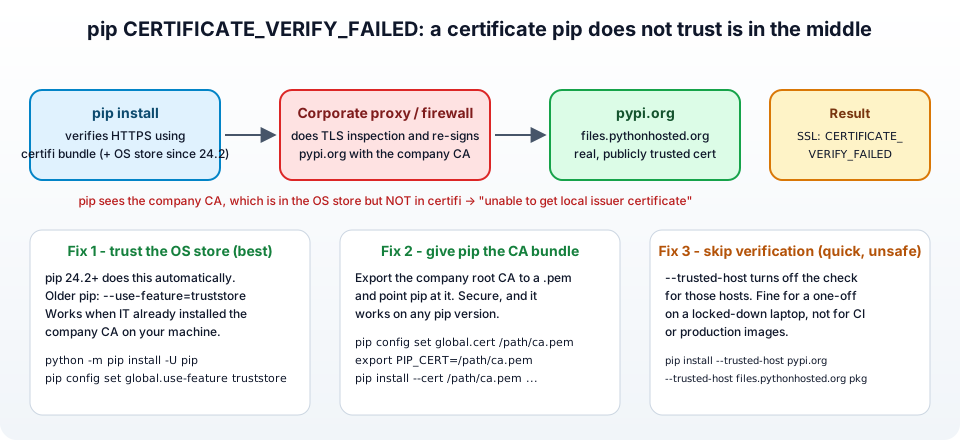
The wording of the error depends on which store did the checking -
| Where pip verified | Error text you see | Typical setup |
|---|---|---|
| certifi bundle (pip older than 24.2, or Linux/macOS with OpenSSL) | [SSL: CERTIFICATE_VERIFY_FAILED] certificate verify failed: unable to get local issuer certificate (_ssl.c:1000) | Any OS, pip before 24.2 |
| certifi bundle, self-signed proxy CA | certificate verify failed: self signed certificate in certificate chain | Proxy with a one-level CA |
| Windows certificate store via truststore (pip 24.2+) | A certificate chain processed, but terminated in a root certificate which is not trusted by the trust provider. | Windows, pip 24.2+, CA not installed in Windows either |
| macOS Keychain via truststore (pip 24.2+) | certificate verify failed with a Security framework code such as -67843 | macOS, pip 24.2+ |
| Python 3.8 and older | connection error: [SSL: CERTIFICATE_VERIFY_FAILED] certificate verify failed (_ssl.c:598) | Legacy interpreters |
The number in (_ssl.c:598) / (_ssl.c:1000) / (_ssl.c:1006) is just the line in Python's SSL module and changes with the Python version. It is the same error.
You can confirm the cause in 10 seconds - print the certificate chain pip is actually receiving -
1openssl s_client -connect pypi.org:443 -servername pypi.org </dev/null 2>/dev/null | openssl x509 -noout -issuer
If the issuer is your company (issuer=CN=Contoso Corporate Proxy CA) and not a public CA, that is your answer, and Fix 2 or Fix 4 is the right one. If the issuer is a public CA and you still get the error, your Python's certificate store itself is broken or missing - jump to Fix 5.
Other, rarer causes - a very old Python or pip with an outdated bundle, a wrong system clock (certificates look "not yet valid"), an antivirus doing the same interception as a proxy, or a captive portal on a hotel Wi-Fi.
The hosts that must be reachable for pip to work -
| Host | Role | Needs trusting? |
|---|---|---|
pypi.org | the package index (/simple/) | yes |
files.pythonhosted.org | the wheels and source archives | yes |
pypi.python.org | the pre-2017 hostname, redirects to pypi.org | only for very old pip and tutorials |
3. Fix 2 - Upgrade pip to 24.2 or newer (it trusts your OS certificate store)
If your company CA is installed in the operating system (it is, if your browser works on the same machine), the cleanest fix is simply a current pip. From 24.2, pip uses the OS trust store in addition to its own bundle, so the corporate CA is trusted automatically and the error disappears with no configuration at all.
Check your version -
1python -m pip --version
2# pip 23.1.2 from ... (python 3.11)   <- older than 24.2
The chicken-and-egg problem is that upgrading pip also needs PyPI. Use --trusted-host once, only for the upgrade -
1python -m pip install --trusted-host pypi.org --trusted-host files.pythonhosted.org --upgrade pip
Then try your install again without any flags -
1python -m pip install requests
If you cannot upgrade pip (pinned by your project, or a pip between 22.2 and 24.1), turn the same feature on explicitly -
1# one command
2python -m pip install --use-feature=truststore requests
3
4# permanently
5pip config set global.use-feature truststore
On pip older than 22.2 the truststore feature does not exist - use Fix 1 for the upgrade and then this fix.
And if a current pip suddenly fails where an old one worked, the opposite switch exists - --use-deprecated=legacy-certs goes back to certifi only. I have never needed it, but it is in the pip HTTPS certificates documentation.
4. Fix 3 - Make it permanent in the pip.conf file
Typing two --trusted-host flags on every install gets old fast. pip reads default options from a configuration file, and the easiest way to write it is the pip config command, which puts the file in the right place for your OS -
1pip config set global.trusted-host "pypi.org files.pythonhosted.org"
To see where pip wrote it, and every config file it is reading -
1pip config debug
2pip config list
If you prefer to create the file by hand, these are the current locations from the pip documentation -
| OS | Per-user file | Machine-wide file |
|---|---|---|
| Linux | $HOME/.config/pip/pip.conf (legacy $HOME/.pip/pip.conf still works) | /etc/pip.conf |
| macOS | $HOME/Library/Application Support/pip/pip.conf if that directory exists, otherwise $HOME/.config/pip/pip.conf | /Library/Application Support/pip/pip.conf |
| Windows | %APPDATA%\pip\pip.ini | C:\ProgramData\pip\pip.ini |
| Inside a venv | pip.conf / pip.ini in the venv root (applies only to that venv) | - |
The content, in INI format -
1[global]
2trusted-host = pypi.org
3               files.pythonhosted.org
Restart your shell and pip will trust these hosts permanently. The same file is where you would put the secure settings from Fix 2 and Fix 4 instead -
1[global]
2use-feature = truststore
3# or
4cert = /etc/ssl/certs/company-root-ca.pem
5. Fix 4 - Give pip your company's CA certificate (the proper fix)
This is the fix I would put in a team wiki. Instead of skipping verification, you give pip the CA certificate it is missing, so verification works again. It is a little more work and it needs OpenSSL on your machine.
1. Find the issuer in the chain. Run the following to see the certificate chain pip receives through the proxy -
1openssl s_client -connect pypi.org:443 -servername pypi.org -showcerts </dev/null
The output ends with the chain -
1Certificate chain
2 0 s:CN = pypi.org
3   i:CN = Contoso Corporate Proxy CA, O = Contoso Ltd
4 1 s:CN = Contoso Corporate Proxy CA, O = Contoso Ltd
5   i:CN = Contoso Root CA, O = Contoso Ltd
6---
The top of the chain (Contoso Root CA here) is the certificate you need. On an un-intercepted connection you would instead see a public CA, and this whole fix would not apply.
2. Get the root CA as a PEM file. The best source is your IT department or the company's internal wiki. If you have to extract it yourself, the -showcerts output above prints every certificate as a -----BEGIN CERTIFICATE----- block - copy the last one into company-root-ca.pem. On Windows you can also export it from the Certificate Manager (certmgr.msc, Trusted Root Certification Authorities) as Base-64 encoded X.509, and on macOS from Keychain Access as .pem.
If you got a .crt or .cer in DER (binary) format, convert it to PEM -
1openssl x509 -inform der -in company-root-ca.cer -out company-root-ca.pem
3. Build a bundle pip can use. pip needs one file. The simplest bundle is certifi's list plus your CA appended -
1# where is certifi's bundle?
2python -m certifi
3# /usr/lib/python3/dist-packages/certifi/cacert.pem
4
5cat "$(python -m certifi)" company-root-ca.pem > ~/pip-ca-bundle.pem
4. Tell pip to use it. Any of the three -
1# per command
2pip install --cert ~/pip-ca-bundle.pem requests
3
4# environment variable (also respected by requests and the AWS CLI)
5export PIP_CERT=~/pip-ca-bundle.pem
6
7# permanently
8pip config set global.cert ~/pip-ca-bundle.pem
pip also honours REQUESTS_CA_BUNDLE and CURL_CA_BUNDLE, which is handy because setting REQUESTS_CA_BUNDLE fixes the same error in your own Python code that uses requests.
Now you have the correct trusted certificate for your Python installation, verification stays on, and the setting survives pip upgrades. (The first version of this post downloaded the DigiCert root for pypi.python.org - that only ever helped when the chain was genuinely DigiCert, and PyPI's certificates have changed since. Export the CA you actually see in the chain.)
6. Fix 5 - Fix Python's own certificates on macOS
If openssl s_client shows a normal public CA and pip still fails, and you installed Python from the python.org installer on macOS, the cause is different - that Python ships without any root certificates until you run the post-install script. The error message is the same CERTIFICATE_VERIFY_FAILED.
Run the script once (replace 3.12 with your version) -
1/Applications/Python\ 3.12/Install\ Certificates.command
It installs certifi and links Python's SSL module to it. If you use Homebrew Python this is not needed, Homebrew's openssl brings its own bundle.
7. Docker, CI, conda and Windows variants
Docker builds - The proxy intercepts the build too. Do not bake --trusted-host into a production Dockerfile. Copy the CA in and point pip at it -
1FROM python:3.12-slim
2COPY company-root-ca.pem /usr/local/share/ca-certificates/company-root-ca.crt
3RUN update-ca-certificates && \
4    pip config set global.cert /etc/ssl/certs/ca-certificates.crt
5COPY requirements.txt .
6RUN pip install -r requirements.txt
update-ca-certificates merges your CA into the system bundle, so apt, curl and pip all trust it. If the container itself also runs behind the proxy, set HTTPS_PROXY as a build argument. I use the same pattern for the Terraform and AWS CLI images in my pipelines, and the same CA file fixes the self-signed certificate error in git and curl.
GitHub Actions / GitLab CI self-hosted runners - Same idea - install the CA on the runner image and set PIP_CERT (or REQUESTS_CA_BUNDLE) as a runner-level environment variable.
conda - conda has its own setting - conda config --set ssl_verify /path/to/company-root-ca.pem (or --set ssl_verify false as the unsafe equivalent of --trusted-host).
Windows - Everything above works in PowerShell, the config file is %APPDATA%\pip\pip.ini, and pip config set writes it for you. With pip 24.2+ on Windows the OS store is used automatically, so Fix 2 usually ends the story - and when it does not, the error reads terminated in a root certificate which is not trusted by the trust provider, which means the CA is not in the Windows store either: import it with certmgr.msc or use Fix 4.
Using a proxy that needs a URL - If pip cannot reach PyPI at all (timeouts, not certificate errors), it is the proxy address that is missing - pip install --proxy http://proxy.company.com:8080 requests, or pip config set global.proxy http://proxy.company.com:8080.
8. What broke when I ran this
I re-ran every command in this post on 2026-10-12 with pip 25.0.1 and Python 3.12.10 on Windows 10, with self-signed.badssl.com playing the role of the corporate proxy. Three things surprised me.
1. The error message I had in the post for years is not the one Windows users see any more. With pip 24.2+ on Windows, verification is done by the Windows certificate store (through truststore), and the text changes from unable to get local issuer certificate (_ssl.c:1000) to A certificate chain processed, but terminated in a root certificate which is not trusted by the trust provider. If you searched for the old wording and landed here, the table in section 2 maps both to the same fix. I added the Windows wording to the post because a reader who copies the new text into Google finds almost nothing.
2. --trusted-host really does switch verification off, not just silence a warning. I expected pip to at least complain once. It does not: the five retry warnings disappear completely and pip talks to the untrusted server as if nothing happened (the second console block in section 1). That is the argument against leaving the flag in a Dockerfile.
3. pip retries five times before failing, about 4 seconds in total on my machine. On a slow proxy the same install can sit for 30 seconds or more printing Retrying lines before the real error appears, which is why people often paste only the first WARNING line into search and miss the Could not fetch URL line that actually explains it.
9. Common error variants and what they mean
1. certificate verify failed: unable to get local issuer certificate - The CA that signed the certificate is unknown to pip. Corporate proxy - Fix 2 or Fix 4.
2. certificate verify failed: self signed certificate in certificate chain - Same thing with a self-signed proxy CA. Same fixes. (The generic version of this error for git and curl is in my post on the self-signed certificate in certificate chain error.)
3. A certificate chain processed, but terminated in a root certificate which is not trusted by the trust provider - Windows, pip 24.2+. The CA is missing from the Windows store as well. Import it (certmgr.msc) or use Fix 4.
4. certificate verify failed: certificate has expired - Either the proxy's certificate really expired (tell IT) or your machine's clock is wrong. Check the date before anything else.
5. ERROR: To use the truststore feature, 'truststore' must be installed - You asked for --use-feature=truststore on a pip older than 24.2 without the library. pip install --trusted-host pypi.org --trusted-host files.pythonhosted.org truststore, or just upgrade pip.
6. All attempts to connect to files.pythonhosted.org failed / Max retries exceeded without an SSL error - Not a certificate problem. The host is blocked or needs the proxy URL (see the proxy note above).
7. WARNING: pip is configured with locations that require TLS/SSL, however the ssl module in Python is not available - Python was built without OpenSSL. On Linux install libssl-dev and rebuild, or use the distribution's Python package; on Windows reinstall Python from python.org.
8. It works in the browser but not in pip, even with pip 24.2+ - The CA is in the browser's own store (Firefox keeps its own) but not in the OS store. Export it from the browser and use Fix 4.
9. pip install works but python -c "import requests; requests.get('https://pypi.org')" fails - Your code uses certifi directly. Set REQUESTS_CA_BUNDLE to the bundle from Fix 4, or install pip-system-certs so Python uses the OS store too.
10. Conclusion
"SSL: CERTIFICATE_VERIFY_FAILED" on pip install is pip doing its job - refusing a certificate signed by a CA it does not know, which behind a corporate proxy is your company's CA. To summarise the fixes -
--trusted-host pypi.org --trusted-host files.pythonhosted.org- the one-minute unblock, verification off.- Upgrade to pip 24.2 or newer - it trusts the OS certificate store, so a CA installed by IT just works. For pip 22.2 to 24.1,
--use-feature=truststore. pip config set global.trusted-host ...- the shortcut made permanent inpip.conf/pip.ini.--cert/PIP_CERTwith your company's root CA - the secure, permanent fix, and the one to use in Docker and CI.- macOS python.org installs - run
Install Certificates.command.
The authoritative references are the pip documentation on HTTPS certificates and configuration files. The same proxy breaks git clone and curl in the same way - I have covered those in two ways to fix SSL certificate problem: self signed certificate in certificate chain, and the related GitHub errors in permission denied (publickey) and unable to update url base from redirection.
Did this save you a debugging session? Stay in the loop -
- Subscribe on YouTube - every post here has a screen-recorded companion video.
- Code on GitHub - the repositories, Terraform and scripts behind these posts.