Overlapping CIDR Blocks - How to Find Them Before VPC Peering or Transit Gateway Refuses the Connection, What AWS, Azure and Google Cloud Each Reject, and the Four Ways Out (Renumber, Secondary CIDR, Private NAT, PrivateLink)

TL;DR
- Overlap means one of three things: the ranges are identical (10.0.0.0/16 and 10.0.0.0/16), one contains the other (10.0.0.0/16 contains 10.0.128.0/17), or they are both inside a bigger block you treat as one (10.1.0.0/16 and 10.2.0.0/16 do not overlap; 10.0.0.0/15 contains both 10.0.0.0/16 and 10.1.0.0/16).
- What each cloud rejects: AWS refuses a peering connection if any CIDR block of either VPC overlaps, even one you never intend to route, and Transit Gateway cannot route two attachments with the same destination; Azure requires non-overlapping address spaces to peer; Google Cloud fails the peering if any subnet range matches, contains or fits inside a peer's, and keeps enforcing it on every new subnet afterwards.
- Check in seconds:
ip_network(a).overlaps(ip_network(b))in Python, or paste your inventory into the VPC Subnet Planner and it flags the hit and lists free blocks of the same size, 10.2.0.0/16 to 10.5.0.0/16 in the example below. - When it is already in production, in order of cost: renumber the newer, smaller network; add a secondary CIDR to carry only the traffic that must cross; put a private NAT gateway between the overlapping ranges; or use PrivateLink or Private Service Connect so the service is reachable without any route to the other network.
- The real fix is an inventory. One line per network with its CIDR, owner and purpose, checked before every new VPC, VNet or project. The planner reads exactly that format.
- Not your exact case? If you are sizing the new network rather than checking it, start with what is CIDR; if the overlap is between a cluster's service range and a VPC, see EKS running out of IP addresses.
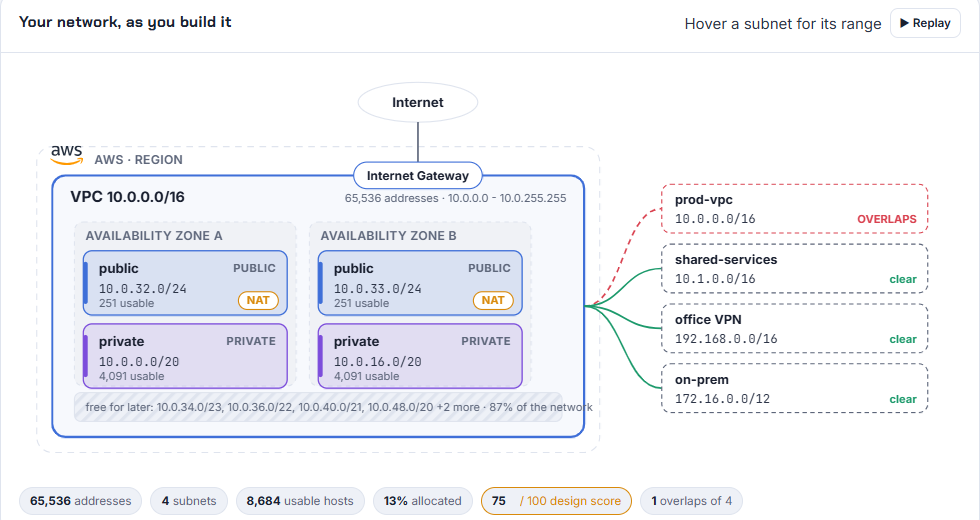
Table of Content
- What overlap means, exactly
- What AWS, Azure and Google Cloud reject
- Check an inventory in seconds
- The planner's overlap check and free alternatives
- Four ways out when the overlap is already live
- Keeping it from happening again
- What broke when I ran this
- Conclusion
1. What overlap means, exactly
Two CIDR blocks overlap when at least one address belongs to both. Because CIDR blocks are aligned powers of two, that can only happen in one of two shapes: the blocks are identical, or one contains the other. Two blocks of the same size either match exactly or do not touch at all; a bigger block either swallows a smaller one whole or misses it entirely. There is no partial overlap between valid CIDR blocks.
| Pair | Overlap | Shape |
|---|---|---|
| 10.0.0.0/16 and 10.0.0.0/16 | yes | identical |
| 10.0.0.0/16 and 10.0.128.0/17 | yes | the /16 contains the /17 |
| 10.0.0.0/15 and 10.1.0.0/16 | yes | the /15 spans 10.0.0.0 to 10.1.255.255, so it contains the /16 |
| 10.1.0.0/16 and 10.2.0.0/16 | no | adjacent, which is fine |
| 172.16.0.0/12 and 172.20.0.0/16 | yes | the /12 spans 172.16.0.0 to 172.31.255.255 |
| 100.64.0.0/16 and 10.0.0.0/8 | no | different ranges entirely |
The fourth row is the one that catches people: "we used 10.0.0.0/8 for the office" means every 10.x.x.x VPC anyone ever creates overlaps the office, and the only clean fix is to stop writing /8 in inventories and record what the office actually uses.
2. What AWS, Azure and Google Cloud reject
| Cloud | Rule, from the documentation | Where it bites |
|---|---|---|
| AWS VPC peering | "You cannot create a VPC peering connection between VPCs that have matching or overlapping IPv4 or IPv6 CIDR blocks. If you have multiple IPv4 CIDR blocks, you can't create a VPC peering connection if any of the CIDR blocks overlap, even if you intend to use only the non-overlapping CIDR blocks" (peering basics) | the request is created and then fails; a secondary CIDR you added for pods can block a peering you set up years ago |
| AWS Transit Gateway | VPC attachments do not support ECMP "since CIDR blocks cannot overlap"; two attachments with the same destination cannot both be routed, and where a static route and a propagated route share a destination the static route wins (how transit gateways work) | both VPCs attach, but only one of them is reachable from the rest of the network, and which one depends on the route table |
| AWS VPC CIDR association | a secondary CIDR "must not overlap with any existing CIDR block that's associated with the VPC" or with a route in the route table (VPC CIDR blocks) | the association itself is refused |
| Azure VNet peering | "The virtual networks you peer must have nonoverlapping IP address spaces" (manage peering) | adding an address space to a peered VNet that overlaps the peer breaks the peering |
| Google Cloud VPC peering | "No subnet IP range can exactly match, contain, or fit within another subnet IP range in a peered VPC network. At the time of peering, Google Cloud checks ... if they do, then the peering fails", and it keeps checking when you add a subnet, add a secondary range or expand a primary range (VPC Network Peering) | the check is per subnet, not per network, so two networks with different "main" ranges can still fail on one secondary range |
Two details worth reading twice. On AWS the test is on every CIDR block of both VPCs, so the 100.64.0.0/16 you attached for EKS pods counts. On Google Cloud the test is on subnet ranges including secondary ranges, and it is enforced for the life of the peering, so a GKE Pod range created a year later can be the thing that fails.
3. Check an inventory in seconds
You do not need a tool for a single pair. Python's ipaddress module answers it, and tells you the shape (run on 2026-10-19 with Python 3.12.10):
1import ipaddress as ip
2pairs = [('10.0.0.0/16','10.0.0.0/16'), ('10.0.0.0/16','10.0.128.0/17'), ('10.0.0.0/15','10.1.0.0/16'),
3         ('10.1.0.0/16','10.2.0.0/16'), ('172.16.0.0/12','172.20.0.0/16'), ('100.64.0.0/16','10.0.0.0/8')]
4for a, b in pairs:
5    A, B = ip.ip_network(a), ip.ip_network(b)
6    rel = 'identical' if A == B else ('contains' if B.subnet_of(A) else ('inside' if A.subnet_of(B) else '-'))
7    print(f'{a:>16} vs {b:<16} overlap={str(A.overlaps(B)):<5} {rel}')
1     10.0.0.0/16 vs 10.0.0.0/16      overlap=True  identical
2     10.0.0.0/16 vs 10.0.128.0/17    overlap=True  contains
3     10.0.0.0/15 vs 10.1.0.0/16      overlap=True  contains
4     10.1.0.0/16 vs 10.2.0.0/16      overlap=False -
5   172.16.0.0/12 vs 172.20.0.0/16    overlap=True  contains
6   100.64.0.0/16 vs 10.0.0.0/8       overlap=False -
For a whole inventory, pull the live ranges rather than the spreadsheet, because the spreadsheet is what was wrong in the first place:
1# AWS: every CIDR block of every VPC in the region, including secondary blocks
2aws ec2 describe-vpcs --query 'Vpcs[].[VpcId,CidrBlockAssociationSet[].CidrBlock]' --output text
3# Azure: address spaces of every VNet in the subscription
4az network vnet list --query '[].{name:name, space:addressSpace.addressPrefixes}' -o table
5# Google Cloud: every subnet range in the project, primary and secondary
6gcloud compute networks subnets list --format='table(name,region,ipCidrRange,secondaryIpRanges[].ipCidrRange)'
4. The planner's overlap check and free alternatives
The VPC Subnet Planner has a box for exactly this inventory, one CIDR per line with an optional label. I pasted four networks: the production VPC, a shared-services VPC, the office VPN range and the on-prem block, and asked for a new 10.0.0.0/16:
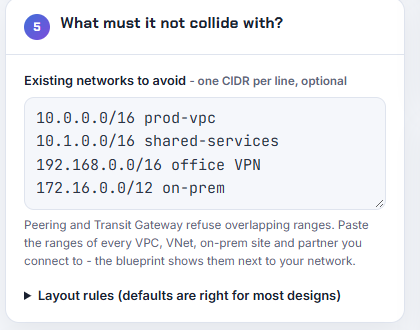
The design review drops to 75 of 100 and names the collision, and the overlap check below it lists each network as a hit or clear and then the free alternatives of the same size. This is the engine's output for that run from the planner's test harness on 2026-10-19, reformatted from its JSON into one line per network:
1score 75
2bad | Overlaps 1 existing network: 10.0.0.0/16 | VPC peering and Transit Gateway cannot route overlapping ranges. Pick a different block - the table below suggests free ones.
3existing: 10.0.0.0/16 prod-vpc hit=true | 10.1.0.0/16 shared-services hit=false | 192.168.0.0/16 office VPN hit=false | 172.16.0.0/12 on-prem hit=false
4free alternatives of the same size: 10.2.0.0/16, 10.3.0.0/16, 10.4.0.0/16, 10.5.0.0/16
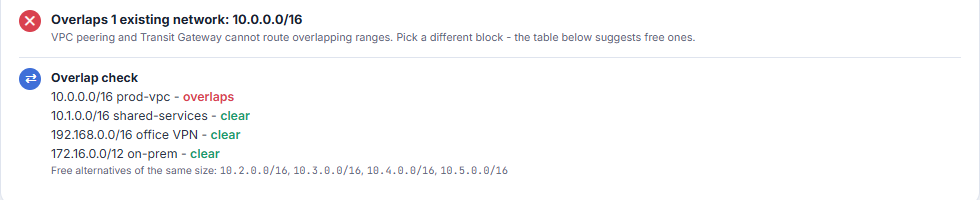
The alternatives are the next aligned blocks of the requested size that touch nothing in the inventory, so the fix is one click: change the network address to 10.2.0.0, the score goes to 100, and the share link now carries the inventory with the design so the reviewer sees what it was checked against. The same check runs on the Azure and Google Cloud cards with their reserved-address rules, and the Kubernetes IP Calculator applies the EKS variant of it to the service CIDR, which must also avoid the VPC.
5. Four ways out when the overlap is already live
In the order I would try them, cheapest first:
| Option | What it costs | When it fits |
|---|---|---|
| Renumber the newer, smaller network | a maintenance window and new addresses for everything in it; nothing if the network is still empty | the overlap was found at design time, or the new side has a handful of resources |
| Secondary CIDR for the traffic that must cross | a new non-overlapping block attached to the VPC and new subnets in it for the services other networks must reach; the original range stays for everything local | one or two services need to be reachable; AWS allows secondary blocks from 10.0.0.0/8, 100.64.0.0/10 and public space between /16 and /28 (VPC CIDR blocks) |
| Private NAT gateway between overlapping ranges | one NAT gateway per zone, about $0.045 per hour each plus $0.045 per GB processed, and a routable range assigned by the IP team | AWS documents this as the pattern for overlapping networks: each VPC keeps its non-routable range and gets a small routable one, the private NAT gateway translates, and Transit Gateway carries the routable ranges (NAT gateway scenarios) |
| PrivateLink or Private Service Connect | an endpoint per consumer VPC, about $0.01 per hour per zone plus $0.01 per GB on AWS | a service, not a network, needs to be shared; the consumer and provider ranges can overlap completely because no route to the other side exists (PrivateLink step by step, Private Service Connect) |
The thing none of them fixes is a 10.0.0.0/8 written against the office in the inventory. Until the real office ranges are recorded, every 10.x VPC is an overlap on paper, and someone will approve one that overlaps for real.
6. Keeping it from happening again
- One inventory, in a file, in a repository. CIDR, owner, purpose, cloud, account. The planner's "existing networks" box takes that format directly, so the inventory is the input to every new design.
- Allocate from the top of a plan, not from habit. 10.0.0.0/16 is the first VPC on every account because it is the default in every tutorial, including mine. Give each account or team a /12 and let them carve /16s from it; the planner's "free alternatives" are that plan computed live.
- Check every secondary range, not just the main one. EKS pod CIDRs and GKE Pod ranges are the overlaps nobody lists.
- Reserve space for the next zone and the next environment before anyone needs it. Both planner switches are free today and expensive after the first peering.
7. What broke when I ran this
1. Python refused my "partial overlap" example. I wrote 10.1.0.0/15 to show a block straddling two /16s. ipaddress.ip_network('10.1.0.0/15') raises ValueError: 10.1.0.0/15 has host bits set, because a /15 starting at 10.1.0.0 is not aligned: the valid block is 10.0.0.0/15. That error is the section 1 lesson in one line, and the planner snaps an unaligned address to its network address for the same reason.
2. The planner's AWS card rejected my /15 before it checked overlap. Asking for 10.0.0.0/15 on AWS returned "AWS VPCs must be /16 to /28" alongside the overlap item. Correct, and it is why the free-alternatives list only ever proposes blocks the cloud would accept.
3. "10.0.0.0/8 corporate" moved every suggestion to 172.16. With a single /8 in the inventory the planner flagged my 10.20.0.0/16 as overlapping and proposed 172.16.0.0/16, 172.17.0.0/16, 172.18.0.0/16 and 172.19.0.0/16, which is correct and also useless if the whole company lives in 10.x. The tool was doing what the inventory told it. I added the line about recording real office ranges to section 5 because of this run, and the planner now shows an information item when an inventory entry is a /8 or larger, saying exactly that.
4. The re:Post article I wanted to cite for the AWS peering failure message is gone, so the rules in section 2 are quoted from the current user guides instead, each of which I curled on 2026-10-19.
8. Conclusion
To summarise:
- Overlap is identical or contained; there is no partial overlap between valid CIDR blocks, and a /8 in the inventory overlaps everything.
- AWS tests every CIDR block of both VPCs for peering, Transit Gateway cannot route duplicate destinations, Azure requires non-overlapping address spaces, and Google Cloud tests every subnet range for the life of the peering.
- Three lines of Python answer a pair; the planner answers an inventory and proposes free blocks.
- Already live: renumber the small side, add a secondary CIDR, put a private NAT gateway between the ranges, or share the service with PrivateLink instead of the network.
- Keep the inventory in a repository and check secondary ranges too.
Did this save you a debugging session? Stay in the loop -
- Subscribe on YouTube - every post here has a screen-recorded companion video.
- Code on GitHub - the repositories, Terraform and scripts behind these posts.
AWS step by step series -
- Part-1 : AWS IAM user - create a user, group, policy, access keys and MFA
- Part-2 : AWS Organizations - multi-account setup, OUs and SCPs
- Part-3 : AWS assume IAM role - trust policy, switch role in console and CLI
- Part-4 : How to launch an EC2 instance - key pair, security group, SSH
- Part-5 : AWS VPC - public and private subnets, Internet Gateway, NAT Gateway, route tables
- Part-8 : EC2 launch template - versions, default version, source template, SSM parameter AMI
- Part-10 : EC2 Auto Scaling - launch template, Auto Scaling group, target tracking, ALB
- Part-11 : AWS WAF - web ACL, managed rules, rate limiting, geo blocking
- Part-12 : AWS VPC Peering - connect two VPCs, routes, security groups, DNS
- Part-13 : AWS Transit Gateway - hub-and-spoke for many VPCs and on-premises
- Part-14 : AWS NAT Gateway deep dive - public vs private, limits, cost, troubleshooting
- Part-15 : Amazon Route 53 - hosted zones, records, alias, routing policies, health checks
- Part-16 : AWS security groups - inbound and outbound rules, stateful, referencing, quotas
- Part-16 : AWS Certificate Manager - free TLS certificates for ALB, CloudFront and API Gateway
- Part-17 : AWS Lambda - function URLs, environment variables and layers
- Part-18 : Network Load Balancer - setup, and ALB vs NLB
- Part-19 : VPC endpoints - gateway and interface endpoints (PrivateLink) instead of NAT
- Part-20 : AWS PrivateLink - publish your own service with an endpoint service and NLB
- Part-20 : Amazon EBS volumes - types, attach, mount, resize, snapshots, encryption
- Part-21 : VPC Flow Logs - CloudWatch Logs, S3, record format, Logs Insights, Athena
- Part-21 : EC2 Spot Instances - pricing, interruptions, mixed instances groups
- Part-23 : AWS Global Accelerator - static anycast IPs in front of ALBs in two regions, traffic dials, weights
- Part-24 : AWS Control Tower - landing zone, controls, Account Factory, Identity Center
- Part-25 : AWS Cloud WAN - global network, core network policy, dev/prod/shared segments, tag-based attachments across three regions
Networking fundamentals -
- What is a VPC and a subnet? AWS networking in five minutes
- What is CIDR? Calculate IP ranges for VPCs and subnets
- VPC Subnet Planner - the free tool I use to size the VPC and subnet CIDRs in every part of this series (AWS, Azure, GCP rules built in)
- What is NAT? Static NAT, dynamic NAT and PAT explained
More AWS guides -
- What is AWS CloudFormation? Templates, stacks, change sets, drift, StackSets
- Learn AWS S3 - the complete course
- AWS API Gateway - REST API with Lambda, authorizers, Terraform
- AWS Advanced Networking Specialty (ANS-C01) - course companion
- AWS ECS and Fargate - how to deploy a Docker container
- AWS S3 - how to host a static website
- Terraform create EC2 instance on AWS
- Terraform AWS IAM - users, roles and policies
- Terraform and AWS multi-account setup
- Terraform - setting up an ALB and SSL