kubectl recreate pods - Why a Deleted Pod Comes Back in Seconds, How to Recreate Pods on Purpose (rollout restart) and How to Delete Them for Good (Deployment, ReplicaSet, DaemonSet, StatefulSet, Job)

TL;DR
- A deleted pod comes back because a controller owns it. On my test cluster the ReplicaSet replaced the pod 9 seconds after
kubectl delete pod. Deleting the ReplicaSet does not help either - the Deployment recreated it within 5 seconds. - Find the owner in one command:
kubectl get pod <name> -o jsonpath='{.metadata.ownerReferences[*].kind}/{.metadata.ownerReferences[*].name}'(orkubectl describe pod <name> | grep "Controlled By"), then repeat on the owner until there is none. Act on the top of the chain. - To recreate pods on purpose (new image, new ConfigMap, "just restart it"):
kubectl rollout restart deployment/<name>. It replaces the pods one by one;rollout statustells you when it is done. Deleting pods by hand does the same thing with downtime and no rollback. - To stop the pods:
kubectl scale deployment <name> --replicas=0keeps everything else;kubectl delete deployment <name>removes the application. For a StatefulSet scale or delete the StatefulSet (PVCs stay), for a DaemonSet delete it or relabel the node, for a CronJob suspend it. - A bare pod (
kubectl run, no owner) stays deleted. Static pods, Helm releases, operators and GitOps controllers recreate things from outside the ownerReferences chain - section 9. - All output below is from a kind v0.33.0 cluster running Kubernetes v1.37.0 with kubectl v1.37.1, captured on 2026-10-12.
- Not your exact case? The closest post on this site is kubectl get YAML.
One day I was working with my local Kubernetes cluster which I set up using Kubespray and I was deploying my docker container into it. Since it was a local cluster I had done a couple of deployments before, and after each one I was deleting the Kubernetes POD, the deployment and the service.
Eventually, after doing the same thing 3-4 times, I noticed something strange - I was trying to delete the POD but the POD was getting recreated after a few seconds, every single time. I looked at the pod logs, the deployment logs, nothing. Then I googled around and someone in a forum said - you should delete the deployment, not the pod - and that was it.
That advice is correct, but it is only half of the story, because the owner is not always a Deployment. So in this post I have documented the whole picture - why a pod comes back, how to find out what is bringing it back, and the right command for every kind of owner. If you just want the fast path, jump to Section 2.
Here is what we will go through -
- Why a deleted pod comes back - controllers and ownerReferences
- Find out who owns the pod (the fast way)
- Run kubectl get all to see everything in the namespace
- Owner is a Deployment - delete or scale the Deployment
- Owner is a ReplicaSet (no Deployment)
- Owner is a StatefulSet
- Owner is a DaemonSet
- Owner is a Job or CronJob
- No owner, but it still comes back - static pods, Helm, operators and GitOps
- Delete the Service and other leftovers
- (With caution) Nuke everything in a namespace
- Common mistakes and errors
- What broke when I ran this
- Conclusion
1. Why a deleted pod comes back - controllers and ownerReferences
A pod on its own is just a pod - delete it and it is gone. But you almost never create pods directly. You create a Deployment, and the Deployment creates a ReplicaSet, and the ReplicaSet creates the pods. Each of those is a controller with one job: make reality match the spec. The ReplicaSet spec says replicas: 2, so the moment it sees only one pod, it creates another one. It does not care that you were the one who deleted it.
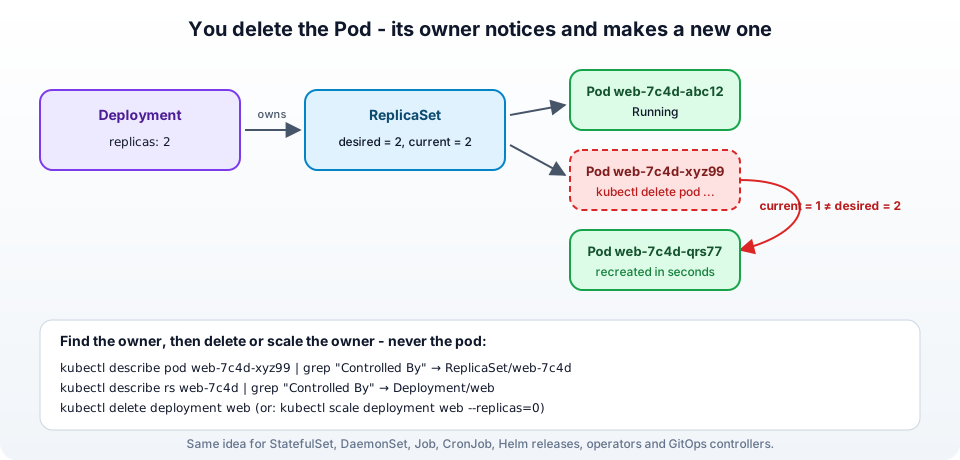
Kubernetes records this relationship on every object in the metadata.ownerReferences field. The pod points at the ReplicaSet, the ReplicaSet points at the Deployment. This is also what makes cascading deletion work - delete the Deployment and the garbage collector deletes its ReplicaSets and their pods for you. The concept is explained in the Kubernetes docs on owners and dependents.
So the rule is simple - always delete (or scale down) the top of the chain, never the pod. The rest of this post is about finding the top of the chain.
Here is the whole thing happening on a fresh kind cluster (Kubernetes v1.37.0, 2026-10-12): a Deployment with two replicas, one pod deleted, and a replacement already running 9 seconds later with a new random suffix -
 1$ kubectl create deployment web --image=nginx:1.27-alpine --replicas=2
 2deployment.apps/web created
 3
 4$ kubectl get pods -l app=web -o wide
 5NAME                  READY   STATUS    RESTARTS   AGE   IP           NODE
 6web-7c6cdd646-glxnf   1/1     Running   0          4s    10.244.0.5   jhooq-control-plane
 7web-7c6cdd646-thjtk   1/1     Running   0          4s    10.244.0.6   jhooq-control-plane
 8
 9$ kubectl delete pod web-7c6cdd646-glxnf
10pod "web-7c6cdd646-glxnf" deleted from default namespace
11
12$ kubectl get pods -l app=web
13NAME                  READY   STATUS    RESTARTS   AGE
14web-7c6cdd646-csl7f   1/1     Running   0          9s
15web-7c6cdd646-thjtk   1/1     Running   0          13s
And the step most people do not expect: deleting the ReplicaSet is just as pointless, because the Deployment owns it -
 1$ kubectl delete rs web-7c6cdd646
 2replicaset.apps "web-7c6cdd646" deleted from default namespace
 3
 4$ kubectl get rs,pods -l app=web
 5NAME                            DESIRED   CURRENT   READY   AGE
 6replicaset.apps/web-7c6cdd646   2         2         2       5s
 7
 8NAME                      READY   STATUS    RESTARTS   AGE
 9pod/web-7c6cdd646-jg6tk   1/1     Running   0          5s
10pod/web-7c6cdd646-r77m5   1/1     Running   0          5s
Same ReplicaSet name (it is derived from the pod template hash), two brand-new pods, 5 seconds.
2. Find out who owns the pod (the fast way)
Two commands. The first shows the direct owner of the pod -
1kubectl describe pod <pod-name> -n <namespace> | grep -i "Controlled By"
1Controlled By: ReplicaSet/jhooq-springboot-f8c5f6cb8
The second does the same on the owner, to walk up the chain -
1kubectl describe rs jhooq-springboot-f8c5f6cb8 -n <namespace> | grep -i "Controlled By"
1Controlled By: Deployment/jhooq-springboot
If you prefer the raw field (handy in scripts), ask for the ownerReferences directly -
1kubectl get pod <pod-name> -n <namespace> -o jsonpath='{.metadata.ownerReferences[*].kind}/{.metadata.ownerReferences[*].name}{"\n"}'
On the test cluster, walking the chain from the pod to the top takes two of these -
1$ kubectl get pod web-7c6cdd646-csl7f -o jsonpath='{.metadata.ownerReferences[*].kind}/{.metadata.ownerReferences[*].name}{"\n"}'
2ReplicaSet/web-7c6cdd646
3
4$ kubectl get rs web-7c6cdd646 -o jsonpath='{.metadata.ownerReferences[*].kind}/{.metadata.ownerReferences[*].name}{"\n"}'
5Deployment/web
6
7$ kubectl describe pod web-7c6cdd646-csl7f | grep '^Controlled By'
8Controlled By:  ReplicaSet/web-7c6cdd646
And to see the owner kind of every pod in a namespace at once -
1kubectl get pods -n <namespace> -o custom-columns='POD:.metadata.name,OWNER-KIND:.metadata.ownerReferences[0].kind,OWNER:.metadata.ownerReferences[0].name'
1POD                                 OWNER-KIND   OWNER
2jhooq-springboot-f8c5f6cb8-gjm6b    ReplicaSet   jhooq-springboot-f8c5f6cb8
3node-exporter-7h2kx                 DaemonSet    node-exporter
4postgres-0                          StatefulSet  postgres
5backup-28123450-x9k2p               Job          backup-28123450
Now match the owner kind to the section below. If OWNER-KIND is empty the pod has no owner object, and you are in Section 9.
3. Run kubectl get all to see everything in the namespace
Before deleting anything I like to see the whole picture. The simplest way is -
1kubectl get all
The kubectl get all command lists the pods, services, deployments, replica sets, stateful sets, daemon sets, jobs and cron jobs of the current namespace, so you get a very good idea of what is running.
If you are working in a specific kubernetes namespace then use the -n flag -
1kubectl get all -n <your_namespace_name>
 1NAME                                    READY   STATUS    RESTARTS   AGE
 2pod/jhooq-springboot-f8c5f6cb8-gjm6b    1/1     Running   0          2m
 3pod/jhooq-springboot-f8c5f6cb8-tq8zw    1/1     Running   0          2m
 4
 5NAME                       TYPE           CLUSTER-IP     EXTERNAL-IP   PORT(S)          AGE
 6service/jhooq-springboot   LoadBalancer   10.233.5.12    <pending>     8080:31234/TCP   10m
 7
 8NAME                               READY   UP-TO-DATE   AVAILABLE   AGE
 9deployment.apps/jhooq-springboot   2/2     2            2           10m
10
11NAME                                          DESIRED   CURRENT   READY   AGE
12replicaset.apps/jhooq-springboot-f8c5f6cb8    2         2         2       10m
Note - despite the name,
get alldoes not show everything. ConfigMaps, Secrets, PersistentVolumeClaims, Ingresses and custom resources are not included. For those usekubectl get <kind>orkubectl api-resources. If you want to back up the YAML of what is there before deleting it, my post on exporting the YAML of deployed Kubernetes resources has a one-line script for it.
4. Owner is a Deployment - delete or scale the Deployment
This is the most common case - pod is owned by a ReplicaSet, the ReplicaSet is owned by a Deployment. You have two options, and which one you want depends on whether the application should come back later.
Option A - stop the pods but keep the Deployment (scale to zero). The Deployment, its ReplicaSets, the Service and all the config stay. Scale back up whenever you want -
1kubectl scale deployment jhooq-springboot --replicas=0 -n <namespace>
2
3# later
4kubectl scale deployment jhooq-springboot --replicas=2 -n <namespace>
Option B - remove the application (delete the Deployment). The garbage collector deletes the ReplicaSets and the pods -
1kubectl delete deployment jhooq-springboot -n <namespace>
To list the deployments first -
1kubectl get deployment -n <namespace>
2
3# or across all namespaces
4kubectl get deployments --all-namespaces
What about restarting instead? Many people delete a pod because they want the application to restart with a new image or config. You do not need to delete anything for that - the Deployment has a rollout command, which replaces the pods one by one with no downtime -
1kubectl rollout restart deployment jhooq-springboot -n <namespace>
2kubectl rollout status deployment jhooq-springboot -n <namespace>
This is the answer to "kubectl recreate pods". Watch it happen: a new ReplicaSet (web-56bfcc6f65) comes up, the old one (web-7c6cdd646) drains, and at no point are there fewer than two ready pods -
 1$ kubectl rollout restart deployment/web
 2deployment.apps/web restarted
 3
 4$ kubectl rollout status deployment/web --timeout=120s
 5Waiting for deployment "web" rollout to finish: 1 out of 2 new replicas have been updated...
 6Waiting for deployment "web" rollout to finish: 1 old replicas are pending termination...
 7deployment "web" successfully rolled out
 8
 9$ kubectl get pods -l app=web
10NAME                   READY   STATUS        RESTARTS   AGE
11web-56bfcc6f65-5clpn   1/1     Running       0          2s
12web-56bfcc6f65-v5ns9   1/1     Running       0          1s
13web-7c6cdd646-mbhkl    1/1     Terminating   0          3s
And the two ways to stop them, scale to zero and delete, both leaving an empty namespace -
1$ kubectl scale deployment web --replicas=0
2deployment.apps/web scaled
3
4$ kubectl get pods -l app=web
5No resources found in default namespace.
6
7$ kubectl delete deployment web
8deployment.apps "web" deleted from default namespace
| You want | Command | Pods afterwards | Comes back? |
|---|---|---|---|
| fresh pods, same spec (restart) | kubectl rollout restart deployment/web | 2 new pods, old ones drained one by one | yes, that is the point |
| pods gone, app kept for later | kubectl scale deployment web --replicas=0 | 0 | only when you scale up |
| app removed | kubectl delete deployment web | 0 (ReplicaSet and pods garbage-collected) | no |
| one pod gone | kubectl delete pod web-... | 2 (a replacement in about 9 s) | yes |
| ReplicaSet gone | kubectl delete rs web-... | 2 (new ReplicaSet in about 5 s) | yes |
The complete reference is in the Kubernetes docs on Deployments. If you deploy with Helm, see Section 9 before you delete the Deployment by hand.
5. Owner is a ReplicaSet (no Deployment)
Sometimes describe rs shows no Controlled By line - the ReplicaSet was created directly (old tutorials, or a ReplicationController on very old clusters). Then the ReplicaSet is the top of the chain -
1kubectl get rs -n <namespace>
2kubectl delete rs <your_replica_set_name> -n <namespace>
Why does deleting the ReplicaSet fix it? The pods are managed by the ReplicaSet. Even though you deleted a pod manually, the ReplicaSet still has desired: 2 and sees current: 1, so it creates a new copy, and you are back to square one. Delete the ReplicaSet and there is nothing left to notice the missing pod. The ReplicaSet documentation has the details, including --cascade=orphan if you ever want to delete a ReplicaSet but keep its pods running.
6. Owner is a StatefulSet
Databases and anything with stable storage usually run as a StatefulSet. Deleting postgres-0 just makes the StatefulSet recreate postgres-0 with the same name and the same PersistentVolumeClaim, which is exactly what you want in production. To actually stop it -
1# stop the pods, keep the data (PVCs stay)
2kubectl scale statefulset postgres --replicas=0 -n <namespace>
3
4# remove the StatefulSet (PVCs are NOT deleted by default - your data is safe)
5kubectl delete statefulset postgres -n <namespace>
Deleting the PersistentVolumeClaims is a separate, deliberate step, and once it is done the data is gone. I have a post on deleting PV and PVC for that.
7. Owner is a DaemonSet
A DaemonSet runs one pod on every node (log collectors, node-exporter, CNI plugins, kube-proxy). Delete the pod on a node and the DaemonSet puts it right back, because that node is still in the cluster. List them -
1kubectl get daemonsets --all-namespaces
Here is a DaemonSet doing exactly that on the test cluster: the pod I deleted was back 3 seconds later, with DaemonSet as its owner -
1$ kubectl delete pod agent-wqsmz
2pod "agent-wqsmz" deleted from default namespace
3
4$ kubectl get pods -l app=agent
5NAME          READY   STATUS    RESTARTS   AGE
6agent-bjr9h   1/1     Running   0          3s
7
8$ kubectl get pods -l app=agent -o jsonpath='{.items[0].metadata.ownerReferences[0].kind}{"\n"}'
9DaemonSet
Then either delete the DaemonSet -
1kubectl delete daemonset node-exporter -n monitoring
or, if you only want it off one node, give the node a label or taint that the DaemonSet's nodeSelector or tolerations do not match. There is no scale for a DaemonSet - the number of pods is always the number of matching nodes. Be careful with the DaemonSets in kube-system (kube-proxy, the CNI, nodelocaldns) - deleting those breaks the cluster.
7.1 Delete the daemon set with its pods
kubectl delete cascades by default, so the pods go with the DaemonSet. If you want to delete the DaemonSet but leave the pods running until they die naturally -
1kubectl delete daemonset node-exporter -n monitoring --cascade=orphan
8. Owner is a Job or CronJob
A Job recreates its pod until the pod exits successfully, up to backoffLimit times. So a crashing job pod keeps coming back in Error or CrashLoopBackOff until the limit is hit. A CronJob creates a brand new Job on every schedule, so even after you delete the Job, a fresh one appears at the next tick.
 1kubectl get jobs -n <namespace>
 2kubectl get cronjobs -n <namespace>
 3
 4# delete the job and its pods
 5kubectl delete job backup-28123450 -n <namespace>
 6
 7# stop a cronjob from creating new jobs, without deleting it
 8kubectl patch cronjob backup -n <namespace> -p '{"spec":{"suspend":true}}'
 9
10# or delete the cronjob entirely
11kubectl delete cronjob backup -n <namespace>
The Job name usually has the CronJob name as its prefix (backup-28123450 comes from the CronJob backup), and describe job shows Controlled By: CronJob/backup.
9. No owner, but it still comes back - static pods, Helm, operators and GitOps
If ownerReferences is empty and the pod still reappears, something outside the normal controller chain is recreating it. There are four usual suspects.
1. Static pods - The control plane components (kube-apiserver-master1, etcd-master1, kube-controller-manager-...) and anything else defined as a file in /etc/kubernetes/manifests/ on a node are static pods. The kubelet on that node creates them from the file, and what you see in kubectl is only a read-only mirror pod. kubectl delete removes the mirror for a second and the kubelet puts it back. You will recognise them by the node name suffix and by describe pod showing Controlled By: Node/master1. To stop one, SSH to the node and move the manifest file out of that directory -
1sudo mv /etc/kubernetes/manifests/kube-scheduler.yaml /root/
This is documented in create static pods. On a Kubespray or kubeadm cluster, think twice - you are removing control plane components.
2. Helm - If the Deployment was installed by Helm, deleting it with kubectl works, but the next helm upgrade (or a CI pipeline running it) recreates it. Uninstall the release instead -
1helm list -n <namespace>
2helm uninstall <release-name> -n <namespace>
If you are new to Helm releases, start with getting started with Helm charts.
3. Operators and custom resources - On a cluster with an operator (Prometheus Operator, a database operator, Strimzi, cert-manager), the Deployment or StatefulSet is itself owned by a custom resource - describe deployment shows Controlled By: Prometheus/main or Kafka/my-cluster. Delete or edit the custom resource, not the Deployment. kubectl get crd lists the kinds, and kubectl describe on the owner tells you the next link in the chain.
4. GitOps controllers (Argo CD, Flux) - With GitOps, the desired state lives in a Git repository and the controller reconciles the cluster back to it. Argo CD with selfHeal: true recreates anything you delete within minutes. The fix is to remove the resource from Git (or disable auto-sync for that application), then sync. Deleting in the cluster alone is a losing battle.
10. Delete the Service and other leftovers
The Service does not recreate pods, so it is not the cause of the problem - but once the pods are gone on purpose, you usually want the Service gone too, otherwise you keep a LoadBalancer (and on AWS a real ELB that costs money) pointing at nothing.
1kubectl get service -n <namespace>
2kubectl delete service <your_service_name> -n <namespace>
The same goes for the Ingress, the ConfigMaps and Secrets that belonged to the application, and the PVCs if you really do not need the data. I have explained how I create Services (ClusterIP, NodePort, LoadBalancer) for a deployment in the Spring Boot on Kubernetes post, and the reverse order applies for cleaning up.
11. (With caution) Nuke everything in a namespace
(Note - I would keep this approach as my last resort and I highly discourage it in a production environment)
If nothing else helps and you just want the namespace empty, you can delete every workload type at once. Be very careful, because once you delete deployments, statefulsets, jobs, services and pods there is no going back -
1kubectl delete deployments,statefulsets,daemonsets,replicasets,jobs,cronjobs,services,pods --all -n <your_namespace>
Or delete the whole namespace, which removes everything in it including ConfigMaps, Secrets and PVCs -
1kubectl delete namespace <your_namespace>
If a namespace or a pod gets stuck in Terminating after this, that is a finalizer problem, not a recreation problem - see how to delete a pod stuck in terminating state.
12. Common mistakes and errors
1. Deleting the pod with --force --grace-period=0 and it still comes back - Force only skips the graceful shutdown. The owner still recreates it. Find the owner (Section 2).
2. Deleted the Deployment in the wrong namespace - kubectl delete deployment web silently targets the default namespace (or whatever your context's namespace is). kubectl get deployments -A shows where it really lives.
3. The new pod has a different name - jhooq-springboot-f8c5f6cb8-gjm6b becomes jhooq-springboot-f8c5f6cb8-tq8zw. That is normal - every pod from a ReplicaSet gets a random suffix. Only StatefulSet pods keep their name.
4. error: the server doesn't have a resource type "rs" - Very old cluster or an alias problem. Use the full name replicaset.
5. Pod is recreated but immediately CrashLoopBackOff - Different issue - the pod starts fine but the container keeps dying. Check kubectl logs <pod> --previous and the liveness and readiness probes.
6. I only wanted to delete one pod of a Deployment to free a node - Use kubectl drain <node> (or kubectl cordon plus delete) - the ReplicaSet reschedules the pod elsewhere, which is the behaviour you actually want.
13. What broke when I ran this
To replace the examples in this post with real output I built a throwaway cluster with kind on 2026-10-12 (kind create cluster was ready after 18 seconds, Kubernetes v1.37.0, kubectl v1.37.1) and ran every scenario in a script, in order, with the outputs captured as they came. Three things worth knowing.
1. A bare pod really does stay deleted. I had never actually checked the control case. kubectl run solo --image=nginx:1.27-alpine creates a pod with no owner, and after kubectl delete pod solo the namespace was empty. So "my pod comes back" is a reliable signal that an owner exists, even when kubectl get all looks empty - look for a DaemonSet, a Job or a static pod before blaming the cluster.
2. The replacement is fast, and it keeps the old ReplicaSet name. The pod came back in 9 seconds and the deleted ReplicaSet in 5 seconds with the identical name web-7c6cdd646, because the name is a hash of the pod template, not a random string. If you are scripting a check for "did my delete stick", compare pod UIDs, not names.
3. kubectl delete now tells you the namespace. kubectl 1.37 prints pod "web-7c6cdd646-glxnf" deleted from default namespace. Older versions printed only pod "..." deleted. That small change answers the second most common mistake in the list above (deleted in the wrong namespace) right in the output.
Nothing in the behaviour itself has changed since I first wrote this post in 2021; what changed is that I can now show it instead of describing it.
14. Conclusion
A pod that keeps getting recreated is not a bug. It is a controller doing exactly what you asked it to do when you created the Deployment. So the approach is -
- Find the owner -
kubectl describe pod <pod> | grep "Controlled By", and walk up the chain. - Act on the top of the chain - scale the Deployment or StatefulSet to zero, delete the DaemonSet, suspend the CronJob, uninstall the Helm release, change the custom resource, or fix Git for a GitOps cluster.
- Clean up the Service, Ingress and PVCs afterwards, and only use the namespace-wide delete as a last resort.
I hope this post helps you troubleshoot your pod recreation issue. The Kubernetes documentation on owners and dependents and on Deployments are the two references I would recommend reading next, and my Kubernetes cheat sheet has all the get and delete commands from this post in one place.
Did this save you a debugging session? Stay in the loop -
- Subscribe on YouTube - every post here has a screen-recorded companion video.
- Code on GitHub - the repositories, Terraform and scripts behind these posts.
Learn more On Kubernetes -
- Setup kubernetes on Ubuntu
- Setup Kubernetes on CentOs
- Setup HA Kubernetes Cluster with Kubespray
- Setup HA Kubernetes with Minikube
- Setup Kubernetes Dashboard for local kubernetes cluster
- Setup Kubernetes Dashboard On GCP(Google Cloud Platform)
- How to use Persistent Volume and Persistent Volume Claims in Kubernetes
- Deploy Spring Boot Microservice on local Kubernetes cluster
- Deploy Spring Boot Microservice on Cloud Platform(GCP)
- Setting up Ingress controller NGINX along with HAproxy inside Kubernetes cluster
- CI/CD Kubernetes | Setting up CI/CD Jenkins pipeline for kubernetes
- kubectl export YAML | Get YAML for deployed kubernetes resources(service, deployment, PV, PVC....)
- How to setup kubernetes jenkins pipeline on AWS?
- Implementing Kubernetes liveness, Readiness and Startup probes with Spring Boot Microservice Application?
- How to fix kubernetes pods getting recreated?
- How to delete all kubernetes PODS?
- How to use Kubernetes secrets?
- Share kubernetes secrets between namespaces?
- How to Delete PV(Persistent Volume) and PVC(Persistent Volume Claim) stuck in terminating state?
- Delete Kubernetes POD stuck in terminating state?
- Kubernetes IP Calculator - the free tool that sizes node subnets, Pod ranges and max pods per node for EKS, GKE and AKS
- Kubernetes IP address planning - 22 problems the calculator solves on EKS, GKE, AKS and on-premises (kubeadm, Mirantis MKE, RKE2, OpenShift, Tanzu, Talos)