Kubernetes IP Calculator - a Free Tool That Sizes EKS, GKE and AKS Networks: Max Pods per Node, VPC Addresses per Node, Subnet per Zone, Pod and Service Ranges, with the Rule Behind Every Number

TL;DR
- The tool: Kubernetes IP Calculator. Pick EKS, GKE or AKS, the instance type or pods per node, the node count and the zones; get max pods per node, the addresses every node takes, the subnet per zone and the pod and service ranges. Free, one HTML file, nothing leaves your browser.
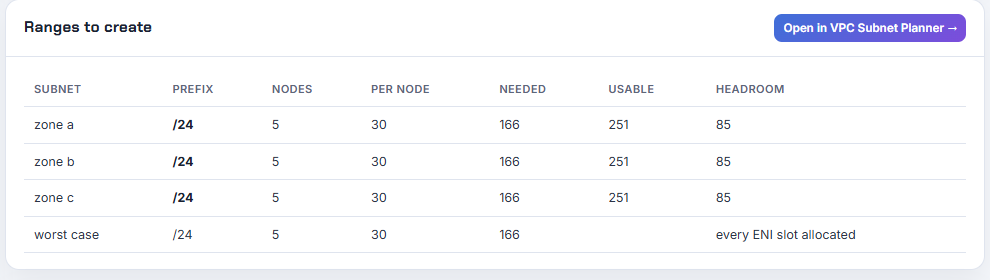
- EKS numbers that matter: an m5.large runs 29 pods (3 ENIs × (10 − 1) + 2) and can hold 30 VPC addresses, because the CNI allocates every address of an attached ENI and keeps one ENI warm. 5 nodes per zone need 166 addresses with the control-plane headroom, which is a /24. A c5.4xlarge computes to 234 pods but a managed node group caps it at 110.
- GKE: every node reserves a Pod range of 31 − ⌈log₂(max pods)⌉, so 110 pods is a /24 per node and 900 nodes need a /14 secondary range. Autopilot fixes 32 pods per node, a /26 each.
- AKS: legacy Azure CNI pre-assigns (nodes + surge) × (1 + maxPods) addresses, 1,581 for 50 nodes at the default 30, a /21. Overlay takes 51 addresses for the same cluster and puts pods in 10.244.0.0/16.
- Everything is sourced. Each rule links to the EKS, GKE or AKS documentation page it came from, and the EKS instance table (1,404 types) is generated from the file the EKS AMI itself uses. The Terraform exports validate against hashicorp/aws 6.69.1, google 8.7.0 and azurerm 5.10.0.
- Not your exact case? If the question is how many addresses a plain subnet has, read usable IP addresses per subnet; if you want the whole VPC laid out, start in the VPC Subnet Planner and come back here for the cluster.
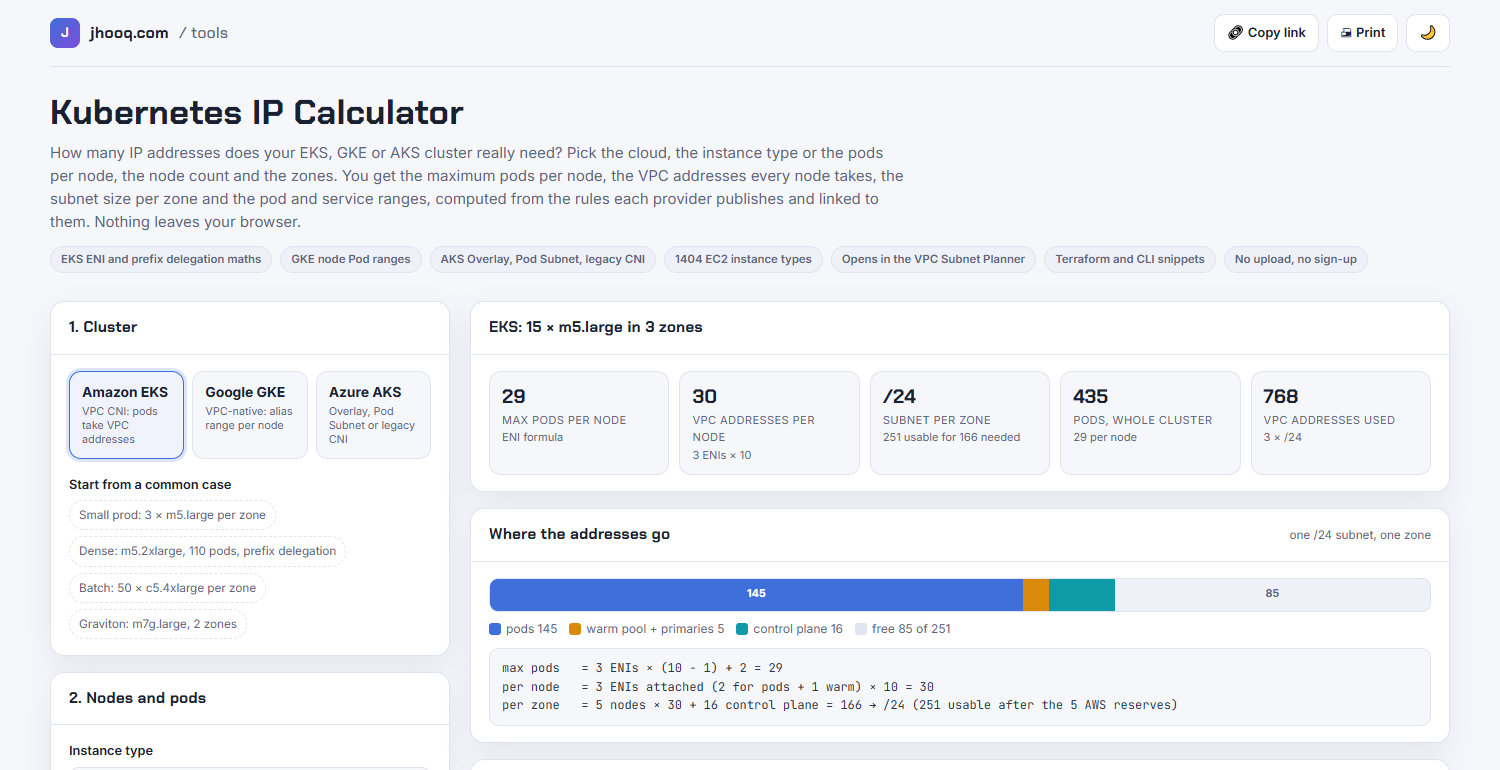
Table of Content
- Why the planner was not enough
- What the calculator does, per cloud
- EKS - the ENI formula, the warm pool and the cap
- EKS with prefix delegation
- GKE - a Pod range per node
- AKS - four plugins, four answers
- From the calculator to the planner and to Terraform
- How the numbers are kept honest
- What broke when I built this
- What it does not do yet
- Conclusion
1. Why the planner was not enough
The VPC Subnet Planner I shipped last week answers "how big is this subnet": a /24 has 251 usable addresses on AWS. The question under my EKS videos is a different one: "I have ten nodes in a /24 and the subnet is out of IP addresses, how?" The planner cannot answer that, because the answer depends on the instance type, the CNI mode and the node count, and each cloud does it differently. With the Amazon VPC CNI every pod takes a VPC address and every attached ENI takes all of its addresses whether pods use them or not. On GKE every node reserves a whole alias range. On AKS it depends on which of four network plugins you picked.
So I built the second tool: the Kubernetes IP Calculator. It is the same shape as the planner (one file, share link in the URL fragment, same visual language) and it hands its result to the planner with one click, so the two cover the whole path from "which CIDR" to "how many nodes fit".
2. What the calculator does, per cloud
| Cloud and mode | Max pods per node | What a node takes from your network | Source |
|---|---|---|---|
| EKS, VPC CNI secondary IPs | ENIs × (IPs per ENI − 1) + 2; managed node groups cap at 110 under 30 vCPU, 250 above | every attached ENI fully allocated; WARM_ENI_TARGET 1 keeps a spare ENI | EKS instance types, VPC CNI README |
| EKS, prefix delegation | ENI slots × 16 + 2, same cap | prefixes × 16 plus one primary address per ENI; needs contiguous /28 blocks | EKS prefix mode |
| EKS, cluster subnets | - | 6 free addresses per subnet minimum, 16 recommended, 2 Availability Zones; service CIDR /12 to /24 inside a private range | EKS network requirements |
| GKE, VPC-native | 8 to 256, default 110, Autopilot 32 | a /(31 − ⌈log₂ pods⌉) alias range per node; node pool Pod range at least /24; primary range reserves 4 | GKE max Pods per node |
| AKS, Azure CNI Overlay | 250 | one VNet address per node; a /24 per node from the pod CIDR, 10.244.0.0/16 by default | AKS IP planning |
| AKS, Azure CNI Pod Subnet | 110 | nodes in the node subnet, pods in a VNet pod subnet in batches of 16 | AKS dynamic IP allocation |
| AKS, Azure CNI node subnet (legacy) | 30 | (nodes + surge) + (nodes + surge) × maxPods, assigned up front | AKS IP planning |
For every result the page shows the arithmetic as a formula block, a bar of where the addresses go, the ranges to create, a checks list with a source link per item, and three exports.
3. EKS - the ENI formula, the warm pool and the cap
The default case is 5 m5.large per zone in 3 zones. The instance table says 3 ENIs and 10 IPv4 addresses per ENI, so:
1max pods   = 3 ENIs × (10 − 1) + 2 = 29
2per node   = 3 ENIs attached (2 for pods + 1 warm) × 10 = 30
3per zone   = 5 nodes × 30 + 16 control plane = 166 → /24 (251 usable after the 5 AWS reserves)
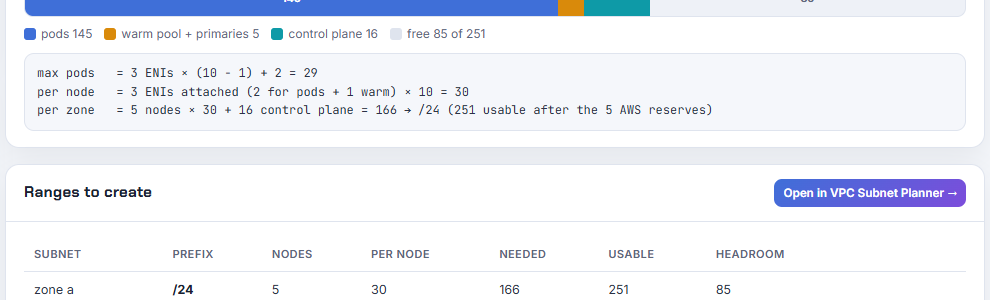
Two things in that block are the ones people miss. The "+ 2" is the VPC CNI and kube-proxy pods, which run with host networking and take no address. And "30 per node for 29 pods" is the warm pool: in secondary-IP mode the CNI allocates every address of an ENI when it attaches it, and with the default WARM_ENI_TARGET of 1 it keeps a whole ENI spare. On an m5.large that is 1 extra address. On an m5.8xlarge, with 8 ENIs of 30 addresses, a node running 20 pods still holds 60 addresses. The calculator shows that number per node and per zone, and the checks list tells you to set WARM_IP_TARGET and MINIMUM_IP_TARGET when the warm pool is more than half of what the pods use.
The third thing is the one I did not know before I read the current documentation for this tool: managed node groups cap maxPods at 110 for instances under 30 vCPU and 250 above, and the cap wins over the formula and over your own maxPodsExpression. Type c5.4xlarge and the calculator shows 110 with "capped (formula 234)", because 8 × 29 + 2 = 234 is what the ENI arithmetic allows and what older blog posts quote. Turn the "managed node group" switch off and you get 234 back, which is what self-managed nodes and custom AMIs see.
4. EKS with prefix delegation
Flip the prefix delegation switch and each ENI slot holds a /28 prefix, 16 addresses, instead of one address. For an m5.2xlarge at 110 pods:
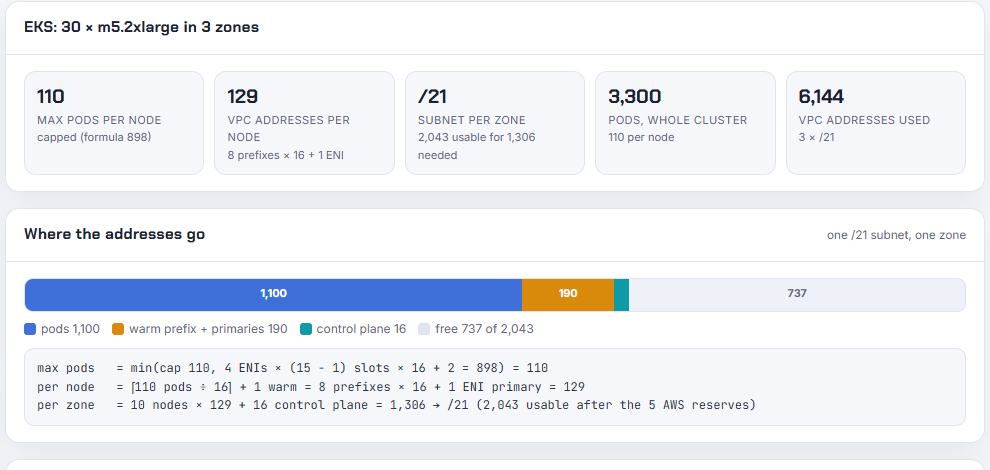
The formula gives 4 ENIs × 14 slots × 16 + 2 = 898, the cap makes it 110, and the node takes ⌈110 ÷ 16⌉ + 1 warm = 8 prefixes × 16 + 1 primary = 129 addresses. Ten of those per zone need a /21. The checks list adds the warning that matters in practice: prefixes come from free, aligned 16-address blocks, so a fragmented subnet makes prefix attachment fail. New subnet or a subnet CIDR reservation, not a migration in place.
5. GKE - a Pod range per node
GKE does not count pods; it hands each node a block of at least twice its max pods. The rule is M = 31 − ⌈log₂(Q)⌉, which the calculator reproduces exactly as the documentation table: 8 pods is a /28, 32 is a /26, 110 is a /24, 256 is a /23. The Pod secondary range then needs one block per node, and a node pool range can never be smaller than /24.
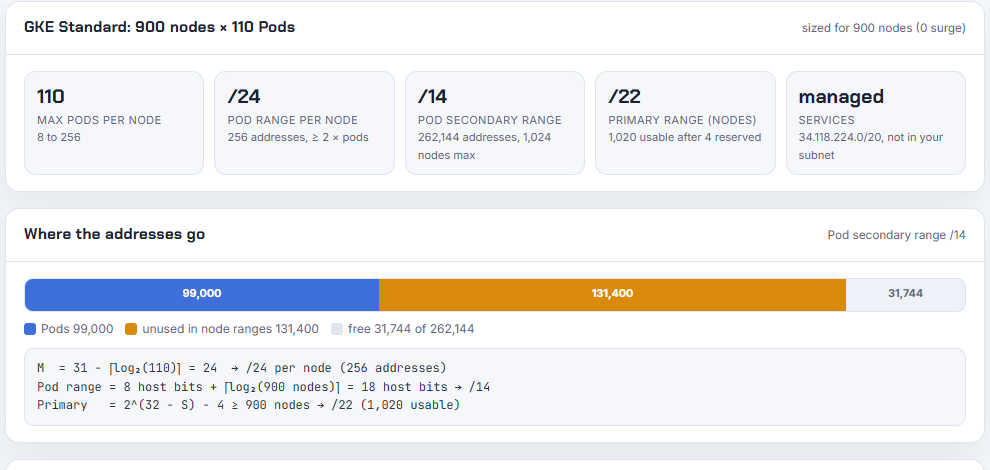
The documentation's example is 900 nodes at 110 pods per node needing a /14, and that is what the calculator returns. It also shows the two things the example leaves out: the primary range only needs to hold the nodes (900 nodes is a /22 after the 4 reserved addresses), and new clusters take Service IPs from the GKE-managed 34.118.224.0/20, so the Services secondary range most tutorials still create is optional. Autopilot fixes Q at 32, a /26 per node, which is why an Autopilot cluster of the same size needs a Pod range two bits smaller.
6. AKS - four plugins, four answers
AKS is where the plugin choice changes the answer by an order of magnitude. The documentation's own example is a 50-node cluster on legacy Azure CNI with the default 30 pods per node and one surge node: (51) + (51 × 30) = 1,581 addresses, a /21.
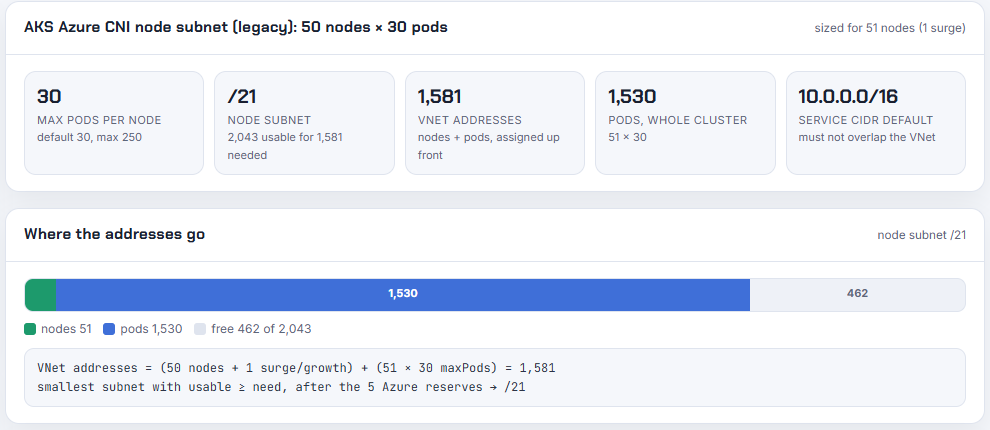
Switch the same cluster to Azure CNI Overlay and the VNet side drops to 51 addresses, a /26, because pods come from a private /24 per node out of 10.244.0.0/16. Pod Subnet mode puts the pods back in the VNet but in a separate subnet and in batches of 16, so 10 nodes at 110 pods need a /20 pod subnet next to a /27 node subnet. The calculator applies the right default max pods per plugin (250, 110, 30, 110), enforces the 10 to 250 range, and warns that the default overlay pod CIDR holds 256 nodes.
7. From the calculator to the planner and to Terraform
The "Open in VPC Subnet Planner" button builds a planner link with the subnets as tiers: on EKS a private node tier at the computed prefix per zone plus a public tier, on GKE the primary and Pod ranges, on AKS the node and pod subnets. I verified all three links load into the planner with the right cloud and tiers (design scores 92, 100 and 100) rather than falling back to defaults, which is the failure mode I hit with hand-built links last week.
The export tab has Terraform, a CLI block (eksctl YAML, gcloud or az aks create) and a Markdown summary. I validated the three Terraform snippets on 2026-10-19 with Terraform 1.16.2 against the current providers, wrapped in stub resources for the VPC, roles and resource group they reference:
1--- tf-k8s-eks
2- Using previously-installed hashicorp/aws v6.69.1
3Success! The configuration is valid.
4--- tf-k8s-gke
5- Installed hashicorp/google v8.7.0 (signed by HashiCorp)
6Success! The configuration is valid.
7--- tf-k8s-aks
8- Installed hashicorp/azurerm v5.10.0 (signed by HashiCorp)
9Success! The configuration is valid.
They are sizing sheets, not modules: the subnet, the cluster's network config, the node group with the instance type and max pods, and the vpc-cni add-on values when prefix delegation is on. Security groups, IAM and routing are yours.
8. How the numbers are kept honest
The EKS instance limits do not live in a documentation table I could copy; they live in instance-info.jsonl in the EKS AMI repository, the file nodeadm reads on boot to compute maxPods. A build script turns that file into a 44 KB JSON (ENIs, IPv4 per ENI, vCPU, memory for 1,404 instance types) with the upstream commit and date in its metadata, and a refresh script pulls the latest copy and reruns the tests. The page you load is a single 131 KB file with the engine and the table inlined, so there is no fetch at run time and the share link works offline.
The tests use the published numbers as fixtures: the max-pods values everyone quotes, the GKE table and its 900-node example, the AKS 1,581-address example. This is the run on 2026-10-19 with Node 22.23.2:
 1$ npm test
 2> node --test test/engine.test.js
 3ok 1 - EKS ENI formula reproduces the published max-pods values
 4ok 2 - EKS managed node group cap: 110 under 30 vCPU, 250 above
 5ok 3 - EKS prefix delegation: formula x16, then the cap binds
 6ok 4 - EKS per-node VPC addresses in secondary-IP mode
 7ok 5 - EKS per-node VPC addresses in prefix mode
 8ok 6 - EKS plan picks the subnet per zone
 9ok 7 - EKS service CIDR rules
10ok 8 - GKE node Pod range per max pods
11ok 9 - GKE 900 nodes x 110 pods needs a /14 Pod range (doc example)
12ok 10 - GKE primary range: 252 nodes fit a /24, 253 need a /23; node pool Pod range floor is /24
13ok 11 - GKE Autopilot fixes 32 pods per node
14ok 12 - AKS legacy Azure CNI: 50 nodes, 30 pods, surge 1 -> 1,581 addresses -> /21
15ok 13 - AKS overlay: nodes only in the VNet, a /24 per node from the pod CIDR
16ok 14 - AKS pod subnet: batches of 16 per node
17ok 15 - AKS maxPods bounds
18ok 16 - prefixFor respects reserved addresses and bounds
19# tests 16
20# pass 16
21# fail 0
The source is on GitHub at rahulwagh/kubernetes-ip-calculator under the MIT licence, with the same tests running in CI.
9. What broke when I built this
1. The max-pods file I planned to use is gone. Every older guide, including the EKS best-practices page, points at eni-max-pods.txt and a max-pods-calculator.sh script in the EKS AMI repository. Both return 404 today; the repository replaced them with instance-info.jsonl and a Go function (DefaultMaxENIs × (Ipv4AddressesPerInterface − 1) + 2) in nodeadm/internal/kubelet/eni_max_pods.go. I generate the table from the new file and cite the Go function for the formula. If your own scripts still curl the old text file, they are quietly failing.
2. The current azurerm provider rejects the obvious AKS resource. My first terraform validate for the AKS snippet failed with Insufficient node_provisioning_profile blocks ... At least 1 "node_provisioning_profile" blocks are required. That block is new in azurerm 5.x; it did not exist in the 4.x examples I had in my head. The export now includes node_provisioning_profile { mode = "Manual" } with a comment saying why.
3. The AWS provider deprecated an attribute I used in the first line. data.aws_region.current.name validates with a warning on hashicorp/aws 6.69.1: name is deprecated. Use region instead. The export uses .region now, which means it needs provider 6.
4. The first CI run was red for a one-character reason. node --test test/ with a directory argument fails on Node 22 with Cannot find module ... test, even though the same tests pass when the file is named. The workflow, package.json and the refresh script all call the file explicitly now.
5. Five instance types have no vCPU count upstream. bmn-sf1.metal, c5a.metal, c5ad.metal, cr1.8xlarge and hs1.8xlarge carry ENI and IP limits but no vCPU value in instance-info.jsonl. I kept them, and the cap logic treats a missing vCPU as under 30, which is the conservative direction; if you run clusters on those five, check the cap by hand.
6. A label I shipped locally was wrong. The AKS overlay result called its pod CIDR a "pod subnet (VNet)" because my label test matched the word "VNet" inside the phrase "not VNet space". It never reached the live site, but it is exactly the kind of mistake this tool exists to prevent, so it is in the list.
10. What it does not do yet
Windows nodes, IPv6 clusters, EKS custom networking with secondary CIDRs, security groups for pods (branch ENIs), GKE multi-Pod CIDR and AKS static block allocation all change the arithmetic and are not modelled. The numbers are planning maximums: real clusters also lose addresses to load balancers, endpoints and nodes being replaced during upgrades, which is why the control-plane headroom and the surge node are inputs rather than assumptions. Tell me which of those gaps hurts you on the YouTube channel or in the repository issues and it moves up the list.
11. Conclusion
To summarise:
- On EKS, pods take VPC addresses and ENIs take them in whole blocks: 29 pods and 30 addresses per m5.large, and managed node groups cap maxPods at 110 or 250 whatever the formula says.
- On GKE, each node reserves 31 − ⌈log₂(max pods)⌉: a /24 per node at 110 pods, a /14 for 900 nodes.
- On AKS, the plugin decides: 1,581 VNet addresses for 50 nodes on legacy CNI, 51 on Overlay.
- The calculator does the arithmetic from the documented rules, links each rule, hands the subnets to the planner and exports Terraform that validates today.
- Size by nodes × addresses per node, add the control plane and the surge, round up to the next prefix, and leave room for the warm pool you did not know you had.
Did this save you a debugging session? Stay in the loop -
- Subscribe on YouTube - every post here has a screen-recorded companion video.
- Code on GitHub - the repositories, Terraform and scripts behind these posts.
Learn more On Kubernetes -
- Setup kubernetes on Ubuntu
- Setup Kubernetes on CentOs
- Setup HA Kubernetes Cluster with Kubespray
- Setup HA Kubernetes with Minikube
- Setup Kubernetes Dashboard for local kubernetes cluster
- Setup Kubernetes Dashboard On GCP(Google Cloud Platform)
- How to use Persistent Volume and Persistent Volume Claims in Kubernetes
- Deploy Spring Boot Microservice on local Kubernetes cluster
- Deploy Spring Boot Microservice on Cloud Platform(GCP)
- Setting up Ingress controller NGINX along with HAproxy inside Kubernetes cluster
- CI/CD Kubernetes | Setting up CI/CD Jenkins pipeline for kubernetes
- kubectl export YAML | Get YAML for deployed kubernetes resources(service, deployment, PV, PVC....)
- How to setup kubernetes jenkins pipeline on AWS?
- Implementing Kubernetes liveness, Readiness and Startup probes with Spring Boot Microservice Application?
- How to fix kubernetes pods getting recreated?
- How to delete all kubernetes PODS?
- How to use Kubernetes secrets?
- Share kubernetes secrets between namespaces?
- How to Delete PV(Persistent Volume) and PVC(Persistent Volume Claim) stuck in terminating state?
- Delete Kubernetes POD stuck in terminating state?
- Kubernetes IP Calculator - the free tool that sizes node subnets, Pod ranges and max pods per node for EKS, GKE and AKS