Kubernetes IP Address Planning: 22 Problems the Free IP Calculator Solves on EKS, GKE, AKS and On-Premises (kubeadm, Mirantis MKE, RKE2, OpenShift, Tanzu, Talos), with the Numbers and a Screenshot for Each

TL;DR
- Every "my cluster has no IPs left" ticket is one of four address pools filling up: the node subnet, the pod addresses, the service CIDR, or the load-balancer pool. Which pool fills first depends on the platform: on EKS pods take VPC addresses (an m5.2xlarge holds 60), on GKE every node reserves a Pod range (/24 for 110 pods, so 900 nodes need a /14), on AKS legacy CNI pre-assigns pods (50 nodes × 30 pods = 1,581 addresses, a /21) while Overlay takes 51, and on-premises a /16 pod CIDR holds 256 kubeadm or RKE2 nodes, 512 Calico nodes at 110 pods, or 512 OpenShift nodes at hostPrefix 23.
- The Kubernetes IP Calculator answers all 22 problems below in the browser, in about five seconds: pick the cloud or the on-premises distribution (kubeadm, Mirantis MKE, RKE2/k3s, OpenShift, Tanzu, Talos), the node size or CNI, the node count and the pods per node, and you get the one number you came for, the subnets named inside your VPC, a diagram of where every address goes, the checks that block a bad plan, and the Terraform, eksctl, kubeadm, RKE2, install-config or Talos snippet.
- Every number has a source. Each rule links to the EKS, GKE, AKS, Kubernetes, Calico, Cilium, Flannel, RKE2, OpenShift, Mirantis, Broadcom, Sidero or MetalLB page it came from, and the 1,404-type EKS instance table is generated from the EKS AMI repository. Nothing leaves your browser; the share link reproduces a calculation for a colleague.
- Not your exact case? If you only want to know how many addresses a plain subnet has, read usable IP addresses per subnet on AWS, Azure and GCP; if the pain is specifically an EKS subnet at 0 free addresses, start with EKS running out of IP addresses.
Table of Content
- The four address pools every cluster drains
- Amazon EKS problems
- Google GKE problems
- Azure AKS problems
- On-premises problems: kubeadm, Mirantis MKE, RKE2, OpenShift, Tanzu, Talos
- What broke when I ran this
- Every problem, the one number, and the preset that shows it
- Sharing a plan with your team
- What the calculator does not do
- FAQ
1. The four address pools every cluster drains
I used to treat "the cluster is out of IP addresses" as one problem. It is four, and the fix for one makes the others worse:
| Pool | Who takes from it | EKS | GKE | AKS | On-premises |
|---|---|---|---|---|---|
| Node addresses | one per node, plus control plane or VIPs | VPC subnet, plus 16 recommended for the control plane | subnet primary range, 4 reserved | VNet node subnet, 5 reserved | VLAN: nodes + control-plane VIPs + MetalLB pool |
| Pod addresses | the big one | the same VPC subnet (secondary IPs or /28 prefixes), or a 100.64.0.0/10 secondary CIDR with custom networking | Pod secondary range, one /M block per node | pod CIDR outside the VNet (Overlay), a VNet pod subnet (Pod Subnet), or the node subnet itself (legacy CNI) | pod CIDR split into one block per node (/24 default, /23 on OpenShift, /26 blocks on Calico) |
| Service addresses | ClusterIPs, virtual | /12 to /24 private range that must not overlap the VPC | GKE-managed 34.118.224.0/20 by default | service CIDR, default 10.0.0.0/16 | service CIDR: 10.96.0.0/12 (kubeadm, Talos), 10.43.0.0/16 (RKE2), 172.30.0.0/16 (OpenShift), 10.96.0.0/16 (MKE), 100.64.0.0/13 (Tanzu) |
| Load-balancer addresses | one per Service of type LoadBalancer | ELB in the subnet | Google load balancer | Azure load balancer | MetalLB or kube-vip pool inside the VLAN |
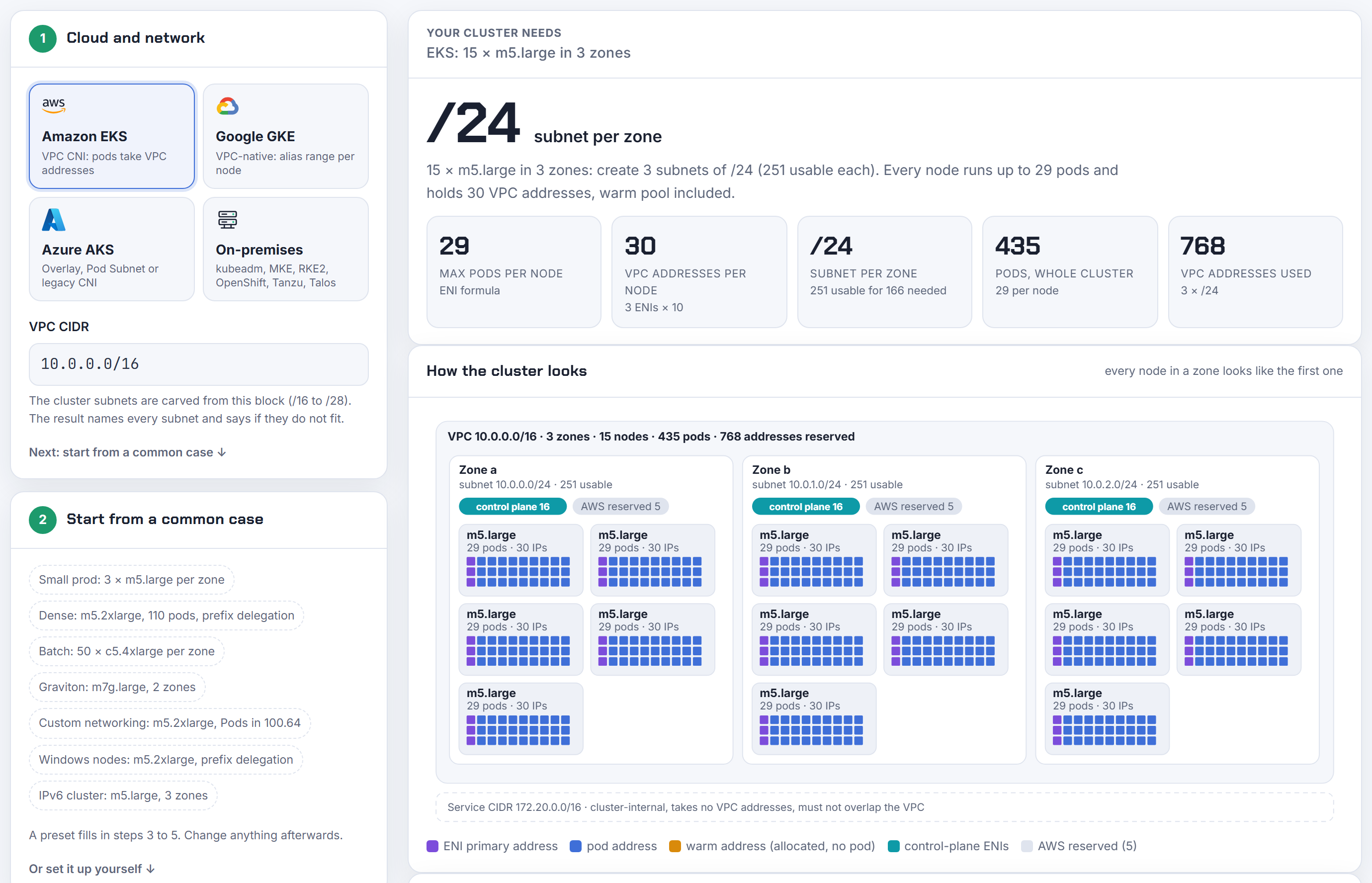
The calculator sizes all four at once and shows them in one picture, so the trade-off is visible before you create the ranges. The rest of this post is the problems, grouped by platform, each with the number the tool gives and the screenshot of it giving it. All numbers below come from version 1.4.0 of the tool on 2026-10-28; the exact run is in section 6.
2. Amazon EKS problems
Problem 1: the EKS subnet is out of IP addresses with only 10 nodes
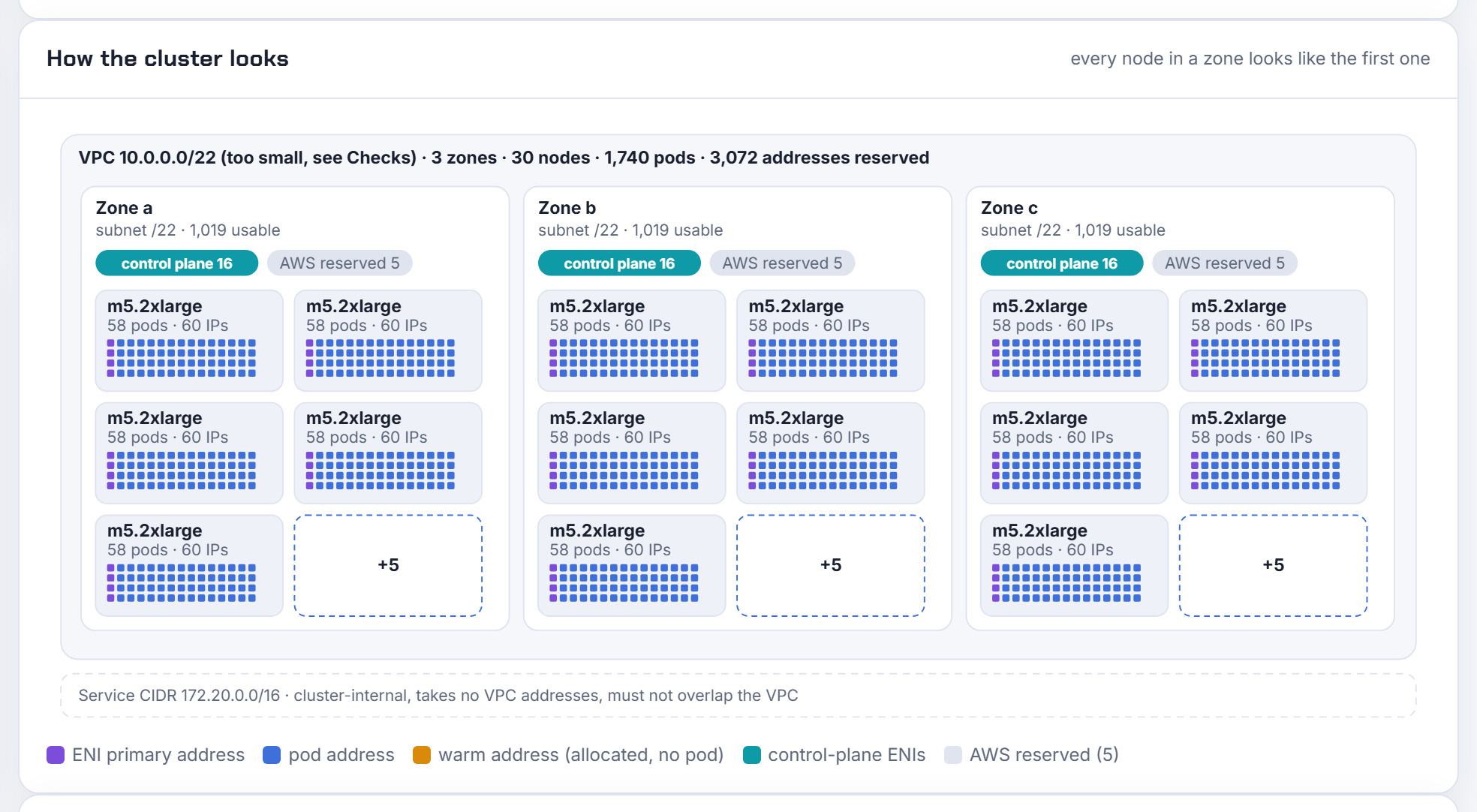
The ticket reads "we have 10 nodes and a /23, how can 507 addresses be gone?" Because on EKS pods, not nodes, take the addresses. The VPC CNI attaches ENIs to the node and allocates every secondary address of every attached ENI, whether a pod uses it or not. An m5.2xlarge has 4 ENIs × 15 addresses, so one node can hold 60 VPC addresses for its 58 pods. Ten of them per zone need 616 addresses per zone (600 for the nodes plus 16 for the control plane), and the smallest AWS subnet that holds 616 is a /22 with 1,019 usable.
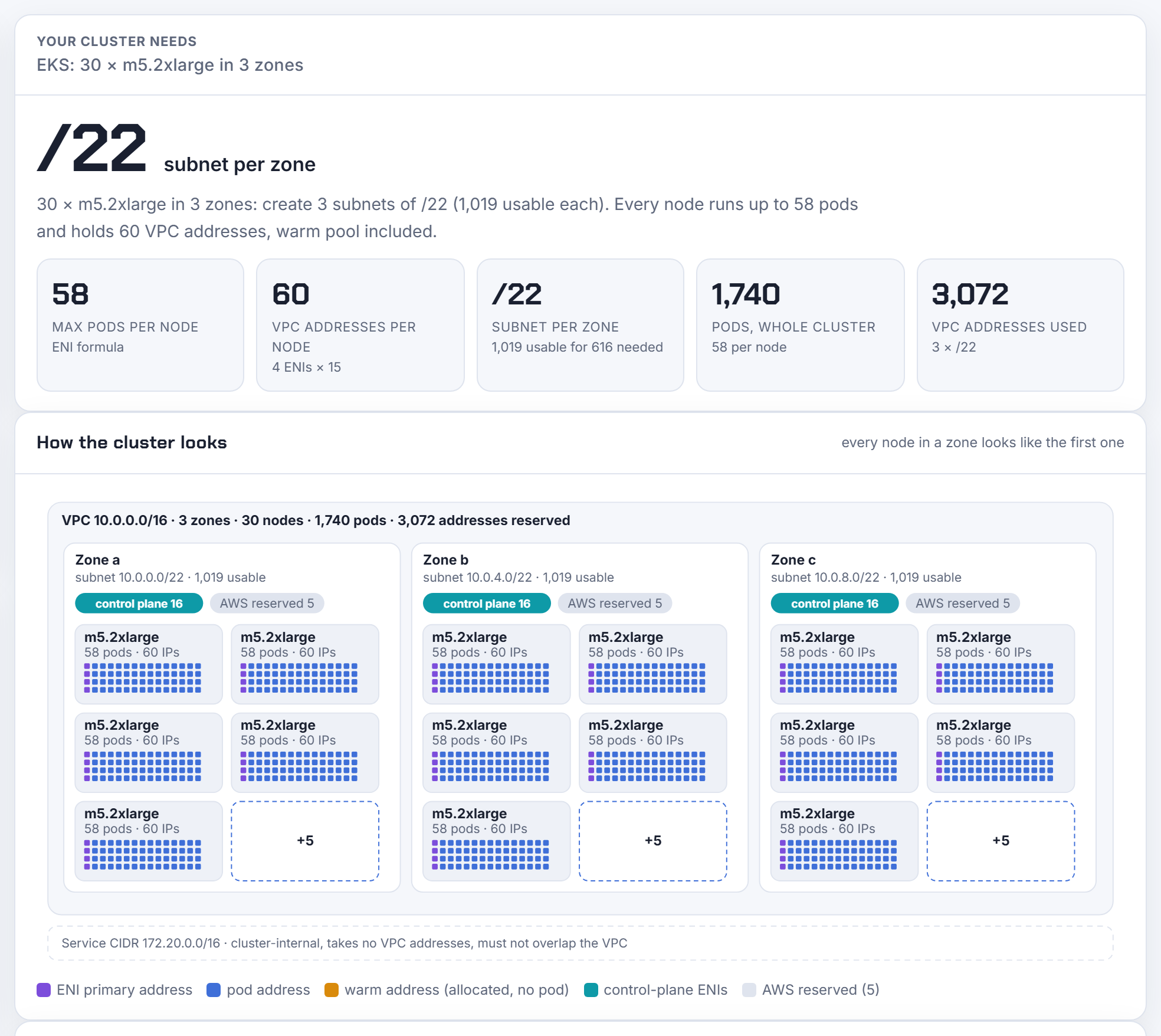
The diagram makes the waste visible: each tile is one node, each square one address, the violet square the ENI's own primary address and the amber ones the warm pool the CNI keeps ready. If you want to shrink the warm pool, set WARM_IP_TARGET and MINIMUM_IP_TARGET on the add-on; the worst-case row in the ranges table shows what the zone needs if every ENI slot is allocated anyway. The long version of this one is in EKS running out of IP addresses.
Problem 2: how many pods can an EKS node run, and why 110 keeps appearing
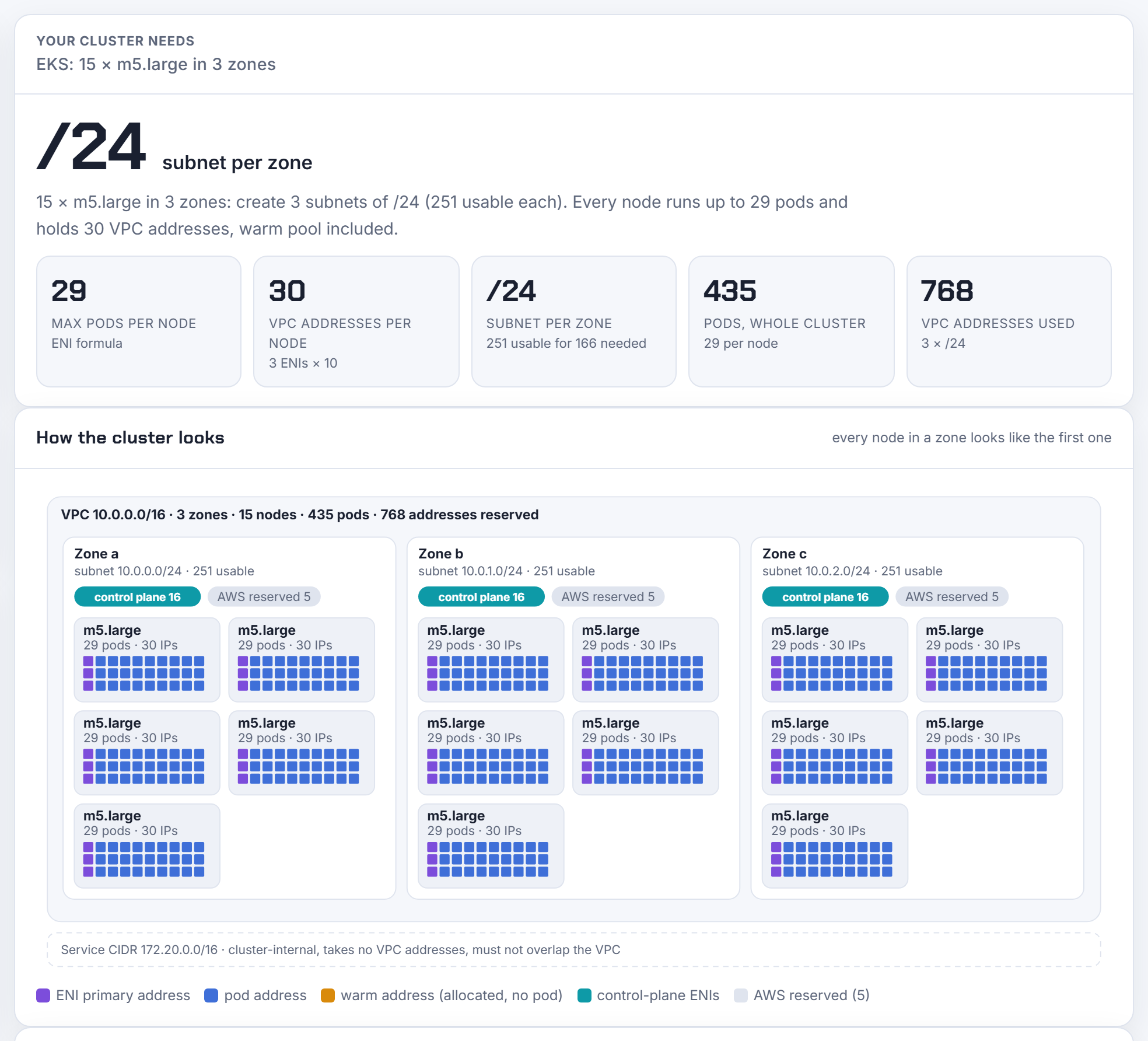
The formula from the EKS documentation is ENIs × (IPs per ENI − 1) + 2. An m5.large is 3 × (10 − 1) + 2 = 29 pods, and it can hold 30 VPC addresses, one more than its pods, because the CNI allocates whole ENIs. Managed node groups then cap the value at 110 for instance types under 30 vCPU and 250 above, so a c5.4xlarge whose formula says 234 advertises 110. The calculator shows both numbers and which rule won.
Problem 3: I need 110 pods per node, the ENI formula gives 58
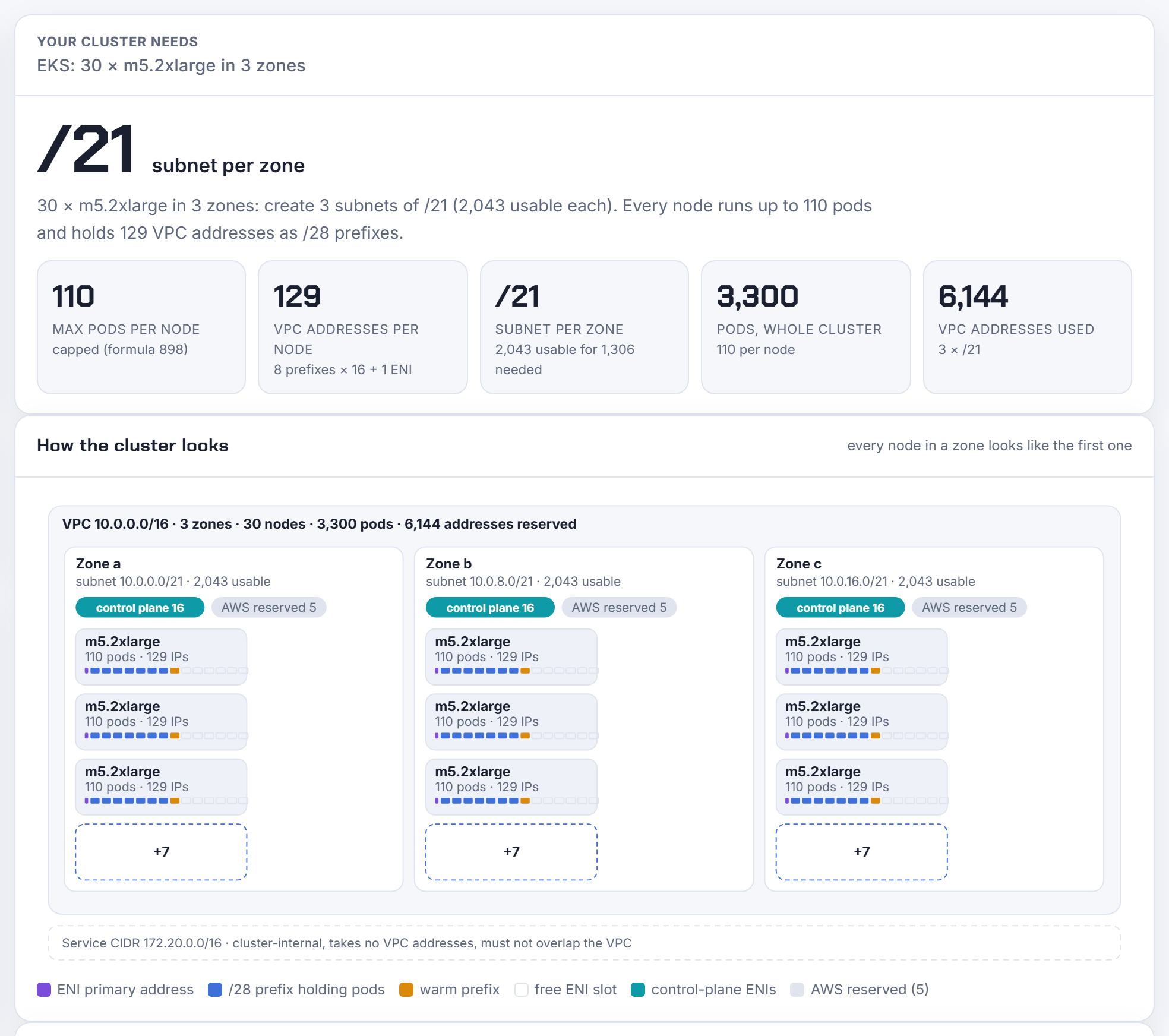
Prefix delegation. Each ENI slot holds a /28 prefix of 16 addresses instead of one address, so an m5.2xlarge's formula jumps to 4 × 14 × 16 + 2 = 898 and the managed node group cap makes it 110. The price is on the subnet side: a node running 110 pods holds 8 prefixes (7 for the pods plus one warm) and one primary address per ENI, 129 addresses, so 10 nodes per zone need 1,306 addresses and a /21 per zone. Prefixes also need contiguous, aligned /28 blocks, which a fragmented subnet cannot give; the checks say so.
Problem 4: the VPC has no space left for pods at all
When the routable VPC is a /20 shared with everything else, the answer is custom networking: nodes keep one address in the node subnet and every pod ENI moves to a per-zone subnet carved from a secondary CIDR, which AWS recommends taking from 100.64.0.0/10 because corporate networks rarely use it. The catch nobody expects: the primary ENI no longer serves pods, so max pods drops. An m5.2xlarge goes from 58 to (4 − 1) × (15 − 1) + 2 = 44. For 10 nodes per zone in 2 zones the calculator sizes a /27 node subnet and a /23 pod subnet per zone and names the secondary block, 100.64.0.0/22.
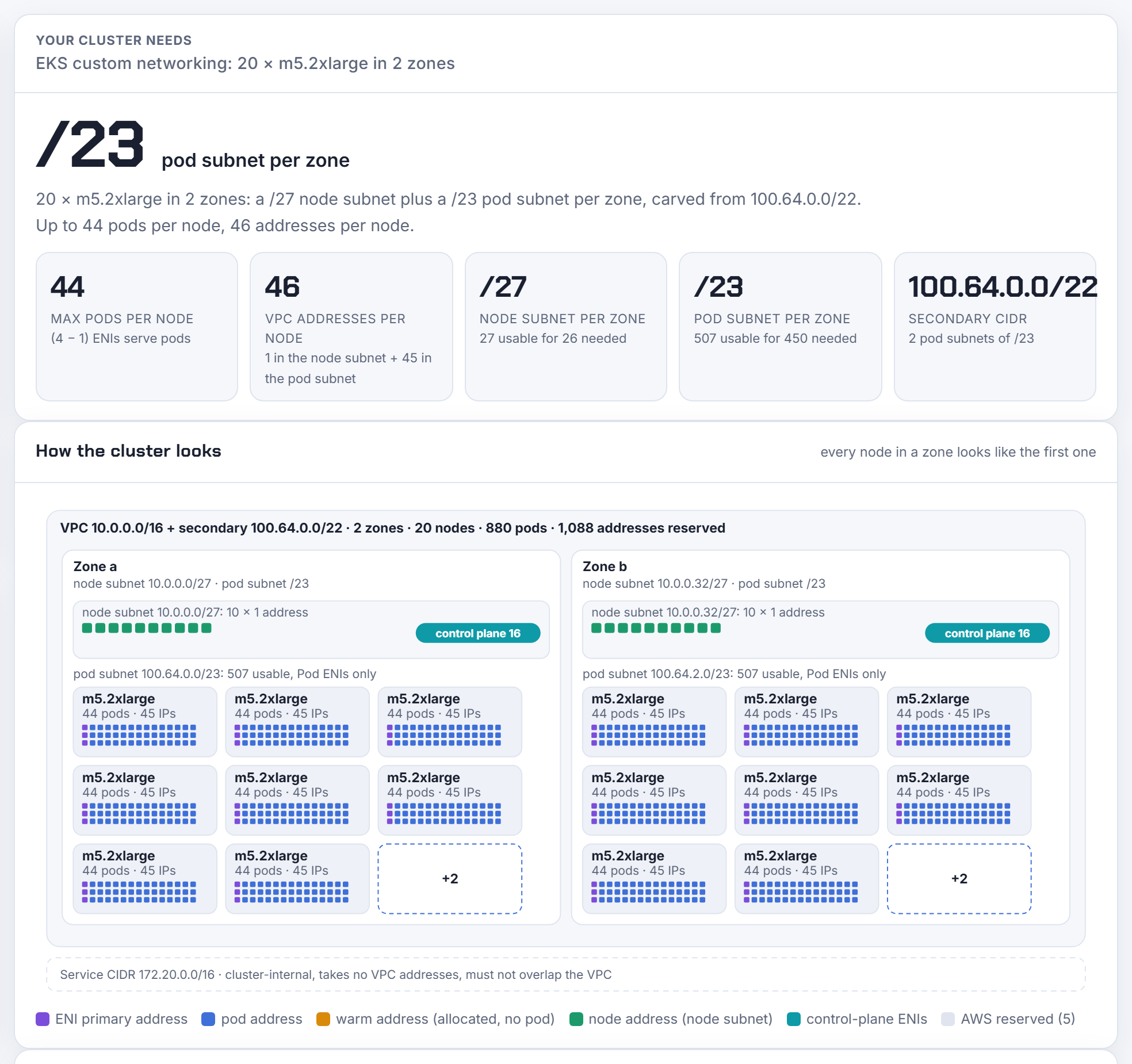
The Terraform tab writes the aws_vpc_ipv4_cidr_block_association, both subnet sets and the add-on's AWS_VPC_K8S_CNI_CUSTOM_NETWORK_CFG setting; the CLI tab writes one ENIConfig per zone. Existing nodes keep their ENIs, so this needs a new node group.
Problem 5: Windows nodes only run 14 pods
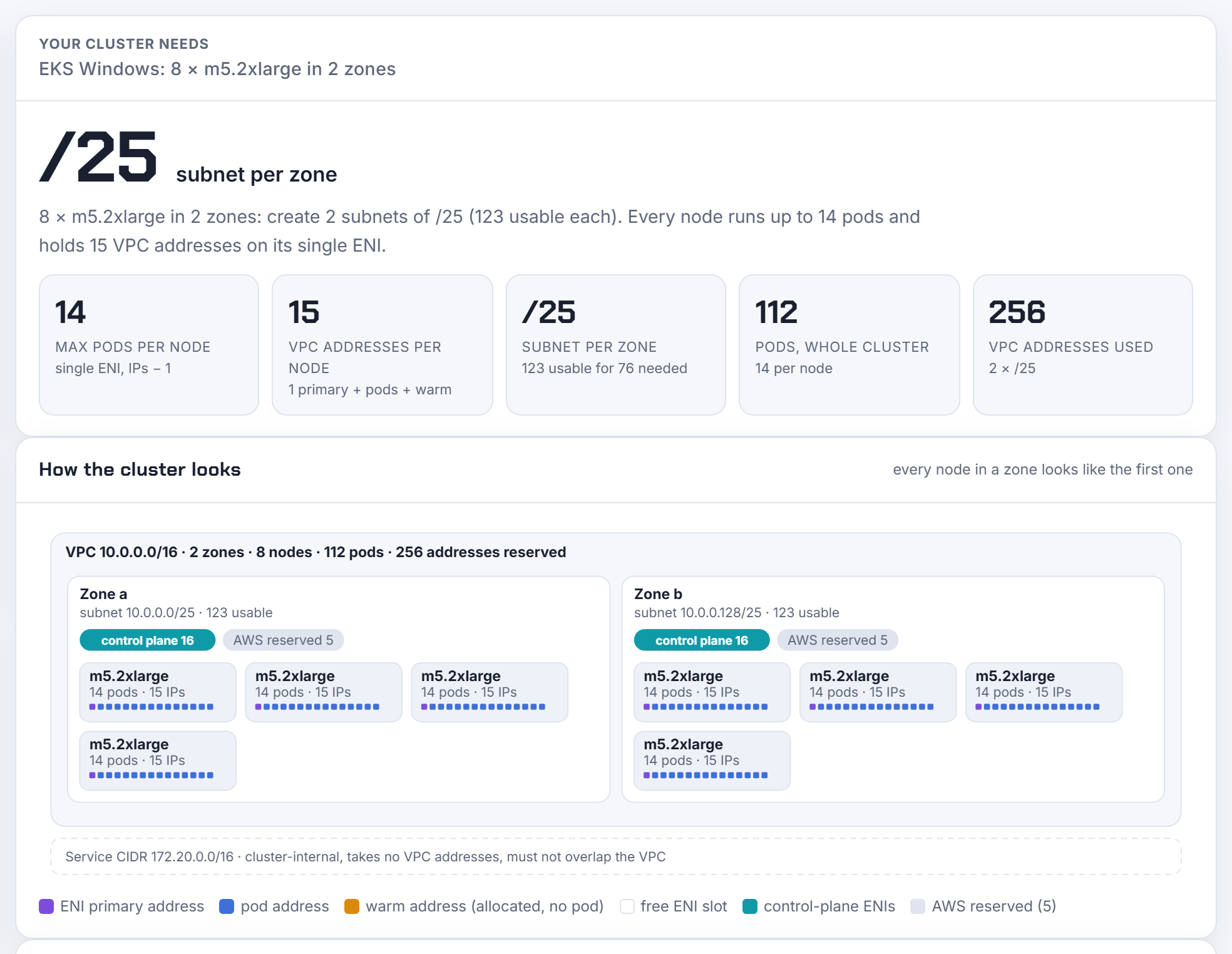
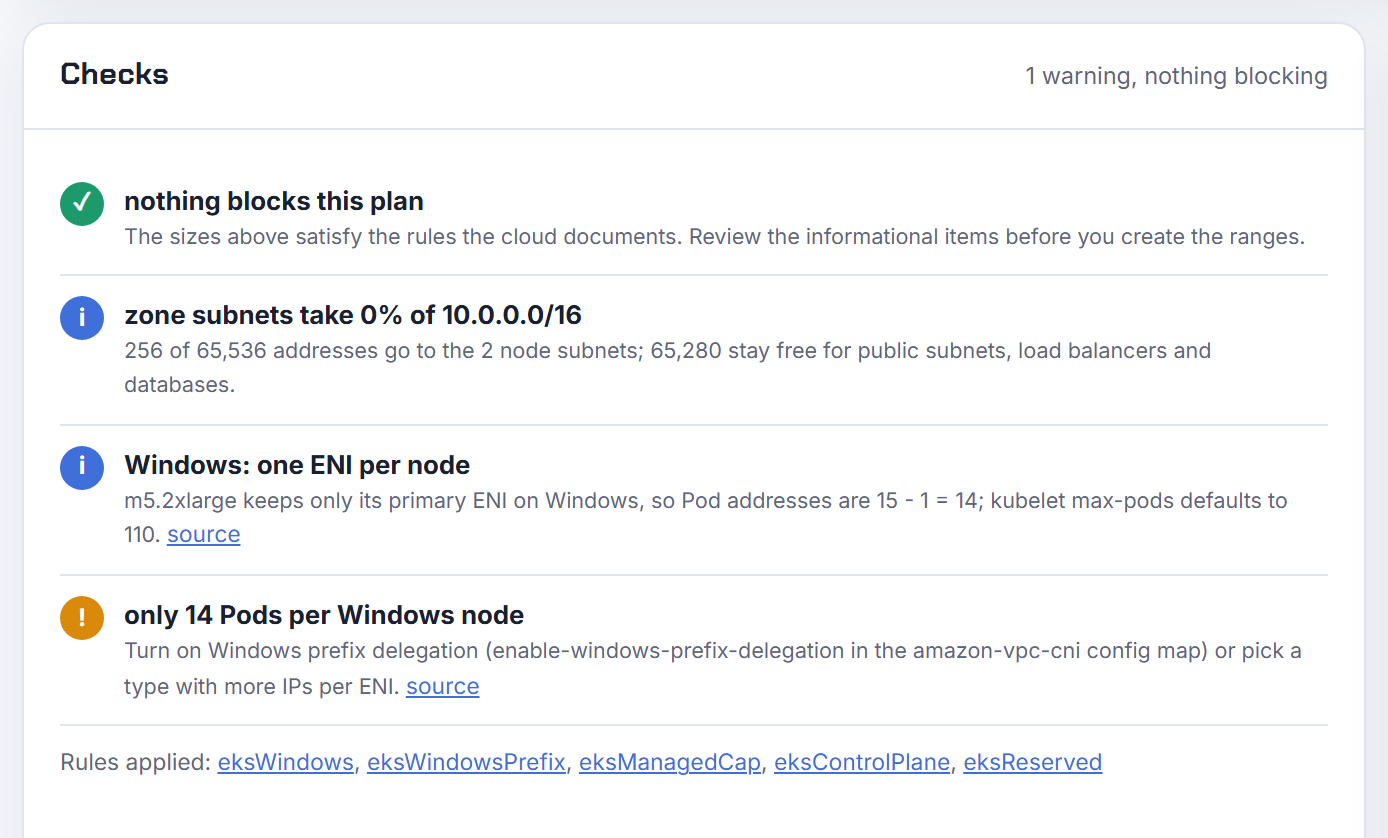
Windows nodes keep a single ENI, so pod addresses are IPs per ENI − 1: 14 on an m5.2xlarge, 9 on an m5.large. Teams size a Windows node pool like a Linux one and then watch pods wait in ContainerCreating at 15. Windows prefix delegation multiplies the 14 by 16 (224), and kubelet's default max-pods of 110 then applies. The calculator warns below 30 pods and tells you the config map key (enable-windows-prefix-delegation).
Problem 6: stop the IPv4 exhaustion for good
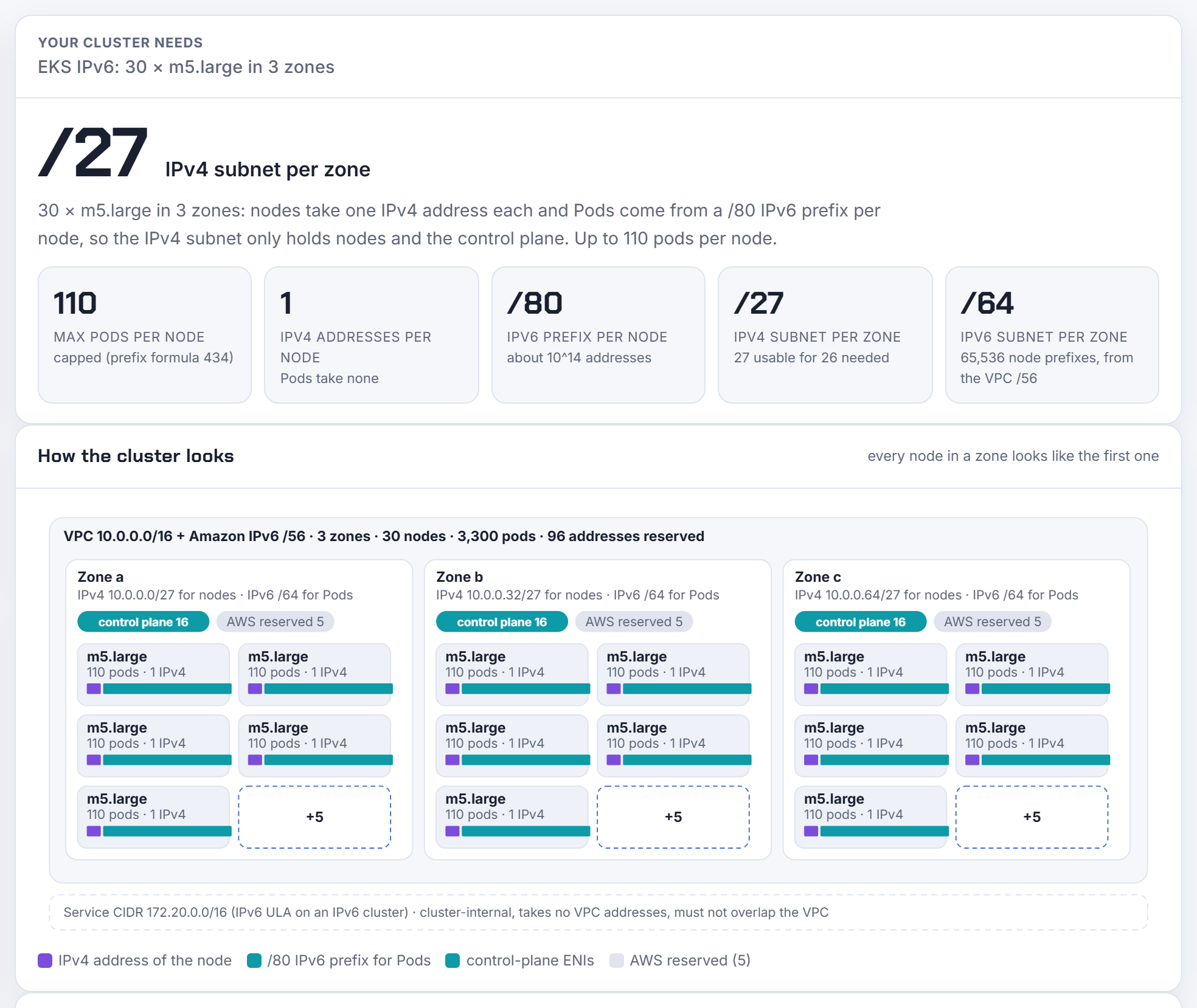
An IPv6 cluster takes the pods out of the IPv4 subnet entirely. Each node gets a /80 IPv6 prefix for its pods (about 10^14 addresses) and one IPv4 address for itself, so 10 m5.large per zone need 26 IPv4 addresses per zone, a /27 instead of the /24 the same nodes need on IPv4. Max pods comes from the prefix formula and the cap, 110 for an m5.large, and the real limit becomes CPU and memory. The constraints matter: it is a creation-time choice, Nitro instances only, no custom networking, and Services are IPv6 only.
Problem 7: the service CIDR overlaps the VPC, or is the wrong size
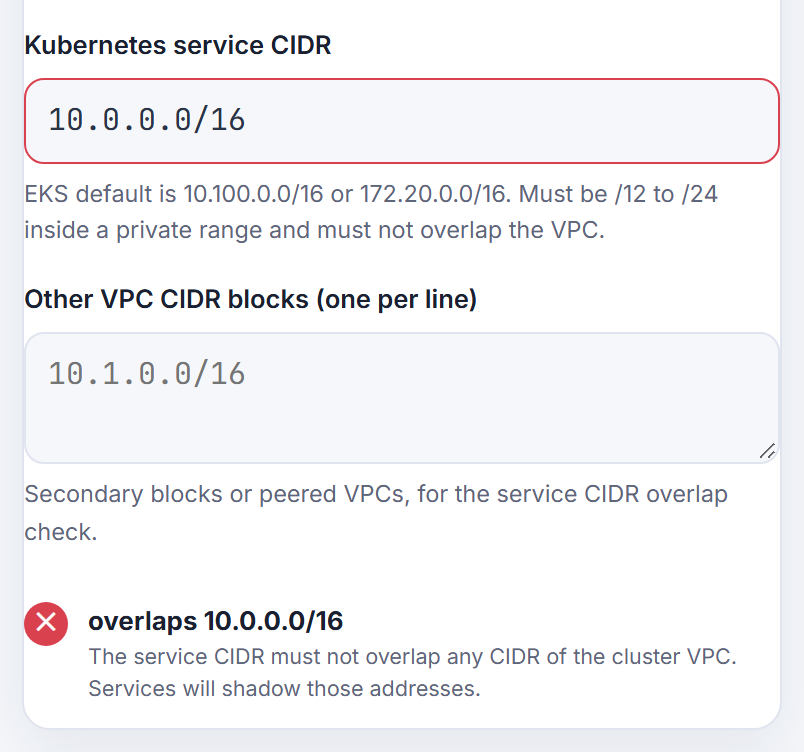
EKS accepts a service CIDR between /24 and /12 inside 10.0.0.0/8, 172.16.0.0/12 or 192.168.0.0/16, and it must not overlap any VPC CIDR, because Services would shadow those addresses. People hit this when the VPC is 10.0.0.0/16 and someone picks 10.0.0.0/16 for Services too. The check under More options reads the VPC CIDR from step 1 and any other blocks you list.
Problem 8: the zone subnets do not fit in the VPC
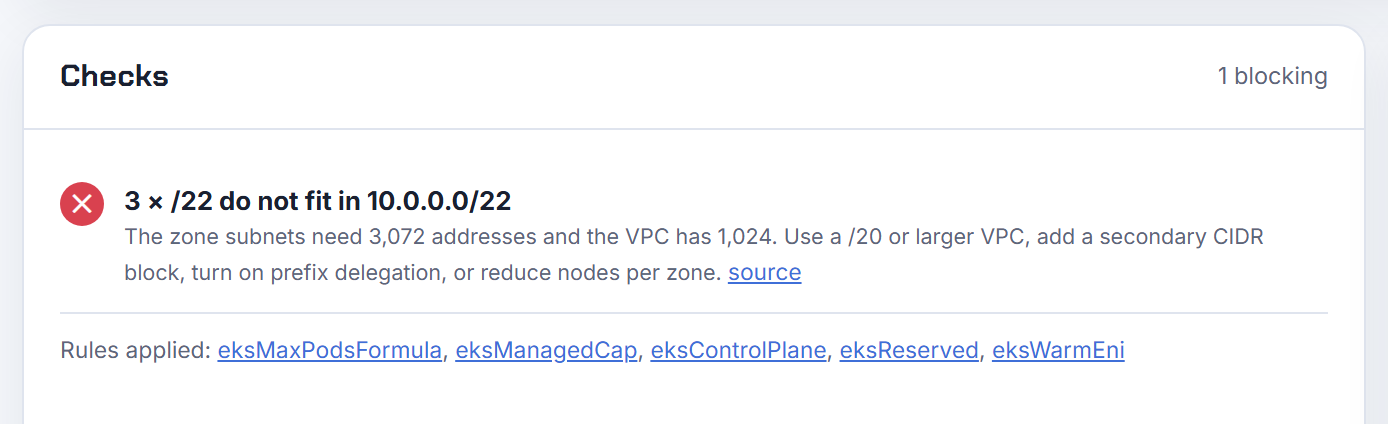
This one hides until terraform apply. Three /22 subnets need 3,072 addresses; a VPC of 10.0.0.0/22 has 1,024. Older versions of the calculator assumed a /16 in the exports (see section 6); since 1.3.1 the VPC CIDR is an input and the checks say when the subnets do not fit, with the smallest VPC that would, or a secondary CIDR block, or prefix delegation as the way out. When they fit, the subnets are named: 10.0.0.0/22, 10.0.4.0/22, 10.0.8.0/22.
3. Google GKE problems
Problem 9: how big should the GKE Pod secondary range be?
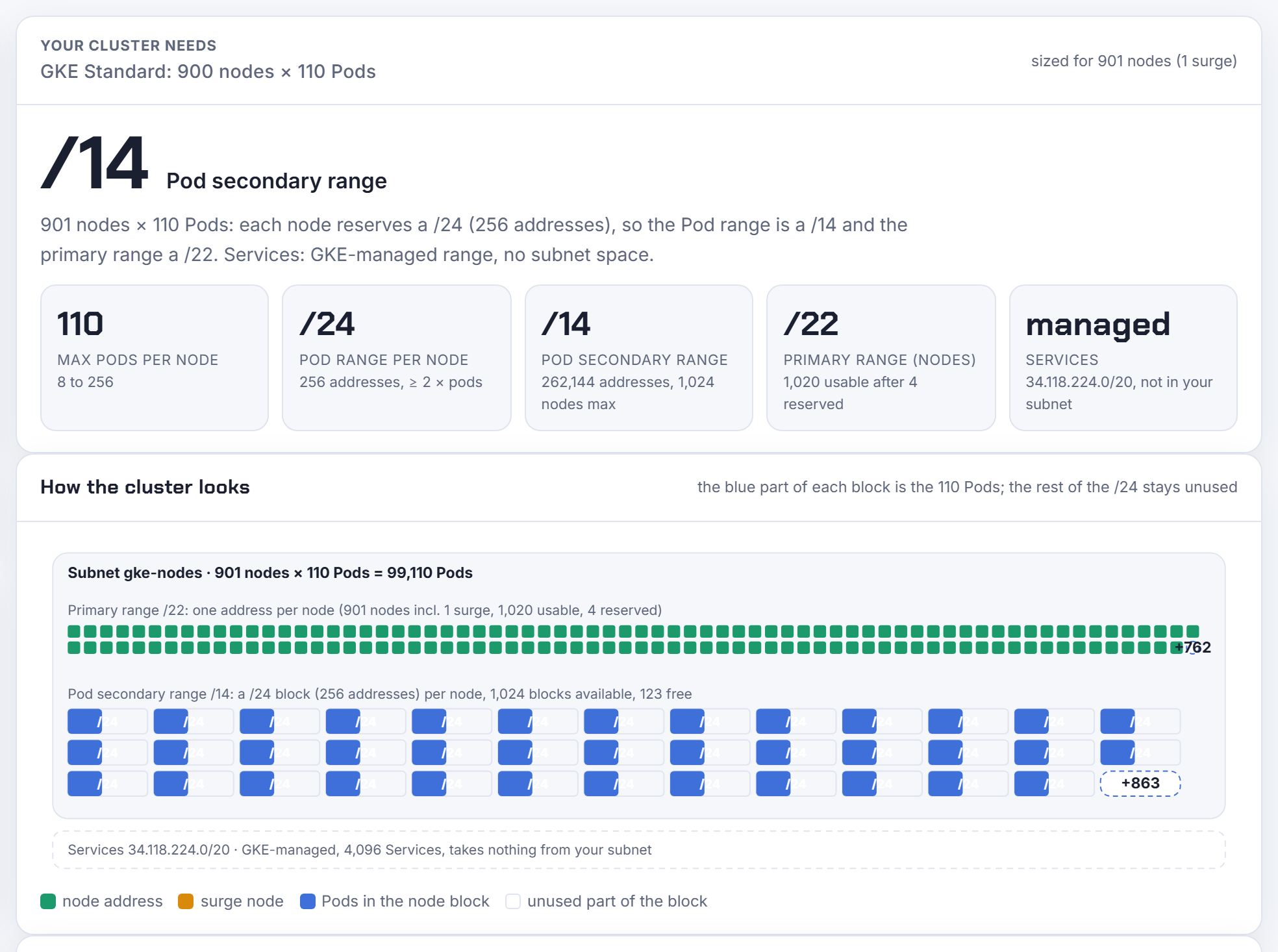
GKE is the opposite of EKS: addresses are reserved per node, not per pod. Every node gets a Pod range of /(31 − ⌈log₂(max pods)⌉), so the default 110 pods reserve a /24 (256 addresses) per node whether 3 pods or 110 run on it. The documentation's own example, 900 nodes at 110 pods, needs a /14 Pod secondary range; the calculator reproduces it, plus a /22 primary range for the nodes (4 addresses reserved) and the note that the range is immutable after cluster creation.
Problem 10: the cluster cannot add a node because the Pod range is full
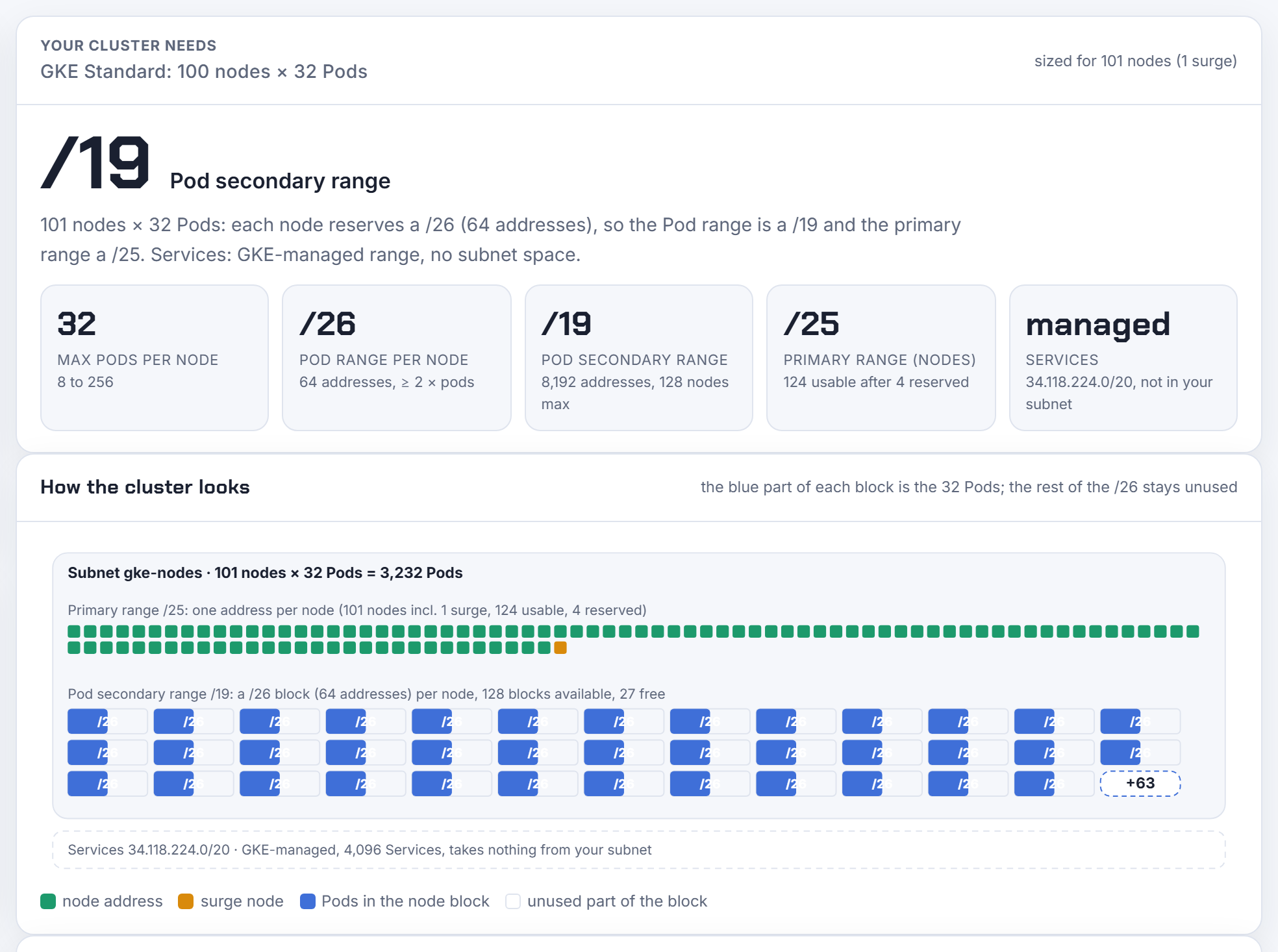
The autoscaler says the node pool is at its limit while the VPC looks empty. The Pod secondary range was created too small for the node count, and GKE cannot grow it. The way out for the next cluster is lower max pods per node: at 32 pods each node reserves only a /26, so a /19 holds 128 nodes instead of 32. The calculator shows the block per node, the range and how many nodes fit, so you can pick the density before the range is fixed.
Problem 11: what does Autopilot reserve?
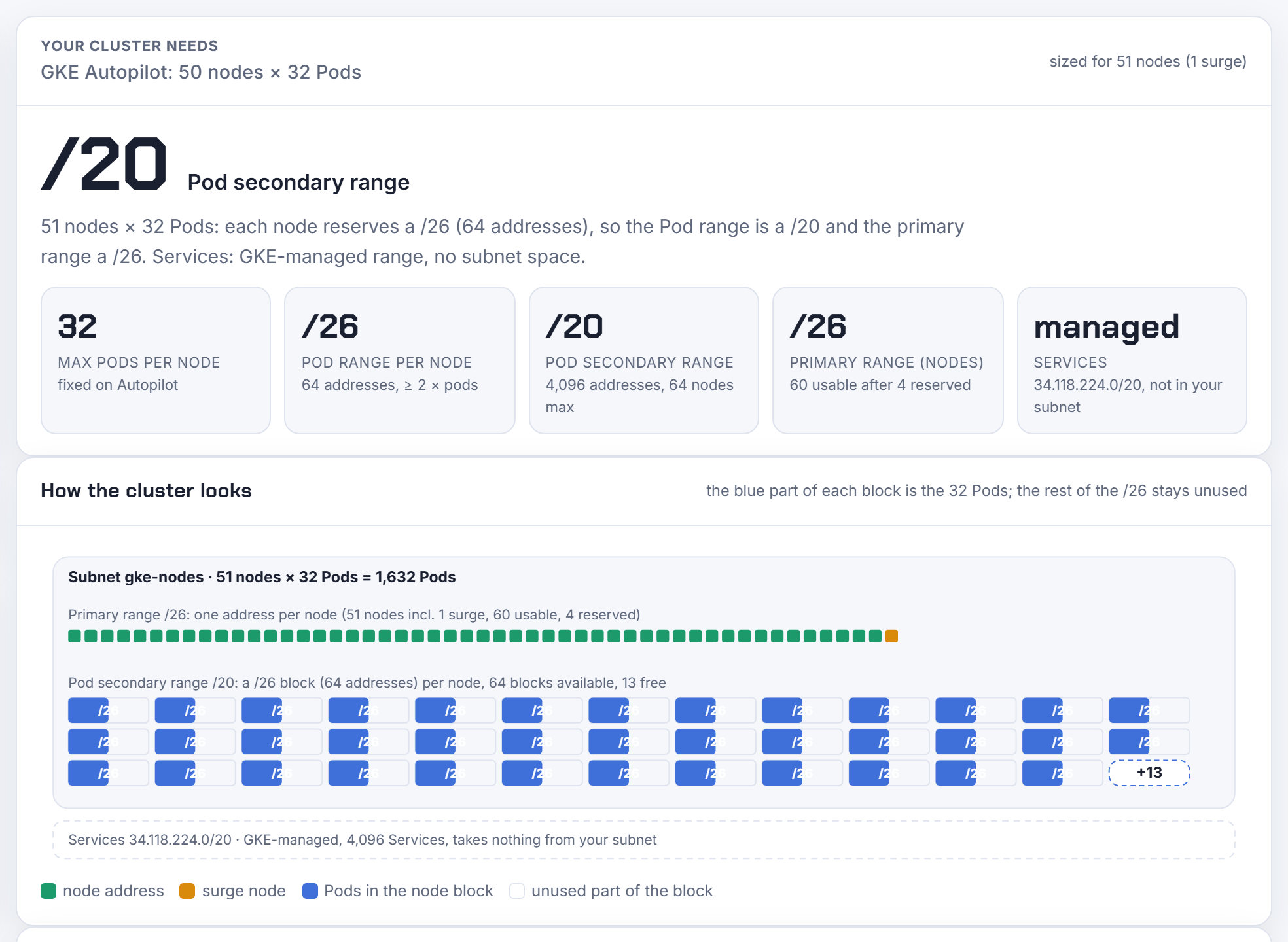
Autopilot fixes 32 Pods per node, a /26 each, and you do not choose. 50 nodes plus one surge node need 51 blocks, so the calculator gives a /20 Pod range (64 blocks) and a /26 primary range. Useful when the shared VPC owner asks "how much of my space will this take?".
4. Azure AKS problems
Problem 12: the VNet is being eaten by pods that do not exist
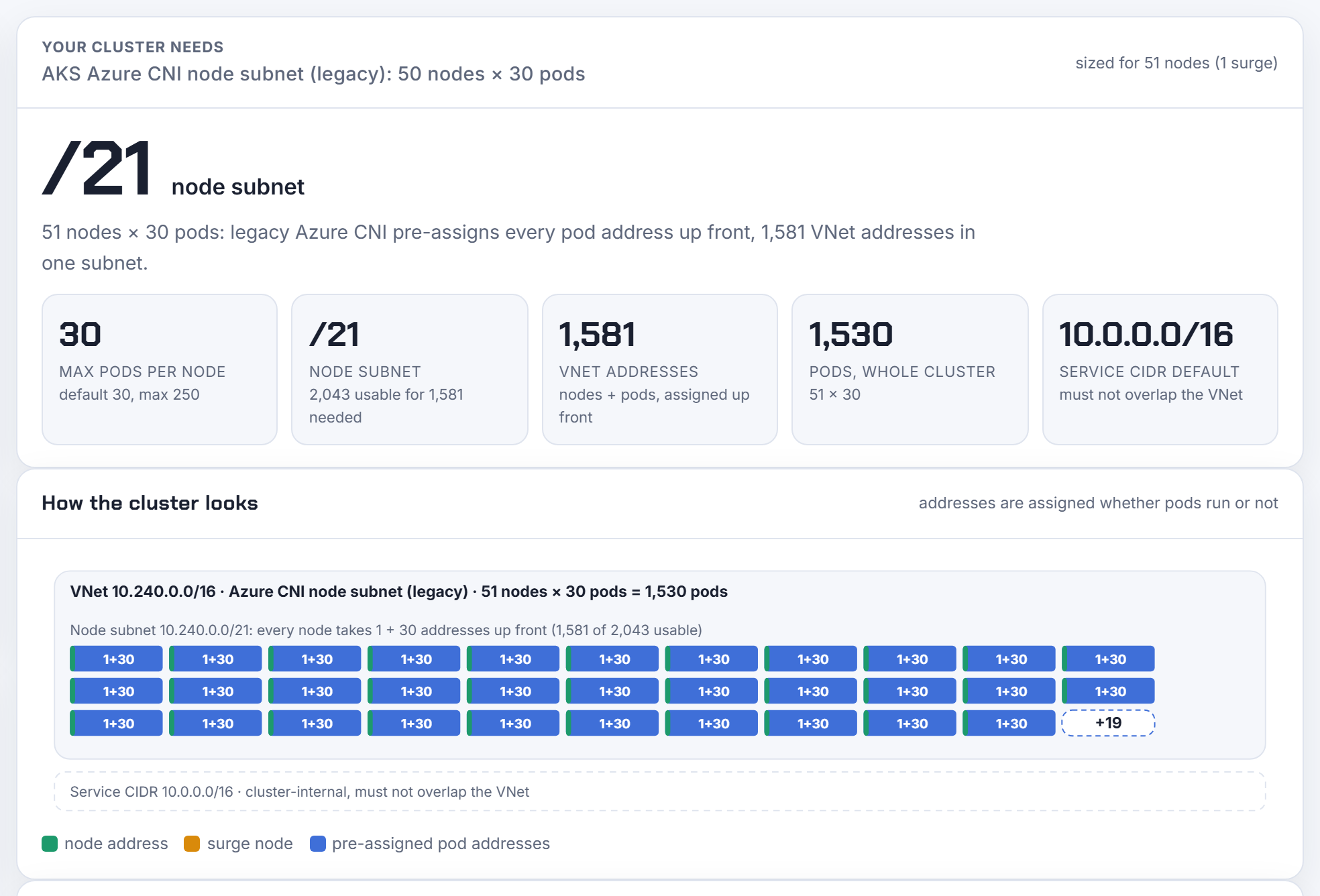
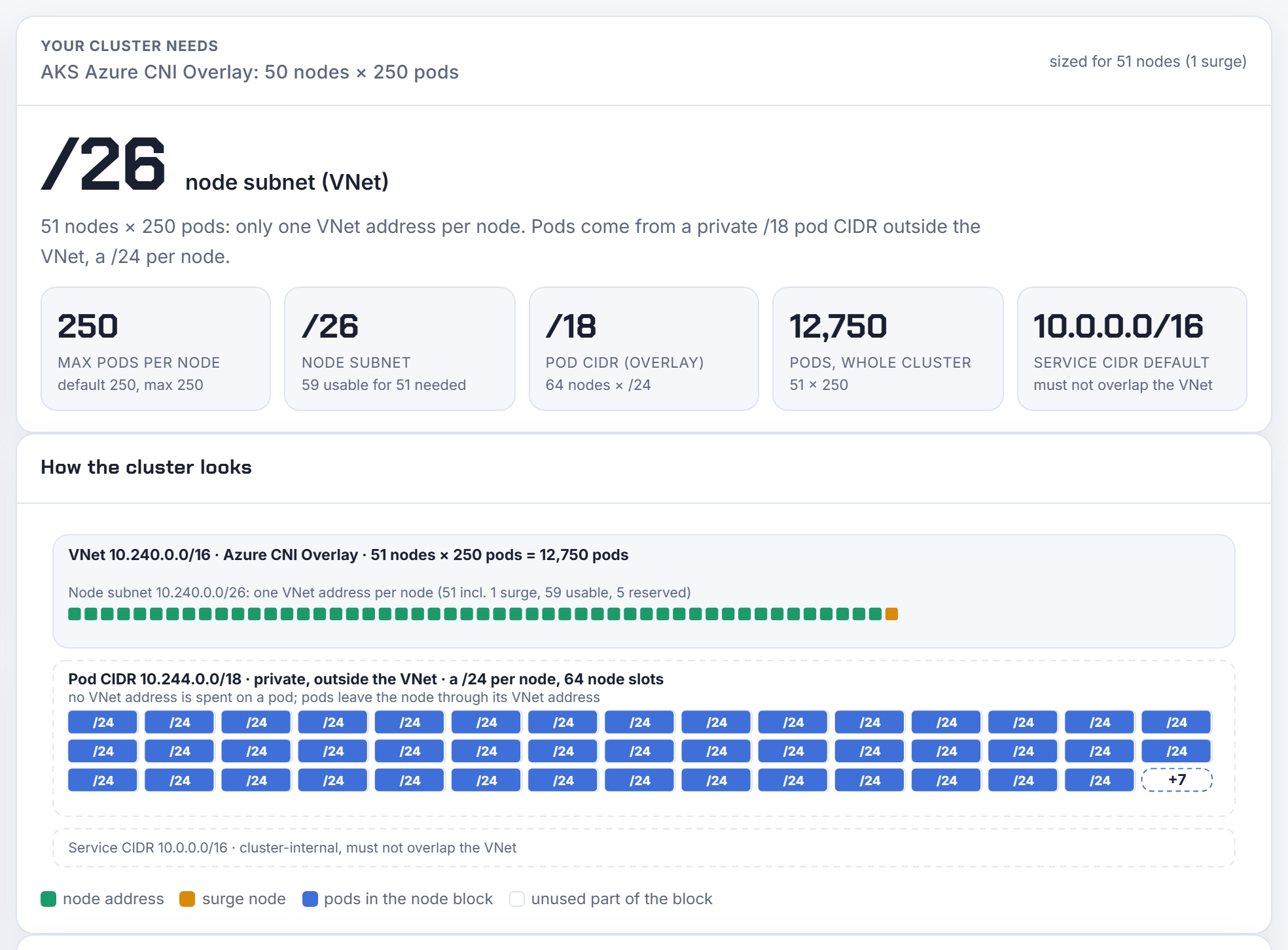
Legacy Azure CNI (node subnet mode) pre-assigns maxPods addresses to every node up front, whether pods run or not. 50 nodes at the default 30 pods, plus one surge node, take (51) + (51 × 30) = 1,581 VNet addresses, a /21. The same 50 nodes on Azure CNI Overlay take 51 VNet addresses, a /26, because pods come from a private 10.244.0.0/16 that is not VNet space. Microsoft recommends Overlay for new clusters; the calculator shows both so the comparison is a click.
Problem 13: Azure CNI Pod Subnet uses more than maxPods
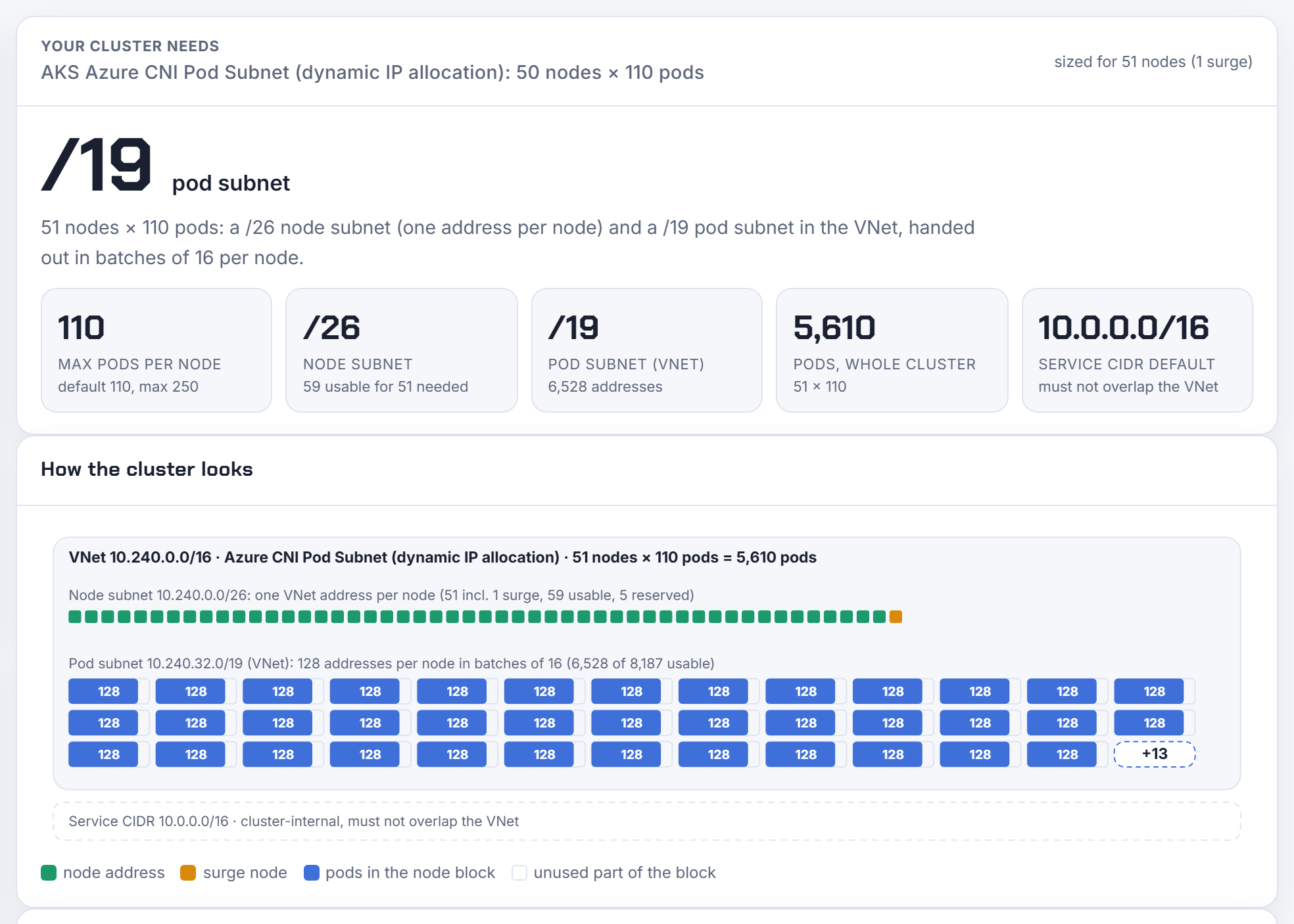
Pod Subnet mode (dynamic IP allocation) keeps pods in VNet space but hands addresses to nodes in batches of 16, requesting the next batch when fewer than 8 remain. The calculator plans ⌈maxPods ÷ 16⌉ × 16 + 16 per node: 128 addresses for 110 pods, 6,528 for 51 nodes, a /19 pod subnet. The subnet also needs the Microsoft.ContainerService/managedClusters delegation, which the Terraform tab writes.
Problem 14: the subnets do not fit in the VNet
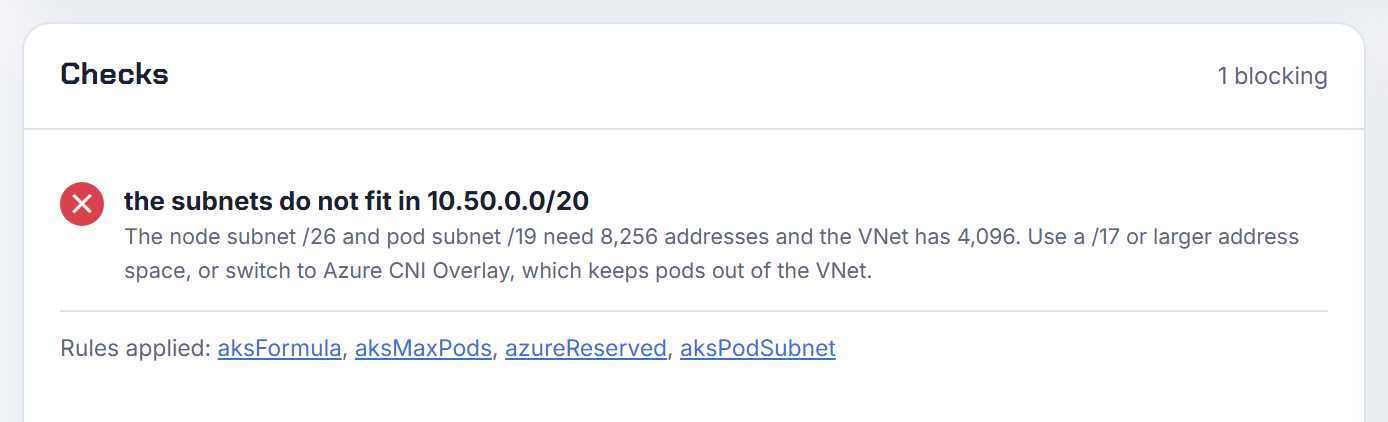
Same trap as EKS. A /26 node subnet and a /19 pod subnet need 8,256 addresses; a 10.50.0.0/20 VNet has 4,096. The check names the sizes and the smallest address space that works (a /17), and suggests Overlay as the alternative that keeps pods out of the VNet.
5. On-premises problems: kubeadm, Mirantis MKE, RKE2, OpenShift, Tanzu, Talos
On-premises there is no cloud to hide the arithmetic, and the vendor matters less than people think: the CNI decides how the pod CIDR is split, the distribution only sets the defaults. The calculator's fourth option takes the distribution (kubeadm, Mirantis Kubernetes Engine, Rancher RKE2 or k3s, Red Hat OpenShift, VMware Tanzu Kubernetes Grid, Talos Linux), the CNI where you get to choose (Flannel, Calico, Cilium, Canal, OVN-Kubernetes, Antrea), and the VLAN the nodes live in.
Problem 15: the kubeadm or RKE2 cluster stops at 256 nodes
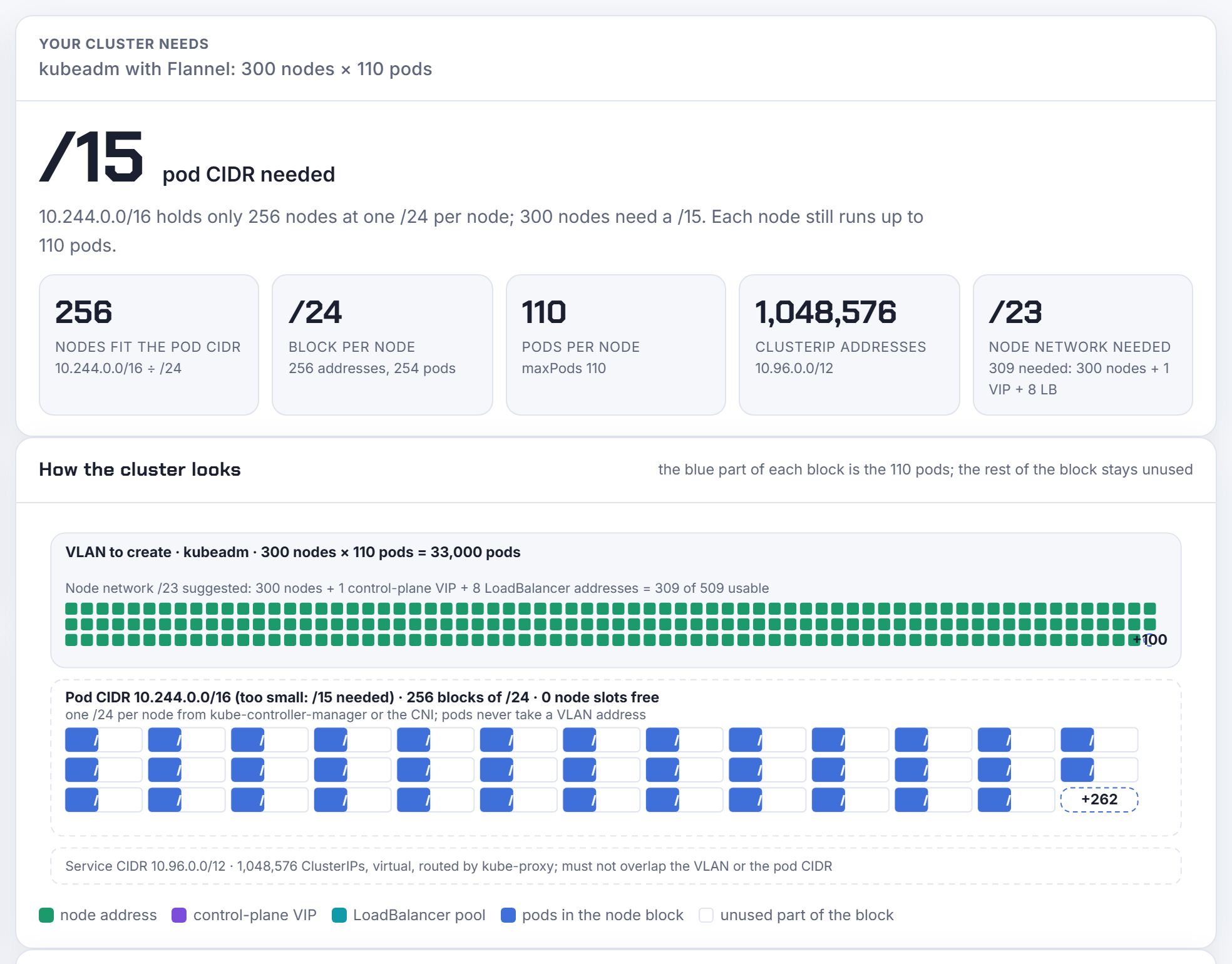
kube-controller-manager's --node-cidr-mask-size defaults to 24, so a /16 pod CIDR (10.244.0.0/16 on kubeadm and Talos, 10.42.0.0/16 on RKE2 and k3s) holds exactly 256 node blocks. Node 257 never gets a podCIDR and its pods stay Pending. The range cannot be changed after installation on kubeadm, RKE2, k3s, MKE or Tanzu, so the calculator answers the planning question up front: 300 nodes need a /15, and 20 nodes use 8% of a /16.
Problem 16: how many nodes does Mirantis Kubernetes Engine hold at 110 pods?
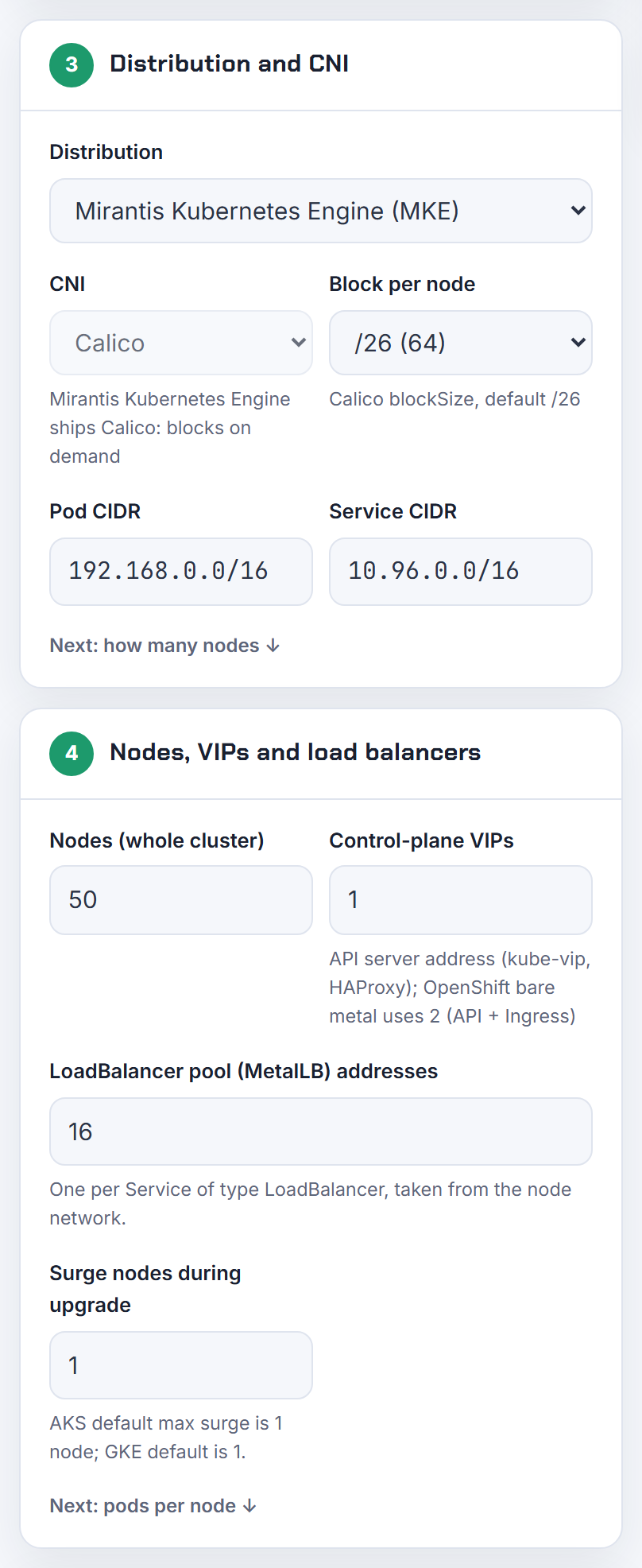
MKE ships Calico, whose IPAM works differently: it hands out /26 blocks (64 addresses) on demand and gives a node a second block when the first fills, then borrows single addresses from other nodes' blocks when no blocks are left. At the default 110 pods per node that is two blocks per node, so MKE's default 192.168.0.0/16 (1,024 blocks) holds 512 nodes; at 64 pods or fewer it holds 1,024. blockSize is fixed when the pool is created, which is why the calculator writes it into the IPPool manifest for you.
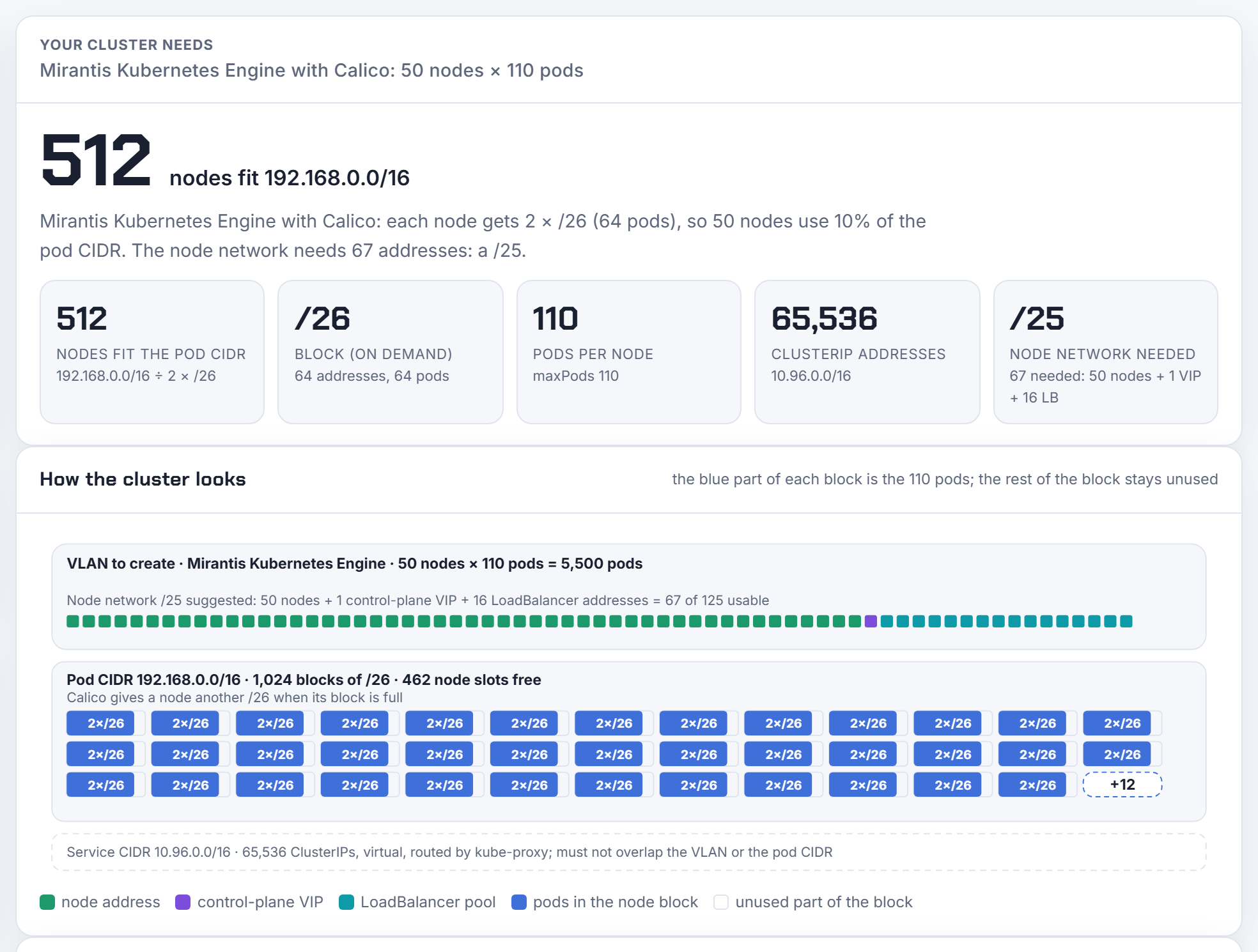
Problem 17: OpenShift hostPrefix 23 and why you cannot change it
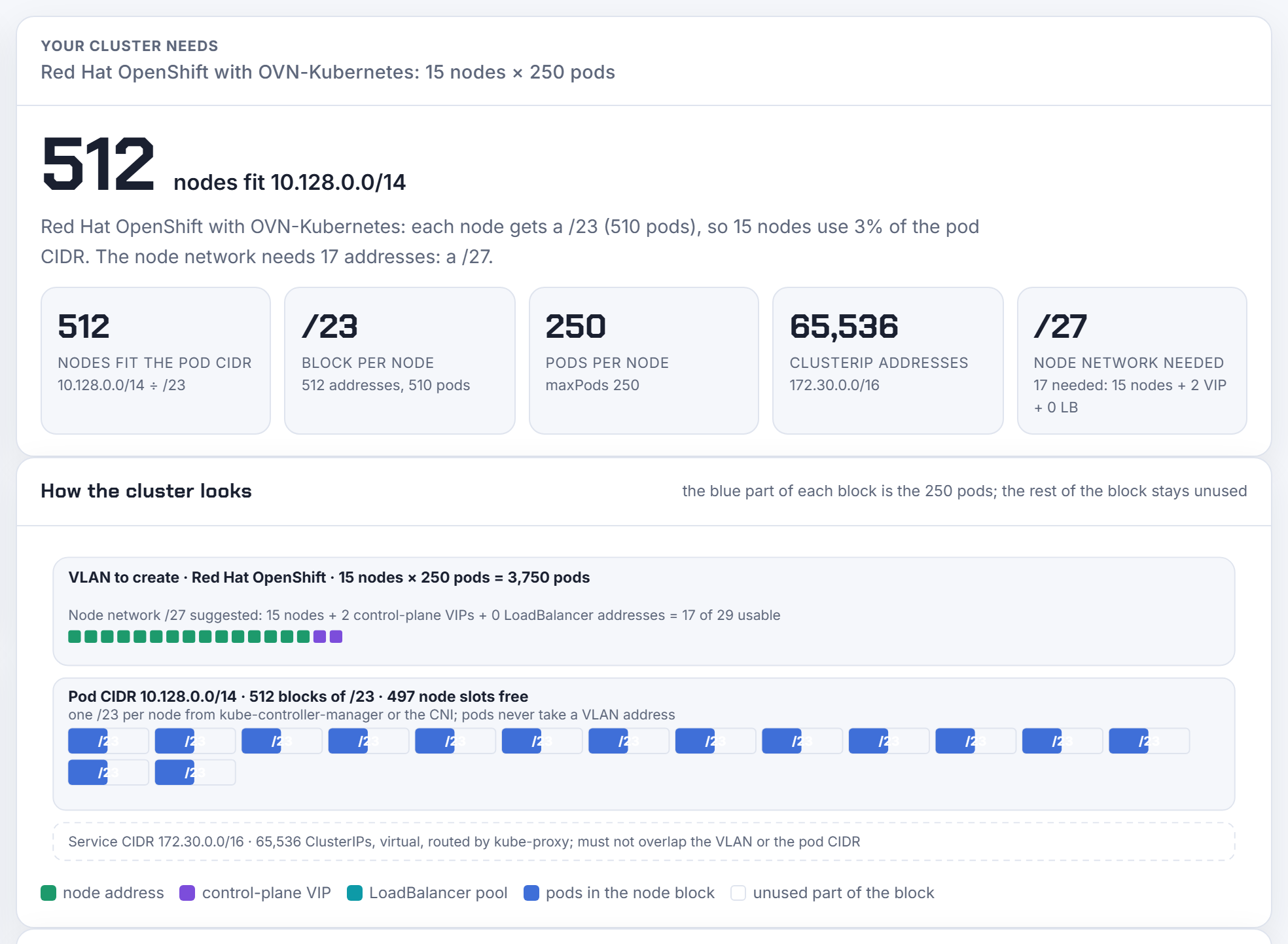
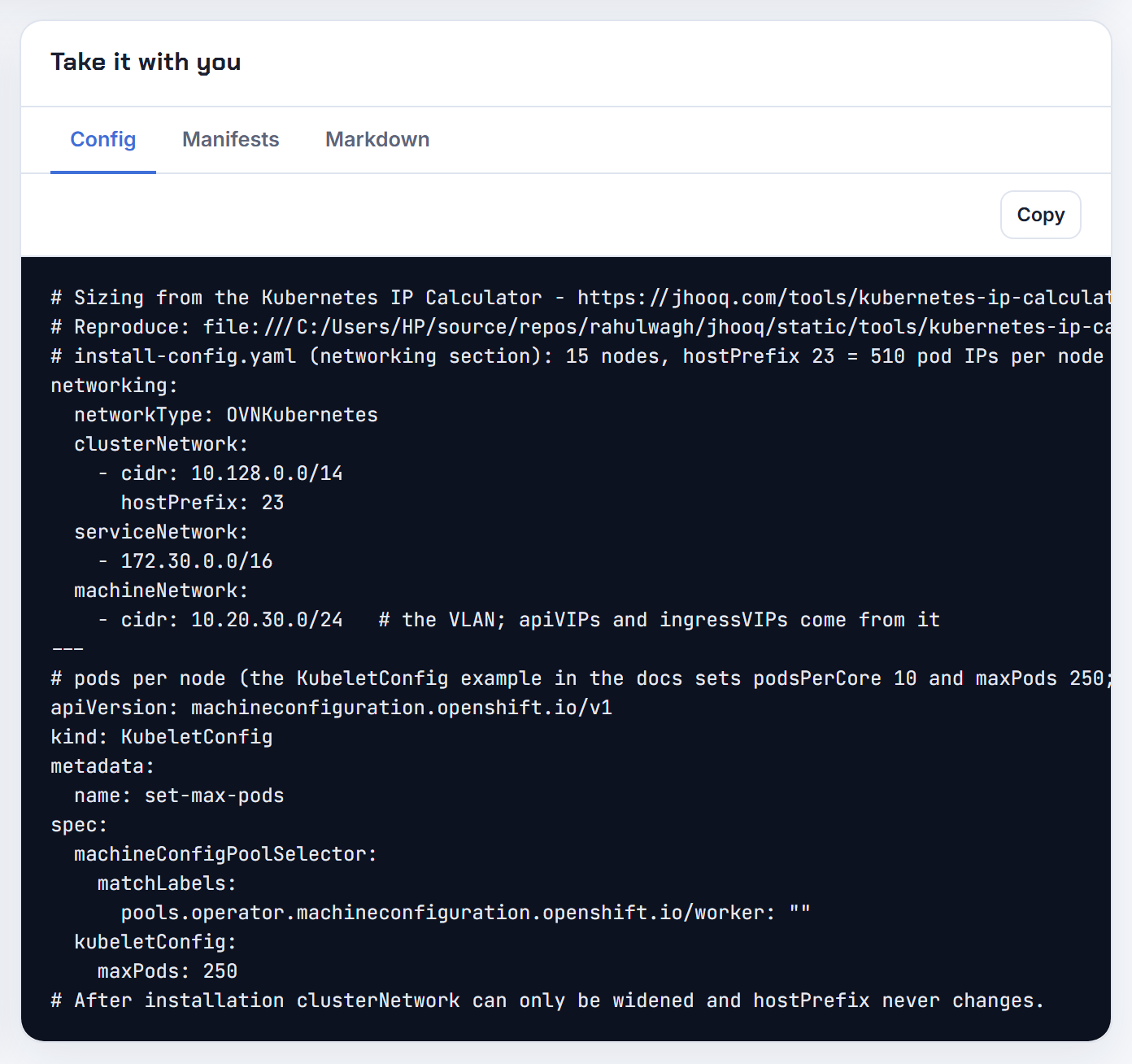
OpenShift's default clusterNetwork is 10.128.0.0/14 with hostPrefix 23: each node gets a /23, 510 pod IPs (2^(32 − 23) − 2), and the /14 holds 512 nodes. After installation the cluster network can only be widened and hostPrefix never changes, so a three-master, twelve-worker cluster that will grow to 600 nodes has to be sized before openshift-install. The Config tab writes the networking block of install-config.yaml with your machineNetwork, and a KubeletConfig for maxPods.
Problem 18: pods stay Pending although the pod CIDR has free addresses
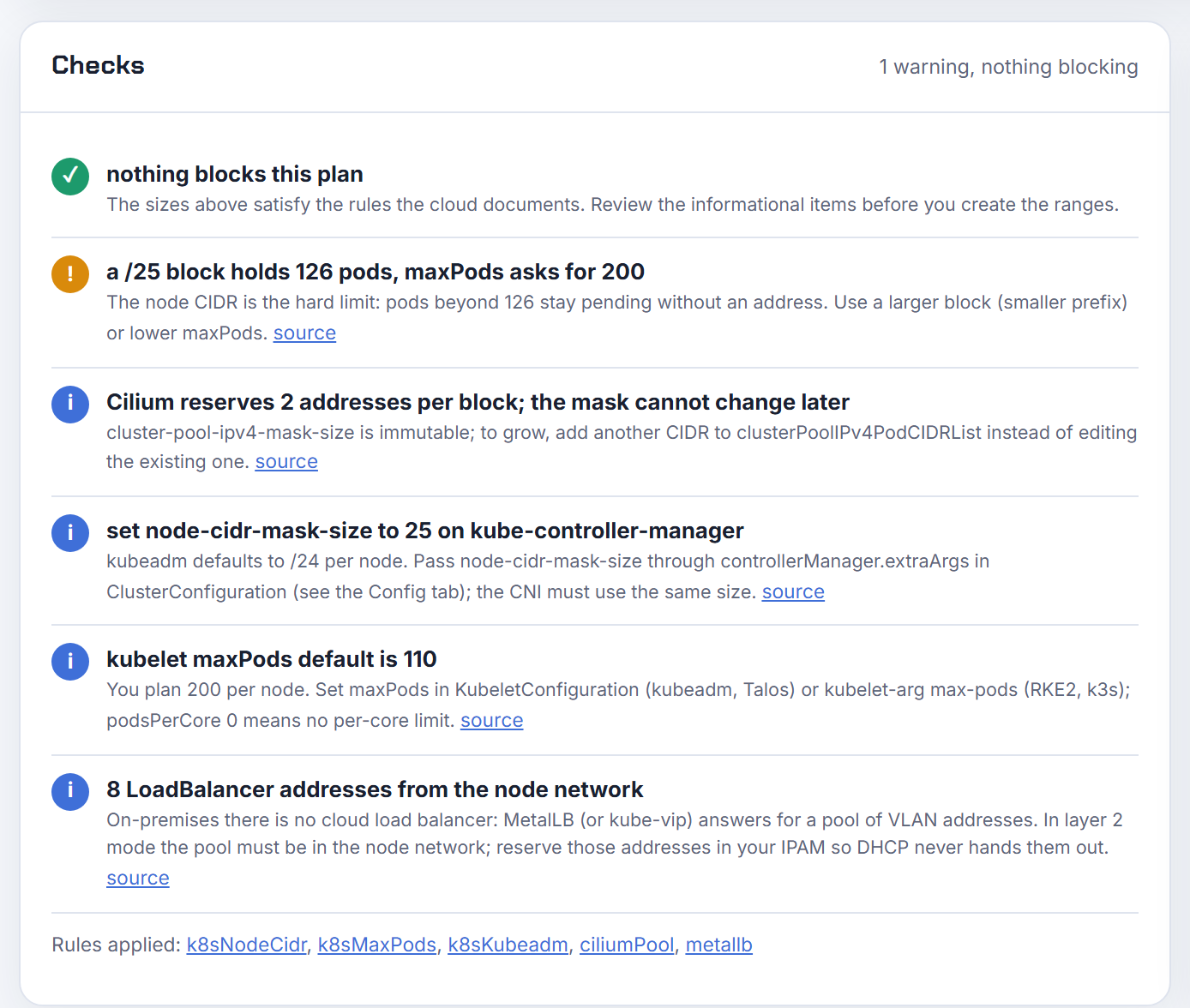
The node's block is the hard limit, not maxPods. With Cilium cluster-pool IPAM and a /25 per node, a block holds 126 pods (2 are reserved); if kubelet is set to 200, pods 127 and up never get an address. The calculator caps the effective pods per node at the block and warns. The same applies to Flannel, OVN-Kubernetes and Antrea; Calico is the exception because it adds blocks.
Problem 19: how big must the node VLAN be, and where does MetalLB get addresses?
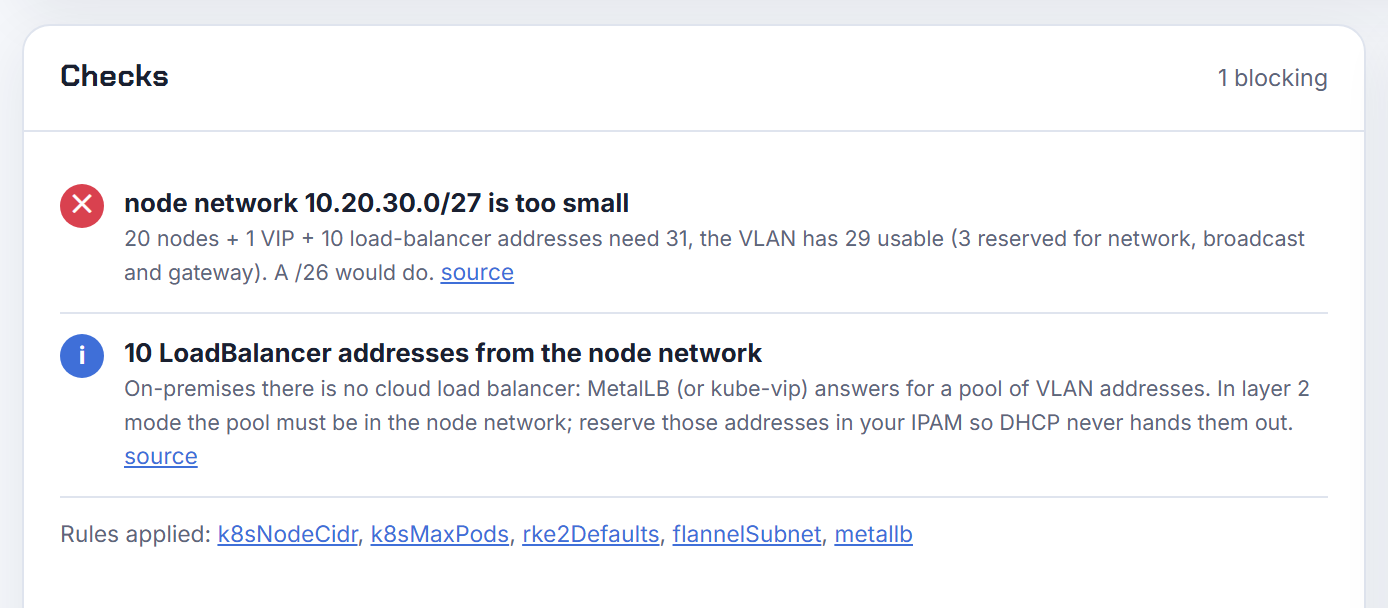
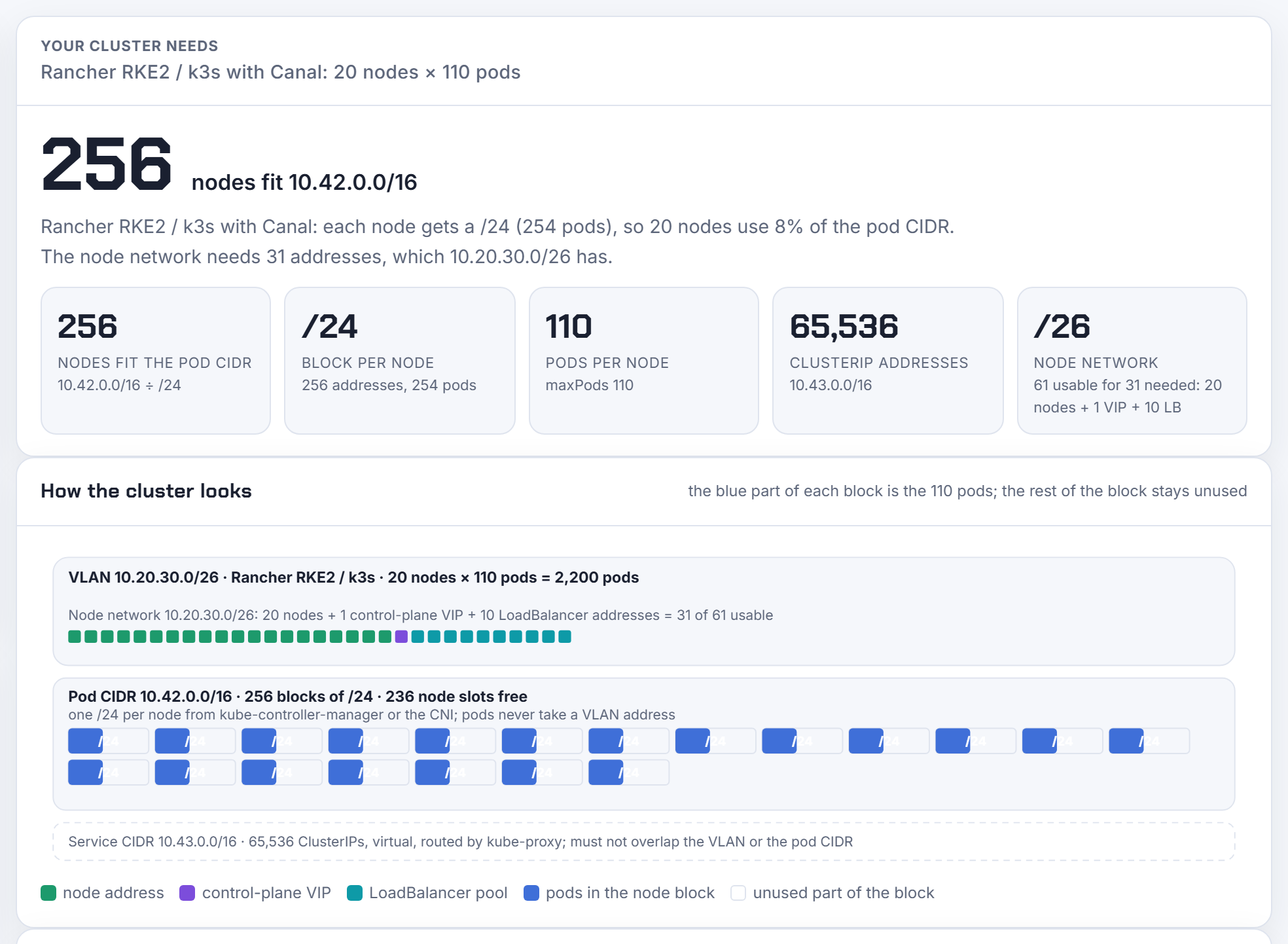
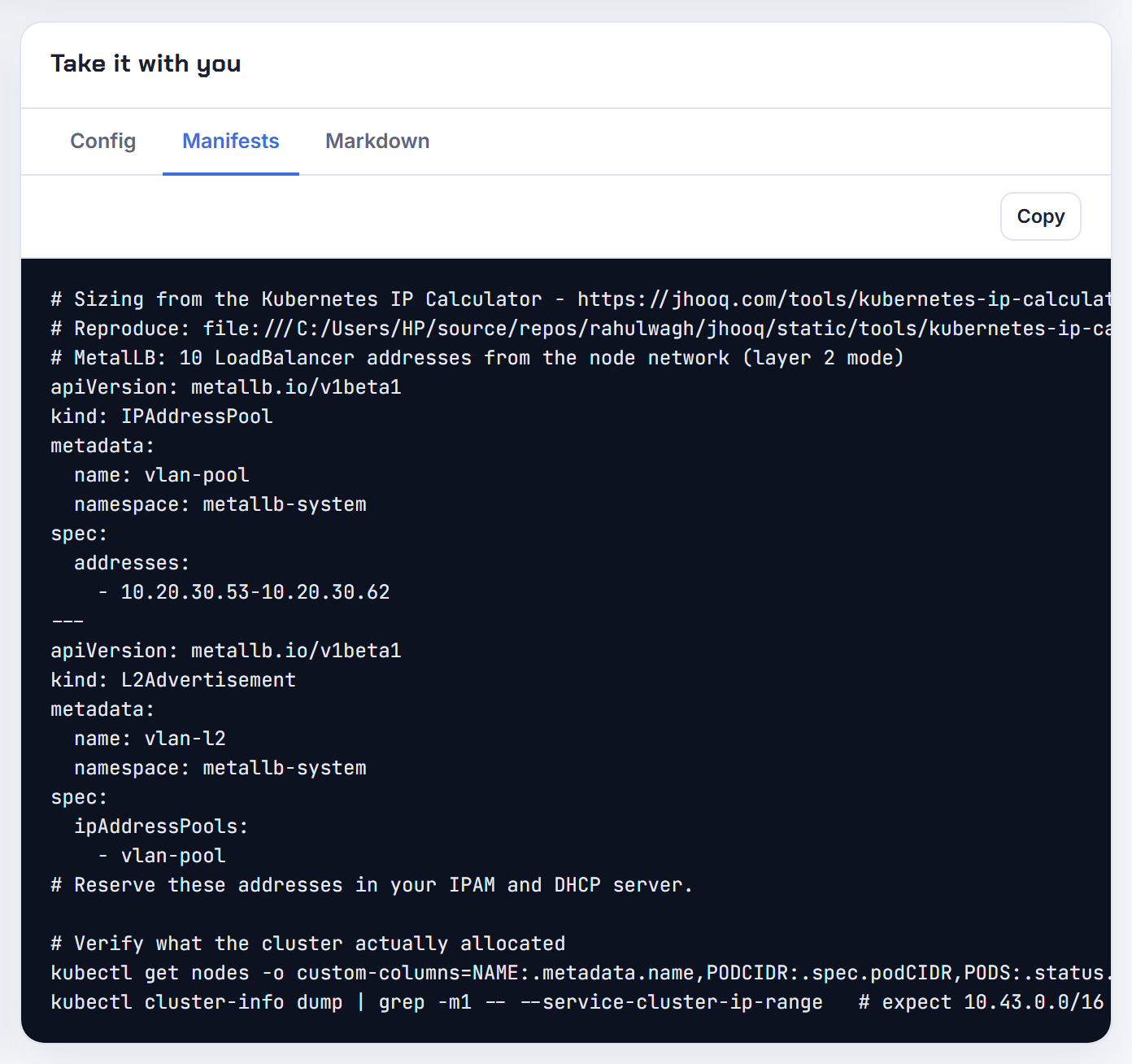
On-premises there is no cloud load balancer, so every Service of type LoadBalancer takes a VLAN address from a MetalLB (or kube-vip) pool, and in layer 2 mode that pool must be inside the node network. 20 RKE2 nodes, one control-plane VIP and a 10-address pool need 31 usable addresses; a /27 leaves 29 after the network, broadcast and gateway addresses, so the plan fails and a /26 is the answer. Give the calculator the /26 and it carves the pool from the top of it, 10.20.30.53 to 10.20.30.62, and writes the IPAddressPool and L2Advertisement manifests.
Problem 20: the node network overlaps the pod CIDR
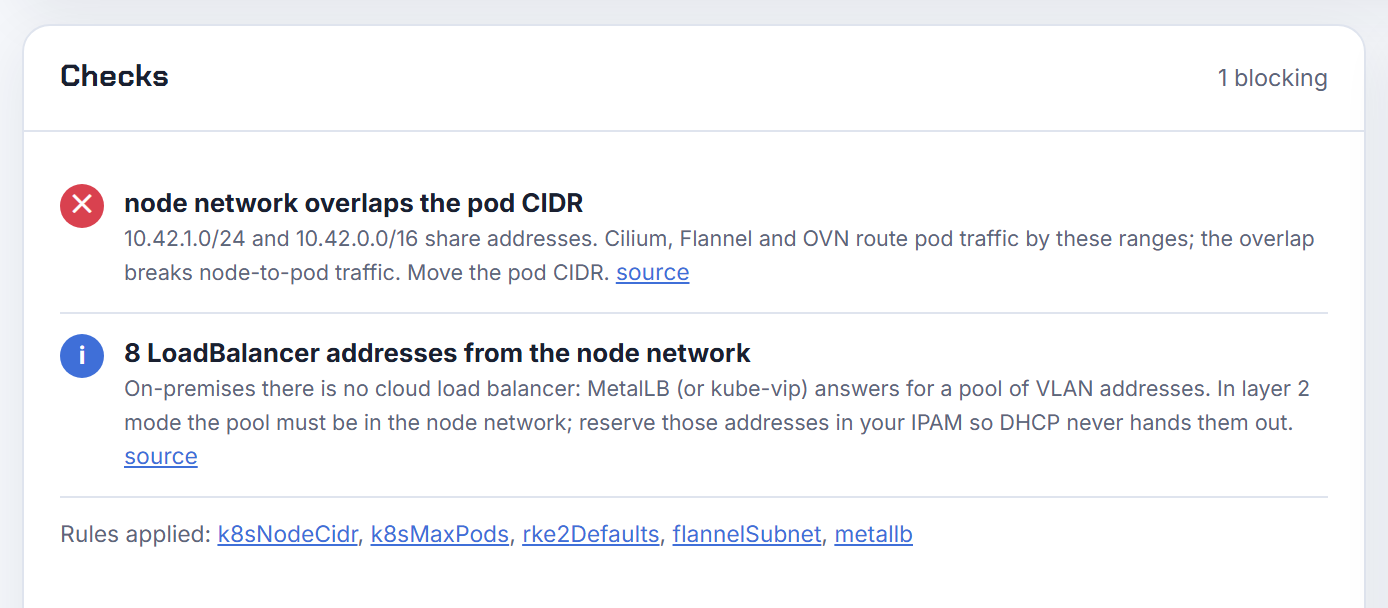
A lab on 10.42.1.0/24 with RKE2's default cluster-cidr of 10.42.0.0/16 is the classic: node-to-pod traffic breaks because the CNI routes the pod range locally. The checks flag an overlap between the node network and the pod CIDR, between the node network and the service CIDR, between the pod and service CIDRs, and against any corporate ranges you list under More options.
Problem 21: what do Tanzu and Talos reserve by default?
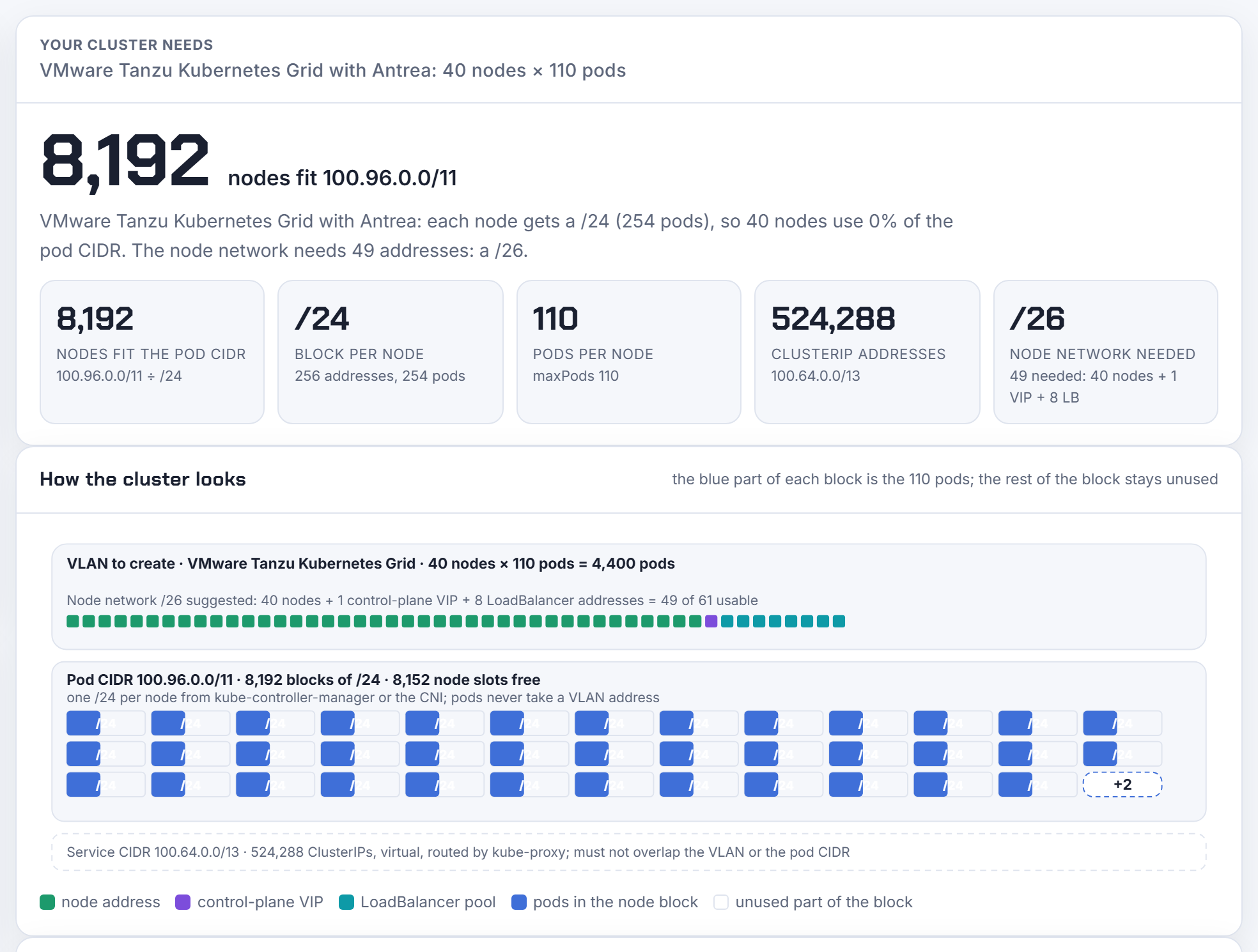
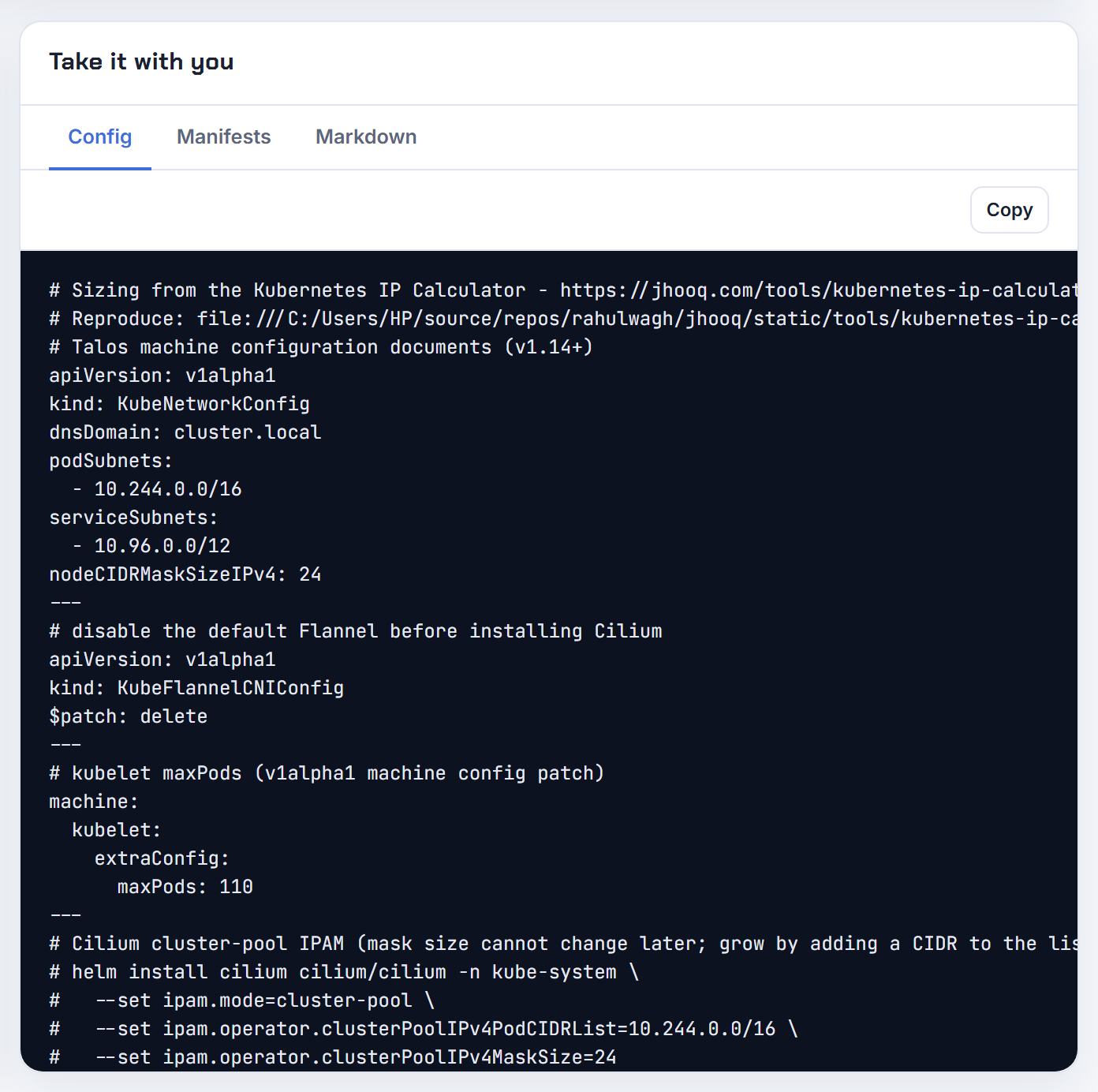
Tanzu Kubernetes Grid defaults to CLUSTER_CIDR 100.96.0.0/11 and SERVICE_CIDR 100.64.0.0/13 with Antrea, a /24 per node, so 8,192 nodes fit and 40 nodes use well under 1%. The ranges sit in the shared address space 100.64.0.0/10, which is also where AWS custom networking sends EKS pods, so the "networks the pods must reach" list is worth filling in if you run both. Talos Linux defaults to 10.244.0.0/16 and 10.96.0.0/12 with Flannel over VXLAN and nodeCIDRMaskSizeIPv4: 24; the Config tab writes the KubeNetworkConfig document, and a $patch: delete for the Flannel document when you pick Cilium or Calico.
Problem 22: translating the plan into the installer's own words
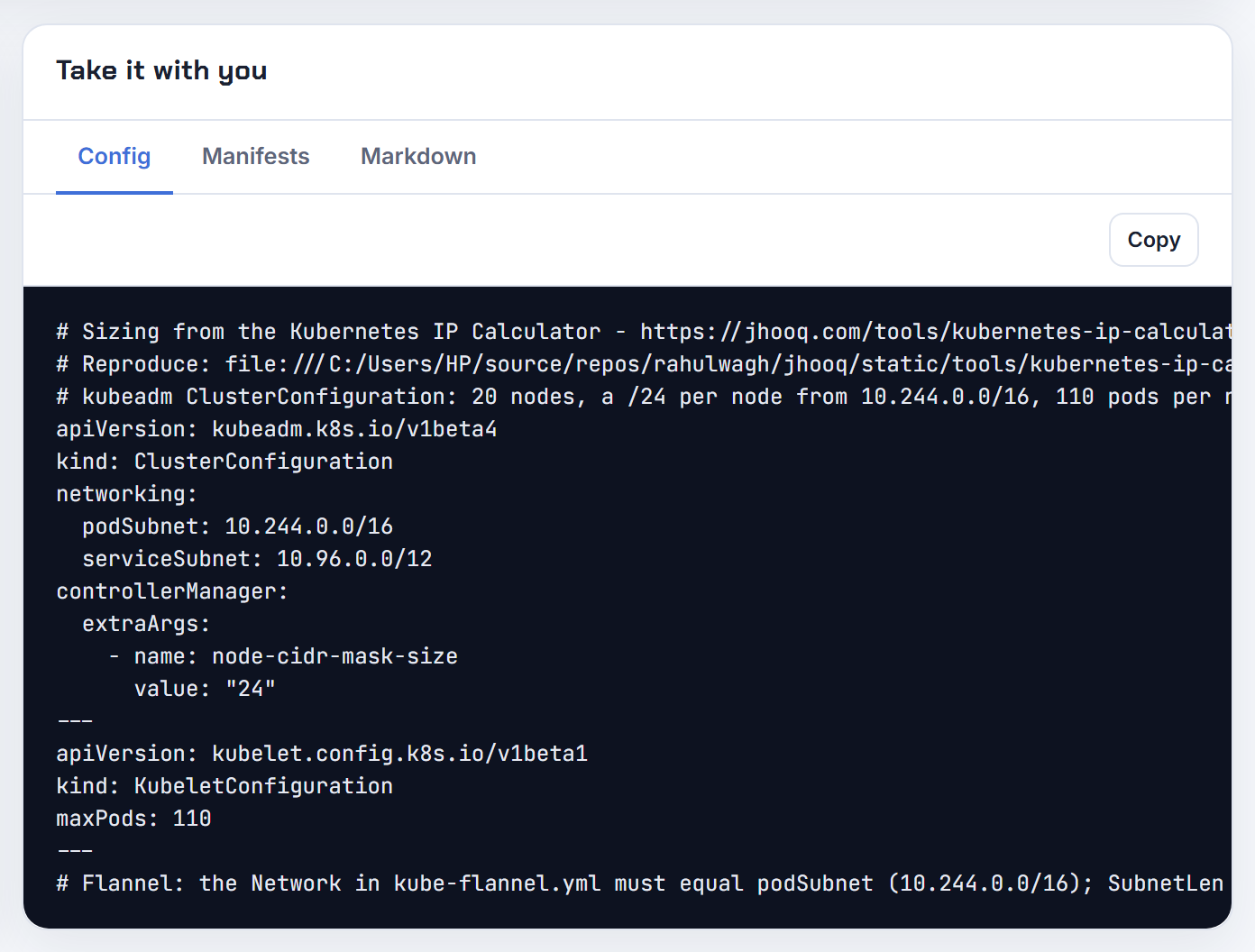
Each distribution spells the same three ranges differently, and getting one key wrong means reinstalling. The Config tab writes the native form: a kubeadm ClusterConfiguration with podSubnet, serviceSubnet and node-cidr-mask-size under controllerManager.extraArgs plus a KubeletConfiguration for maxPods; RKE2's /etc/rancher/rke2/config.yaml with cluster-cidr, service-cidr, cni, kubelet-arg and kube-controller-manager-arg; OpenShift's install-config networking block; TKG's CLUSTER_CIDR, SERVICE_CIDR and CNI variables; Talos documents; and the ucp install flags for MKE (--pod-cidr, --service-cluster-ip-range).
6. What broke when I ran this
The tool is the thing that ran, so here is what went wrong while version 1.3 and 1.4 were built and tested on 2026-10-28, and how each was fixed.
The exports assumed a /16 VPC. Until 1.3.0 the Terraform and eksctl tabs hard-coded vpc_cidr = "10.0.0.0/16" and computed cidrsubnet bits as subnet prefix − 16, and nothing checked whether three /22 subnets fit the VPC you really had. A review question, "how did you assume the user always has a /16?", was the right one. 1.3.1 added the VPC CIDR input to step 1, carved the named subnets from it, and added the fit check in Problem 8.
In-page links broke the share link. Adding the "Next: start from a common case" anchors (#step2, #answer) made the page try to decode them as a share link on load, and every visitor got the toast This link is damaged; showing the defaults. The fix is a one-line regex that leaves #stepN, #answer and #about alone; a share link is base64 JSON, an anchor is not.
The chosen preset deselected itself. The first guided version highlighted a common case only while every value still matched it, so clicking an instance type in step 3 silently cleared the chip in step 2 and looked like a toggle bug. 1.3.2 keeps the chip selected, adds an "edited" marker and names what you changed; a selection the user made must never clear itself.
Red Hat's documentation refuses automated link checks. curl against docs.redhat.com returns HTTP 403, which this site's publishing gate treats as a dead link. The OpenShift rules therefore cite the OKD mirror of the same pages (docs.okd.io returns 200) and the KubeletConfig example values rather than any "platform maximum" I could not verify.
The screenshots had a blank stripe. The Checks card sits in a CSS grid next to the export card and stretches to its neighbour's height, so the first captures of the checks carried 600 pixels of nothing. Clipping to the card header and body instead of the card fixed it; the images above are the second run.
The numbers in this post come from the engine itself, not from reading the screenshots. This is the run on 2026-10-28 with version 1.4.0 of the calculator (node -e against engine.js, the same file the page embeds), followed by the test suite:
 1$ node -e "const E=require('./engine.js'); E.loadEks(require('./data/eks-instances.json')); ..."
 2EKS m5.2xlarge x10/zone: maxPods 58 ipsPerNode 60 need/zone 616 subnet /22 usable 1,019
 3EKS prefix: maxPods 110 ipsPerNode 129 prefixes 8 subnet /21 need 1,306
 4EKS custom: maxPods 44 node /27 pod /23 secondary 100.64.0.0/22
 5EKS windows: 14 with prefix 110 formula 224
 6EKS ipv6: maxPods 110 ipv4 subnet /27 need 26
 7m5.large maxPods 29 eniFormula 29 per node ips 30
 8GKE 900x110: perNode /24 podRange /14 primary /22
 9GKE 100x32: perNode /26 podRange /19 maxNodes 128
10GKE 30x110 (31 planned): podRange /19 primary /26
11AKS legacy 50x30: need 1,581 /21
12AKS overlay 50: node /26 need 51 pod cidr /18
13AKS podsubnet 50x110: perNode 128 need 6,528 /19
14onprem kubeadm 300: capacity 256 fits false required /15
15onprem MKE: blocks 1024 perNode 2 capacity 512
16onprem OCP: podsPerBlock 510 capacity 512
17onprem cilium /25 maxPods 200: effective 126
18onprem VLAN /27: need 31 usable 29 fits false suggested /26
19onprem overlap: node network overlaps the pod CIDR
20onprem tanzu: 100.96.0.0/11 capacity 8,192 svc 100.64.0.0/13
21onprem talos+cilium: 10.244.0.0/16 capacity 256
22
23$ npm test
24# tests 27
25# pass 27
26# fail 0
7. Every problem, the one number, and the preset that shows it
| # | Problem | The number | Preset or input in the calculator |
|---|---|---|---|
| 1 | EKS subnet out of IPs at 10 nodes | m5.2xlarge takes 60 addresses; /22 per zone | EKS, instance m5.2xlarge, 10 nodes per zone |
| 2 | Pods per EKS node | m5.large 29, cap 110 under 30 vCPU | EKS, Small prod |
| 3 | 110 pods per node on EKS | 129 addresses per node, /21 per zone | EKS, Dense |
| 4 | No VPC space for pods | 44 pods, /23 pod subnet from 100.64.0.0/22 | EKS, Custom networking |
| 5 | Windows pods | 14 on m5.2xlarge, 110 with prefix delegation | EKS, Windows nodes |
| 6 | IPv4 exhaustion | 1 IPv4 per node, /27 per zone | EKS, IPv6 cluster |
| 7 | Service CIDR overlap | /24 to /12, no overlap with the VPC | EKS, More options |
| 8 | Subnets do not fit the VPC | 3 × /22 = 3,072 > 1,024 | EKS, VPC CIDR in step 1 |
| 9 | GKE Pod range size | 900 nodes at 110 pods = /14 | GKE, Doc example |
| 10 | GKE cannot add nodes | 32 pods per node = /26, 128 nodes in a /19 | GKE, IP-constrained |
| 11 | Autopilot reservation | 32 pods, /26 per node, /20 for 50 nodes | GKE, Autopilot |
| 12 | AKS VNet exhaustion | legacy 1,581 addresses vs Overlay 51 | AKS, Doc example and Overlay |
| 13 | Pod Subnet batches | 128 per node for 110 pods, /19 | AKS, Pod Subnet |
| 14 | AKS subnets do not fit | 8,256 > 4,096 | AKS, VNet address space in step 1 |
| 15 | 256-node ceiling | /16 ÷ /24 = 256; 300 nodes need /15 | On-premises, kubeadm, 300 nodes |
| 16 | MKE capacity | 2 × /26 per node, 512 nodes in a /16 | On-premises, Mirantis MKE |
| 17 | OpenShift hostPrefix | 510 pods per node, 512 nodes, immutable | On-premises, OpenShift |
| 18 | Pending pods with free CIDR | /25 block holds 126 < maxPods 200 | On-premises, Cilium, block /25 |
| 19 | VLAN and MetalLB | 20 + 1 + 10 = 31 usable, /26 | On-premises, RKE2, node network |
| 20 | Node and pod overlap | 10.42.1.0/24 inside 10.42.0.0/16 | On-premises, node network |
| 21 | Tanzu and Talos defaults | 100.96.0.0/11 = 8,192 nodes; Talos 256 | On-premises, Tanzu TKG, Talos |
| 22 | Installer syntax | one Config tab per distribution | On-premises, Config tab |
8. Sharing a plan with your team
Nothing is uploaded and there is no account, so sharing is a URL. The Copy link button in the header puts every input into the URL fragment (the part after #, which browsers never send to a server); whoever opens it sees the same calculation, can change one value and send a new link back. The Markdown tab gives a table with the source link for a ticket or a design document, and the Terraform, CLI, Config and Manifests tabs are meant to be pasted into the repository that creates the cluster. A plan that fails a blocking check is still shareable; the red item travels with it, which is the point. The calculator is a single HTML file with its engine and tests in the open: rahulwagh/kubernetes-ip-calculator on GitHub (MIT), so a team can also run it from an internal server or read the rule that produced a number.
9. What the calculator does not do
It does not model security groups for pods (branch ENIs on EKS), GKE multi-Pod CIDR, AKS static block allocation, Cilium multi-pool IPAM, or the exact address Calico borrows when a pool is empty. It assumes 3 reserved addresses in an on-premises VLAN (network, broadcast, gateway), which is a planning assumption rather than a Kubernetes rule. OpenShift's documented example of 250 pods per node is used as that platform's default because that is what the documentation shows; the tool does not claim a platform maximum it cannot cite. The numbers are planning maximums: real clusters also lose addresses to load balancers, endpoints and node replacements, so leave headroom, which the growth percentage under More options adds for you. If you need the whole VPC laid out around the cluster subnets, hand the result to the VPC Subnet Planner with the button under the ranges table.
10. FAQ
How many IP addresses does a Kubernetes cluster need? Nodes plus pods plus services plus load balancers, and the pods dominate. On EKS budget the instance type's ENI capacity per node (60 for an m5.2xlarge); on GKE a /24 per node at 110 pods; on AKS Overlay one per node; on-premises one /24 block per node from the pod CIDR plus a VLAN address per node. The Kubernetes IP Calculator does the sum for your exact inputs.
Why does my EKS node run only 29 pods? Because an m5.large has 3 ENIs with 10 addresses each and the formula is 3 × (10 − 1) + 2. Prefix delegation raises it to the managed node group cap of 110.
How many nodes does a /16 pod CIDR hold? 256 with a /24 per node (kubeadm, RKE2, k3s, Talos, Cilium, Flannel), 512 with Calico at 110 pods per node (two /26 blocks each), 1,024 with Calico at 64 pods or fewer, and 512 on OpenShift's /14 at hostPrefix 23.
Can the pod CIDR be changed later? Rarely. kubeadm, RKE2, k3s, MKE and Tanzu fix it at install time; Cilium's per-node mask is immutable but a second CIDR can be added; Calico can add an IPPool; OpenShift can only widen clusterNetwork and never changes hostPrefix; GKE's Pod secondary range is immutable. Size it for the cluster you expect in three years.
Where does MetalLB get its addresses? From an IPAddressPool you define, inside the node VLAN for layer 2 mode. Count those addresses when sizing the VLAN: 20 nodes, one VIP and a 10-address pool need a /26.
Are the rules current? Each rule links to the documentation page it came from: the EKS instance-type page and VPC CNI README, the GKE flexible Pod CIDR page, the AKS IP planning page, the kube-controller-manager and kubelet references, the Calico IPPool reference, the Cilium cluster-pool page, the RKE2 server configuration, the OKD Cluster Network Operator page, Mirantis's IP considerations, Broadcom's TKG variable reference, Sidero's KubeNetworkConfig reference and the MetalLB configuration page. The sources for the formulas used above are EKS instance types and max pods, GKE max Pods per node and Pod ranges, AKS IP address planning, kube-controller-manager node-cidr-mask-size, Calico IPPool blockSize and MetalLB configuration. The calculator FAQ has the long answers with a screenshot per question.
Did this save you a debugging session? Stay in the loop -
- Subscribe on YouTube - every post here has a screen-recorded companion video.
- Code on GitHub - the repositories, Terraform and scripts behind these posts.
Learn more On Kubernetes -
- Setup kubernetes on Ubuntu
- Setup Kubernetes on CentOs
- Setup HA Kubernetes Cluster with Kubespray
- Setup HA Kubernetes with Minikube
- Setup Kubernetes Dashboard for local kubernetes cluster
- Setup Kubernetes Dashboard On GCP(Google Cloud Platform)
- How to use Persistent Volume and Persistent Volume Claims in Kubernetes
- Deploy Spring Boot Microservice on local Kubernetes cluster
- Deploy Spring Boot Microservice on Cloud Platform(GCP)
- Setting up Ingress controller NGINX along with HAproxy inside Kubernetes cluster
- CI/CD Kubernetes | Setting up CI/CD Jenkins pipeline for kubernetes
- kubectl export YAML | Get YAML for deployed kubernetes resources(service, deployment, PV, PVC....)
- How to setup kubernetes jenkins pipeline on AWS?
- Implementing Kubernetes liveness, Readiness and Startup probes with Spring Boot Microservice Application?
- How to fix kubernetes pods getting recreated?
- How to delete all kubernetes PODS?
- How to use Kubernetes secrets?
- Share kubernetes secrets between namespaces?
- How to Delete PV(Persistent Volume) and PVC(Persistent Volume Claim) stuck in terminating state?
- Delete Kubernetes POD stuck in terminating state?
- Kubernetes IP Calculator - the free tool that sizes node subnets, Pod ranges and max pods per node for EKS, GKE and AKS
- Kubernetes IP address planning - 22 problems the calculator solves on EKS, GKE, AKS and on-premises (kubeadm, Mirantis MKE, RKE2, OpenShift, Tanzu, Talos)