How to fix kubectl - The connection to the server localhost:8080 was refused - did you specify the right host or port? (kubeadm, Kubespray, minikube, k3s, EKS)
You have just installed a Kubernetes cluster - with kubeadm, with Kubespray, on a fresh EC2 instance - you type kubectl get nodes, and instead of your nodes you get -
1$ kubectl get nodes
2The connection to the server localhost:8080 was refused - did you specify the right host or port?
Nothing is listening on localhost:8080, and nothing should be. Kubernetes API servers listen on 6443. The error is not telling you the cluster is broken - it is telling you that kubectl has no idea where your cluster is, so it fell back to its built-in default address. In other words: kubectl could not find a kubeconfig file. This short post gives you the three-line fix, explains why it happens (especially with sudo and root), and covers every cluster type.
Table of Content
- Why the error says localhost:8080
- The fix after kubeadm or Kubespray (three lines)
- Why it works as root but not as your user (or the other way round)
- The same fix for minikube, k3s, EKS, GKE, AKS and kind
- Verify which kubeconfig kubectl is using
- When the API server really is unreachable
- Conclusion
1. Why the error says localhost:8080
kubectl needs a kubeconfig - a YAML file with the cluster's API server address, the CA certificate and your credentials. It looks for one in this order -
- the
--kubeconfigflag on the command line, - the
KUBECONFIGenvironment variable (a colon-separated list of files, merged), $HOME/.kube/config- the default location for the current user.
If none of the three exists, kubectl assumes an unauthenticated API server on http://localhost:8080 - a default from the very early days of Kubernetes - tries to connect, and nothing answers. Hence the message. The kubectl reference and the kubeconfig docs describe the lookup; the short version is in the diagram -
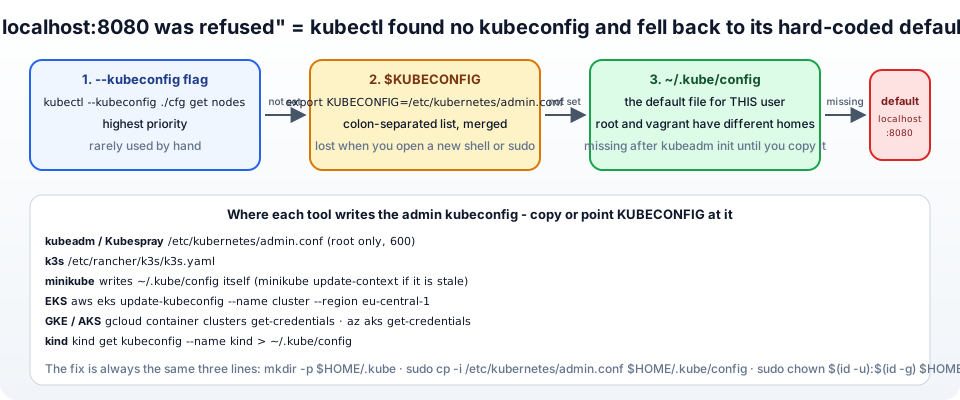
So the fix is always the same: give kubectl a kubeconfig - either copy it to ~/.kube/config or point KUBECONFIG at it.
2. The fix after kubeadm or Kubespray (three lines)
Both kubeadm and Kubespray write the admin kubeconfig to /etc/kubernetes/admin.conf on the control-plane node, readable by root only. kubeadm init even prints the fix at the end of its output (creating a cluster with kubeadm) - the lines everybody scrolls past -
1mkdir -p $HOME/.kube
2sudo cp -i /etc/kubernetes/admin.conf $HOME/.kube/config
3sudo chown $(id -u):$(id -g) $HOME/.kube/config
Then -
1kubectl get nodes
2# NAME      STATUS   ROLES           AGE   VERSION
3# kmaster   Ready    control-plane   12m   v1.37.0
That is the whole fix for 90% of the people who search this error. The chown matters - without it the file belongs to root and you get a different error (error loading config file ... permission denied). On a Kubespray cluster the file is in the same place on the first control-plane node (kube_control_plane group); it is step 11 of my Kubespray guide. To use the cluster from your laptop, copy that file down (scp user@kmaster:~/.kube/config ~/.kube/config) and change the server: address from the private IP to one you can reach - the API server certificate must include that name or IP (kubeadm init --apiserver-cert-extra-sans).
A security note from the kubeadm docs: admin.conf has cluster-admin rights - do not hand it to colleagues. Generate per-user credentials with kubeadm kubeconfig user --client-name <name> and bind roles with kubectl create rolebinding; and super-admin.conf, which bypasses RBAC entirely, should be moved somewhere safe.
3. Why it works as root but not as your user (or the other way round)
The kubeconfig lives in $HOME, and $HOME is different for every user. The three classic situations -
- You ran the fix as
vagrant/ubuntu, thensudo kubectl get nodesfails -sudoruns as root withHOME=/root, where there is no.kube/config. Do not run kubectl with sudo; or, as root,export KUBECONFIG=/etc/kubernetes/admin.conf. - You did everything as root, then logged in as a normal user - the normal user has no
~/.kube/config. Run the three lines as that user. - It worked yesterday, fails today - you had
export KUBECONFIG=...in a shell session; the new shell does not have it. Put the export in~/.bashrc, or copy the file to~/.kube/configso no variable is needed.
1# as root, the documented way
2export KUBECONFIG=/etc/kubernetes/admin.conf
3echo 'export KUBECONFIG=/etc/kubernetes/admin.conf' >> ~/.bashrc
4. The same fix for minikube, k3s, EKS, GKE, AKS and kind
Same error, different location of the file -
| Cluster | Where the kubeconfig is | Fix |
|---|---|---|
| minikube | writes ~/.kube/config itself when you run minikube start | if you deleted or overwrote it: minikube update-context; if minikube is stopped: minikube start (minikube and kubectl, my Minikube guide) |
| k3s | /etc/rancher/k3s/k3s.yaml (root-readable) | export KUBECONFIG=/etc/rancher/k3s/k3s.yaml or sudo k3s kubectl get nodes, or install with --write-kubeconfig-mode 644 (k3s cluster access) |
| Amazon EKS | not on any node - generated from the AWS API | aws eks update-kubeconfig --region eu-central-1 --name my-cluster with working AWS credentials (EKS kubeconfig) |
| GKE | generated by gcloud | gcloud container clusters get-credentials my-cluster --region europe-west3 |
| AKS | generated by az | az aks get-credentials --resource-group rg --name my-cluster |
| kind | written to ~/.kube/config on kind create cluster | kind get kubeconfig --name kind > ~/.kube/config |
| Docker Desktop | written to ~/.kube/config when Kubernetes is enabled | enable Kubernetes in Docker Desktop settings, kubectl config use-context docker-desktop |
Several clusters at once? Keep them all in one file and switch with kubectl config use-context, or merge files with KUBECONFIG=~/.kube/config:~/.kube/prod kubectl config view --flatten > merged. The kubectl config reference lists the sub-commands.
5. Verify which kubeconfig kubectl is using
1echo $KUBECONFIG                       # empty = using ~/.kube/config
2ls -l ~/.kube/config                   # exists? owned by you?
3kubectl config view --minify           # the cluster/user/context in effect - server: should be https://<ip>:6443
4kubectl config current-context
5kubectl config get-contexts
6kubectl cluster-info                   # talks to the API server
7kubectl version                        # client and server versions - server appears only if connected
If kubectl config view shows server: https://10.0.1.10:6443 and cluster-info works, the kubeconfig problem is solved and any remaining error is a real connectivity or authentication problem - next section.
6. When the API server really is unreachable
Once a kubeconfig is in place the error changes wording, and each wording has a cause -
1. The connection to the server 10.0.1.10:6443 was refused - The API server is not running on the control plane. On the node: sudo crictl ps | grep apiserver, sudo systemctl status kubelet, sudo journalctl -u kubelet -f. Common causes: swap is on (the swap error), the container runtime is down, or etcd is unhealthy (etcd cluster is unavailable).
2. dial tcp 10.0.1.10:6443: i/o timeout - Network: a firewall or AWS security group does not allow 6443 from where you are, or the IP in the kubeconfig is a private address you cannot reach from your laptop. Open 6443 (security groups) or use the public IP / a bastion.
3. x509: certificate signed by unknown authority / certificate is valid for 10.0.1.10, not 3.70.1.2 - You edited server: to another address that is not in the API server certificate. Re-init with --apiserver-cert-extra-sans, or kubeadm init phase certs apiserver to regenerate, or (lab only) --insecure-skip-tls-verify.
4. error: You must be logged in to the server (Unauthorized) - Expired or wrong client certificate/token. kubeadm certs expire after one year: sudo kubeadm certs check-expiration, sudo kubeadm certs renew all, then copy the new admin.conf again. On EKS, your AWS identity is not mapped in the cluster's access entries.
5. error: error loading config file "/home/ubuntu/.kube/config": open ...: permission denied - The file is owned by root - the chown line from section 2.
6. Unable to connect to the server: net/http: TLS handshake timeout - The API server is overloaded or the node is out of resources (the memory check in Kubespray).
7. Conclusion
"The connection to the server localhost:8080 was refused" means kubectl has no kubeconfig and used its ancient default address. Give it one -
- After kubeadm or Kubespray, the three lines:
mkdir -p $HOME/.kube,sudo cp -i /etc/kubernetes/admin.conf $HOME/.kube/config,sudo chown $(id -u):$(id -g) $HOME/.kube/config- as the user who will run kubectl, not with sudo. - As root,
export KUBECONFIG=/etc/kubernetes/admin.conf; for k3s point at/etc/rancher/k3s/k3s.yaml; for EKS, GKE, AKS generate the file with the cloud CLI; minikube and kind write it for you. - Verify with
kubectl config view --minifyandkubectl cluster-info- and once the address in the error is your API server's:6443, the problem is connectivity, certificates or the API server itself, not the kubeconfig.
The official pages are organizing cluster access using kubeconfig files and the kubeadm cluster creation guide. The complete cluster setups this error usually follows are on the Kubernetes table of content.
Learn more On Kubernetes -
- Setup kubernetes on Ubuntu
- Setup Kubernetes on CentOs
- Setup HA Kubernetes Cluster with Kubespray
- Setup HA Kubernetes with Minikube
- Setup Kubernetes Dashboard for local kubernetes cluster
- Setup Kubernetes Dashboard On GCP(Google Cloud Platform)
- How to use Persistent Volume and Persistent Volume Claims in Kubernetes
- Deploy Spring Boot Microservice on local Kubernetes cluster
- Deploy Spring Boot Microservice on Cloud Platform(GCP)
- Setting up Ingress controller NGINX along with HAproxy inside Kubernetes cluster
- CI/CD Kubernetes | Setting up CI/CD Jenkins pipeline for kubernetes
- kubectl export YAML | Get YAML for deployed kubernetes resources(service, deployment, PV, PVC....)
- How to setup kubernetes jenkins pipeline on AWS?
- Implementing Kubernetes liveness, Readiness and Startup probes with Spring Boot Microservice Application?
- How to fix kubernetes pods getting recreated?
- How to delete all kubernetes PODS?
- How to use Kubernetes secrets?
- Share kubernetes secrets between namespaces?
- How to Delete PV(Persistent Volume) and PVC(Persistent Volume Claim) stuck in terminating state?
- Delete Kubernetes POD stuck in terminating state?