helm template Explained - Render a Helm Chart Locally Without a Cluster (Helm 4): Values Files, --set, --show-only, --output-dir, and the Traps That Bite

TL;DR
helm template <release> <chart>renders the chart into plain Kubernetes YAML on your machine. No cluster, no kubeconfig, no release record. On my laptop a local chart renders in 0.19 seconds, and the 767-line ingress-nginx chart renders straight from its repository in 0.67 seconds.- Values precedence: the chart's
values.yamlloses to-ffiles, the right-most-ffile wins over earlier ones, and--setbeats every file. In my runreplicaCountwent 1, 4, 6, 8 exactly that way. - The flags you will use daily:
--show-only templates/deployment.yamlfor one file,--output-dir renderedto write one file per template,--skip-teststo drop test pods,--kube-versionand--api-versionsto fake cluster capabilities. - The traps:
tag: 1.10in a values file renders as1.1(quote it), the namespace does not appear in the output unless the chart writes it,lookupalways returns an empty map, and--validateis deprecated in Helm 4 in favour of--dry-run=server. - Not your exact case? If you want to test an install against a real cluster without changing it, read helm install --dry-run; if you are new to charts, start with getting started with Helm.
Table of Content
- What helm template does, and what it does not
- Render your first chart with no cluster
- Render a single template with show-only
- Override values with set and values files
- Write the output to files and diff two renders
- Render a third-party chart straight from its repository
- Fake the cluster: kube-version, api-versions and lookup
- helm template vs dry run vs lint
- What broke when I ran this
- Conclusion
1. What helm template does, and what it does not
I use helm template every time I touch a chart, because it answers one question before anything reaches a cluster: what YAML will this chart actually produce with these values? The official reference describes it in one line, "Render chart templates locally and display the output", and adds the part people miss: any values that would normally be looked up in the cluster are faked locally, and none of the server-side validity checks run.
That gives it a clear place next to the other commands:
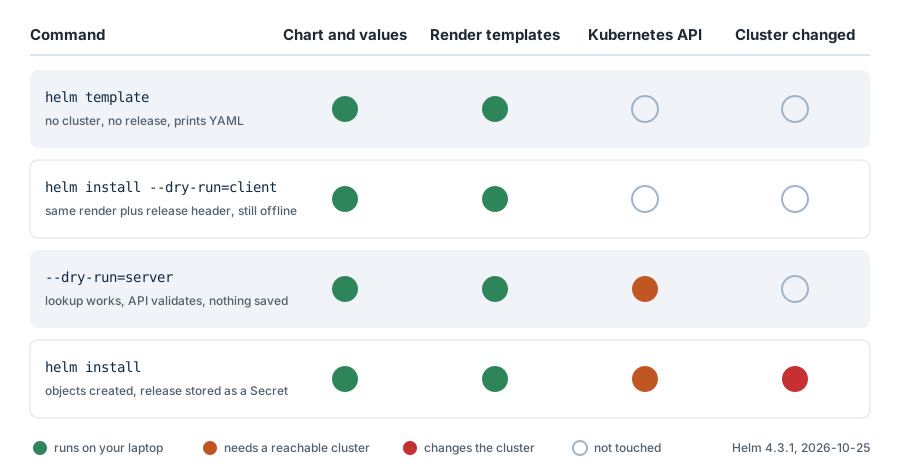
| Command | Needs a cluster | Creates a release | Output | Use it for |
|---|---|---|---|---|
helm template | no | no | YAML on stdout or files | reviewing, diffing, GitOps, CI |
helm install --dry-run=client | no | no | release header plus YAML | seeing NOTES.txt and hooks the way install prints them |
helm install --dry-run=server | yes | no | same, validated by the API server | lookups and admission checks against a real cluster |
helm lint | no | no | errors and warnings | catching broken YAML and missing fields |
helm install | yes | yes, stored as a Secret | release status | actually deploying |
All of this is Helm 4. Helm 4.0.0 shipped on 12 November 2025, the first major version in 6 years, and the Helm 3 end-of-life notice puts the last Helm 3 feature release on 9 September 2026 with security patches only until February 2027. If you are still on Helm 3, the helm template behaviour below is the same apart from the --validate change in section 9.
2. Render your first chart with no cluster
To prove the point I pointed KUBECONFIG at a file that does not exist before running anything, so any command that tries to reach a cluster fails. This is Helm 4.3.1 on my Windows laptop, run on 2026-10-25:
 1$ helm version
 2version.BuildInfo{Version:"v4.3.1", GitCommit:"c0d08d0d6d9424d4a14febb5e8a3e51b0dd00dff", GitTreeState:"clean", GoVersion:"go1.27.2", KubeClientVersion:"v1.37"}
 3
 4$ helm create webapp
 5Creating webapp
 6
 7$ find webapp -type f | sort
 8webapp/.helmignore
 9webapp/Chart.yaml
10webapp/templates/NOTES.txt
11webapp/templates/_helpers.tpl
12webapp/templates/deployment.yaml
13webapp/templates/hpa.yaml
14webapp/templates/httproute.yaml
15webapp/templates/ingress.yaml
16webapp/templates/service.yaml
17webapp/templates/serviceaccount.yaml
18webapp/templates/tests/test-connection.yaml
19webapp/values.yaml
Notice httproute.yaml: the starter chart in Helm 4.3.1 ships a Gateway API HTTPRoute template next to the classic Ingress, both disabled by default. Rendering the chart prints one YAML document per enabled template, each headed with a # Source: comment that tells you which file produced it:
1$ helm template webapp ./webapp | grep -E "^(# Source|kind):"
2# Source: webapp/templates/serviceaccount.yaml
3kind: ServiceAccount
4# Source: webapp/templates/service.yaml
5kind: Service
6# Source: webapp/templates/deployment.yaml
7kind: Deployment
8# Source: webapp/templates/tests/test-connection.yaml
9kind: Pod
Four documents out of nine templates: hpa.yaml, ingress.yaml and httproute.yaml are wrapped in {{- if .Values.<feature>.enabled }} and render nothing until you switch them on. NOTES.txt and _helpers.tpl never produce manifests. The test pod is there because test hooks are rendered too; add --skip-tests and the count drops to 3.
The first argument is the release name. It feeds .Release.Name, which the default helpers turn into names like shop-webapp. Leave it out and Helm uses the literal release-name:
1$ helm template ./webapp | grep -m2 "name:"
2  name: release-name-webapp
3    app.kubernetes.io/name: webapp
3. Render a single template with show-only
On a real chart the full output runs to hundreds of lines. --show-only (or -s) prints only the documents produced by one template file, using the path inside the chart:
 1$ helm template shop ./webapp --show-only templates/deployment.yaml
 2---
 3# Source: webapp/templates/deployment.yaml
 4apiVersion: apps/v1
 5kind: Deployment
 6metadata:
 7  name: shop-webapp
 8  labels:
 9    helm.sh/chart: webapp-0.1.0
10    app.kubernetes.io/name: webapp
11    app.kubernetes.io/instance: shop
12    app.kubernetes.io/version: "1.16.0"
13    app.kubernetes.io/managed-by: Helm
14spec:
15  replicas: 1
16  selector:
17    matchLabels:
18      app.kubernetes.io/name: webapp
19      app.kubernetes.io/instance: shop
20  template:
21    metadata:
22      labels:
23        helm.sh/chart: webapp-0.1.0
24        app.kubernetes.io/name: webapp
25        app.kubernetes.io/instance: shop
26        app.kubernetes.io/version: "1.16.0"
27        app.kubernetes.io/managed-by: Helm
28    spec:
29      serviceAccountName: shop-webapp
30      containers:
31        - name: webapp
32          image: "nginx:1.16.0"
33          imagePullPolicy: IfNotPresent
34          ports:
35            - name: http
36              containerPort: 80
37              protocol: TCP
38          livenessProbe:
39            httpGet:
40              path: /
41              port: http
42          readinessProbe:
43            httpGet:
44              path: /
45              port: http
The image tag 1.16.0 comes from appVersion in Chart.yaml, because image.tag is an empty string in values.yaml and the template falls back with default .Chart.AppVersion. You can repeat --show-only to print several files, and it works with every other flag in this post.
4. Override values with set and values files
--set overrides one key at a time from the command line:
1$ helm template shop ./webapp --set replicaCount=3 --set image.tag=1.27.2 --show-only templates/deployment.yaml | grep -E "replicas:|image:"
2  replicas: 3
3          image: "nginx:1.27.2"
For anything real I keep one values file per environment, which is the pattern in my multiple values files post. This production file raises the replica count, pins the image and switches the Ingress on:
 1replicaCount: 4
 2image:
 3  tag: "1.27.2"
 4ingress:
 5  enabled: true
 6  className: nginx
 7  hosts:
 8    - host: shop.example.com
 9      paths:
10        - path: /
11          pathType: Prefix
 1$ helm template shop ./webapp -f values-prod.yaml | grep -E "^(# Source|kind):|replicas:|image:|host:"
 2# Source: webapp/templates/serviceaccount.yaml
 3kind: ServiceAccount
 4# Source: webapp/templates/service.yaml
 5kind: Service
 6# Source: webapp/templates/deployment.yaml
 7kind: Deployment
 8  replicas: 4
 9          image: "nginx:1.27.2"
10# Source: webapp/templates/ingress.yaml
11kind: Ingress
12    - host: "shop.example.com"
13# Source: webapp/templates/tests/test-connection.yaml
14kind: Pod
15      image: busybox
The Ingress appeared the moment ingress.enabled became true, without touching the chart. When the same key is set in several places, the install reference says the last (right-most) file wins and --set wins over files. I checked it with a second file, values-eu.yaml, that only sets replicaCount: 6:
1$ helm template shop ./webapp -f values-prod.yaml -f values-eu.yaml --set replicaCount=8 | grep "replicas:"
2  replicas: 8
3$ helm template shop ./webapp -f values-prod.yaml -f values-eu.yaml | grep "replicas:"
4  replicas: 6
5$ helm template shop ./webapp -f values-eu.yaml -f values-prod.yaml | grep "replicas:"
6  replicas: 4
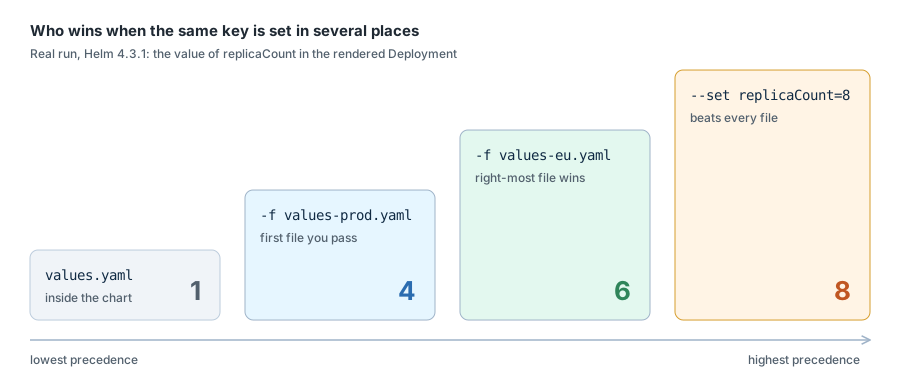
Swapping the order of the two -f files changed the result from 6 to 4. That is the single most common reason a value "does not apply" in CI: the pipeline passes the files in a different order than you do locally. If the value comes from an environment variable, my environment variables in Helm post shows the --set and envsubst patterns.
5. Write the output to files and diff two renders
--output-dir writes one file per template instead of printing to stdout, keeping the chart's folder structure. This is what I commit when a GitOps tool needs plain manifests:
1$ helm template shop ./webapp -f values-prod.yaml --output-dir rendered
2wrote rendered\webapp/templates/serviceaccount.yaml
3wrote rendered\webapp/templates/service.yaml
4wrote rendered\webapp/templates/deployment.yaml
5wrote rendered\webapp/templates/ingress.yaml
6wrote rendered\webapp/templates/tests/test-connection.yaml
The mixed \ and / in those paths is what Helm prints on Windows; the files land in the right place. Add --release-name if you render several releases into the same folder and want the release name in the path.
The habit that saves me the most time is rendering twice and diffing before an upgrade. No plugin, no cluster:
 1$ helm template shop ./webapp > render-default.yaml
 2$ helm template shop ./webapp -f values-prod.yaml > render-prod.yaml
 3$ diff -u render-default.yaml render-prod.yaml
 4@@ -48,7 +48,7 @@
 5     app.kubernetes.io/version: "1.16.0"
 6     app.kubernetes.io/managed-by: Helm
 7 spec:
 8-  replicas: 1
 9+  replicas: 4
10   selector:
11     matchLabels:
12       app.kubernetes.io/name: webapp
13@@ -65,7 +65,7 @@
14       serviceAccountName: shop-webapp
15       containers:
16         - name: webapp
17-          image: "nginx:1.16.0"
18+          image: "nginx:1.27.2"
19           imagePullPolicy: IfNotPresent
20           ports:
21             - name: http
22@@ -79,6 +79,32 @@
23             httpGet:
24               path: /
25               port: http
26+
27+---
28+# Source: webapp/templates/ingress.yaml
29+apiVersion: networking.k8s.io/v1
30+kind: Ingress
I trimmed the diff after the Ingress header; the rest is the Ingress body. That diff is exactly what changes in the cluster, two changed lines and one new object, and it reads well in a pull request. When you need the diff against what is already running in a cluster instead of against another render, that is the job of the helm-diff plugin from my Helm plugins post, which does need cluster access.
6. Render a third-party chart straight from its repository
helm template does not need the chart on disk or a helm repo add first. --repo takes the repository URL directly, which is how I read a public chart before I trust it:
 1$ helm template ingress-nginx ingress-nginx --repo https://kubernetes.github.io/ingress-nginx --namespace ingress-nginx > ingress-nginx.yaml
 2$ grep "^kind:" ingress-nginx.yaml | sort | uniq -c
 3      2 kind: ClusterRole
 4      2 kind: ClusterRoleBinding
 5      1 kind: ConfigMap
 6      1 kind: Deployment
 7      1 kind: IngressClass
 8      2 kind: Job
 9      2 kind: Role
10      2 kind: RoleBinding
11      2 kind: Service
12      2 kind: ServiceAccount
13      1 kind: ValidatingWebhookConfiguration
14$ wc -l ingress-nginx.yaml
15767 ingress-nginx.yaml
That is chart version 4.15.1 of ingress-nginx, 18 objects including two cluster-wide roles and a validating webhook, all visible before a single permission is granted. I timed three runs of each render on my laptop:
| Render | Run 1 | Run 2 | Run 3 |
|---|---|---|---|
Local webapp chart with values-prod.yaml | 0.19 s | 0.19 s | 0.20 s |
| ingress-nginx downloaded from its repository | 0.70 s | 0.64 s | 0.67 s |
Fast enough to run on every commit in CI.
7. Fake the cluster: kube-version, api-versions and lookup
Charts often branch on the cluster they are installed into, through the .Capabilities built-in object, and some read live objects with lookup. Offline, helm template has to invent those answers. I added a small probe template to a copy of the chart to see what it invents:
 1apiVersion: v1
 2kind: ConfigMap
 3metadata:
 4  name: {{ .Release.Name }}-probe
 5  namespace: {{ .Release.Namespace }}
 6data:
 7  kubeVersion: {{ .Capabilities.KubeVersion.Version | quote }}
 8  hasGatewayAPI: {{ .Capabilities.APIVersions.Has "gateway.networking.k8s.io/v1" | quote }}
 9  isInstall: {{ .Release.IsInstall | quote }}
10  existingSecret: {{ lookup "v1" "Secret" .Release.Namespace "db-credentials" | toJson | quote }}
 1$ helm template shop ./probe --namespace payments --show-only templates/probe.yaml
 2---
 3# Source: webapp/templates/probe.yaml
 4apiVersion: v1
 5kind: ConfigMap
 6metadata:
 7  name: shop-probe
 8  namespace: payments
 9data:
10  kubeVersion: "v1.37.0"
11  hasGatewayAPI: "false"
12  isInstall: "true"
13  existingSecret: "{}"
14
15$ helm template shop ./probe --kube-version 1.31.0 --api-versions gateway.networking.k8s.io/v1 --show-only templates/probe.yaml | grep -E "kubeVersion|hasGateway"
16  kubeVersion: "v1.31.0"
17  hasGatewayAPI: "true"
Three things to take from that:
- The Kubernetes version defaults to the version Helm was built against, v1.37.0 for Helm 4.3.1, not to your cluster's version. If a chart switches API versions on
semverCompare, pass--kube-versionwith your real cluster version or you are reviewing YAML for a cluster you do not run. - API capabilities default to the built-in Kubernetes APIs only, so a chart that renders a Gateway API route or a cert-manager
Certificateonly when the CRD exists will silently skip it.--api-versions(repeatable) tells Helm the CRD is there. lookupreturns an empty map. The function documentation says it plainly: withhelm templateit always returns an empty response. A chart that reuses an existing password from a Secret will generate a new one in your render. Use--is-upgradeto flip.Release.IsInstalltoIsUpgradewhen a template branches on that.
8. helm template vs dry run vs lint
With the same fake kubeconfig in place, this is what the cluster-facing variants do:
 1$ helm install shop ./webapp --dry-run=client | head -12
 2NAME: shop
 3LAST DEPLOYED: Sun Oct 25 09:56:45 2026
 4NAMESPACE: default
 5STATUS: pending-install
 6REVISION: 1
 7DESCRIPTION: Dry run complete
 8HOOKS:
 9---
10# Source: webapp/templates/tests/test-connection.yaml
11apiVersion: v1
12kind: Pod
13metadata:
14
15$ helm install shop ./webapp --dry-run=server
16level=ERROR msg="cluster reachability check failed: kubernetes cluster unreachable: Get \"http://localhost:8080/version\": dial tcp [::1]:8080: connectex: No connection could be made because the target machine actively refused it."
17Error: INSTALLATION FAILED: cluster reachability check failed: kubernetes cluster unreachable: Get "http://localhost:8080/version": dial tcp [::1]:8080: connectex: No connection could be made because the target machine actively refused it.
18
19$ helm lint ./webapp
20==> Linting ./webapp
21[INFO] Chart.yaml: icon is recommended
22
231 chart(s) linted, 0 chart(s) failed
--dry-run=client works offline and adds the release header and the hooks section the way a real install prints them; --dry-run=server needs the API server, which is the price of real lookups and admission validation. helm lint is the cheap first gate. The dry-run side, including helm upgrade --dry-run, is covered in depth in my helm dry run post, and the debugging templates guide lists the same three tools.
My order is lint, then template and diff, then a server dry run against a non-production cluster only for charts that use lookup or rely on admission webhooks.
9. What broke when I ran this
1. A tag of 1.10 rendered as 1.1. I put an unquoted tag: 1.10 in a values file and got the wrong image:
1$ cat values-float.yaml
2image:
3  tag: 1.10
4$ helm template shop ./webapp -f values-float.yaml --show-only templates/deployment.yaml | grep image:
5          image: "nginx:1.1"
YAML reads 1.10 as the number 1.1 before Helm ever sees it, and the template quotes the number. nginx:1.1 is not the image I meant: either the pull fails with ErrImagePull at deploy time, or an old image with that tag runs. The fix is to quote version strings in values files, tag: "1.10". Oddly, --set image.tag=1.20 on the command line rendered nginx:1.20 correctly in Helm 4.3.1, so the bug only showed up in the file, which is exactly where nobody looks.
2. The namespace was missing from every object. I rendered with --namespace payments and counted:
1$ helm template shop ./webapp --namespace payments | grep -c "namespace:"
20
The starter chart from helm create never writes metadata.namespace, so --namespace only sets .Release.Namespace for templates that use it. If you pipe this output into kubectl apply -f -, everything lands in whatever namespace your current context points at. The ingress-nginx chart, by contrast, writes namespace: {{ .Release.Namespace }} and its render had 17 namespace lines. Check your own chart before you rely on the flag.
3. A broken template and broken YAML fail differently. I broke the chart two ways, a missing brace in the Deployment and a mis-indented labels: in the Service:
1$ helm template shop ./broken
2Error: parse error at (webapp/templates/deployment.yaml:9): unexpected "}" in operand
3
4Use --debug flag to render out invalid YAML
5
6$ helm template shop ./badyaml
7Error: YAML parse error on webapp/templates/service.yaml: error converting YAML to JSON: yaml: line 4: did not find expected key
8
9Use --debug flag to render out invalid YAML
The first is a template syntax error and points at the exact line of the source file. The second only says "line 4", and line 4 of the rendered Service, not of your template. --debug prints the rendered output so you can see it:
1$ helm template shop ./badyaml --debug 2>&1 | grep -n -A6 "Source: webapp/templates/service.yaml"
219:# Source: webapp/templates/service.yaml
320-apiVersion: v1
421-kind: Service
522-metadata:
623-  name: shop-webapp
724- labels:
825-    helm.sh/chart: webapp-0.1.0
Line 4 of that document is labels: with one space instead of two. helm lint ./badyaml reported the same error with the file name, which is why lint runs first in my order.
4. --validate is deprecated in Helm 4. My old CI script used helm template --validate to check manifests against a cluster:
1$ helm template shop ./webapp --validate
2Flag --validate has been deprecated, use '--dry-run=server' instead
3level=ERROR msg="cluster reachability check failed: kubernetes cluster unreachable: Get \"http://localhost:8080/version\": dial tcp [::1]:8080: connectex: No connection could be made because the target machine actively refused it."
The warning is easy to miss in a long CI log. Helm 4 still accepts the flag but prints that warning, and the replacement is helm template --dry-run=server. The lookup guide names the same flag as the way to test lookup against a running cluster. Both need a reachable cluster, which is the whole point.
10. Conclusion
To summarise:
helm templaterenders a chart to plain YAML on your laptop with no cluster, in well under a second.-ffiles are applied left to right, the right-most wins, and--setbeats every file.--show-only,--output-dir,--skip-testsand a plaindiffof two renders cover most daily review work.- Offline,
.Capabilitiesdescribes Helm's own Kubernetes version andlookupreturns nothing: pass--kube-versionand--api-versions, and test lookup-based charts with--dry-run=server. - Quote version strings in values files, and do not trust
--namespaceunless your chart writes the namespace.
For the full Helm walkthrough, from install to upgrade and rollback, my complete Helm chart tutorial on YouTube covers the whole lifecycle, and the Kubernetes index lists every Kubernetes and Helm post on this site.
Read More -
- Helm chart - How to Add/Install plugins
- Getting started with Helm Chart
- Helm chart - WordPress Installation with MariaDB on Kubernetes
- Helm chart - Build you first helm chart with Spring Boot
- Helm Chart - Convert Kubernetes YAML into Helm Chart YAML
- Helm Chart - Pass environment variables
- Helm Chart - Plugin
- Helm Chart - Dry Run Install
- Helm Chart - How to create multiple values files inside helm chart?
- Helmfile - How to use Helmfile for managing helm chart?
- Helm template - Render a chart locally without a cluster (Helm 4)
Did this save you a debugging session? Stay in the loop -
- Subscribe on YouTube - every post here has a screen-recorded companion video.
- Code on GitHub - the repositories, Terraform and scripts behind these posts.