Pass environment variables into a Helm chart: --set, values files, --set-string and the traps (Helm 4)

TL;DR
- A Helm chart does not read your shell environment. You pass a value in through a values file (
-f) or one of five command-line flags:--set,--set-string,--set-file,--set-jsonand--set-literal. The template then writes it into the containerenv:list. - Which value wins: chart
values.yaml<-ffiles (the right-most file wins) <--set-json<--set<--set-string<--set-file<--set-literal. I confirmed the first five on Helm 4.3.1 on 2026-10-27; the order of the flags on the command line does not matter. - The trap with numbers:
tag: 1.10in a values file is parsed as the float 1.1 and renders asnginx:1.1.--set image.tag=1.10and a quoted"1.10"both keep1.10. - The trap with commas:
--set key=a,bfails withkey "b" has no value. Escape it asa\,bor use--set-literal. - Not your case? To compare several values files in depth read helm multiple values files; if you have never built a chart, start with getting started with Helm.
Table of Content
- What the chart actually does with environment variables
- The lab chart
- Pass values with set
- Pass values with a values file
- Which value wins
- Shell variables, files and JSON
- What broke when I ran this
- Which flag should you use
1. What the chart actually does with environment variables
People ask "how do I pass an environment variable into Helm" and mean two different things. The first meaning is a container environment variable: an entry in the env: list of a pod, such as DB_HOST=db.internal.example. The second meaning is a value from your shell ($DB_HOST in the terminal) that you want to land in the chart. Helm has no feature that reads the shell for you. A template can only read the object called .Values, and .Values is built from the chart's own values.yaml plus whatever you hand over with -f and --set*.
So the pattern is always the same three steps:
- The template loops over a list in
.Valuesand writesenv:entries. - You provide that list through a values file or a flag.
- If the number lives in your shell, you expand it into the flag yourself (
"...value=$DB_HOST"), or you render a values file from a template first.
The diagram shows the order in which Helm merges those sources. I wrote it from the MergeValues function in the Helm source and then checked it with the commands below.
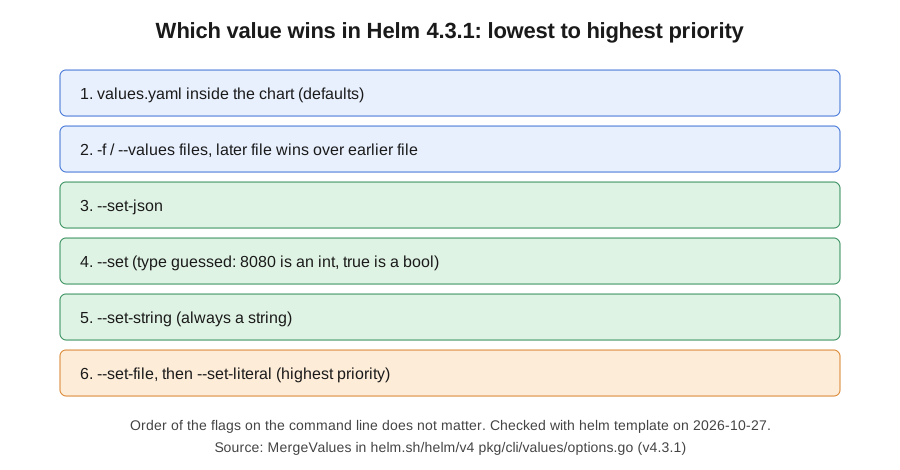
| Source | Flag | Type handling | Priority (1 = lowest) |
|---|---|---|---|
| Chart defaults | values.yaml in the chart | YAML types | 1 |
| Values file | -f file.yaml, repeatable | YAML types, so 1.10 is a float | 2 |
| JSON | --set-json 'a=[1,2]' | JSON types | 3 |
| Inline | --set a=b | Guessed: ints, bools and null are converted | 4 |
| Inline string | --set-string a=b | Always a string | 5 |
| File content | --set-file a=path | Whole file as a string | 6 |
| Literal | --set-literal a=b,c | Raw string, no parsing | 7 |
The official Helm guide to values files lists the same sources, and the helm install reference says that for repeated -f files and repeated --set flags the last (right-most) one wins. On the Kubernetes side, the env: list the template writes is the one described in define environment variables for a container. In the Helm source, the values come from the Options struct documented on pkg.go.dev for the Helm values package, and the --set syntax (dots, [0] indexes, escaped commas) is implemented by the strvals package. The merge of those results on top of the chart defaults is done by the coalesce functions in the chart util package.
2. The lab chart
Everything below uses helm template, which renders the chart to YAML without contacting Kubernetes, so you can follow along with no cluster at all. The --set and -f flags are shared by helm install, helm upgrade and helm template, so what you see here is what an install would receive. If you want to see the same flags against a real cluster without changing it, helm install --dry-run is the next step, and helm template explained covers the render command itself.
I ran every command on 2026-10-27 with Helm v4.3.1 (helm version --short prints v4.3.1+gc0d08d0) and KUBECONFIG pointing at a file that does not exist, to prove no cluster was involved. I ran the lab twice, on Linux and on my Windows laptop, and the rendered output was byte for byte the same.
A render is cheap: three runs of helm template r helloworld -f env-values.yaml took 56 ms, 55 ms and 56 ms on the Linux machine and 343 ms, 365 ms and 326 ms on Windows, and the default chart renders to 4 Kubernetes objects in 2,587 bytes (about 2.5 KiB) of YAML. That is cheap enough to run on every commit in CI.
1helm create helloworld
helm create writes a chart whose values.yaml has replicaCount: 1 and an image.tag that defaults to empty. I added two things. First, a list at the bottom of values.yaml:
1examplemap:
2  - name: APP_MODE
3    value: dev
Second, a loop in templates/deployment.yaml, right under the image: line of the container:
1          env:
2            {{- range .Values.examplemap }}
3            - name: {{ .name | quote }}
4              value: {{ .value | quote }}
5            {{- end }}
That is the whole mechanism. Every entry you pass in examplemap becomes one environment variable. If you are turning a plain Kubernetes Deployment into a chart for the first time, convert Kubernetes YAML into a Helm chart shows how to get to this point.
3. Pass values with set
Start with the number of replicas, because it is easy to see in the output. With Helm 4.3.1 on 2026-10-27 I ran a render with one flag, and then with the same key twice:
1$ helm template r helloworld --set replicaCount=2 | grep replicas:
2  replicas: 2
3$ helm template r helloworld --set replicaCount=2 --set replicaCount=3 | grep replicas:
4  replicas: 3
The last --set for the same key wins. That is the behaviour the old version of this post described for helm install, and helm install, helm upgrade and helm template all share the same flag parser, so it holds for all three.
For a list entry such as an environment variable you use the index syntax. The same version and date:
1$ helm template r helloworld --set examplemap[0].name=USERNAME,examplemap[0].value=test1 -s templates/deployment.yaml | grep -A4 "env:"
2          env:
3            - name: "USERNAME"
4              value: "test1"
5          imagePullPolicy: IfNotPresent
Two details. The index replaces the list from values.yaml: the default APP_MODE entry is gone, because --set on examplemap[0] overwrites element 0 rather than appending. And the -s short flag is --show-only, which prints a single template.
4. Pass values with a values file
A values file is the better choice once you have more than two or three variables. I wrote env-values.yaml with two entries and rendered it (Helm 4.3.1, 2026-10-27):
1examplemap:
2  - name: USERNAME
3    value: test1
4  - name: PASSWORD
5    value: test2
1$ helm template r helloworld -f env-values.yaml -s templates/deployment.yaml | grep -A6 "env:"
2          env:
3            - name: "USERNAME"
4              value: "test1"
5            - name: "PASSWORD"
6              value: "test2"
7          imagePullPolicy: IfNotPresent
8          ports:
Here the whole list is replaced, so APP_MODE from the chart default disappears again. Helm merges maps key by key, but it replaces lists as a unit. That surprises people who expect -f to append an environment variable, so if you need to keep the defaults, repeat them in your file or change the chart so that env is a map (DB_HOST: value) instead of a list.
This is also the cleanest answer to "take the environment variables from my shell": keep a values template with ${VAR} placeholders, fill it with envsubst and pipe it into Helm, because -f - reads a values file from standard input. I ran it with Helm 4.3.1 and envsubst from GNU gettext-runtime 1.0 on 2026-10-27:
 1$ cat values.tpl.yaml
 2examplemap:
 3  - name: DB_HOST
 4    value: ${DB_HOST}
 5  - name: DB_PORT
 6    value: "${DB_PORT}"
 7$ export DB_HOST=db.internal.example DB_PORT=5432
 8$ envsubst < values.tpl.yaml | helm template r helloworld -f - -s templates/deployment.yaml | grep -A6 "env:"
 9          env:
10            - name: "DB_HOST"
11              value: "db.internal.example"
12            - name: "DB_PORT"
13              value: "5432"
14          imagePullPolicy: IfNotPresent
15          ports:
Two things to know before you rely on it. I quoted "${DB_PORT}" in the template so that the number stays a string even before the chart's quote runs. And when I ran the same pipe with DB_PORT unset, envsubst did not complain: it replaced the placeholder with nothing and Helm rendered value: "". Nothing fails until the application starts without its port, so check the variables in your pipeline before you render.
5. Which value wins
When two sources set the same key, the rule is fixed. I tested it with two small files: myvalues.yaml with replicaCount: 2 and myvalues-override.yaml with replicaCount: 3. Helm 4.3.1, 2026-10-27:
1$ helm template r helloworld -f myvalues.yaml -f myvalues-override.yaml | grep replicas:
2  replicas: 3
3$ helm template r helloworld -f myvalues-override.yaml -f myvalues.yaml | grep replicas:
4  replicas: 2
5$ helm template r helloworld -f myvalues-override.yaml --set replicaCount=5 | grep replicas:
6  replicas: 5
The right-most -f file wins, and --set beats every file. The next test mixes the three inline flags in a "wrong" order on the command line, to see whether position matters:
1$ helm template r helloworld --set-string replicaCount=7 --set replicaCount=5 --set-json replicaCount=9 -f myvalues.yaml | grep replicas:
2  replicas: 7
3$ helm template r helloworld --set replicaCount=5 --set-json replicaCount=9 | grep replicas:
4  replicas: 5
--set-string beat --set, which beat --set-json, even though --set-json was last on the line. So the flag kind decides, not the flag position. Only repeats of the same flag are ordered left to right. The slightly odd part is that --set-string replicaCount=7 produced replicas: 7 and no error: the template prints the string 7 unquoted, so the output looks identical to an integer. The type only matters when the API server parses the manifest, which I could not test without a cluster. For the deeper per-environment layout (values-dev.yaml, values-prod.yaml) see helm multiple values files.
6. Shell variables, files and JSON
A shell variable. Let the shell expand it before Helm sees it. Helm 4.3.1, 2026-10-27, with DB_HOST=db.internal.example exported:
1$ helm template r helloworld --set "examplemap[0].name=DB_HOST,examplemap[0].value=$DB_HOST" -s templates/deployment.yaml | grep -A2 "env:"
2          env:
3            - name: "DB_HOST"
4              value: "db.internal.example"
Use double quotes so the shell expands $DB_HOST. If the variable might contain a comma, a dot or a bracket, use --set-literal (section 7) or put the value in a file.
A whole file. --set-file key=path reads the file content into the key. I created token.txt with the text s3cr3t-token and ran:
1$ helm template r helloworld --set-file examplemap[0].value=token.txt --set examplemap[0].name=TOKEN -s templates/deployment.yaml | grep -A2 "env:"
2          env:
3            - name: "TOKEN"
4              value: "s3cr3t-token\n"
Notice the \n. echo and most editors end the file with a newline and Helm keeps it. If you feed a token into an application that compares strings, that newline will bite. Create the file with printf '%s' value > token.txt or trim in the template with | trim. I would not put real secrets into a chart's env: at all; a Kubernetes Secret is the right object, and Kubernetes secrets explains how to create one.
JSON. --set-json is the clean way to pass a whole list in one flag:
1$ helm template r helloworld --set-json "examplemap=[{\"name\":\"A\",\"value\":\"1\"},{\"name\":\"B\",\"value\":\"2\"}]" -s templates/deployment.yaml | grep -A4 "env:"
2          env:
3            - name: "A"
4              value: "1"
5            - name: "B"
6              value: "2"
7. What broke when I ran this
1. A values file silently turned 1.10 into 1.1. I put an image tag into a file the natural way:
1image:
2  tag: 1.10
Helm 4.3.1 on 2026-10-27 rendered this, and the other spellings of the same tag, as follows:
1$ helm template r helloworld -f tag-values.yaml | grep image:
2          image: "nginx:1.1"
3$ helm template r helloworld --set image.tag=1.10 | grep image:
4          image: "nginx:1.10"
5$ helm template r helloworld --set-string image.tag=1.10 -f tag-values.yaml | grep image:
6          image: "nginx:1.10"
7$ helm template r helloworld -f tag-quoted.yaml | grep image:
8          image: "nginx:1.10"
YAML reads an unquoted 1.10 as the number 1.1. There is no error and no warning, you just deploy the wrong image tag (or fail to pull a tag that does not exist). The fix is to quote the value in the file (tag: "1.10") or pass it with --set or --set-string. A few other tags I tried through --set stayed intact: 1.10.0, 1e3, 0123 and 12345678901234567890 all rendered exactly as typed.
2. A comma in the value breaks --set. I tried a value of a,b:
1$ helm template r helloworld --set examplemap[0].name=A,examplemap[0].value=a,b -s templates/deployment.yaml
2Error: failed parsing --set data: key "b" has no value
The comma is the separator between two key=value pairs, so b looked like a key with no value. Escaping with a backslash fixed it, and the result was value: "a,b":
1helm template r helloworld --set "examplemap[0].name=A,examplemap[0].value=a\,b" -s templates/deployment.yaml
--set-literal is the other fix: it takes the string as is, so --set-literal image.tag=a,b rendered nginx:a,b for me. This matters for connection strings, JSON snippets and passwords.
3. Unquoted values look fine in helm template and break later. In the lab chart I used {{ .value | quote }}. To see what happens without it, I removed the quote filter and rendered a value of 8080 and then true:
1$ helm template r unq --set examplemap[0].name=X,examplemap[0].value=8080 -s templates/deployment.yaml | grep -A2 env:
2          env:
3            - name: "X"
4              value: 8080
5$ helm template r unq --set examplemap[0].name=X,examplemap[0].value=true -s templates/deployment.yaml | grep -A2 env:
6          env:
7            - name: "X"
8              value: true
I parsed the rendered YAML with Python to see what a consumer would receive. With the unquoted template the value is the integer 8080 (8080 int); with | quote it is the string '8080' ('8080' str). Environment variable values in a pod spec must be strings, so an unquoted true or 8080 is a type error for the API server. I could not run an apply to show the error message, so I am not quoting one. My rule is to put | quote on every env value in a template.
4. There is no cluster, so install failed instantly. Running helm install without a reachable cluster fails before any templating:
1$ helm install r helloworld
2level=ERROR msg="cluster reachability check failed: kubernetes cluster unreachable: Get \"http://localhost:8080/version\": dial tcp 127.0.0.1:8080: connect: connection refused"
3Error: INSTALLATION FAILED: cluster reachability check failed: kubernetes cluster unreachable: Get "http://localhost:8080/version": dial tcp 127.0.0.1:8080: connect: connection refused
This is why every example here uses helm template. If you copy a command from this post and it fails with this error, you are not in a broken chart; you have no kubeconfig context. And one more: if you are still on Helm 2 muscle memory, helm install --name myrelease fails on Helm 3 and 4, see unknown flag --name.
8. Which flag should you use
| Situation | Use | Why |
|---|---|---|
| A handful of fixed settings per environment | -f values-prod.yaml | Reviewable in git, types are explicit |
| One-off override in CI | --set key=value | Short, wins over files |
Version-like or numeric strings (1.10, 0123) | --set-string or a quoted value | Avoids float and int coercion |
| Value from a shell variable | --set "key=$VAR" | The shell expands it |
| Value contains commas | --set-literal or \, | --set splits on commas |
| Multi-line text or a certificate | --set-file | Keeps line breaks, but also a trailing newline |
| A whole list or object | --set-json | One flag, real JSON types |
My recommendation after running all of this: keep defaults in the chart, per-environment values in files under version control, and use --set-string only for the few values that CI computes, such as an image tag from a commit hash. Quote every string in your templates, and check the result with helm template before the first install. Chart tooling grows around this, for instance Helm plugins add helm diff and encrypted values files.
Conclusion
An environment variable reaches a pod through a list in .Values, and .Values is assembled from the chart defaults, your -f files and the --set* flags, in that order. I verified the order, the 1.10 float trap, the comma error and the trailing newline from --set-file with Helm 4.3.1 on 2026-10-27. Anything that needs a live cluster, such as the type error from an unquoted number, I left unverified rather than inventing the output.
Read More -
- Helm chart - How to Add/Install plugins
- Getting started with Helm Chart
- Helm chart - WordPress Installation with MariaDB on Kubernetes
- Helm chart - Build you first helm chart with Spring Boot
- Helm Chart - Convert Kubernetes YAML into Helm Chart YAML
- Helm Chart - Pass environment variables
- Helm Chart - Plugin
- Helm Chart - Dry Run Install
- Helm Chart - How to create multiple values files inside helm chart?
- Helmfile - How to use Helmfile for managing helm chart?
- Helm template - Render a chart locally without a cluster (Helm 4)
Did this save you a debugging session? Stay in the loop -
- Subscribe on YouTube - every post here has a screen-recorded companion video.
- Code on GitHub - the repositories, Terraform and scripts behind these posts.