Helm install: unknown flag --name and must either provide a name or specify --generate-name (Fixed on Helm 4)

TL;DR
Error: unknown flag: --namemeans you typed a Helm 2 command. Since Helm 3 the release name is a positional argument:helm install RELEASE_NAME CHART, with no--nameflag. I reproduced this on Helm 4.3 on 2026-10-28, and the same flag removal hitshelm template --nameandhelm upgrade --install --name.Error: INSTALLATION FAILED: must either provide a name or specify --generate-namemeans you gave a chart but no release name. Either add the name (helm install myrel ./helloworld) or pass--generate-name(helm install --generate-name ./helloworld, which gave mehelloworld-1793164328).- The release name has limits: lowercase letters, digits,
-and., and at most 53 characters.helloWorldRelease,my_reland a 54-character name were all rejected in my runs, so the example in many old tutorials, including the first version of this post, fails on uppercase alone. - Not your exact case? If the command is accepted but you want to see what it would create, read helm install --dry-run; if you are brand new to charts, start with getting started with Helm.
Table of Content
- The two errors and what causes them
- Fix 1: put the release name before the chart
- Fix 2: let Helm generate the name
- Release name rules
- Other Helm 2 flags that no longer exist
- What broke when I ran this
- Quick reference table
- Conclusion
The two errors and what causes them
Both errors come from the same change. In Helm 2 you wrote helm install --name myrel stable/nginx. Helm 3 removed the --name flag, and Helm 4 keeps it that way. The usage line of helm install on Helm 4.3 shows the new shape, which I read from helm install --help on 2026-10-28:
1Usage:
2  helm install [NAME] [CHART] [flags]
The release name comes first, the chart second. That is why the two mistakes produce two different messages. The Helm project documents the change in its changes since Helm 2 FAQ, and the full flag list lives in the helm install reference.
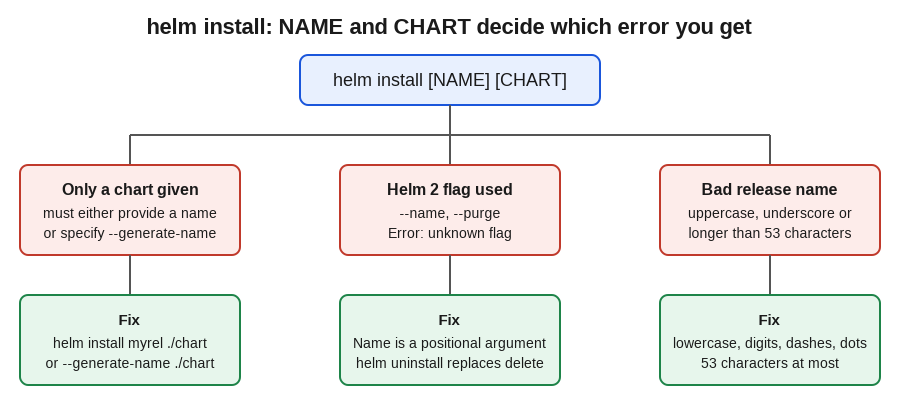
| What you typed | Error | Cause |
|---|---|---|
helm install helloworld --name myrel | Error: unknown flag: --name | Helm 2 flag, removed in Helm 3 |
helm install helloworld | must either provide a name or specify --generate-name | Only one positional argument, so Helm reads it as the chart |
helm install helloWorldRelease ./helloworld | invalid release name | Uppercase letters are not allowed |
helm install a b c | expected at most two arguments | A third positional argument |
Fix 1: put the release name before the chart
I created a throwaway chart with helm create helloworld and ran everything below with Helm 4.3 on 2026-10-28, with KUBECONFIG pointing to a file that does not exist, so nothing touched a cluster. That works because --dry-run=client never connects to a cluster. Here is the failure first:
1$ helm install helloworld --name helloWorldRelease
2Error: unknown flag: --name
3
4$ helm install helloworld
5Error: INSTALLATION FAILED: must either provide a name or specify --generate-name
And here is the working form, release name first and chart path second:
1$ helm install myrel ./helloworld --dry-run=client
2NAME: myrel
3LAST DEPLOYED: Wed Oct 28 05:12:17 2026
4NAMESPACE: default
I trimmed the output to the first lines. The full render is 119 lines and 3,220 bytes for the default chart, and three runs took 52 ms, 55 ms and 57 ms on my machine. The second argument is a chart reference: a local directory, a packaged .tgz, a repo/chart name or a URL. When I passed helloWorld with a capital W, which does not exist as a directory, Helm treated it as a repository chart and said:
1$ helm install myrel helloWorld
2Error: INSTALLATION FAILED: non-absolute URLs should be in form of repo_name/path_to_chart, got: helloWorld
On a case-sensitive file system that message means "I could not find a directory with that name", so check the spelling and the working directory before you suspect Helm.
Fix 2: let Helm generate the name
When the name does not matter, which is typical for a quick test, --generate-name (short form -g) builds one from the chart name and a number:
1$ helm install --generate-name ./helloworld --dry-run=client
2NAME: helloworld-1793164338
3LAST DEPLOYED: Wed Oct 28 05:12:18 2026
If you want a pattern instead of a bare number, --name-template accepts a Go template. I ran this twice and got a different suffix each time:
1$ helm install --generate-name --name-template 'web-{{randAlpha 5 | lower}}' ./helloworld --dry-run=client
2NAME: web-gnetn
3$ helm install --name-template 'web-{{randAlpha 5 | lower}}' ./helloworld --dry-run=client
4NAME: web-guulj
Both flags together with an explicit name are a mistake. I tried helm install myrel --generate-name ./helloworld and Helm refused:
1$ helm install myrel --generate-name ./helloworld --dry-run=client
2Error: INSTALLATION FAILED: cannot set --generate-name and also specify a name
My recommendation: use generated names for throwaway experiments only. In a pipeline, name the release explicitly, because helm upgrade, helm rollback and helm uninstall all need that name, and a random one makes your scripts unrepeatable. For the idempotent form, helm upgrade --install NAME CHART creates the release when it is missing (the -i, --install flag in the upgrade help), which is what most CI jobs want.
Release name rules
The old version of this post used helloWorldRelease as the example name. It does not work. Helm validates the name against a fixed pattern in its source (the validate_name.go file in the v4.3.1 tag) and the error text prints the rule:
1$ helm install helloWorldRelease ./helloworld --dry-run=client
2Error: INSTALLATION FAILED: release name check failed: release name "helloWorldRelease": invalid release name, must match regex ^[a-z0-9]([-a-z0-9]*[a-z0-9])?(\.[a-z0-9]([-a-z0-9]*[a-z0-9])?)*$ and the length must not be longer than 53
| Rule | Limit | Result when broken |
|---|---|---|
| Allowed characters | a-z, 0-9, - and . | invalid release name |
| First and last character | letter or digit | invalid release name |
| Maximum length | 53 characters | invalid release name |
I confirmed all three families with real names: helloWorldRelease (uppercase), my_rel (underscore) and a name made of 54 letter a characters (one over the limit) each returned the same release name check failed error. The 53-character cap exists because the name is used to build Kubernetes resource names, which have their own length limits.
Other Helm 2 flags that no longer exist
If your command came from an old tutorial, --name is probably not the only stale part. I tried the other Helm 2 forms I could think of:
1$ helm upgrade --install --name x ./helloworld
2Error: unknown flag: --name
3$ helm delete --purge x
4Error: unknown flag: --purge
5$ helm template --name x ./helloworld
6Error: unknown flag: --name
| Helm 2 command | Helm 3 and 4 replacement |
|---|---|
helm install --name myrel stable/nginx | helm install myrel REPO/nginx |
helm delete --purge myrel | helm uninstall myrel |
helm template --name myrel . | helm template myrel . |
helm install --generate-name (new) | helm install --generate-name CHART |
The old stable repository is also gone from a fresh Helm: helm install --generate-name stable/nginx returned Error: INSTALLATION FAILED: repo stable not found on a machine with no repositories added (helm repo list printed no repositories to show). Add the repository you actually want with helm repo add first. To see how values reach the chart once the install works, read passing environment variables to Helm and multiple values files.
What broke when I ran this
Four things surprised me while reproducing this on 2026-10-28.
1. The name check runs before anything else. I expected a missing chart to fail first. It does not: the invalid name error appears even when the chart path is fine, and it appears with --dry-run=client too. So a pipeline that builds a release name from a branch name, for example feature/Login_Fix, fails here. The fix is to normalise it in the shell before calling Helm, for example tr '[:upper:]_/' '[:lower:]--', and to cut it at 53 characters.
2. --dry-run without a value is deprecated. Helm 4.3 prints level=WARN msg="--dry-run is deprecated and should be replaced with '--dry-run=client'" for the bare flag. The accepted values are none, client and server; server needs a cluster. If you copy the command from an older post, change it to --dry-run=client for an offline check.
3. Failures are instant. The name errors came back in 56 ms because Helm validates the arguments before it reads the chart or contacts anything, so you never wait on a timeout. The only long timer in helm install is --timeout, which defaults to 5m0s for each Kubernetes operation, and it matters once you add --wait.
4. A one-argument command is always read as a chart. helm install helloworld does not say "you forgot the name of the release"; the message mentions --generate-name, which sends many people down the wrong path. Count your positional arguments: one means the chart is there and the name is missing.
For a cost note: none of this needs a cluster, so debugging the command line is free. The first time an install touches a cluster it can create real resources that cost money on a cloud provider, which is why I run --dry-run=client first and, when the command is right, move to the server-side check described in helm install --dry-run. If the install later fails while creating objects, see helm chart failed to create.
Quick reference table
| Goal | Command (Helm 4.3) |
|---|---|
| Install with a name | helm install myrel ./helloworld |
| Install with a generated name | helm install --generate-name ./helloworld |
| Generated name with a pattern | helm install --name-template 'web-{{randAlpha 5 | lower}}' ./helloworld |
| Create or upgrade | helm upgrade --install myrel ./helloworld |
| Remove a release | helm uninstall myrel |
| Check the command offline | add --dry-run=client |
Conclusion
Both errors in the title come down to one rule: Helm 3 and Helm 4 want helm install NAME CHART, with a name that is lowercase and at most 53 characters. Drop --name, replace --purge with helm uninstall, and use --generate-name only when you do not care what the release is called. The companion video above walks through the same two errors on screen, and if you want the render side of the story, helm template shows the same chart without any release at all.
Read More -
- Helm chart - How to Add/Install plugins
- Getting started with Helm Chart
- Helm chart - WordPress Installation with MariaDB on Kubernetes
- Helm chart - Build you first helm chart with Spring Boot
- Helm Chart - Convert Kubernetes YAML into Helm Chart YAML
- Helm Chart - Pass environment variables
- Helm Chart - Plugin
- Helm Chart - Dry Run Install
- Helm Chart - How to create multiple values files inside helm chart?
- Helmfile - How to use Helmfile for managing helm chart?
- Helm template - Render a chart locally without a cluster (Helm 4)
Did this save you a debugging session? Stay in the loop -
- Subscribe on YouTube - every post here has a screen-recorded companion video.
- Code on GitHub - the repositories, Terraform and scripts behind these posts.