helm install --dry-run Explained (Helm 4) - client vs server, --debug, helm upgrade --dry-run, and What Each Mode Actually Checks

TL;DR
helm install <name> <chart> --dry-run=clientrenders the chart and prints what an install would print, the release header, hooks, manifest and NOTES, without touching a cluster. In Helm 4.3.1 it ran with no kubeconfig at all in about 0.23 seconds.--dry-run=serversends the render to the API server in dry-run mode, solookupreturns real objects and conflicts with running resources are found. It needs a reachable cluster and fails fast without one.- Plain
--dry-runwith no value is deprecated in Helm 4. It still works asclient, but prints a warning. Write--dry-run=clientor--dry-run=server. helm upgrade --dry-run=clientneeds a cluster, because it has to read the release that is already installed. Onlyhelm installcan dry-run offline.- Do not trust the client dry run as a schema check. A misspelled
replica:field passed both--dry-run=clientandhelm lintin my test. - Not your exact case? If you only want the YAML a chart produces, with no release and no cluster at all, read helm template explained; if you are new to charts, start with getting started with Helm.
Table of Content
- Which one should you use?
- helm install --dry-run=client --debug, with the real output
- client vs server vs none in Helm 4
- Does a dry run need a Kubernetes cluster?
- Where helm template fits
- helm lint, and what it does not catch
- helm upgrade --dry-run and helm diff for an existing release
- What broke when I ran this
- Common errors with helm dry run
- Conclusion
1. Which one should you use?
When I recorded the video in 2021, --dry-run was a simple on or off switch. Helm 3.13 turned it into three modes, and Helm 4 changed the defaults again, so I re-ran everything in this post with Helm 4.3.1 on 2026-10-26. To be sure which commands really work offline, I pointed KUBECONFIG at a file that does not exist before running anything.
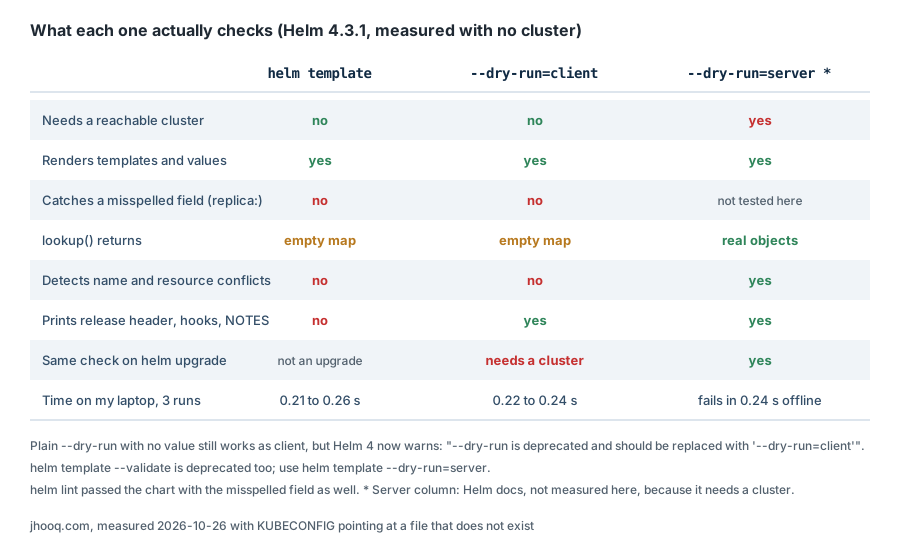
helm template | helm install --dry-run=client | helm install --dry-run=server | |
|---|---|---|---|
| Needs a reachable cluster | no | no | yes |
| Prints release header, hooks and NOTES | no | yes | yes |
lookup returns | empty map | empty map | real objects |
| Finds conflicts with running resources | no | no | yes |
Caught my misspelled replica: field | no | no | not tested here |
Works for helm upgrade offline | not an upgrade | no, needs the release | no |
| Time on my laptop, 3 runs | 0.21 to 0.26 s | 0.22 to 0.24 s | fails in 0.24 s with no cluster |
My rule now: helm lint first, then helm template and a diff while I write the chart (see the helm template post), then helm install --dry-run=server against a test cluster for any chart that uses lookup, CRDs or admission webhooks.
2. helm install --dry-run=client --debug, with the real output
I used the starter chart from helm create webapp and a production values file that raises replicaCount to 4, pins the image tag and switches the Ingress on. This is the real output, Helm 4.3.1, 2026-10-26, with the long middle sections cut where marked:
 1$ helm install shop ./webapp -f values-prod.yaml --dry-run=client --debug
 2level=DEBUG msg="Original chart version" version=""
 3level=DEBUG msg="Chart path" path=C:\Users\HP\...\helm-lab\webapp
 4level=DEBUG msg="number of dependencies in the chart" chart=webapp dependencies=0
 5NAME: shop
 6LAST DEPLOYED: Mon Oct 26 19:03:34 2026
 7NAMESPACE: default
 8STATUS: pending-install
 9REVISION: 1
10DESCRIPTION: Dry run complete
11USER-SUPPLIED VALUES:
12image:
13  tag: 1.27.2
14ingress:
15  className: nginx
16  enabled: true
17  hosts:
18  - host: shop.example.com
19    paths:
20    - path: /
21      pathType: Prefix
22replicaCount: 4
23
24COMPUTED VALUES:
25(the full merged values, 64 lines for this chart)
26
27HOOKS:
28(the test-connection Pod, because it carries a helm.sh/hook annotation)
29
30MANIFEST:
31(ServiceAccount, Service, Deployment and Ingress, 110 lines)
32
33NOTES:
34(the rendered templates/NOTES.txt)
The whole output was 222 lines and took 0.22 to 0.24 seconds across three runs, the same as helm template at 0.21 to 0.26 seconds, so speed is no reason to pick one over the other. What --debug adds on top of a plain dry run:
- USER-SUPPLIED VALUES is exactly what you passed with
-fand--set, nothing from the chart. If a key is not here, Helm never saw it. - COMPUTED VALUES is the merge of the chart's
values.yamlwith your overrides. When a value "does not apply", compare the two sections: nine times out of ten the key is misspelled or at the wrong nesting level, so it lands in USER-SUPPLIED but changes nothing in COMPUTED. - The
level=DEBUGlines are Helm 4's structured logging. Helm 3 printed lines such asinstall.go:224: [debug] Original chart version, so old blog posts and Stack Overflow answers will not match what you see.
Without --debug you still get the header, HOOKS, MANIFEST and NOTES, just not the two values sections.
3. client vs server vs none in Helm 4
The helm install reference for Helm 4.3 lists three values for the flag:
| Value | What it does | Cluster needed |
|---|---|---|
--dry-run=none | the default when the flag is absent: a real install that persists changes | yes |
--dry-run=client | simulates the operation client-side only and avoids cluster connections | no |
--dry-run=server | simulates the operation on the server, nothing is persisted | yes |
And plain --dry-run with no value? In Helm 4.3.1 it still works, as client, but it warns you first:
1$ helm install shop ./webapp --dry-run 2>&1 | head -8
2level=WARN msg="--dry-run is deprecated and should be replaced with '--dry-run=client'"
3NAME: shop
4LAST DEPLOYED: Mon Oct 26 19:03:22 2026
5NAMESPACE: default
6STATUS: pending-install
7REVISION: 1
8DESCRIPTION: Dry run complete
9HOOKS:
The chart debugging guide explains the difference that matters most: a dry run checks for conflicting resources already running on the cluster, and --dry-run=server additionally executes any lookup in your chart against the server. I proved the client half of that offline with a small template that reads an existing Secret:
1$ helm install shop ./probe --dry-run=client 2>&1 | grep existingSecret
2  existingSecret: "{}"
An empty map. So when a chart reuses an existing password from a Secret, the client dry run shows you a freshly generated one, not the one the real install will use. For those charts only --dry-run=server tells the truth.
4. Does a dry run need a Kubernetes cluster?
These are the three answers from my laptop with no cluster configured:
1$ helm install shop ./webapp --dry-run=server
2level=ERROR msg="cluster reachability check failed: kubernetes cluster unreachable: Get \"http://localhost:8080/version\": dial tcp [::1]:8080: connectex: No connection could be made because the target machine actively refused it."
3Error: INSTALLATION FAILED: cluster reachability check failed: kubernetes cluster unreachable: Get "http://localhost:8080/version": dial tcp [::1]:8080: connectex: No connection could be made because the target machine actively refused it.
4
5$ helm install shop ./webapp --dry-run=none 2>&1 | head -3
6level=ERROR msg="cluster reachability check failed: kubernetes cluster unreachable: Get \"http://localhost:8080/version\": dial tcp [::1]:8080: connectex: No connection could be made because the target machine actively refused it."
7Error: INSTALLATION FAILED: cluster reachability check failed: kubernetes cluster unreachable: Get "http://localhost:8080/version": dial tcp [::1]:8080: connectex: No connection could be made because the target machine actively refused it.
--dry-run=serverand a real install: yes. With no cluster both gave up in about 0.24 seconds rather than hanging on a timeout, which is good news for CI. Thelocalhost:8080in the message means Helm found no kubeconfig at all and fell back to the default address. Checkkubectl config current-context, theKUBECONFIGvariable, or pass--kubeconfigand--kube-contextto Helm.--dry-run=clienton install: no. It printed the release in section 2 with the same broken kubeconfig. The earlier version of this post warned that client mode still reads the kubeconfig; in Helm 4.3.1 it did not need one.--dry-run=clienton upgrade: yes. See section 8.
5. Where helm template fits
helm template renders the same YAML as the client dry run, but with no release header, no hooks section, no NOTES and no release name check. That makes it the tool for CI, GitOps and diffing two renders before an upgrade. I moved the full walkthrough, with value precedence, --show-only, --output-dir, faking --kube-version and the traps I hit, into its own post: helm template explained.
The one pattern worth repeating here is the CI pair: render with helm template, then hand the YAML to the cluster for validation without Helm in the loop.
1helm template shop ./webapp -f values-prod.yaml > rendered.yaml
2kubectl apply --dry-run=server -f rendered.yaml
The second command needs cluster access, like --dry-run=server. It is how I validate rendered charts I converted from plain Kubernetes YAML.
6. helm lint, and what it does not catch
helm lint checks the chart structure, Chart.yaml, that values.yaml parses and that every template renders to valid YAML. On the clean starter chart:
1$ helm lint ./webapp
2==> Linting ./webapp
3[INFO] Chart.yaml: icon is recommended
4
51 chart(s) linted, 0 chart(s) failed
It is fast and catches broken YAML, with the file name in the message, which the install error does not always give you. Run it with your values file, helm lint ./webapp -f values-prod.yaml --strict, so templates that only render with your values are exercised, and --strict turns warnings into failures for a pipeline. Section 8 shows the kind of mistake it does not catch. If lint complains about Chart.yaml fields, my getting started with Helm post explains every field.
7. helm upgrade --dry-run and helm diff for an existing release
For a release that is already running, the dry run you want is on helm upgrade:
1helm upgrade shop ./webapp -f values-prod.yaml --dry-run=server --debug
It renders with the new values and validates on the server, but prints the full new manifest, not a diff. For the lines that will actually change, install the helm-diff plugin:
1helm plugin install https://github.com/databus23/helm-diff
2helm diff upgrade shop ./webapp -f values-prod.yaml
Both need cluster access, because both compare against what is installed. Plugins in general are covered in Helm chart plugins, and with many releases helmfile gives you helmfile diff across all of them. To see what a release has deployed right now, without rendering anything, use helm get manifest shop and helm get values shop.
8. What broke when I ran this
1. The client dry run accepted a misspelled field. I changed replicas: to replica: in the Deployment template, a typo the Kubernetes API would not accept as a real field, and ran the client dry run and lint:
 1$ grep -n replica typo/templates/deployment.yaml | head -1
 29:  replica: {{ .Values.replicaCount }}
 3
 4$ helm install shop ./typo --dry-run=client | grep -E "STATUS|replica:"
 5STATUS: pending-install
 6  replica: 1
 7
 8$ helm lint ./typo
 9==> Linting ./typo
10[INFO] Chart.yaml: icon is recommended
11
121 chart(s) linted, 0 chart(s) failed
Both passed. The earlier version of this post said the client dry run validates against a built-in OpenAPI schema; offline, in Helm 4.3.1, it did not catch this. The typo would only surface at install time, or on --dry-run=server or kubectl apply --dry-run=server against a real API server, which I could not test here without a cluster. The lesson: a green client dry run means the chart renders, not that Kubernetes will accept it.
2. helm upgrade --dry-run=client needs a cluster. I expected the upgrade version to work offline like the install:
1$ helm upgrade shop ./webapp -f values-prod.yaml --dry-run=client
2Error: UPGRADE FAILED: kubernetes cluster unreachable: Get "http://localhost:8080/version": dial tcp [::1]:8080: connectex: No connection could be made because the target machine actively refused it.
3
4$ helm upgrade --install shop ./webapp -f values-prod.yaml --dry-run=client
5Error: kubernetes cluster unreachable: Get "http://localhost:8080/version": dial tcp [::1]:8080: connectex: No connection could be made because the target machine actively refused it.
An upgrade has to read the current release from the cluster to know what it is upgrading, so there is nothing to simulate offline. Even --install does not help, because it first checks whether the release exists. In CI without cluster access, use helm template for the upgrade preview.
3. Two flags from the old version of this post now print warnings. This post used to recommend plain --dry-run and helm template --validate. In Helm 4.3.1 both still run but warn, --dry-run is deprecated and should be replaced with '--dry-run=client' and Flag --validate has been deprecated, use '--dry-run=server' instead. The warnings are easy to miss in a long CI log, and deprecated flags are the ones that disappear in the next major version, so every command in this post now uses the explicit form.
4. The error message changed shape. Helm 3 said Error: Kubernetes cluster unreachable. Helm 4 says cluster reachability check failed: kubernetes cluster unreachable, with the INSTALLATION FAILED or UPGRADE FAILED prefix and a level=ERROR log line first. If your pipeline greps for the old text to decide whether to retry, it no longer matches.
9. Common errors with helm dry run
1. cluster reachability check failed: kubernetes cluster unreachable - No kubeconfig or the wrong context. For a render without a cluster use --dry-run=client on install, or helm template; for --dry-run=server and upgrades, fix the context (section 4).
2. Error: unknown flag: --dry-run=server - Your Helm is older than 3.13. Check helm version and upgrade; Helm 3 itself gets its last feature release on 9 September 2026 and security patches only until February 2027, per the Helm 3 end-of-life notice. More on unknown flag errors in Helm.
3. Error: INSTALLATION FAILED: cannot re-use a name that is still in use - Only --dry-run=server and real installs check this. The release exists: use helm upgrade --install, or helm uninstall the old one.
4. A field that "does not apply" - Compare USER-SUPPLIED VALUES with COMPUTED VALUES in the --debug output (section 2).
5. Error: parse error at (webapp/templates/deployment.yaml:9): unexpected "}" in operand - A Go template syntax error, with the file and line of the template. helm lint reports the same.
6. Error: YAML parse error on webapp/templates/service.yaml: error converting YAML to JSON: yaml: line 4: did not find expected key - The template rendered invalid YAML, usually indentation. Line 4 is in the rendered document, not your template; helm template --debug prints it (details).
7. lookup returns nothing - Expected with --dry-run=client and helm template. Use --dry-run=server.
8. Error: failed to create: ... on a real install right after a clean dry run - Admission webhooks, RBAC, quotas and schema problems like section 8's typo only show up against the API server. If you only ran the client dry run, run --dry-run=server next time. For the classic install failures, see Helm chart failed to create.
10. Conclusion
To summarise:
helm install --dry-run=clientrenders and prints what an install would print, offline, in about a quarter of a second; plain--dry-runis deprecated in Helm 4.--dry-run=serveris the only mode that runslookupand conflict checks for real, and it needs a cluster.helm upgrade --dry-runalways needs a cluster; usehelm templateand a diff when you have none.- A green client dry run and a green
helm lintmean the chart renders, not that Kubernetes will accept it. --debugadds USER-SUPPLIED and COMPUTED VALUES, the fastest way to find a value that does not apply.
Read More -
- Helm chart - How to Add/Install plugins
- Getting started with Helm Chart
- Helm chart - WordPress Installation with MariaDB on Kubernetes
- Helm chart - Build you first helm chart with Spring Boot
- Helm Chart - Convert Kubernetes YAML into Helm Chart YAML
- Helm Chart - Pass environment variables
- Helm Chart - Plugin
- Helm Chart - Dry Run Install
- Helm Chart - How to create multiple values files inside helm chart?
- Helmfile - How to use Helmfile for managing helm chart?
- Helm template - Render a chart locally without a cluster (Helm 4)
Did this save you a debugging session? Stay in the loop -
- Subscribe on YouTube - every post here has a screen-recorded companion video.
- Code on GitHub - the repositories, Terraform and scripts behind these posts.