git rebase --exec Explained - Run Your Tests on Every Commit Before You Push, with Real Output, the Failure Path, and the Three Things That Bit Me

TL;DR
git rebase --exec "<cmd>" <upstream>(short form-x) appends anexec <cmd>line after everypickin the rebase instruction list, so the command runs in the working tree of each replayed commit. A non-zero exit stops the rebase on that commit with exit code 1.- When it stops, fix the commit in place: edit,
git commit --amend --no-edit -a, thengit rebase --continue. Every commit from the fixed one onward gets a new hash; commits that passed unchanged keep theirs. - Fixing a commit can conflict with the next one. In my run the amended line was the context the following commit appended to, so
--continuehit a merge conflict I had to resolve before the exec ran again. --reschedule-failed-execre-runs the failed command on every--continueuntil it passes, instead of moving on. Set it permanently withgit config rebase.rescheduleFailedExec true.- An empty range runs nothing and still prints
Successfully rebased. Checkgit log --oneline <upstream>..HEADfirst. - Not your exact case? If you want to find which commit introduced a bug rather than test all of them, that is
git bisect run; and if you are new to rebasing, start with my free Git and GitHub course.
Table of Content
- What exec does inside a rebase
- The lab repository
- A clean run over every commit
- A run that stops on a bad commit, and the fix
- reschedule-failed-exec: retry instead of skipping
- More than one command, and seeing which commit is running
- exec versus bisect run versus CI
- What broke when I ran this
- Conclusion
1. What exec does inside a rebase
Most people meet exec as one of the commands in the interactive rebase instruction list, next to pick, squash and drop. The git rebase reference describes the --exec <cmd> option as appending exec <cmd> after each line that creates a commit in the final history, and says that any command that fails will interrupt the rebase with exit code 1. It also says it uses the interactive machinery internally but can be run without --interactive, which is the form I use most: no editor opens, the commands just run.
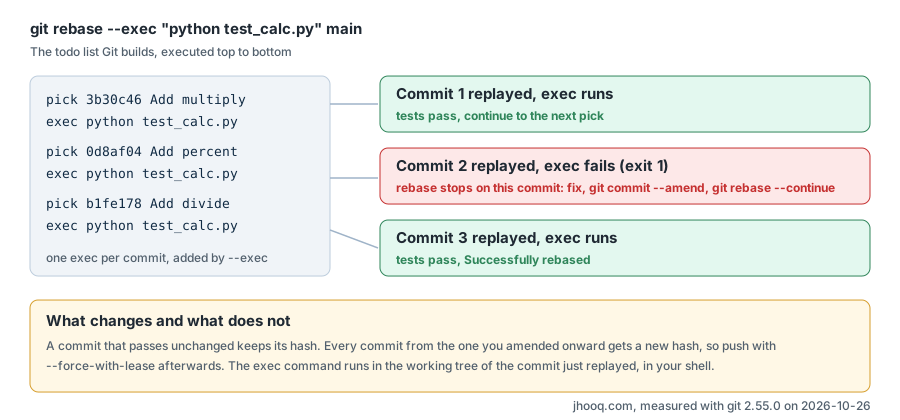
Why would you want this? A branch with five commits usually gets tested once, at the tip, in CI. If a reviewer checks out commit three, or git bisect lands on it a month later, it may not even build. Running the tests on every commit before you push is the cheapest way to make a branch bisectable, and --exec does it in one command.
| Option | What it does | Source |
|---|---|---|
--exec <cmd>, -x <cmd> | append exec <cmd> after each commit-creating line; a failing command stops the rebase with exit code 1 | git-rebase |
several --exec flags | each becomes its own exec line, in order, after every commit | git-rebase |
--exec "cmd1 && cmd2" | one exec line, the shell runs both | git-rebase |
--reschedule-failed-exec | a failed exec is put back on the instruction list, so --continue runs it again | git-rebase |
rebase.rescheduleFailedExec | the config key that turns the option on by default | git-config |
--autosquash with --exec | exec lines are not added for the intermediate fixup commits, only after each squash series | git-rebase |
--empty=keep | implied by --exec unless -i is also given: commits that become empty are kept | git-rebase |
GIT_SEQUENCE_EDITOR | the editor used for the instruction list; set it to cat to print the list without stopping | git-config, sequence.editor |
2. The lab repository
Everything below ran on my Windows laptop with git 2.55.0 on 2026-10-26. The repository is a tiny calculator with a test script that only tests the functions that exist, so every commit can be tested on its own:
 1# test_calc.py
 2import calc
 3
 4def check(name, got, want):
 5    status = "ok" if got == want else "FAIL"
 6    print(f"{status}  {name}: got {got}, want {want}")
 7    return got == want
 8
 9results = [check("add", calc.add(2, 3), 5)]
10if hasattr(calc, "subtract"):
11    results.append(check("subtract", calc.subtract(5, 3), 2))
12if hasattr(calc, "multiply"):
13    results.append(check("multiply", calc.multiply(4, 3), 12))
14if hasattr(calc, "divide"):
15    results.append(check("divide", calc.divide(8, 2), 4))
16raise SystemExit(0 if all(results) else 1)
Four commits add one function each:
1$ git log --oneline
293d7148 Add divide
39e244e5 Add multiply
4a7151dd Add subtract
505ce776 Add calculator with add
3. A clean run over every commit
The branch has no upstream, so I rebase from the root. GIT_SEQUENCE_EDITOR=cat makes Git print the instruction list it built instead of opening an editor, which is the clearest way to see what --exec did:
 1$ GIT_SEQUENCE_EDITOR=cat git rebase -i --exec "python test_calc.py" --root
 2pick 05ce776 # Add calculator with add
 3exec python test_calc.py
 4pick a7151dd # Add subtract
 5exec python test_calc.py
 6pick 9e244e5 # Add multiply
 7exec python test_calc.py
 8pick 93d7148 # Add divide
 9exec python test_calc.py
10
11# Rebase 93d7148 onto 20b3a2e (8 commands)
12...
13Rebasing (1/8)Rebasing (2/8)Executing: python test_calc.py
14ok  add: got 5, want 5
15Rebasing (3/8)Rebasing (4/8)Executing: python test_calc.py
16ok  add: got 5, want 5
17ok  subtract: got 2, want 2
18Rebasing (5/8)Rebasing (6/8)Executing: python test_calc.py
19ok  add: got 5, want 5
20ok  subtract: got 2, want 2
21ok  multiply: got 12, want 12
22Rebasing (7/8)Rebasing (8/8)Executing: python test_calc.py
23ok  add: got 5, want 5
24ok  subtract: got 2, want 2
25ok  multiply: got 12, want 12
26ok  divide: got 4.0, want 4
27Successfully rebased and updated refs/heads/main.
Four commits, eight instruction lines, and the test suite grows by one line per commit because each commit adds a function. That is the whole idea: the tests ran against the tree as it was at each commit, not against the tip.
One detail worth knowing: after this run the hashes were unchanged.
1$ git log --oneline
293d7148 Add divide
39e244e5 Add multiply
4a7151dd Add subtract
505ce776 Add calculator with add
--exec on its own does not rewrite anything. When every commit replays identically, Git keeps the original objects, so a clean check costs you no history rewrite and no force push.
4. A run that stops on a bad commit, and the fix
Now the case the option exists for. On a feature branch I made three commits, and the first one has a bug: multiply returns a + b. I usually rebase onto the branch I will merge into; here the upstream is main~2.
 1$ git log --oneline main..feature/percent
 2b1fe178 Add divide
 30d8af04 Add percent
 43b30c46 Add multiply
 5
 6$ git rebase --exec "python test_calc.py" main~2
 7Rebasing (2/6)Executing: python test_calc.py
 8ok  add: got 5, want 5
 9ok  subtract: got 2, want 2
10FAIL  multiply: got 7, want 12
11warning: execution failed: python test_calc.py
12You can fix the problem, and then run
13
14  git rebase --continue
The rebase stopped with exit code 1 on the first commit whose tests fail, with HEAD sitting on that commit. git status explains where you are:
 1$ git status
 2interactive rebase in progress; onto a7151dd
 3Last commands done (2 commands done):
 4   pick 3b30c46 # Add multiply
 5   exec python test_calc.py
 6Next commands to do (4 remaining commands):
 7   pick 0d8af04 # Add percent
 8   exec python test_calc.py
 9  (use "git rebase --edit-todo" to view and edit)
10You are currently editing a commit while rebasing branch 'feature/percent' on 'a7151dd'.
11  (use "git commit --amend" to amend the current commit)
12  (use "git rebase --continue" once you are satisfied with your changes)
The fix is a normal edit plus an amend. I changed the one line and checked the diff before amending, which I recommend every time, because the amend goes into the commit that is being replayed:
 1$ git diff
 2diff --git a/calc.py b/calc.py
 3index 178c7ac..d7eb496 100644
 4--- a/calc.py
 5+++ b/calc.py
 6@@ -3,4 +3,4 @@ def add(a, b):
 7 def subtract(a, b):
 8     return a - b
 9 def multiply(a, b):
10-    return a + b
11+    return a * b
12$ git commit --amend --no-edit -a
13 1 file changed, 2 insertions(+)
14$ git rebase --continue
15Rebasing (3/6)Auto-merging calc.py
16CONFLICT (content): Merge conflict in calc.py
17error: could not apply 0d8af04... Add percent
18hint: Resolve all conflicts manually, mark them as resolved with
19hint: "git add/rm <conflicted_files>", then run "git rebase --continue".
That conflict surprised me, and it is the most useful thing in this post, so it gets its own entry in section 8. The short version: the next commit, Add percent, appended its lines directly after return a + b, and that line no longer exists. Git shows both sides:
 1$ git diff
 2diff --cc calc.py
 3@@@ -3,4 -3,6 +3,10 @@@ def add(a, b)
 4  def subtract(a, b):
 5      return a - b
 6  def multiply(a, b):
 7++<<<<<<< HEAD
 8 +    return a * b
 9++=======
10+     return a + b
11+ def percent(part, whole):
12+     return part / whole * 100
13++>>>>>>> 0d8af04 (Add percent)
I kept the corrected return a * b and the new percent function, staged the file, and continued. The exec then ran for the resolved commit and for the last one:
 1$ git add calc.py
 2$ git rebase --continue
 3[detached HEAD e792183] Add percent
 4 1 file changed, 2 insertions(+)
 5Rebasing (4/6)Executing: python test_calc.py
 6ok  add: got 5, want 5
 7ok  subtract: got 2, want 2
 8ok  multiply: got 12, want 12
 9Rebasing (5/6)Rebasing (6/6)Executing: python test_calc.py
10ok  add: got 5, want 5
11ok  subtract: got 2, want 2
12ok  multiply: got 12, want 12
13ok  divide: got 4.0, want 4
14Successfully rebased and updated refs/heads/feature/percent.
15
16$ git log --oneline main~2..feature/percent
175dcbe71 Add divide
18e792183 Add percent
190f18cc8 Add multiply
All three hashes changed, because the first commit was amended and the two after it were replayed on top of it. If this branch was already pushed, the next push needs --force-with-lease. The clean run in section 3 changed nothing and needed no force; this one rewrote three commits.
5. reschedule-failed-exec: retry instead of skipping
By default, when an exec fails and you run git rebase --continue, Git moves on to the next instruction without running the failed command again. That is fine when you fixed the commit and know the tests pass, and dangerous when you did not. --reschedule-failed-exec puts the failed command back on the list, so --continue has to get through it.
For this run I used a 40-character line-length lint instead of the tests, with a commit that breaks it:
 1$ git rebase --reschedule-failed-exec --exec "python lint.py calc.py" main
 2Rebasing (2/6)Executing: python lint.py calc.py
 3lint ok
 4Rebasing (3/6)Rebasing (4/6)Executing: python lint.py calc.py
 5calc.py:10: line too long (51 chars, limit 40)
 6warning: execution failed: python lint.py calc.py
 7You can fix the problem, and then run
 8
 9  git rebase --continue
10
11
12hint: Could not execute the todo command
13hint:
14hint:     exec python lint.py calc.py
15hint:
16hint: It has been rescheduled; To edit the command before continuing, please
17hint: edit the todo list first:
18hint:
19hint:     git rebase --edit-todo
20hint:     git rebase --continue
21
22$ git rebase --continue   (nothing fixed yet)
23Rebasing (5/7)Executing: python lint.py calc.py
24calc.py:10: line too long (51 chars, limit 40)
25warning: execution failed: python lint.py calc.py
Note the counter: the list grew from 6 commands to 7, because the failed exec was re-added. Without the flag, that second --continue would have moved on to Add cube with the lint failure still in history. The reference says the option is recorded for the whole rebase from the command line, the rebase.rescheduleFailedExec setting, or the default of false, and that you cannot pass it to git rebase --continue later, so decide at the start. I set it globally once:
1git config --global rebase.rescheduleFailedExec true
To get out of a stuck rebase, git rebase --abort returns the branch to exactly where it was:
1$ git rebase --abort && git log --oneline -1
220ae5eb Add cube
6. More than one command, and seeing which commit is running
Two things make the output easier to read on long branches. First, print the commit before the test, with a second -x; each flag becomes its own exec line:
 1$ git rebase -x "git log --oneline -1" -x "python test_calc.py" --root 2>&1 | grep -v "^ok"
 2Rebasing (1/12)Rebasing (2/12)Executing: git log --oneline -1
 305ce776 Add calculator with add
 4Rebasing (3/12)Executing: python test_calc.py
 5Rebasing (4/12)Rebasing (5/12)Executing: git log --oneline -1
 6a7151dd Add subtract
 7Rebasing (6/12)Executing: python test_calc.py
 8Rebasing (7/12)Rebasing (8/12)Executing: git log --oneline -1
 99e244e5 Add multiply
10Rebasing (9/12)Executing: python test_calc.py
11Rebasing (10/12)Rebasing (11/12)Executing: git log --oneline -1
1293d7148 Add divide
13Rebasing (12/12)Executing: python test_calc.py
14Successfully rebased and updated refs/heads/main.
Four commits became twelve instruction lines: a pick and two execs each. The whole check over four commits took 0.81 seconds, 0.85 seconds and 0.84 seconds in three timed runs, against 0.06 seconds for the test script on its own, so almost all of the time is Git replaying commits, and on a real branch the test suite will dominate. Second, you can chain commands in one shell line, which the reference documents as --exec "cmd1 && cmd2 && ..."; the whole line runs in your shell, quoting and all:
1$ git rebase --exec "python test_calc.py && python -c \"import calc; print(dir(calc)[-4:])\"" HEAD~1 2>&1 | grep -v "^ok"
2Rebasing (2/2)Executing: python test_calc.py && python -c "import calc; print(dir(calc)[-4:])"
3['add', 'divide', 'multiply', 'subtract']
4Successfully rebased and updated refs/heads/main.
And to limit the check to the last few commits, give a range such as HEAD~2 instead of a branch:
 1$ GIT_SEQUENCE_EDITOR=cat git rebase -i --exec "python test_calc.py" HEAD~2 2>&1 | grep -v "^#" | grep -v "^$"
 2pick 9e244e5 # Add multiply
 3exec python test_calc.py
 4pick 93d7148 # Add divide
 5exec python test_calc.py
 6Rebasing (2/4)Executing: python test_calc.py
 7ok  add: got 5, want 5
 8ok  subtract: got 2, want 2
 9ok  multiply: got 12, want 12
10Rebasing (3/4)Rebasing (4/4)Executing: python test_calc.py
11ok  add: got 5, want 5
12ok  subtract: got 2, want 2
13ok  multiply: got 12, want 12
14ok  divide: got 4.0, want 4
15Successfully rebased and updated refs/heads/main.
7. exec versus bisect run versus CI
These three answer different questions, and I use all of them:
| Tool | Question it answers | When | Rewrites history |
|---|---|---|---|
git rebase --exec | does every commit on this branch pass? | before you push a branch, after squashing or reordering | only if a commit is amended |
git bisect run | which commit introduced this failure? | after a bug is found, over any range of history | no |
| CI on push | does the tip pass, on a clean machine? | every push and pull request | no |
--exec before the push is what makes the other two work well: bisect is only useful when every commit builds, and CI only tests the commit you pushed. The DevOps project in Terraform, Jenkins and a Flask REST API on AWS is where the CI side of that lives; the rebase check is the step before it. Two habits that go with it: keep your SSH key loaded so a long rebase with pushes does not stall on a prompt (add an SSH key permanently), and clean up branches after the merge (delete merged branches).
8. What broke when I ran this
1. Fixing the bad commit caused a conflict in the next one. This is the output in section 4: git rebase --continue after the amend stopped with CONFLICT (content): Merge conflict in calc.py. The commit I amended changed return a + b to return a * b, and the very next commit had been written against the old file, appending def percent right after that line. When Git replayed it, the three lines of context did not match any more. The fix is a normal conflict resolution: keep your corrected line and the new function, git add, git rebase --continue, and the exec runs again for the resolved commit. The lesson is that an amend inside a rebase is a real history rewrite, and the commits after it have to be replayed against the new version. When the fix touches lines that later commits sit next to, expect this.
2. An empty range runs nothing and still says it succeeded. While standing on main I ran the check against main itself:
1$ git rebase --exec "python test_calc.py" main
2Successfully rebased and updated refs/heads/main.
No Executing: line, no test output, no error. There were no commits between the upstream and HEAD, so the instruction list had no picks and therefore no execs. A CI script that checks only the exit code would call that green. Before trusting a run, check that the range has commits, git log --oneline main..HEAD, or look for Executing: in the output.
3. A clone taken mid-rebase had no main branch. To run the reschedule demo in a clean copy I cloned the lab repository while it was stopped inside a rebase, and the clone's HEAD pointed at the detached rebase state, so git checkout -b lint main failed with 'main' is not a commit. git clone -b main fixed it. Unrelated to --exec, but it cost me 5 minutes, and it is the kind of thing that happens when you script around a repository that is in the middle of something.
4. A line-ending surprise on Windows. My first attempt to fix the bad commit rewrote the file with a script that normalised line endings, and the diff became six insertions and six deletions instead of one changed line. Git's core.autocrlf had checked the files out with Windows line endings. On Windows, make the fix with your editor or a byte-preserving tool, and check git diff before --amend; a whole-file diff means you are about to bake a line-ending change into the commit.
9. Conclusion
To summarise:
git rebase --exec "<cmd>" <upstream>runs the command after every replayed commit and stops on the first failure, which is how you make a branch pass at every commit, not just at the tip.- A clean run keeps every hash; a run with an amend rewrites the amended commit and everything after it, so push with
--force-with-lease. - Amending can conflict with the following commit when they touch neighbouring lines; resolve it and continue, the exec runs again.
- Turn on
rebase.rescheduleFailedExecso a failed check cannot be skipped by accident. - Check the range has commits, because an empty range prints success without running anything.
The exec command is one lesson of the DevOps Master Course on YouTube; the written foundation for rebasing, branches and pull requests is in the free Git and GitHub blueprint course.
Did this save you a debugging session? Stay in the loop -
- Subscribe on YouTube - every post here has a screen-recorded companion video.
- Code on GitHub - the repositories, Terraform and scripts behind these posts.