Google Cloud IAM Explained - Principals, Roles and Permissions, Owner vs Editor vs Viewer (Now Legacy) vs the New Admin, Writer and Reader Roles, and What an Editor Can Really Do (GCP Part 4)

TL;DR
- IAM is "who gets to do what on which resource": a principal (a user, group, service account or domain) is granted a role (a bundle of permissions) on a resource (organization, folder, project or a single resource), and grants on a project apply to everything in it.
- The test in the recording: I granted Editor on the project to a second account and signed in as it. It had the Enable button for the Compute Engine API and could open Cloud Run's deploy page; on the IAM page Grant access and Remove access were greyed out. Editor builds things; only Owner manages who has access.
- The names changed since the video. Google's roles overview now calls Owner, Editor and Viewer the legacy basic roles and has new basic roles Admin, Writer and Reader (
roles/admin,roles/writer,roles/reader), which you can grant only with gcloud or the API, not in the console. - Google's own advice: basic roles "include thousands of permissions across all Google Cloud services. In production environments, do not grant basic roles unless there is no alternative." Give a developer predefined roles such as
roles/run.developerorroles/compute.instanceAdmin.v1instead. - Two things that surprised me: the project's default compute service account already had Editor, because the project sits in no organization; and a policy change takes typically 2 minutes, potentially 7 minutes or longer to apply.
- Not your exact case? For organizations, folders and moving projects under one, read Google Cloud Organization setup; for sharing one network across projects with IAM, Shared VPC.
Table of Content
- Who, what, where
- The roles you can grant
- Grant a role to a second user
- Sign in as the Editor - what works and what does not
- The same grants with gcloud
- What broke when I ran this
- Conclusion
1. Who, what, where
I explain IAM in the video with one sentence: who gets to do what on which resource.
| Part | IAM term | Examples |
|---|---|---|
| Who | Principal | a Google account (user:), a Google group (group:), a service account (serviceAccount:), a Workspace or Cloud Identity domain (domain:) |
| What | Role, a set of permissions | roles/viewer, roles/run.developer; each permission looks like compute.instances.create |
| Where | Resource | organization, folder, project, or a single resource such as a bucket or a VM |
A grant is a binding of a principal to a role on a resource, stored in that resource's allow policy. Grants are inherited downward: a role on a project applies to every resource in the project, and a role on a folder applies to every project in it. The IAM overview has the full model; for this post, project-level grants are enough.
2. The roles you can grant
| Role type | Roles | What they include | How to grant |
|---|---|---|---|
| Basic (new) | Reader roles/reader, Writer roles/writer, Admin roles/admin | Read-only; read plus create, modify and delete for most services; plus managing roles and billing setup | gcloud or API only; the console cannot grant them |
| Legacy basic | Viewer roles/viewer, Editor roles/editor, Owner roles/owner | The same three levels, plus extra permissions some services give legacy roles (Cloud Storage convenience values, BigQuery special groups); no IAM Conditions | console, gcloud, API |
| Predefined | about one set per service, for example roles/run.developer, roles/compute.instanceAdmin.v1, roles/compute.viewer | only the permissions for one job on one service | console, gcloud, API |
| Custom | your own list of permissions | exactly what you choose | console, gcloud, API |
Two details from the roles overview that matter in practice. Owner (and Admin) can manage roles and permissions and set up billing, but neither contains every permission: they cannot change the Cloud Billing payment information or create IAM deny policies. And Editor "doesn't contain permissions to perform all actions for all services", so "Editor can do everything except IAM" is close but not exact.
3. Grant a role to a second user
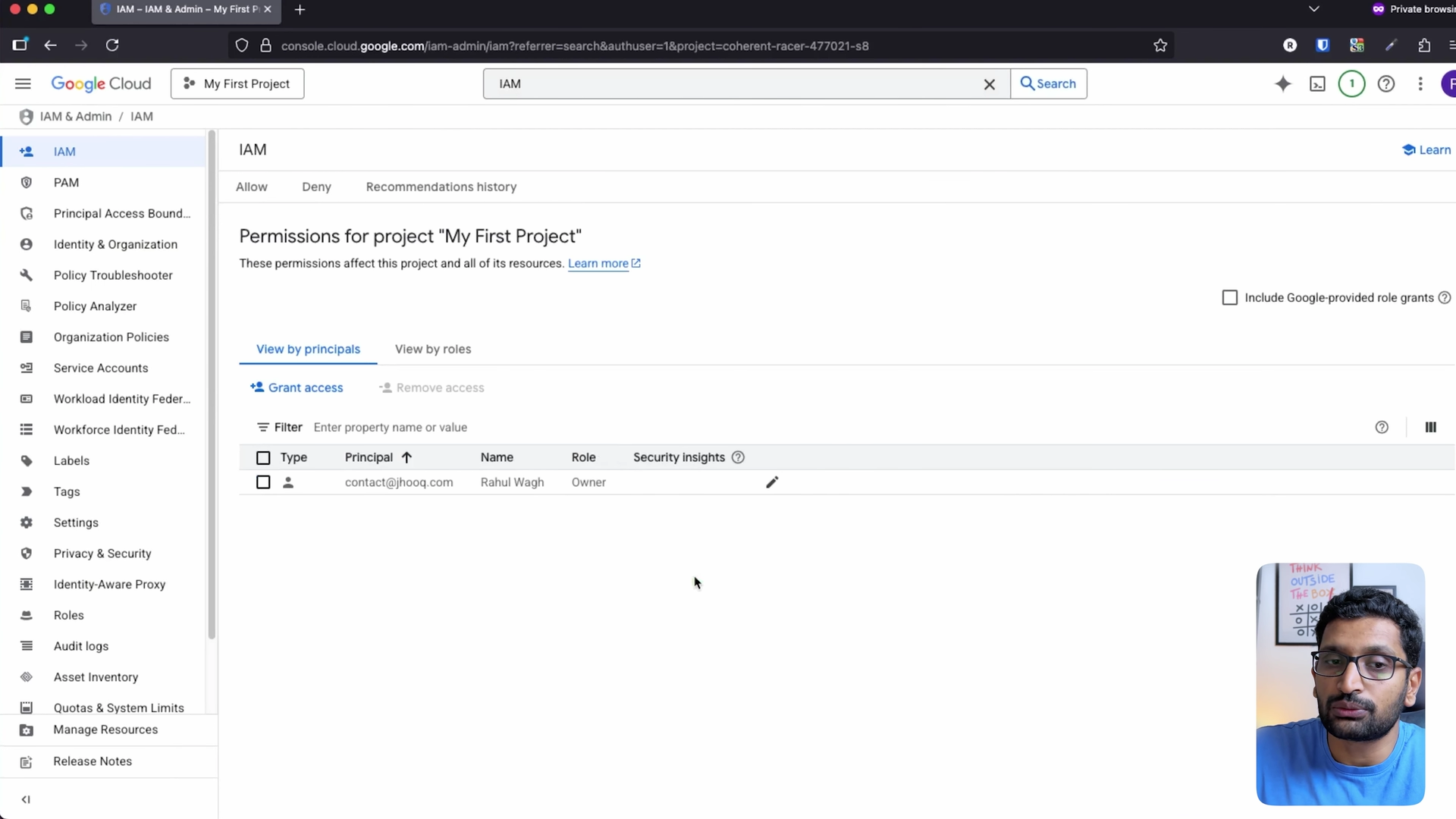
The project in the recording is the default My First Project from the free $300 credit account. Before the grant, the IAM page listed one principal, my main account, as Owner:
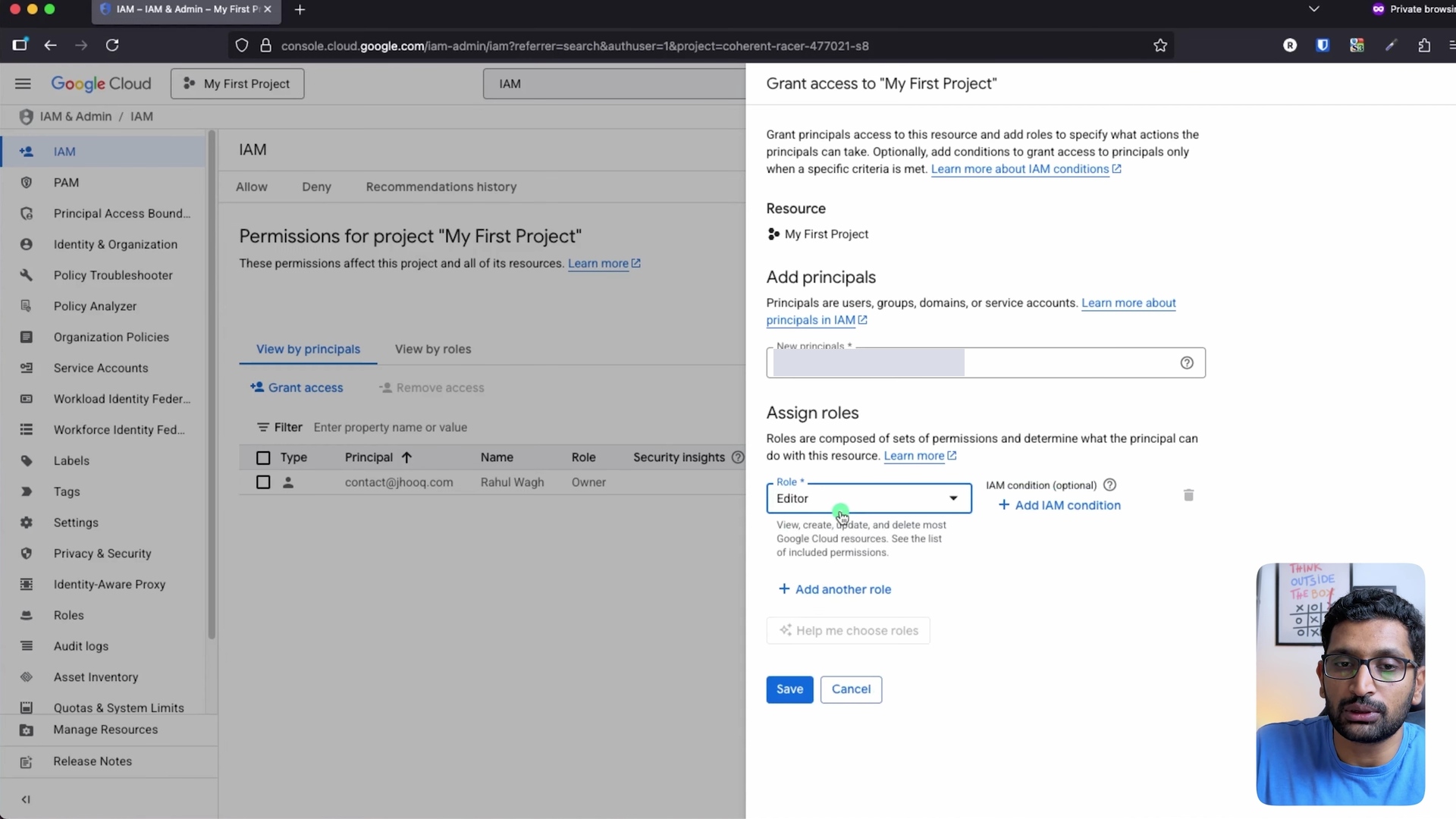
IAM & Admin → IAM → Grant access. Add the new principal (I used a second Google account of mine; it is masked in the screenshots), and under Assign roles pick Basic → Editor. The role picker's own description of Editor is "View, create, update, and delete most Google Cloud resources".
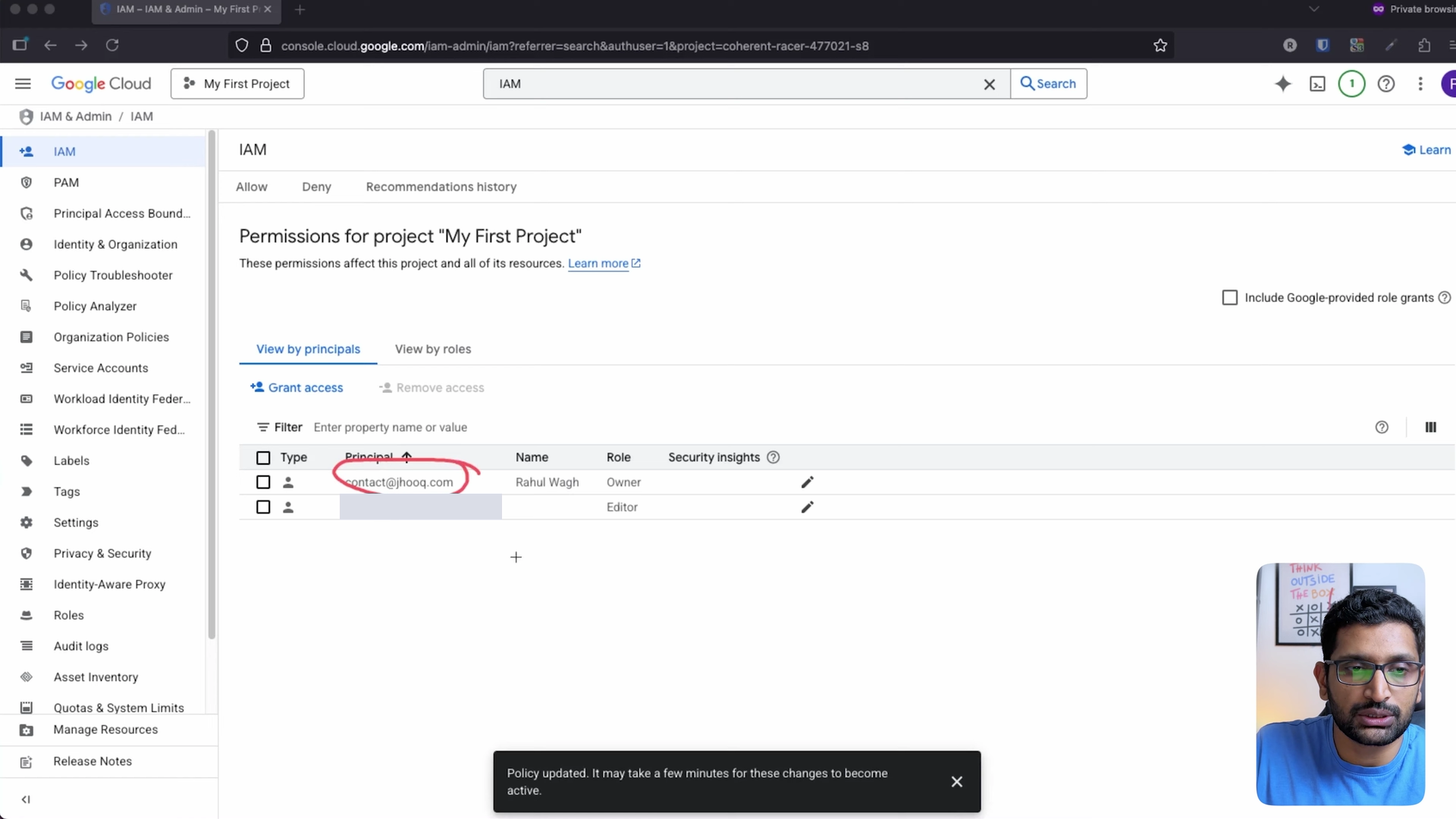
Save, and the list shows two principals. The console's toast is worth reading:
4. Sign in as the Editor - what works and what does not
I opened a private browser window and signed in as the second account. It could see and select My First Project, which is the grant working. Then the tests:
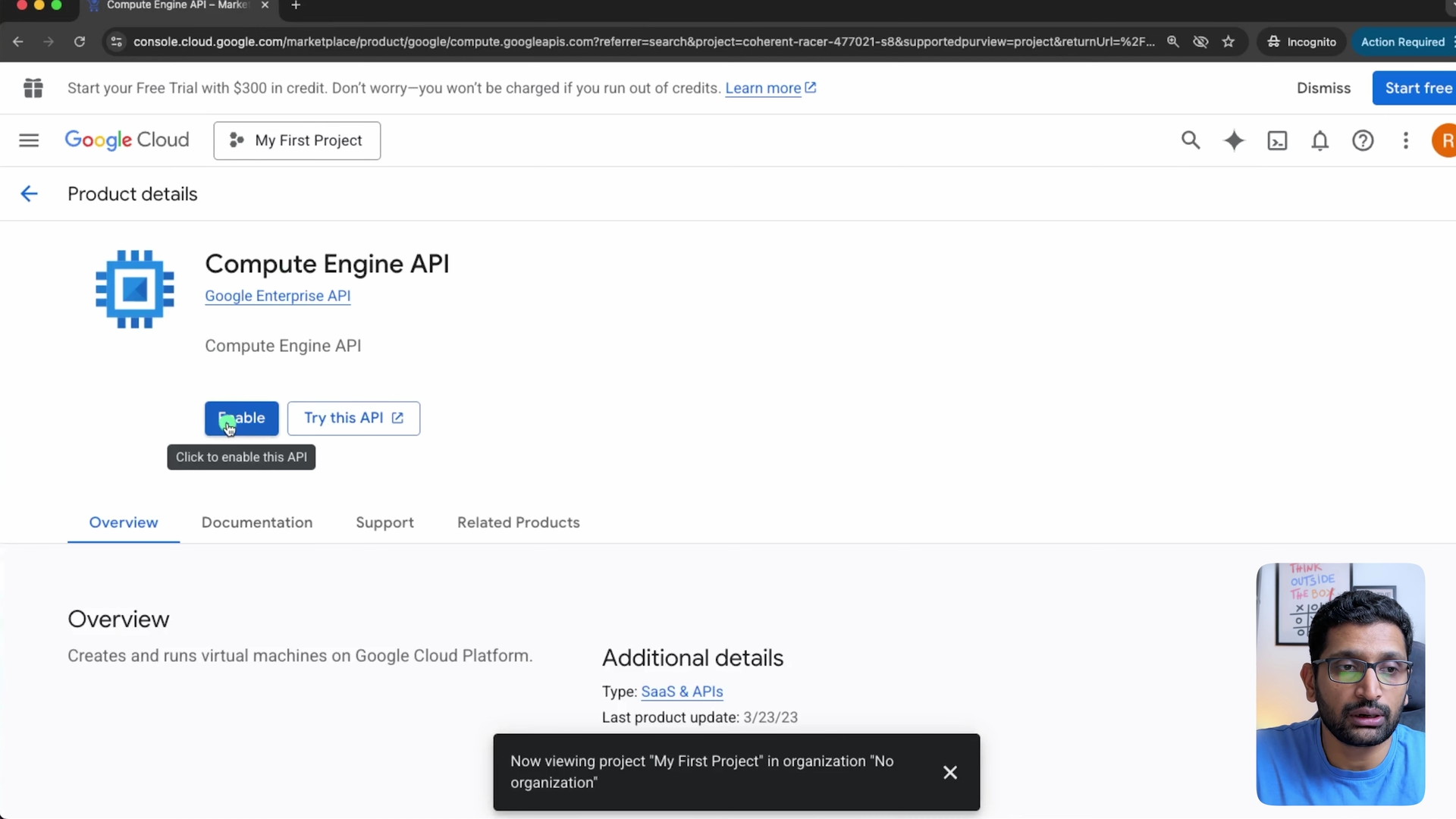
It could enable the Compute Engine API. The Enable button was available to the Editor; enabling an API changes the project, and Editor allows it:
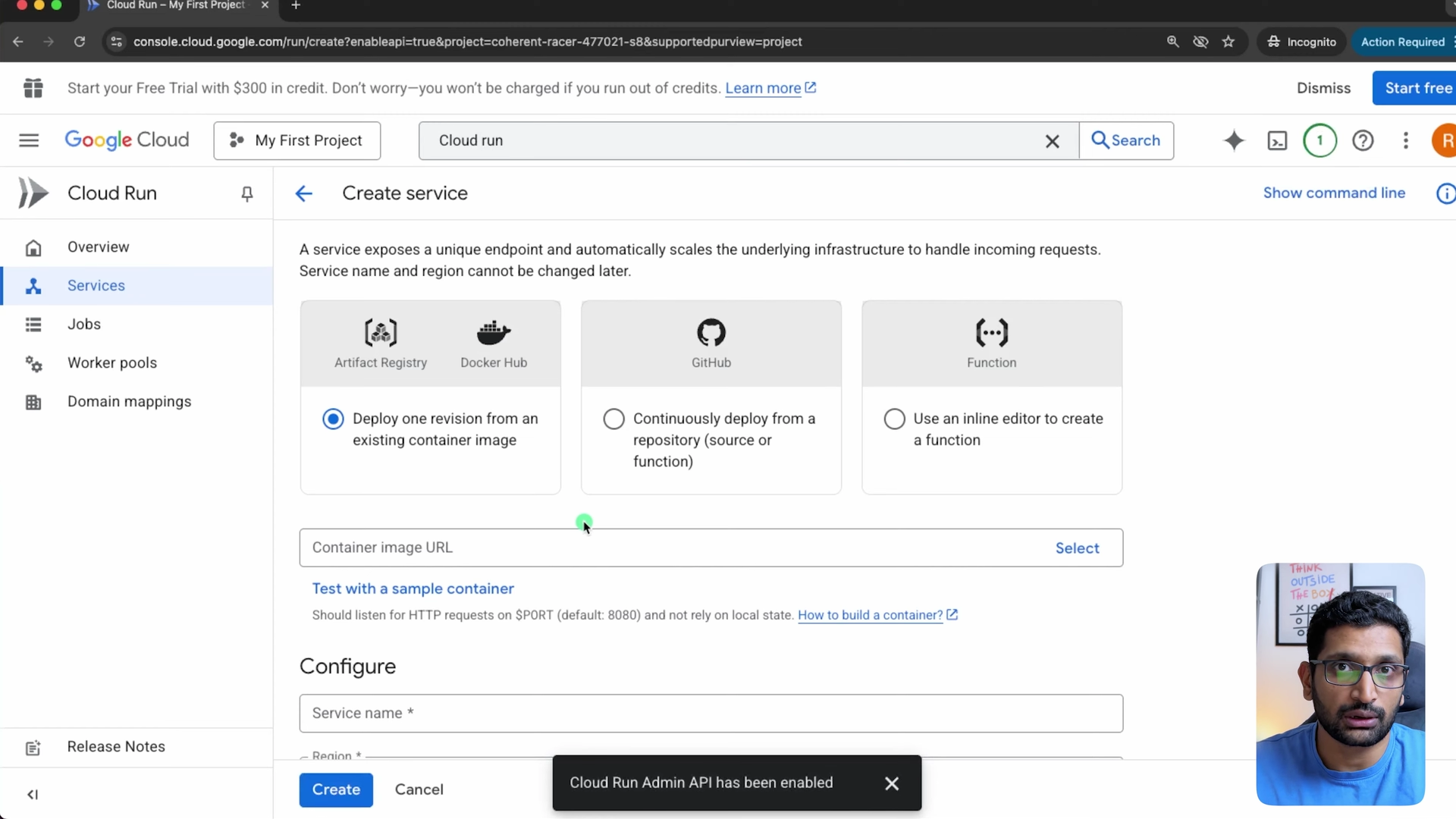
It could open Cloud Run's Create service page, and the console enabled the Cloud Run Admin API on the way, so this account could deploy containers, and with the Compute Engine API enabled it could create VMs too:
It could not change access. On the IAM page, Grant access and Remove access were greyed out. This is the list as the Editor saw it, transcribed from the recording, with the second account's address replaced:
 1Permissions for project "My First Project"
 2[Grant access]  [Remove access]          <- both disabled for this principal
 3
 4Type             Principal                                              Name                             Role
 5Service account  144691523595-compute@developer.gserviceaccount.com    Default compute service account  Editor
 6User             contact@jhooq.com                                                                       Owner
 7User             <my second Google account>                             Rahul Wagh                       Editor
 8
 9Toast after saving the grant, as Owner:
10Policy updated. It may take a few minutes for these changes to become active.
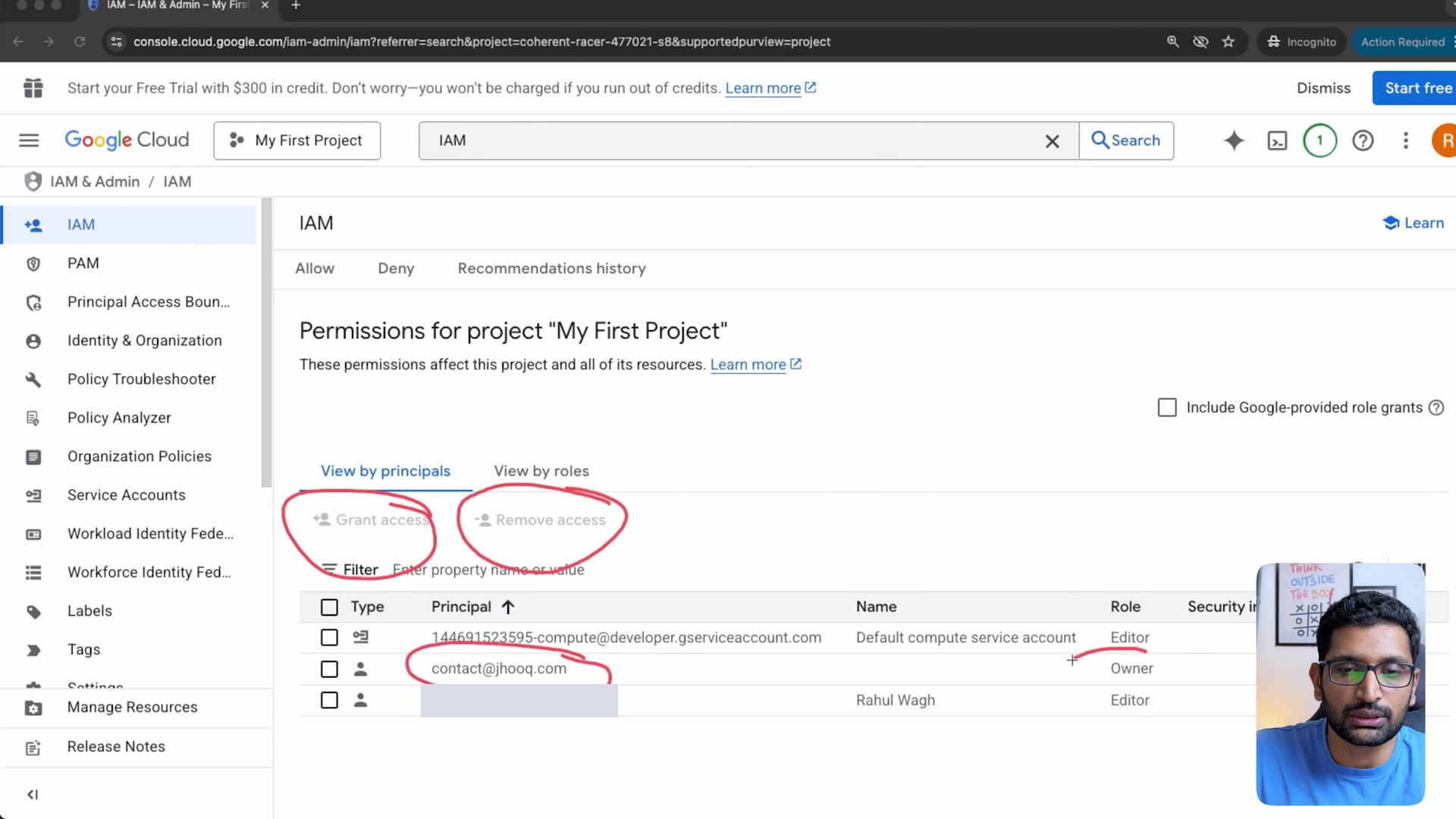
So the line between Editor and Owner in this test is exactly the one the roles overview draws: Editor creates, changes and deletes resources; managing who has access is Owner's.
5. The same grants with gcloud
The console is fine for one user; for anything repeatable I use gcloud, and the new basic roles can only be granted this way. These are the commands for the grants in this post, with your own project ID and address; I did not run them for this post (this laptop has no Google Cloud credentials), so there is no output to show:
 1# the grant from the recording: legacy basic role Editor
 2gcloud projects add-iam-policy-binding PROJECT_ID --member="user:dev@example.com" --role="roles/editor"
 3
 4# the same level with the new basic role, which the console cannot grant
 5gcloud projects add-iam-policy-binding PROJECT_ID --member="user:dev@example.com" --role="roles/writer"
 6
 7# what I would actually give a developer who deploys to Cloud Run and manages VMs
 8gcloud projects add-iam-policy-binding PROJECT_ID --member="user:dev@example.com" --role="roles/run.developer"
 9gcloud projects add-iam-policy-binding PROJECT_ID --member="user:dev@example.com" --role="roles/compute.instanceAdmin.v1"
10
11# who has what on the project
12gcloud projects get-iam-policy PROJECT_ID --format="table(bindings.role, bindings.members)"
Both predefined roles are listed in Google's role references for Cloud Run and Compute Engine. Unlike legacy basic roles, they and the new basic roles accept IAM Conditions, so you can, for example, limit a grant to resources with a given tag or to a time window.
6. What broke when I ran this
1. The default compute service account was already an Editor. I did not grant that; it was in the list when the second account opened the IAM page, as ...-compute@developer.gserviceaccount.com with the Editor role. Google's service account documentation explains it: depending on your organization policy, the default compute service account is automatically granted Editor on the project, and Google "strongly recommend[s]" disabling that with the iam.automaticIamGrantsForDefaultServiceAccounts constraint, which is enforced by default only for organizations created after 3 May 2024. My project was in No organization (the console said so in the toast when I switched to it), so nothing stopped the grant. Every VM that runs as that service account can therefore change most of the project. Replace its Editor role with narrower roles, or give your VMs their own service accounts.
2. "It may take a few minutes" is not a figure of speech. The toast after saving the grant says the change may take a few minutes to become active, and Google's access change propagation page puts a policy change at "typically 2 minutes, potentially 7 minutes or longer". In my recording the second account could see the project about 2 minutes after I saved, in line with the typical figure. If a new user says "access denied" right after you add them, wait before you start debugging.
3. Editor could do more than I would give a developer. The point of the test was to show the limit, and the limit was IAM. But in the same session the Editor account had the Enable button for the Compute Engine API, and opening Cloud Run enabled the Cloud Run Admin API on the project, which a developer who only deploys one service should not be able to do. For a team member, start from predefined roles (section 5) and add permissions when something is denied, which is the principle of least privilege the video ends on.
4. The video's role names are now the legacy names. In November 2025 I called Owner, Editor and Viewer "the basic roles". The roles overview now lists Admin, Writer and Reader as the basic roles and the three I showed as legacy basic roles that "existed prior to the introduction of IAM". Because the console cannot grant the new ones, the role picker's Basic category is where the legacy three still appear, so the recording still matches the console; the new ones are gcloud and API only.
7. Conclusion
To summarise:
- IAM is a principal, a role and a resource; project grants apply to everything in the project.
- Editor creates, changes and deletes resources; only Owner (or Admin) manages access. The recording shows the boundary on the IAM page.
- Owner, Editor and Viewer are now legacy basic roles; Admin, Writer and Reader are the new basic roles and need gcloud or the API.
- In production, grant predefined roles such as
roles/run.developerandroles/compute.instanceAdmin.v1, not basic roles, and check what the default compute service account holds. - Give a policy change 2 to 7 minutes before you call it broken.
The code for the whole series is in rahulwagh/gcp-zero-to-expert-by-rahulwagh, the repository linked from the video; this part is console-only, so it has no chapter folder of its own. The next parts of the series use these roles directly: Shared VPC is built on the compute.networkUser role, and cross-project VPC peering needs Compute Network Admin on each side.
Did this save you a debugging session? Stay in the loop -
- Subscribe on YouTube - every post here has a screen-recorded companion video.
- Code on GitHub - the repositories, Terraform and scripts behind these posts.
Google Cloud networking series on jhooq.com -
- Google Cloud VPC peering - hub and spoke with gcloud and Terraform
- Google Cloud cross-project VPC peering - two projects, two providers
- Google Cloud Organization setup with Cloud Identity (free)
- Google Cloud Shared VPC - host project, service project, networkUser and Cloud NAT
- Google Cloud Private Service Connect - publish one service privately
- Create a free Google Cloud account with $300 credit
- Google Cloud IAM explained - principals, roles and permissions (Part 4)
- Google Cloud external HTTP load balancer step by step (Part 9)
Tools used in this series -