EKS Running Out of IP Addresses - Why Ten Nodes Empty a /23, How to Count What the VPC CNI Really Takes, and the Four Fixes in Order (Warm Pool, Secondary CIDR with Custom Networking, Prefix Delegation, Sizing the Next Cluster)

TL;DR
- The symptom: pods stuck in
ContainerCreating, a managed node group failing withInsufficientFreeAddresses, or a cluster update refusing because a subnet has fewer than 6 free addresses. The cause is the same: the subnet was sized for nodes and the Amazon VPC CNI consumes addresses per pod and per ENI. - The arithmetic nobody does: an m5.2xlarge runs 58 pods (4 ENIs × (15 − 1) + 2) and holds 60 VPC addresses, because every attached ENI has all its addresses allocated and one ENI is kept warm. 10 of them per zone need 616 addresses with 16 for the control plane: a /23 (507 usable) holds 8 nodes, a /24 holds 3.
- The warm pool is often half the problem. An m5.2xlarge running 20 pods still holds 45 addresses; with WARM_IP_TARGET and MINIMUM_IP_TARGET set it holds 30. An m5.8xlarge at 20 pods holds 60 and can hold 240.
- Fix order: 1) shrink the warm pool (minutes, no new nodes); 2) attach a secondary CIDR from 100.64.0.0/10 and move pods there with custom networking (a /19 per zone is 8,187 usable, but max pods drops to 44 on an m5.2xlarge because the primary ENI no longer serves pods); 3) prefix delegation (110 pods, 129 addresses per node, needs contiguous /28s); 4) size the next cluster at a /19 per zone or go IPv6.
- Which ranges you can attach: with a 10.0.0.0/16 VPC you can add other 10.0.0.0/8 blocks, public ranges and 100.64.0.0/10 blocks between /16 and /28, but not 172.16.0.0/12, 192.168.0.0/16 or 198.19.0.0/16.
- Not your exact case? For the per-instance numbers on any of 1,404 types use the Kubernetes IP Calculator; for how a plain subnet loses 5 addresses before Kubernetes starts, read usable IPs per subnet.
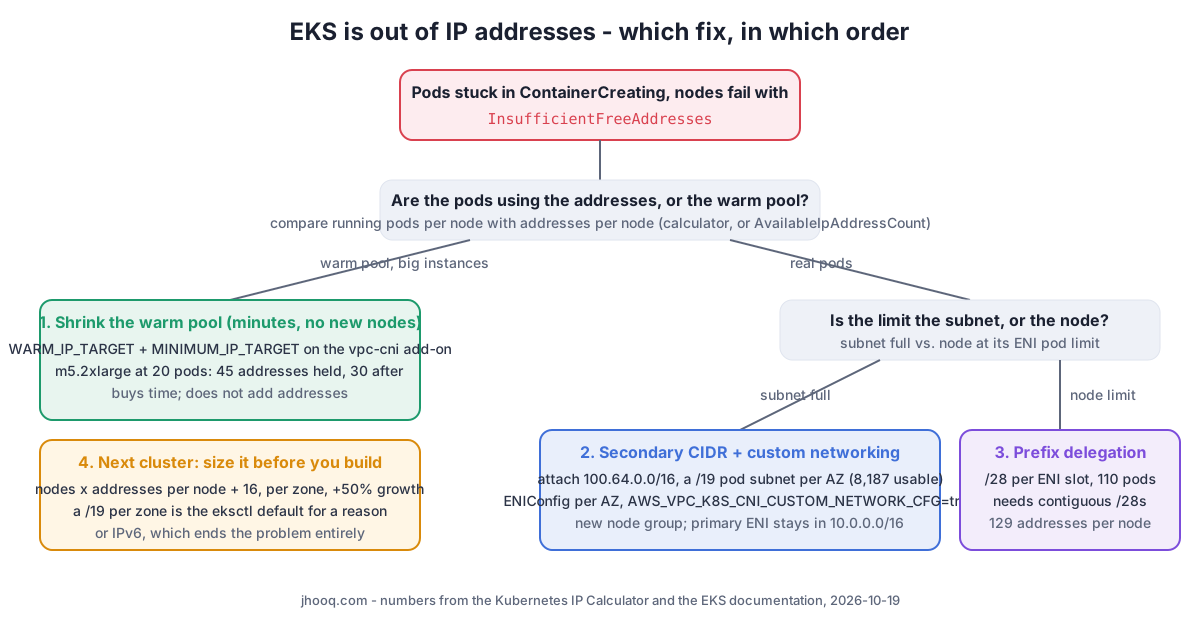
Table of Content
- What the errors look like
- Count what the VPC CNI actually takes
- Fix 1 - shrink the warm pool
- Fix 2 - secondary CIDR and custom networking
- Fix 3 - prefix delegation
- Fix 4 - size the next cluster before you build it
- What broke when I worked this through
- Conclusion
1. What the errors look like
Three places report the same shortage, and they are documented in three different pages:
| Where | What you see | Source |
|---|---|---|
| Pods | stuck in ContainerCreating; the VPC CNI's ipamd cannot get secondary addresses from the subnet, so new pods on that node get no IP | VPC CNI troubleshooting |
| Managed node group | health issue InsufficientFreeAddresses: "One or more of the subnets associated with your managed node group doesn't have enough available IP addresses for new nodes" | EKS troubleshooting |
| Cluster | creation or update fails because a cluster subnet does not have at least 6 (16 recommended) free addresses for the cross-account ENIs | EKS network requirements |
The quick way to see which subnet is empty is the free-address count EC2 keeps per subnet:
1aws ec2 describe-subnets --filters Name=vpc-id,Values=vpc-0123 --query 'Subnets[].[SubnetId,AvailabilityZone,CidrBlock,AvailableIpAddressCount]' --output table
If that number is low while kubectl get pods -A -o wide | wc -l is much lower than you would expect, the warm pool is holding the addresses, and fix 1 is enough for today.
2. Count what the VPC CNI actually takes
I will use the cluster that produces most of the questions I get: 10 m5.2xlarge nodes per zone in 2 zones, nodes in a /23 per zone. The Kubernetes IP Calculator applies the published rules; this is its engine run from Node on 2026-10-19, instance table from the EKS AMI repository at commit 8254d71:
1--- 10 x m5.2xlarge per zone, 2 zones, secondary IP mode
2max pods 58 | per node 60 | per zone need 616 | subnet /22 (1,019 usable)
3a /24 per zone holds 3 nodes; a /23 holds 8
4--- same, prefix delegation
5max pods 110 | per node 129 | per zone need 1,306 | subnet /21
6--- 20 x m5.2xlarge, 20 pods each: warm pool cost
7ips per node at 20 pods 45 enis 3 | with no warm ENI: 30
8--- m5.8xlarge, 20 pods
9ips 60 enis 2 worst 240
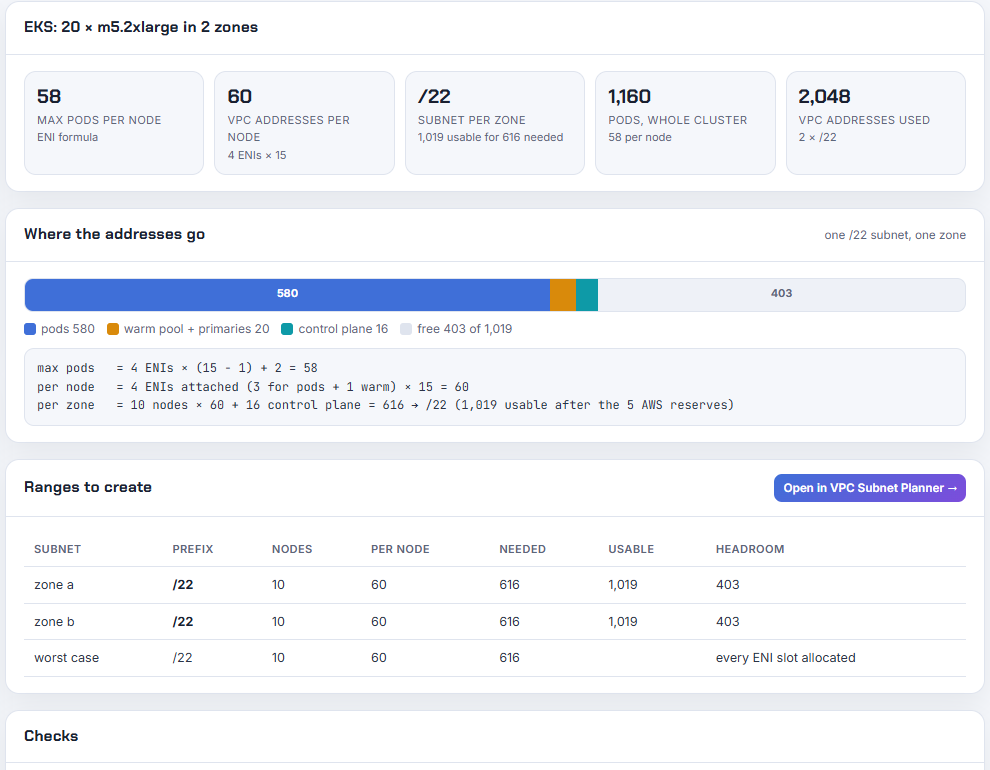
Three rules produce those numbers, each from the EKS instance type page and the VPC CNI README:
- Max pods = ENIs × (IPs per ENI − 1) + 2. The m5.2xlarge has 4 ENIs with 15 addresses each; one address per ENI is the ENI's own, and the + 2 is the CNI and kube-proxy pods, which use host networking.
- An attached ENI has every address allocated, whether a pod uses it or not. So a node at 58 pods has 4 × 15 = 60 addresses taken.
- WARM_ENI_TARGET defaults to 1: the CNI keeps a whole spare ENI attached and allocated. A node running 20 pods needs 2 ENIs for them and holds a third: 3 × 15 = 45 addresses.
So the /23 per zone that looked generous (507 usable, "we only have 10 nodes") holds 8 nodes at full density, and the ninth node's pods sit in ContainerCreating. Nothing is broken; the subnet was sized by the wrong unit.
3. Fix 1 - shrink the warm pool
This is the only fix that works in minutes without launching nodes, and on large instance types it recovers the most. The VPC CNI add-on takes WARM_IP_TARGET (how many free addresses to keep per node) and MINIMUM_IP_TARGET (how many to allocate at boot), and when they are set they override the whole-ENI warm pool:
1# keep 5 spare addresses per node instead of a whole spare ENI; pre-allocate 20 so pods start fast
2kubectl set env daemonset aws-node -n kube-system WARM_IP_TARGET=5 MINIMUM_IP_TARGET=20
On the m5.2xlarge running 20 pods that takes the node from 45 held addresses to about 27 (20 pods, 5 warm, 2 ENI primaries), and across 20 nodes that is about 360 addresses handed back to the subnet. Two cautions from the IP optimisation page: a very low WARM_IP_TARGET makes the CNI call the EC2 API on every pod start, which gets throttled on big clusters, and the values reset when you update the add-on unless you set them through the add-on's configuration values. If you manage the add-on with Terraform, put them there:
1resource "aws_eks_addon" "vpc_cni" {
2  cluster_name = aws_eks_cluster.this.name
3  addon_name   = "vpc-cni"
4  configuration_values = jsonencode({
5    env = { WARM_IP_TARGET = "5", MINIMUM_IP_TARGET = "20" }
6  })
7}
One more number from the VPC CNI guide explains why a busy cluster looks fuller than its pod count: a deleted pod's address sits in a 30 seconds cool-down cache before it returns to the warm pool, so a deployment that churns 100 pods per minute keeps about 50 addresses permanently parked.
This buys time. It does not add addresses, and a node at full pod density still needs the same 60.
4. Fix 2 - secondary CIDR and custom networking
The structural fix is to give pods their own, larger address space. You attach a second CIDR block to the VPC, create a big pod subnet per Availability Zone in it, and tell the CNI to put the secondary ENIs (the ones that carry pods) in those subnets while the node's primary ENI stays where it is. AWS calls it custom networking.
Which block can you attach? Not any block. The VPC CIDR rules for a VPC whose primary CIDR is in 10.0.0.0/8 are:
| Secondary CIDR | Allowed |
|---|---|
| Another block from 10.0.0.0/8, /16 to /28, that does not overlap an existing block or route | yes |
| 100.64.0.0/10 blocks (shared address space, RFC 6598), /16 to /28 | yes, and it is what AWS recommends for pods |
| Publicly routable (non-RFC 1918) blocks, /16 to /28 | yes |
| 172.16.0.0/12 or 192.168.0.0/16 blocks | no, because the primary is in 10.0.0.0/8 |
| 198.19.0.0/16 | no, reserved |
The reason 100.64.0.0/10 is the recommendation: the pod range never has to be routable from the office or from peered VPCs (pods talk out through the node's primary address or a NAT), so taking it from a space no corporate network uses keeps the VPC's real CIDR plan untouched. I validated this Terraform on 2026-10-19 with hashicorp/aws 6.69.1:
 1resource "aws_vpc_ipv4_cidr_block_association" "pods" {
 2  vpc_id     = aws_vpc.this.id
 3  cidr_block = "100.64.0.0/16"
 4}
 5
 6locals { azs = ["us-east-1a", "us-east-1b"] }
 7
 8resource "aws_subnet" "pods" {
 9  for_each          = { for k, az in local.azs : az => cidrsubnet(aws_vpc_ipv4_cidr_block_association.pods.cidr_block, 3, k) } # /19 each, 8,187 usable
10  vpc_id            = aws_vpc.this.id
11  availability_zone = each.key
12  cidr_block        = each.value
13  tags = { Name = "eks-pods-${each.key}" }
14}
1$ terraform validate
2Success! The configuration is valid.
3$ terraform console
4> cidrsubnet("100.64.0.0/16", 3, 0)
5"100.64.0.0/19"
6> cidrsubnet("100.64.0.0/16", 3, 1)
7"100.64.32.0/19"
Then one ENIConfig per Availability Zone, named after the zone so the CNI picks it automatically, and the switch on the daemonset:
1apiVersion: crd.k8s.amazonaws.com/v1alpha1
2kind: ENIConfig
3metadata:
4  name: us-east-1a          # must match the node's topology.kubernetes.io/zone label
5spec:
6  subnet: subnet-0abc        # the 100.64.0.0/19 pod subnet in that zone
7  securityGroups:
8    - sg-0def                # the node security group, or a pod-specific one
1kubectl set env daemonset aws-node -n kube-system AWS_VPC_K8S_CNI_CUSTOM_NETWORK_CFG=true ENI_CONFIG_LABEL_DEF=topology.kubernetes.io/zone
Two consequences the documentation states and the calculator does not yet model:
- Only new nodes use it. Existing nodes keep their ENIs where they are; you create a new node group, then cordon and drain the old one.
- Max pods goes down, not up. With custom networking the primary ENI's addresses are no longer given to pods, so the formula becomes (ENIs − 1) × (IPs per ENI − 1) + 2: on the m5.2xlarge that is 3 × 14 + 2 = 44 pods instead of 58. You traded density for a subnet that will not run dry. Prefix delegation on top of custom networking gets the density back.
If you work across accounts, the custom networking best-practices page adds that the ENIConfig must be keyed by Availability Zone ID, not name, because zone names are shuffled per account.
5. Fix 3 - prefix delegation
Prefix delegation changes what one ENI slot holds: a /28 prefix of 16 addresses instead of a single address. The formula becomes slots × 16 + 2, which is 898 on the m5.2xlarge, and the managed node group cap of 110 (under 30 vCPU) or 250 takes over. The calculator with prefix delegation on, 50% growth headroom and the same 10 nodes per zone:
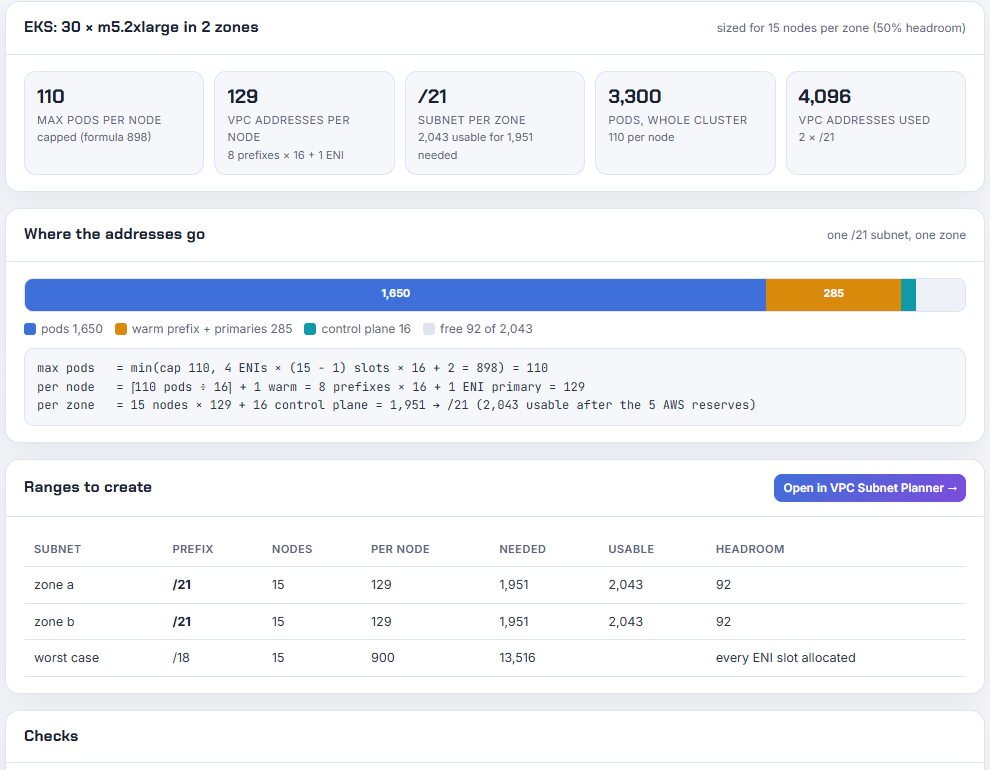
Per node: ⌈110 ÷ 16⌉ + 1 warm prefix = 8 prefixes × 16 + 1 primary = 129 addresses. That is more addresses per node than before, for almost twice the pods, so prefix delegation is a density fix, not an address-saving fix. The catch, from the prefix mode page: each /28 must be a contiguous, aligned free block in the subnet, and a subnet that has been handing out scattered secondary addresses for a year rarely has them. Create the prefix-mode node group in a fresh subnet, or reserve space with a subnet CIDR reservation first.
1kubectl set env daemonset aws-node -n kube-system ENABLE_PREFIX_DELEGATION=true WARM_PREFIX_TARGET=1
6. Fix 4 - size the next cluster before you build it
The arithmetic for the next cluster is one line per zone:
1addresses per zone = nodes × addresses per node + 16 (control plane) , then × (1 + growth), then round up to a prefix
For the example cluster at 50% growth: 15 × 60 + 16 = 916, a /22 per zone. The eksctl default is a /19 per zone (8,187 usable), which looks wasteful until you have done this exercise once. The EKS subnets guidance adds the rule that keeps upgrades safe: do not run nodes in the cluster subnets at all; give the control plane its own small subnets (a /28 is enough, 16 recommended addresses) so a full node subnet can never block a cluster upgrade.
If you can, pick the IPv6 cluster option for a new cluster and the whole post stops applying: pods get addresses from a /80 per node and the subnet never runs out. The constraint is that it is a creation-time choice, so it is a fix for the next cluster, not this one.
The Kubernetes IP Calculator (source on GitHub) does the per-zone number for any instance type, with or without prefix delegation, and opens the result in the VPC Subnet Planner so the pod subnets land next to the rest of the VPC without overlapping anything.
7. What broke when I worked this through
1. My hand calculation was wrong by two nodes. Before running the engine I wrote "a /23 holds 10 m5.2xlarge" on paper: 507 ÷ 58 = 8.7, round down to 8, then I forgot the control plane and the warm ENI and rounded the wrong way. The engine says 8 at full density, and it says 3 for a /24, which is the number that explains most of the "but I only have five nodes" comments. I replaced every number in this post with the engine's output.
2. The range I wanted to attach is on the restricted list. My first secondary CIDR was 198.19.0.0/16, because I remembered it as "the other CG-NAT-like range". The VPC CIDR page lists 198.19.0.0/16 as restricted for every primary range, so the association would have failed at apply time. 100.64.0.0/16 is the right block, and the planner now carries both facts.
3. Custom networking lowers max pods, and I had assumed the opposite. I expected moving pods to a /19 to raise density. The user guide says plainly that the primary ENI's addresses are no longer assigned to pods, so an m5.2xlarge drops from 58 to 44. The calculator does not model this yet, so the post states the formula explicitly; modelling it is on the tool's list.
4. The support article I planned to cite is gone. The AWS re:Post knowledge-center page for pods not getting IP addresses returns 404 today, so the pod-level symptom is cited from the VPC CNI repository's troubleshooting guide instead, which is where that text lives now.
5. The ENI formula gives a deprecation warning on the current provider. The validated Terraform used data.aws_region.current.name in its first draft; hashicorp/aws 6.69.1 warns name is deprecated. Use region instead. The snippets here and in the calculator use .region.
8. Conclusion
To summarise:
- The subnet did not shrink; the unit was wrong. Count pods and ENIs, not nodes: 58 pods and 60 addresses per m5.2xlarge, 616 per zone for 10 nodes.
- Shrink the warm pool first with WARM_IP_TARGET and MINIMUM_IP_TARGET; it returns addresses in minutes.
- Attach a 100.64.0.0/16 secondary CIDR, a /19 pod subnet per zone, an ENIConfig per zone, and a new node group; expect 44 pods per m5.2xlarge, not 58.
- Prefix delegation is for density (110 pods, 129 addresses per node) and needs unfragmented subnets.
- Size the next cluster per zone with the calculator, keep the control plane out of the node subnets, and consider IPv6 before the first node launches.
Did this save you a debugging session? Stay in the loop -
- Subscribe on YouTube - every post here has a screen-recorded companion video.
- Code on GitHub - the repositories, Terraform and scripts behind these posts.
AWS step by step series -
- Part-1 : AWS IAM user - create a user, group, policy, access keys and MFA
- Part-2 : AWS Organizations - multi-account setup, OUs and SCPs
- Part-3 : AWS assume IAM role - trust policy, switch role in console and CLI
- Part-4 : How to launch an EC2 instance - key pair, security group, SSH
- Part-5 : AWS VPC - public and private subnets, Internet Gateway, NAT Gateway, route tables
- Part-8 : EC2 launch template - versions, default version, source template, SSM parameter AMI
- Part-10 : EC2 Auto Scaling - launch template, Auto Scaling group, target tracking, ALB
- Part-11 : AWS WAF - web ACL, managed rules, rate limiting, geo blocking
- Part-12 : AWS VPC Peering - connect two VPCs, routes, security groups, DNS
- Part-13 : AWS Transit Gateway - hub-and-spoke for many VPCs and on-premises
- Part-14 : AWS NAT Gateway deep dive - public vs private, limits, cost, troubleshooting
- Part-15 : Amazon Route 53 - hosted zones, records, alias, routing policies, health checks
- Part-16 : AWS security groups - inbound and outbound rules, stateful, referencing, quotas
- Part-16 : AWS Certificate Manager - free TLS certificates for ALB, CloudFront and API Gateway
- Part-17 : AWS Lambda - function URLs, environment variables and layers
- Part-18 : Network Load Balancer - setup, and ALB vs NLB
- Part-19 : VPC endpoints - gateway and interface endpoints (PrivateLink) instead of NAT
- Part-20 : AWS PrivateLink - publish your own service with an endpoint service and NLB
- Part-20 : Amazon EBS volumes - types, attach, mount, resize, snapshots, encryption
- Part-21 : VPC Flow Logs - CloudWatch Logs, S3, record format, Logs Insights, Athena
- Part-21 : EC2 Spot Instances - pricing, interruptions, mixed instances groups
- Part-23 : AWS Global Accelerator - static anycast IPs in front of ALBs in two regions, traffic dials, weights
- Part-24 : AWS Control Tower - landing zone, controls, Account Factory, Identity Center
- Part-25 : AWS Cloud WAN - global network, core network policy, dev/prod/shared segments, tag-based attachments across three regions
Networking fundamentals -
- What is a VPC and a subnet? AWS networking in five minutes
- What is CIDR? Calculate IP ranges for VPCs and subnets
- VPC Subnet Planner - the free tool I use to size the VPC and subnet CIDRs in every part of this series (AWS, Azure, GCP rules built in)
- What is NAT? Static NAT, dynamic NAT and PAT explained
More AWS guides -
- What is AWS CloudFormation? Templates, stacks, change sets, drift, StackSets
- Learn AWS S3 - the complete course
- AWS API Gateway - REST API with Lambda, authorizers, Terraform
- AWS Advanced Networking Specialty (ANS-C01) - course companion
- AWS ECS and Fargate - how to deploy a Docker container
- AWS S3 - how to host a static website
- Terraform create EC2 instance on AWS
- Terraform AWS IAM - users, roles and policies
- Terraform and AWS multi-account setup
- Terraform - setting up an ALB and SSL