docker restart container - Restart One Container (or One Compose Service) Without Touching the Others, with Real Output from Docker 28

TL;DR
- One container:
docker restart <name-or-id>. Only that container stops and starts again; the others keep running. Reproduced below with nginx, redis and postgres side by side. - Grace period:
docker restart --timeout 30 <name>waits up to 30 seconds for the process to exit cleanly before killing it. The default is 10 seconds, and--timestill works but printsFlag --time has been deprecated, use --timeout insteadon Docker 28. - Several or all:
docker restart api cache, ordocker restart $(docker ps -q)for every running container. - What survives: files written inside the container's own filesystem survive a restart (it is the same container, only the process is replaced). What does not survive is anything in memory, and the container's IP address can change.
- Compose:
docker compose restart webrestarts one service's containers. It does not re-read the compose file or pull a new image - for that usedocker compose up -d web(or--force-recreate), which recreates only the containers whose definition changed. - Automatic restarts:
--restart unless-stopped(orrestart: unless-stoppedin compose) makes Docker restart the container after a crash or a reboot, so you do not have to. - All output below is from Docker 28.0.4 and Compose v2.38.2 on Ubuntu 24.04, captured on 2026-10-12.
- Not your exact case? The closest post on this site is Detach from a Docker container without stopping it.
Table of Content
- Restart a single container with docker restart
- The grace period: --timeout (and the deprecated --time)
- Restart several containers, or all of them
- What survives a restart and what does not
- docker compose: restart one service
- When restart is not enough: recreate with up -d, or rebuild from scratch
- Let Docker restart it for you: restart policies
- What broke when I ran this
- Conclusion
1. Restart a single container with docker restart
I use Docker every day precisely because it isolates things, and the question I had early on was simple: with five containers running, how do I restart just one after a config change without disturbing the rest? The answer is the docker restart command with the container's name or ID.
Here are three containers running side by side, then a restart of only api -
 1$ docker ps --format 'table {{.Names}}\t{{.Status}}\t{{.Ports}}'
 2NAMES     STATUS          PORTS
 3db        Up 5 seconds    5432/tcp
 4cache     Up 12 seconds   6379/tcp
 5api       Up 14 seconds   0.0.0.0:8080->80/tcp, [::]:8080->80/tcp
 6
 7$ docker restart api
 8api
 9
10$ docker ps --format 'table {{.Names}}\t{{.Status}}'
11NAMES     STATUS
12db        Up 5 seconds
13cache     Up 13 seconds
14api       Up Less than a second
db and cache kept their uptime; only api went to Up Less than a second. The command prints the name you gave it and returns when the container is running again. You can use the ID (or its first few characters) instead of the name, which is what docker ps gives you in the first column -
1docker restart 7b935e3cfafd
2. The grace period: --timeout (and the deprecated --time)
docker restart first sends SIGTERM to the main process, waits for it to exit, and sends SIGKILL if it has not exited after the grace period. The default is 10 seconds. For a database or a queue worker that needs longer to flush, raise it; for a stateless web server that ignores SIGTERM, lower it -
1$ docker restart --time 2 cache
2Flag --time has been deprecated, use --timeout instead
3cache
The old post used -t 40, which still works but is deprecated on Docker 28; the current spelling is --timeout -
1docker restart --timeout 40 db      # wait up to 40 seconds for postgres to shut down cleanly
2docker restart --timeout 0 api      # do not wait at all - immediate SIGKILL
Note what the timeout is not: it is not a delay before the restart happens. The restart begins immediately; the number is only how long Docker is willing to wait for a graceful exit. (The 2021 version of this post got that wrong.)
3. Restart several containers, or all of them
docker restart takes any number of names or IDs -
 1$ docker restart api cache
 2api
 3cache
 4
 5$ docker restart $(docker ps -q)
 65daa415f6867
 74c962be14dde
 87b935e3cfafd
 9
10$ docker ps --format 'table {{.Names}}\t{{.Status}}'
11NAMES     STATUS
12db        Up Less than a second
13cache     Up Less than a second
14api       Up Less than a second
docker ps -q prints only the IDs of running containers, so $(docker ps -q) restarts all of them. $(docker ps -aq) would include stopped containers, which restart starts as well - useful after a host reboot without restart policies, dangerous if you have containers that are stopped on purpose.
To restart by label or by image instead of by name -
1docker restart $(docker ps -q --filter label=app=jhooq)
2docker restart $(docker ps -q --filter ancestor=nginx:1.27-alpine)
4. What survives a restart and what does not
A restart keeps the same container: same ID, same writable layer, same volumes, same port mappings. Only the process inside is replaced. I checked by writing a file into the container's own filesystem (not a volume) and restarting -
1$ docker exec api sh -c 'echo hello > /tmp/marker && cat /tmp/marker'
2hello
3
4$ docker restart api
5api
6
7$ docker exec api cat /tmp/marker
8hello
| Thing | After docker restart | After docker rm + docker run |
|---|---|---|
| Files in the container's writable layer | kept | lost |
| Named volumes and bind mounts | kept | kept (volumes outlive containers) |
| Environment variables, port mappings, command | unchanged (from the original docker run) | whatever the new docker run says |
| Image | the same image ID the container was created from, even if the tag now points at a newer image | the current image behind the tag |
| Container IP on the default bridge | may change (docker inspect -f '{{.NetworkSettings.IPAddress}}' api gave 172.17.0.2 here, reassigned at start) | may change |
| Process memory, open connections | lost | lost |
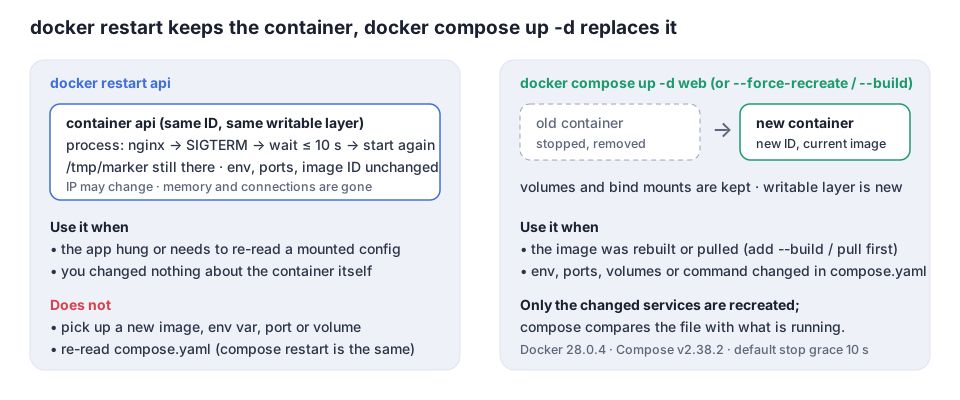
The image row is the one that matters most: a restart never picks up a new image or a changed environment variable. If you rebuilt the image or edited the compose file, you need to recreate the container (section 6).
5. docker compose: restart one service
With a compose stack you address services, not container names. Here is a two-service stack and a restart of only web -
1services:
2  web:
3    image: nginx:1.27-alpine
4    ports: ["8080:80"]
5  cache:
6    image: redis:7-alpine
 1$ docker compose up -d
 2 Network stack_default  Created
 3 Container stack-cache-1  Started
 4 Container stack-web-1  Started
 5
 6$ docker compose restart web
 7 Container stack-web-1  Restarting
 8 Container stack-web-1  Started
 9
10$ docker compose ps --format 'table {{.Name}}\t{{.Service}}\t{{.Status}}'
11NAME            SERVICE   STATUS
12stack-cache-1   cache     Up Less than a second
13stack-web-1     web       Up Less than a second
(cache shows a fresh uptime only because the stack had just been created; compose restart web did not touch it.) The same --timeout flag exists: docker compose restart --timeout 30 web, documented in the docker compose restart reference; the signal and grace-period behaviour is the same as docker stop. docker-compose with a hyphen is the old v1 Python tool; on any current installation use docker compose with a space, the v2 plugin.
6. When restart is not enough: recreate with up -d, or rebuild from scratch
docker compose restart does not read the compose file again. If you changed the image tag, an environment variable, a port or a volume, the running container still has the old definition. docker compose up -d compares the file with what is running and recreates only the services whose definition changed -
1$ docker compose up -d --force-recreate web
2 Container stack-web-1  Recreate
3 Container stack-web-1  Recreated
4 Container stack-web-1  Started
--force-recreate recreates even when nothing changed (handy when you want a clean container state); without the flag compose decides. Add --build when the Dockerfile changed, and docker compose pull web first when a :latest image moved -
1docker compose up -d --build web          # rebuild the image for web, recreate only web
2docker compose pull web && docker compose up -d web
And the fully clean sequence, when you want neither the old container nor the old image around (the "hard" restart from the first version of this post) -
1docker compose stop web            # 1. stop the container
2docker compose rm -f web           # 2. remove it
3docker rmi stack-web               # 3. remove the image (name from docker image ls)
4docker compose up -d --build web   # 4. build a fresh image and start a fresh container
Use that when a build cache is hiding a change; for day-to-day restarts it is overkill.
7. Let Docker restart it for you: restart policies
If the reason you restart a container is that it crashed, a restart policy does it automatically, including after a host reboot -
1docker run -d --restart unless-stopped --name api -p 8080:80 nginx:1.27-alpine
2docker update --restart unless-stopped api      # change it on a running container
1services:
2  web:
3    image: nginx:1.27-alpine
4    restart: unless-stopped
| Policy | Restarts after a crash | Restarts after a daemon or host reboot | Restarts after you stop it by hand |
|---|---|---|---|
no (default) | no | no | no |
on-failure[:N] | yes, up to N times | no | no |
always | yes | yes | yes, as soon as the daemon starts |
unless-stopped | yes | yes, unless it was stopped manually before | no |
The policies are documented in start containers automatically. unless-stopped is the one I put on anything that should behave like a service.
8. What broke when I ran this
I rebuilt every example in this post on 2026-10-12 with Docker 28.0.4 and Compose v2.38.2. Three corrections to what I had written in 2021.
1. --time is deprecated. The old post used docker-compose restart -t 40. On Docker 28 the same flag on docker restart prints Flag --time has been deprecated, use --timeout instead. It still works, but scripts should move to --timeout.
2. I had described the timeout as a delay. The 2021 text said the container "will restart after 40 seconds". It does not; the restart starts immediately and 40 seconds is the maximum wait for a graceful shutdown. I checked with --time 2 on the redis container and it was back up in well under 2 seconds, because redis exits on SIGTERM right away.
3. docker-compose with a hyphen is gone from a fresh Ubuntu 24.04. The runner had only the v2 plugin (docker compose version printed v2.38.2). Every command in this post now uses the space form. If you still have docker-compose v1 installed, the commands are the same except for the hyphen, but v1 has been unsupported since mid-2023.
One thing that surprised me positively: the file I wrote into the container survived the restart (section 4). I had assumed a restart would give me a fresh filesystem, which is only true for docker rm + docker run.
9. Conclusion
To restart one container among many, docker restart <name> is the whole answer; --timeout controls how patient it is with the shutdown, and docker restart $(docker ps -q) does all of them. In compose, docker compose restart web restarts one service's containers but keeps their old definition - when the image, the environment or the ports changed, docker compose up -d web is the command you actually want, and --build or pull go in front when the image itself changed. For crashes and reboots, a restart policy saves you the typing.
If you are starting out with Docker, my Spring Boot with Docker post builds a container from scratch, docker driver failed programming external connectivity covers the port conflict you hit when the old container is still holding the port, and how to copy files to and from a container covers the other half of "I need to change something inside a running container".
Did this save you a debugging session? Stay in the loop -
- Subscribe on YouTube - every post here has a screen-recorded companion video.
- Code on GitHub - the repositories, Terraform and scripts behind these posts.