Docker environment variables - ENV vs ARG, -e and --env-file, Compose environment and .env, precedence, PATH, and why you cannot change a running container's variables (tested on Docker 28)

TL;DR
- Dockerfile:
ENVsets a variable for the build and the container;ARGexists only during the build and is gone at run time.exportinside aRUNline dies with that line. - Run time:
docker run -e KEY=valueand--env-file app.env. Flags overrideENVfrom the image, and-e KEYwith no value copies the variable from your shell. - Compose:
environment:in the service,env_file:for a file ofKEY=valuelines, and the.envfile next tocompose.yamlfor substituting${VAR}in the file itself.environment:beatsenv_file:. - You cannot change a running container's environment.
docker exec -eonly affects that one command,exportin an exec shell is gone when the shell exits, anddocker updatehas no environment option at all. Recreate the container. - Secrets do not belong in ENV:
docker inspectprints every variable, includingDB_PASSWORD=hunter2, to anyone with access to the Docker socket. - Every output below is from Docker 28.0.4 and Docker Compose v2.38.2 on Ubuntu 24.04, captured on 2026-10-16.
- Not your exact case? The closest post on this site is exec.
The 2022 version of this post answered "how do I use an environment variable in Docker" with a few examples. The questions that bring people here today are more specific: dockerfile export environment variable, dockerfile add to path, docker update environment variables. Those have precise answers, and some of them are "you cannot", so for this rewrite I ran every case and kept the output.
Table of Content
- Where a variable can come from, and which one wins
- Dockerfile - ENV, ARG, export in RUN, and PATH
- docker run - the -e flag and --env-file
- Read a container's variables from outside
- Change a variable in a running container
- Docker Compose - the three sources of a variable
- Secrets, and the size limits of environment variables
- What broke when I ran this
- Conclusion
1. Where a variable can come from, and which one wins
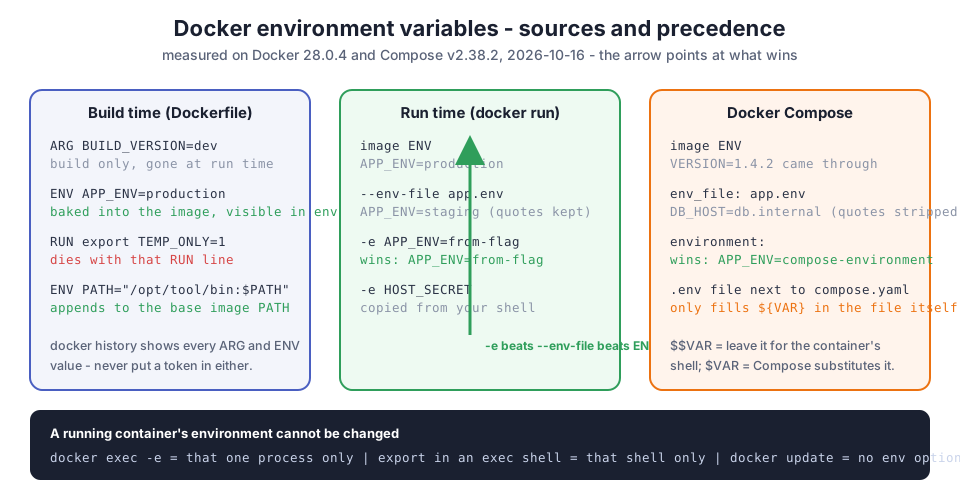
| Source | When it applies | Visible in the running container? | Overrides |
|---|---|---|---|
ARG in the Dockerfile | build only | no | - |
ENV in the Dockerfile | build and run | yes | ARG of the same name during the build |
export in a RUN line | that one RUN line | no | nothing |
docker run --env-file | run | yes | ENV |
docker run -e | run | yes | ENV and --env-file |
Compose env_file: | run | yes | ENV |
Compose environment: | run | yes | env_file |
Compose .env file | when Compose reads compose.yaml | only through ${VAR} substitution | nothing in the container directly |
docker exec -e | that one exec | that process only | nothing lasting |
The Compose side has its own precedence page; the table above is what I observed on 2.38.2 and it matches the documented order.
2. Dockerfile - ENV, ARG, export in RUN, and PATH
One Dockerfile that exercises all four, on an alpine:3.20 base that is 7.8 MB (measured on the same runner on 2026-10-14):
1FROM alpine:3.20
2ARG BUILD_VERSION=dev
3ENV APP_ENV=production \
4    APP_PORT=8080 \
5    VERSION=$BUILD_VERSION
6RUN export TEMP_ONLY=1 && echo "inside RUN: TEMP_ONLY=$TEMP_ONLY"
7ENV PATH="/opt/tool/bin:$PATH"
8RUN mkdir -p /opt/tool/bin && printf '#!/bin/sh\necho mytool ok\n' > /opt/tool/bin/mytool && chmod +x /opt/tool/bin/mytool
9CMD ["sh", "-c", "env | sort"]
 1$ docker build -q --build-arg BUILD_VERSION=1.4.2 -t denv:1 .
 2$ docker run --rm denv:1
 3APP_ENV=production
 4APP_PORT=8080
 5HOME=/root
 6HOSTNAME=9b7b9d1a1510
 7PATH=/opt/tool/bin:/usr/local/sbin:/usr/local/bin:/usr/sbin:/usr/bin:/sbin:/bin
 8PWD=/
 9SHLVL=1
10VERSION=1.4.2
Three things to see in that list:
VERSION=1.4.2is there,BUILD_VERSIONis not. TheARGwas used during the build to set anENV, which is the standard way to bake a build-time value into the image. ARG and ENV are documented separately for this reason.TEMP_ONLYis not there.exportin aRUNline sets the variable for that shell only; the next instruction starts a new shell. This is the answer to "dockerfile export environment variable": useENV, notexport.PATHstarts with/opt/tool/bin.ENV PATH="/opt/tool/bin:$PATH"appends to the existing value because$PATHis expanded from the base image'sENV. That is how you "add to PATH" in a Dockerfile.
1$ docker run --rm denv:1 sh -c 'echo "TEMP_ONLY=[$TEMP_ONLY]  BUILD_VERSION=[$BUILD_VERSION]  VERSION=[$VERSION]"; mytool'
2TEMP_ONLY=[]  BUILD_VERSION=[]  VERSION=[1.4.2]
3mytool ok
There is no UNSET instruction. To remove a variable that a base image sets, set it to an empty string with ENV VAR= or, if the program distinguishes empty from absent, unset it in the entrypoint script. If a tool you installed is still not found after this, executable file not found in $PATH covers the other reasons.
3. docker run - the -e flag and --env-file
An env file is plain KEY=value lines; comments are ignored and quotes are kept:
1$ cat app.env
2APP_ENV=staging
3DB_HOST=db.internal
4# comment lines are ignored
5QUOTED="keeps the quotes"
6
7$ docker run --rm --env-file app.env denv:1 sh -c 'echo APP_ENV=$APP_ENV DB_HOST=$DB_HOST QUOTED=$QUOTED'
8APP_ENV=staging DB_HOST=db.internal QUOTED="keeps the quotes"
APP_ENV went from production (the image's ENV) to staging (the file). A -e flag beats the file, and -e NAME with no value copies the variable from the shell you run Docker from:
1$ docker run --rm --env-file app.env -e APP_ENV=from-flag denv:1 sh -c 'echo APP_ENV=$APP_ENV'
2APP_ENV=from-flag
3
4$ export HOST_SECRET=from-host-shell
5$ docker run --rm -e HOST_SECRET denv:1 sh -c 'echo HOST_SECRET=$HOST_SECRET'
6HOST_SECRET=from-host-shell
The quote behaviour is the thing that surprises people: --env-file does no shell parsing, so QUOTED="keeps the quotes" arrives with the literal double quotes. Compose's env_file strips them. The docker run reference describes the file format.
4. Read a container's variables from outside
A container that sleeps for 300 seconds is enough to inspect and exec into:
 1$ docker run -d --name c1 -e DB_HOST=db.internal denv:1 sleep 300
 2$ docker inspect c1 --format '{{range .Config.Env}}{{println .}}{{end}}'
 3DB_HOST=db.internal
 4PATH=/opt/tool/bin:/usr/local/sbin:/usr/local/bin:/usr/sbin:/usr/bin:/sbin:/bin
 5APP_ENV=production
 6APP_PORT=8080
 7VERSION=1.4.2
 8
 9$ docker exec c1 sh -c 'echo DB_HOST=$DB_HOST'
10DB_HOST=db.internal
docker inspect shows what the container was created with; docker exec shows what a new process inside sees now. For a container that has been running for a while they are the same thing, which is the point of the next section.
5. Change a variable in a running container
Three things people try, in order, with the real result of each:
 1$ docker exec -e DB_HOST=only-for-this-exec c1 sh -c 'echo DB_HOST=$DB_HOST'
 2DB_HOST=only-for-this-exec
 3$ docker exec c1 sh -c 'echo DB_HOST=$DB_HOST'
 4DB_HOST=db.internal
 5
 6$ docker exec c1 sh -c 'export DB_HOST=changed-in-shell; echo DB_HOST=$DB_HOST'
 7DB_HOST=changed-in-shell
 8$ docker exec c1 sh -c 'echo DB_HOST=$DB_HOST'
 9DB_HOST=db.internal
10
11$ docker update --help | grep -ci env
120
docker exec -e sets the variable for that one process. export sets it for that one shell. docker update cannot touch the environment at all; its help text does not contain the word. The process that matters, PID 1 of the container, got its environment when it started and nothing can change it from outside. The only real way is to recreate the container:
1$ docker rm -f c1
2$ docker run -d --name c1 -e DB_HOST=db-v2.internal denv:1 sleep 300
3$ docker exec c1 sh -c 'echo DB_HOST=$DB_HOST'
4DB_HOST=db-v2.internal
With Compose that is docker compose up -d after editing the file; it recreates only the services whose configuration changed. If the recreated container then refuses to start, restarting a single container shows the difference between restart and recreate.
6. Docker Compose - the three sources of a variable
Compose has three mechanisms that look similar and do different things:
1# .env (next to compose.yaml) - substituted into THIS file, not sent to the container
2TAG=1
3APP_PORT=9090
1services:
2  app:
3    image: denv:${TAG}
4    env_file: app.env                    # KEY=value lines, sent to the container
5    environment:                         # sent to the container, wins over env_file
6      APP_PORT: ${APP_PORT}              # substituted from .env or your shell
7      APP_ENV: compose-environment
8      EMPTY_FROM_HOST:                   # copies EMPTY_FROM_HOST from your shell, if set
9    command: sh -c "echo APP_ENV=$$APP_ENV APP_PORT=$$APP_PORT DB_HOST=$$DB_HOST VERSION=$$VERSION EMPTY=[$$EMPTY_FROM_HOST]"
1$ docker compose up --no-log-prefix
2APP_ENV=compose-environment APP_PORT=9090 DB_HOST=db.internal VERSION=1.4.2 EMPTY=[]
Reading the result against the sources: APP_ENV came from environment: and beat both env_file (staging) and the image (production). APP_PORT was ${APP_PORT} in the file, filled from .env as 9090. DB_HOST came from env_file. VERSION came from the image. EMPTY_FROM_HOST was not set in my shell, so it arrived empty.
The $$ is the other half of this: $VAR in compose.yaml is substituted by Compose before the container exists, so a variable the container's shell should expand has to be written $$VAR. The interpolation page covers the syntax, including defaults like ${PORT:-8080}. If you run several commands in one command:, the same rule applies, which I cover in multiple commands in Docker Compose.
7. Secrets, and the size limits of environment variables
The last test is the reason to keep passwords out of ENV:
1$ docker run -d --name c2 -e DB_PASSWORD=hunter2 denv:1 sleep 300
2$ docker inspect c2 --format '{{.Config.Env}}'
3[DB_PASSWORD=hunter2 PATH=/opt/tool/bin:/usr/local/sbin:/usr/local/bin:/usr/sbin:/usr/bin:/sbin:/bin APP_ENV=production APP_PORT=8080 VERSION=1.4.2]
Anyone who can run docker inspect can read it, and so can any process in the container, including a compromised dependency. docker history shows the build arguments too:
1$ docker history --no-trunc denv:1 --format '{{.CreatedBy}}'
2RUN |1 BUILD_VERSION=1.4.2 /bin/sh -c mkdir -p /opt/tool/bin && ... # buildkit
3ENV APP_ENV=production APP_PORT=8080 VERSION=1.4.2
4ARG BUILD_VERSION=1.4.2
An ARG that held a token during the build is in the image history for ever. For secrets use docker secret in Swarm, the secrets: section in Compose (mounted as files under /run/secrets), or RUN --mount=type=secret for build-time credentials, and keep ENV for configuration that is fine to print in a log.
Environment variables are also the wrong place for anything large. The limits come from the Linux kernel and from Docker, not from your application:
| Limit | Value | Source |
|---|---|---|
One environment string (KEY=value) | 32 pages = 131072 bytes (128 KiB) on 4 KiB pages | execve(2), MAX_ARG_STRLEN |
| All arguments plus environment together | 1/4 of the stack limit, floor of 32 pages | execve(2) |
| A Swarm or Compose secret file | up to 500 KB | Docker secrets |
| Visibility | 100% of variables readable with docker inspect | measured above |
A 2 MB certificate chain in a variable fails at execve with Argument list too long before your process starts; mount it as a file or a secret instead.
8. What broke when I ran this
I ran every example as a script on a GitHub Actions runner (Docker 28.0.4, Compose v2.38.2) on 2026-10-16.
1. docker compose config --format json did not give me JSON. I wanted to print the resolved environment for the post and piped the output into Python, which failed with Expecting value: line 2 column 1. The first line of the output was not JSON on this Compose version. Plain docker compose config (YAML) is the reliable way to see what Compose resolved; I used the running container's output instead.
2. --env-file kept the quotes. I had written QUOTED="keeps the quotes" expecting Docker to strip them the way a shell would. It does not; the container saw the quote characters. Compose's env_file does strip them, so the same file behaves differently in the two tools.
3. docker update --help | grep -ci env printed 0. I knew docker update could not change the environment, but I expected at least a mention. Nothing. The command is for resource limits and restart policies only.
9. Conclusion
To summarise what I measured on Docker 28.0.4 and Compose 2.38.2:
ENVfor values that must exist in the container,ARGfor build-only values, neverexportinRUN.ENV PATH="/opt/tool/bin:$PATH"is how you add to PATH.-ebeats--env-file, both beatENV; in Compose,environment:beatsenv_file:, and.envonly feeds${VAR}substitution.- A running container's environment cannot be changed. Recreate it.
- Keep secrets out of
ENVandARG;docker inspectanddocker historyshow both.
If the variable you need is a build-time version or commit hash, Docker ARG and ENV in a CI build is where the tag ends up, and for installing Docker itself see Docker installation.
Did this save you a debugging session? Stay in the loop -
- Subscribe on YouTube - every post here has a screen-recorded companion video.
- Code on GitHub - the repositories, Terraform and scripts behind these posts.