exec - executable file not found in $PATH (or %PATH%) in Docker - every cause and fix, inside the container and on the host

TL;DR
- Read the line before the error.
OCI runtime create failed ... exec: "bash"is inside the container: the image cannot find that program.error: exec: "docker","docker-compose"or"docker-credential-desktop"is on your host: a tool cannot find a Docker binary. - Inside the container, the five causes are: the program is not in the image (
bashon alpine - usesh), an exec-formCMD ["python app.py"]with the whole command in one string (split it:["python", "app.py"]), a tool installed outsidePATH, an entrypoint without the execute bit (exit 126,permission denied), and Windows CRLF line endings in the shebang (exit 255,no such file or directory). - On the host: put the Docker CLI on
PATH(on Windows the message says%PATH%), replacedocker-composewithdocker composebecause Compose v1 is retired, and remove"credsStore": "desktop"from~/.docker/config.jsonon machines without Docker Desktop. - Exit code tells you which: 127 = not found, 126 = found but not executable.
- Every output below is from Docker 28.0.4 and Go 1.24.13 on Ubuntu 24.04, captured on 2026-10-14.
- Not your exact case? The closest post on this site is How to edit file within Docker container or edit a file after I shell into a....
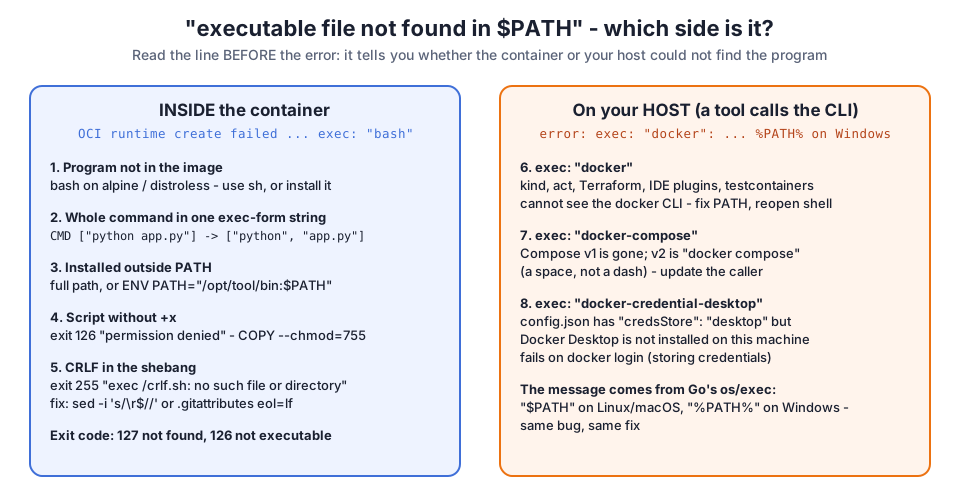
When I first wrote about this error in 2021, I only covered the container side - a Python CMD and a shell script. Then I looked at what people actually search for when they land here: most of them search for error: exec: "docker": executable file not found in %PATH% and exec: "docker-compose": executable file not found in $PATH. That is the host side, a completely different problem with the same words. So I rewrote the post and reproduced all eight cases on Docker 28.0.4.
Table of Content
- Which side is the error on?
- The image does not have the program (bash on alpine)
- The whole command in one exec-form string
- The tool is installed outside PATH
- Entrypoint script without the execute bit
- Windows line endings in the shebang
- exec docker - a tool on the host cannot find the Docker CLI
- exec docker-compose - Compose v1 is gone
- exec docker-credential-desktop
- What broke when I ran this
- Conclusion
1. Which side is the error on?
| What you see | Side | Exit code | Most likely cause | Fix |
|---|---|---|---|---|
OCI runtime create failed ... exec: "bash": executable file not found in $PATH | container | 127 | program not in the image | use sh, or install the program |
exec: "python app.py": executable file not found | container | 127 | exec form with one string | CMD ["python", "app.py"] |
exec: "mytool": executable file not found | container | 127 | installed outside PATH | full path, or ENV PATH=... |
exec: "/entrypoint.sh": permission denied | container | 126 | no execute bit | COPY --chmod=755 |
exec /crlf.sh: no such file or directory | container | 255 | CRLF line endings | convert to LF |
error: exec: "docker": executable file not found in %PATH% | host | tool-specific | Docker CLI not on PATH | fix PATH, reopen the terminal |
exec: "docker-compose": executable file not found | host | 127 | Compose v1 removed | docker compose |
exec: "docker-credential-desktop": executable file not found | host | 1 | credsStore: desktop without Docker Desktop | remove credsStore |
The message text itself comes from Go's os/exec package (Docker, runc and most Docker tooling are written in Go). That is why it reads $PATH on Linux and macOS and %PATH% on Windows - the os/exec documentation describes the lookup, and the error is the same bug on every platform.
2. The image does not have the program (bash on alpine)
Small images ship without bash. Alpine has BusyBox sh, distroless images have no shell at all:
1$ docker run --rm alpine:3.20 bash -c 'echo hi'
2docker: Error response from daemon: failed to create task for container: failed to create shim task: OCI runtime create failed: runc create failed: unable to start container process: error during container init: exec: "bash": executable file not found in $PATH
3
4Run 'docker run --help' for more information
5
6$ docker run --rm alpine:3.20 sh -c 'echo hi from sh'
7hi from sh
The same thing happens with docker exec into a running container, with a slightly different prefix:
1$ docker exec a1 bash
2OCI runtime exec failed: exec failed: unable to start container process: exec: "bash": executable file not found in $PATH
3
4$ docker exec a1 sh -c 'command -v bash || echo "no bash in alpine $(cat /etc/alpine-release)"'
5no bash in alpine 3.20.10
And on a distroless image even sh is missing:
1$ docker run --rm gcr.io/distroless/static-debian12 sh -c 'echo hi'
2docker: Error response from daemon: ... exec: "sh": executable file not found in $PATH
Is it worth adding bash just to get rid of the error? I measured it on the same machine:
| Image | Size on disk | Shell |
|---|---|---|
gcr.io/distroless/static-debian12 | 2.11 MB | none |
gcr.io/distroless/static-debian12:debug | 3.29 MB | BusyBox sh |
alpine:3.20 | 7.8 MB | BusyBox sh |
alpine:3.20 + apk add --no-cache bash | 9.83 MB | bash |
python:3.12-alpine | 55.1 MB | BusyBox sh |
ubuntu:24.04 | 78.2 MB | bash |
Bash adds about 2 MB to alpine, so for a dev image it is cheap. For production I keep sh and write POSIX scripts instead.
Fix: use sh on alpine; if your script really needs bash, add RUN apk add --no-cache bash to the Dockerfile. For distroless, debug with the :debug variant of the image (it includes a BusyBox shell) or with docker debug on Docker Desktop, rather than adding a shell to the production image. If you only need to change one file inside the container, my post on editing a file inside a Docker container shows the docker cp round trip that works without any shell.
3. The whole command in one exec-form string
This is the cause I hit most in code reviews. The JSON (exec) form of CMD and ENTRYPOINT does not go through a shell, so each array element is one argument:
1FROM python:3.12-alpine
2WORKDIR /app
3COPY app.py .
4CMD ["python app.py"]
1$ docker run --rm exe:bad
2docker: Error response from daemon: ... exec: "python app.py": executable file not found in $PATH
Docker looked for a program literally named python app.py, space included. Split the command into its words:
1CMD ["python", "app.py"]
1$ docker run --rm exe:good
2app started
The Dockerfile CMD reference explains the exec form and the shell form (CMD python app.py, which runs /bin/sh -c and therefore needs a shell in the image).
4. The tool is installed outside PATH
A tool copied to /opt/tool/bin is invisible to a bare name:
1$ docker run --rm exe:path
2docker: Error response from daemon: ... exec: "mytool": executable file not found in $PATH
3
4$ docker run --rm exe:path /opt/tool/bin/mytool
5mytool ran
Either call it by its full path, or extend PATH in the image so every later command finds it:
1FROM alpine:3.20
2COPY --chmod=755 mytool /opt/tool/bin/mytool
3ENV PATH="/opt/tool/bin:$PATH"
4CMD ["mytool"]
1$ docker run --rm exe:path2
2mytool ran
5. Entrypoint script without the execute bit
Here the file is found, but it cannot be run, so the message changes to permission denied and the exit code to 126:
1$ docker run --rm exe:perm
2docker: Error response from daemon: ... error during container init: exec: "/entrypoint.sh": permission denied
3[exit 126]
The script lost its execute bit on the way into the image (on Windows checkouts it often never had one). Set it in the COPY itself - no extra RUN chmod layer needed:
1FROM alpine:3.20
2COPY --chmod=755 entrypoint.sh /entrypoint.sh
3ENTRYPOINT ["/entrypoint.sh"]
4CMD ["echo","done"]
1$ docker run --rm exe:perm2
2entrypoint ok
3done
6. Windows line endings in the shebang
This one does not even mention PATH, which is why it takes so long to find. A script saved with CRLF line endings has #!/bin/sh\r as its first line, and the kernel looks for an interpreter called sh\r:
1$ docker run --rm exe:crlf
2exec /crlf.sh: no such file or directory
3[exit 255]
4
5$ file crlf.sh
6crlf.sh: POSIX shell script, ASCII text executable, with CRLF line terminators
The file exists, it is executable, and Docker still says "no such file". Convert the line endings and rebuild:
1$ sed -i 's/\r$//' crlf.sh
2$ file crlf.sh
3crlf.sh: POSIX shell script, ASCII text executable
4
5$ docker run --rm exe:crlf
6crlf ok
To stop it coming back, add *.sh text eol=lf to .gitattributes in the repository, so Git on Windows checks shell scripts out with LF.
7. exec docker - a tool on the host cannot find the Docker CLI
Now the host side. Tools such as kind, act, minikube, the Terraform Docker provider, IDE plugins and testcontainers do not talk to Docker through magic - many of them start the docker binary as a child process. If that binary is not on the PATH the tool sees, you get the Go error. I reproduced it with a 10-line Go program that does exactly what those tools do:
1$ env PATH=/opt/nothing ./callcli docker docker-compose
2error: exec: "docker": executable file not found in $PATH
3error: exec: "docker-compose": executable file not found in $PATH
4
5$ ./callcli docker docker-compose
6ok: Client: Docker Engine - Community
7 Version:           28.0.4
8 API vers ...
9error: exec: "docker-compose": executable file not found in $PATH
With a normal PATH, docker is found and docker-compose still is not (more on that in the next section). On Windows the very same failure prints error: exec: "docker": executable file not found in %PATH%.
Fixes, in the order I check them:
- Run
docker versionin the same terminal the tool runs in. If that fails too, Docker is not installed or not onPATH. - On Windows, Docker Desktop puts the CLI in
C:\Program Files\Docker\Docker\resources\bin. A terminal or IDE that was open during the install keeps the oldPATH- close it and open a new one (for VS Code, quit all windows). - For a GUI app or a service (Jenkins agent, systemd unit),
PATHcomes from the service definition, not your shell profile. Set it there, or configure the tool with the full path todocker. - In CI, make sure the job runs on an image or runner that has the Docker CLI installed - a plain
python:3.12image does not.
8. exec docker-compose - Compose v1 is gone
Compose v1 was the separate Python program called docker-compose. Compose v2 is a Docker CLI plugin called with a space: docker compose. On my Ubuntu 24.04 machine with Docker 28.0.4 there is no docker-compose binary at all:
1$ bash -c 'docker-compose version'
2bash: line 1: docker-compose: command not found
3[exit 127]
4
5$ docker compose version
6Docker Compose version v2.38.2
Any script, Makefile, CI step or tool that still calls docker-compose fails with exec: "docker-compose": executable file not found in $PATH. Docker's history of Docker Compose page explains how the standalone v1 tool turned into the docker compose plugin. The fix is to change the caller to docker compose. Where you cannot change the caller (an old tool you do not maintain), a tiny wrapper script named docker-compose on the PATH that runs exec docker compose "$@" keeps it working until you can.
9. exec docker-credential-desktop
This happens when ~/.docker/config.json contains "credsStore": "desktop" on a machine without Docker Desktop - typically a config copied from a laptop to a server, or left behind after uninstalling Docker Desktop:
1$ cat ~/.docker/config.json
2{
3  "auths": {},
4  "credsStore": "desktop"
5}
6
7$ echo "anything" | docker login localhost:5000 -u me --password-stdin
8Error saving credentials: error storing credentials - err: exec: "docker-credential-desktop": executable file not found in $PATH, out: ``
Remove the credsStore line (or set it to a helper that exists on this machine) and log in again:
1$ echo "anything" | docker login localhost:5000 -u me --password-stdin
2
3WARNING! Your credentials are stored unencrypted in '/tmp/cfg/config.json'.
4Configure a credential helper to remove this warning. See
5https://docs.docker.com/go/credential-store/
6
7Login Succeeded
That warning is real: without a helper, config.json holds user:password in base64, which is not encryption. On a server I install docker-credential-pass or use the cloud helper (docker-credential-ecr-login, docker-credential-gcloud were already on my runner) instead. If the login itself is refused after this, my post on requested access to the resource is denied covers the registry side.
10. What broke when I ran this
I ran every case as a script on a fresh GitHub Actions runner (Ubuntu 24.04, Docker 28.0.4, Go 1.24.13) on 2026-10-14. These are the surprises.
1. The credential helper error did not show up where I expected it. Every forum thread says docker pull fails with docker-credential-desktop missing. On Docker 28.0.4 it did not:
1$ docker pull -q alpine:3.20
2docker.io/library/alpine:3.20
A BuildKit build from a local registry did not mention the helper either. Only docker login, which has to store a credential, failed. So if you see this error on pull today, you are probably on an older Docker version - upgrading is a valid fix on its own.
2. The distroless debug image rejected my command. I expected gcr.io/distroless/static-debian12:debug to behave like alpine. It does not - its entrypoint is already /busybox/sh, so my sh -c '...' was passed to that shell as a script name:
1$ docker run --rm gcr.io/distroless/static-debian12:debug sh -c 'echo debug variant has $(busybox | head -1)'
2/busybox/sh: can't open 'sh': No such file or directory
With the debug variant, drop the leading sh (docker run --rm IMAGE:debug -c 'echo hi') or override it with --entrypoint sh.
3. A failing container fails fast. Over 5 runs each, docker run --rm alpine:3.20 bash -c true failed in 118 to 125 ms, while the working sh -c true took 224 to 245 ms. The error happens at container init, before anything runs, so a crash loop on this error burns very little time per attempt - it just never stops on its own.
4. The CRLF case exited with 255, not 127. Because the message says "no such file or directory" and the exit code is unusual, it does not look like the same family of problems at all. file script.sh is the fastest check: it prints with CRLF line terminators straight away.
5. Exit codes are a shortcut. In my runs, every container-side "not found" case and the missing docker-compose command exited 127 and the missing execute bit exited 126 - the same convention a shell uses. In CI logs that one number tells you which half of this post to read.
11. Conclusion
executable file not found in $PATH is one message for two different problems. To summarise:
- Inside the container (
OCI runtime create failed): the program is missing from the image, the exec-form command is one string, it lives outsidePATH, the script is not executable (126), or the script has CRLF line endings (255). - On the host (
error: exec: "docker",%PATH%on Windows): the calling tool cannot see the Docker CLI, still calls Compose v1, orconfig.jsonpoints atdocker-credential-desktop.
If the container starts but you cannot get a shell into it, attaching and detaching from a running container shows when to use docker exec instead of docker attach. And if your problem is a command in docker-compose.yml that does not run the way you wrote it, running multiple commands in Docker Compose is the companion to this post.
Did this save you a debugging session? Stay in the loop -
- Subscribe on YouTube - every post here has a screen-recorded companion video.
- Code on GitHub - the repositories, Terraform and scripts behind these posts.