Failed to start docker.service: Unit docker.service not found - the fix on CentOS, Rocky and RHEL 9 (and why dnf install docker makes it worse)

TL;DR
- The message is literal.
Failed to start docker.service: Unit docker.service not found.means there is no file calleddocker.serviceunder/usr/lib/systemd/system/. Docker Engine is not installed, however manydockercommands you have run. dnf install dockerdoes not install Docker on CentOS, Rocky or RHEL 9. It installspodman-docker, a shim that makes thedockercommand run Podman. There is still nodocker.service, and the shim then blocks the real thing:package docker-ce conflicts with docker provided by podman-docker.- The fix:
dnf remove podman-docker, add Docker's own repository,dnf install docker-ce docker-ce-cli containerd.io, thensystemctl enable --now docker. On my Rocky 9.8 test machine the install took 25 seconds and the daemon wasactive (running)6 seconds later. - Two other causes with different text:
Unit docker.service is masked(fix:systemctl unmask docker) and adocker.socketthat is active whiledockershows inactive, which is normal socket activation, not an error. - Every output below is from Rocky Linux 9.8 with systemd 252, captured on 2026-10-15.
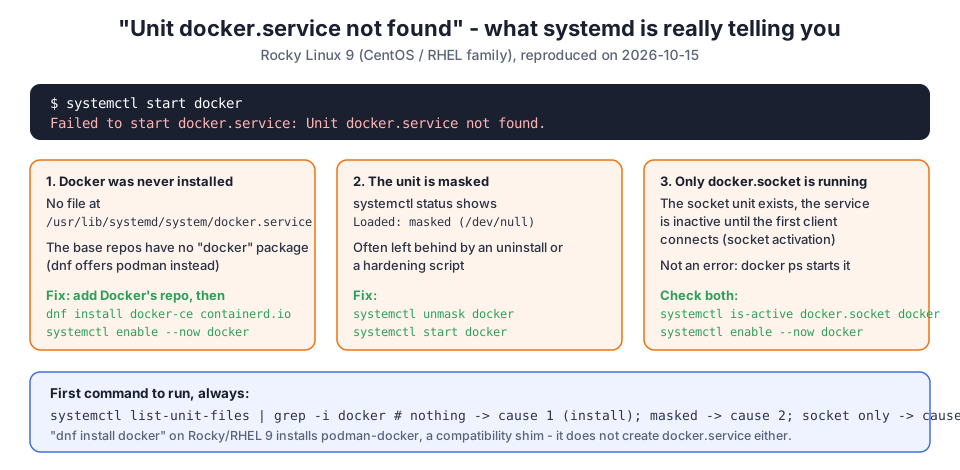
I first hit this error in 2021 while setting up a Kubernetes cluster on CentOS. Back then the fix was "install Docker properly". Five years later people still land on this page every day, because the trap has got worse: on the current RHEL family, the obvious command dnf install docker succeeds and installs the wrong thing. So I rebuilt the whole scenario on a fresh Rocky Linux 9.8 system and recorded every command.
Table of Content
- What the three error texts mean
- Confirm the cause in one command
- The trap: dnf install docker installs podman-docker
- The fix: remove the shim and install Docker CE
- Cause 2: the unit is masked
- Cause 3: only docker.socket is running
- What broke when I ran this
- Conclusion
1. What the three error texts mean
| Command | Error | Meaning |
|---|---|---|
systemctl start docker | Failed to start docker.service: Unit docker.service not found. | no unit file: Docker Engine is not installed |
systemctl enable docker | Failed to enable unit: Unit file docker.service does not exist. | same cause, different verb |
systemctl status docker | Unit docker.service could not be found. | same cause |
systemctl start docker | Failed to start docker.service: Unit docker.service is masked. | the unit exists but is linked to /dev/null |
systemctl is-active docker | inactive while docker.socket is active | socket activation; the daemon starts on the first client call |
All three "not found" texts come from a fresh Rocky 9.8 system in my run:
 1[rocky9]$ systemctl start docker
 2Failed to start docker.service: Unit docker.service not found.
 3[exit 5]
 4
 5[rocky9]$ systemctl enable docker
 6Failed to enable unit: Unit file docker.service does not exist.
 7[exit 1]
 8
 9[rocky9]$ systemctl status docker
10Unit docker.service could not be found.
11[exit 4]
2. Confirm the cause in one command
Before installing anything, ask systemd what it knows about Docker:
1[rocky9]$ systemctl list-unit-files | grep -i docker || echo "(no docker unit files)"
2(no docker unit files)
3
4[rocky9]$ ls /usr/lib/systemd/system/docker* 2>&1
5ls: cannot access '/usr/lib/systemd/system/docker*': No such file or directory
Nothing listed means cause 1: install Docker. A line with masked means cause 2. docker.socket listed but docker.service inactive means cause 3. The systemctl manual page describes list-unit-files, mask and unmask if you want the details.
3. The trap: dnf install docker installs podman-docker
This is the part that did not exist when I wrote the original post. On Rocky, AlmaLinux, CentOS Stream and RHEL 9 there is no docker package in the base repositories. There is a package that provides the name:
1[rocky9]$ dnf -q repoquery --whatprovides docker 2>/dev/null | head -5
2podman-docker-6:5.8.0-1.el9.noarch
3podman-docker-6:5.8.2-1.el9_8.noarch
4podman-docker-6:5.8.2-3.el9_8.noarch
5
6[rocky9]$ dnf -q info podman-docker 2>/dev/null | grep -E "^(Name|Version|Summary)"
7Name         : podman-docker
8Version      : 5.8.2
9Summary      : Emulate Docker CLI using podman
Rocky documents Podman as the default engine on its Podman page. So dnf install docker succeeds, and afterwards you have a docker command that is Podman in disguise and still no service:
 1[rocky9]$ dnf -q install -y docker >/dev/null 2>&1; rpm -q podman-docker podman
 2podman-docker-5.8.2-7.el9_8.noarch
 3podman-5.8.2-7.el9_8.x86_64
 4
 5[rocky9]$ docker --version
 6Emulate Docker CLI using podman. Create /etc/containers/nodocker to quiet msg.
 7podman version 5.8.2
 8
 9[rocky9]$ systemctl start docker
10Failed to start docker.service: Unit docker.service not found.
And when you then follow Docker's instructions and install docker-ce, the shim blocks it:
1[rocky9]$ dnf -q install -y docker-ce 2>&1 | grep -m2 -E "conflicts|Error"
2Error:
3  - package docker-ce-3:29.9.1-1.el9.x86_64 from docker-ce-stable conflicts with docker provided by podman-docker-6:5.8.2-7.el9_8.noarch from @System
If Podman is what you want, that is fine: it is the default container engine on this family, and the shim exists for scripts that hard-code docker. But Podman has no docker.service, and tools that need the Docker daemon socket (Docker Compose v2, Testcontainers, most CI runners) will not work with it.
4. The fix: remove the shim and install Docker CE
Remove the shim first, then follow Docker's CentOS installation guide, which is the one Docker publishes for the whole RHEL 9 family:
1sudo dnf remove -y podman-docker
2sudo dnf install -y dnf-plugins-core
3sudo dnf config-manager --add-repo https://download.docker.com/linux/centos/docker-ce.repo
4sudo dnf install -y docker-ce docker-ce-cli containerd.io docker-buildx-plugin docker-compose-plugin
5sudo systemctl enable --now docker
My run, with the timing:
 1[rocky9]$ dnf -q remove -y podman-docker 2>&1 | tail -1; rpm -q podman-docker
 2package podman-docker is not installed
 3
 4[rocky9]$ time dnf -q install -y docker-ce docker-ce-cli containerd.io docker-buildx-plugin docker-compose-plugin 2>&1 | tail -2
 5real    0m25.368s   # 25.4 seconds for all five packages
 6
 7[rocky9]$ rpm -q docker-ce containerd.io
 8docker-ce-29.9.1-1.el9.x86_64
 9containerd.io-2.4.2-2.el9.x86_64
10
11[rocky9]$ ls -l /usr/lib/systemd/system/docker.service /usr/lib/systemd/system/docker.socket
12-rw-r--r-- 1 root root 1268 Oct 14 18:30 /usr/lib/systemd/system/docker.service
13-rw-r--r-- 1 root root  295 Oct 14 18:30 /usr/lib/systemd/system/docker.socket
Now the unit files exist, and systemctl behaves:
 1[rocky9]$ systemctl list-unit-files | grep -i docker
 2docker.service                         disabled disabled
 3docker.socket                          disabled disabled
 4
 5[rocky9]$ systemctl enable --now docker 2>&1
 6Created symlink /etc/systemd/system/multi-user.target.wants/docker.service → /usr/lib/systemd/system/docker.service.
 7
 8[rocky9]$ systemctl is-active docker; systemctl is-enabled docker
 9active
10enabled
11
12[rocky9]$ systemctl status docker --no-pager -l 2>&1 | head -8
13● docker.service - Docker Application Container Engine
14     Loaded: loaded (/usr/lib/systemd/system/docker.service; enabled; preset: disabled)
15     Active: active (running) since Thu 2026-10-15 22:23:46 UTC; 6s ago
16TriggeredBy: ● docker.socket
17       Docs: https://docs.docker.com
18   Main PID: 461 (dockerd)
19      Tasks: 9
20     Memory: 26.2M (peak: 29.7M)
The daemon sat at 26.2 MB of memory with no containers running, and the whole thing from dnf install to active took about 31 seconds.
1
2[rocky9]$ docker version --format "client {{.Client.Version}} server {{.Server.Version}}"
3client 29.9.1 server 29.9.1
Note preset: disabled in the status line: on this family Docker is not enabled automatically after installation, which is why enable --now is the right command rather than plain start. After this, add your user to the docker group so you do not need sudo for every command - Docker lists that in its Linux post-install steps, and the exact steps and the error you get without it are in permission denied while trying to connect to the Docker daemon socket.
5. Cause 2: the unit is masked
A masked unit is linked to /dev/null, usually by an uninstall script or a hardening playbook. The error text is different, so you will not confuse it with cause 1:
 1[rocky9]$ systemctl mask docker; systemctl start docker; systemctl status docker --no-pager 2>&1 | head -3
 2Created symlink /etc/systemd/system/docker.service → /dev/null.
 3Failed to start docker.service: Unit docker.service is masked.
 4○ docker.service
 5     Loaded: masked (Reason: Unit docker.service is masked.)
 6     Active: inactive (dead) since Thu 2026-10-15 22:23:53 UTC; 89 ms ago
 7
 8[rocky9]$ systemctl unmask docker; systemctl start docker; systemctl is-active docker
 9Removed "/etc/systemd/system/docker.service".
10active
One subtlety I only noticed by running it: systemctl mask docker works even when Docker is not installed (Unit docker.service does not exist, proceeding anyway.). Then the error changes from "not found" to "masked", and unmask brings back "not found". If you see "masked" on a machine that never had Docker, you still have to install it.
6. Cause 3: only docker.socket is running
Docker CE ships two units. docker.socket listens on /run/docker.sock; the first client that connects starts docker.service. So this is not a failure:
1[rocky9]$ systemctl stop docker docker.socket; systemctl start docker.socket; systemctl is-active docker.socket docker
2active
3inactive
4
5[rocky9]$ docker ps >/dev/null 2>&1; sleep 2; systemctl is-active docker.socket docker
6active
7active
The daemon came up on its own the moment docker ps touched the socket. If you want dockerd running at boot regardless of clients, enable the service itself (systemctl enable docker), not only the socket. If a container will not come back after a reboot, restarting a single Docker container covers restart policies.
7. What broke when I ran this
I ran all of this on 2026-10-15 inside a Rocky Linux 9.8 systemd container (rockylinux/rockylinux:9-ubi-init) on a GitHub Actions runner, because I no longer keep a CentOS virtual machine around. Three things are worth knowing.
1. My first attempt installed nothing and I did not notice at once. I ran dnf install docker as the "wrong way" step and then went straight to dnf install docker-ce. The second command printed the conflict and exited, but my script only looked at the last lines, so rpm -q docker-ce reporting package docker-ce is not installed was the first clear sign. If you script an install, check rpm -q docker-ce afterwards, not the exit code of a pipeline.
2. docker run hello-world failed inside my test container. The daemon was active (running) and pulled the image, but creating a container failed with failed to mount ... fstype: overlay ... invalid argument. That is Docker-inside-Docker: an overlay filesystem cannot be stacked on the runner's overlay filesystem. On a real Rocky machine or VM this step works; the daemon log line just before it, API listen on /run/docker.sock, is the proof that the service problem this post is about was solved.
3. SELinux was disabled in the container. getenforce printed Disabled. On a real RHEL-family install it is Enforcing, and Docker CE runs fine with that; if you ever see permission denied on bind mounts, the :z or :Z volume suffix is the answer, not disabling SELinux. The install itself reported driver overlayfs cgroup systemd version 29.9.1.
8. Conclusion
Unit docker.service not found is systemd telling you Docker Engine is not installed. To summarise what I found on Rocky Linux 9.8:
dnf install dockerinstallspodman-docker, which does not createdocker.serviceand later conflicts withdocker-ce.- Remove
podman-docker, add Docker's repository, installdocker-ce docker-ce-cli containerd.io, thensystemctl enable --now docker. It took 25 seconds plus 6 seconds to become active for me. - "Unit docker.service is masked" needs
systemctl unmask docker; an activedocker.socketwith an inactivedocker.serviceis normal.
If your problem starts after the install, Docker installation step by step covers the post-install checks, and the most common next error is the permission denied on docker.sock.
Did this save you a debugging session? Stay in the loop -
- Subscribe on YouTube - every post here has a screen-recorded companion video.
- Code on GitHub - the repositories, Terraform and scripts behind these posts.