Deploying a Next.js SaaS on Google Cloud Run with Terraform: Cloud SQL, Secret Manager, Cloud Build and a deployer service account (ReplyDial case study)
For the last few weeks I have been building and shipping a small SaaS of my own, and I want to document the infrastructure side while it is fresh, because most "deploy to Cloud Run" tutorials stop at gcloud run deploy and skip everything that makes a service production-ready: a managed database, secrets, a CI build identity, org policies, and a deploy identity that does not expire every hour.
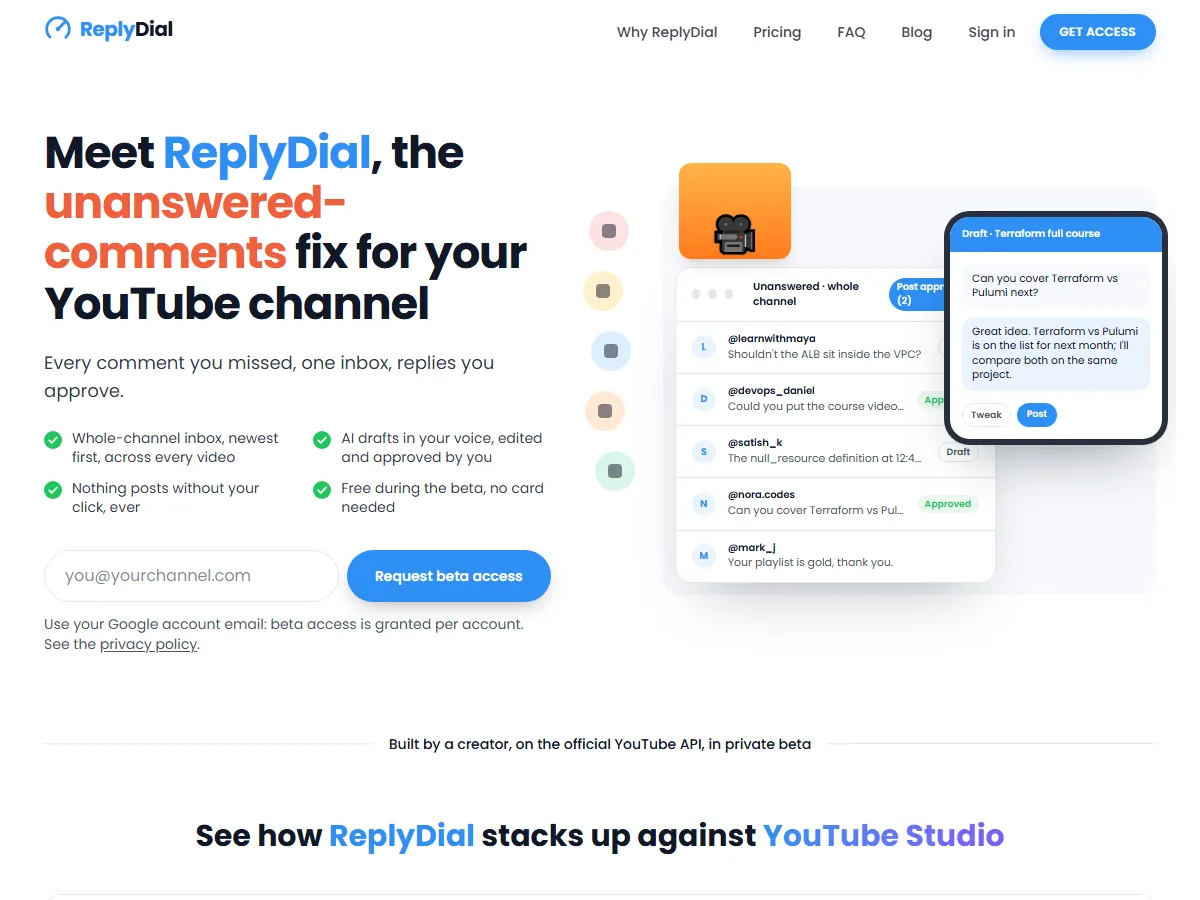
The product is ReplyDial, a YouTube comment tool I wrote for my own channel first. It finds every comment on a channel that the creator never replied to, drafts a reply with AI, and posts only what the creator approves. It started as a Node script running on my laptop against the YouTube Data API; today it runs on Google Cloud Run, takes payments, and every piece of infrastructure is Terraform. This post is the Terraform part.
If you are new to Terraform, start with my getting started guide and installation steps and the Google Cloud VM tutorial, which covers creating the project, the service account and its key. This post assumes that groundwork and goes straight to the production pieces.
Table of Content
- Why I built it: 200 technical comments a week
- The resource list
- Cloud SQL over the Unix socket
- Secrets: generated vs manual
- Cloud Build with its own service account
- The allUsers org-policy trap
- A deployer service account
- Hardening a payment webhook
- What I would do the same, and differently
- The YouTube API quota, which shaped the product
- FAQ
1. Why I built it: 200 technical comments a week
My channel has about 104,000 subscribers and the videos are tutorials: Terraform, Kubernetes, Google Cloud, AWS. That means the comments are not "nice video". They are questions: this fails on step 4 with a 403, does this work with Terraform 1.9, how do I do the same on Azure. Around 200 of those arrive every week, spread across a back catalogue of a few hundred videos, and YouTube Studio shows them video by video with no way to see "everything I have not answered".
The arithmetic is what pushed me to build something:
| Per comment | Per week (200) | Per year | |
|---|---|---|---|
| Read, think, write a technical answer by hand | ~3 minutes | ~10 hours | ~520 hours (13 working weeks) |
| Review and approve a good draft, edit one in six | ~45 seconds | ~2.5 hours | ~130 hours |
| Time back | ~7.5 hours a week | ~390 hours a year |
Ten hours a week is a part-time job, so in practice I did what most creators do: answered the newest ones and let the rest sink. Unanswered technical questions under a tutorial are a bad look, and they are also lost content ideas.
So I wrote a script that pulls every unanswered comment across the whole channel, drafts an answer with an AI model that has the video title and my tone as context, and lets me approve or fix each one before it is posted. That script became ReplyDial. The important design rule survived from day one: nothing is posted without my click. There is no auto-reply, no scheduling, no bulk mode, and YouTube's spam policy is the reason, not a marketing line. If you are a creator rather than a developer, that is the part to take away; the rest of this post is how the hosted version is built and deployed.
2. The resource list
I run the whole thing in one project, region europe-north1 (Finland, cheap and in the EU). This is everything Terraform manages:
| Resource | Why |
|---|---|
google_project_service (run, sqladmin, secretmanager, artifactregistry, cloudbuild, iam) | APIs are off by default in a new project |
google_artifact_registry_repository | Container images |
google_sql_database_instance (PostgreSQL 16, db-f1-micro) + database + user | Managed Postgres, private connection only |
google_secret_manager_secret × 10 | DB URL, session secret, token-encryption key, OAuth client, AI key, payment keys |
google_service_account × 3 | runtime (replydial-run), build (replydial-build), deployer (replydial-deployer) |
google_cloud_run_v2_service | The app, with env vars from Secret Manager |
google_cloud_run_domain_mapping | replydial.com with Google-managed TLS |
google_storage_bucket | Cloud Build source staging (the default bucket is also blocked in new projects) |
What I left out on purpose: a static IP, Cloud NAT, a load balancer, Cloud Armor, and scheduled snapshots. For a service doing a few thousand requests a day they add cost and nothing else. db-f1-micro plus Cloud Run at minimum instances 0 costs under 20 USD a month.
Everything that varies between machines (project id, domain, admin emails, feature flags) lives in a git-ignored local.auto.tfvars; the pattern is the one from my post on terraform variable files and tfvars. State lives in a GCS bucket with locking, for the reasons in do not store tfstate in git and terraform state file locking.
3. Cloud SQL over the Unix socket
The single best decision was to give the database no public IP at all. Cloud Run mounts the Cloud SQL socket into the container, so the app connects to a file path, not a host:
 1resource "google_sql_database_instance" "pg" {
 2  name             = "replydial-pg"
 3  database_version = "POSTGRES_16"
 4  region           = var.region
 5
 6  settings {
 7    tier = "db-f1-micro"
 8    ip_configuration {
 9      ipv4_enabled = false   # no public IP, ever
10    }
11    backup_configuration {
12      enabled = true
13    }
14  }
15  deletion_protection = true
16}
17
18resource "google_cloud_run_v2_service" "web" {
19  name     = "replydial"
20  location = var.region
21
22  template {
23    service_account = google_service_account.run.email
24    volumes {
25      name = "cloudsql"
26      cloud_sql_instance {
27        instances = [google_sql_database_instance.pg.connection_name]
28      }
29    }
30    containers {
31      image = var.image
32      volume_mounts {
33        name       = "cloudsql"
34        mount_path = "/cloudsql"
35      }
36      env {
37        name = "DATABASE_URL"
38        value_source {
39          secret_key_ref {
40            secret  = google_secret_manager_secret.database_url.secret_id
41            version = "latest"
42          }
43        }
44      }
45    }
46  }
47}
The connection string the app receives looks like this (the password is a random_password resource, written straight into a secret):
1postgresql://replydial:<password>@localhost/replydial?host=/cloudsql/<project>:europe-north1:replydial-pg
Wait, ipv4_enabled = false without private services access? Yes: the Cloud SQL socket proxy built into Cloud Run does not need a VPC or a private IP. That is the cheapest secure setup there is, and it took me an embarrassingly long time to believe it.
4. Secrets: generated vs manual
I split secrets into two kinds, and it has made life much easier.
Generated secrets (session signing key, AES key for OAuth tokens, DB password) are created by Terraform with random_bytes / random_password and written to Secret Manager. Nobody ever sees them.
Manual secrets (Google OAuth client secret, the Anthropic API key, the payment provider keys) exist in Terraform only as empty containers. The owner adds a version from the console or with gcloud secrets versions add. The values never pass through Terraform state, a terminal, or a chat window.
 1locals {
 2  manual_app_secrets = [
 3    "replydial-google-client-id",
 4    "replydial-google-client-secret",
 5    "replydial-anthropic-api-key",
 6    "replydial-paddle-api-key",
 7    "replydial-paddle-webhook-secret",
 8  ]
 9}
10
11resource "google_secret_manager_secret" "manual_app" {
12  for_each  = toset(local.manual_app_secrets)
13  secret_id = each.value
14  replication { auto {} }
15}
16
17# The runtime service account may read, and only read, each secret.
18resource "google_secret_manager_secret_iam_member" "run_reads_app" {
19  for_each  = google_secret_manager_secret.manual_app
20  secret_id = each.value.id
21  role      = "roles/secretmanager.secretAccessor"
22  member    = "serviceAccount:${google_service_account.run.email}"
23}
The for_each over a list of names is the same technique as in my post on terraform resource meta-arguments; the conditional env blocks below use a dynamic block. If you come from Kubernetes, the mental model is close to Kubernetes secrets, except that Secret Manager versions are immutable and access is IAM per secret.
Features that depend on a manual secret sit behind a boolean variable (paddle_enabled, resend_enabled), so a first deploy works before the owner has pasted anything, and the app degrades cleanly ("emails are logged", "paid plans not open yet") instead of crashing on a missing env var:
 1dynamic "env" {
 2  for_each = var.paddle_enabled ? [1] : []
 3  content {
 4    name = "PADDLE_API_KEY"
 5    value_source {
 6      secret_key_ref {
 7        secret  = google_secret_manager_secret.manual_app["replydial-paddle-api-key"].secret_id
 8        version = "latest"
 9      }
10    }
11  }
12}
One gotcha: Cloud Run resolves version = "latest" when a revision starts, not on every request. Adding a new secret version does nothing until the next deploy. That is a feature (deploys are atomic), but remember it when you rotate keys.
5. Cloud Build with its own service account
In projects created after mid-2024 the default Cloud Build service account no longer gets broad roles, so gcloud builds submit fails with a 403 on the first try. Create a build identity and a staging bucket yourself:
 1resource "google_service_account" "build" {
 2  account_id = "replydial-build"
 3}
 4
 5resource "google_project_iam_member" "build_roles" {
 6  for_each = toset([
 7    "roles/logging.logWriter",
 8    "roles/artifactregistry.writer",
 9    "roles/storage.objectViewer",
10  ])
11  project = var.project_id
12  role    = each.value
13  member  = "serviceAccount:${google_service_account.build.email}"
14}
15
16resource "google_storage_bucket" "build_source" {
17  name     = "${var.project_id}-build-source"
18  location = var.region
19  uniform_bucket_level_access = true
20}
Then the build is one command, with the image tag equal to the git commit so every deploy is traceable:
1gcloud builds submit . \
2  --project replydial --region europe-north1 --config cloudbuild.yaml \
3  --substitutions "_IMAGE=europe-north1-docker.pkg.dev/replydial/replydial/web:$(git rev-parse --short HEAD)" \
4  --gcs-source-staging-dir "gs://replydial-build-source/source" \
5  --service-account "projects/replydial/serviceAccounts/replydial-build@replydial.iam.gserviceaccount.com"
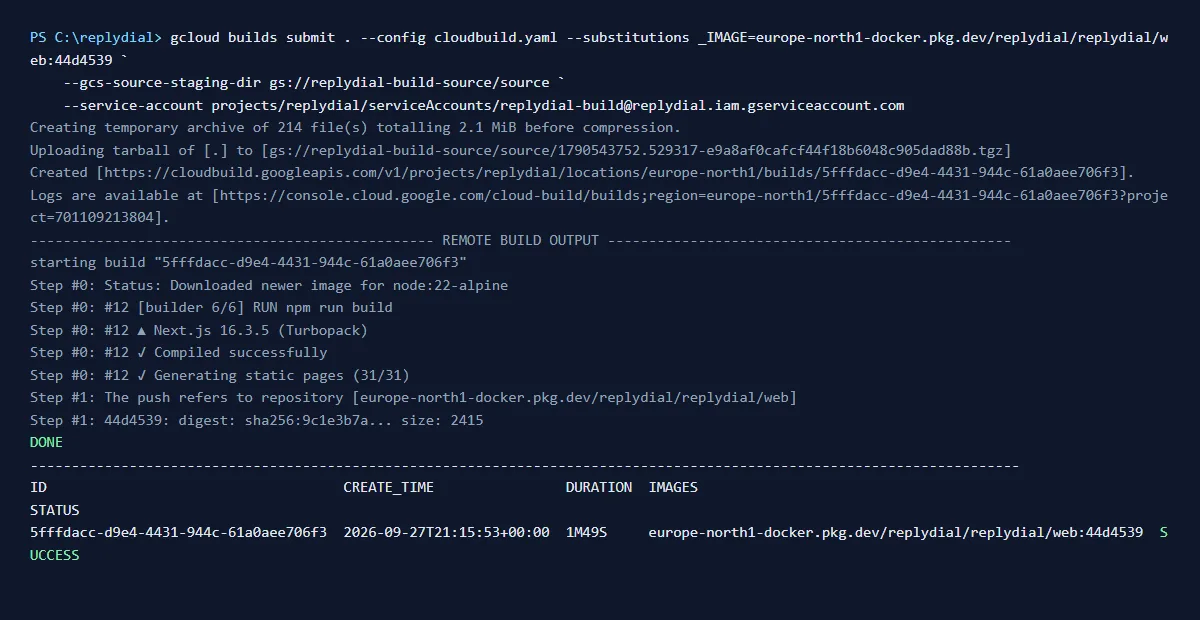
The Dockerfile is the standard Next.js output: "standalone" build listening on port 8080. Cloud Build takes about two minutes.
6. The allUsers org-policy trap
A public web app needs unauthenticated invocations. The classic way is an IAM binding of roles/run.invoker to allUsers. If your project lives inside an organization (mine does, under a Google Workspace domain), the domain restricted sharing org policy silently forbids that member, and Terraform fails with a policy error that does not say "org policy" anywhere useful.
The fix in the v2 Cloud Run resource is one line, and it does not touch IAM at all:
1resource "google_cloud_run_v2_service" "web" {
2  # ...
3  invoker_iam_disabled = true
4}
That tells Cloud Run to skip the invoker check for this service. Keep it for public sites only; an internal API should use IAM.
7. A deployer service account (no more gcloud auth login)
For the first week I deployed from my own Google account. Tokens expire hourly, and when you deploy from a phone over a remote session that is painful. So the deploys now run as a dedicated service account with exactly the roles Terraform needs, and nothing else:
 1resource "google_service_account" "deployer" {
 2  account_id = "replydial-deployer"
 3}
 4
 5resource "google_project_iam_member" "deployer" {
 6  for_each = toset([
 7    "roles/run.admin",
 8    "roles/cloudsql.admin",
 9    "roles/secretmanager.admin",
10    "roles/artifactregistry.admin",
11    "roles/cloudbuild.builds.editor",
12    "roles/iam.serviceAccountUser",
13    "roles/storage.admin",
14    "roles/logging.viewer",
15  ])
16  project = var.project_id
17  role    = each.value
18  member  = "serviceAccount:${google_service_account.deployer.email}"
19}
The key file is created once with gcloud iam service-accounts keys create (not by Terraform: a key in state is a key in your backups) and lives at %APPDATA%\gcloud\replydial-deployer.json on the deploy machine. Every deploy is then:
1$env:GOOGLE_APPLICATION_CREDENTIALS = "$env:APPDATA\gcloud\replydial-deployer.json"
2terraform -chdir=infra plan  -out=release.tfplan -var image=...:$tag
3terraform -chdir=infra apply release.tfplan
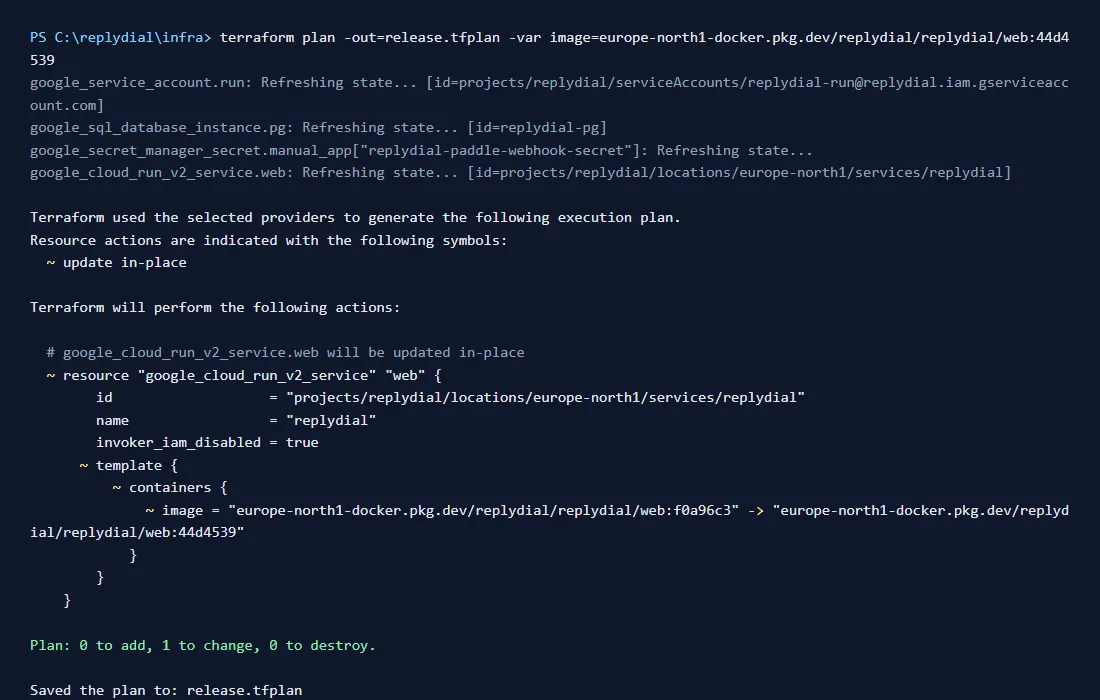
I always plan to a file and apply the file. Reviewing "1 to change, 0 to destroy" before every apply has saved me twice already. The same discipline applies to managing Terraform state: never run an apply you have not read.
If you want to go one step further, Workload Identity Federation from GitHub Actions removes the key file entirely; for a one-person project deploying from a laptop, the scoped key was the pragmatic choice.
8. Hardening a payment webhook
ReplyDial uses Paddle as merchant of record, and the only code path that can change a customer's plan is the webhook Paddle calls. Two layers protect it, both cheap:
Signature. Paddle signs every delivery with HMAC-SHA256 over timestamp:rawBody. Verify against the raw request bytes (any JSON re-serialisation breaks it), use a constant-time comparison, and reject timestamps older than a few seconds to stop replays.
Source IP allowlist, fetched at runtime. Paddle publishes its outbound IPs at https://api.paddle.com/ips. Do not hard-code them; fetch and cache for an hour, then compare against the first entry of X-Forwarded-For (that is the real client behind Cloud Run's load balancer):
1const ips = await paddleWebhookIps();          // cached 1h, from /ips
2const ip  = req.headers.get("x-forwarded-for")?.split(",")[0]?.trim();
3if (ips && !ips.has(ip)) return new Response("forbidden", { status: 403 });
If the list cannot be fetched and nothing is cached, I let the signature check decide on its own rather than blocking billing. Defence in depth should not become a single point of failure.
9. What I would do the same, and differently
Same: Terraform for everything from day one, Cloud SQL over the socket with no public IP, secrets split into generated and manual, plan-to-file before every apply, image tag = git commit.
Differently: create the build service account and the staging bucket in the very first apply (I lost an hour to the 403), and set invoker_iam_disabled before the first deploy if the project is inside an organization.
10. The YouTube API quota, which shaped the product
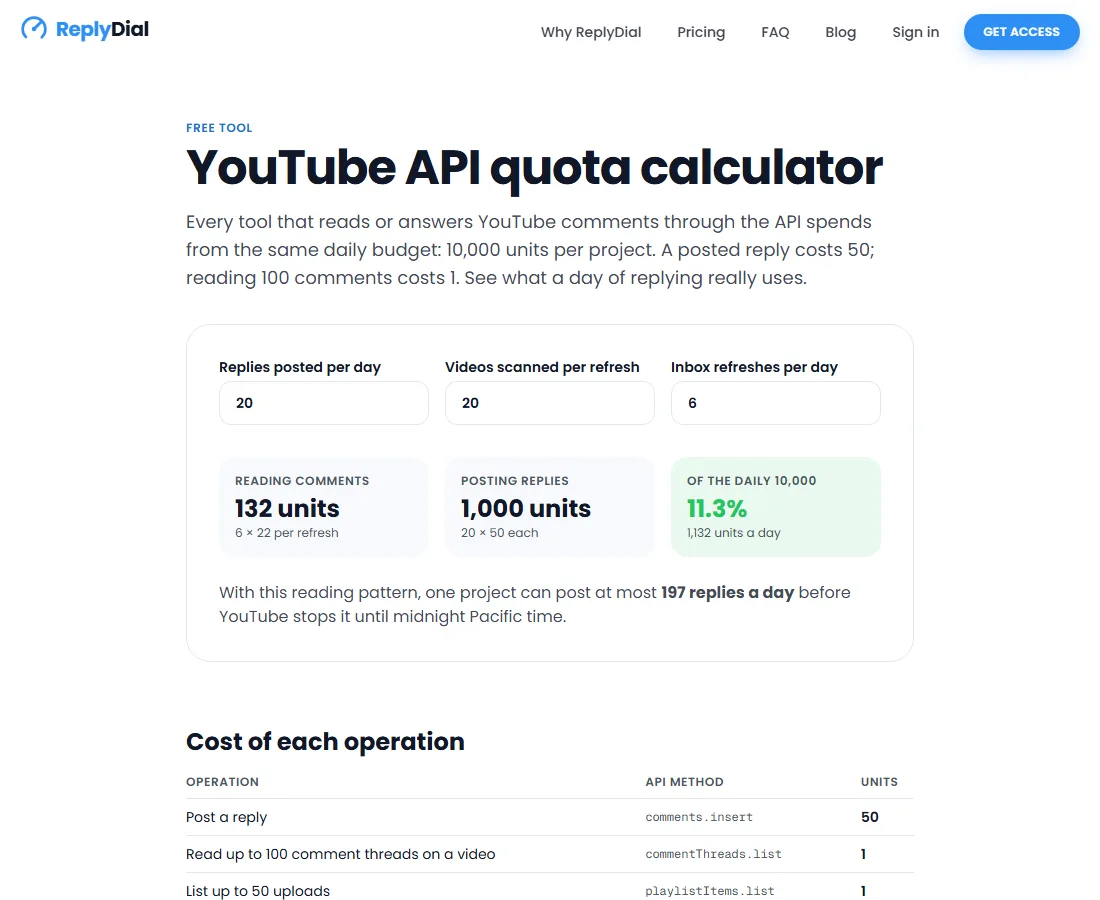
If you build anything on the YouTube Data API you will hit its quota model before you hit any scaling problem: 10,000 units a day per project, and a single posted reply costs 50 of them. That number decided ReplyDial's design (approve-then-post, paced, capped per day). I put the arithmetic into a small free YouTube API quota calculator if you want to see what a day of replies actually costs.
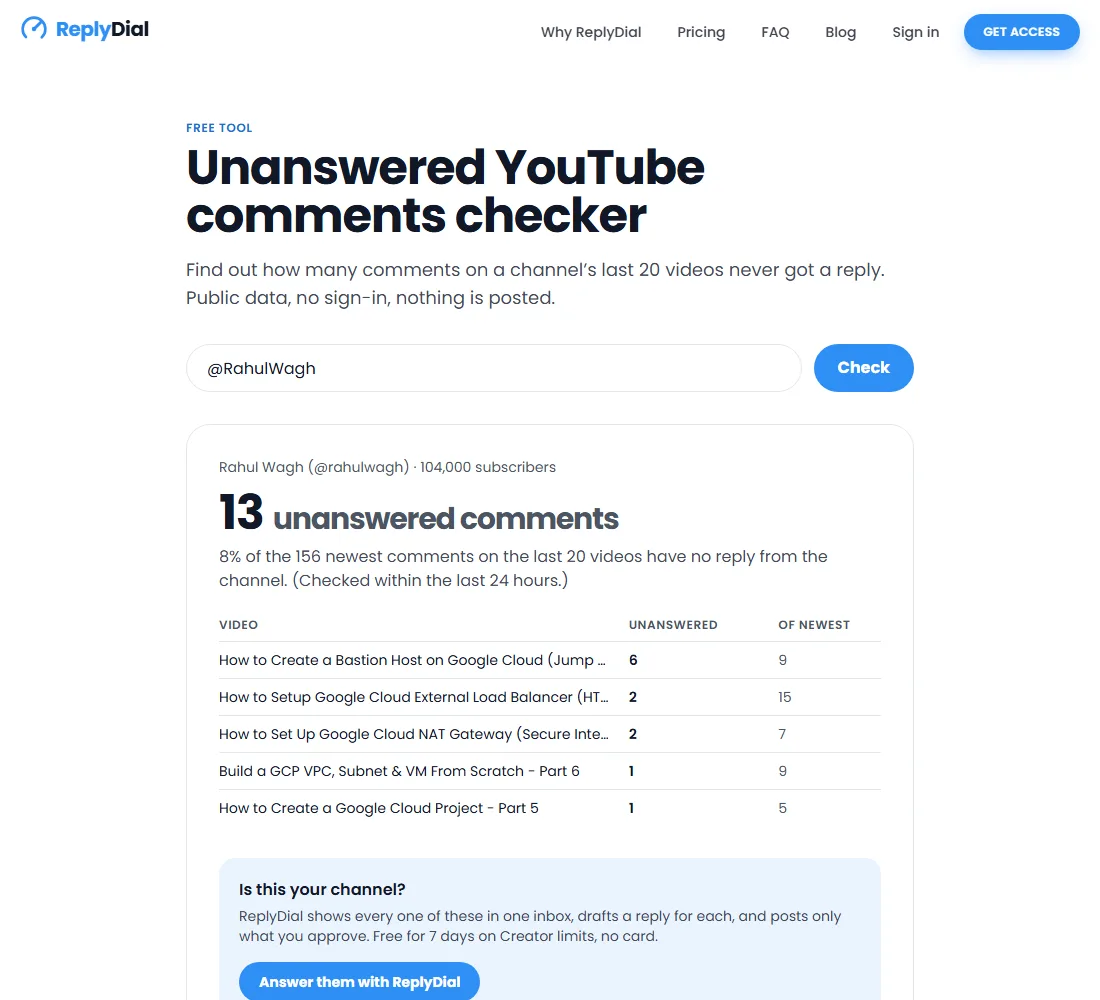
There is also an unanswered comments checker that reads public data only. It runs on a second Google Cloud project with its own API key and its own quota, exactly so a popular free tool can never starve the paid app; that is the same isolation-by-project idea as separating environments in Terraform.
11. FAQ
Is replying to YouTube comments with AI allowed?
Yes, when a person reviews and posts each reply. YouTube's policies prohibit spam and deceptive engagement, and the YouTube API Services terms prohibit unattended posting patterns. ReplyDial drafts; the creator approves and posts every reply individually, with pacing and per-day caps. I wrote up the policy details in the ReplyDial blog post on whether AI replies to YouTube comments are allowed.
Does ReplyDial post comments automatically?
No. It has no auto-reply mode, no scheduling and no bulk posting. Each reply is approved by the creator and sent one at a time with a pause between them. That is also why it can pass Google's OAuth verification for the youtube.force-ssl scope.
What does it cost to run on Google Cloud?
With Cloud SQL on db-f1-micro, Cloud Run scaling to zero, Secret Manager and Artifact Registry, the infrastructure is under 20 USD a month at a few thousand requests a day. AI drafting adds well under a cent per comment on a small model. Payments run through Paddle as merchant of record, so there is no separate payment infrastructure to operate.
Can I self-host it or run the script myself?
The hosted product is ReplyDial. The original local script needs your own Google Cloud project with the YouTube Data API enabled, an OAuth consent screen, and an Anthropic API key; it is the same approve-then-post flow without the web UI. If you are comfortable with that setup you can build the equivalent from the YouTube API docs in a day, and this post gives you the production deployment for free.
Why Cloud Run and not a VM or Kubernetes?
A single-container web app with a Postgres database does not need a cluster. Cloud Run gives HTTPS, autoscaling to zero, revisions and rollbacks, and the Cloud SQL socket for free, and the whole thing is a few Terraform resources. Kubernetes would have been more to operate for no benefit at this size; see my Kubernetes guides if your workload is genuinely multi-service.
If you have questions about any of the Terraform above, the comments are open, and yes, I will answer them.
Posts in this series
- Deploying a Next.js SaaS on Google Cloud Run with Terraform: Cloud SQL, Secret Manager, Cloud Build and a deployer service account (ReplyDial case study)
- Securing Sensitive Data in Terraform
- Boost Your AWS Security with Terraform : A Step-by-Step Guide
- How to Load Input Data from a File in Terraform?
- Can Terraform be used to provision on-premises infrastructure?
- Fixing the Terraform Error creating IAM Role. MalformedPolicyDocument Has prohibited field Resource
- In terraform how to handle null value with default value?
- Terraform use module output variables as inputs for another module?
- How to Reference a Resource Created by a Terraform Module?
- Understanding Terraform Escape Sequences
- How to fix private-dns-enabled cannot be set because there is already a conflicting DNS domain?
- Use Terraform to manage AWS IAM Policies, Roles and Users
- How to split Your Terraform main.tf File into Multiple Files
- How to use Terraform variable within variable
- Mastering the Terraform Lookup Function for Dynamic Keys
- Copy files to EC2 and S3 bucket using Terraform
- Troubleshooting Error creating EC2 Subnet InvalidSubnet Range The CIDR is Invalid
- Troubleshooting InvalidParameter Security group and subnet belong to different networks
- Managing strings in Terraform: A comprehensive guide
- How to use terraform depends_on meta argument?
- What is user_data in Terraform?
- Why you should not store terraform state file(.tfstate) inside Git Repository?
- How to import existing resource using terraform import comand?
- Terraform - A detailed guide on setting up ALB(Application Load Balancer) and SSL?
- Testing Infrastructure as Code with Terraform?
- How to remove a resource from Terraform state?
- What is Terraform null Resource?
- In terraform how to skip creation of resource if the resource already exist?
- How to setup Virtual machine on Google Cloud Platform
- How to use Terraform locals?
- Terraform Guide - Docker Containers & AWS ECR(elastic container registry)?
- How to generate SSH key in Terraform using tls_private_key?
- How to fix-Terraform Error acquiring the state lock ConditionalCheckFiledException?
- Terraform Template - A complete guide?
- How to use Terragrunt?
- Terraform and AWS Multi account Setup?
- Terraform and AWS credentials handling?
- How to fix-error configuring S3 Backend no valid credential sources for S3 Backend found?
- Terraform state locking using DynamoDB (aws_dynamodb_table)?
- Managing Terraform states?
- Securing AWS secrets using HashiCorp Vault with Terraform?
- How to use Workspaces in Terraform?
- How to run specific terraform resource, module, target?
- How Terraform modules works?
- Secure AWS EC2s & GCP VMs with Terraform SSH Keys!
- What is terraform provisioner?
- Is terraform destroy needed before terraform apply?
- How to fix terraform error Your query returned no results. Please change your search criteria and try again?
- How to use Terraform Data sources?
- How to use Terraform resource meta arguments?
- How to use Terraform Dynamic blocks?
- Terraform - How to nuke AWS resources and save additional AWS infrastructure cost?
- Understanding terraform count, for_each and for loop?
- How to use Terraform output values?
- How to fix error configuring Terraform AWS Provider error validating provider credentials error calling sts GetCallerIdentity SignatureDoesNotMatch?
- How to fix Invalid function argument on line in provider credentials file google Invalid value for path parameter no file exists
- How to fix error value for undeclared variable a variable named was assigned on the command line?
- What is variable.tf and terraform.tfvars?
- How to use Terraform Variables - Locals,Input,Output
- Terraform create EC2 Instance on AWS
- How to fix Error creating service account googleapi Error 403 Identity and Access Management (IAM) API has not been used in project before or it is disabled
- Install terraform on Ubuntu 20.04, CentOS 8, MacOS, Windows 10, Fedora 33, Red hat 8 and Solaris 11