AWS VPC Step by Step - Create a VPC with Public and Private Subnets, Internet Gateway, NAT Gateway and Route Tables (and Test It with EC2) (AWS Part-5)
In Part-4 we launched an EC2 instance into the default VPC and did not think about the network at all. That is fine for a lab and wrong for everything else - a database with a public IP address is how companies end up in the news. In this Part-5 we build the network that every real AWS workload sits in: a VPC (Virtual Private Cloud) with public subnets for the things the internet may reach (load balancers, a bastion) and private subnets for the things it may not (application servers, databases), connected to the internet through an Internet Gateway on the public side and a NAT Gateway on the private side, with route tables deciding which is which.
This is the most-watched video of the whole series, and the questions under it are always the same three: "my private instance cannot reach the internet", "my public instance is unreachable", and "what is the NAT Gateway costing me". All three are answered below. We do everything by hand first - that is how you learn what the one-click wizard and the Terraform module are doing - and then I show both shortcuts.
Table of Content
- VPC vocabulary - VPC, subnet, route table, Internet Gateway, NAT Gateway
- Plan the CIDR blocks
- Step 1 - Create the VPC
- Step 2 - Create two public and two private subnets
- Step 3 - Create and attach the Internet Gateway
- Step 4 - Public route table - 0.0.0.0/0 to the Internet Gateway
- Step 5 - Create the NAT Gateway with an Elastic IP
- Step 6 - Private route table - 0.0.0.0/0 to the NAT Gateway
- Step 7 - Test it - bastion in public, app server in private
- Security groups vs network ACLs
- The shortcuts - "VPC and more" wizard and the AWS CLI
- What it costs - NAT Gateway, public IPv4, and the gateway endpoint trick
- Clean up in the right order
- Common VPC errors and how to fix them
- Conclusion
1. VPC vocabulary - VPC, subnet, route table, Internet Gateway, NAT Gateway
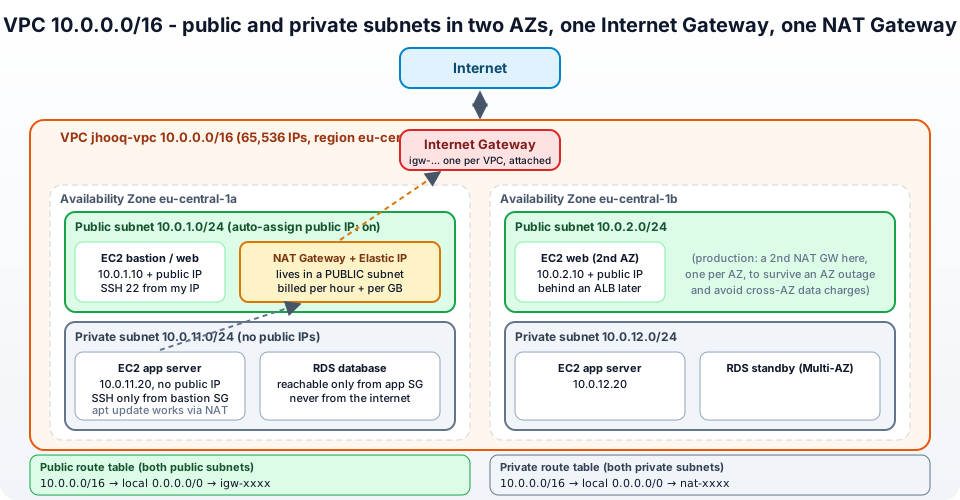
- VPC - your own isolated slice of the AWS network in one region, defined by an IPv4 CIDR block (
10.0.0.0/16). Nothing in it can talk to the internet until you say so. Every region has a default VPC (172.31.0.0/16, all subnets public) that exists so that "Launch instance" works on day one; real workloads get their own. - Subnet - a slice of the VPC's address range that lives in exactly one Availability Zone. Instances are launched into subnets. A subnet is public or private purely because of its route table - there is no "type" checkbox.
- Route table - a list of
destination → targetrules. Every subnet is associated with one route table (the VPC's main route table if you do not say otherwise). Every route table has the un-deletable local route for the VPC's own CIDR. - Internet Gateway (IGW) - the VPC's door to the internet, one per VPC. A subnet whose route table sends
0.0.0.0/0to the IGW is a public subnet. Instances in it still need a public IPv4 address (or an Elastic IP) to be reachable. - NAT Gateway - lets instances in private subnets start connections out to the internet (
apt update, calling an API, pulling a container image) while nothing on the internet can start a connection in. It lives in a public subnet, has an Elastic IP, and is managed by AWS - no instance to patch. - Security group and network ACL - the two firewalls, covered in section 10.
The flow for a packet from a private instance to the internet is: instance → private route table says 0.0.0.0/0 → nat-xxx → NAT Gateway in the public subnet swaps the source IP for its Elastic IP → public route table says 0.0.0.0/0 → igw-xxx → internet. Replies follow the state the NAT keeps. Keep this picture in mind and the errors in section 14 all make sense.
2. Plan the CIDR blocks
Five minutes of planning here saves a rebuild later, because a VPC CIDR cannot be changed (only extended with secondary blocks) and overlapping ranges make VPC peering and VPNs impossible. From the VPC CIDR docs -
- A VPC IPv4 CIDR is between /16 (65,536 addresses) and /28 (16). Use the private ranges
10.0.0.0/8,172.16.0.0/12,192.168.0.0/16. - Each subnet reserves 5 addresses - the first four (network, VPC router, DNS, future) and the last (broadcast). A
/24gives you 251 usable, not 256. - Do not reuse the default VPC's
172.31.0.0/16or your office's range. - Leave room - one VPC per environment, non-overlapping, e.g.
10.0.0.0/16dev,10.1.0.0/16prod.
Our plan, two AZs so that an AZ outage does not take everything down -
| Subnet | CIDR | AZ | Route table |
|---|---|---|---|
jhooq-public-1a | 10.0.1.0/24 | eu-central-1a | public |
jhooq-public-1b | 10.0.2.0/24 | eu-central-1b | public |
jhooq-private-1a | 10.0.11.0/24 | eu-central-1a | private |
jhooq-private-1b | 10.0.12.0/24 | eu-central-1b | private |
The /16 leaves 10.0.3.0 to 10.0.255.0 for databases subnets, more AZs and future tiers. If CIDR notation is still fuzzy, the short video on CIDR in this series is for exactly that; the rule of thumb is /24 = 256 addresses, each step down doubles, each step up halves.
3. Step 1 - Create the VPC
Switch the console to eu-central-1 (or your region) and open VPC → Your VPCs → Create VPC (docs) -
- Resources to create - VPC only. (The other option, VPC and more, is the wizard in section 11 - we go manual first.)
- Name tag -
jhooq-vpc. - IPv4 CIDR block - IPv4 CIDR manual input →
10.0.0.0/16. - IPv6 CIDR block - No IPv6 CIDR block for this tutorial (adding an Amazon-provided
/56later is one click). - Tenancy - Default.
- Create VPC.
Then one setting people forget - select the VPC → Actions → Edit VPC settings → tick Enable DNS hostnames (Enable DNS resolution is already on). Without DNS hostnames your instances get no public DNS name and, later, interface endpoints and some services misbehave.
What AWS created for you along with the VPC: a main route table (just the local route), a default network ACL (allow all) and a default security group (allow from itself, all outbound). No subnets, no gateway.
4. Step 2 - Create two public and two private subnets
VPC → Subnets → Create subnet (configure subnets) -
- VPC ID -
jhooq-vpc. - Subnet name -
jhooq-public-1a, Availability Zone -eu-central-1a, IPv4 subnet CIDR block -10.0.1.0/24. - Click Add new subnet three times for
jhooq-public-1b/1b/10.0.2.0/24,jhooq-private-1a/1a/10.0.11.0/24,jhooq-private-1b/1b/10.0.12.0/24. - Create subnet.
Now make the public ones actually hand out public IPs: select jhooq-public-1a → Actions → Edit subnet settings → tick Enable auto-assign public IPv4 address → Save. Repeat for jhooq-public-1b. Leave it off for the private subnets - that is half of what makes them private. (You can still override per instance at launch, but the subnet default is what Auto Scaling and most tooling rely on.)
Notice in the subnet list that all four currently use the main route table and show Available IPv4 addresses: 251.
5. Step 3 - Create and attach the Internet Gateway
VPC → Internet gateways → Create internet gateway (docs) -
- Name tag -
jhooq-igw, Create internet gateway. Its state isDetached. - The green banner offers Attach to a VPC - click it, choose
jhooq-vpc, Attach internet gateway. State becomesAttached.
One IGW per VPC, one VPC per IGW. It is horizontally scaled and redundant by itself, costs nothing, and does two jobs: it is the route target for internet traffic, and it performs the one-to-one NAT between an instance's private IP and its public/Elastic IP (the instance itself never sees its public address - ip addr on the instance shows only 10.0.1.x).
Attaching the IGW alone changes nothing - no route table points at it yet.
6. Step 4 - Public route table - 0.0.0.0/0 to the Internet Gateway
Do not add the internet route to the main route table - every new subnet would silently become public. Create a dedicated one (route tables) -
- VPC → Route tables → Create route table - Name
jhooq-public-rt, VPCjhooq-vpc, Create. - Open it → Routes tab → Edit routes → Add route - Destination
0.0.0.0/0, Target → Internet Gateway →jhooq-igw. Save changes. The table now reads -
110.0.0.0/16   local
20.0.0.0/0     igw-0123456789abcdef0
- Subnet associations tab → Edit subnet associations → tick
jhooq-public-1aandjhooq-public-1b→ Save.
Those two subnets are now public by definition. Routing picks the most specific match, so traffic to 10.0.x.x stays local and everything else goes to the IGW. The main route table keeps only the local route and becomes, in effect, the private one - but we will create an explicit private table in Step 6 so that nothing depends on the default.
7. Step 5 - Create the NAT Gateway with an Elastic IP
NAT Gateway - VPC → NAT gateways → Create NAT gateway -
- Name -
jhooq-nat-1a. - Subnet -
jhooq-public-1a. This is the mistake to avoid - a NAT Gateway must be in a public subnet, because it needs the IGW route to reach the internet. Put it in a private subnet and the private instances will time out forever. - Connectivity type - Public. (A private NAT Gateway, without an EIP, is for routing between VPCs/on-premises with overlapping ranges - not what we want.)
- Elastic IP allocation ID - click Allocate Elastic IP. This reserves a fixed public IPv4 address for the gateway - the address your private instances will appear as to the outside world, handy for allow-lists.
- Create NAT gateway. State goes
Pending → Availablein a minute or two.
A NAT Gateway handles 5 Gbps and scales to 100 Gbps, supports 55,000 simultaneous connections per destination, and is per Availability Zone. For production, create jhooq-nat-1b in jhooq-public-1b as well and give each private subnet its own route table pointing at the NAT in its AZ - otherwise an outage of 1a cuts off 1b's private instances too, and you pay cross-AZ data transfer for every byte. For this tutorial, one NAT is enough.
8. Step 6 - Private route table - 0.0.0.0/0 to the NAT Gateway
- Route tables → Create route table - Name
jhooq-private-rt, VPCjhooq-vpc, Create. - Edit routes → Add route - Destination
0.0.0.0/0, Target → NAT Gateway →jhooq-nat-1a. Save.
110.0.0.0/16   local
20.0.0.0/0     nat-0123456789abcdef0
- Edit subnet associations → tick
jhooq-private-1aandjhooq-private-1b→ Save.
That is the whole network. Open the VPC → Resource map tab and you get the same picture as my diagram, drawn from your actual resources - four subnets, two route tables, the IGW and the NAT, with lines showing which subnet routes where. If a subnet is not where you expect, this tab shows it in two seconds.
9. Step 7 - Test it - bastion in public, app server in private
Proof beats theory. Launch two instances exactly as in Part-4 -
Bastion - jhooq-bastion, Ubuntu 24.04, t3.micro, key pair jhooq-key, Network settings → Edit → VPC jhooq-vpc, subnet jhooq-public-1a, Auto-assign public IP: Enable, new security group jhooq-bastion-sg with SSH from My IP.
App server - jhooq-app, same AMI and type and key, VPC jhooq-vpc, subnet jhooq-private-1a, Auto-assign public IP: Disable, new security group jhooq-app-sg with one inbound rule: SSH, Source = the bastion's security group jhooq-bastion-sg. Referencing a security group instead of an IP is the pattern - "anything wearing the bastion SG may SSH here".
Now test, from your laptop -
 1# 1. public subnet works - SSH to the bastion's public IP
 2ssh -i ~/.ssh/jhooq-key.pem ubuntu@<bastion-public-ip>
 3
 4# 2. the bastion reaches the internet through the IGW
 5curl -s https://checkip.amazonaws.com        # prints the bastion's own public IP
 6
 7# 3. hop to the private instance (forward your key with -A, or copy it to the bastion)
 8ssh -A ubuntu@<bastion-public-ip>            # from laptop, then on the bastion:
 9ssh ubuntu@10.0.11.x                         # the app server's private IP
10
11# 4. the private instance reaches the internet through the NAT
12curl -s https://checkip.amazonaws.com        # prints the NAT Gateway's ELASTIC IP, not the instance's
13sudo apt-get update                          # works - outbound only
1# 5. and the internet cannot reach the private instance - it has no public IP at all
2aws ec2 describe-instances --filters Name=tag:Name,Values=jhooq-app \
3  --query 'Reservations[].Instances[].[PrivateIpAddress,PublicIpAddress]' --output text
4# 10.0.11.23    None
Step 4 is the key observation - the private server's outbound traffic leaves with the NAT's Elastic IP. That is what NAT (network address translation) means, and it is why a NAT Gateway cannot be used for inbound traffic. If step 4 hangs, go straight to section 14, errors 1 and 2.
Instead of SSH-hopping, the modern options from Part-4 work here too - EC2 Instance Connect Endpoint (create one in a private subnet, then the console's Connect button reaches jhooq-app directly) or Session Manager via the instance role - and then you do not need a bastion or port 22 at all.
10. Security groups vs network ACLs
The VPC has two firewall layers and people mix them up constantly -
| Security group | Network ACL | |
|---|---|---|
| Attached to | the instance's network interface | the subnet |
| Rules | allow only | allow and deny |
| State | stateful - replies are automatically allowed | stateless - you must allow the return traffic (ephemeral ports 1024-65535) |
| Evaluation | all rules together | in rule-number order, first match wins, * deny at the end |
| Can reference | IPs and other security groups | IPs only |
| Default | new SG: deny all inbound, allow all outbound | default NACL: allow all both ways |
Use security groups for 99% of your rules - they are what the bastion/app pattern above uses. Use a network ACL for the rare blunt instrument: blocking a specific IP range from an entire subnet, or compliance rules that demand a subnet-level deny. If you ever write a NACL, remember the stateless part - an inbound allow 443 needs an outbound allow 1024-65535, or the responses never leave.
11. The shortcuts - "VPC and more" wizard and the AWS CLI
Now that you know what each piece does, use the shortcuts.
The console wizard - Create VPC → Resources to create → VPC and more. One form builds everything from Steps 1-6: Name tag auto-generation (jhooq → jhooq-vpc, jhooq-subnet-public1-eu-central-1a ...), IPv4 CIDR 10.0.0.0/16, Number of Availability Zones 2, Number of public subnets 2, Number of private subnets 2, NAT gateways - None, In 1 AZ or 1 per AZ, VPC endpoints - S3 Gateway (keep it, see section 12), DNS options both on. The Preview pane draws the resource map before you click Create VPC. It produces exactly the layout of this post, with a separate private route table per AZ.
The AWS CLI - the same steps as commands, straight from the docs, condensed -
 1VPC_ID=$(aws ec2 create-vpc --cidr-block 10.0.0.0/16 \
 2  --tag-specifications 'ResourceType=vpc,Tags=[{Key=Name,Value=jhooq-vpc}]' \
 3  --query Vpc.VpcId --output text)
 4aws ec2 modify-vpc-attribute --vpc-id "$VPC_ID" --enable-dns-hostnames
 5
 6PUB_A=$(aws ec2 create-subnet --vpc-id "$VPC_ID" --cidr-block 10.0.1.0/24  --availability-zone eu-central-1a --query Subnet.SubnetId --output text)
 7PRV_A=$(aws ec2 create-subnet --vpc-id "$VPC_ID" --cidr-block 10.0.11.0/24 --availability-zone eu-central-1a --query Subnet.SubnetId --output text)
 8aws ec2 modify-subnet-attribute --subnet-id "$PUB_A" --map-public-ip-on-launch
 9
10IGW_ID=$(aws ec2 create-internet-gateway --query InternetGateway.InternetGatewayId --output text)
11aws ec2 attach-internet-gateway --vpc-id "$VPC_ID" --internet-gateway-id "$IGW_ID"
12
13PUB_RT=$(aws ec2 create-route-table --vpc-id "$VPC_ID" --query RouteTable.RouteTableId --output text)
14aws ec2 create-route --route-table-id "$PUB_RT" --destination-cidr-block 0.0.0.0/0 --gateway-id "$IGW_ID"
15aws ec2 associate-route-table --route-table-id "$PUB_RT" --subnet-id "$PUB_A"
16
17EIP_ID=$(aws ec2 allocate-address --domain vpc --query AllocationId --output text)
18NAT_ID=$(aws ec2 create-nat-gateway --subnet-id "$PUB_A" --allocation-id "$EIP_ID" --query NatGateway.NatGatewayId --output text)
19aws ec2 wait nat-gateway-available --nat-gateway-ids "$NAT_ID"
20
21PRV_RT=$(aws ec2 create-route-table --vpc-id "$VPC_ID" --query RouteTable.RouteTableId --output text)
22aws ec2 create-route --route-table-id "$PRV_RT" --destination-cidr-block 0.0.0.0/0 --nat-gateway-id "$NAT_ID"
23aws ec2 associate-route-table --route-table-id "$PRV_RT" --subnet-id "$PRV_A"
(Add the 1b subnets the same way.) And of course the whole thing is a few resources in Terraform - aws_vpc, aws_subnet, aws_internet_gateway, aws_nat_gateway, aws_eip, aws_route_table, aws_route_table_association - or one call to the community terraform-aws-modules/vpc module. My ALB and SSL guide builds this exact VPC in Terraform before putting a load balancer in the public subnets, and the Google Cloud equivalent (where subnets are regional, not zonal, and there is no public/private subnet distinction) is in GCP VPC peering.
12. What it costs - NAT Gateway, public IPv4, and the gateway endpoint trick
The VPC, subnets, route tables, Internet Gateway, security groups and NACLs are free. Two things on this page are not -
- NAT Gateway - from the pricing page, you pay per hour the gateway exists and per GB it processes, plus the normal data transfer out. In us-east-1 that is $0.045 per hour (about $33 a month for one gateway doing nothing) and $0.045 per GB processed. Two NAT Gateways for HA double the hourly part. This is the line item that surprises people on the first bill of a "free tier" lab - delete the NAT Gateway when you are done (section 13).
- Public IPv4 addresses - $0.005 per hour each (about $3.60 a month) for every public IP and Elastic IP, including the NAT Gateway's, since February 2024. Fewer public IPs is both cheaper and safer.
Two ways AWS itself recommends to cut NAT cost -
- Gateway endpoints for S3 and DynamoDB are free. Traffic from private subnets to S3 and DynamoDB goes through the endpoint instead of the NAT, so you pay nothing per GB for backups, logs, container layers in ECR (which are stored in S3) and so on. The wizard adds the S3 one by default; by hand: VPC → Endpoints → Create endpoint → AWS services → com.amazonaws.eu-central-1.s3 (Gateway) → tick the private route tables.
- Keep traffic in one AZ - a NAT in
1aserving instances in1badds cross-AZ data charges; one NAT per AZ with per-AZ route tables avoids them. For other AWS services with heavy traffic, interface endpoints (PrivateLink) cost per hour but can still beat NAT per-GB charges - that is Part-19 and Part-20 of the video series.
Use the AWS Pricing Calculator for your region; the ratios above hold everywhere.
13. Clean up in the right order
Dependencies mean you cannot just delete the VPC. The order -
- Terminate the EC2 instances (
jhooq-bastion,jhooq-app). - Delete the NAT Gateway (NAT gateways → Actions → Delete) and wait until its state is
Deleted- this is the one that costs money every hour. - Release the Elastic IP (Elastic IPs → Actions → Release) - otherwise it keeps billing; how to release an Elastic IP if it refuses because something is still attached.
- Delete any VPC endpoints and Instance Connect endpoints.
- Delete the VPC (Your VPCs → Actions → Delete VPC). The console lists and deletes the subnets, route tables, IGW, security groups and NACLs for you, after you type
delete.
If the VPC deletion fails with a dependency error, a network interface is usually left behind - Network interfaces in the EC2 console, find the ones in jhooq-vpc, detach and delete (error 9 below). The default VPC - leave it alone, or recreate it later with Actions → Create default VPC if you deleted it.
14. Common VPC errors and how to fix them
1. Private instance cannot reach the internet - apt update and curl time out - Check in this order: (a) the private subnet's route table has 0.0.0.0/0 → nat-... and the subnet is associated with that table; (b) the NAT Gateway is in a public subnet whose table routes 0.0.0.0/0 → igw-...; (c) the NAT Gateway state is Available; (d) the instance's security group allows outbound (default yes) and the NACL allows ephemeral return ports. 95% of cases are (a) or (b).
2. Private instance reaches the internet only sometimes / very slowly - The NAT is in another AZ, or you hit the 55,000 connections-per-destination limit (ErrorPortAllocation in the NAT Gateway CloudWatch metrics). One NAT per AZ; multiple EIPs on the NAT for the port limit.
3. Public instance - ssh: connect ... Connection timed out - It has no public IP (subnet auto-assign off and you did not enable it at launch - the fix is an Elastic IP or a relaunch), or the subnet's route table has no IGW route, or the security group lacks port 22 from your IP, or the IGW is detached. The Resource map shows the routing part instantly.
4. Network vpc-... has no internet gateway attached when creating a NAT Gateway or an internet-facing load balancer -** Attach the IGW first (Step 3).
5. The CIDR '10.0.1.0/24' conflicts with another subnet / InvalidSubnet.Conflict - Overlapping subnet ranges inside the VPC. Plan them as in section 2; my InvalidSubnet.Range post covers the Terraform version.
6. InvalidParameter: Security group sg-... and subnet subnet-... belong to different networks - You picked a security group from the default VPC for an instance in jhooq-vpc. Security groups are per VPC - create one in the right VPC. Full write-up.
7. AddressLimitExceeded: The maximum number of addresses has been reached - Five Elastic IPs per region by default. Release unused ones (how) or request a quota increase.
8. VpcLimitExceeded - Five VPCs per region by default (VPC quotas). Delete old lab VPCs or request an increase.
9. DependencyViolation: The vpc has dependencies and cannot be deleted - An ENI, NAT Gateway, endpoint, or a load balancer / RDS instance still exists in it. Follow the order in section 13; find leftovers under EC2 → Network interfaces filtered by VPC.
10. Instances in the same VPC cannot ping each other - Security groups: ICMP is not allowed by default; add an inbound rule All ICMP - IPv4 from the other instance's SG. Routing inside the VPC is always there via the local route - it is never the route table.
11. My NAT Gateway bill is high although I barely use the instances - Something is pulling data through it continuously - container image pulls, S3 backups, package mirrors. Add the free S3 gateway endpoint, check the BytesOutToDestination metric, and consider interface endpoints for ECR, CloudWatch and SSM.
12. DNS names do not resolve / no public DNS name on the instance - Enable DNS hostnames on the VPC (Step 1).
15. Conclusion
To summarise Part-5 -
- A VPC is your isolated network in a region; subnets live in one AZ each; whether a subnet is public or private is decided only by its route table.
- Plan the CIDR first -
/16for the VPC,/24per subnet, two AZs, five reserved addresses per subnet, no overlaps with anything you may peer with. - Public subnets - a route table with
0.0.0.0/0 → Internet Gateway, plus auto-assign public IP. Private subnets - a route table with0.0.0.0/0 → NAT Gateway, and the NAT Gateway itself sits in a public subnet with an Elastic IP. - Prove it with a bastion in public and an app server in private - the private server's traffic leaves with the NAT's IP, and nothing can connect to it from outside.
- Security groups (stateful, allow-only, on the instance) for almost everything; NACLs (stateless, on the subnet) for the rare deny.
- The "VPC and more" wizard, the CLI and Terraform build the same thing in a minute - and the NAT Gateway is the part that costs money, so delete it after the lab and add the free S3 gateway endpoint in real deployments.
The official references are the VPC User Guide, create a VPC, NAT gateways and route tables. From here the series goes to launch templates and Auto Scaling, WAF, VPC peering, Transit Gateway and the NAT Gateway deep dive - and for the infrastructure-as-code version of this network with a load balancer on top, Terraform - setting up an ALB and SSL.
More videos on this topic - the same build in one sitting from my 2024 Solutions Architect series (EC2, VPC, subnets, route tables, Internet Gateway, NAT Gateway, jump host), and the one-minute explainer of the Internet Gateway -
AWS step by step series -
- Part-1 : AWS IAM user - create a user, group, policy, access keys and MFA
- Part-2 : AWS Organizations - multi-account setup, OUs and SCPs
- Part-3 : AWS assume IAM role - trust policy, switch role in console and CLI
- Part-4 : How to launch an EC2 instance - key pair, security group, SSH
- Part-5 : AWS VPC - public and private subnets, Internet Gateway, NAT Gateway, route tables
- Part-8 : EC2 launch template - versions, default version, source template, SSM parameter AMI
- Part-10 : EC2 Auto Scaling - launch template, Auto Scaling group, target tracking, ALB
- Part-11 : AWS WAF - web ACL, managed rules, rate limiting, geo blocking
- Part-12 : AWS VPC Peering - connect two VPCs, routes, security groups, DNS
- Part-13 : AWS Transit Gateway - hub-and-spoke for many VPCs and on-premises
- Part-14 : AWS NAT Gateway deep dive - public vs private, limits, cost, troubleshooting
- Part-15 : Amazon Route 53 - hosted zones, records, alias, routing policies, health checks
- Part-16 : AWS security groups - inbound and outbound rules, stateful, referencing, quotas
- Part-16 : AWS Certificate Manager - free TLS certificates for ALB, CloudFront and API Gateway
- Part-17 : AWS Lambda - function URLs, environment variables and layers
- Part-18 : Network Load Balancer - setup, and ALB vs NLB
- Part-19 : VPC endpoints - gateway and interface endpoints (PrivateLink) instead of NAT
- Part-20 : AWS PrivateLink - publish your own service with an endpoint service and NLB
- Part-20 : Amazon EBS volumes - types, attach, mount, resize, snapshots, encryption
- Part-21 : VPC Flow Logs - CloudWatch Logs, S3, record format, Logs Insights, Athena
- Part-21 : EC2 Spot Instances - pricing, interruptions, mixed instances groups
- Part-24 : AWS Control Tower - landing zone, controls, Account Factory, Identity Center
Networking fundamentals -
- What is a VPC and a subnet? AWS networking in five minutes
- What is CIDR? Calculate IP ranges for VPCs and subnets
- What is NAT? Static NAT, dynamic NAT and PAT explained
More AWS guides -
- What is AWS CloudFormation? Templates, stacks, change sets, drift, StackSets
- Learn AWS S3 - the complete course
- AWS API Gateway - REST API with Lambda, authorizers, Terraform
- AWS Advanced Networking Specialty (ANS-C01) - course companion
- AWS ECS and Fargate - how to deploy a Docker container
- AWS S3 - how to host a static website
- Terraform create EC2 instance on AWS
- Terraform AWS IAM - users, roles and policies
- Terraform and AWS multi-account setup
- Terraform - setting up an ALB and SSL
Posts in this series
- Amazon EBS Volumes Step by Step - Volume Types Compared (gp3, gp2, io2 Block Express, st1, sc1), Create, Attach, Format and Mount a Volume, Resize Without Downtime, Snapshots, Encryption, Multi-Attach, Pricing and Troubleshooting (AWS Part-20)
- Amazon Route 53 Step by Step - Hosted Zones, Record Types, Alias Records, Point a Domain at an ALB, Routing Policies (Weighted, Latency, Failover, Geolocation), Health Checks, Private Zones and Pricing (AWS Part-15)
- AWS Advanced Networking - Free 8-Hour Full Course Companion (VPC, NAT Gateway, Bastion, ALB, NLB, WAF, VPC Peering, Transit Gateway, VPC Endpoints and PrivateLink, Route 53, ACM) with Timestamps and the ANS-C01 Exam Facts
- AWS Assume IAM Role Step by Step - Trust Policy vs Permissions Policy, Switch Role in the Console, aws sts assume-role, CLI Profiles, Cross-Account Access, MFA and External ID (AWS Part-3)
- AWS Certificate Manager (ACM) Step by Step - Request a Free TLS Certificate, DNS Validation with Route 53, Attach It to an ALB HTTPS Listener, Redirect HTTP to HTTPS, CloudFront and API Gateway, Auto-Renewal, Exportable Certificates and ACME (AWS Part-16)
- AWS Control Tower Step by Step - Set Up a Landing Zone, Security OU with Log Archive and Audit Accounts, Controls (Guardrails), Region Deny, IAM Identity Center, Account Factory and Enrolling Existing Accounts (AWS Part-24)
- AWS EC2 Auto Scaling Step by Step - Launch Template, Auto Scaling Group Across Two AZs, Target Tracking Policy, Application Load Balancer, Health Checks and Instance Refresh (AWS Part-10)
- AWS EC2 Launch Template Step by Step - Create a Template, Versions and the Default Version, Source Template, Create From a Running Instance, Systems Manager Parameter Instead of an AMI ID, Launch Templates vs Launch Configurations, IAM Guardrails, CLI and Terraform (AWS Part-8 and Part-17)
- AWS EC2 Spot Instances Step by Step - How Spot Pricing Works, Launch a Spot Instance, Interruptions and the Two-Minute Notice, Rebalance Recommendations, Stop vs Hibernate vs Terminate, Spot in Auto Scaling Mixed Instances Groups, Billing Rules, Best Practices, CLI and Terraform (AWS Part-21)
- AWS IAM User Step by Step - Create a User, User Group, Attach Policies, Access Keys, MFA and Sign-in URL (AWS Part-1)
- AWS Lambda Step by Step - Create a Function, Function URL (HTTPS Endpoint Without API Gateway), Environment Variables, Lambda Layers for Python Dependencies, Versions and Aliases, Limits, Pricing and Errors (AWS Part-17)
- AWS NAT Gateway Deep Dive - How It Works, Public vs Private NAT Gateway, Setup Step by Step, Limits (55,000 Connections, 100 Gbps), CloudWatch Metrics, Cost Optimisation, NAT Instance Comparison and Troubleshooting (AWS Part-14)
- AWS Network Load Balancer Step by Step - Create an NLB with Static IPs, Target Groups, TCP and TLS Listeners, Security Groups, Client IP Preservation, Cross-Zone Load Balancing, and ALB vs NLB Explained (AWS Part-18)
- AWS Organizations Step by Step - Multi-Account Setup, Organizational Units, Service Control Policies (SCPs), Consolidated Billing and Identity Center (AWS Part-2)
- AWS PrivateLink Step by Step - Publish Your Own Service with a VPC Endpoint Service and Network Load Balancer, Allow Consumers, Accept Connections, Private DNS Name, Cross-Account and Cross-Region, Pricing and Troubleshooting (AWS Part-20)
- AWS Security Groups Step by Step - Inbound and Outbound Rules, Stateful Behaviour, Referencing Security Groups, the Three-Tier ALB-Web-DB Pattern, Quotas, Security Group vs Network ACL, CLI and Terraform (AWS Part-16)
- AWS Transit Gateway Step by Step - Connect Many VPCs and On-Premises Through One Hub, VPC Attachments, Transit Gateway Route Tables, Associations and Propagations, Isolation, Peering, Pricing (AWS Part-13)
- AWS VPC Endpoints Step by Step - Gateway Endpoints for S3 and DynamoDB, Interface Endpoints (PrivateLink) for SSM, ECR and Other Services, Private DNS, Endpoint Policies, Security Groups, Cost vs NAT Gateway, and Troubleshooting (AWS Part-19)
- AWS VPC Flow Logs Step by Step - Enable Flow Logs for a VPC, Subnet or Network Interface, Publish to CloudWatch Logs or S3, Read a Flow Log Record Field by Field, Custom Formats, Query with Logs Insights and Athena, Find Rejected Traffic, Pricing and Limitations (AWS Part-21)
- AWS VPC Peering Step by Step - Connect Two VPCs (Same or Different Account and Region), Accept the Request, Add Routes, Security Groups, DNS Resolution, Test with EC2, and the Limits (AWS Part-12)
- AWS VPC Step by Step - Create a VPC with Public and Private Subnets, Internet Gateway, NAT Gateway and Route Tables (and Test It with EC2) (AWS Part-5)
- AWS WAF Step by Step - Create a Web ACL, Attach It to an ALB or API Gateway, AWS Managed Rules, Rate-Based Rules, Geo Blocking, IP Sets, Count Mode and Logging (AWS Part-11)
- How to Launch an EC2 Instance on AWS Step by Step - AMI, Instance Type, Key Pair, Security Group, Connect with SSH or EC2 Instance Connect, Stop vs Terminate (AWS Part-4)
- What is an AWS VPC and a Subnet? Virtual Private Cloud Explained in Five Minutes (Region, Availability Zones, Public vs Private Subnets, Gateways, Route Tables)
- What is AWS CloudFormation? Templates, Stacks and Change Sets Explained, Template Anatomy Section by Section, Create Your First Stack Step by Step, Update With a Change Set, Drift Detection, Nested Stacks and StackSets, Quotas, Pricing, CLI, and CloudFormation vs Terraform
- What is CIDR (Classless Inter-Domain Routing)? How to Calculate IP Ranges for VPCs and Subnets, with Examples (/8, /16, /24, /28, /32)
- What is NAT (Network Address Translation)? How It Works, Static NAT vs Dynamic NAT vs PAT, the Translation Table, and Where NAT Shows Up in AWS
- AWS API Gateway Tutorial - REST API with Lambda Proxy and Non-Proxy Integration, Request Validation, HTTP API vs REST API, Resource Policies, Lambda Authorizers and Terraform
- Learn AWS S3 - The Complete Course (Buckets, Objects, Storage Classes, Lifecycle, Versioning, Security Defaults, Bucket Policies, Static Hosting, CLI and Terraform)
- How to release(delete) Elastic IP from AWS?
- Fix docker login 'error saving credentials: error storing credentials - err: exit status 1' (AWS ECR on macOS, Windows, Linux and WSL)