AWS VPC Endpoints Step by Step - Gateway Endpoints for S3 and DynamoDB, Interface Endpoints (PrivateLink) for SSM, ECR and Other Services, Private DNS, Endpoint Policies, Security Groups, Cost vs NAT Gateway, and Troubleshooting (AWS Part-19)
In Part-14 I kept saying "add the S3 gateway endpoint and that traffic stops costing NAT money". This Part-19 is that feature in full. A VPC endpoint lets instances in a private subnet reach AWS services - S3, DynamoDB, Systems Manager, ECR, CloudWatch Logs, Secrets Manager, two hundred more - without an Internet Gateway, a NAT Gateway or a public IP. The traffic stays inside the AWS network, the private subnet can be truly private, and the per-GB NAT charge disappears.
We create the two kinds that matter - a gateway endpoint for S3 and interface endpoints for Systems Manager - test both from an instance that has no route to the internet at all, and then go through private DNS, policies, the ECR special case, cost and errors. Checked against the current PrivateLink documentation, which has grown two new endpoint types since the video (resource and service-network endpoints).
Table of Content
- Why VPC endpoints - the problem with NAT for AWS traffic
- The endpoint types - gateway, interface, and the newer ones
- Prerequisites - a private instance with no internet
- Step 1 - Gateway endpoint for S3
- Step 2 - Interface endpoints for Systems Manager (Session Manager without internet)
- Private DNS - how it stays transparent
- Endpoint policies and bucket policies with aws:sourceVpce
- The ECR, CloudWatch and Secrets Manager endpoint sets
- Interface endpoints from peered VPCs, Transit Gateway and on-premises
- What it costs - endpoint vs NAT Gateway
- The AWS CLI equivalents
- Quotas
- Common VPC endpoint errors and how to fix them
- Conclusion
1. Why VPC endpoints - the problem with NAT for AWS traffic
An instance in a private subnet calling aws s3 cp resolves s3.eu-central-1.amazonaws.com to a public IP and sends the request out through the NAT Gateway and the Internet Gateway to S3's public endpoint - and back. Three things are wrong with that -
- Cost - every byte pays the NAT data-processing fee ($0.045 per GB); backups, logs and container images add up fast.
- Exposure - the subnet needs an outbound path to the internet at all, which auditors dislike and which malware uses for exfiltration.
- Dependency - no NAT Gateway, no S3; no Internet Gateway, no Session Manager.
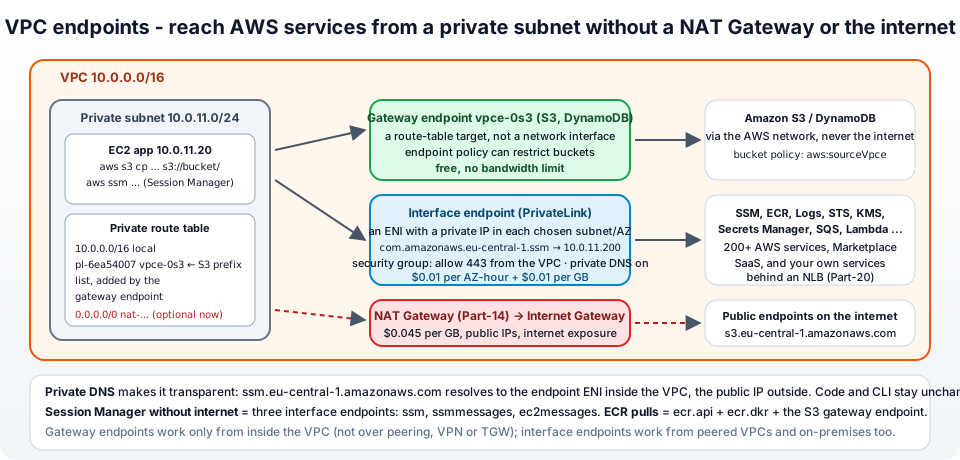
A VPC endpoint gives the VPC a private path to the service. The instance resolves the same hostname, but to a private address inside the VPC (interface endpoint) or routes the service's IP ranges through a special target (gateway endpoint). No public IP, no NAT, no internet.
2. The endpoint types - gateway, interface, and the newer ones
From the PrivateLink concepts -
| Type | For | How it works | Cost |
|---|---|---|---|
| Gateway endpoint | S3 and DynamoDB only | a target in your route tables for the service's prefix list; no network interface | free |
| Interface endpoint (PrivateLink) | 200+ AWS services, Marketplace SaaS, your own services behind an NLB | an elastic network interface with a private IP in each subnet you choose; DNS resolves the service name to it | per AZ-hour + per GB |
| Gateway Load Balancer endpoint | inserting firewalls/appliances in the traffic path | a route-table target that hands packets to a GWLB fleet | per hour + per GB |
| Resource endpoint | one shared resource - an RDS database, an EC2 instance, an IP or DNS name in another VPC/account - without a load balancer | ENI, via a provider-side resource gateway and RAM sharing | per hour + per GB |
| Service-network endpoint | many resources and services on a VPC Lattice service network through one endpoint | ENI | per hour + per GB |
Gateway endpoints are older, free, and limited to the two services; interface endpoints are the general mechanism (and S3 also has an interface endpoint for the cases a gateway cannot serve - section 9). The rest of this post builds one of each of the first two.
3. Prerequisites - a private instance with no internet
From Part-5: jhooq-vpc with private subnet jhooq-private-1a and an instance jhooq-app in it with an IAM instance profile that allows S3 read and includes AmazonSSMManagedInstanceCore (Part-3). To make the test honest, remove the NAT route: edit jhooq-private-rt and delete 0.0.0.0/0 → nat-... (or use a VPC with no NAT at all). Confirm from the bastion → app server -
1aws s3 ls s3://jhooq-demo-bucket/ --region eu-central-1
2# ... hangs, then: Connect timeout on endpoint URL: "https://jhooq-demo-bucket.s3.eu-central-1.amazonaws.com/"
No internet, no S3. Now we fix that without giving it internet.
4. Step 1 - Gateway endpoint for S3
VPC → Endpoints → Create endpoint -
- Name tag
jhooq-s3-gw. Type - AWS services. - Services - search
s3, pickcom.amazonaws.eu-central-1.s3with Type Gateway (the one with type Interface is the other kind). - VPC -
jhooq-vpc. - Route tables - tick
jhooq-private-rt(and any other table whose subnets should use it). This is the whole mechanism: AWS adds a route whose destination is the S3 prefix listpl-6ea54007(all S3 IP ranges in the region) and whose target is the endpointvpce-.... - Policy - Full access for now (section 7 restricts it).
- Create endpoint. State
Availablewithin a minute.
Open jhooq-private-rt → Routes - a new row pl-6ea54007 (com.amazonaws.eu-central-1.s3) → vpce-0abc... appeared. Back on the instance -
1aws s3 ls s3://jhooq-demo-bucket/ --region eu-central-1
2# 2026-10-10 10:00:00      1234 report.pdf
3aws s3 cp s3://jhooq-demo-bucket/report.pdf /tmp/
Works, with no NAT and no public IP. The same for DynamoDB: com.amazonaws.eu-central-1.dynamodb, type Gateway. Two things to know - the gateway endpoint only works from inside the VPC (not over peering, VPN or Transit Gateway), and the instance must use the regional S3 endpoint (the CLI does; very old SDKs pointed at the global s3.amazonaws.com, which the gateway in other regions does not cover).
5. Step 2 - Interface endpoints for Systems Manager (Session Manager without internet)
Session Manager (Part-4) needs the SSM agent on the instance to reach three services. With no internet it cannot, so the instance shows as not managed. Three interface endpoints fix it. First a security group for the endpoints - jhooq-vpce-sg in jhooq-vpc, inbound HTTPS 443 from 10.0.0.0/16 (the endpoint ENIs receive the traffic, so they need to allow the callers).
Create endpoint (interface endpoints), three times -
- Name tag
jhooq-ssm. Type AWS services. Services -com.amazonaws.eu-central-1.ssm(type Interface). - VPC
jhooq-vpc. Additional settings → Enable DNS name - keep ticked (private DNS, section 6). - Subnets - tick one subnet per AZ where you have instances -
jhooq-private-1a,jhooq-private-1b. One ENI (and one AZ-hour charge) per subnet. - IP address type IPv4. Security groups -
jhooq-vpce-sg. Policy - Full access. - Create endpoint. Repeat for
com.amazonaws.eu-central-1.ssmmessagesandcom.amazonaws.eu-central-1.ec2messages.
After a couple of minutes all three are Available. On the instance restart the agent (sudo systemctl restart snap.amazon-ssm-agent.amazon-ssm-agent on Ubuntu, amazon-ssm-agent on Amazon Linux) and within a minute Systems Manager → Fleet Manager lists it as Online. EC2 → the instance → Connect → Session Manager opens a shell - into a subnet that has no route to the internet whatsoever. That is the production pattern: private subnets, no bastion, no port 22, shell access logged by SSM.
Under EC2 → Network interfaces you can see the endpoint ENIs (VPC Endpoint Interface vpce-...), each with a private IP from your subnet - that is what the service name now resolves to.
6. Private DNS - how it stays transparent
With Enable DNS name (private DNS) on, Route 53 creates a hidden private hosted zone for ssm.eu-central-1.amazonaws.com associated with the VPC, so -
1# inside the VPC
2dig +short ssm.eu-central-1.amazonaws.com
3# 10.0.11.200
4# 10.0.12.200          <- the endpoint ENIs
5
6# from your laptop
7dig +short ssm.eu-central-1.amazonaws.com
8# 52.94.x.y            <- the public endpoint
Nothing in the CLI, SDK or agent configuration changes - the same hostname just resolves differently inside the VPC. Requirements: the VPC has DNS hostnames and DNS resolution enabled (Part-5, Step 1), and instances use the VPC resolver. With private DNS off, the endpoint only answers on its endpoint-specific DNS name (vpce-0abc-xyz.ssm.eu-central-1.vpce.amazonaws.com) and you must point clients at it with --endpoint-url - occasionally wanted, usually not.
The S3 interface endpoint is the exception - its private DNS is off by default (gateway endpoints already serve in-VPC traffic), and it supports inbound Resolver endpoint style private DNS for on-premises if you turn it on.
7. Endpoint policies and bucket policies with aws:sourceVpce
Two policies control what flows through an endpoint (control access) -
Endpoint policy - an IAM resource policy on the endpoint, default "allow everything for everyone". For the S3 gateway endpoint, restrict to your buckets so that a compromised instance cannot upload to an attacker's bucket through your own endpoint -
1{
2  "Version": "2012-10-17",
3  "Statement": [{
4    "Effect": "Allow",
5    "Principal": "*",
6    "Action": ["s3:GetObject", "s3:PutObject", "s3:ListBucket"],
7    "Resource": ["arn:aws:s3:::jhooq-demo-bucket", "arn:aws:s3:::jhooq-demo-bucket/*"]
8  }]
9}
Careful with ECR and Amazon Linux package repositories, which live in AWS-owned S3 buckets - the ECR docs list the bucket ARNs (arn:aws:s3:::prod-eu-central-1-starport-layer-bucket/*) you must allow, and amazonlinux.*.amazonaws.com repos need theirs too.
Resource policy on the other side - a bucket policy that only allows access through the endpoint, so the bucket is unreachable from the internet even with valid credentials -
 1{
 2  "Version": "2012-10-17",
 3  "Statement": [{
 4    "Sid": "OnlyViaOurEndpoint",
 5    "Effect": "Deny",
 6    "Principal": "*",
 7    "Action": "s3:*",
 8    "Resource": ["arn:aws:s3:::jhooq-demo-bucket", "arn:aws:s3:::jhooq-demo-bucket/*"],
 9    "Condition": { "StringNotEquals": { "aws:sourceVpce": "vpce-0abc1234567890def" } }
10  }]
11}
aws:sourceVpce and aws:sourceVpc condition keys work in bucket policies, IAM policies and SCPs (Part-2). Do test the deny from your laptop before you rely on it - and remember that the console itself does not go through the endpoint, so that policy locks the console out of the bucket too, unless you add an exception for your admin role. Effective permission is the intersection of the IAM policy, the endpoint policy and the bucket policy.
8. The ECR, CloudWatch and Secrets Manager endpoint sets
Some services need several endpoints to work privately - the sets people search for -
| Goal | Endpoints |
|---|---|
| Session Manager / SSM | ssm, ssmmessages, ec2messages (interface) + logs if you ship session logs |
| Pull images from ECR (ECS, EKS, EC2 Docker) | ecr.api, ecr.dkr (interface) + the S3 gateway endpoint - image layers are stored in S3 |
| CloudWatch Logs and metrics | logs, monitoring |
| Secrets and parameters | secretsmanager, ssm (Parameter Store is part of SSM), kms for decryption |
| STS for role assumption | sts (regional STS endpoint - set AWS_STS_REGIONAL_ENDPOINTS=regional on older SDKs) |
| Lambda in a VPC calling AWS | the endpoints of whatever it calls - dynamodb (gateway), sqs, sns, lambda |
| Private API Gateway | execute-api |
| EKS worker nodes with no NAT | ecr.api, ecr.dkr, S3 gateway, ec2, sts, logs, elasticloadbalancing, autoscaling (+ eks for the API) |
The full list of services and their names is AWS services that integrate with PrivateLink. Missing one of a set is the classic cause of "it works with NAT, breaks without" (section 13).
9. Interface endpoints from peered VPCs, Transit Gateway and on-premises
A gateway endpoint is only usable from inside its VPC. An interface endpoint has an ENI with a private IP, so anything that can route to that IP can use it - a peered VPC (Part-12), spokes behind a Transit Gateway (Part-13), and on-premises over VPN or Direct Connect. That is the centralised endpoints pattern: one shared-services VPC holds the interface endpoints (and pays the AZ-hours once), every spoke VPC routes to it, and DNS is handled by associating the endpoints' private hosted zones with the spoke VPCs or by a Route 53 Resolver inbound endpoint for on-premises. For S3 specifically, that is why the S3 interface endpoint exists next to the gateway one - the gateway cannot be shared, the interface can.
10. What it costs - endpoint vs NAT Gateway
From the PrivateLink pricing page -
| Gateway endpoint | Interface endpoint | NAT Gateway | |
|---|---|---|---|
| Hourly | free | $0.01 per AZ per hour (about $7.30 a month per AZ) | $0.045 per hour (about $33 a month) |
| Data | free | $0.01 per GB (first PB; cheaper beyond) | $0.045 per GB |
| Also | - | - | public IPv4 address, data transfer out |
So the S3 and DynamoDB gateway endpoints are a pure win - create them in every VPC. Interface endpoints pay off when the traffic to that service is large (1 TB of ECR pulls through NAT = $46; through endpoints = $10 + hours) or when the requirement is "no internet path at all". Three SSM endpoints in two AZs cost about $44 a month in hours - about the same as the NAT Gateway they can replace for a fully private VPC, with none of its data charges. For a lab, delete the interface endpoints when done; the gateway endpoint can stay.
11. The AWS CLI equivalents
 1# gateway endpoint for S3 on the private route table
 2aws ec2 create-vpc-endpoint --vpc-id vpc-0abc --vpc-endpoint-type Gateway \
 3  --service-name com.amazonaws.eu-central-1.s3 --route-table-ids rtb-private1a rtb-private1b \
 4  --tag-specifications 'ResourceType=vpc-endpoint,Tags=[{Key=Name,Value=jhooq-s3-gw}]'
 5
 6# interface endpoints for SSM (one subnet per AZ, private DNS on)
 7for svc in ssm ssmmessages ec2messages; do
 8  aws ec2 create-vpc-endpoint --vpc-id vpc-0abc --vpc-endpoint-type Interface \
 9    --service-name "com.amazonaws.eu-central-1.$svc" \
10    --subnet-ids subnet-private1a subnet-private1b --security-group-ids sg-0vpce \
11    --private-dns-enabled --tag-specifications "ResourceType=vpc-endpoint,Tags=[{Key=Name,Value=jhooq-$svc}]"
12done
13
14# endpoint policy on the S3 gateway
15aws ec2 modify-vpc-endpoint --vpc-endpoint-id vpce-0abc --policy-document file://s3-endpoint-policy.json
16
17# which services exist in this region?
18aws ec2 describe-vpc-endpoint-services --query 'ServiceNames' --output text | tr '\t' '\n' | grep -E 'ecr|logs'
19
20aws ec2 describe-vpc-endpoints --query 'VpcEndpoints[].[VpcEndpointId,ServiceName,VpcEndpointType,State]' --output table
Terraform: aws_vpc_endpoint with vpc_endpoint_type = "Gateway" + route_table_ids, or "Interface" + subnet_ids, security_group_ids, private_dns_enabled = true; aws_vpc_endpoint_policy for the policy.
12. Quotas
From the endpoint quotas - 50 interface endpoints per VPC (adjustable), 20 gateway endpoints per region, up to 10 Gbps per AZ per interface endpoint scaling to 100 Gbps, endpoint policies up to 20,480 characters, and gateway endpoints do not have a bandwidth limit.
13. Common VPC endpoint errors and how to fix them
1. Connect timeout on endpoint URL: "https://ssm.eu-central-1.amazonaws.com/" after creating the interface endpoint - The endpoint security group does not allow 443 from the instance's subnet/VPC CIDR, or private DNS is off so the name still resolves to the public IP (dig it from the instance - it must be a 10.x address). Also check the endpoint is in a subnet of the instance's AZ (cross-AZ works but needs a route and costs transfer).
2. S3 still times out with the gateway endpoint - The endpoint is not associated with the route table the instance's subnet uses (check Subnet associations), or the client targets the global/other-region S3 endpoint - set --region / the SDK region. A 0.0.0.0/0 route is not needed, but a more specific wrong route can hijack traffic.
3. AccessDenied through the endpoint although IAM allows it - The endpoint policy does not allow the action/bucket (default allows all; a restricted policy forgot a bucket), or the bucket policy with aws:sourceVpce names a different endpoint ID (one per VPC).
4. private DNS names ... can't be enabled / enableDnsHostnames must be true - Turn on DNS hostnames and DNS resolution on the VPC.
5. The VPC endpoint ... conflicts with ... private hosted zone - You already have a private hosted zone for the same service domain (from a manual setup). Delete it or create the endpoint without private DNS.
6. ECR pull fails: dial tcp ... i/o timeout or 403 after adding ecr endpoints - Missing one of the set - ecr.api and ecr.dkr and the S3 gateway endpoint (layers are in S3), and an endpoint policy that excludes the ECR S3 bucket.
7. SSM instance still "not managed" - One of the three SSM endpoints missing, the agent not restarted, no instance profile with AmazonSSMManagedInstanceCore, or the endpoint SG blocks 443.
8. VpcEndpointLimitExceeded - 50 interface endpoints per VPC - request an increase or centralise endpoints in a shared VPC (section 9).
9. Works for instances in 1a, not in 1b - Interface endpoints have an ENI only in the subnets you selected; add a subnet in 1b (or accept cross-AZ traffic via a route).
10. On-premises cannot resolve the endpoint names - Private DNS only answers inside the VPC. Add a Route 53 Resolver inbound endpoint and forward the *.amazonaws.com names to it, or use the endpoint-specific DNS names.
11. Gateway endpoint not usable from the peered VPC - By design. Use an interface endpoint (S3 has one) in the hub VPC.
14. Conclusion
To summarise Part-19 -
- A VPC endpoint gives private subnets a private path to AWS services - no NAT, no Internet Gateway, no public IP, no internet.
- Gateway endpoints (S3, DynamoDB) are a route-table target, free, in-VPC only - create them in every VPC on day one.
- Interface endpoints (PrivateLink) are ENIs with private IPs per subnet, reachable from peered VPCs, Transit Gateway and on-premises, with a security group that must allow 443 and private DNS that keeps the service hostname unchanged; they cost about $7 per AZ per month plus $0.01 per GB.
- Endpoint policies restrict what goes through;
aws:sourceVpcein bucket and IAM policies restricts where requests may come from. - Some services come in sets - SSM needs three endpoints, ECR needs two plus the S3 gateway - and a missing member is the usual "works with NAT, not without" cause.
The official references are the PrivateLink guide, PrivateLink concepts, create an interface endpoint, gateway endpoints and controlling access with endpoint policies. In the next part we flip to the provider side - publishing your own service through PrivateLink with an endpoint service and an NLB (Part-18 built the NLB for it).
AWS step by step series -
- Part-1 : AWS IAM user - create a user, group, policy, access keys and MFA
- Part-2 : AWS Organizations - multi-account setup, OUs and SCPs
- Part-3 : AWS assume IAM role - trust policy, switch role in console and CLI
- Part-4 : How to launch an EC2 instance - key pair, security group, SSH
- Part-5 : AWS VPC - public and private subnets, Internet Gateway, NAT Gateway, route tables
- Part-8 : EC2 launch template - versions, default version, source template, SSM parameter AMI
- Part-10 : EC2 Auto Scaling - launch template, Auto Scaling group, target tracking, ALB
- Part-11 : AWS WAF - web ACL, managed rules, rate limiting, geo blocking
- Part-12 : AWS VPC Peering - connect two VPCs, routes, security groups, DNS
- Part-13 : AWS Transit Gateway - hub-and-spoke for many VPCs and on-premises
- Part-14 : AWS NAT Gateway deep dive - public vs private, limits, cost, troubleshooting
- Part-15 : Amazon Route 53 - hosted zones, records, alias, routing policies, health checks
- Part-16 : AWS security groups - inbound and outbound rules, stateful, referencing, quotas
- Part-16 : AWS Certificate Manager - free TLS certificates for ALB, CloudFront and API Gateway
- Part-17 : AWS Lambda - function URLs, environment variables and layers
- Part-18 : Network Load Balancer - setup, and ALB vs NLB
- Part-19 : VPC endpoints - gateway and interface endpoints (PrivateLink) instead of NAT
- Part-20 : AWS PrivateLink - publish your own service with an endpoint service and NLB
- Part-20 : Amazon EBS volumes - types, attach, mount, resize, snapshots, encryption
- Part-21 : VPC Flow Logs - CloudWatch Logs, S3, record format, Logs Insights, Athena
- Part-21 : EC2 Spot Instances - pricing, interruptions, mixed instances groups
- Part-24 : AWS Control Tower - landing zone, controls, Account Factory, Identity Center
Networking fundamentals -
- What is a VPC and a subnet? AWS networking in five minutes
- What is CIDR? Calculate IP ranges for VPCs and subnets
- What is NAT? Static NAT, dynamic NAT and PAT explained
More AWS guides -
- What is AWS CloudFormation? Templates, stacks, change sets, drift, StackSets
- Learn AWS S3 - the complete course
- AWS API Gateway - REST API with Lambda, authorizers, Terraform
- AWS Advanced Networking Specialty (ANS-C01) - course companion
- AWS ECS and Fargate - how to deploy a Docker container
- AWS S3 - how to host a static website
- Terraform create EC2 instance on AWS
- Terraform AWS IAM - users, roles and policies
- Terraform and AWS multi-account setup
- Terraform - setting up an ALB and SSL
Posts in this series
- Amazon EBS Volumes Step by Step - Volume Types Compared (gp3, gp2, io2 Block Express, st1, sc1), Create, Attach, Format and Mount a Volume, Resize Without Downtime, Snapshots, Encryption, Multi-Attach, Pricing and Troubleshooting (AWS Part-20)
- Amazon Route 53 Step by Step - Hosted Zones, Record Types, Alias Records, Point a Domain at an ALB, Routing Policies (Weighted, Latency, Failover, Geolocation), Health Checks, Private Zones and Pricing (AWS Part-15)
- AWS Advanced Networking - Free 8-Hour Full Course Companion (VPC, NAT Gateway, Bastion, ALB, NLB, WAF, VPC Peering, Transit Gateway, VPC Endpoints and PrivateLink, Route 53, ACM) with Timestamps and the ANS-C01 Exam Facts
- AWS Assume IAM Role Step by Step - Trust Policy vs Permissions Policy, Switch Role in the Console, aws sts assume-role, CLI Profiles, Cross-Account Access, MFA and External ID (AWS Part-3)
- AWS Certificate Manager (ACM) Step by Step - Request a Free TLS Certificate, DNS Validation with Route 53, Attach It to an ALB HTTPS Listener, Redirect HTTP to HTTPS, CloudFront and API Gateway, Auto-Renewal, Exportable Certificates and ACME (AWS Part-16)
- AWS Control Tower Step by Step - Set Up a Landing Zone, Security OU with Log Archive and Audit Accounts, Controls (Guardrails), Region Deny, IAM Identity Center, Account Factory and Enrolling Existing Accounts (AWS Part-24)
- AWS EC2 Auto Scaling Step by Step - Launch Template, Auto Scaling Group Across Two AZs, Target Tracking Policy, Application Load Balancer, Health Checks and Instance Refresh (AWS Part-10)
- AWS EC2 Launch Template Step by Step - Create a Template, Versions and the Default Version, Source Template, Create From a Running Instance, Systems Manager Parameter Instead of an AMI ID, Launch Templates vs Launch Configurations, IAM Guardrails, CLI and Terraform (AWS Part-8 and Part-17)
- AWS EC2 Spot Instances Step by Step - How Spot Pricing Works, Launch a Spot Instance, Interruptions and the Two-Minute Notice, Rebalance Recommendations, Stop vs Hibernate vs Terminate, Spot in Auto Scaling Mixed Instances Groups, Billing Rules, Best Practices, CLI and Terraform (AWS Part-21)
- AWS IAM User Step by Step - Create a User, User Group, Attach Policies, Access Keys, MFA and Sign-in URL (AWS Part-1)
- AWS Lambda Step by Step - Create a Function, Function URL (HTTPS Endpoint Without API Gateway), Environment Variables, Lambda Layers for Python Dependencies, Versions and Aliases, Limits, Pricing and Errors (AWS Part-17)
- AWS NAT Gateway Deep Dive - How It Works, Public vs Private NAT Gateway, Setup Step by Step, Limits (55,000 Connections, 100 Gbps), CloudWatch Metrics, Cost Optimisation, NAT Instance Comparison and Troubleshooting (AWS Part-14)
- AWS Network Load Balancer Step by Step - Create an NLB with Static IPs, Target Groups, TCP and TLS Listeners, Security Groups, Client IP Preservation, Cross-Zone Load Balancing, and ALB vs NLB Explained (AWS Part-18)
- AWS Organizations Step by Step - Multi-Account Setup, Organizational Units, Service Control Policies (SCPs), Consolidated Billing and Identity Center (AWS Part-2)
- AWS PrivateLink Step by Step - Publish Your Own Service with a VPC Endpoint Service and Network Load Balancer, Allow Consumers, Accept Connections, Private DNS Name, Cross-Account and Cross-Region, Pricing and Troubleshooting (AWS Part-20)
- AWS Security Groups Step by Step - Inbound and Outbound Rules, Stateful Behaviour, Referencing Security Groups, the Three-Tier ALB-Web-DB Pattern, Quotas, Security Group vs Network ACL, CLI and Terraform (AWS Part-16)
- AWS Transit Gateway Step by Step - Connect Many VPCs and On-Premises Through One Hub, VPC Attachments, Transit Gateway Route Tables, Associations and Propagations, Isolation, Peering, Pricing (AWS Part-13)
- AWS VPC Endpoints Step by Step - Gateway Endpoints for S3 and DynamoDB, Interface Endpoints (PrivateLink) for SSM, ECR and Other Services, Private DNS, Endpoint Policies, Security Groups, Cost vs NAT Gateway, and Troubleshooting (AWS Part-19)
- AWS VPC Flow Logs Step by Step - Enable Flow Logs for a VPC, Subnet or Network Interface, Publish to CloudWatch Logs or S3, Read a Flow Log Record Field by Field, Custom Formats, Query with Logs Insights and Athena, Find Rejected Traffic, Pricing and Limitations (AWS Part-21)
- AWS VPC Peering Step by Step - Connect Two VPCs (Same or Different Account and Region), Accept the Request, Add Routes, Security Groups, DNS Resolution, Test with EC2, and the Limits (AWS Part-12)
- AWS VPC Step by Step - Create a VPC with Public and Private Subnets, Internet Gateway, NAT Gateway and Route Tables (and Test It with EC2) (AWS Part-5)
- AWS WAF Step by Step - Create a Web ACL, Attach It to an ALB or API Gateway, AWS Managed Rules, Rate-Based Rules, Geo Blocking, IP Sets, Count Mode and Logging (AWS Part-11)
- How to Launch an EC2 Instance on AWS Step by Step - AMI, Instance Type, Key Pair, Security Group, Connect with SSH or EC2 Instance Connect, Stop vs Terminate (AWS Part-4)
- What is an AWS VPC and a Subnet? Virtual Private Cloud Explained in Five Minutes (Region, Availability Zones, Public vs Private Subnets, Gateways, Route Tables)
- What is AWS CloudFormation? Templates, Stacks and Change Sets Explained, Template Anatomy Section by Section, Create Your First Stack Step by Step, Update With a Change Set, Drift Detection, Nested Stacks and StackSets, Quotas, Pricing, CLI, and CloudFormation vs Terraform
- What is CIDR (Classless Inter-Domain Routing)? How to Calculate IP Ranges for VPCs and Subnets, with Examples (/8, /16, /24, /28, /32)
- What is NAT (Network Address Translation)? How It Works, Static NAT vs Dynamic NAT vs PAT, the Translation Table, and Where NAT Shows Up in AWS
- AWS API Gateway Tutorial - REST API with Lambda Proxy and Non-Proxy Integration, Request Validation, HTTP API vs REST API, Resource Policies, Lambda Authorizers and Terraform
- Learn AWS S3 - The Complete Course (Buckets, Objects, Storage Classes, Lifecycle, Versioning, Security Defaults, Bucket Policies, Static Hosting, CLI and Terraform)
- How to release(delete) Elastic IP from AWS?
- Fix docker login 'error saving credentials: error storing credentials - err: exit status 1' (AWS ECR on macOS, Windows, Linux and WSL)