AWS Transit Gateway Step by Step - Connect Many VPCs and On-Premises Through One Hub, VPC Attachments, Transit Gateway Route Tables, Associations and Propagations, Isolation, Peering, Pricing (AWS Part-13)
Part-12 ended with the problem - VPC peering is point-to-point and not transitive, so ten VPCs need 45 peering connections, and none of them can share a VPN to the office. AWS Transit Gateway is the fix: a regional router you attach every VPC, VPN and Direct Connect to once, and then control who reaches whom with route tables in the hub.
In this Part-13 we create a Transit Gateway, attach three VPCs, make dev and prod both reach a shared-services VPC while being isolated from each other, and look at VPN attachments, cross-region peering, cross-account sharing, cost and the errors. Figures are from the current Transit Gateway documentation - for example the VPC attachment bandwidth is now up to 100 Gbps per AZ, double what it was when I recorded the video.
Table of Content
- What a Transit Gateway is and how it routes
- The vocabulary - attachments, TGW route tables, associations, propagations
- Prerequisites - three VPCs and a subnet per AZ for the attachments
- Step 1 - Create the Transit Gateway
- Step 2 - Create the VPC attachments
- Step 3 - Add routes in each VPC towards the Transit Gateway
- Step 4 - The Transit Gateway route table
- Step 5 - Test it with EC2
- Step 6 - Isolate dev from prod with separate route tables
- On-premises - VPN and Direct Connect attachments
- Transit Gateway peering across regions and sharing across accounts
- What it costs and the quotas
- The AWS CLI equivalents
- Common Transit Gateway errors and how to fix them
- Conclusion
1. What a Transit Gateway is and how it routes
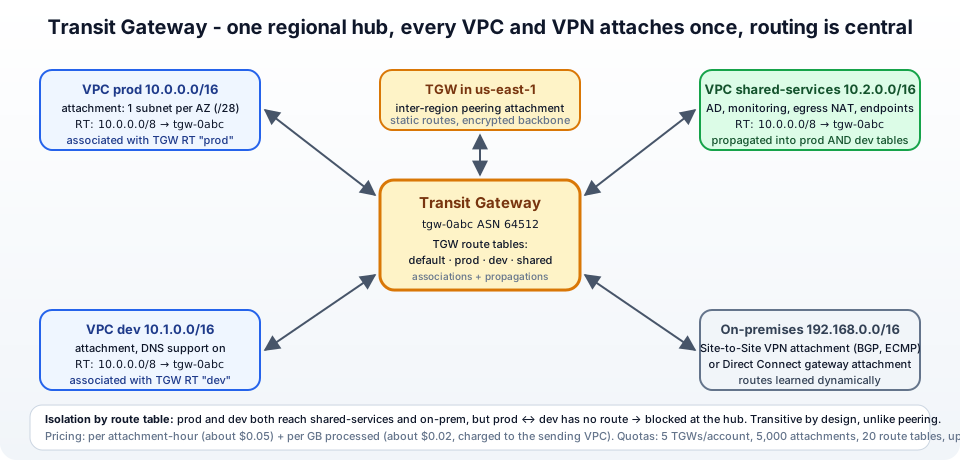
A Transit Gateway (TGW) is a highly available, scalable regional router that AWS runs for you. Instead of connecting VPCs to each other, you connect each of them to the TGW with an attachment, and the TGW forwards packets between attachments according to its own route tables. The how it works page describes it as a hub-and-spoke: a transit gateway acts as a Regional virtual router for traffic flowing between your virtual private clouds (VPCs) and on-premises networks.
What that gives you over peering -
- Transitive routing - A, B and C attach once and can all talk (if you let them).
- Shared on-premises connectivity - one Site-to-Site VPN or Direct Connect attachment serves every VPC.
- Central control - which VPC may reach which is decided in the TGW route tables, not in 45 places.
- Centralised egress and inspection - one VPC with the NAT Gateways or firewalls for all the others.
- Scale - 5,000 attachments, up to 100 Gbps per VPC attachment per AZ.
2. The vocabulary - attachments, TGW route tables, associations, propagations
Four terms, and routing in a TGW is simple once they click -
- Attachment - a connection between the TGW and something: a VPC (one subnet per AZ, the TGW puts a network interface there), a Site-to-Site VPN, a Direct Connect gateway, a peering to another TGW, or a Connect attachment (GRE/BGP to a virtual appliance).
- Transit gateway route table - a routing table inside the TGW -
destination CIDR → attachment. A TGW has one default table and can have up to 20. - Association - which TGW route table an attachment uses when traffic enters the TGW from it. Each attachment is associated with exactly one table. Think of it as "when a packet comes from VPC A, look it up in table X".
- Propagation - an attachment advertising its CIDRs into a TGW route table, creating routes automatically. VPC attachments propagate their VPC CIDR; VPN and Direct Connect propagate what BGP learns. You can also add static routes by hand.
By default, with Default route table association and Default route table propagation enabled, every attachment is associated with and propagates into the one default table - which means every attached VPC can reach every other. That is the quick start; isolation (section 9) means turning those defaults off and using several tables.
And the thing that trips everyone: the TGW route table gets traffic to the TGW. The VPC's own route tables still need a route towards the TGW for the destination CIDRs - two layers of routing, both required.
3. Prerequisites - three VPCs and a subnet per AZ for the attachments
| VPC | CIDR | Purpose |
|---|---|---|
jhooq-vpc (prod) | 10.0.0.0/16 | from Part-5, EC2 in a private subnet |
jhooq-dev-vpc | 10.1.0.0/16 | VPC and more, 2 private subnets, EC2 in one |
jhooq-shared-vpc | 10.2.0.0/16 | VPC and more, 2 private subnets, EC2 in one (pretend it is the monitoring server) |
CIDRs must not overlap here either - a TGW route table cannot hold two identical routes to different attachments. Best practice for attachments: create a dedicated small subnet per AZ (/28, 16 addresses) in each VPC just for the TGW network interfaces - 10.0.250.0/28 and 10.0.250.16/28 in prod, and so on. The TGW can only reach resources in AZs where it has an attachment subnet, and keeping the attachment subnets separate means their route table can stay minimal and no application ever launches into them. For the lab, the existing private subnets work too.
4. Step 1 - Create the Transit Gateway
VPC → Transit gateways → Create transit gateway (getting started) -
- Name tag -
jhooq-tgw. Description optional. - Amazon side Autonomous System Number (ASN) - leave
64512(private range 64512-65534; only matters for BGP over VPN/Direct Connect - make it unique if you will peer TGWs or connect several to the same on-premises router). - DNS support - on (lets instances resolve public DNS names of peers to private IPs across the TGW).
- VPN ECMP support - on (aggregate multiple VPN tunnels).
- Default route table association - on; Default route table propagation - on. (We turn these off in section 9 for the isolation pattern; for the first test keep them on.)
- Multicast support - off. Security Group Referencing support - on if you want to reference security groups across attached VPCs (same region).
- Create transit gateway. State
Pending → Availablein a couple of minutes. A default Transit gateway route table is created with it.
5. Step 2 - Create the VPC attachments
Transit gateway attachments → Create transit gateway attachment (VPC attachments), three times -
- Name tag -
tgw-att-prod. Transit gateway ID -jhooq-tgw. Attachment type - VPC. - DNS support - on. IPv6 support - off. Appliance mode support - off (only for firewall/inspection VPCs, where flows must stick to one AZ).
- VPC ID -
jhooq-vpc. Subnet IDs - tick one subnet per Availability Zone (jhooq-private-1a,jhooq-private-1b, or the dedicated/28s). - Create transit gateway attachment. Repeat for
tgw-att-dev(jhooq-dev-vpc) andtgw-att-shared(jhooq-shared-vpc).
Each attachment goes Pending → Available. In the EC2 → Network interfaces list you will see one new interface per selected subnet, description Network Interface for Transit Gateway Attachment tgw-attach-.... If you later add an AZ to a VPC, Modify the attachment to add a subnet there.
6. Step 3 - Add routes in each VPC towards the Transit Gateway
Now the half everyone forgets. In each VPC, in every route table whose subnets should reach the other VPCs, add a route with the TGW as target -
jhooq-vpc (prod) - jhooq-private-rt - Destination 10.0.0.0/8, Target → Transit Gateway → jhooq-tgw. One summary route covers every 10.x VPC you will ever attach; the more specific local route for 10.0.0.0/16 still wins inside the VPC.
110.0.0.0/16   local
20.0.0.0/0     nat-...
310.0.0.0/8    tgw-0123456789abcdef0
jhooq-dev-vpc and jhooq-shared-vpc private route tables - same 10.0.0.0/8 → tgw-....
Alternatively, add specific routes per peer (10.1.0.0/16 → tgw, 10.2.0.0/16 → tgw) if you prefer explicitness; summary routes are what make a TGW low-maintenance. If on-premises is 192.168.0.0/16, add that too once the VPN is attached.
7. Step 4 - The Transit Gateway route table
Open Transit gateway route tables → the default table → Routes. Because propagation is on, you already see -
110.0.0.0/16   tgw-attach-prod     propagated   active
210.1.0.0/16   tgw-attach-dev      propagated   active
310.2.0.0/16   tgw-attach-shared   propagated   active
The Associations tab shows all three attachments associated with this table, the Propagations tab shows all three propagating. That is a full mesh in three attachments - packets from any VPC that reach the TGW are looked up here and forwarded to the right attachment. Static routes can be added on the same tab (Create static route) - for example 0.0.0.0/0 → tgw-attach-shared to send all internet traffic through NAT Gateways in the shared VPC (centralised egress), or a blackhole route to drop traffic to a CIDR. The route tables page covers route priority: most specific prefix wins, then static over propagated, then VPC over Direct Connect over VPN.
8. Step 5 - Test it with EC2
From the prod instance (via bastion or Session Manager) -
1ping -c 3 10.1.11.20     # dev instance
2ping -c 3 10.2.11.20     # shared instance
3traceroute 10.2.11.20    # one hop at the TGW ENI's address, then the target
Security groups on the destination instances must allow ICMP/SSH from the source CIDRs (10.0.0.0/8 keeps it simple in a lab), exactly as with peering. From dev, ping 10.0.11.20 reaches prod too - the default full mesh. Also handy: Transit gateway route tables → Route Analyzer (in Network Manager) and the Reachability Analyzer in the VPC console tell you why a path fails without a single packet.
9. Step 6 - Isolate dev from prod with separate route tables
The classic requirement - dev and prod must both reach shared services, but never each other. With TGW it is pure route table design -
- Create two TGW route tables -
rt-spokesandrt-shared(Transit gateway route tables → Create). - Associations - associate
tgw-att-prodandtgw-att-devwithrt-spokes(first disassociate them from the default table - an attachment can be associated with one table). Associatetgw-att-sharedwithrt-shared. - Propagations - into
rt-spokes, propagate onlytgw-att-shared→ the spokes table knows just10.2.0.0/16. Intort-shared, propagatetgw-att-prodandtgw-att-dev→ the shared table knows both spokes so replies get back. - Result -
1rt-spokes (used by traffic FROM prod and dev):   10.2.0.0/16 → tgw-att-shared
2rt-shared (used by traffic FROM shared):         10.0.0.0/16 → tgw-att-prod,  10.1.0.0/16 → tgw-att-dev
Now ping 10.2.11.20 works from prod and dev, ping 10.1.11.20 from prod gets nothing - there is no route for 10.1.0.0/16 in the table prod's traffic uses. No security group needed to enforce it; the hub simply has no path. For new TGWs that will use this pattern, create them with default association/propagation off so nothing is reachable until you say so. The same technique builds inspection architectures (all inter-VPC traffic forced through a firewall VPC) and centralised egress (one NAT Gateway set for all VPCs - see Part-14).
10. On-premises - VPN and Direct Connect attachments
The second big win over peering. Create transit gateway attachment → Attachment type: VPN → pick or create a Customer gateway (your office router's public IP and ASN) → routing Dynamic (BGP) → create. AWS gives you two tunnels; with ECMP on, add more VPN connections to aggregate bandwidth (each tunnel is 1.25 Gbps). Routes learned via BGP propagate into the TGW route table you choose, and every VPC associated with a table that has the on-prem route can reach the office through the one VPN. For Direct Connect, attach a Direct Connect gateway the same way - up to 100 Gbps per AZ. In both cases the on-premises router learns the VPC CIDRs you allow via the TGW's BGP advertisements (filter them per attachment with route table design).
11. Transit Gateway peering across regions and sharing across accounts
Peering - a TGW is regional. To connect eu-central-1 to us-east-1, create a peering attachment from one TGW to the other (same or another account), accept it on the other side, and add static routes in both TGW route tables (peering does not propagate dynamically) - 10.100.0.0/16 → tgw-attach-peering. Traffic is encrypted on the AWS backbone, MTU 8,500, one peering per TGW pair, 50 per TGW.
Sharing - in an organization, one network account owns the TGW and shares it with AWS Resource Access Manager (RAM) to the other accounts (or the whole OU). Those accounts then create VPC attachments to the shared TGW from their own consoles; the network team accepts them (or auto-accepts) and controls the route tables. This is the standard multi-account landing zone network, and what Control Tower's network baseline builds on.
12. What it costs and the quotas
From the pricing page - two dimensions -
- Attachment hours - every attachment (VPC, VPN, Direct Connect gateway, peering, Connect) is billed per hour it exists, about $0.05 per hour per VPC attachment (around $36 a month each). Three VPCs = ~$110 a month before any traffic. The VPC owner pays for their attachment.
- Data processing - about $0.02 per GB entering the TGW, charged to the sending attachment's owner. Peering attachments are not charged for data processing on the receiving side.
Plus normal inter-AZ and inter-region data transfer. Compared with peering (free, data transfer only) this is why the rule is "peer two or three VPCs, TGW for more".
Key quotas - 5 TGWs per account per region (adjustable), 5,000 attachments per TGW, 5 TGWs per VPC, 20 route tables per TGW, 10,000 routes total, 50 peering attachments, up to 100 Gbps and 7.5 million packets per second per VPC attachment per AZ, MTU 8,500 for VPC/DX/peering and 1,500 over VPN.
13. The AWS CLI equivalents
 1TGW=$(aws ec2 create-transit-gateway --description "jhooq hub" \
 2  --options AmazonSideAsn=64512,DnsSupport=enable,VpnEcmpSupport=enable,DefaultRouteTableAssociation=enable,DefaultRouteTablePropagation=enable \
 3  --tag-specifications 'ResourceType=transit-gateway,Tags=[{Key=Name,Value=jhooq-tgw}]' \
 4  --query TransitGateway.TransitGatewayId --output text)
 5aws ec2 wait transit-gateway-available --transit-gateway-ids "$TGW" 2>/dev/null || sleep 120
 6
 7# one attachment per VPC, one subnet per AZ
 8ATT_PROD=$(aws ec2 create-transit-gateway-vpc-attachment --transit-gateway-id "$TGW" --vpc-id vpc-0prod \
 9  --subnet-ids subnet-prod-1a subnet-prod-1b --query TransitGatewayVpcAttachment.TransitGatewayAttachmentId --output text)
10# ... dev, shared
11
12# VPC side routes
13aws ec2 create-route --route-table-id rtb-prod-private --destination-cidr-block 10.0.0.0/8 --transit-gateway-id "$TGW"
14
15# isolation: custom TGW route tables
16RT_SPOKES=$(aws ec2 create-transit-gateway-route-table --transit-gateway-id "$TGW" --query TransitGatewayRouteTable.TransitGatewayRouteTableId --output text)
17aws ec2 associate-transit-gateway-route-table --transit-gateway-route-table-id "$RT_SPOKES" --transit-gateway-attachment-id "$ATT_PROD"
18aws ec2 enable-transit-gateway-route-table-propagation --transit-gateway-route-table-id "$RT_SPOKES" --transit-gateway-attachment-id "$ATT_SHARED"
19
20# inspect
21aws ec2 search-transit-gateway-routes --transit-gateway-route-table-id "$RT_SPOKES" --filters Name=state,Values=active
Terraform: aws_ec2_transit_gateway, aws_ec2_transit_gateway_vpc_attachment, aws_ec2_transit_gateway_route_table, _association, _propagation, aws_ec2_transit_gateway_route, plus aws_route in each VPC - and aws_ram_resource_share for the multi-account pattern, with provider aliases as in Terraform and AWS multi-account setup.
14. Common Transit Gateway errors and how to fix them
1. Attachments are Available but ping fails - The VPC-side route towards the TGW is missing (section 6) - this is error number one. Then: the destination VPC's route table also needs its route back; then security groups/NACLs; then check the TGW route table associated with the source attachment actually contains the destination CIDR.
2. One AZ works, another does not - The attachment has no subnet in that AZ. Modify the attachment and add a subnet in the AZ where the instance lives.
3. Route already exists / cannot add a route in the TGW table - A propagated route for the same CIDR exists (overlapping VPC CIDRs). A static route to a different attachment overrides a propagated one only if it is more specific or you remove the propagation.
4. IncorrectState: ... is not in a valid state on associate - The attachment is still pending, or is already associated with another table - disassociate first (one association per attachment).
5. TransitGatewayLimitExceeded - 5 per account per region. Delete lab TGWs or request an increase.
6. The VPN attachment shows DOWN - Tunnel configuration on the customer gateway (pre-shared key, IKE version, BGP ASN) - download the configuration file for your router model from the VPN connection page.
7. Traffic to the internet from a spoke fails after centralising egress - The 0.0.0.0/0 → shared attachment static route is in the spokes table, but the shared VPC's private route table for the attachment subnets has no 0.0.0.0/0 → nat-..., or the NAT's public route table lacks the return routes to the spoke CIDRs (10.0.0.0/8 → tgw). Both layers again.
8. Cross-account attachment stays pendingAcceptance - The TGW owner must accept it (or enable auto-accept on the TGW), and the TGW must be shared via RAM with that account first.
9. Peering routes do not appear - Peering attachments do not propagate - add static routes in both TGWs' tables.
10. Big bill with little traffic - Attachment-hours. Count your attachments (including the forgotten ones in deleted projects) and remove what you do not need.
15. Conclusion
To summarise Part-13 -
- A Transit Gateway is a regional hub router: attach each VPC, VPN, Direct Connect gateway or peer TGW once, and the hub forwards between them - transitive, scalable, centrally controlled.
- Routing has two layers - every VPC route table needs a route towards the TGW (a
10.0.0.0/8summary works), and the TGW route tables decide where traffic goes next. - Associations say which TGW table an attachment's incoming traffic uses; propagations fill tables with attachment CIDRs automatically; static routes handle peering, egress and blackholes.
- Isolation is table design - spokes in one table that only sees shared services, shared services in another that sees the spokes; the same pattern gives centralised egress and inspection.
- It costs per attachment-hour and per GB - so peer two or three VPCs, and use a TGW for many VPCs, shared on-premises links or central control.
The official references are the Transit Gateway guide, how transit gateways work, route tables and quotas. Next, the component every private subnet depends on gets its own deep dive - NAT Gateway, Part-14.
AWS step by step series -
- Part-1 : AWS IAM user - create a user, group, policy, access keys and MFA
- Part-2 : AWS Organizations - multi-account setup, OUs and SCPs
- Part-3 : AWS assume IAM role - trust policy, switch role in console and CLI
- Part-4 : How to launch an EC2 instance - key pair, security group, SSH
- Part-5 : AWS VPC - public and private subnets, Internet Gateway, NAT Gateway, route tables
- Part-8 : EC2 launch template - versions, default version, source template, SSM parameter AMI
- Part-10 : EC2 Auto Scaling - launch template, Auto Scaling group, target tracking, ALB
- Part-11 : AWS WAF - web ACL, managed rules, rate limiting, geo blocking
- Part-12 : AWS VPC Peering - connect two VPCs, routes, security groups, DNS
- Part-13 : AWS Transit Gateway - hub-and-spoke for many VPCs and on-premises
- Part-14 : AWS NAT Gateway deep dive - public vs private, limits, cost, troubleshooting
- Part-15 : Amazon Route 53 - hosted zones, records, alias, routing policies, health checks
- Part-16 : AWS security groups - inbound and outbound rules, stateful, referencing, quotas
- Part-16 : AWS Certificate Manager - free TLS certificates for ALB, CloudFront and API Gateway
- Part-17 : AWS Lambda - function URLs, environment variables and layers
- Part-18 : Network Load Balancer - setup, and ALB vs NLB
- Part-19 : VPC endpoints - gateway and interface endpoints (PrivateLink) instead of NAT
- Part-20 : AWS PrivateLink - publish your own service with an endpoint service and NLB
- Part-20 : Amazon EBS volumes - types, attach, mount, resize, snapshots, encryption
- Part-21 : VPC Flow Logs - CloudWatch Logs, S3, record format, Logs Insights, Athena
- Part-21 : EC2 Spot Instances - pricing, interruptions, mixed instances groups
- Part-24 : AWS Control Tower - landing zone, controls, Account Factory, Identity Center
Networking fundamentals -
- What is a VPC and a subnet? AWS networking in five minutes
- What is CIDR? Calculate IP ranges for VPCs and subnets
- What is NAT? Static NAT, dynamic NAT and PAT explained
More AWS guides -
- What is AWS CloudFormation? Templates, stacks, change sets, drift, StackSets
- Learn AWS S3 - the complete course
- AWS API Gateway - REST API with Lambda, authorizers, Terraform
- AWS Advanced Networking Specialty (ANS-C01) - course companion
- AWS ECS and Fargate - how to deploy a Docker container
- AWS S3 - how to host a static website
- Terraform create EC2 instance on AWS
- Terraform AWS IAM - users, roles and policies
- Terraform and AWS multi-account setup
- Terraform - setting up an ALB and SSL
Posts in this series
- Amazon EBS Volumes Step by Step - Volume Types Compared (gp3, gp2, io2 Block Express, st1, sc1), Create, Attach, Format and Mount a Volume, Resize Without Downtime, Snapshots, Encryption, Multi-Attach, Pricing and Troubleshooting (AWS Part-20)
- Amazon Route 53 Step by Step - Hosted Zones, Record Types, Alias Records, Point a Domain at an ALB, Routing Policies (Weighted, Latency, Failover, Geolocation), Health Checks, Private Zones and Pricing (AWS Part-15)
- AWS Advanced Networking - Free 8-Hour Full Course Companion (VPC, NAT Gateway, Bastion, ALB, NLB, WAF, VPC Peering, Transit Gateway, VPC Endpoints and PrivateLink, Route 53, ACM) with Timestamps and the ANS-C01 Exam Facts
- AWS Assume IAM Role Step by Step - Trust Policy vs Permissions Policy, Switch Role in the Console, aws sts assume-role, CLI Profiles, Cross-Account Access, MFA and External ID (AWS Part-3)
- AWS Certificate Manager (ACM) Step by Step - Request a Free TLS Certificate, DNS Validation with Route 53, Attach It to an ALB HTTPS Listener, Redirect HTTP to HTTPS, CloudFront and API Gateway, Auto-Renewal, Exportable Certificates and ACME (AWS Part-16)
- AWS Control Tower Step by Step - Set Up a Landing Zone, Security OU with Log Archive and Audit Accounts, Controls (Guardrails), Region Deny, IAM Identity Center, Account Factory and Enrolling Existing Accounts (AWS Part-24)
- AWS EC2 Auto Scaling Step by Step - Launch Template, Auto Scaling Group Across Two AZs, Target Tracking Policy, Application Load Balancer, Health Checks and Instance Refresh (AWS Part-10)
- AWS EC2 Launch Template Step by Step - Create a Template, Versions and the Default Version, Source Template, Create From a Running Instance, Systems Manager Parameter Instead of an AMI ID, Launch Templates vs Launch Configurations, IAM Guardrails, CLI and Terraform (AWS Part-8 and Part-17)
- AWS EC2 Spot Instances Step by Step - How Spot Pricing Works, Launch a Spot Instance, Interruptions and the Two-Minute Notice, Rebalance Recommendations, Stop vs Hibernate vs Terminate, Spot in Auto Scaling Mixed Instances Groups, Billing Rules, Best Practices, CLI and Terraform (AWS Part-21)
- AWS IAM User Step by Step - Create a User, User Group, Attach Policies, Access Keys, MFA and Sign-in URL (AWS Part-1)
- AWS Lambda Step by Step - Create a Function, Function URL (HTTPS Endpoint Without API Gateway), Environment Variables, Lambda Layers for Python Dependencies, Versions and Aliases, Limits, Pricing and Errors (AWS Part-17)
- AWS NAT Gateway Deep Dive - How It Works, Public vs Private NAT Gateway, Setup Step by Step, Limits (55,000 Connections, 100 Gbps), CloudWatch Metrics, Cost Optimisation, NAT Instance Comparison and Troubleshooting (AWS Part-14)
- AWS Network Load Balancer Step by Step - Create an NLB with Static IPs, Target Groups, TCP and TLS Listeners, Security Groups, Client IP Preservation, Cross-Zone Load Balancing, and ALB vs NLB Explained (AWS Part-18)
- AWS Organizations Step by Step - Multi-Account Setup, Organizational Units, Service Control Policies (SCPs), Consolidated Billing and Identity Center (AWS Part-2)
- AWS PrivateLink Step by Step - Publish Your Own Service with a VPC Endpoint Service and Network Load Balancer, Allow Consumers, Accept Connections, Private DNS Name, Cross-Account and Cross-Region, Pricing and Troubleshooting (AWS Part-20)
- AWS Security Groups Step by Step - Inbound and Outbound Rules, Stateful Behaviour, Referencing Security Groups, the Three-Tier ALB-Web-DB Pattern, Quotas, Security Group vs Network ACL, CLI and Terraform (AWS Part-16)
- AWS Transit Gateway Step by Step - Connect Many VPCs and On-Premises Through One Hub, VPC Attachments, Transit Gateway Route Tables, Associations and Propagations, Isolation, Peering, Pricing (AWS Part-13)
- AWS VPC Endpoints Step by Step - Gateway Endpoints for S3 and DynamoDB, Interface Endpoints (PrivateLink) for SSM, ECR and Other Services, Private DNS, Endpoint Policies, Security Groups, Cost vs NAT Gateway, and Troubleshooting (AWS Part-19)
- AWS VPC Flow Logs Step by Step - Enable Flow Logs for a VPC, Subnet or Network Interface, Publish to CloudWatch Logs or S3, Read a Flow Log Record Field by Field, Custom Formats, Query with Logs Insights and Athena, Find Rejected Traffic, Pricing and Limitations (AWS Part-21)
- AWS VPC Peering Step by Step - Connect Two VPCs (Same or Different Account and Region), Accept the Request, Add Routes, Security Groups, DNS Resolution, Test with EC2, and the Limits (AWS Part-12)
- AWS VPC Step by Step - Create a VPC with Public and Private Subnets, Internet Gateway, NAT Gateway and Route Tables (and Test It with EC2) (AWS Part-5)
- AWS WAF Step by Step - Create a Web ACL, Attach It to an ALB or API Gateway, AWS Managed Rules, Rate-Based Rules, Geo Blocking, IP Sets, Count Mode and Logging (AWS Part-11)
- How to Launch an EC2 Instance on AWS Step by Step - AMI, Instance Type, Key Pair, Security Group, Connect with SSH or EC2 Instance Connect, Stop vs Terminate (AWS Part-4)
- What is an AWS VPC and a Subnet? Virtual Private Cloud Explained in Five Minutes (Region, Availability Zones, Public vs Private Subnets, Gateways, Route Tables)
- What is AWS CloudFormation? Templates, Stacks and Change Sets Explained, Template Anatomy Section by Section, Create Your First Stack Step by Step, Update With a Change Set, Drift Detection, Nested Stacks and StackSets, Quotas, Pricing, CLI, and CloudFormation vs Terraform
- What is CIDR (Classless Inter-Domain Routing)? How to Calculate IP Ranges for VPCs and Subnets, with Examples (/8, /16, /24, /28, /32)
- What is NAT (Network Address Translation)? How It Works, Static NAT vs Dynamic NAT vs PAT, the Translation Table, and Where NAT Shows Up in AWS
- AWS API Gateway Tutorial - REST API with Lambda Proxy and Non-Proxy Integration, Request Validation, HTTP API vs REST API, Resource Policies, Lambda Authorizers and Terraform
- Learn AWS S3 - The Complete Course (Buckets, Objects, Storage Classes, Lifecycle, Versioning, Security Defaults, Bucket Policies, Static Hosting, CLI and Terraform)
- How to release(delete) Elastic IP from AWS?
- Fix docker login 'error saving credentials: error storing credentials - err: exit status 1' (AWS ECR on macOS, Windows, Linux and WSL)