Amazon Route 53 Step by Step - Hosted Zones, Record Types, Alias Records, Point a Domain at an ALB, Routing Policies (Weighted, Latency, Failover, Geolocation), Health Checks, Private Zones and Pricing (AWS Part-15)
Everything we built so far answers on an ugly name - jhooq-web-alb-1234567890.eu-central-1.elb.amazonaws.com. Users need www.jhooq.com, and that is DNS. Amazon Route 53 is the AWS DNS service - a domain registrar, an authoritative DNS server with a 100% availability SLA, health checks, and the routing policies that let DNS itself do failover, canary releases and geographic routing.
This is Part-15, and it is the longest video of the series, so the post is organised the same way - the concepts first, then the hands-on of moving a domain in and pointing it at the ALB from Part-10, then every routing policy, health checks, private zones, cost and errors. This blog's own DNS runs on Route 53 and is changed through a workflow in Git, so the examples are real.
Table of Content
- How DNS resolution works - and where Route 53 sits
- Hosted zones - public and private
- Record types you will actually use
- Alias vs CNAME
- Step 1 - Create a hosted zone and move the domain to Route 53
- Step 2 - Point the domain at the Application Load Balancer
- Routing policies - simple, weighted, latency, failover, geolocation, geoproximity, multivalue, IP-based
- Health checks and DNS failover
- Private hosted zones for internal names
- Route 53 Resolver, query logging and DNSSEC in brief
- The AWS CLI equivalents
- What Route 53 costs
- Common Route 53 and DNS errors and how to fix them
- Conclusion
1. How DNS resolution works - and where Route 53 sits
When a browser asks for www.jhooq.com -
- The operating system asks its recursive resolver (the ISP's, or
8.8.8.8/1.1.1.1). If the resolver has the answer cached (within its TTL), that is the end. - Otherwise the resolver asks a root server, which points to the .com TLD servers, which answer "jhooq.com is served by
ns-123.awsdns-45.com,ns-678.awsdns-90.net..." - those are the NS records your registrar holds. - The resolver asks one of those Route 53 name servers, which hold the hosted zone for
jhooq.comand answer with the record -www A 3.70.1.2, TTL 60. - The browser connects to
3.70.1.2.
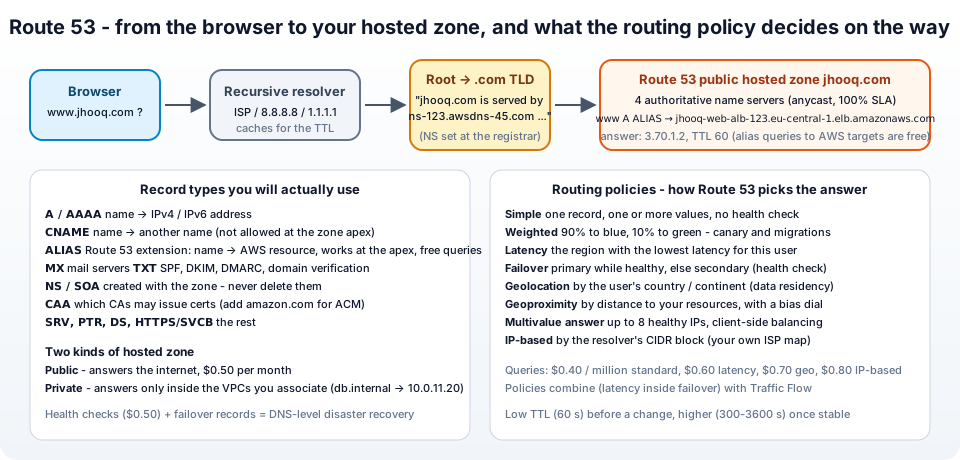
Route 53 is step 3 - the authoritative DNS for your domain - and optionally the registrar that holds step 2. The name comes from port 53. Four things make it more than "just DNS": it is anycast across AWS edge locations worldwide (fast and the only AWS service with a 100% SLA), it has alias records into AWS resources, health checks feed into the answers, and routing policies choose between answers per query.
2. Hosted zones - public and private
A hosted zone is a container of records for one domain and its subdomains -
- Public hosted zone - answers queries from the internet. Created for
jhooq.com, it gets four NS records (the name servers that must go to the registrar) and one SOA record. $0.50 per month. - Private hosted zone - answers only from the VPCs you associate with it.
db.jhooq.internal → 10.0.11.20. Nobody outside can even see the names. Same price.
The same name can exist in both - split-horizon DNS - api.jhooq.com resolving to a private IP inside the VPC and to the public ALB outside.
3. Record types you will actually use
From the supported record types, the ones that matter -
| Type | Maps | Example |
|---|---|---|
| A | name → IPv4 address | www A 3.70.1.2 |
| AAAA | name → IPv6 address | www AAAA 2a05:d014::1 |
| CNAME | name → another name | blog CNAME myblog.ghost.io - not allowed at the zone apex jhooq.com |
| Alias (Route 53 extension, on A/AAAA) | name → AWS resource | jhooq.com A ALIAS → the ALB - works at the apex |
| MX | mail servers, with priority | jhooq.com MX 10 inbound-smtp.eu-central-1.amazonaws.com |
| TXT | free text - SPF, DKIM, DMARC, domain verification | jhooq.com TXT "v=spf1 include:amazonses.com -all" |
| NS | name servers of the zone or a delegated subdomain | created with the zone |
| SOA | zone authority and timers | created with the zone |
| CAA | which CAs may issue certificates | jhooq.com CAA 0 issue "amazon.com" - needed for ACM, Part-16 if you use CAA at all |
| SRV, PTR, NAPTR, DS, HTTPS/SVCB, TLSA, SSHFP | the rest | service discovery, reverse DNS, DNSSEC delegation |
Every record has a TTL in seconds - how long resolvers may cache it. Low (60) when you plan a change, higher (300-3600) when stable; alias records inherit the TTL of the target.
4. Alias vs CNAME
The question that comes up in every interview. From the choosing between alias and non-alias records page -
| CNAME | Alias | |
|---|---|---|
| Points to | any DNS name | AWS resources: ELB, CloudFront, API Gateway, S3 website, VPC endpoint, Global Accelerator, Elastic Beanstalk, another record in the same zone |
At the zone apex (jhooq.com) | not allowed (DNS standard) | allowed |
| How it resolves | two lookups - the CNAME, then the target | Route 53 resolves the target itself and returns the IPs in one answer |
| Queries billed | yes | free when the target is an AWS resource |
| Health | none | Evaluate target health - can follow the ALB's health |
| TTL | you set it | inherited from the target |
Rule - alias for anything in AWS, CNAME for anything outside. The alias is also why you never hard-code an ALB's IP addresses: they change, and the alias follows.
5. Step 1 - Create a hosted zone and move the domain to Route 53
If you buy the domain in Route 53 (Registered domains → Register domains) the hosted zone is created for you and the NS records are already set - skip to Step 2. If the domain lives at another registrar (GoDaddy, Namecheap, Google Domains ...) you have two options: keep the registrar and just use Route 53 as the DNS, or transfer the registration too. The DNS move is the important one -
- Route 53 → Hosted zones → Create hosted zone - Domain name
jhooq.com, Type Public hosted zone, Create. - Open the zone - it has an NS record with four name servers and an SOA. Copy the four names.
- Recreate your existing records in the new zone first - MX for mail, TXT for SPF/DKIM, any CNAMEs - otherwise mail stops the moment you switch.
dig jhooq.com ANY @your-old-dnsor the registrar's DNS page lists them. (The migrating DNS guide has the full checklist.) - A day before the switch, lower the TTLs of important records at the old provider so caches expire fast.
- At the registrar, replace the name servers with the four Route 53 ones. Propagation takes minutes to 48 hours as TLD caches expire.
- Verify -
dig +short NS jhooq.comshows the awsdns servers;dig www.jhooq.com @ns-123.awsdns-45.comanswers from Route 53.
If the domain is registered in Route 53 and the hosted zone was ever deleted and recreated, the registrar-side NS records will not match the new zone - Registered domains → the domain → Name servers must list the zone's NS values. That mismatch is the number one "Route 53 does not resolve" ticket.
6. Step 2 - Point the domain at the Application Load Balancer
In the hosted zone, Create record (routing traffic to an ELB) -
- Record name - leave empty for the apex
jhooq.com. Record type - A. - Toggle Alias on. Route traffic to → Alias to Application and Classic Load Balancer → region
eu-central-1→ pickjhooq-web-alb. (CloudFront, API Gateway, S3 website endpoints and the rest are in the same dropdown.) - Routing policy - Simple. Evaluate target health - Yes.
- Add another record - Record name
www, same alias target - or a CNAMEwww → jhooq.com; alias is cleaner. - Create records.
Test -
1dig +short jhooq.com
2# 3.70.1.2
3# 18.195.3.4           <- one per ALB AZ
4dig +short www.jhooq.com
5curl -I http://jhooq.com/
HTTPS needs a certificate on the ALB - that is Part-16, where this exact record also validates the certificate. For a CloudFront distribution (this blog), the alias target is the distribution's d123.cloudfront.net name, and an AAAA alias gives you IPv6 for free.
7. Routing policies - simple, weighted, latency, failover, geolocation, geoproximity, multivalue, IP-based
Each record has a routing policy that decides which value to return when several records share a name -
- Simple - one record, one or more values returned in random order to the client. No health checks. The default.
- Weighted - several records with the same name, each with a weight 0-255; Route 53 answers proportionally.
web-v1weight 90,web-v2weight 10 = a 10% canary; weight 0 takes a record out of rotation. Each can have a health check. - Latency - a record per region; Route 53 answers with the region that has the lowest latency from the user's resolver (measured by AWS, not geography). The standard way to run an app in two regions.
- Failover - a primary and a secondary record; primary is returned while its health check passes, else the secondary (an S3 static "we are down" page, or a DR region). Active-passive DR in two records.
- Geolocation - by the country or continent of the user (from the resolver's IP) - EU users to Frankfurt for data residency, Indian users to Mumbai, a default record for everyone else. Routes by location, not by speed.
- Geoproximity - by distance to your resources, with a bias value to pull more or less traffic towards one region. Needs Traffic Flow for complex setups.
- Multivalue answer - up to 8 healthy records returned per query, each with its own health check - cheap client-side load balancing without an ELB.
- IP-based - you supply CIDR blocks (your ISP map) and which record each gets - for when you know better than latency measurements.
Policies nest with Traffic Flow (a visual policy editor, $50 per policy record per month): failover on the outside, latency inside each half. For most applications the real-world set is alias + simple for the site, weighted for a migration, failover for DR.
8. Health checks and DNS failover
A health check has checkers in many AWS regions probe an endpoint; a record with a health check is only returned while the check passes. Health checks → Create health check -
- Name
jhooq-web-primary. What to monitor - Endpoint (an IP or domain name), or Status of other health checks (calculated), or State of CloudWatch alarm (for private resources that checkers cannot reach). - Specify endpoint by domain name
jhooq.com, protocol HTTPS, port 443, Path/health. - Advanced - Request interval standard 30 s (fast 10 s costs extra), Failure threshold 3, optional string matching in the body, latency graphs, invert.
- Optional SNS alarm when it fails. Create.
Then DNS failover: two records named app.jhooq.com with routing policy Failover - Primary alias → ALB (health check or Evaluate target health), Secondary alias → an S3 static website bucket or a second region's ALB. When the checkers (a majority of ~16 locations) see failures past the threshold, the primary disappears from answers within about a minute plus TTL. For alias records to AWS resources you often do not need a separate health check at all - Evaluate target health = Yes uses the load balancer's own target health. Health checks cost $0.50 per month for AWS endpoints; up to 50 on AWS endpoints are free.
9. Private hosted zones for internal names
Create hosted zone → Type: Private hosted zone → VPCs to associate → jhooq-vpc in eu-central-1 (add more VPCs and regions later; cross-account association works through the CLI). Requirements: the VPC has DNS hostnames and DNS resolution enabled (Part-5).
Then records like db.jhooq.internal A 10.0.11.20 or cache CNAME jhooq-redis.abc.euc1.cache.amazonaws.com. Instances in the VPC resolve them through the VPC's own resolver (10.0.0.2, the "plus-two" address); nothing outside the VPC can. The use cases - stable names for private IPs that change, service names across accounts, and the private side of split-horizon DNS for the ALB (internal clients reach api.jhooq.com on the internal load balancer). Interface VPC endpoints (Part-19) create private hosted zones for you behind the scenes.
10. Route 53 Resolver, query logging and DNSSEC in brief
- Route 53 Resolver is the VPC's DNS server. Inbound endpoints let your on-premises DNS resolve private hosted zone names through the VPN; outbound endpoints with forwarding rules send
corp.example.comqueries from the VPC to your on-premises DNS. $0.125 per ENI-hour each. Resolver DNS Firewall blocks resolution of malicious domains from the VPC. - Query logging - public zone query logs to CloudWatch Logs (who asks what), and Resolver query logs for VPC-side resolution - useful for security investigations.
- DNSSEC - signs your zone with a KMS key so resolvers can verify answers were not forged. Enable signing on the zone, then add the DS record at the registrar (Route 53 does it for you for domains it registers). No Route 53 charge, only KMS.
11. The AWS CLI equivalents
 1# hosted zone
 2aws route53 create-hosted-zone --name jhooq.com --caller-reference "$(date +%s)" \
 3  --query 'DelegationSet.NameServers'
 4
 5# alias record to an ALB (hosted zone ID of the ALB comes from describe-load-balancers)
 6ZONE=Z0123456789ABCDEFGHIJ
 7ALB_DNS=jhooq-web-alb-1234567890.eu-central-1.elb.amazonaws.com
 8ALB_ZONE=Z215JYRZR1TBD5     # eu-central-1 ALB hosted zone id
 9aws route53 change-resource-record-sets --hosted-zone-id "$ZONE" --change-batch "{
10  \"Changes\": [{ \"Action\": \"UPSERT\", \"ResourceRecordSet\": {
11    \"Name\": \"jhooq.com\", \"Type\": \"A\",
12    \"AliasTarget\": { \"HostedZoneId\": \"$ALB_ZONE\", \"DNSName\": \"$ALB_DNS\", \"EvaluateTargetHealth\": true }
13  }}]}"
14
15# plain record with TTL
16aws route53 change-resource-record-sets --hosted-zone-id "$ZONE" --change-batch '{
17  "Changes": [{ "Action": "UPSERT", "ResourceRecordSet": {
18    "Name": "blog.jhooq.com", "Type": "CNAME", "TTL": 300,
19    "ResourceRecords": [{ "Value": "myblog.ghost.io" }] } }]}'
20
21aws route53 list-resource-record-sets --hosted-zone-id "$ZONE" --output table
22aws route53 get-change --id /change/C0123456789   # INSYNC when propagated to all Route 53 servers (~60 s)
23
24# health check
25aws route53 create-health-check --caller-reference "$(date +%s)" \
26  --health-check-config Type=HTTPS,FullyQualifiedDomainName=jhooq.com,Port=443,ResourcePath=/health,RequestInterval=30,FailureThreshold=3
Change batches are atomic - all records in one call change together, which is how this blog's DNS workflow applies a whole JSON file at once. Terraform: aws_route53_zone, aws_route53_record (with an alias {} block), aws_route53_health_check; the Google Cloud counterpart is Cloud DNS, with the same record model.
12. What Route 53 costs
From the pricing page -
| Item | Price |
|---|---|
| Hosted zone | $0.50 per month for the first 25, $0.10 beyond (not charged if deleted within 12 hours) |
| Standard queries | $0.40 per million (first billion per month), $0.20 beyond |
| Latency-based queries | $0.60 per million |
| Geolocation / geoproximity queries | $0.70 per million |
| IP-based queries | $0.80 per million |
| Alias queries to AWS resources | free |
| Health checks | $0.50 per month (AWS endpoint, up to 50 free), $0.75 non-AWS, +$1-2 per optional feature (fast interval, string match, HTTPS, latency) |
| Resolver endpoints | $0.125 per ENI-hour |
| Traffic Flow policy record | $50 per month |
| DNSSEC | KMS charges only |
| Domain registration | per TLD - see the price list; .com is in the usual $14-15 per year range |
A small site - one zone, alias records, a couple of million queries - is well under $2 a month.
13. Common Route 53 and DNS errors and how to fix them
1. The domain does not resolve at all / SERVFAIL / NXDOMAIN for everything - The NS records at the registrar do not match the hosted zone (zone recreated, or a leftover NS delegation). Compare dig +short NS jhooq.com (what the world sees) with the NS record in the zone; fix at the registrar. If the domain is registered in Route 53, fix under Registered domains → Name servers.
2. RRSet of type CNAME with DNS name jhooq.com. is not permitted at apex in zone jhooq.com. - The DNS standard forbids CNAME at the apex. Use an alias A record.
3. Changes do not show up - Caching. Check directly against the authoritative server, dig www.jhooq.com @ns-123.awsdns-45.com; if that is right, wait for the old TTL to expire at resolvers. get-change must say INSYNC.
4. www works but the bare domain does not (or vice versa) - Two separate records. Create both, or an alias from one to the other.
5. Health check fails although the site works in the browser - Checkers come from the public internet from many AWS IPs; a WAF geo/rate rule (Part-11) or security group blocks them, the path returns a redirect (3xx counts as failure unless configured), or the check is HTTP while the site forces HTTPS. Allow the Route 53 health checker IP ranges and check /health returns a plain 200.
6. Private zone names resolve to nothing from an instance - DNS hostnames/resolution disabled on the VPC, the VPC is not associated with the zone, or the instance uses a custom resolver (/etc/resolv.conf) instead of the VPC's .2 address.
7. InvalidChangeBatch: ... but it already exists - Using CREATE on an existing record. Use UPSERT.
8. ACM certificate stuck in Pending validation - The validation CNAME was created in the wrong zone (a duplicate hosted zone for the same domain is a classic), or a CAA record forbids Amazon. See Part-16.
9. Mail broke after moving DNS - MX/SPF/DKIM records were not recreated before the NS switch. Add them now; the TTL trick in Step 1 keeps the outage short next time.
10. Alias record to an ALB in another account or region not offered in the dropdown - Alias targets must be in the same account; cross-account works via the CLI with the target's hosted zone ID, and cross-region ALB aliases work the same way (pick the region in the dropdown).
14. Conclusion
To summarise Part-15 -
- Route 53 is the authoritative DNS (and optionally the registrar) for your domain; a public hosted zone answers the internet, a private hosted zone answers your VPCs.
- Alias records point at AWS resources, work at the zone apex, follow the target's changing IPs, and their queries are free - use them for every ALB, CloudFront and API Gateway; CNAME only for external names.
- Moving a domain in is create zone → recreate records → lower TTLs → swap NS at the registrar → verify with dig.
- Routing policies turn DNS into a traffic tool - weighted for canaries, latency for multi-region, failover with health checks for DR, geolocation for residency.
- It costs $0.50 per zone and cents per million queries - and alias queries nothing.
The official references are the Route 53 Developer Guide, routing policies, alias vs non-alias and DNS failover. The site now answers on its real name over HTTP - Part-16 adds the free certificate for HTTPS.
More videos on this topic - how the internet finds your website - what DNS is, in ten minutes -
AWS step by step series -
- Part-1 : AWS IAM user - create a user, group, policy, access keys and MFA
- Part-2 : AWS Organizations - multi-account setup, OUs and SCPs
- Part-3 : AWS assume IAM role - trust policy, switch role in console and CLI
- Part-4 : How to launch an EC2 instance - key pair, security group, SSH
- Part-5 : AWS VPC - public and private subnets, Internet Gateway, NAT Gateway, route tables
- Part-8 : EC2 launch template - versions, default version, source template, SSM parameter AMI
- Part-10 : EC2 Auto Scaling - launch template, Auto Scaling group, target tracking, ALB
- Part-11 : AWS WAF - web ACL, managed rules, rate limiting, geo blocking
- Part-12 : AWS VPC Peering - connect two VPCs, routes, security groups, DNS
- Part-13 : AWS Transit Gateway - hub-and-spoke for many VPCs and on-premises
- Part-14 : AWS NAT Gateway deep dive - public vs private, limits, cost, troubleshooting
- Part-15 : Amazon Route 53 - hosted zones, records, alias, routing policies, health checks
- Part-16 : AWS security groups - inbound and outbound rules, stateful, referencing, quotas
- Part-16 : AWS Certificate Manager - free TLS certificates for ALB, CloudFront and API Gateway
- Part-17 : AWS Lambda - function URLs, environment variables and layers
- Part-18 : Network Load Balancer - setup, and ALB vs NLB
- Part-19 : VPC endpoints - gateway and interface endpoints (PrivateLink) instead of NAT
- Part-20 : AWS PrivateLink - publish your own service with an endpoint service and NLB
- Part-20 : Amazon EBS volumes - types, attach, mount, resize, snapshots, encryption
- Part-21 : VPC Flow Logs - CloudWatch Logs, S3, record format, Logs Insights, Athena
- Part-21 : EC2 Spot Instances - pricing, interruptions, mixed instances groups
- Part-24 : AWS Control Tower - landing zone, controls, Account Factory, Identity Center
Networking fundamentals -
- What is a VPC and a subnet? AWS networking in five minutes
- What is CIDR? Calculate IP ranges for VPCs and subnets
- What is NAT? Static NAT, dynamic NAT and PAT explained
More AWS guides -
- What is AWS CloudFormation? Templates, stacks, change sets, drift, StackSets
- Learn AWS S3 - the complete course
- AWS API Gateway - REST API with Lambda, authorizers, Terraform
- AWS Advanced Networking Specialty (ANS-C01) - course companion
- AWS ECS and Fargate - how to deploy a Docker container
- AWS S3 - how to host a static website
- Terraform create EC2 instance on AWS
- Terraform AWS IAM - users, roles and policies
- Terraform and AWS multi-account setup
- Terraform - setting up an ALB and SSL
Posts in this series
- Amazon EBS Volumes Step by Step - Volume Types Compared (gp3, gp2, io2 Block Express, st1, sc1), Create, Attach, Format and Mount a Volume, Resize Without Downtime, Snapshots, Encryption, Multi-Attach, Pricing and Troubleshooting (AWS Part-20)
- Amazon Route 53 Step by Step - Hosted Zones, Record Types, Alias Records, Point a Domain at an ALB, Routing Policies (Weighted, Latency, Failover, Geolocation), Health Checks, Private Zones and Pricing (AWS Part-15)
- AWS Advanced Networking - Free 8-Hour Full Course Companion (VPC, NAT Gateway, Bastion, ALB, NLB, WAF, VPC Peering, Transit Gateway, VPC Endpoints and PrivateLink, Route 53, ACM) with Timestamps and the ANS-C01 Exam Facts
- AWS Assume IAM Role Step by Step - Trust Policy vs Permissions Policy, Switch Role in the Console, aws sts assume-role, CLI Profiles, Cross-Account Access, MFA and External ID (AWS Part-3)
- AWS Certificate Manager (ACM) Step by Step - Request a Free TLS Certificate, DNS Validation with Route 53, Attach It to an ALB HTTPS Listener, Redirect HTTP to HTTPS, CloudFront and API Gateway, Auto-Renewal, Exportable Certificates and ACME (AWS Part-16)
- AWS Control Tower Step by Step - Set Up a Landing Zone, Security OU with Log Archive and Audit Accounts, Controls (Guardrails), Region Deny, IAM Identity Center, Account Factory and Enrolling Existing Accounts (AWS Part-24)
- AWS EC2 Auto Scaling Step by Step - Launch Template, Auto Scaling Group Across Two AZs, Target Tracking Policy, Application Load Balancer, Health Checks and Instance Refresh (AWS Part-10)
- AWS EC2 Launch Template Step by Step - Create a Template, Versions and the Default Version, Source Template, Create From a Running Instance, Systems Manager Parameter Instead of an AMI ID, Launch Templates vs Launch Configurations, IAM Guardrails, CLI and Terraform (AWS Part-8 and Part-17)
- AWS EC2 Spot Instances Step by Step - How Spot Pricing Works, Launch a Spot Instance, Interruptions and the Two-Minute Notice, Rebalance Recommendations, Stop vs Hibernate vs Terminate, Spot in Auto Scaling Mixed Instances Groups, Billing Rules, Best Practices, CLI and Terraform (AWS Part-21)
- AWS IAM User Step by Step - Create a User, User Group, Attach Policies, Access Keys, MFA and Sign-in URL (AWS Part-1)
- AWS Lambda Step by Step - Create a Function, Function URL (HTTPS Endpoint Without API Gateway), Environment Variables, Lambda Layers for Python Dependencies, Versions and Aliases, Limits, Pricing and Errors (AWS Part-17)
- AWS NAT Gateway Deep Dive - How It Works, Public vs Private NAT Gateway, Setup Step by Step, Limits (55,000 Connections, 100 Gbps), CloudWatch Metrics, Cost Optimisation, NAT Instance Comparison and Troubleshooting (AWS Part-14)
- AWS Network Load Balancer Step by Step - Create an NLB with Static IPs, Target Groups, TCP and TLS Listeners, Security Groups, Client IP Preservation, Cross-Zone Load Balancing, and ALB vs NLB Explained (AWS Part-18)
- AWS Organizations Step by Step - Multi-Account Setup, Organizational Units, Service Control Policies (SCPs), Consolidated Billing and Identity Center (AWS Part-2)
- AWS PrivateLink Step by Step - Publish Your Own Service with a VPC Endpoint Service and Network Load Balancer, Allow Consumers, Accept Connections, Private DNS Name, Cross-Account and Cross-Region, Pricing and Troubleshooting (AWS Part-20)
- AWS Security Groups Step by Step - Inbound and Outbound Rules, Stateful Behaviour, Referencing Security Groups, the Three-Tier ALB-Web-DB Pattern, Quotas, Security Group vs Network ACL, CLI and Terraform (AWS Part-16)
- AWS Transit Gateway Step by Step - Connect Many VPCs and On-Premises Through One Hub, VPC Attachments, Transit Gateway Route Tables, Associations and Propagations, Isolation, Peering, Pricing (AWS Part-13)
- AWS VPC Endpoints Step by Step - Gateway Endpoints for S3 and DynamoDB, Interface Endpoints (PrivateLink) for SSM, ECR and Other Services, Private DNS, Endpoint Policies, Security Groups, Cost vs NAT Gateway, and Troubleshooting (AWS Part-19)
- AWS VPC Flow Logs Step by Step - Enable Flow Logs for a VPC, Subnet or Network Interface, Publish to CloudWatch Logs or S3, Read a Flow Log Record Field by Field, Custom Formats, Query with Logs Insights and Athena, Find Rejected Traffic, Pricing and Limitations (AWS Part-21)
- AWS VPC Peering Step by Step - Connect Two VPCs (Same or Different Account and Region), Accept the Request, Add Routes, Security Groups, DNS Resolution, Test with EC2, and the Limits (AWS Part-12)
- AWS VPC Step by Step - Create a VPC with Public and Private Subnets, Internet Gateway, NAT Gateway and Route Tables (and Test It with EC2) (AWS Part-5)
- AWS WAF Step by Step - Create a Web ACL, Attach It to an ALB or API Gateway, AWS Managed Rules, Rate-Based Rules, Geo Blocking, IP Sets, Count Mode and Logging (AWS Part-11)
- How to Launch an EC2 Instance on AWS Step by Step - AMI, Instance Type, Key Pair, Security Group, Connect with SSH or EC2 Instance Connect, Stop vs Terminate (AWS Part-4)
- What is an AWS VPC and a Subnet? Virtual Private Cloud Explained in Five Minutes (Region, Availability Zones, Public vs Private Subnets, Gateways, Route Tables)
- What is AWS CloudFormation? Templates, Stacks and Change Sets Explained, Template Anatomy Section by Section, Create Your First Stack Step by Step, Update With a Change Set, Drift Detection, Nested Stacks and StackSets, Quotas, Pricing, CLI, and CloudFormation vs Terraform
- What is CIDR (Classless Inter-Domain Routing)? How to Calculate IP Ranges for VPCs and Subnets, with Examples (/8, /16, /24, /28, /32)
- What is NAT (Network Address Translation)? How It Works, Static NAT vs Dynamic NAT vs PAT, the Translation Table, and Where NAT Shows Up in AWS
- AWS API Gateway Tutorial - REST API with Lambda Proxy and Non-Proxy Integration, Request Validation, HTTP API vs REST API, Resource Policies, Lambda Authorizers and Terraform
- Learn AWS S3 - The Complete Course (Buckets, Objects, Storage Classes, Lifecycle, Versioning, Security Defaults, Bucket Policies, Static Hosting, CLI and Terraform)
- How to release(delete) Elastic IP from AWS?
- Fix docker login 'error saving credentials: error storing credentials - err: exit status 1' (AWS ECR on macOS, Windows, Linux and WSL)