AWS PrivateLink Step by Step - Publish Your Own Service with a VPC Endpoint Service and Network Load Balancer, Allow Consumers, Accept Connections, Private DNS Name, Cross-Account and Cross-Region, Pricing and Troubleshooting (AWS Part-20)
In Part-19 we were the consumer - we created interface endpoints to reach AWS services privately. This Part-20 flips the table: we are the provider. We have an application in our VPC and want other VPCs - other teams, other accounts, customers - to reach it privately, without VPC peering, without exposing it to the internet, and without caring whether their CIDR overlaps ours. That is AWS PrivateLink with a VPC endpoint service: our service sits behind a Network Load Balancer (Part-18), we register the NLB as an endpoint service, and each consumer gets an interface endpoint in their own VPC that leads straight to it.
It is exactly how AWS exposes its own services to your VPC, how SaaS vendors on the Marketplace deliver private connectivity, and how large organisations share internal APIs across hundreds of accounts. Checked against the current PrivateLink documentation, including cross-region endpoint services, which did not exist when I recorded the video.
Table of Content
- Why PrivateLink instead of peering or Transit Gateway
- How an endpoint service works - provider, NLB, service name, consumer endpoint
- Step 1 - The provider VPC and the application behind an internal NLB
- Step 2 - Create the endpoint service
- Step 3 - Allow the consumer principals
- Step 4 - The consumer creates an interface endpoint to your service
- Step 5 - Accept the connection and test
- Step 6 - Add a private DNS name (domain verification)
- Getting the real client IP - proxy protocol v2
- Cross-account, cross-region, and selling on the Marketplace
- Who pays what
- The AWS CLI equivalents
- Common PrivateLink errors and how to fix them
- Conclusion
1. Why PrivateLink instead of peering or Transit Gateway
| VPC peering (Part-12) | Transit Gateway (Part-13) | PrivateLink | |
|---|---|---|---|
| What connects | two whole networks, both directions | many whole networks, routed | one service, consumer → provider only |
| Overlapping CIDRs | impossible | impossible | irrelevant - the consumer only sees an IP in its own subnet |
| Routes to maintain | in every VPC | VPC + TGW tables | none - it is DNS and an ENI |
| Exposure of the provider network | all of it (minus security groups) | all of it | only the NLB listener |
| Consumers | tens | thousands of VPCs | thousands of accounts, including ones you do not know (SaaS) |
| Cost model | free + data transfer | attachment-hours + GB | consumer pays endpoint-hours + GB |
PrivateLink is the answer when the requirement is "expose this service to those consumers, privately, and nothing else". It is not a replacement for peering when two teams need full network access between their VPCs.
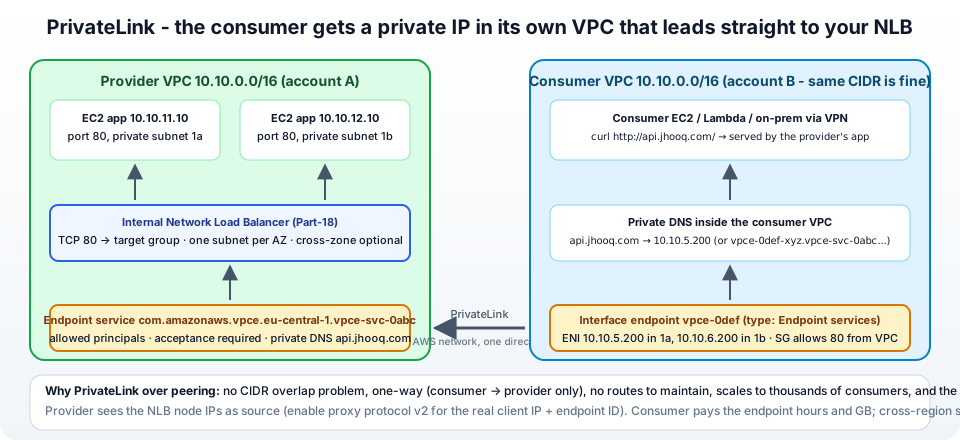
2. How an endpoint service works - provider, NLB, service name, consumer endpoint
From the PrivateLink concepts -
- The provider runs the application and puts a Network Load Balancer (or a Gateway Load Balancer for appliances) in front of it. Endpoint services require one of those two; an ALB can sit behind the NLB as its target.
- The provider creates an endpoint service from the NLB. AWS assigns a service name -
com.amazonaws.vpce.eu-central-1.vpce-svc-0123456789abcdef0- and the provider decides which principals may connect and whether connections need acceptance. - A consumer creates an interface endpoint of type Endpoint services with that service name, in the subnets of their choice. AWS creates endpoint network interfaces in the consumer VPC and, behind the scenes, a private connection to the provider's NLB in the same AZs.
- The consumer reaches the service through the endpoint's DNS names - the AWS-generated
vpce-...vpce-svc-....eu-central-1.vpce.amazonaws.com, or the provider's own private DNS name (api.jhooq.com) once verified. - Traffic flows one way - consumer to provider - over the AWS network; the provider's NLB sees the request arriving from the NLB's own node addresses (unless proxy protocol is on).
The Availability Zone matters: the endpoint service is available in the AZs where the NLB has subnets, and consumers can only create endpoint ENIs in AZs they share with the provider - compared by AZ ID (euc1-az2), because eu-central-1a can map to different physical zones in different accounts.
3. Step 1 - The provider VPC and the application behind an internal NLB
Provider side, in jhooq-vpc (10.0.0.0/16, Part-5) -
- Two instances running the nginx page from the Auto Scaling launch template, in the private subnets
jhooq-private-1aandjhooq-private-1b, security groupjhooq-app-sg. - A target group
jhooq-pl-tg, type Instances, TCP 80, health check HTTP/health, both instances registered. - An internal Network Load Balancer
jhooq-pl-nlb- Scheme Internal, mappings in both private subnets, security groupjhooq-nlb-sg(allow TCP 80 from10.0.0.0/8- or, for PrivateLink traffic specifically, see the note below), listener TCP 80 →jhooq-pl-tg. Full build in Part-18. jhooq-app-sgallows TCP 80 fromjhooq-nlb-sg.
Two PrivateLink-specific notes from the prerequisites: the NLB should have a subnet in every AZ where consumers will connect (at least two), and if the NLB has a security group, its inbound rules must allow the consumer client IPs - which you do not know for arbitrary consumers - so either allow the listener port from 0.0.0.0/0 on the NLB (it is internal; only PrivateLink and your VPC can reach it anyway) or turn off Enforce inbound rules on PrivateLink traffic on the NLB's Security tab. From a bastion in the provider VPC, curl http://<nlb-dns-name>/ must work before you continue.
4. Step 2 - Create the endpoint service
VPC → Endpoint services → Create endpoint service (docs) -
- Name tag
jhooq-api-service. - Load balancer type - Network. Available load balancers - tick
jhooq-pl-nlb. Details of selected load balancers → Included Availability Zones shows where the service will be available. (One NLB belongs to at most one endpoint service; a service can have several NLBs for capacity.) - Service Regions - optional; add other regions to let consumers there connect (section 10).
- Require acceptance for endpoint - tick Acceptance required - every consumer connection waits for you to approve it. Leave it off only for fully automated internal setups.
- Enable private DNS name - leave off for now; we add it in section 8 after verifying the domain.
- Supported IP address types - IPv4.
- Create.
The service appears with Service name com.amazonaws.vpce.eu-central-1.vpce-svc-0123456789abcdef0, state Available. Copy the service name - it is what consumers need, together with the list of AZs.
5. Step 3 - Allow the consumer principals
By default nobody can connect. Select the service → Allow principals tab → Allow principals → enter ARNs (manage permissions) -
- a whole account:
arn:aws:iam::222222222222:root - one role or user:
arn:aws:iam::222222222222:role/NetworkAdmin - an organization or OU:
arn:aws:organizations::111111111111:organization/o-abc123/arn:aws:organizations::111111111111:ou/o-abc123/ou-xyz - everyone (public SaaS):
*- combined with acceptance required, so you still approve each one
The principal is checked when the consumer creates the endpoint. Removing a principal later does not disconnect existing endpoints - reject or delete the connection for that.
6. Step 4 - The consumer creates an interface endpoint to your service
Now switch hats (and, in the real world, accounts). In the consumer VPC - jhooq-consumer-vpc, which can deliberately use the same 10.0.0.0/16 to prove overlap does not matter - with an instance in a private subnet: VPC → Endpoints → Create endpoint -
- Name tag
to-jhooq-api. Type - Endpoint services that use NLBs and GWLBs. - Service name - paste
com.amazonaws.vpce.eu-central-1.vpce-svc-0123456789abcdef0→ Verify service. A green Service name verified means the principal is allowed; Service name could not be verified means it is not (or a typo). - VPC -
jhooq-consumer-vpc. Subnets - one per AZ that the service lists (the console only offers AZs you have in common). - IP address type IPv4. Security group -
consumer-vpce-sgallowing TCP 80 from the consumer VPC CIDR (the endpoint ENIs receive the traffic). - Create endpoint. State: Pending acceptance.
The consumer's Details tab shows the DNS names of the endpoint - a regional one and one per AZ -
1vpce-0def4567890abcdef-abcd1234.vpce-svc-0123456789abcdef0.eu-central-1.vpce.amazonaws.com
2vpce-0def4567890abcdef-abcd1234-eu-central-1a.vpce-svc-0123456789abcdef0.eu-central-1.vpce.amazonaws.com
7. Step 5 - Accept the connection and test
Provider side: Endpoint services → jhooq-api-service → Endpoint connections tab shows the request from account 222222222222 with state Pending acceptance → select → Actions → Accept endpoint connection request → confirm. (Rejecting or later deleting the connection from here cuts the consumer off instantly.) The consumer's endpoint goes Pending → Available in a minute.
Consumer side, from the instance -
1curl -s http://vpce-0def4567890abcdef-abcd1234.vpce-svc-0123456789abcdef0.eu-central-1.vpce.amazonaws.com/
2# <h1>jhooq web - i-0aaa in eu-central-1a</h1>
3
4dig +short vpce-0def4567890abcdef-abcd1234.vpce-svc-0123456789abcdef0.eu-central-1.vpce.amazonaws.com
5# 10.0.11.200      <- the endpoint ENI in the CONSUMER vpc
6# 10.0.12.200
The consumer talks to a private IP in its own subnet; the provider's application answers; neither VPC has a route to the other. On the provider side, the nginx access log shows the request coming from the NLB node's private IP, not from the consumer - that is section 9.
8. Step 6 - Add a private DNS name (domain verification)
Consumers do not want to hard-code vpce-0def...vpce.amazonaws.com. A private DNS name lets them use api.jhooq.com, and if your service also has a public endpoint under the same name, their code works unchanged inside and outside the VPC (the docs call this out as the main benefit). You must prove you own the domain first -
- Provider: Endpoint services →
jhooq-api-service→ Actions → Modify private DNS name → Associate a private DNS name with the service →api.jhooq.com→ Save. The Details tab now shows Domain verification name (_6e86v84tqgqubxbwii1m) and Domain verification value (vpce:l6p0ERxlTt45jevFwOCp), statuspendingVerification. - In the public hosted zone for
jhooq.com(Part-15) create a TXT record - Record name_6e86v84tqgqubxbwii1m.jhooq.com, Value"vpce:l6p0ERxlTt45jevFwOCp", TTL 1800. (Verifyingjhooq.comcovers every subdomain, so one TXT servesapi.jhooq.comandmy.service.jhooq.com.) - Check it published -
nslookup -type=TXT _6e86v84tqgqubxbwii1m.jhooq.com ns-123.awsdns-45.com- then Actions → Verify domain ownership for private DNS name. Status becomesverified(minutes; DNS propagation can take longer). - Consumer: select the endpoint → Actions → Modify private DNS name → Enable for this endpoint. Requirements on the consumer VPC: DNS hostnames and DNS resolution enabled. AWS creates a hidden private hosted zone in the consumer VPC with
api.jhooq.com CNAME → the endpoint's regional name.
1# on the consumer instance
2dig +short api.jhooq.com
3# 10.0.11.200
4curl -s http://api.jhooq.com/
Outside the consumer VPC api.jhooq.com still resolves to whatever public record you keep - split-horizon by PrivateLink. One private DNS name per endpoint service; not supported for Gateway Load Balancer endpoints.
9. Getting the real client IP - proxy protocol v2
With PrivateLink the provider's targets see the NLB node IPs as the source, so logs, rate limits and allow-lists lose the client. The fix is proxy protocol v2 on the NLB target group - Target groups → jhooq-pl-tg → Attributes → Edit → Proxy protocol v2 → on. The NLB then prepends a binary header to every TCP connection carrying the consumer's private IP and, as a PrivateLink extension (TLV type 0xEA), the endpoint ID (vpce-0def...) - so you know which consumer is calling, not just which IP (several consumers may have the same 10.0.11.x). Your application or proxy must understand the header - nginx (proxy_protocol on the listen directive and $proxy_protocol_addr), HAProxy, Envoy and most load balancers do; a raw application will see garbage at the start of the stream, so turn it on only when the targets are ready.
10. Cross-account, cross-region, and selling on the Marketplace
- Cross-account is the normal case - we just did it. Allowed principals plus acceptance give you the control; AWS RAM is not involved (that is for resource configurations / resource endpoints, the newer PrivateLink flavour for single resources without a load balancer).
- Cross-region - since late 2024 an endpoint service can list Service Regions; a consumer in
us-east-1creates an endpoint with Enable Cross Region endpoint and the consumer VPC never needs anything ineu-central-1. The provider pays a per-remote-region hourly fee, the consumer pays endpoint hours, data processing and inter-region data transfer; no inter-region VPC peering or TGW needed. - Marketplace / SaaS - PrivateLink is how vendors like Snowflake, Datadog and MongoDB Atlas offer "private connectivity". Technically identical to this post with
*as the allowed principal and acceptance on, plus the private DNS name so customers useyour-tenant.vendor.com. The SaaS access guide describes the consumer side.
11. Who pays what
From the PrivateLink pricing -
- Consumer - $0.01 per endpoint ENI per hour (so per AZ) plus $0.01 per GB processed (cheaper above 1 PB). Two AZs, 100 GB a month ≈ $15.60.
- Provider - the NLB ($0.0225 per hour plus NLCUs, Part-18) and the application; the endpoint service itself has no charge, except a per-remote-region hourly fee if you enable cross-region access.
- Nobody pays data transfer between the VPCs for same-region PrivateLink beyond the processing fee; cross-AZ charges apply if the consumer uses an endpoint ENI in one AZ to reach a provider target in another (keep AZs aligned, or enable NLB cross-zone and accept the charge).
12. The AWS CLI equivalents
 1# provider: endpoint service from the NLB, acceptance required
 2SVC=$(aws ec2 create-vpc-endpoint-service-configuration \
 3  --network-load-balancer-arns "$NLB_ARN" --acceptance-required \
 4  --tag-specifications 'ResourceType=vpc-endpoint-service,Tags=[{Key=Name,Value=jhooq-api-service}]' \
 5  --query ServiceConfiguration.ServiceId --output text)
 6aws ec2 describe-vpc-endpoint-service-configurations --service-ids "$SVC" --query 'ServiceConfigurations[0].ServiceName'
 7
 8# provider: allow a consumer account
 9aws ec2 modify-vpc-endpoint-service-permissions --service-id "$SVC" --add-allowed-principals arn:aws:iam::222222222222:root
10
11# consumer (account 222222222222): interface endpoint to the service
12aws ec2 create-vpc-endpoint --vpc-id vpc-0consumer --vpc-endpoint-type Interface \
13  --service-name com.amazonaws.vpce.eu-central-1.vpce-svc-0123456789abcdef0 \
14  --subnet-ids subnet-c1a subnet-c1b --security-group-ids sg-0cvpce
15
16# provider: accept
17aws ec2 describe-vpc-endpoint-connections --filters Name=service-id,Values="$SVC" --query 'VpcEndpointConnections[].[VpcEndpointId,VpcEndpointOwner,VpcEndpointState]' --output table
18aws ec2 accept-vpc-endpoint-connections --service-id "$SVC" --vpc-endpoint-ids vpce-0def4567890abcdef
19
20# provider: private DNS name + verification record values
21aws ec2 modify-vpc-endpoint-service-configuration --service-id "$SVC" --private-dns-name api.jhooq.com
22aws ec2 describe-vpc-endpoint-service-configurations --service-ids "$SVC" --query 'ServiceConfigurations[0].PrivateDnsNameConfiguration'
23aws ec2 start-vpc-endpoint-service-private-dns-verification --service-id "$SVC"
24
25# consumer: turn on private DNS for the endpoint
26aws ec2 modify-vpc-endpoint --vpc-endpoint-id vpce-0def4567890abcdef --private-dns-enabled
Terraform: aws_vpc_endpoint_service (network_load_balancer_arns, acceptance_required, allowed_principals, private_dns_name), aws_route53_record for the TXT, aws_vpc_endpoint on the consumer side with a second provider alias as in Terraform and AWS multi-account setup, and aws_vpc_endpoint_connection_accepter to approve.
13. Common PrivateLink errors and how to fix them
1. Service name could not be verified when the consumer creates the endpoint - The consumer's principal is not in Allow principals, the service name has a typo, or the region differs (the service name embeds the region). Add arn:aws:iam::<consumer-account>:root.
2. The endpoint stays Pending acceptance - Acceptance is required and the provider has not accepted. Provider: Endpoint connections → Accept. Consider auto-acceptance for internal consumers.
3. The endpoint is Available but curl times out - In order: the consumer endpoint security group allows the port from the consumer subnet? The provider NLB security group allows the port - from the consumer's client IPs, or Enforce inbound rules on PrivateLink traffic is off? The NLB targets are healthy? The consumer ENI is in an AZ where the NLB has a subnet?
4. Works from one consumer AZ, not from another - The NLB has no subnet in that AZ (the service lists its AZs); add the AZ to the NLB or enable cross-zone load balancing on it.
5. Rejected state - The provider rejected or later deleted the connection, or removed the NLB from the service. Ask the provider; the consumer must create a new endpoint after a fix.
6. Private DNS verification stuck at pendingVerification / failed - TXT record name wrong (the DNS provider appended the domain twice - add the trailing dot), value changed to lowercase, underscores not supported (omit the label and put the TXT on the apex), or not yet propagated. nslookup -type=TXT against the zone's own name server, then Verify domain ownership.
7. api.jhooq.com resolves to the public IP inside the consumer VPC - The consumer did not enable private DNS on the endpoint, or the consumer VPC has DNS hostnames/resolution off, or an existing private hosted zone for jhooq.com in that VPC overrides it.
8. The application logs show the NLB's IP for every request - Expected. Turn on proxy protocol v2 (section 9) and parse the header.
9. Garbage / 400 Bad Request right after enabling proxy protocol - The targets do not parse the proxy protocol header. Configure nginx/HAProxy for it, or turn it off.
10. You cannot associate the load balancer with more than one endpoint service - One NLB per endpoint service. Create a second NLB for a second service.
11. Cross-region endpoint creation fails - The provider did not add that region under Service Regions, or the consumer did not tick Enable Cross Region endpoint.
14. Conclusion
To summarise Part-20 -
- PrivateLink exposes one service privately to other VPCs and accounts: the provider puts it behind an internal NLB, creates an endpoint service, allows principals and accepts connections; each consumer creates an interface endpoint and gets a private IP in its own subnet - no peering, no routes, no CIDR conflicts, one-way traffic.
- The consumer uses the AWS-generated endpoint DNS name, or your private DNS name after a one-time TXT verification of the domain - which lets the same hostname work inside and outside the VPC.
- Targets see the NLB's IP; proxy protocol v2 carries the consumer's client IP and endpoint ID.
- It works cross-account natively, cross-region via Service Regions, and is the mechanism behind every "private connectivity" SaaS offer.
- The consumer pays endpoint-hours and GB; the provider pays for the NLB.
The official references are share your services through PrivateLink, create an endpoint service, manage DNS names and configure an endpoint service. With networking covered end to end, the series turns to governance at scale - Part-24, AWS Control Tower.
AWS step by step series -
- Part-1 : AWS IAM user - create a user, group, policy, access keys and MFA
- Part-2 : AWS Organizations - multi-account setup, OUs and SCPs
- Part-3 : AWS assume IAM role - trust policy, switch role in console and CLI
- Part-4 : How to launch an EC2 instance - key pair, security group, SSH
- Part-5 : AWS VPC - public and private subnets, Internet Gateway, NAT Gateway, route tables
- Part-8 : EC2 launch template - versions, default version, source template, SSM parameter AMI
- Part-10 : EC2 Auto Scaling - launch template, Auto Scaling group, target tracking, ALB
- Part-11 : AWS WAF - web ACL, managed rules, rate limiting, geo blocking
- Part-12 : AWS VPC Peering - connect two VPCs, routes, security groups, DNS
- Part-13 : AWS Transit Gateway - hub-and-spoke for many VPCs and on-premises
- Part-14 : AWS NAT Gateway deep dive - public vs private, limits, cost, troubleshooting
- Part-15 : Amazon Route 53 - hosted zones, records, alias, routing policies, health checks
- Part-16 : AWS security groups - inbound and outbound rules, stateful, referencing, quotas
- Part-16 : AWS Certificate Manager - free TLS certificates for ALB, CloudFront and API Gateway
- Part-17 : AWS Lambda - function URLs, environment variables and layers
- Part-18 : Network Load Balancer - setup, and ALB vs NLB
- Part-19 : VPC endpoints - gateway and interface endpoints (PrivateLink) instead of NAT
- Part-20 : AWS PrivateLink - publish your own service with an endpoint service and NLB
- Part-20 : Amazon EBS volumes - types, attach, mount, resize, snapshots, encryption
- Part-21 : VPC Flow Logs - CloudWatch Logs, S3, record format, Logs Insights, Athena
- Part-21 : EC2 Spot Instances - pricing, interruptions, mixed instances groups
- Part-24 : AWS Control Tower - landing zone, controls, Account Factory, Identity Center
Networking fundamentals -
- What is a VPC and a subnet? AWS networking in five minutes
- What is CIDR? Calculate IP ranges for VPCs and subnets
- What is NAT? Static NAT, dynamic NAT and PAT explained
More AWS guides -
- What is AWS CloudFormation? Templates, stacks, change sets, drift, StackSets
- Learn AWS S3 - the complete course
- AWS API Gateway - REST API with Lambda, authorizers, Terraform
- AWS Advanced Networking Specialty (ANS-C01) - course companion
- AWS ECS and Fargate - how to deploy a Docker container
- AWS S3 - how to host a static website
- Terraform create EC2 instance on AWS
- Terraform AWS IAM - users, roles and policies
- Terraform and AWS multi-account setup
- Terraform - setting up an ALB and SSL
Posts in this series
- Amazon EBS Volumes Step by Step - Volume Types Compared (gp3, gp2, io2 Block Express, st1, sc1), Create, Attach, Format and Mount a Volume, Resize Without Downtime, Snapshots, Encryption, Multi-Attach, Pricing and Troubleshooting (AWS Part-20)
- Amazon Route 53 Step by Step - Hosted Zones, Record Types, Alias Records, Point a Domain at an ALB, Routing Policies (Weighted, Latency, Failover, Geolocation), Health Checks, Private Zones and Pricing (AWS Part-15)
- AWS Advanced Networking - Free 8-Hour Full Course Companion (VPC, NAT Gateway, Bastion, ALB, NLB, WAF, VPC Peering, Transit Gateway, VPC Endpoints and PrivateLink, Route 53, ACM) with Timestamps and the ANS-C01 Exam Facts
- AWS Assume IAM Role Step by Step - Trust Policy vs Permissions Policy, Switch Role in the Console, aws sts assume-role, CLI Profiles, Cross-Account Access, MFA and External ID (AWS Part-3)
- AWS Certificate Manager (ACM) Step by Step - Request a Free TLS Certificate, DNS Validation with Route 53, Attach It to an ALB HTTPS Listener, Redirect HTTP to HTTPS, CloudFront and API Gateway, Auto-Renewal, Exportable Certificates and ACME (AWS Part-16)
- AWS Control Tower Step by Step - Set Up a Landing Zone, Security OU with Log Archive and Audit Accounts, Controls (Guardrails), Region Deny, IAM Identity Center, Account Factory and Enrolling Existing Accounts (AWS Part-24)
- AWS EC2 Auto Scaling Step by Step - Launch Template, Auto Scaling Group Across Two AZs, Target Tracking Policy, Application Load Balancer, Health Checks and Instance Refresh (AWS Part-10)
- AWS EC2 Launch Template Step by Step - Create a Template, Versions and the Default Version, Source Template, Create From a Running Instance, Systems Manager Parameter Instead of an AMI ID, Launch Templates vs Launch Configurations, IAM Guardrails, CLI and Terraform (AWS Part-8 and Part-17)
- AWS EC2 Spot Instances Step by Step - How Spot Pricing Works, Launch a Spot Instance, Interruptions and the Two-Minute Notice, Rebalance Recommendations, Stop vs Hibernate vs Terminate, Spot in Auto Scaling Mixed Instances Groups, Billing Rules, Best Practices, CLI and Terraform (AWS Part-21)
- AWS IAM User Step by Step - Create a User, User Group, Attach Policies, Access Keys, MFA and Sign-in URL (AWS Part-1)
- AWS Lambda Step by Step - Create a Function, Function URL (HTTPS Endpoint Without API Gateway), Environment Variables, Lambda Layers for Python Dependencies, Versions and Aliases, Limits, Pricing and Errors (AWS Part-17)
- AWS NAT Gateway Deep Dive - How It Works, Public vs Private NAT Gateway, Setup Step by Step, Limits (55,000 Connections, 100 Gbps), CloudWatch Metrics, Cost Optimisation, NAT Instance Comparison and Troubleshooting (AWS Part-14)
- AWS Network Load Balancer Step by Step - Create an NLB with Static IPs, Target Groups, TCP and TLS Listeners, Security Groups, Client IP Preservation, Cross-Zone Load Balancing, and ALB vs NLB Explained (AWS Part-18)
- AWS Organizations Step by Step - Multi-Account Setup, Organizational Units, Service Control Policies (SCPs), Consolidated Billing and Identity Center (AWS Part-2)
- AWS PrivateLink Step by Step - Publish Your Own Service with a VPC Endpoint Service and Network Load Balancer, Allow Consumers, Accept Connections, Private DNS Name, Cross-Account and Cross-Region, Pricing and Troubleshooting (AWS Part-20)
- AWS Security Groups Step by Step - Inbound and Outbound Rules, Stateful Behaviour, Referencing Security Groups, the Three-Tier ALB-Web-DB Pattern, Quotas, Security Group vs Network ACL, CLI and Terraform (AWS Part-16)
- AWS Transit Gateway Step by Step - Connect Many VPCs and On-Premises Through One Hub, VPC Attachments, Transit Gateway Route Tables, Associations and Propagations, Isolation, Peering, Pricing (AWS Part-13)
- AWS VPC Endpoints Step by Step - Gateway Endpoints for S3 and DynamoDB, Interface Endpoints (PrivateLink) for SSM, ECR and Other Services, Private DNS, Endpoint Policies, Security Groups, Cost vs NAT Gateway, and Troubleshooting (AWS Part-19)
- AWS VPC Flow Logs Step by Step - Enable Flow Logs for a VPC, Subnet or Network Interface, Publish to CloudWatch Logs or S3, Read a Flow Log Record Field by Field, Custom Formats, Query with Logs Insights and Athena, Find Rejected Traffic, Pricing and Limitations (AWS Part-21)
- AWS VPC Peering Step by Step - Connect Two VPCs (Same or Different Account and Region), Accept the Request, Add Routes, Security Groups, DNS Resolution, Test with EC2, and the Limits (AWS Part-12)
- AWS VPC Step by Step - Create a VPC with Public and Private Subnets, Internet Gateway, NAT Gateway and Route Tables (and Test It with EC2) (AWS Part-5)
- AWS WAF Step by Step - Create a Web ACL, Attach It to an ALB or API Gateway, AWS Managed Rules, Rate-Based Rules, Geo Blocking, IP Sets, Count Mode and Logging (AWS Part-11)
- How to Launch an EC2 Instance on AWS Step by Step - AMI, Instance Type, Key Pair, Security Group, Connect with SSH or EC2 Instance Connect, Stop vs Terminate (AWS Part-4)
- What is an AWS VPC and a Subnet? Virtual Private Cloud Explained in Five Minutes (Region, Availability Zones, Public vs Private Subnets, Gateways, Route Tables)
- What is AWS CloudFormation? Templates, Stacks and Change Sets Explained, Template Anatomy Section by Section, Create Your First Stack Step by Step, Update With a Change Set, Drift Detection, Nested Stacks and StackSets, Quotas, Pricing, CLI, and CloudFormation vs Terraform
- What is CIDR (Classless Inter-Domain Routing)? How to Calculate IP Ranges for VPCs and Subnets, with Examples (/8, /16, /24, /28, /32)
- What is NAT (Network Address Translation)? How It Works, Static NAT vs Dynamic NAT vs PAT, the Translation Table, and Where NAT Shows Up in AWS
- AWS API Gateway Tutorial - REST API with Lambda Proxy and Non-Proxy Integration, Request Validation, HTTP API vs REST API, Resource Policies, Lambda Authorizers and Terraform
- Learn AWS S3 - The Complete Course (Buckets, Objects, Storage Classes, Lifecycle, Versioning, Security Defaults, Bucket Policies, Static Hosting, CLI and Terraform)
- How to release(delete) Elastic IP from AWS?
- Fix docker login 'error saving credentials: error storing credentials - err: exit status 1' (AWS ECR on macOS, Windows, Linux and WSL)