AWS Network Load Balancer Step by Step - Create an NLB with Static IPs, Target Groups, TCP and TLS Listeners, Security Groups, Client IP Preservation, Cross-Zone Load Balancing, and ALB vs NLB Explained (AWS Part-18)
In Part-10 we used an Application Load Balancer, and for a web application that is the right default. But every so often the requirements say "the customer needs a fixed IP to allow-list", "it is not HTTP, it is MQTT on port 8883", "we need a million connections per second", or "we want to expose this service privately to another account through PrivateLink" - and all four point at the Network Load Balancer.
This Part-18 builds an NLB in the console, explains the parts that behave differently from the ALB (static IPs, security groups you can only add at creation, client IP preservation, cross-zone off by default), and ends with the comparison table I wish I had when I started. Checked against the current NLB documentation - which now also lists QUIC listeners, new since the video.
Table of Content
- Layer 4 vs layer 7 - what an NLB sees
- NLB building blocks - nodes, static IPs, listeners, target groups
- Step 1 - Target group and targets
- Step 2 - Create the Network Load Balancer (with a security group)
- Step 3 - Test it and look at the static IPs
- Step 4 - Add a TLS listener with an ACM certificate
- Client IP preservation and target security groups
- Cross-zone load balancing and AZ failover
- NLB in front of an ALB - static IPs plus layer 7
- ALB vs NLB - the complete comparison
- The AWS CLI equivalents
- What it costs - NLCUs
- Common NLB errors and how to fix them
- Conclusion
1. Layer 4 vs layer 7 - what an NLB sees
Elastic Load Balancing has three current load balancer types (the ELB guide) -
- Application Load Balancer - layer 7. It terminates the HTTP connection, reads the request, and routes by host, path, header, method and query string; it can authenticate, redirect, return fixed responses, and talk to Lambda. It sees everything and can therefore do everything - and costs a few hundred microseconds per request for it.
- Network Load Balancer - layer 4. It sees a TCP/UDP connection - source IP and port, destination IP and port - picks a target with a flow hash, and forwards packets. It does not know what HTTP is. Latency is measured in microseconds, throughput in millions of requests per second, and it keeps the connection to the same target for its whole life.
- Gateway Load Balancer - layer 3, for inserting firewalls and inspection appliances transparently into traffic. Not in this post.
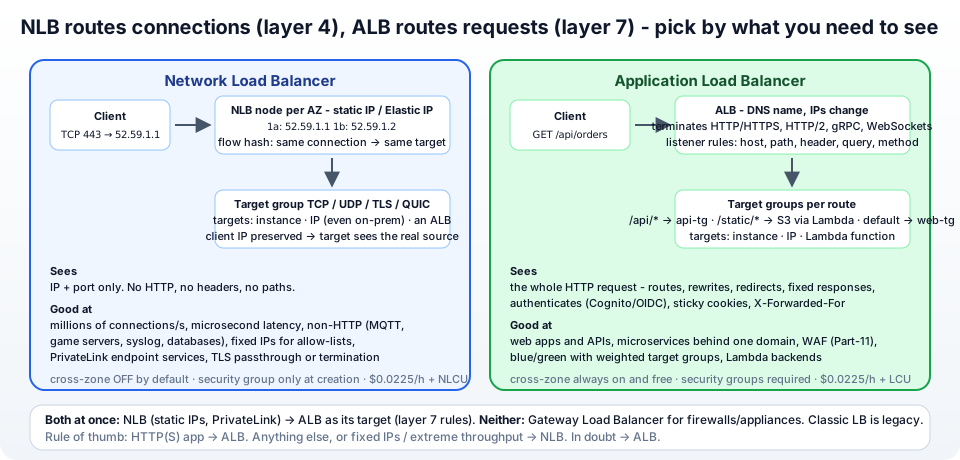
2. NLB building blocks - nodes, static IPs, listeners, target groups
From the NLB components -
- Load balancer nodes - one per enabled Availability Zone, each with a static IP address from your subnet and, for internet-facing NLBs, optionally one Elastic IP per AZ. This is the headline feature: the IPs never change, so customers and firewalls can allow-list them. The DNS name of the NLB returns all of them.
- Listeners - protocol and port: TCP, UDP, TCP_UDP (same port both), TLS (the NLB terminates TLS with an ACM certificate), and QUIC / TCP_QUIC (HTTP/3 transport). No rules - a listener forwards to exactly one target group.
- Target groups - target type instance (by ID), ip (any routable IP - including on-premises through Direct Connect, or containers), or alb (an Application Load Balancer, section 9). Protocols TCP, UDP, TCP_UDP, TLS, QUIC. Health checks TCP (a connection opens), HTTP or HTTPS (a path returns 200-399).
- Flow hash - for TCP, protocol + source IP + source port + destination IP + destination port + sequence number pick the target; every packet of that connection goes to the same target. UDP flows likewise. QUIC uses the connection ID so a client can roam networks.
- Security groups - supported since 2023, but only if you attach one when you create the NLB (security groups); without one, all traffic reaches the listeners and your targets' security groups do the filtering.
3. Step 1 - Target group and targets
Reuse the two web instances from the Auto Scaling group in Part-10 (or launch two from the launch template). EC2 → Target Groups → Create target group -
- Target type - Instances. Target group name
jhooq-nlb-tg. Protocol : Port - TCP : 80. IP address type IPv4. VPCjhooq-vpc. - Health checks - Protocol HTTP, Path
/health(a TCP check only proves the port is open; an HTTP check proves nginx answers). Advanced: healthy threshold 3, interval 10 s. - Next → Register targets - tick the two instances, Include as pending below, Create target group.
If you attach this target group to the Auto Scaling group (ASG → Integrate with other services → Load balancing), the group registers and deregisters instances for you, exactly as with the ALB.
4. Step 2 - Create the Network Load Balancer (with a security group)
EC2 → Load Balancers → Create load balancer → Network Load Balancer → Create (create an NLB) -
- Load balancer name
jhooq-nlb. Scheme Internet-facing (or Internal for a private one - the targets of a PrivateLink endpoint service, for example). IP address type IPv4 (or Dualstack). - Network mapping - VPC
jhooq-vpc, then tick eu-central-1a and eu-central-1b and pick the public subnets. For each AZ the IPv4 address can be Assigned by AWS (a static private IP from the subnet, plus an AWS-owned public IP that is still static for the NLB's life) or Use an Elastic IP address - choose an EIP you allocated beforehand if customers will allow-list it; that EIP is yours even if you rebuild the NLB. - Security groups - create one now -
jhooq-nlb-sgwith inbound TCP 80 from 0.0.0.0/0 (and 443 for section 6), all outbound. This is the step you cannot do later: if you create a Network Load Balancer without associating any security groups, you can't associate them with the Network Load Balancer later on. - Listeners and routing - Protocol TCP, Port 80, Default action → Forward to
jhooq-nlb-tg. - Optional Secure listener settings appear only for TLS listeners. Create load balancer. State
Provisioning → Activein a couple of minutes.
Then on the instances' security group jhooq-web-sg, allow TCP 80 from jhooq-nlb-sg - the recommended pattern from the docs so that targets accept traffic only via the load balancer - and keep in mind section 7 about client IPs.
5. Step 3 - Test it and look at the static IPs
1NLB=jhooq-nlb-1234567890abcdef.elb.eu-central-1.amazonaws.com
2
3dig +short "$NLB"
4# 52.59.1.1      <- node in 1a, static
5# 3.120.2.2      <- node in 1b, static
6
7for i in 1 2 3 4; do curl -s "http://$NLB/"; done
8# <h1>jhooq web - i-0aaa in eu-central-1a</h1>
9# <h1>jhooq web - i-0bbb in eu-central-1b</h1>
Note what you will not see compared with the ALB: no X-Forwarded-For header (the NLB does not touch HTTP), and the target's access log shows your real client IP as the source - that is client IP preservation, next section. Under the NLB's Network mapping tab the IPs per AZ are listed; they stay the same for the life of the load balancer (and forever, if they are your EIPs).
6. Step 4 - Add a TLS listener with an ACM certificate
An NLB can terminate TLS so your instances speak plain TCP, exactly like the ALB's HTTPS listener, but at layer 4 - useful for non-HTTP protocols over TLS (MQTT, SMTP, custom TCP) and for offloading crypto. Listeners → Add listener - Protocol TLS, Port 443, Forward to jhooq-nlb-tg, Secure listener settings → Security policy ELBSecurityPolicy-TLS13-1-2-2021-06, Default SSL/TLS certificate → From ACM → the jhooq.com certificate from Part-16 (same region). Add 443 to jhooq-nlb-sg. SNI picks between several certificates on the listener.
The alternative is TLS passthrough - a plain TCP 443 listener that forwards the encrypted bytes untouched to targets that hold their own certificates; the NLB never decrypts. That is the choice when the application must do mutual TLS itself, or when the certificate must not live in AWS.
7. Client IP preservation and target security groups
With instance targets the NLB preserves the client IP - packets arrive at the instance with the real source address. Convenient for logging and geo-blocking in the app, but it changes the security group logic: the target's security group must allow the clients, not just the NLB. That is why the docs recommend referencing the NLB's security group in the target's inbound rule - the reference is honoured even with client IP preservation on, and clients still cannot bypass the NLB. (Without an NLB security group you would have to allow 0.0.0.0/0 on the targets, which is the old, bad pattern.)
With ip targets, preservation is off by default (the source becomes the NLB node's private IP) and can be enabled per target group; for TLS listeners the source is always the NLB. One side effect of preservation: an instance cannot connect to itself through the NLB (the loopback/hairpin problem), which matters when a target also acts as a client of the same service.
8. Cross-zone load balancing and AZ failover
By default each NLB node sends traffic only to targets in its own AZ - cross-zone load balancing is off (the ALB has it always on). With two targets in 1a and one in 1b, 1b's node sends all its traffic to its single target. Turn it on under the load balancer Attributes → Cross-zone load balancing (or per target group) and every node spreads across all targets in all AZs. The trade-off is cross-AZ data transfer and slightly higher latency; the benefit is even distribution and resilience when an AZ has few healthy targets.
If all targets in an AZ become unhealthy, the NLB removes that AZ's IP from DNS (fail-open to the other AZ), which is why clients should resolve the DNS name rather than pin one IP - unless you use EIPs and your clients understand that one of them may be down. Zonal shift (Application Recovery Controller) lets you take an AZ out of DNS deliberately.
9. NLB in front of an ALB - static IPs plus layer 7
The combination that solves "we need fixed IPs and path-based routing": an NLB whose target group has target type ALB (ALB as a target). Clients hit the NLB's static IPs or EIPs; the NLB forwards TCP to the ALB; the ALB does host/path rules, WAF (Part-11) and Lambda targets. It is also how you expose an ALB-fronted application through PrivateLink, since endpoint services require an NLB (or GWLB) - the subject of the PrivateLink part of this series. The ALB must be internal, in the same VPC, and its listeners' ports match the NLB target group port.
10. ALB vs NLB - the complete comparison
| Application Load Balancer | Network Load Balancer | |
|---|---|---|
| OSI layer | 7 (HTTP/HTTPS, HTTP/2, gRPC, WebSockets) | 4 (TCP, UDP, TLS, QUIC) |
| Routing | host, path, header, query, method, source IP rules; weighted target groups | one listener → one target group, flow hash |
| IP addresses | dynamic, DNS name only | static per AZ, optional Elastic IPs |
| Targets | instance, ip, Lambda | instance, ip, ALB |
| Client IP | in X-Forwarded-For header | preserved at the packet level (instance targets) |
| TLS | terminates; SNI, ACM | terminates (TLS listener) or passthrough |
| Authentication | Cognito / OIDC on the listener | no |
| WAF | yes | no (via ALB target) |
| Sticky sessions | application/duration cookies | source-IP stickiness |
| Health checks | HTTP/HTTPS/gRPC | TCP/HTTP/HTTPS |
| Cross-zone | always on, free | off by default |
| Security groups | required | optional, only at creation |
| PrivateLink endpoint service | no | yes |
| Performance | hundreds of µs per request, scales with warm-up | µs latency, millions of RPS, sudden spikes |
| Idle timeout | 60 s default, configurable | 350 s TCP, fixed |
| Price (us-east-1) | $0.0225/h + $0.008 per LCU-hour | $0.0225/h + $0.006 per NLCU-hour |
Pick the ALB for HTTP applications and APIs. Pick the NLB for anything that is not HTTP, needs static IPs, extreme throughput, TLS passthrough or PrivateLink. Pick both when you need static IPs with layer 7 routing. Avoid the Classic Load Balancer entirely - it is the legacy generation.
11. The AWS CLI equivalents
 1# target group + targets
 2TG=$(aws elbv2 create-target-group --name jhooq-nlb-tg --protocol TCP --port 80 --vpc-id vpc-0abc \
 3  --target-type instance --health-check-protocol HTTP --health-check-path /health \
 4  --query 'TargetGroups[0].TargetGroupArn' --output text)
 5aws elbv2 register-targets --target-group-arn "$TG" --targets Id=i-0aaa Id=i-0bbb
 6
 7# NLB with a security group and an EIP per AZ
 8NLB=$(aws elbv2 create-load-balancer --name jhooq-nlb --type network --scheme internet-facing \
 9  --security-groups sg-0nlb \
10  --subnet-mappings SubnetId=subnet-public1a,AllocationId=eipalloc-aaa SubnetId=subnet-public1b,AllocationId=eipalloc-bbb \
11  --query 'LoadBalancers[0].LoadBalancerArn' --output text)
12
13# listeners
14aws elbv2 create-listener --load-balancer-arn "$NLB" --protocol TCP --port 80 --default-actions Type=forward,TargetGroupArn="$TG"
15aws elbv2 create-listener --load-balancer-arn "$NLB" --protocol TLS --port 443 \
16  --certificates CertificateArn=arn:aws:acm:eu-central-1:111111111111:certificate/abc \
17  --ssl-policy ELBSecurityPolicy-TLS13-1-2-2021-06 --default-actions Type=forward,TargetGroupArn="$TG"
18
19# cross-zone on, client IP preservation per target group
20aws elbv2 modify-load-balancer-attributes --load-balancer-arn "$NLB" --attributes Key=load_balancing.cross_zone.enabled,Value=true
21aws elbv2 modify-target-group-attributes --target-group-arn "$TG" --attributes Key=preserve_client_ip.enabled,Value=true
22
23aws elbv2 describe-target-health --target-group-arn "$TG"
Terraform: aws_lb with load_balancer_type = "network" and subnet_mapping blocks for EIPs, aws_lb_target_group, aws_lb_listener, aws_lb_target_group_attachment - the ALB version of the whole stack is in Terraform - setting up an ALB and SSL.
12. What it costs - NLCUs
From the ELB pricing page (us-east-1): $0.0225 per hour (about $16 a month) plus $0.006 per NLCU-hour. An NLCU (network load balancer capacity unit) is the highest of three dimensions per hour - for TCP: 800 new connections per second, 100,000 active connections per minute, or 1 GB processed per hour (UDP and TLS have lower thresholds - TLS is 50 new connections per second). A small service rarely exceeds one or two NLCUs, so the hourly charge dominates - the same $16 as an ALB. Plus data transfer, and EIP charges ($0.005 per hour each) for the static addresses.
13. Common NLB errors and how to fix them
1. Targets stay Unhealthy - The target security group does not allow the health check / traffic. With client IP preservation the source of real traffic is the client, but health checks come from the NLB nodes' private IPs - allow the NLB security group (or the VPC CIDR / the NLB subnet CIDRs if the NLB has no SG) on both the target port and the health check port. Also check NACLs for the ephemeral return ports.
2. Health checks pass but clients time out - The NLB has a security group without the listener port inbound, or the targets allow only the NLB SG while client IP preservation sends packets with the client's IP and the SG reference is missing. Add the NLB SG reference on the target SG.
3. I cannot add a security group to my NLB - It was created without one. There is no way to add one later; recreate the NLB with a security group (plan the DNS/EIP move).
4. Elastic IP address eipalloc-... is already associated on create - The EIP is attached to something else (a NAT Gateway from Part-14?). Allocate a fresh one.
5. Uneven traffic - one AZ's instance gets everything - Cross-zone load balancing is off and the AZs have different target counts. Enable cross-zone or balance the targets.
6. The instance cannot call its own service through the NLB (connection timed out) - Hairpinning with client IP preservation. Disable preservation on that target group, or have the instance call a peer, not itself.
7. A listener already exists on this port / UDP and TCP on the same port - Use a TCP_UDP listener and target group for the same port (DNS on 53, for example).
8. The TLS listener does not show my certificate - The certificate must be Issued and in the same region (Part-16).
9. Connections drop after about 6 minutes - The fixed 350-second idle timeout of the NLB. Enable TCP keepalives below 350 s on clients or servers.
10. Registering an ALB target fails - The ALB must be internal (or internet-facing with the right scheme combination), in the same VPC, with a listener on the target group's port, and ALB target groups are IP-type-only on the NLB side with protocol TCP.
14. Conclusion
To summarise Part-18 -
- The NLB load-balances connections at layer 4 - TCP, UDP, TLS and QUIC - with one static IP per AZ (or your Elastic IPs), microsecond latency and millions of requests per second, and it is the only load balancer that can back a PrivateLink endpoint service.
- Build it as target group → NLB (attach the security group at creation!) → listener; add a TLS listener with an ACM certificate to terminate TLS, or TCP passthrough to keep it end-to-end.
- Client IP preservation means targets see real client addresses - reference the NLB's security group on the targets so they still accept only load-balanced traffic.
- Cross-zone is off by default; turn it on for even distribution, and let clients use the DNS name so AZ failover works.
- ALB for HTTP, NLB for everything else or for static IPs, NLB → ALB for both.
The official references are the NLB User Guide, create an NLB, security groups for NLBs and the ELB feature comparison. Next, we stop sending traffic to AWS services over the internet at all - Part-19, VPC endpoints.
More videos on this topic - the load balancer masterclass from my 2024 Solutions Architect series, the 2025 full course on all three load balancers, and the Gateway Load Balancer demo -
AWS step by step series -
- Part-1 : AWS IAM user - create a user, group, policy, access keys and MFA
- Part-2 : AWS Organizations - multi-account setup, OUs and SCPs
- Part-3 : AWS assume IAM role - trust policy, switch role in console and CLI
- Part-4 : How to launch an EC2 instance - key pair, security group, SSH
- Part-5 : AWS VPC - public and private subnets, Internet Gateway, NAT Gateway, route tables
- Part-8 : EC2 launch template - versions, default version, source template, SSM parameter AMI
- Part-10 : EC2 Auto Scaling - launch template, Auto Scaling group, target tracking, ALB
- Part-11 : AWS WAF - web ACL, managed rules, rate limiting, geo blocking
- Part-12 : AWS VPC Peering - connect two VPCs, routes, security groups, DNS
- Part-13 : AWS Transit Gateway - hub-and-spoke for many VPCs and on-premises
- Part-14 : AWS NAT Gateway deep dive - public vs private, limits, cost, troubleshooting
- Part-15 : Amazon Route 53 - hosted zones, records, alias, routing policies, health checks
- Part-16 : AWS security groups - inbound and outbound rules, stateful, referencing, quotas
- Part-16 : AWS Certificate Manager - free TLS certificates for ALB, CloudFront and API Gateway
- Part-17 : AWS Lambda - function URLs, environment variables and layers
- Part-18 : Network Load Balancer - setup, and ALB vs NLB
- Part-19 : VPC endpoints - gateway and interface endpoints (PrivateLink) instead of NAT
- Part-20 : AWS PrivateLink - publish your own service with an endpoint service and NLB
- Part-20 : Amazon EBS volumes - types, attach, mount, resize, snapshots, encryption
- Part-21 : VPC Flow Logs - CloudWatch Logs, S3, record format, Logs Insights, Athena
- Part-21 : EC2 Spot Instances - pricing, interruptions, mixed instances groups
- Part-24 : AWS Control Tower - landing zone, controls, Account Factory, Identity Center
Networking fundamentals -
- What is a VPC and a subnet? AWS networking in five minutes
- What is CIDR? Calculate IP ranges for VPCs and subnets
- What is NAT? Static NAT, dynamic NAT and PAT explained
More AWS guides -
- What is AWS CloudFormation? Templates, stacks, change sets, drift, StackSets
- Learn AWS S3 - the complete course
- AWS API Gateway - REST API with Lambda, authorizers, Terraform
- AWS Advanced Networking Specialty (ANS-C01) - course companion
- AWS ECS and Fargate - how to deploy a Docker container
- AWS S3 - how to host a static website
- Terraform create EC2 instance on AWS
- Terraform AWS IAM - users, roles and policies
- Terraform and AWS multi-account setup
- Terraform - setting up an ALB and SSL
Posts in this series
- Amazon EBS Volumes Step by Step - Volume Types Compared (gp3, gp2, io2 Block Express, st1, sc1), Create, Attach, Format and Mount a Volume, Resize Without Downtime, Snapshots, Encryption, Multi-Attach, Pricing and Troubleshooting (AWS Part-20)
- Amazon Route 53 Step by Step - Hosted Zones, Record Types, Alias Records, Point a Domain at an ALB, Routing Policies (Weighted, Latency, Failover, Geolocation), Health Checks, Private Zones and Pricing (AWS Part-15)
- AWS Advanced Networking - Free 8-Hour Full Course Companion (VPC, NAT Gateway, Bastion, ALB, NLB, WAF, VPC Peering, Transit Gateway, VPC Endpoints and PrivateLink, Route 53, ACM) with Timestamps and the ANS-C01 Exam Facts
- AWS Assume IAM Role Step by Step - Trust Policy vs Permissions Policy, Switch Role in the Console, aws sts assume-role, CLI Profiles, Cross-Account Access, MFA and External ID (AWS Part-3)
- AWS Certificate Manager (ACM) Step by Step - Request a Free TLS Certificate, DNS Validation with Route 53, Attach It to an ALB HTTPS Listener, Redirect HTTP to HTTPS, CloudFront and API Gateway, Auto-Renewal, Exportable Certificates and ACME (AWS Part-16)
- AWS Control Tower Step by Step - Set Up a Landing Zone, Security OU with Log Archive and Audit Accounts, Controls (Guardrails), Region Deny, IAM Identity Center, Account Factory and Enrolling Existing Accounts (AWS Part-24)
- AWS EC2 Auto Scaling Step by Step - Launch Template, Auto Scaling Group Across Two AZs, Target Tracking Policy, Application Load Balancer, Health Checks and Instance Refresh (AWS Part-10)
- AWS EC2 Launch Template Step by Step - Create a Template, Versions and the Default Version, Source Template, Create From a Running Instance, Systems Manager Parameter Instead of an AMI ID, Launch Templates vs Launch Configurations, IAM Guardrails, CLI and Terraform (AWS Part-8 and Part-17)
- AWS EC2 Spot Instances Step by Step - How Spot Pricing Works, Launch a Spot Instance, Interruptions and the Two-Minute Notice, Rebalance Recommendations, Stop vs Hibernate vs Terminate, Spot in Auto Scaling Mixed Instances Groups, Billing Rules, Best Practices, CLI and Terraform (AWS Part-21)
- AWS IAM User Step by Step - Create a User, User Group, Attach Policies, Access Keys, MFA and Sign-in URL (AWS Part-1)
- AWS Lambda Step by Step - Create a Function, Function URL (HTTPS Endpoint Without API Gateway), Environment Variables, Lambda Layers for Python Dependencies, Versions and Aliases, Limits, Pricing and Errors (AWS Part-17)
- AWS NAT Gateway Deep Dive - How It Works, Public vs Private NAT Gateway, Setup Step by Step, Limits (55,000 Connections, 100 Gbps), CloudWatch Metrics, Cost Optimisation, NAT Instance Comparison and Troubleshooting (AWS Part-14)
- AWS Network Load Balancer Step by Step - Create an NLB with Static IPs, Target Groups, TCP and TLS Listeners, Security Groups, Client IP Preservation, Cross-Zone Load Balancing, and ALB vs NLB Explained (AWS Part-18)
- AWS Organizations Step by Step - Multi-Account Setup, Organizational Units, Service Control Policies (SCPs), Consolidated Billing and Identity Center (AWS Part-2)
- AWS PrivateLink Step by Step - Publish Your Own Service with a VPC Endpoint Service and Network Load Balancer, Allow Consumers, Accept Connections, Private DNS Name, Cross-Account and Cross-Region, Pricing and Troubleshooting (AWS Part-20)
- AWS Security Groups Step by Step - Inbound and Outbound Rules, Stateful Behaviour, Referencing Security Groups, the Three-Tier ALB-Web-DB Pattern, Quotas, Security Group vs Network ACL, CLI and Terraform (AWS Part-16)
- AWS Transit Gateway Step by Step - Connect Many VPCs and On-Premises Through One Hub, VPC Attachments, Transit Gateway Route Tables, Associations and Propagations, Isolation, Peering, Pricing (AWS Part-13)
- AWS VPC Endpoints Step by Step - Gateway Endpoints for S3 and DynamoDB, Interface Endpoints (PrivateLink) for SSM, ECR and Other Services, Private DNS, Endpoint Policies, Security Groups, Cost vs NAT Gateway, and Troubleshooting (AWS Part-19)
- AWS VPC Flow Logs Step by Step - Enable Flow Logs for a VPC, Subnet or Network Interface, Publish to CloudWatch Logs or S3, Read a Flow Log Record Field by Field, Custom Formats, Query with Logs Insights and Athena, Find Rejected Traffic, Pricing and Limitations (AWS Part-21)
- AWS VPC Peering Step by Step - Connect Two VPCs (Same or Different Account and Region), Accept the Request, Add Routes, Security Groups, DNS Resolution, Test with EC2, and the Limits (AWS Part-12)
- AWS VPC Step by Step - Create a VPC with Public and Private Subnets, Internet Gateway, NAT Gateway and Route Tables (and Test It with EC2) (AWS Part-5)
- AWS WAF Step by Step - Create a Web ACL, Attach It to an ALB or API Gateway, AWS Managed Rules, Rate-Based Rules, Geo Blocking, IP Sets, Count Mode and Logging (AWS Part-11)
- How to Launch an EC2 Instance on AWS Step by Step - AMI, Instance Type, Key Pair, Security Group, Connect with SSH or EC2 Instance Connect, Stop vs Terminate (AWS Part-4)
- What is an AWS VPC and a Subnet? Virtual Private Cloud Explained in Five Minutes (Region, Availability Zones, Public vs Private Subnets, Gateways, Route Tables)
- What is AWS CloudFormation? Templates, Stacks and Change Sets Explained, Template Anatomy Section by Section, Create Your First Stack Step by Step, Update With a Change Set, Drift Detection, Nested Stacks and StackSets, Quotas, Pricing, CLI, and CloudFormation vs Terraform
- What is CIDR (Classless Inter-Domain Routing)? How to Calculate IP Ranges for VPCs and Subnets, with Examples (/8, /16, /24, /28, /32)
- What is NAT (Network Address Translation)? How It Works, Static NAT vs Dynamic NAT vs PAT, the Translation Table, and Where NAT Shows Up in AWS
- AWS API Gateway Tutorial - REST API with Lambda Proxy and Non-Proxy Integration, Request Validation, HTTP API vs REST API, Resource Policies, Lambda Authorizers and Terraform
- Learn AWS S3 - The Complete Course (Buckets, Objects, Storage Classes, Lifecycle, Versioning, Security Defaults, Bucket Policies, Static Hosting, CLI and Terraform)
- How to release(delete) Elastic IP from AWS?
- Fix docker login 'error saving credentials: error storing credentials - err: exit status 1' (AWS ECR on macOS, Windows, Linux and WSL)