AWS NAT Gateway Deep Dive - How It Works, Public vs Private NAT Gateway, Setup Step by Step, Limits (55,000 Connections, 100 Gbps), CloudWatch Metrics, Cost Optimisation, NAT Instance Comparison and Troubleshooting (AWS Part-14)
We created a NAT Gateway in Part-5 in one step and moved on. It deserves its own part, because the NAT Gateway is the component every private subnet depends on, it is the first surprise on most AWS bills, and the three most common "my instance cannot reach the internet" tickets all end at it.
This Part-14 goes under the hood - what NAT actually does to a packet, the public and private connectivity types, the exact limits, the metrics that tell you it is about to fail, what it costs and how to pay less, when a NAT instance still makes sense, how IPv6 changes the picture, and the complete troubleshooting list from the AWS docs. Numbers are from the current documentation - several (bandwidth, IP addresses per gateway) have gone up since I recorded the video.
Table of Content
- What network address translation does to a packet
- Public vs private NAT Gateway
- Set it up step by step - NAT Gateway, Elastic IP, route table
- High availability - one NAT Gateway per Availability Zone
- The hard numbers - bandwidth, connections, IP addresses, timeouts
- CloudWatch metrics to alarm on
- What a NAT Gateway costs
- Five ways to pay less
- NAT Gateway vs NAT instance
- IPv6 - NAT64, DNS64 and the egress-only Internet Gateway
- NAT Gateway with VPC peering and Transit Gateway
- The AWS CLI equivalents
- Troubleshooting - the official list, explained
- Conclusion
1. What network address translation does to a packet
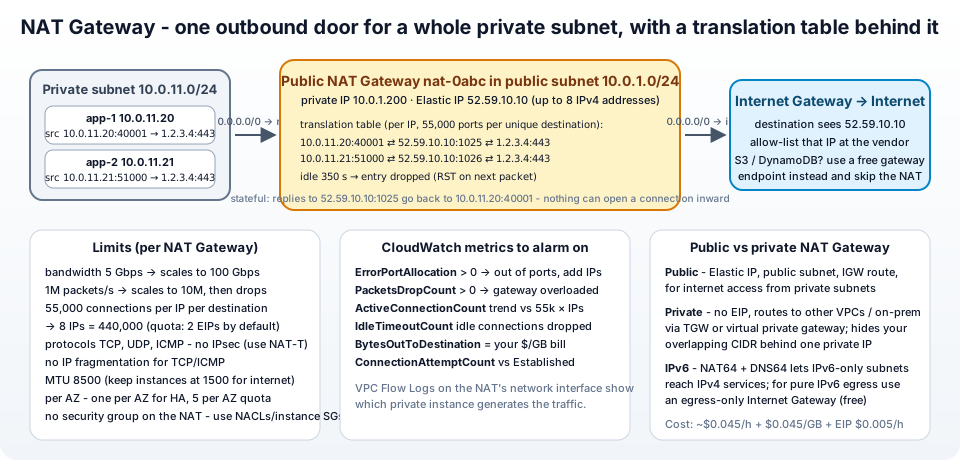
An instance in a private subnet has only a private IP, say 10.0.11.20. Private addresses are not routable on the internet - no server out there can send a reply to 10.0.11.20. NAT (network address translation, specifically port address translation) fixes that by rewriting the packet on the way out and remembering how to rewrite the reply on the way back -
10.0.11.20:40001sends a packet to1.2.3.4:443. The private route table says0.0.0.0/0 → nat-..., so it lands on the NAT Gateway.- The gateway replaces the source with its own Elastic IP and a free port -
52.59.10.10:1025- and writes10.0.11.20:40001 ⇄ 52.59.10.10:1025 ⇄ 1.2.3.4:443into its translation table. - The packet goes out through the public subnet's route (
0.0.0.0/0 → igw-...) and the Internet Gateway. The destination sees52.59.10.10. - The reply to
52.59.10.10:1025comes back, the gateway looks up the entry, rewrites the destination to10.0.11.20:40001, and forwards it.
Two consequences that explain half of the behaviour in this post - every private instance behind the gateway appears to the world as the same Elastic IP (great for vendor allow-lists), and nothing on the internet can start a connection inwards, because there is no table entry for it (that is why a NAT Gateway does not answer ping and cannot be used for inbound traffic).
2. Public vs private NAT Gateway
From the NAT gateway basics -
| Public NAT Gateway | Private NAT Gateway | |
|---|---|---|
| Purpose | private subnets reach the internet | private subnets reach other VPCs or on-premises through a Transit Gateway or virtual private gateway |
| Elastic IP | required | none - it uses a private IP from its subnet |
| Must sit in | a public subnet (route to an Internet Gateway) | any subnet |
| Typical use | apt update, calling SaaS APIs, pulling container images | connecting networks with overlapping CIDRs - the whole VPC hides behind one private address the other side can route to |
Both are managed, redundant within their AZ, support TCP, UDP and ICMP, and cannot have a security group (control traffic with the instances' security groups and the subnet NACLs - the gateway uses ports 1024-65535).
3. Set it up step by step - NAT Gateway, Elastic IP, route table
The full VPC build is in Part-5; the NAT part, with the current console -
- VPC → NAT gateways → Create NAT gateway. Name
jhooq-nat-1a. Subnet - a public subnet (jhooq-public-1a). Connectivity type - Public. Elastic IP allocation ID - Allocate Elastic IP. Optionally Additional settings → Private IPv4 address to pin the gateway's private IP. Create NAT gateway. - Wait for state Available (a minute or two). A
Failedgateway shows the reason under State message and is auto-deleted after about an hour. - Route tables → the private route table → Edit routes -
0.0.0.0/0 → NAT Gateway → jhooq-nat-1a. Make sure the private subnets are associated with that table. - Confirm the public subnet's route table has
0.0.0.0/0 → igw-...- without it the gateway has no way out. - Test from a private instance (Part-5, Step 7) -
curl https://checkip.amazonaws.comprints the gateway's Elastic IP.
Give the EIP a Name tag as well, and write the address down - it is the one you hand to vendors who allow-list your traffic, and it stays yours until you release it.
4. High availability - one NAT Gateway per Availability Zone
A NAT Gateway is zonal - redundant inside its AZ, but if that AZ has an outage, the gateway is gone, and every private subnet routing through it loses internet access, including subnets in the healthy AZs. The docs are explicit: create a NAT gateway in each Availability Zone, and configure your routing to ensure that resources use the NAT gateway in the same Availability Zone. Concretely -
jhooq-nat-1ainjhooq-public-1a,jhooq-nat-1binjhooq-public-1b.- Two private route tables -
jhooq-private-rt-1awith0.0.0.0/0 → jhooq-nat-1a, associated withjhooq-private-1a;jhooq-private-rt-1bwith0.0.0.0/0 → jhooq-nat-1b, associated withjhooq-private-1b.
This is also what the VPC and more wizard builds when you pick NAT gateways: 1 per AZ, and it removes the cross-AZ data charge you pay when traffic from 1b goes through a gateway in 1a. The price is one more gateway-hour; for production it is not optional.
5. The hard numbers - bandwidth, connections, IP addresses, timeouts
From the basics page, as of this update -
| Limit | Value |
|---|---|
| Bandwidth | 5 Gbps, scales automatically to 100 Gbps |
| Packets per second | 1 million, scales to 10 million - beyond that, packets are dropped |
| Simultaneous connections | 55,000 per IPv4 address per unique destination (destination IP + port + protocol) |
| IPv4 addresses per gateway | up to 8 (1 primary + 7 secondary) → up to 440,000 connections per destination; 2 Elastic IPs per public gateway by default, adjustable via Service Quotas |
| Idle timeout | 350 seconds - an idle connection is dropped and the next packet gets an RST |
| MTU | 8,500 bytes; keep instances at 1,500 for internet traffic; no IP fragmentation for TCP/ICMP |
| Protocols | TCP, UDP, ICMP - no IPsec (use NAT-Traversal) |
| Per AZ | 5 NAT gateways per AZ by default |
| Security groups | none - NACLs on the subnet, security groups on the instances |
The 55,000 figure is the one that bites high-volume workloads - many instances all talking to the same destination (one API, one database endpoint) share the port range. The signal is the ErrorPortAllocation metric; the fix is secondary IPs or more gateways.
6. CloudWatch metrics to alarm on
NAT Gateways publish to CloudWatch under the AWS/NATGateway namespace at one-minute intervals, free. The ones worth an alarm -
ErrorPortAllocation- the gateway could not allocate a source port. Anything above 0 means you are hitting the 55,000-per-destination limit. Alarm immediately; add secondary IPv4 addresses (Actions → Edit secondary IP address associations) or split subnets across more gateways.PacketsDropCount- packets dropped by the gateway; above 0 sustained means the gateway is overloaded or something unsupported (fragments, IPsec) is being sent.ActiveConnectionCount- trend it against 55,000 × number of IPs.IdleTimeoutCount- connections closed by the 350-second idle timeout; a rising count with application errors means you need TCP keepalives under 350 s.BytesOutToDestination/BytesInFromDestination- the GB that become your bill. A sudden step up is a backup job, a container pull loop or a compromised instance.ConnectionAttemptCountvsConnectionEstablishedCount- a growing gap means destinations are refusing or unreachable.
To find out which private instance is generating the traffic, enable VPC Flow Logs on the NAT Gateway's network interface (EC2 → Network interfaces → description contains the nat- ID) and query by source address in CloudWatch Logs Insights.
7. What a NAT Gateway costs
From the pricing page - two meters, plus the IP -
- Hourly - charged for every hour the gateway exists, idle or not. About $0.045 per hour in us-east-1 ≈ $33 a month per gateway.
- Data processing - about $0.045 per GB that passes through, in either direction. 1 TB a month ≈ $46.
- Public IPv4 address - the Elastic IP, $0.005 per hour ≈ $3.60 a month.
- Plus the normal data transfer out charges to the internet, and cross-AZ charges if instances use a gateway in another AZ.
So two gateways (one per AZ) pushing 2 TB a month ≈ $66 + $92 + $7 ≈ $165 a month. For a startup's whole network that is often the single biggest line item - which is why the next section exists.
8. Five ways to pay less
The docs themselves list the first two; the rest are standard practice -
- Gateway endpoints for S3 and DynamoDB - free. Traffic to those services from private subnets goes through the endpoint instead of the NAT, so backups, logs, static assets and container image layers from ECR (stored in S3) stop costing $0.045 per GB. VPC → Endpoints → Create endpoint → com.amazonaws.
.s3 (Gateway) → tick the private route tables. If you do nothing else, do this. - One gateway per AZ with per-AZ route tables - eliminates cross-AZ data charges on top of the HA benefit.
- Interface endpoints (PrivateLink) for the AWS services you talk to most - ECR API, CloudWatch Logs, SSM, Secrets Manager, STS. They cost per hour per AZ plus a small per-GB fee, which is still cheaper than NAT for heavy traffic, and they keep that traffic off the internet entirely. Compare with the PrivateLink pricing; the VPC endpoint parts (19 and 20) of this series go deep.
- Centralised egress - with a Transit Gateway, one set of NAT Gateways in a shared VPC serves all spoke VPCs; you pay TGW data processing but save N-1 gateways' hourly charges and get one place to inspect outbound traffic.
- IPv6 - IPv6-enabled workloads can reach IPv6 destinations through an egress-only Internet Gateway, which is free (section 10).
And the obvious one - delete lab gateways and set a billing alarm.
9. NAT Gateway vs NAT instance
Before the managed gateway existed (2015) you ran a NAT instance - an EC2 instance with IP forwarding and source/destination check disabled. AWS still documents it (NAT instances, comparison) and marks it as something you manage yourself -
| NAT Gateway | NAT instance | |
|---|---|---|
| Availability | managed, redundant in the AZ | you build the failover (scripts, ASG) |
| Bandwidth | up to 100 Gbps | depends on the instance type |
| Maintenance | none | patching, monitoring, sizing |
| Security groups | not supported | yes - you can filter on the NAT itself |
| Port forwarding / bastion / IPsec | no | yes - it is a Linux box |
| Fragmented packets | not supported | supported |
| Cost | ~$33 per month + $0.045 per GB | t4g.nano ≈ $3 per month, no per-GB processing fee (data transfer still applies) |
For a dev or sandbox account where traffic is light and HA does not matter, a tiny NAT instance (the open-source fck-nat AMI is the popular packaged version) can cut the NAT bill by 90%. For production, the gateway's zero maintenance and scaling win. There is also the middle option for cheap labs - skip NAT entirely and give the single instance a public IP.
10. IPv6 - NAT64, DNS64 and the egress-only Internet Gateway
IPv6 addresses are globally routable, so an IPv6 subnet does not need NAT to reach the internet - but you still want "outbound only". That is the egress-only Internet Gateway: stateful like a NAT Gateway (replies come back, nothing can connect in), but free, and the route is ::/0 → eigw-... in the private route table.
The remaining problem is IPv6-only subnets that must reach IPv4-only services. That is what the NAT Gateway's NAT64 with DNS64 does - enable DNS64 on the subnet so that the Route 53 Resolver synthesises an IPv6 address (64:ff9b::/96 prefix) for IPv4-only hosts, route 64:ff9b::/96 → nat-..., and the NAT Gateway translates IPv6 to IPv4 on the way out. Same gateway, same pricing. Dual-stack subnets simply use the IGW for IPv6 and the NAT for IPv4.
11. NAT Gateway with VPC peering and Transit Gateway
Two rules from the basics page that explain mysterious timeouts -
- Over VPC peering -
Client → NAT → Peering → Destinationis supported (and return traffic finds its way back to the gateway), butClient → Peering → NAT → Internetis not - a peered VPC cannot use your NAT Gateway to reach the internet. That is the no edge-to-edge rule from Part-12. - Over a Transit Gateway it is supported - which is exactly how centralised egress works: spoke VPCs route
0.0.0.0/0to the TGW, the TGW routes it to the egress VPC attachment, and the egress VPC's NAT Gateways send it out. The return path needs routes back to the spoke CIDRs in the egress VPC's public route table. (A virtual private gateway - the older VPN endpoint - cannot do this; only TGW can.)
12. The AWS CLI equivalents
 1# public NAT gateway with a new EIP
 2EIP=$(aws ec2 allocate-address --domain vpc --query AllocationId --output text)
 3NAT=$(aws ec2 create-nat-gateway --subnet-id subnet-public1a --allocation-id "$EIP" \
 4  --connectivity-type public \
 5  --tag-specifications 'ResourceType=natgateway,Tags=[{Key=Name,Value=jhooq-nat-1a}]' \
 6  --query NatGateway.NatGatewayId --output text)
 7aws ec2 wait nat-gateway-available --nat-gateway-ids "$NAT"
 8
 9# private route table → NAT
10aws ec2 create-route --route-table-id rtb-private1a --destination-cidr-block 0.0.0.0/0 --nat-gateway-id "$NAT"
11
12# add a secondary EIP for more ports (quota: 2 EIPs per NAT by default)
13EIP2=$(aws ec2 allocate-address --domain vpc --query AllocationId --output text)
14aws ec2 associate-nat-gateway-address --nat-gateway-id "$NAT" --allocation-ids "$EIP2"
15
16# private NAT gateway (no EIP)
17aws ec2 create-nat-gateway --subnet-id subnet-private1a --connectivity-type private
18
19# metrics
20aws cloudwatch get-metric-statistics --namespace AWS/NATGateway --metric-name ErrorPortAllocation \
21  --dimensions Name=NatGatewayId,Value="$NAT" --statistics Sum --period 300 \
22  --start-time "$(date -u -d '1 hour ago' +%FT%TZ)" --end-time "$(date -u +%FT%TZ)"
23
24# delete, then release the EIP (otherwise it keeps billing)
25aws ec2 delete-nat-gateway --nat-gateway-id "$NAT"
26aws ec2 wait nat-gateway-deleted --nat-gateway-ids "$NAT"
27aws ec2 release-address --allocation-id "$EIP"
Terraform: aws_eip (domain = "vpc"), aws_nat_gateway (subnet_id, allocation_id, connectivity_type, secondary_allocation_ids), aws_route. The community terraform-aws-modules/vpc module has enable_nat_gateway, single_nat_gateway and one_nat_gateway_per_az flags that implement exactly the trade-offs in this post.
13. Troubleshooting - the official list, explained
The AWS troubleshooting page, with the one-line cause and fix for each -
1. NAT gateway creation fails (Failed state) - Read State message. Subnet has insufficient free addresses → free IPs or use another subnet. Network vpc-... has no internet gateway attached → attach an IGW first. Elastic IP eipalloc-... is already associated → disassociate it or allocate a new one. Failed gateways are deleted automatically after about an hour.
2. Performing this operation would exceed the limit of 5 NAT gateways - Per-AZ quota. Deleting gateways still count until state Deleted; request an increase or use another AZ.
3. The maximum number of addresses has been reached - Elastic IP quota (5 per region). Release unused ones (how to release an Elastic IP) or request an increase.
4. NotAvailableInZone - A constrained AZ; create the gateway in another AZ and route to it.
5. The gateway disappeared - It failed and was auto-deleted after an hour. Create it again and read the state message this time.
6. The gateway does not respond to ping - By design. Test from a private instance instead.
7. Instances cannot access the internet - In order: gateway state Available? gateway in a public subnet whose table routes 0.0.0.0/0 → igw? private subnet's table routes 0.0.0.0/0 → nat and is associated with the subnet? no more specific route sending traffic elsewhere? instance security group allows outbound (and ICMP for ping)? NACLs on both subnets allow outbound and the ephemeral return ports 1024-65535? protocol is TCP/UDP/ICMP? Flow logs show you which layer drops it.
8. Some TCP connections to one destination fail - The destination sends fragmented packets (unsupported - use a NAT instance for that destination) or has tcp_tw_recycle enabled (ask them to disable it).
9. traceroute does not show the NAT's private IP - A more specific route sends that traffic through another gateway (IGW, VPN). Check the route table for the instance's subnet.
10. Connection drops after 350 seconds - The idle timeout. Enable TCP keepalive on the instance with an interval under 350 s (net.ipv4.tcp_keepalive_time = 300), or send traffic.
11. IPsec cannot be established - Not supported through NAT; use NAT-T (UDP 4500) encapsulation.
12. Cannot initiate more connections / ErrorPortAllocation - The 55,000-per-destination limit. Add secondary IPv4 addresses (each gives another 55,000), create gateways per AZ or per subnet, close idle connections (IdleTimeoutCount), or limit client connection counts.
14. Conclusion
To summarise Part-14 -
- A NAT Gateway rewrites the source of outbound packets to its Elastic IP and keeps a translation table for the replies - so private instances share one public address, and nothing can connect in.
- Public gateways (EIP, public subnet) reach the internet; private gateways bridge overlapping networks through a Transit Gateway or virtual private gateway.
- It is zonal - run one per AZ with per-AZ route tables for availability and to avoid cross-AZ charges.
- Know the numbers - 5 to 100 Gbps, 55,000 connections per IP per destination (up to 8 IPs), 350 s idle timeout, no IPsec, no fragmentation - and alarm on
ErrorPortAllocationandPacketsDropCount. - It costs per hour and per GB - so add the free S3 and DynamoDB gateway endpoints, consider interface endpoints and centralised egress, use egress-only Internet Gateways for IPv6, and a NAT instance only for cheap labs.
The official references are the NAT gateway guide, NAT gateway basics, pricing and troubleshooting. The endpoints that replace much of the NAT traffic are the subject of the VPC endpoint and PrivateLink parts of this series, and the full VPC it lives in is Part-5.
AWS step by step series -
- Part-1 : AWS IAM user - create a user, group, policy, access keys and MFA
- Part-2 : AWS Organizations - multi-account setup, OUs and SCPs
- Part-3 : AWS assume IAM role - trust policy, switch role in console and CLI
- Part-4 : How to launch an EC2 instance - key pair, security group, SSH
- Part-5 : AWS VPC - public and private subnets, Internet Gateway, NAT Gateway, route tables
- Part-8 : EC2 launch template - versions, default version, source template, SSM parameter AMI
- Part-10 : EC2 Auto Scaling - launch template, Auto Scaling group, target tracking, ALB
- Part-11 : AWS WAF - web ACL, managed rules, rate limiting, geo blocking
- Part-12 : AWS VPC Peering - connect two VPCs, routes, security groups, DNS
- Part-13 : AWS Transit Gateway - hub-and-spoke for many VPCs and on-premises
- Part-14 : AWS NAT Gateway deep dive - public vs private, limits, cost, troubleshooting
- Part-15 : Amazon Route 53 - hosted zones, records, alias, routing policies, health checks
- Part-16 : AWS security groups - inbound and outbound rules, stateful, referencing, quotas
- Part-16 : AWS Certificate Manager - free TLS certificates for ALB, CloudFront and API Gateway
- Part-17 : AWS Lambda - function URLs, environment variables and layers
- Part-18 : Network Load Balancer - setup, and ALB vs NLB
- Part-19 : VPC endpoints - gateway and interface endpoints (PrivateLink) instead of NAT
- Part-20 : AWS PrivateLink - publish your own service with an endpoint service and NLB
- Part-20 : Amazon EBS volumes - types, attach, mount, resize, snapshots, encryption
- Part-21 : VPC Flow Logs - CloudWatch Logs, S3, record format, Logs Insights, Athena
- Part-21 : EC2 Spot Instances - pricing, interruptions, mixed instances groups
- Part-24 : AWS Control Tower - landing zone, controls, Account Factory, Identity Center
Networking fundamentals -
- What is a VPC and a subnet? AWS networking in five minutes
- What is CIDR? Calculate IP ranges for VPCs and subnets
- What is NAT? Static NAT, dynamic NAT and PAT explained
More AWS guides -
- What is AWS CloudFormation? Templates, stacks, change sets, drift, StackSets
- Learn AWS S3 - the complete course
- AWS API Gateway - REST API with Lambda, authorizers, Terraform
- AWS Advanced Networking Specialty (ANS-C01) - course companion
- AWS ECS and Fargate - how to deploy a Docker container
- AWS S3 - how to host a static website
- Terraform create EC2 instance on AWS
- Terraform AWS IAM - users, roles and policies
- Terraform and AWS multi-account setup
- Terraform - setting up an ALB and SSL
Posts in this series
- Amazon EBS Volumes Step by Step - Volume Types Compared (gp3, gp2, io2 Block Express, st1, sc1), Create, Attach, Format and Mount a Volume, Resize Without Downtime, Snapshots, Encryption, Multi-Attach, Pricing and Troubleshooting (AWS Part-20)
- Amazon Route 53 Step by Step - Hosted Zones, Record Types, Alias Records, Point a Domain at an ALB, Routing Policies (Weighted, Latency, Failover, Geolocation), Health Checks, Private Zones and Pricing (AWS Part-15)
- AWS Advanced Networking - Free 8-Hour Full Course Companion (VPC, NAT Gateway, Bastion, ALB, NLB, WAF, VPC Peering, Transit Gateway, VPC Endpoints and PrivateLink, Route 53, ACM) with Timestamps and the ANS-C01 Exam Facts
- AWS Assume IAM Role Step by Step - Trust Policy vs Permissions Policy, Switch Role in the Console, aws sts assume-role, CLI Profiles, Cross-Account Access, MFA and External ID (AWS Part-3)
- AWS Certificate Manager (ACM) Step by Step - Request a Free TLS Certificate, DNS Validation with Route 53, Attach It to an ALB HTTPS Listener, Redirect HTTP to HTTPS, CloudFront and API Gateway, Auto-Renewal, Exportable Certificates and ACME (AWS Part-16)
- AWS Control Tower Step by Step - Set Up a Landing Zone, Security OU with Log Archive and Audit Accounts, Controls (Guardrails), Region Deny, IAM Identity Center, Account Factory and Enrolling Existing Accounts (AWS Part-24)
- AWS EC2 Auto Scaling Step by Step - Launch Template, Auto Scaling Group Across Two AZs, Target Tracking Policy, Application Load Balancer, Health Checks and Instance Refresh (AWS Part-10)
- AWS EC2 Launch Template Step by Step - Create a Template, Versions and the Default Version, Source Template, Create From a Running Instance, Systems Manager Parameter Instead of an AMI ID, Launch Templates vs Launch Configurations, IAM Guardrails, CLI and Terraform (AWS Part-8 and Part-17)
- AWS EC2 Spot Instances Step by Step - How Spot Pricing Works, Launch a Spot Instance, Interruptions and the Two-Minute Notice, Rebalance Recommendations, Stop vs Hibernate vs Terminate, Spot in Auto Scaling Mixed Instances Groups, Billing Rules, Best Practices, CLI and Terraform (AWS Part-21)
- AWS IAM User Step by Step - Create a User, User Group, Attach Policies, Access Keys, MFA and Sign-in URL (AWS Part-1)
- AWS Lambda Step by Step - Create a Function, Function URL (HTTPS Endpoint Without API Gateway), Environment Variables, Lambda Layers for Python Dependencies, Versions and Aliases, Limits, Pricing and Errors (AWS Part-17)
- AWS NAT Gateway Deep Dive - How It Works, Public vs Private NAT Gateway, Setup Step by Step, Limits (55,000 Connections, 100 Gbps), CloudWatch Metrics, Cost Optimisation, NAT Instance Comparison and Troubleshooting (AWS Part-14)
- AWS Network Load Balancer Step by Step - Create an NLB with Static IPs, Target Groups, TCP and TLS Listeners, Security Groups, Client IP Preservation, Cross-Zone Load Balancing, and ALB vs NLB Explained (AWS Part-18)
- AWS Organizations Step by Step - Multi-Account Setup, Organizational Units, Service Control Policies (SCPs), Consolidated Billing and Identity Center (AWS Part-2)
- AWS PrivateLink Step by Step - Publish Your Own Service with a VPC Endpoint Service and Network Load Balancer, Allow Consumers, Accept Connections, Private DNS Name, Cross-Account and Cross-Region, Pricing and Troubleshooting (AWS Part-20)
- AWS Security Groups Step by Step - Inbound and Outbound Rules, Stateful Behaviour, Referencing Security Groups, the Three-Tier ALB-Web-DB Pattern, Quotas, Security Group vs Network ACL, CLI and Terraform (AWS Part-16)
- AWS Transit Gateway Step by Step - Connect Many VPCs and On-Premises Through One Hub, VPC Attachments, Transit Gateway Route Tables, Associations and Propagations, Isolation, Peering, Pricing (AWS Part-13)
- AWS VPC Endpoints Step by Step - Gateway Endpoints for S3 and DynamoDB, Interface Endpoints (PrivateLink) for SSM, ECR and Other Services, Private DNS, Endpoint Policies, Security Groups, Cost vs NAT Gateway, and Troubleshooting (AWS Part-19)
- AWS VPC Flow Logs Step by Step - Enable Flow Logs for a VPC, Subnet or Network Interface, Publish to CloudWatch Logs or S3, Read a Flow Log Record Field by Field, Custom Formats, Query with Logs Insights and Athena, Find Rejected Traffic, Pricing and Limitations (AWS Part-21)
- AWS VPC Peering Step by Step - Connect Two VPCs (Same or Different Account and Region), Accept the Request, Add Routes, Security Groups, DNS Resolution, Test with EC2, and the Limits (AWS Part-12)
- AWS VPC Step by Step - Create a VPC with Public and Private Subnets, Internet Gateway, NAT Gateway and Route Tables (and Test It with EC2) (AWS Part-5)
- AWS WAF Step by Step - Create a Web ACL, Attach It to an ALB or API Gateway, AWS Managed Rules, Rate-Based Rules, Geo Blocking, IP Sets, Count Mode and Logging (AWS Part-11)
- How to Launch an EC2 Instance on AWS Step by Step - AMI, Instance Type, Key Pair, Security Group, Connect with SSH or EC2 Instance Connect, Stop vs Terminate (AWS Part-4)
- What is an AWS VPC and a Subnet? Virtual Private Cloud Explained in Five Minutes (Region, Availability Zones, Public vs Private Subnets, Gateways, Route Tables)
- What is AWS CloudFormation? Templates, Stacks and Change Sets Explained, Template Anatomy Section by Section, Create Your First Stack Step by Step, Update With a Change Set, Drift Detection, Nested Stacks and StackSets, Quotas, Pricing, CLI, and CloudFormation vs Terraform
- What is CIDR (Classless Inter-Domain Routing)? How to Calculate IP Ranges for VPCs and Subnets, with Examples (/8, /16, /24, /28, /32)
- What is NAT (Network Address Translation)? How It Works, Static NAT vs Dynamic NAT vs PAT, the Translation Table, and Where NAT Shows Up in AWS
- AWS API Gateway Tutorial - REST API with Lambda Proxy and Non-Proxy Integration, Request Validation, HTTP API vs REST API, Resource Policies, Lambda Authorizers and Terraform
- Learn AWS S3 - The Complete Course (Buckets, Objects, Storage Classes, Lifecycle, Versioning, Security Defaults, Bucket Policies, Static Hosting, CLI and Terraform)
- How to release(delete) Elastic IP from AWS?
- Fix docker login 'error saving credentials: error storing credentials - err: exit status 1' (AWS ECR on macOS, Windows, Linux and WSL)