AWS Lambda Step by Step - Create a Function, Function URL (HTTPS Endpoint Without API Gateway), Environment Variables, Lambda Layers for Python Dependencies, Versions and Aliases, Limits, Pricing and Errors (AWS Part-17)
Everything up to now ran on EC2 instances that you launch, patch, scale and pay for while idle. AWS Lambda removes the server: you upload a function, AWS runs it when something invokes it, scales it from zero to thousands of parallel executions, and bills you per millisecond. This Part-17 covers the three features that turn a toy function into something useful - a function URL so the world can call it over HTTPS without API Gateway, environment variables so configuration stays out of code, and layers so your Python dependencies ship once and are reused.
I have a separate post that puts API Gateway in front of Lambda; this one deliberately uses the function URL and explains when each is right. Limits and prices are from the current Lambda documentation - note that new accounts now start with lower concurrency quotas that grow with usage.
Table of Content
- How Lambda works - function, handler, runtime, execution role
- Step 1 - Create and test a Python function
- Step 2 - Add a function URL
- The function URL event and response format
- Function URL vs API Gateway
- Step 3 - Environment variables
- Step 4 - Lambda layers for dependencies
- Versions, aliases and $LATEST
- Cold starts, memory, timeout and concurrency
- The AWS CLI equivalents
- What Lambda costs
- Common Lambda errors and how to fix them
- Conclusion
1. How Lambda works - function, handler, runtime, execution role
- A function is your code plus configuration - memory, timeout, environment, layers, role.
- The runtime is the language environment - Python 3.13, Node.js 22 and 24, Java 21, .NET 8, Ruby 3.3, or a container image / OS-only runtime for Go and Rust (runtimes).
- The handler is the function the runtime calls for every invocation -
lambda_function.lambda_handlermeans filelambda_function.py, functionlambda_handler(event, context).eventis the input (its shape depends on who invoked you),contexthas the request ID, remaining time and function metadata. - The execution role (Part-3) is what the function may do in AWS - at minimum
AWSLambdaBasicExecutionRoleto write logs. - An invocation happens through a trigger - a function URL, API Gateway, an S3 upload, an SQS queue, an EventBridge schedule, a DynamoDB stream, or a direct
invokecall.
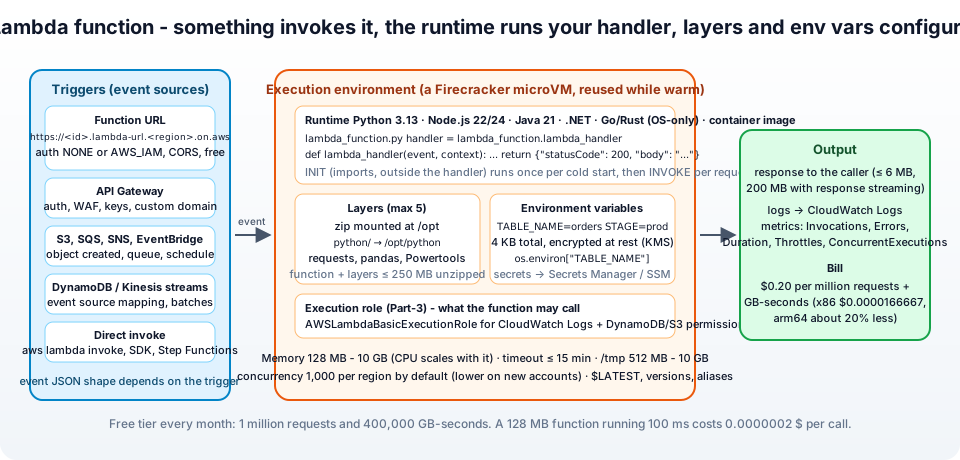
Under the hood, each invocation runs in a Firecracker micro-VM (the execution environment). The first request to a new environment pays the cold start - AWS downloads your package, starts the runtime and runs your initialisation code (imports outside the handler). The environment is then kept warm and reused for later requests, so initialisation runs once, not per request.
2. Step 1 - Create and test a Python function
Lambda → Functions → Create function -
- Author from scratch. Function name
jhooq-hello. Runtime Python 3.13. Architecture arm64 - Graviton, about 20% cheaper per GB-second and usually faster; pick x86_64 only if a dependency has no Arm build. - Permissions → Change default execution role - Create a new role with basic Lambda permissions. Lambda creates
jhooq-hello-role-xxxxwithAWSLambdaBasicExecutionRole. - Create function. You land in the editor with a default
lambda_function.py. Replace it -
 1import json
 2import os
 3import time
 4
 5# INIT phase - runs once per cold start, outside the handler
 6START = time.time()
 7STAGE = os.environ.get("STAGE", "dev")
 8
 9def lambda_handler(event, context):
10    name = "World"
11    params = event.get("queryStringParameters") or {}
12    if params.get("name"):
13        name = params["name"]
14
15    body = {
16        "message": f"Hello, {name}!",
17        "stage": STAGE,
18        "request_id": context.aws_request_id,
19        "env_age_seconds": round(time.time() - START, 1),   # grows while the environment is reused
20        "memory_mb": context.memory_limit_in_mb,
21    }
22    return {
23        "statusCode": 200,
24        "headers": {"Content-Type": "application/json"},
25        "body": json.dumps(body),
26    }
- Deploy (the button above the editor - edits are not live until deployed).
- Test → Create new test event → name
hello, templateapigateway-http-api-proxyor just{"queryStringParameters": {"name": "Rahul"}}→ Save → Test. The result pane shows the JSON response, the log output and the Duration, Billed Duration, Max Memory Used and, on a cold start, the Init Duration. Run it twice and watchenv_age_secondsgrow - that is the warm environment.
Logs go to CloudWatch Logs under /aws/lambda/jhooq-hello; print() is enough, logging is better.
3. Step 2 - Add a function URL
A function URL is a dedicated HTTPS endpoint for the function - no API Gateway, no load balancer, no extra cost. Configuration → Function URL → Create function URL -
- Auth type -
- AWS_IAM - callers must sign requests with SigV4 and have
lambda:InvokeFunctionUrlpermission. For service-to-service and internal tools. - NONE - public. Anyone with the URL can invoke the function (and you pay for it). Lambda adds a resource-based policy allowing
*to invoke the URL. For webhooks, demos and public APIs that do their own auth inside the code.
- AWS_IAM - callers must sign requests with SigV4 and have
- Configure cross-origin resource sharing (CORS) - tick it if a browser on another domain will call the URL; set Allow origin to your site (
https://jhooq.com, not*in production), the methods and headers. Lambda then adds the CORS headers for you - do not also add them in the code, you get duplicate-header errors. - Save.
The URL appears in Function overview - https://abcdef123456.lambda-url.eu-central-1.on.aws/. It never changes for the life of the URL config, is dual-stack (IPv4/IPv6), and maps to $LATEST (or to an alias if you create the URL on the alias - section 8).
1curl "https://abcdef123456.lambda-url.eu-central-1.on.aws/?name=Rahul"
2# {"message": "Hello, Rahul!", "stage": "dev", ...}
3
4# with AWS_IAM auth - curl signs the request with your credentials
5curl --aws-sigv4 "aws:amz:eu-central-1:lambda" --user "$AWS_ACCESS_KEY_ID:$AWS_SECRET_ACCESS_KEY" \
6  -H "x-amz-security-token: $AWS_SESSION_TOKEN" "https://abcdef123456.lambda-url.eu-central-1.on.aws/"
Two more switches live here - Invoke mode BUFFERED (default, response up to 6 MB) or RESPONSE_STREAM (stream up to 200 MB as it is produced - Node.js, great for LLM output and large files), and throttling: a function URL has no rate limit of its own, so set reserved concurrency on the function; requests beyond 10 × that concurrency per second get 429. Set reserved concurrency to 0 to switch a public URL off in an emergency.
4. The function URL event and response format
Function URLs use the API Gateway HTTP API payload format version 2.0 (invoking function URLs) - the same event shape as an HTTP API, so code moves between the two unchanged -
 1{
 2  "version": "2.0",
 3  "rawPath": "/orders/42",
 4  "rawQueryString": "name=Rahul",
 5  "headers": { "host": "abcdef123456.lambda-url.eu-central-1.on.aws", "user-agent": "curl/8.5.0" },
 6  "queryStringParameters": { "name": "Rahul" },
 7  "requestContext": {
 8    "http": { "method": "GET", "path": "/orders/42", "sourceIp": "203.0.113.7" },
 9    "requestId": "..."
10  },
11  "body": null,
12  "isBase64Encoded": false
13}
Your handler reads event["requestContext"]["http"]["method"], event["rawPath"], event["queryStringParameters"] and event["body"] (base64 when isBase64Encoded is true - binary uploads). The response is the same dictionary we return above - statusCode, headers, body (a string), optional cookies list and isBase64Encoded. Return a plain string or dict instead and Lambda wraps it as a 200 with application/json, which is convenient for quick tests. Frameworks like FastAPI (via Mangum) or Lambda Powertools' event handler route on this event for you.
5. Function URL vs API Gateway
| Function URL | API Gateway (HTTP / REST) | |
|---|---|---|
| Cost | free - only the Lambda invocation | $1.00 / $3.50 per million requests on top |
| Setup | one click | API, routes, integration, stage, deployment |
| Custom domain | not natively - put CloudFront in front | yes, with ACM (Part-16) |
| Auth | IAM or none (do it in code) | IAM, Cognito, JWT, Lambda authorizers |
| WAF | via CloudFront only | yes on REST API and via CloudFront |
| Throttling, usage plans, API keys, caching, request validation | no (reserved concurrency only) | yes (REST API) |
| Routing | one function, one URL - route inside the code | many routes, many functions |
| Max timeout | 15 minutes | 29 seconds (REST), 30 seconds (HTTP) |
| Streaming | yes (200 MB) | HTTP API: no; REST: no |
Use a function URL for webhooks, single-purpose endpoints, internal tools behind IAM, long-running or streaming responses, and anything where the API Gateway price matters. Use API Gateway when you need auth, throttling, usage plans, validation, many routes or a product-grade API - the comparison in the API Gateway post picks between HTTP and REST from there. A CloudFront distribution in front of a function URL (with Origin Access Control so only CloudFront may invoke it) gives you a custom domain, WAF and caching at a fraction of the API Gateway cost - a popular middle ground.
6. Step 3 - Environment variables
Configuration belongs outside the code. Configuration → Environment variables → Edit → Add environment variable - STAGE = prod, TABLE_NAME = orders, LOG_LEVEL = INFO → Save. In the code they are plain environment variables -
1import os
2TABLE_NAME = os.environ["TABLE_NAME"]            # fail fast if missing
3LOG_LEVEL  = os.environ.get("LOG_LEVEL", "INFO")  # with a default
The rules -
- 4 KB total for all variables of a function - names and values. That is a limit, not a budget for JSON blobs.
- Lambda sets its own -
AWS_REGION,AWS_LAMBDA_FUNCTION_NAME,AWS_LAMBDA_FUNCTION_MEMORY_SIZE,_HANDLER- and reserves those names; the AWS SDK reads the credentials of the execution role from the environment too. - They are encrypted at rest with a Lambda-managed KMS key by default; choose your own customer managed key under Encryption configuration to control who can read them. Enable helpers for encryption in transit encrypts individual values client-side so that even the console shows ciphertext - the function decrypts with KMS at runtime.
- Changing a variable creates a new
$LATESTconfiguration and restarts the environments (next invocation is a cold start). - Secrets do not belong here in production - anyone with
lambda:GetFunctionConfigurationsees them in plaintext. Put database passwords and API keys in Secrets Manager or SSM Parameter Store and read them at init with the AWS Parameters and Secrets Lambda Extension (a layer that caches them locally). Keep the environment variable for the name of the secret.
Per-version: variables are frozen into a published version (section 8), so prod and dev aliases can carry different values.
7. Step 4 - Lambda layers for dependencies
Try import requests in the function - Runtime.ImportModuleError: Unable to import module 'lambda_function': No module named 'requests'. The runtime ships only the standard library plus boto3. You could zip the libraries with the code every time; a layer packages them once, versioned, and any number of functions attach it.
Build the layer (Python). The one rule that catches everyone: the zip must contain a top-level python/ directory - Lambda extracts the layer to /opt, and /opt/python is on sys.path (Python layers) -
1mkdir -p layer/python
2# match the function's runtime AND architecture - arm64 here
3pip install requests \
4  --platform manylinux2014_aarch64 --only-binary=:all: \
5  --python-version 3.13 --implementation cp \
6  --target layer/python
7cd layer && zip -r ../requests-layer.zip python && cd ..
8ls -la requests-layer.zip
For x86_64 functions use --platform manylinux2014_x86_64. Building on your Mac without those flags produces macOS wheels that fail with invalid ELF header on Lambda - the second most common layer error. Docker with the public.ecr.aws/lambda/python:3.13 image is the other reliable way to build.
Create the layer. Lambda → Layers → Create layer - Name requests-py313, Upload a .zip file (or from S3 for anything over 50 MB), Compatible architectures arm64, Compatible runtimes Python 3.13, Create. You get arn:aws:lambda:eu-central-1:111111111111:layer:requests-py313:1 - the :1 is the layer version; versions are immutable, every upload makes a new one.
Attach it. Function → Code tab → scroll to Layers → Add a layer → Custom layers → requests-py313 → version 1 → Add. (AWS layers here offers AWS-maintained ones - Lambda Powertools, the Parameters and Secrets extension, AWS SDK for pandas - and Specify an ARN takes any shared layer ARN, e.g. from another account.)
Now the import works -
1import requests
2
3def lambda_handler(event, context):
4    r = requests.get("https://api.github.com/repos/hashicorp/terraform", timeout=5)
5    return {"statusCode": 200, "body": r.json()["description"]}
Limits (quotas) - 5 layers per function, and 250 MB unzipped for the function plus all its layers together (container images go to 10 GB when you outgrow that). Layers are for dependencies and shared code, not for data; and because a layer version is immutable, "update the library" means "publish version 2 and point the functions at it".
8. Versions, aliases and $LATEST
Every edit changes $LATEST. To freeze a release, Actions → Publish new version - version 1 is an immutable snapshot of code and configuration (environment variables, layers, memory). An alias is a named pointer - prod → 1, dev → $LATEST. Triggers (function URLs, API Gateway, event sources) should point at aliases, so a deployment is "publish version 2, move prod to 2", and a rollback is "move prod back to 1". A weighted alias (prod → 90% v1, 10% v2) is a canary release, and CodeDeploy can shift the weight automatically while watching alarms. Create the function URL on the prod alias (Aliases → prod → Configuration → Function URL) so the public endpoint never accidentally serves $LATEST.
9. Cold starts, memory, timeout and concurrency
- Memory - 128 MB to 10,240 MB; CPU scales with memory (one full vCPU at 1,769 MB). Many CPU-bound functions are cheaper at 1 GB than at 128 MB because they finish much faster. Test with the AWS Lambda Power Tuning tool.
- Timeout - up to 15 minutes; default 3 seconds, which is why "Task timed out after 3.00 seconds" is everyone's first error.
- Ephemeral storage
/tmp- 512 MB free, up to 10 GB for a fee. - Cold starts - a few hundred ms for Python/Node, seconds for Java/.NET. Reduce them with smaller packages, lazy imports, arm64, SnapStart (Java, Python, .NET) or provisioned concurrency (pre-warmed environments, paid).
- Concurrency - each environment handles one request at a time, so concurrency = requests per second × duration. The region-wide default quota is 1,000 (lower on brand-new accounts and raised automatically); reserved concurrency fences off a share for one function (and caps it), and bursts scale at 1,000 new environments every 10 seconds per function (scaling).
10. The AWS CLI equivalents
 1# package and create
 2zip function.zip lambda_function.py
 3aws lambda create-function --function-name jhooq-hello --runtime python3.13 --architectures arm64 \
 4  --role arn:aws:iam::111111111111:role/jhooq-hello-role --handler lambda_function.lambda_handler \
 5  --zip-file fileb://function.zip --timeout 10 --memory-size 256 \
 6  --environment "Variables={STAGE=prod,TABLE_NAME=orders}"
 7
 8# update code / config
 9aws lambda update-function-code --function-name jhooq-hello --zip-file fileb://function.zip
10aws lambda update-function-configuration --function-name jhooq-hello --environment "Variables={STAGE=prod,LOG_LEVEL=DEBUG}"
11
12# invoke
13aws lambda invoke --function-name jhooq-hello --payload '{"queryStringParameters":{"name":"CLI"}}' --cli-binary-format raw-in-base64-out out.json && cat out.json
14
15# function URL (public)
16aws lambda create-function-url-config --function-name jhooq-hello --auth-type NONE
17aws lambda add-permission --function-name jhooq-hello --statement-id public-url --action lambda:InvokeFunctionUrl \
18  --principal "*" --function-url-auth-type NONE
19
20# layer
21aws lambda publish-layer-version --layer-name requests-py313 --zip-file fileb://requests-layer.zip \
22  --compatible-runtimes python3.13 --compatible-architectures arm64
23aws lambda update-function-configuration --function-name jhooq-hello \
24  --layers arn:aws:lambda:eu-central-1:111111111111:layer:requests-py313:1
25
26# versions and aliases
27aws lambda publish-version --function-name jhooq-hello --description "v1"
28aws lambda create-alias --function-name jhooq-hello --name prod --function-version 1
29
30# logs
31aws logs tail /aws/lambda/jhooq-hello --follow
Terraform: aws_lambda_function, aws_lambda_function_url, aws_lambda_layer_version, aws_lambda_alias, aws_lambda_permission, with archive_file for the zip - and for real projects the AWS SAM CLI or the Serverless Framework, which build layers for you.
11. What Lambda costs
From the pricing page (us-east-1) -
| Item | Price |
|---|---|
| Requests | $0.20 per million |
| Duration, x86 | $0.0000166667 per GB-second (billed per ms, init included) |
| Duration, arm64 | $0.0000133334 per GB-second (about 20% less) |
| Free tier, every month, no expiry | 1 million requests + 400,000 GB-seconds |
| Function URL | no extra charge |
| Response streaming | first 6 MB per request free, then $0.008 per GB |
| Ephemeral storage above 512 MB | $0.0000000309 per GB-second |
| Provisioned concurrency | $0.0000041667 per GB-second reserved + reduced duration price; no free tier |
A 256 MB function that runs 200 ms, called 3 million times a month, costs about $0.40 for requests and about $3 for duration on arm64 - minus the free tier, under $3. The duration meter now includes the INIT phase, so heavy imports at cold start cost money; keep initialisation lean. Compare with the t3.micro from Part-4 at about $7 a month doing nothing.
12. Common Lambda errors and how to fix them
1. Task timed out after 3.00 seconds - The default timeout. Raise it (Configuration → General configuration), and check for a VPC-attached function without a NAT/endpoint trying to reach the internet (Part-19).
2. Runtime.ImportModuleError: Unable to import module 'lambda_function': No module named 'requests' - Dependency missing - add the layer (section 7) or bundle it in the zip.
3. ... No module named 'lambda_function' / Runtime.HandlerNotFound - The handler setting does not match the file and function names (lambda_function.lambda_handler), or the zip has a folder at the top level instead of the files.
4. invalid ELF header / cannot import name ... from partially initialized module on a layer - Wheels built for the wrong OS or architecture. Rebuild with --platform manylinux2014_aarch64 (or x86_64) and --only-binary=:all:, matching the function's architecture.
5. {"Message":"Forbidden"} from the function URL (403) - Auth type is AWS_IAM and the request is unsigned, or the resource-based policy for lambda:InvokeFunctionUrl is missing (add-permission above).
6. 429 Too Many Requests / Rate exceeded / TooManyRequestsException - Concurrency limit hit - the account quota, the function's reserved concurrency, or the 10 × RPS rule of function URLs. Raise reserved concurrency or request a quota increase.
7. Runtime exited with error: signal: killed / Error: Runtime exited without providing a reason - Out of memory. Raise the memory; Max Memory Used in the logs tells you.
8. The 'Access-Control-Allow-Origin' header contains multiple values '*, *' - CORS configured on the function URL and headers set in the code. Remove one (keep the URL config).
9. Lambda was unable to decrypt the environment variables because KMS access was denied - The execution role lacks kms:Decrypt on the customer managed key you chose for environment variables.
10. Layers consume more than the available size of 262144000 bytes / Unzipped size must be smaller than 262144000 bytes - The 250 MB limit. Trim dependencies (pandas + numpy alone are 100 MB+), or switch to a container image.
11. Cannot exceed 5 layers - Merge layers.
12. UnrecognizedClientException / AccessDeniedException calling S3/DynamoDB from the function - The execution role has only the basic logging policy. Attach the permissions the code needs (Part-1).
13. Conclusion
To summarise Part-17 -
- A Lambda function is code with a handler, a runtime, an execution role and configuration; something invokes it, initialisation runs once per cold start, and you pay per millisecond.
- A function URL gives it a free, permanent HTTPS endpoint with IAM or no auth and CORS - the HTTP API event format - and API Gateway or CloudFront in front when you need auth, throttling, a custom domain or WAF.
- Environment variables carry configuration (4 KB, KMS-encrypted, frozen into versions); secrets go to Secrets Manager or Parameter Store.
- Layers package dependencies once -
python/at the top of the zip, built for the right architecture, max 5 per function and 250 MB total. - Publish versions, point triggers at aliases, size memory for speed, set a real timeout, and watch concurrency - and the free tier covers a surprising amount.
The official references are the Lambda Developer Guide, function URLs, environment variables, layers and quotas. Back to networking in Part-18 - the Network Load Balancer, and when to use it instead of the ALB.
AWS step by step series -
- Part-1 : AWS IAM user - create a user, group, policy, access keys and MFA
- Part-2 : AWS Organizations - multi-account setup, OUs and SCPs
- Part-3 : AWS assume IAM role - trust policy, switch role in console and CLI
- Part-4 : How to launch an EC2 instance - key pair, security group, SSH
- Part-5 : AWS VPC - public and private subnets, Internet Gateway, NAT Gateway, route tables
- Part-8 : EC2 launch template - versions, default version, source template, SSM parameter AMI
- Part-10 : EC2 Auto Scaling - launch template, Auto Scaling group, target tracking, ALB
- Part-11 : AWS WAF - web ACL, managed rules, rate limiting, geo blocking
- Part-12 : AWS VPC Peering - connect two VPCs, routes, security groups, DNS
- Part-13 : AWS Transit Gateway - hub-and-spoke for many VPCs and on-premises
- Part-14 : AWS NAT Gateway deep dive - public vs private, limits, cost, troubleshooting
- Part-15 : Amazon Route 53 - hosted zones, records, alias, routing policies, health checks
- Part-16 : AWS security groups - inbound and outbound rules, stateful, referencing, quotas
- Part-16 : AWS Certificate Manager - free TLS certificates for ALB, CloudFront and API Gateway
- Part-17 : AWS Lambda - function URLs, environment variables and layers
- Part-18 : Network Load Balancer - setup, and ALB vs NLB
- Part-19 : VPC endpoints - gateway and interface endpoints (PrivateLink) instead of NAT
- Part-20 : AWS PrivateLink - publish your own service with an endpoint service and NLB
- Part-20 : Amazon EBS volumes - types, attach, mount, resize, snapshots, encryption
- Part-21 : VPC Flow Logs - CloudWatch Logs, S3, record format, Logs Insights, Athena
- Part-21 : EC2 Spot Instances - pricing, interruptions, mixed instances groups
- Part-24 : AWS Control Tower - landing zone, controls, Account Factory, Identity Center
Networking fundamentals -
- What is a VPC and a subnet? AWS networking in five minutes
- What is CIDR? Calculate IP ranges for VPCs and subnets
- What is NAT? Static NAT, dynamic NAT and PAT explained
More AWS guides -
- What is AWS CloudFormation? Templates, stacks, change sets, drift, StackSets
- Learn AWS S3 - the complete course
- AWS API Gateway - REST API with Lambda, authorizers, Terraform
- AWS Advanced Networking Specialty (ANS-C01) - course companion
- AWS ECS and Fargate - how to deploy a Docker container
- AWS S3 - how to host a static website
- Terraform create EC2 instance on AWS
- Terraform AWS IAM - users, roles and policies
- Terraform and AWS multi-account setup
- Terraform - setting up an ALB and SSL
Posts in this series
- Amazon EBS Volumes Step by Step - Volume Types Compared (gp3, gp2, io2 Block Express, st1, sc1), Create, Attach, Format and Mount a Volume, Resize Without Downtime, Snapshots, Encryption, Multi-Attach, Pricing and Troubleshooting (AWS Part-20)
- Amazon Route 53 Step by Step - Hosted Zones, Record Types, Alias Records, Point a Domain at an ALB, Routing Policies (Weighted, Latency, Failover, Geolocation), Health Checks, Private Zones and Pricing (AWS Part-15)
- AWS Advanced Networking - Free 8-Hour Full Course Companion (VPC, NAT Gateway, Bastion, ALB, NLB, WAF, VPC Peering, Transit Gateway, VPC Endpoints and PrivateLink, Route 53, ACM) with Timestamps and the ANS-C01 Exam Facts
- AWS Assume IAM Role Step by Step - Trust Policy vs Permissions Policy, Switch Role in the Console, aws sts assume-role, CLI Profiles, Cross-Account Access, MFA and External ID (AWS Part-3)
- AWS Certificate Manager (ACM) Step by Step - Request a Free TLS Certificate, DNS Validation with Route 53, Attach It to an ALB HTTPS Listener, Redirect HTTP to HTTPS, CloudFront and API Gateway, Auto-Renewal, Exportable Certificates and ACME (AWS Part-16)
- AWS Control Tower Step by Step - Set Up a Landing Zone, Security OU with Log Archive and Audit Accounts, Controls (Guardrails), Region Deny, IAM Identity Center, Account Factory and Enrolling Existing Accounts (AWS Part-24)
- AWS EC2 Auto Scaling Step by Step - Launch Template, Auto Scaling Group Across Two AZs, Target Tracking Policy, Application Load Balancer, Health Checks and Instance Refresh (AWS Part-10)
- AWS EC2 Launch Template Step by Step - Create a Template, Versions and the Default Version, Source Template, Create From a Running Instance, Systems Manager Parameter Instead of an AMI ID, Launch Templates vs Launch Configurations, IAM Guardrails, CLI and Terraform (AWS Part-8 and Part-17)
- AWS EC2 Spot Instances Step by Step - How Spot Pricing Works, Launch a Spot Instance, Interruptions and the Two-Minute Notice, Rebalance Recommendations, Stop vs Hibernate vs Terminate, Spot in Auto Scaling Mixed Instances Groups, Billing Rules, Best Practices, CLI and Terraform (AWS Part-21)
- AWS IAM User Step by Step - Create a User, User Group, Attach Policies, Access Keys, MFA and Sign-in URL (AWS Part-1)
- AWS Lambda Step by Step - Create a Function, Function URL (HTTPS Endpoint Without API Gateway), Environment Variables, Lambda Layers for Python Dependencies, Versions and Aliases, Limits, Pricing and Errors (AWS Part-17)
- AWS NAT Gateway Deep Dive - How It Works, Public vs Private NAT Gateway, Setup Step by Step, Limits (55,000 Connections, 100 Gbps), CloudWatch Metrics, Cost Optimisation, NAT Instance Comparison and Troubleshooting (AWS Part-14)
- AWS Network Load Balancer Step by Step - Create an NLB with Static IPs, Target Groups, TCP and TLS Listeners, Security Groups, Client IP Preservation, Cross-Zone Load Balancing, and ALB vs NLB Explained (AWS Part-18)
- AWS Organizations Step by Step - Multi-Account Setup, Organizational Units, Service Control Policies (SCPs), Consolidated Billing and Identity Center (AWS Part-2)
- AWS PrivateLink Step by Step - Publish Your Own Service with a VPC Endpoint Service and Network Load Balancer, Allow Consumers, Accept Connections, Private DNS Name, Cross-Account and Cross-Region, Pricing and Troubleshooting (AWS Part-20)
- AWS Security Groups Step by Step - Inbound and Outbound Rules, Stateful Behaviour, Referencing Security Groups, the Three-Tier ALB-Web-DB Pattern, Quotas, Security Group vs Network ACL, CLI and Terraform (AWS Part-16)
- AWS Transit Gateway Step by Step - Connect Many VPCs and On-Premises Through One Hub, VPC Attachments, Transit Gateway Route Tables, Associations and Propagations, Isolation, Peering, Pricing (AWS Part-13)
- AWS VPC Endpoints Step by Step - Gateway Endpoints for S3 and DynamoDB, Interface Endpoints (PrivateLink) for SSM, ECR and Other Services, Private DNS, Endpoint Policies, Security Groups, Cost vs NAT Gateway, and Troubleshooting (AWS Part-19)
- AWS VPC Flow Logs Step by Step - Enable Flow Logs for a VPC, Subnet or Network Interface, Publish to CloudWatch Logs or S3, Read a Flow Log Record Field by Field, Custom Formats, Query with Logs Insights and Athena, Find Rejected Traffic, Pricing and Limitations (AWS Part-21)
- AWS VPC Peering Step by Step - Connect Two VPCs (Same or Different Account and Region), Accept the Request, Add Routes, Security Groups, DNS Resolution, Test with EC2, and the Limits (AWS Part-12)
- AWS VPC Step by Step - Create a VPC with Public and Private Subnets, Internet Gateway, NAT Gateway and Route Tables (and Test It with EC2) (AWS Part-5)
- AWS WAF Step by Step - Create a Web ACL, Attach It to an ALB or API Gateway, AWS Managed Rules, Rate-Based Rules, Geo Blocking, IP Sets, Count Mode and Logging (AWS Part-11)
- How to Launch an EC2 Instance on AWS Step by Step - AMI, Instance Type, Key Pair, Security Group, Connect with SSH or EC2 Instance Connect, Stop vs Terminate (AWS Part-4)
- What is an AWS VPC and a Subnet? Virtual Private Cloud Explained in Five Minutes (Region, Availability Zones, Public vs Private Subnets, Gateways, Route Tables)
- What is AWS CloudFormation? Templates, Stacks and Change Sets Explained, Template Anatomy Section by Section, Create Your First Stack Step by Step, Update With a Change Set, Drift Detection, Nested Stacks and StackSets, Quotas, Pricing, CLI, and CloudFormation vs Terraform
- What is CIDR (Classless Inter-Domain Routing)? How to Calculate IP Ranges for VPCs and Subnets, with Examples (/8, /16, /24, /28, /32)
- What is NAT (Network Address Translation)? How It Works, Static NAT vs Dynamic NAT vs PAT, the Translation Table, and Where NAT Shows Up in AWS
- AWS API Gateway Tutorial - REST API with Lambda Proxy and Non-Proxy Integration, Request Validation, HTTP API vs REST API, Resource Policies, Lambda Authorizers and Terraform
- Learn AWS S3 - The Complete Course (Buckets, Objects, Storage Classes, Lifecycle, Versioning, Security Defaults, Bucket Policies, Static Hosting, CLI and Terraform)
- How to release(delete) Elastic IP from AWS?
- Fix docker login 'error saving credentials: error storing credentials - err: exit status 1' (AWS ECR on macOS, Windows, Linux and WSL)