AWS Global Accelerator Step by Step - Two Static Anycast IPs in Front of Load Balancers in Two Regions, Listeners, Endpoint Groups, Traffic Dials, Weights, Client IP Preservation and Pricing (Part 23)

Part-22 kept traffic inside AWS with PrivateLink. This Part-23 is about the opposite direction: users on the public internet, anywhere in the world, reaching an application that runs in more than one region - and reaching the closest healthy copy through one fixed pair of IP addresses.
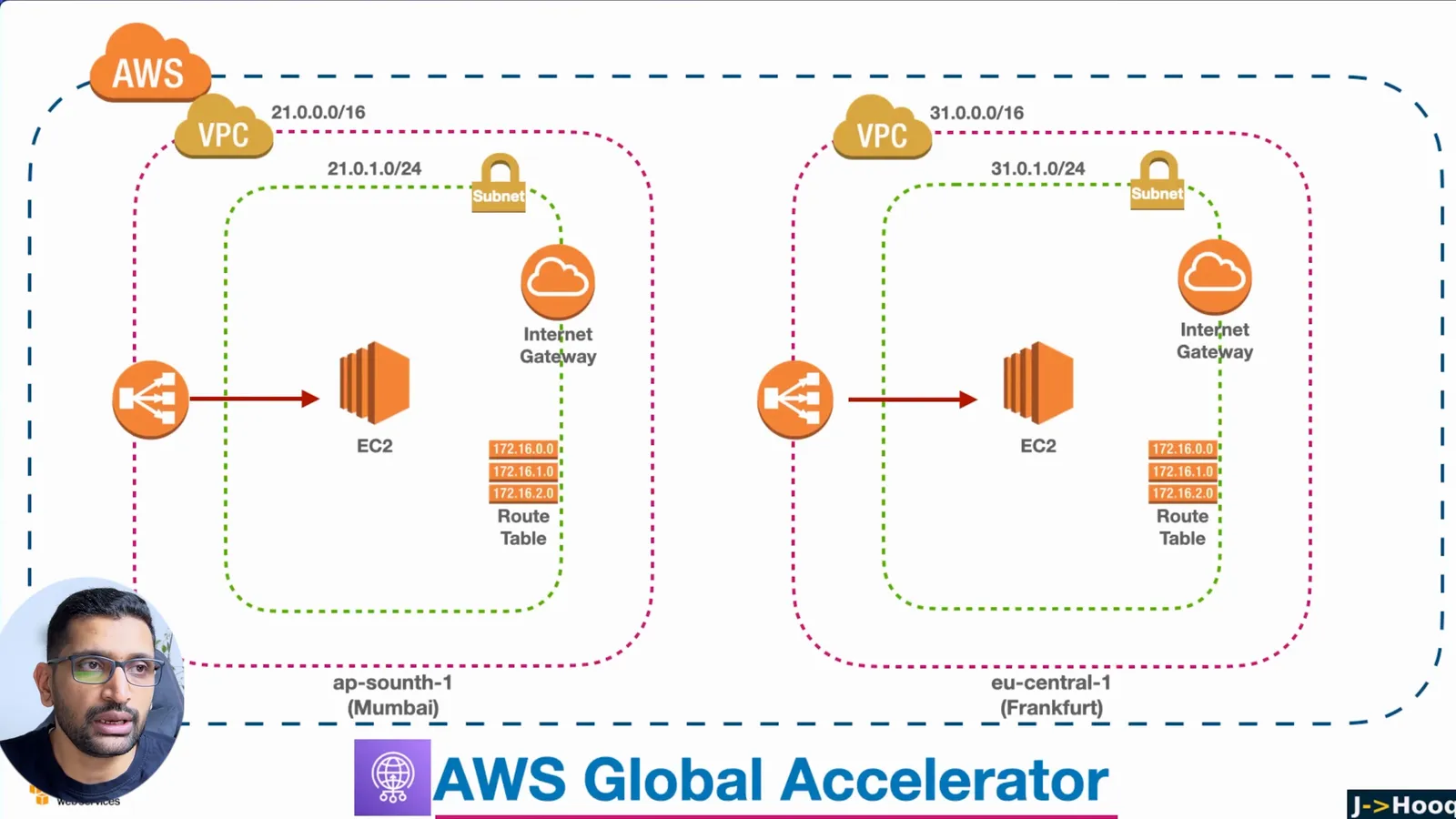
I build it the way I did in the video: a VPC, a subnet, an internet gateway, an EC2 web server and an Application Load Balancer in Mumbai and the same again in Frankfurt, then one AWS Global Accelerator in front of both. The whole build is 66 minutes on camera; the post has every step, the screens that matter, and the numbers I could not fit into the video.
TL;DR
- Global Accelerator gives you two static anycast IP addresses that never change. Users connect to the nearest AWS edge location, and from there traffic rides the AWS backbone to the closest healthy endpoint. My accelerator was assigned two IPs and a DNS name within about a minute of clicking Create.
- It is Layer 4, not a CDN. It forwards TCP and UDP to Application Load Balancers, Network Load Balancers, EC2 instances or Elastic IPs in any region. It caches nothing; use CloudFront for that.
- The structure is accelerator, listener, endpoint group, endpoint. One listener on TCP port 80, one endpoint group per region (
ap-south-1,eu-central-1) with a traffic dial (default 100%), and one ALB per group with a weight (default 128, range 0 to 255). - In the demo a request from Europe came back from Frankfurt (
Hostname: ip-31-0-1-23,IP Address: 31.0.1.23), exactly like a request straight to the Frankfurt ALB, while Mumbai stayed ready as the second endpoint group. - What it costs: a fixed fee of $0.025 per hour per accelerator (about $18 a month) plus a Data Transfer-Premium of, for example, $0.015 per GB from North America to Europe or $0.035 per GB to Asia Pacific, on the dominant direction of traffic only.
- Timeouts to know: 340 seconds idle for TCP, 30 seconds for UDP. Health checks fail an endpoint over to the next healthy one for new connections; existing connections stay until the idle timeout.
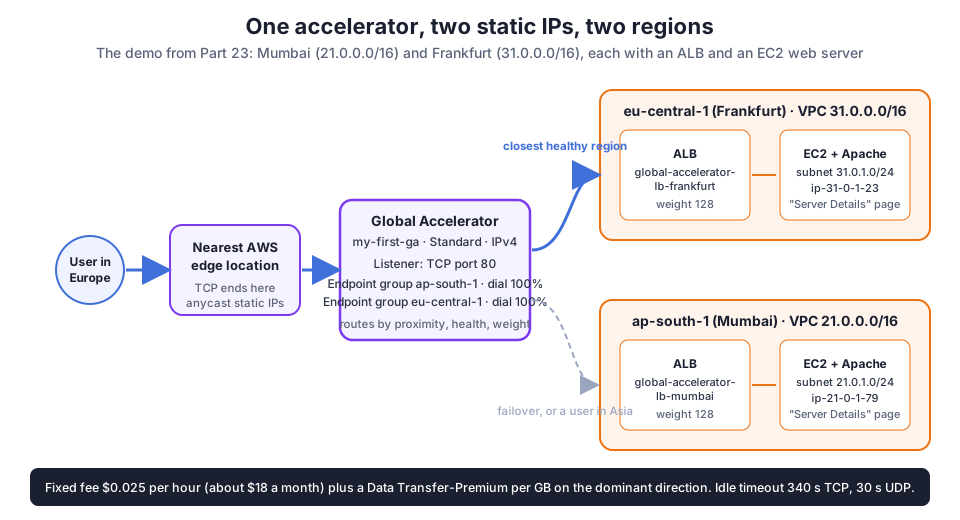
Table of Content
- What Global Accelerator does, and what it is not
- The vocabulary - accelerator, listener, endpoint group, endpoint
- Step 1 - A VPC, subnet, internet gateway and route table in each region
- Step 2 - An EC2 web server per region with user data
- Step 3 - An Application Load Balancer per region
- Step 4 - Create the accelerator and the listener
- Step 5 - Endpoint groups, traffic dials and endpoints
- Step 6 - Test it - which region answers
- Traffic dials and weights in practice
- Global Accelerator vs Route 53 vs CloudFront
- What it costs and the limits
- What broke when I ran this
- Conclusion
1. What Global Accelerator does, and what it is not
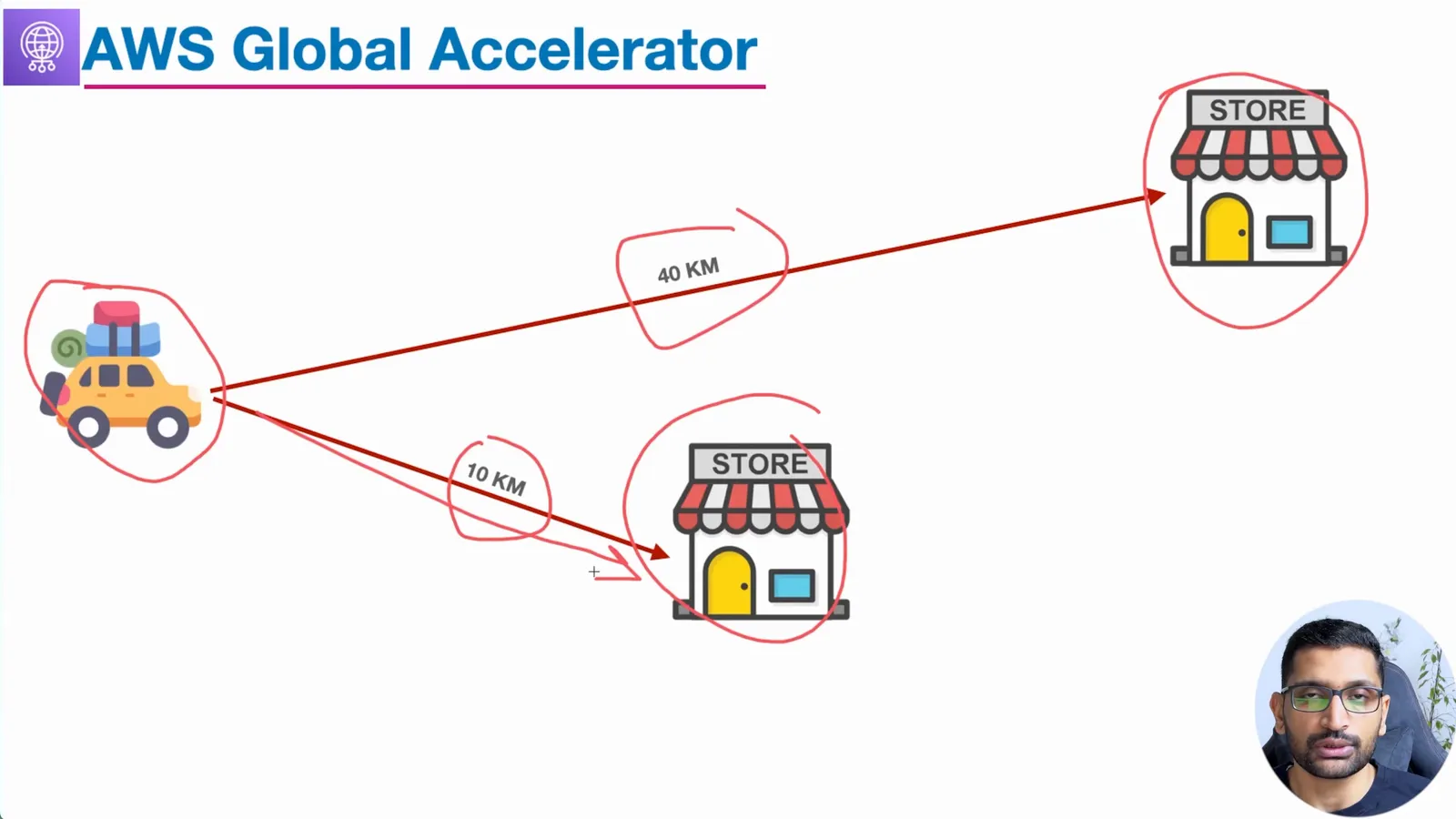
A user in Europe who opens an application hosted in Mumbai travels most of the way over the public internet, with every hop chosen by whoever runs the networks in between. Global Accelerator changes where that journey leaves the internet: the user connects to the nearest AWS edge location on one of two static anycast IP addresses, and from the edge the traffic rides the AWS global network to the region. AWS's own description is on the what is Global Accelerator page.
Three things make it different from the other two services people compare it with:
- It works at Layer 4 (TCP and UDP). It does not cache, does not terminate TLS for you and does not look at HTTP at all. A game server, a VoIP service or an API that needs a fixed IP for a customer's firewall allowlist are the typical users.
- The IP addresses are static for the life of the accelerator. DNS-based routing (Route 53) hands out different answers that clients and resolvers cache; Global Accelerator moves traffic between regions without any DNS change.
- Failover is in seconds, not TTLs. Health checks run against each endpoint; when one goes unhealthy, new connections go to the next healthy endpoint, by proximity. The how it works page adds the detail that existing connections keep flowing to the old endpoint until the idle timeout.
2. The vocabulary - accelerator, listener, endpoint group, endpoint
| Object | What it is | In this demo |
|---|---|---|
| Accelerator | the global resource that owns the two static IPs and a DNS name | my-first-ga, type Standard, IPv4 |
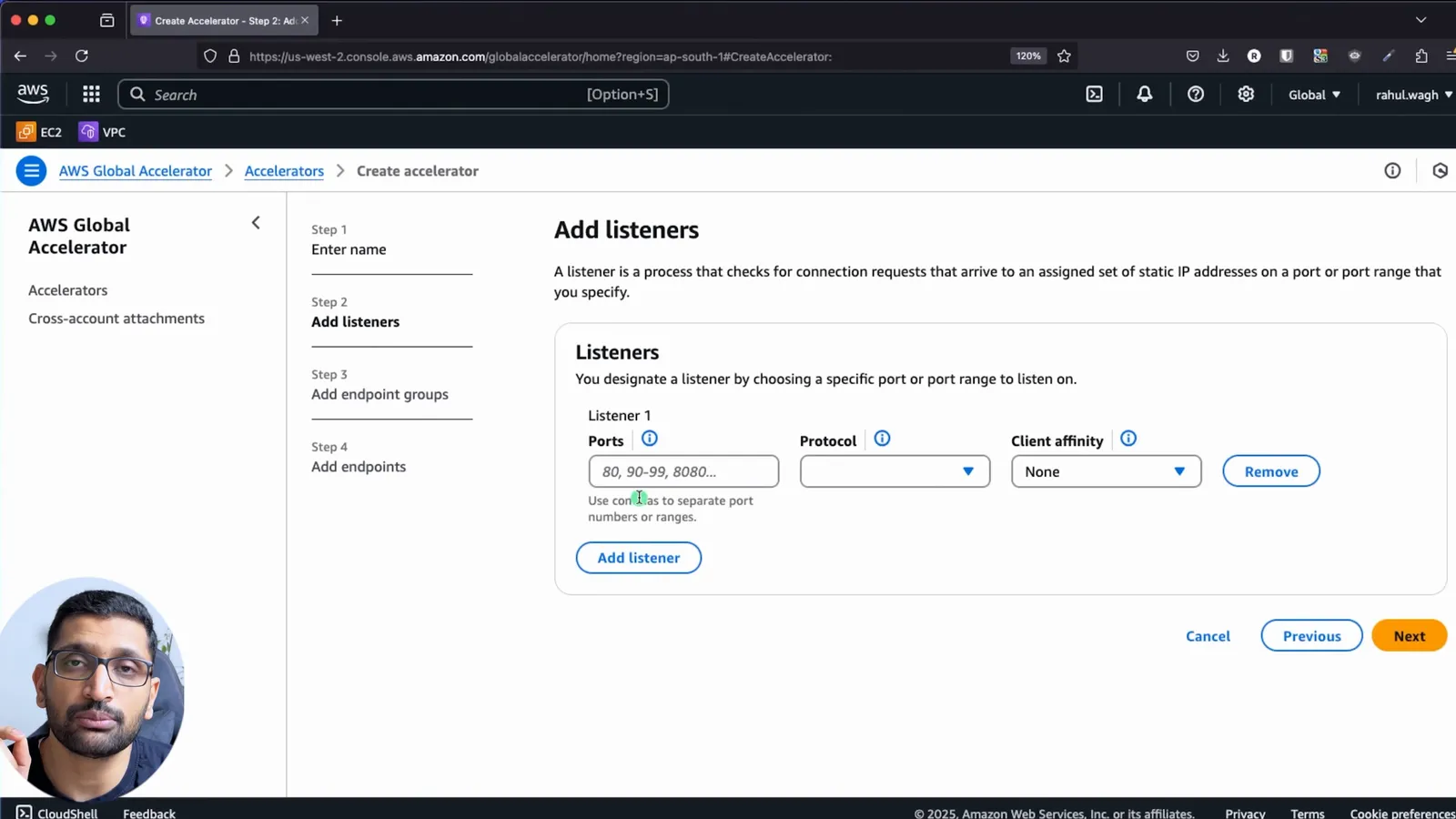
| Listener | a port or port range and a protocol the accelerator accepts | TCP port 80 |
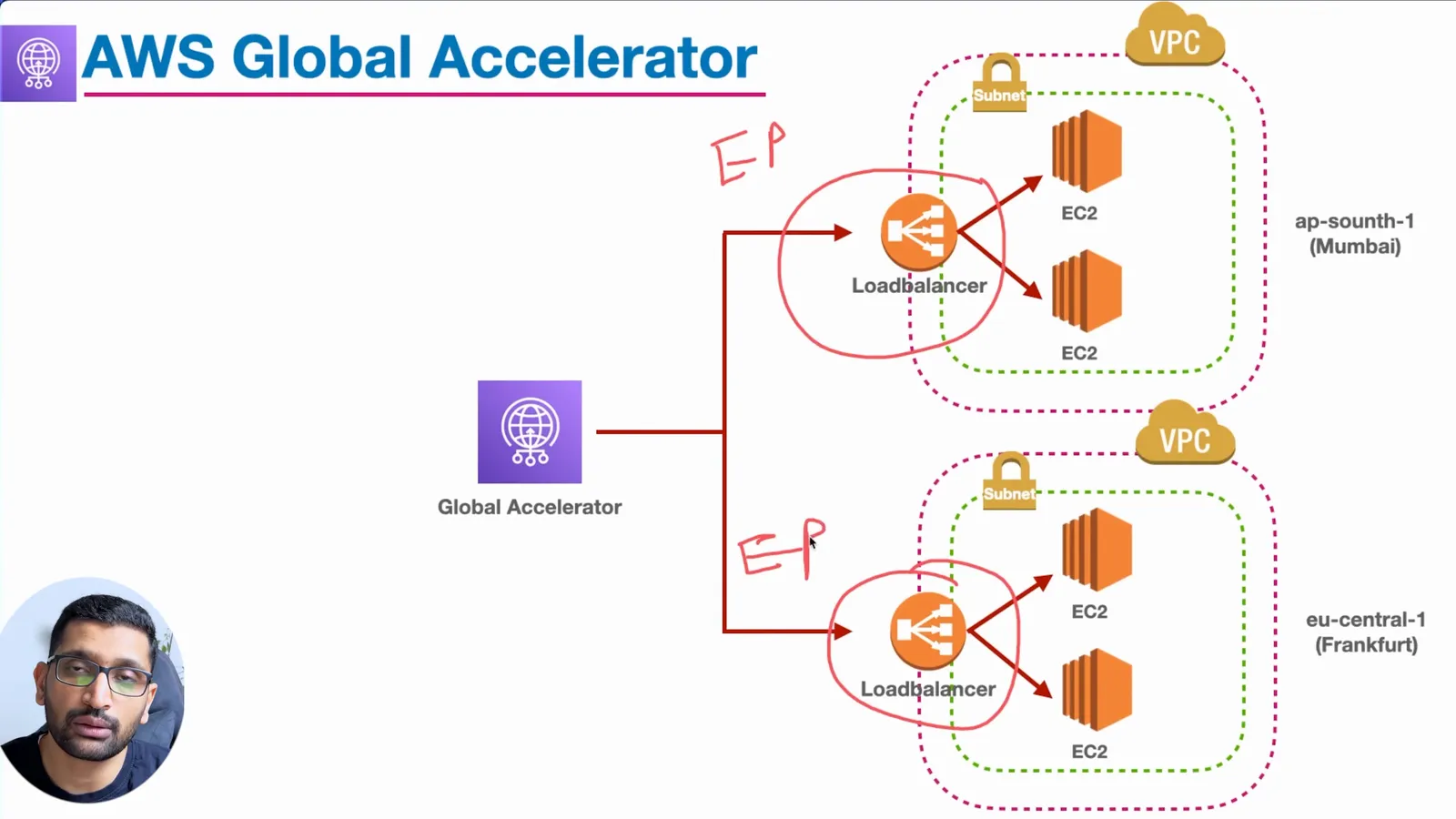
| Endpoint group | one per region, with a traffic dial (0 to 100%) and health check settings | ap-south-1 and eu-central-1, dial 100% |
| Endpoint | an ALB, NLB, EC2 instance or Elastic IP inside a group, with a weight (0 to 255) | one ALB per region, weight 128 |
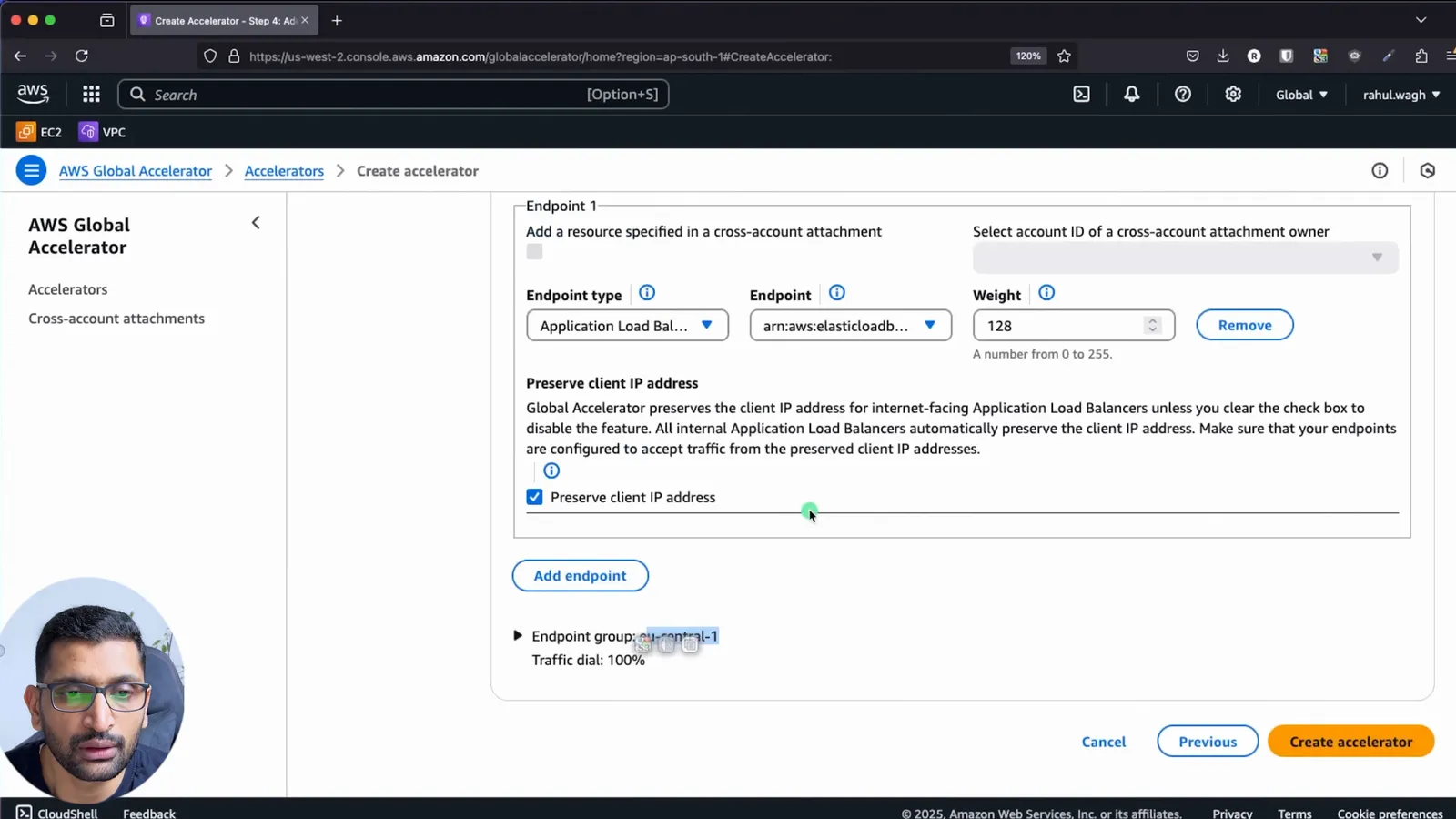
| Client IP preservation | pass the user's real IP to the endpoint instead of the edge IP | on, for internet-facing ALBs |
There are two accelerator types. Standard routes each connection to the best endpoint by proximity, health and weight - that is this post. Custom routing maps each user deterministically to one EC2 instance and port, for things like game sessions; the accelerator types page explains when you want it. Everything in a Standard accelerator is described per region on the endpoint groups page.
3. Step 1 - A VPC, subnet, internet gateway and route table in each region
Each region gets the same minimal network. I used two deliberately different CIDRs so it is obvious in every screen which region you are looking at:
| Region | VPC | Subnet | Instance | ALB |
|---|---|---|---|---|
| ap-south-1 (Mumbai) | 21.0.0.0/16 | 21.0.1.0/24 | ip-21-0-1-79, t2.micro | global-accelerator-lb-mumbai |
| eu-central-1 (Frankfurt) | 31.0.0.0/16 | 31.0.1.0/24 | ip-31-0-1-23 | global-accelerator-lb-frankfurt |
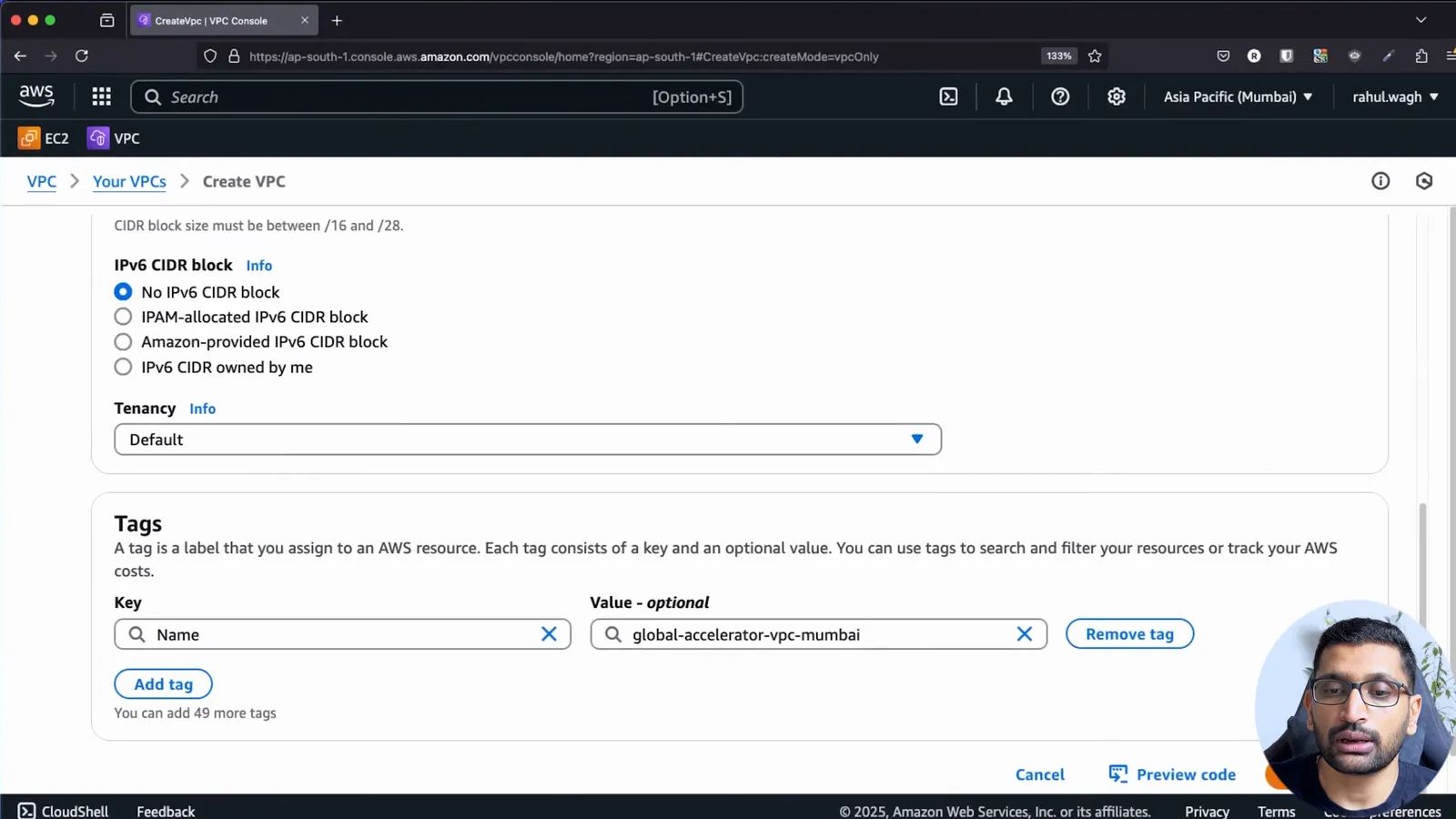
In each region, in order: create the VPC with "VPC only" and its CIDR, create one public subnet, create an internet gateway and attach it to the VPC, and add a 0.0.0.0/0 route to the internet gateway in the subnet's route table. Enable auto-assign public IPv4 on the subnet so the instances get a public address. If any of that is new, Part-5 builds the same VPC in detail, and the VPC Subnet Planner gives you the CIDRs for a bigger layout.
4. Step 2 - An EC2 web server per region with user data
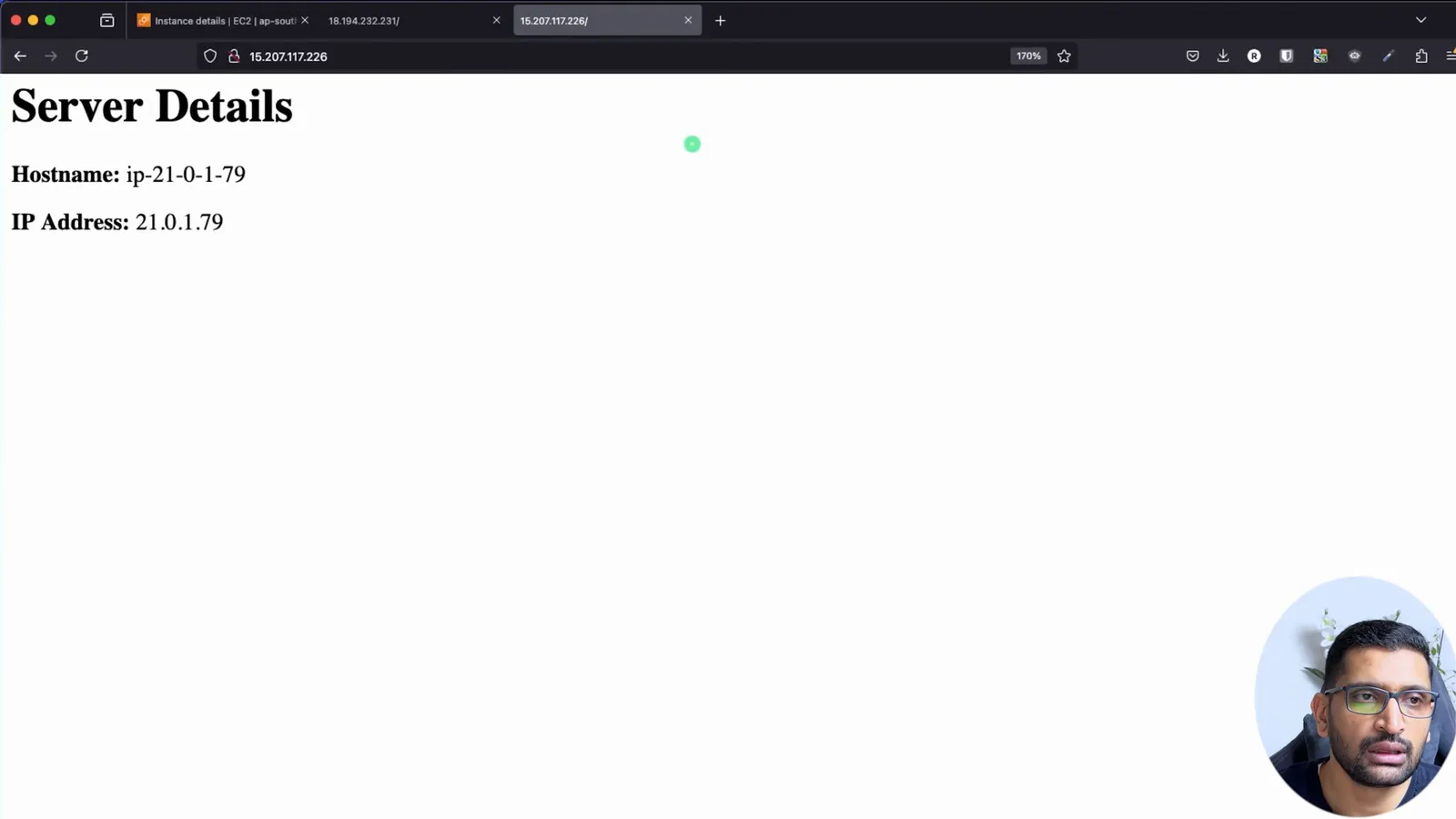
One Ubuntu instance per region in the public subnet, with a security group that allows port 80 from anywhere and port 22 from my IP, and this user data script so I can tell the two servers apart from a browser:
1#!/bin/bash
2yes | sudo apt update
3yes | sudo apt install apache2
4echo "<h1>Server Details</h1><p><strong>Hostname:</strong> $(hostname)</p><p><strong>IP Address:</strong> $(hostname -I | cut -d" " -f1)</p>" > /var/www/html/index.html
5sudo systemctl restart apache2
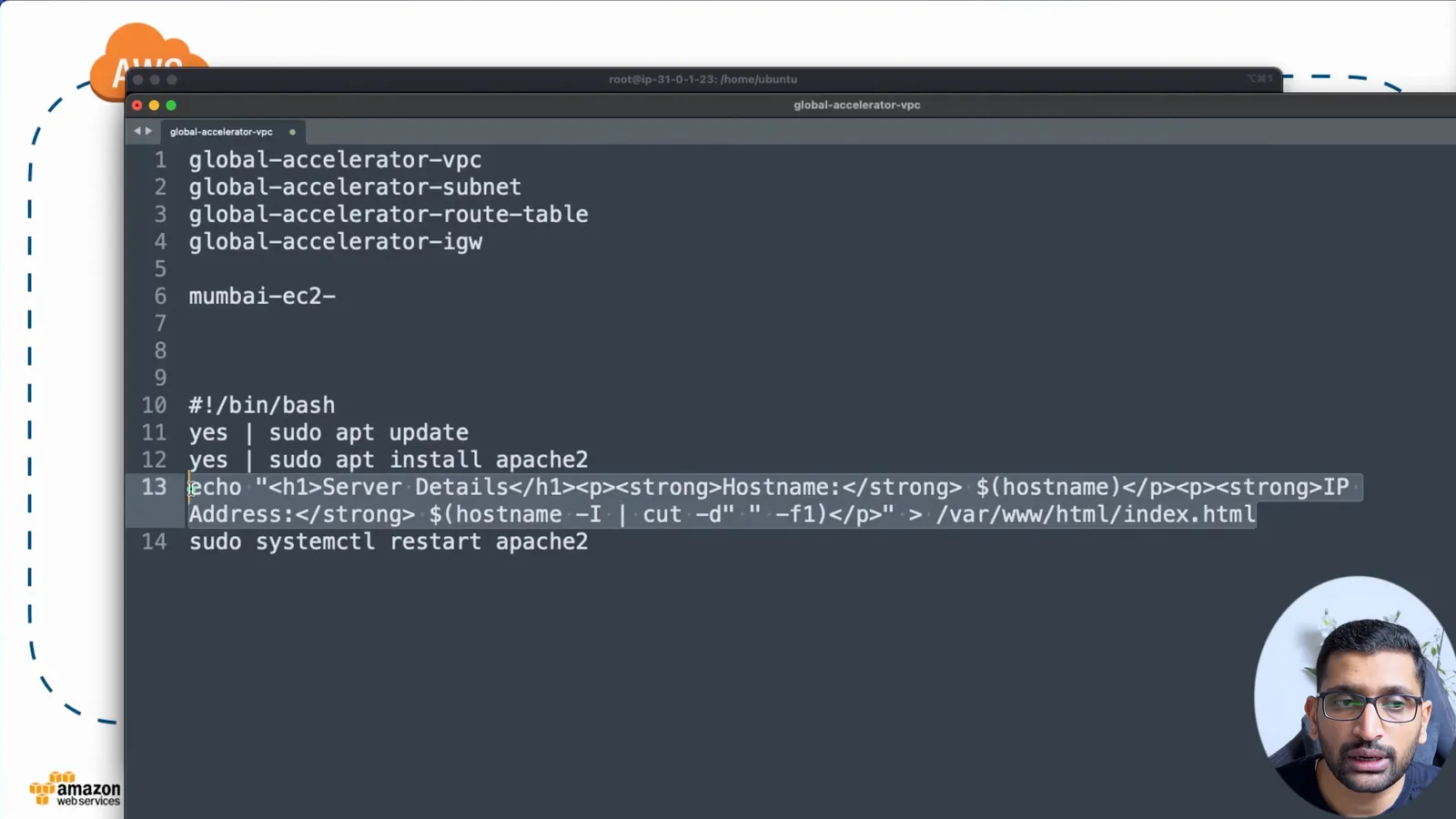
The page prints the private hostname and IP, so ip-31-0-1-23 can only come from Frankfurt and ip-21-0-1-79 only from Mumbai. Opening the instance's public IP shows the page directly, which proves the VPC and security group before any load balancer is involved. The user data script and the two-step apt install are the same pattern as Part-4, launching an EC2 instance.
5. Step 3 - An Application Load Balancer per region
Global Accelerator can point at an EC2 instance directly, but an ALB is what you want in front of a real application, so each region gets one: internet-facing, IPv4, in the VPC, with two availability zones selected (an ALB needs at least two), a security group that allows port 80, and a target group containing the region's instance.
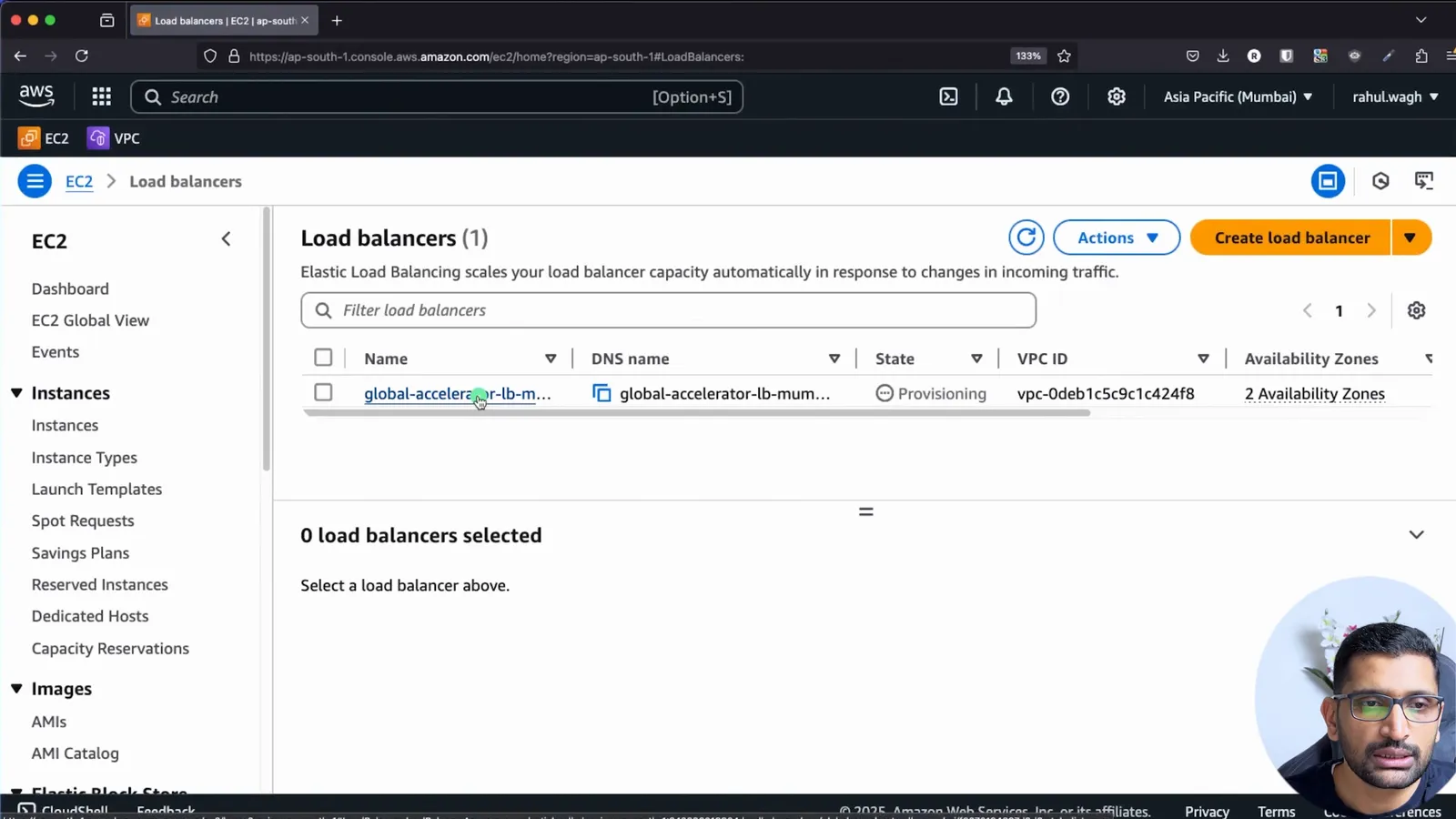
Once the state goes from Provisioning to Active, opening the ALB DNS name in a browser returns the Server Details page from that region's instance:
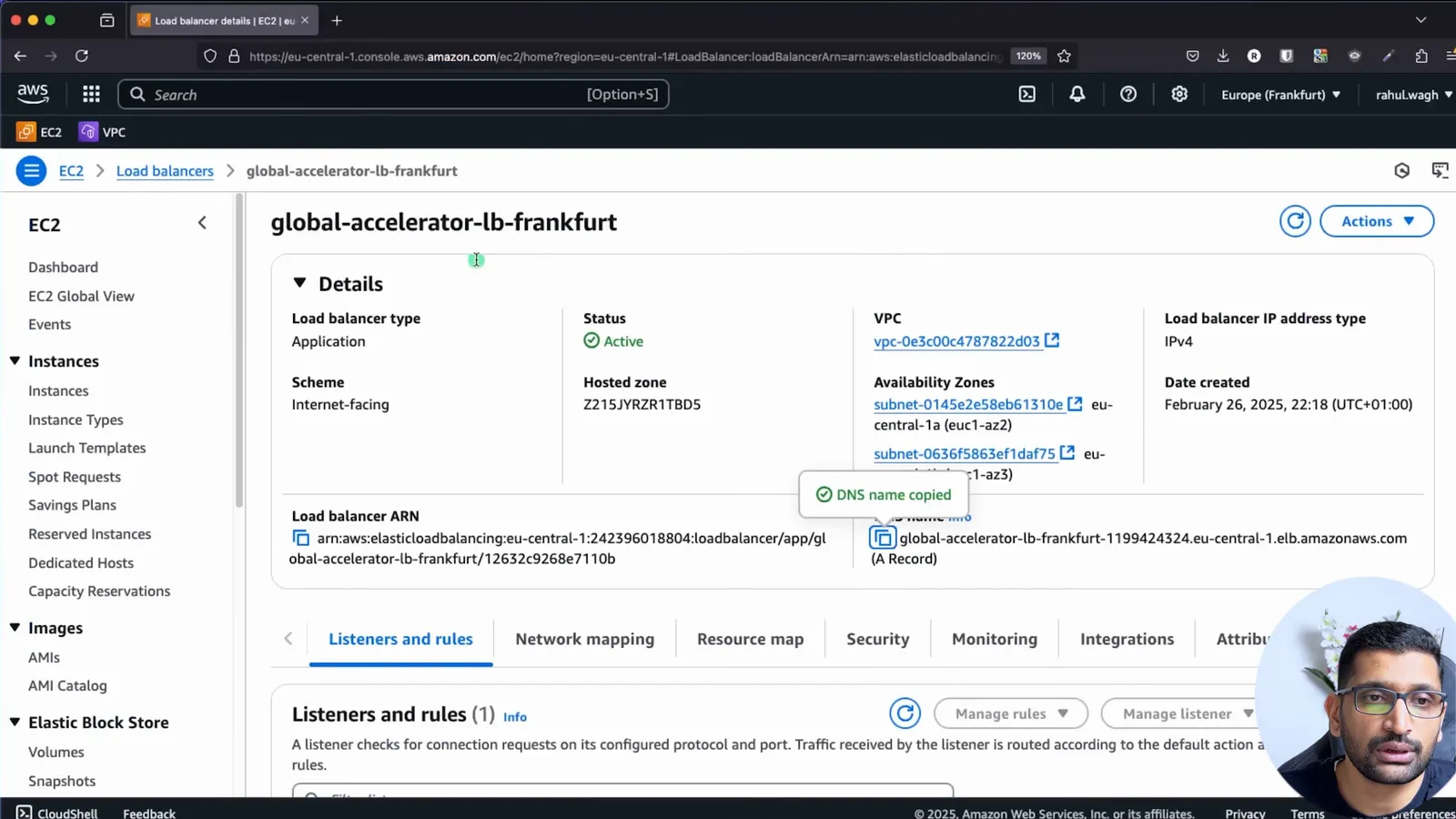
Keep both ALB DNS names open in two tabs; they are your reference for the final test. The ALB itself is covered in Part-18, ALB vs NLB.
6. Step 4 - Create the accelerator and the listener
Global Accelerator is a global service: the console switches to the "Global" region, and under the hood accelerators are managed from us-west-2 (the console URL shows it). Open the service, click Create accelerator, and fill in the basic configuration:
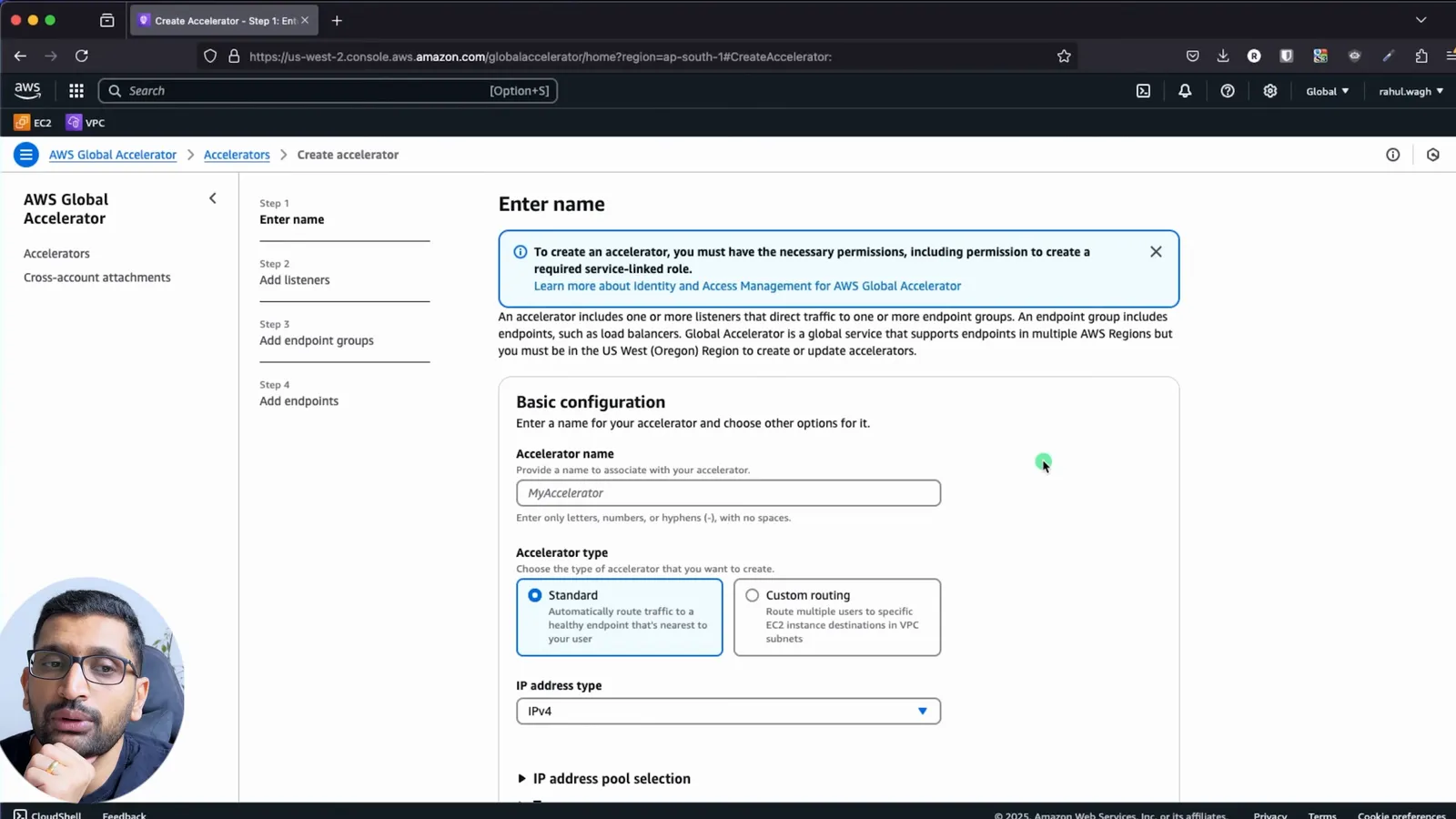
- Name:
my-first-ga - Accelerator type: Standard
- IP address type: IPv4 (dual-stack is available if you want IPv6 too)
- IP address pool: Amazon's pool; bring-your-own-IP is possible if your customers already allowlist a range you own
Then the listener. One listener for TCP on port 80. Client affinity stays at None for a stateless web page; "Source IP" would pin a client to one endpoint.
7. Step 5 - Endpoint groups, traffic dials and endpoints
An endpoint group is one region. Add one for ap-south-1 and one for eu-central-1, each with the traffic dial at 100:
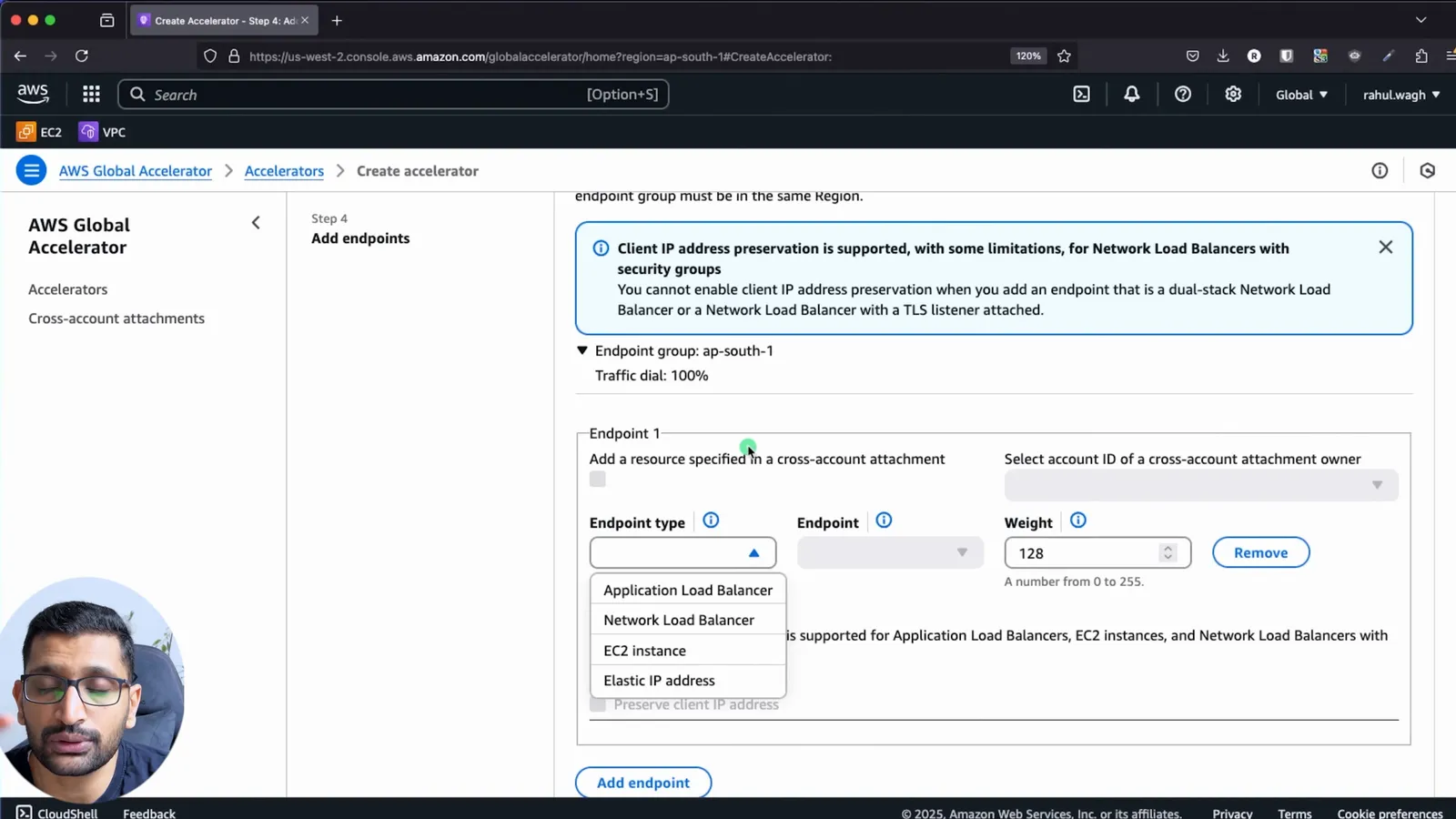
Inside each group, add the region's ALB as an endpoint. The endpoint type list shows what a Standard accelerator accepts: Application Load Balancer, Network Load Balancer, EC2 instance, Elastic IP address. Weight stays at the default 128; the console reminds you the range is 0 to 255.
Note the Preserve client IP address box, ticked by default for an internet-facing ALB. With it on, the ALB sees the user's real IP, so security groups and access logs behave as if there were no accelerator; the client IP preservation page lists which endpoint types support it and the one consequence that matters: your security groups must allow the client IPs, not an AWS range.
Click Create accelerator. Mine was listed as Enabled with two static IPs and a DNS name of the form <id>.awsglobalaccelerator.com within about a minute, with the status still "In progress" while it deployed:
8. Step 6 - Test it - which region answers
Shortly afterwards the provisioning status was Deployed. I opened the accelerator's DNS name from my laptop in Europe:
1Server Details
2Hostname: ip-31-0-1-23
3IP Address: 31.0.1.23
Frankfurt answered, through the Frankfurt ALB, chosen because it is the closest healthy endpoint group to a user in Europe. A user in India opening the same DNS name or the same static IPs would be served by Mumbai, and if the Frankfurt ALB failed its health checks, new connections from Europe would go to Mumbai with no DNS change on the client side.
To see the other region from Europe without flying to India, use the traffic dial: set the eu-central-1 dial to 0, wait a minute, reload, and the page comes from ip-21-0-1-79.
9. Traffic dials and weights in practice
The two knobs look similar and work at different levels:
| Knob | Level | Range | Default | Use it for |
|---|---|---|---|---|
| Traffic dial | endpoint group (region) | 0 to 100% | 100 | take a region out for an upgrade, blue/green by region, slowly ramp a new region |
| Weight | endpoint inside a group | 0 to 255 | 128 | send more to a bigger ALB, drain one endpoint, canary a new target |
The dial only applies to traffic that proximity already sent to that region; it is not a global split. The traffic dial documentation gives the example of two regions both at 50%: a user near region A has a 50% chance of staying in A and otherwise goes to the next closest healthy region. Changing a dial affects only new connections; existing ones are not cut.
Weights are documented on the endpoint weights page. Two endpoints with weights 128 and 64 get two-thirds and one-third of the group's new connections; a weight of 0 drains an endpoint. The docs also note that Global Accelerator can override weights in rare cases to keep clients connected, for example when client IP preservation would otherwise cause a connection collision.
10. Global Accelerator vs Route 53 vs CloudFront
| Global Accelerator | Route 53 latency / failover routing | CloudFront | |
|---|---|---|---|
| Layer | 4 (TCP, UDP) | DNS | 7 (HTTP, HTTPS) |
| Static IPs | yes, 2 anycast | no, answers change | no, many edge IPs |
| Caching | no | no | yes |
| Failover time | seconds, for new connections | DNS TTL plus client cache | per request |
| Protocols beyond HTTP | yes | n/a | no (HTTP only) |
| Client IP at the origin | preserved for ALB, NLB with security groups, EC2 | always (direct) | in X-Forwarded-For |
| Typical use | APIs, games, VoIP, IoT, IP allowlists, multi-region active-active | simple multi-region web with DNS | websites, static assets, video |
| Fixed cost | $0.025 per hour per accelerator | hosted zone and queries | none, per request and per GB |
You can combine them: CloudFront for the website, Global Accelerator for the API or the WebSocket or UDP traffic, Route 53 to give both a friendly name. Route 53 routing policies are in Part-15.
11. What it costs and the limits
From the Global Accelerator pricing page:
| Item | Price |
|---|---|
| Fixed fee, per accelerator, enabled or disabled | $0.025 per hour, about $18 per month |
| Data Transfer-Premium, North America region to Europe edge | $0.015 per GB |
| Data Transfer-Premium, North America region to Asia Pacific edge | $0.035 per GB |
| Charged direction | the dominant one (inbound or outbound) per hour, not both |
| Normal EC2 data transfer out | still applies on top |
AWS's own worked example on that page: 10,000 GB a month with 60% outbound is billed on 6,000 GB, costing $110 of DT-Premium plus the $18 fixed fee. For my demo the fixed fee was the whole bill; the two t2.micro instances and two ALBs cost more than the accelerator did, which is why I deleted everything right after recording.
Limits worth knowing from the docs: the TCP idle timeout is 340 seconds and UDP 30 seconds; a connection that sends nothing for longer is dropped, and TCP keep-alive packets do not count, at least one byte of data must flow. A disabled accelerator still costs the fixed fee; delete it to stop paying.
12. What broke when I ran this
Three things from the recording, made on 2025-02-26 and reviewed frame by frame on 2026-10-15.
1. I ended up running the "user data" by hand. On camera the Server Details script lives in a scratch file next to my resource names, and on both instances I ran it over SSH as root (sudo su, the echo ... > /var/www/html/index.html line, systemctl restart apache2) after the apt install finished, rather than relying on the boot-time user data. It works either way, but if you paste the script into the EC2 user data field, verify it with the instance's public IP before you build the load balancer: a quoting mistake in that long echo line is the usual reason the page shows the Ubuntu default instead.
2. Everything spends time in a waiting state. The Mumbai ALB sat in Provisioning with its DNS name already visible, and the accelerator showed In progress with its two IPs already listed. Opening either DNS name during that window gives a connection error that looks like a configuration mistake. Wait for Active on the ALB and Deployed on the accelerator; in the recording the accelerator reached Deployed well under 5 minutes after creation.
3. "Global" is really us-west-2. The console switched itself to the Global region, but the address bar showed us-west-2.console.aws.amazon.com, and the create page states that you must be in US West (Oregon) to create or update accelerators. The same applies to the CLI and Terraform: run aws globalaccelerator commands with --region us-west-2, whatever region your endpoints are in.
13. Conclusion
To summarise Part-23:
- Global Accelerator puts two static anycast IPs in front of endpoints in any number of regions and routes each connection to the closest healthy one over the AWS network.
- Build it as accelerator, listener (TCP 80), one endpoint group per region with a traffic dial, and an ALB per group with a weight.
- A request from Europe was answered by Frankfurt (
ip-31-0-1-23); the dial and the weights let you move that traffic without touching DNS. - It costs $0.025 per hour plus a per-GB premium on the dominant direction, and it is a Layer 4 service: pair it with CloudFront for websites, not instead of it.
Next, Part-24 covers AWS Control Tower, and the rest of the series is in the index below.
AWS step by step series -
- Part-1 : AWS IAM user - create a user, group, policy, access keys and MFA
- Part-2 : AWS Organizations - multi-account setup, OUs and SCPs
- Part-3 : AWS assume IAM role - trust policy, switch role in console and CLI
- Part-4 : How to launch an EC2 instance - key pair, security group, SSH
- Part-5 : AWS VPC - public and private subnets, Internet Gateway, NAT Gateway, route tables
- Part-8 : EC2 launch template - versions, default version, source template, SSM parameter AMI
- Part-10 : EC2 Auto Scaling - launch template, Auto Scaling group, target tracking, ALB
- Part-11 : AWS WAF - web ACL, managed rules, rate limiting, geo blocking
- Part-12 : AWS VPC Peering - connect two VPCs, routes, security groups, DNS
- Part-13 : AWS Transit Gateway - hub-and-spoke for many VPCs and on-premises
- Part-14 : AWS NAT Gateway deep dive - public vs private, limits, cost, troubleshooting
- Part-15 : Amazon Route 53 - hosted zones, records, alias, routing policies, health checks
- Part-16 : AWS security groups - inbound and outbound rules, stateful, referencing, quotas
- Part-16 : AWS Certificate Manager - free TLS certificates for ALB, CloudFront and API Gateway
- Part-17 : AWS Lambda - function URLs, environment variables and layers
- Part-18 : Network Load Balancer - setup, and ALB vs NLB
- Part-19 : VPC endpoints - gateway and interface endpoints (PrivateLink) instead of NAT
- Part-20 : AWS PrivateLink - publish your own service with an endpoint service and NLB
- Part-20 : Amazon EBS volumes - types, attach, mount, resize, snapshots, encryption
- Part-21 : VPC Flow Logs - CloudWatch Logs, S3, record format, Logs Insights, Athena
- Part-21 : EC2 Spot Instances - pricing, interruptions, mixed instances groups
- Part-23 : AWS Global Accelerator - static anycast IPs in front of ALBs in two regions, traffic dials, weights
- Part-24 : AWS Control Tower - landing zone, controls, Account Factory, Identity Center
Networking fundamentals -
- What is a VPC and a subnet? AWS networking in five minutes
- What is CIDR? Calculate IP ranges for VPCs and subnets
- What is NAT? Static NAT, dynamic NAT and PAT explained
More AWS guides -
- What is AWS CloudFormation? Templates, stacks, change sets, drift, StackSets
- Learn AWS S3 - the complete course
- AWS API Gateway - REST API with Lambda, authorizers, Terraform
- AWS Advanced Networking Specialty (ANS-C01) - course companion
- AWS ECS and Fargate - how to deploy a Docker container
- AWS S3 - how to host a static website
- Terraform create EC2 instance on AWS
- Terraform AWS IAM - users, roles and policies
- Terraform and AWS multi-account setup
- Terraform - setting up an ALB and SSL
Did this save you a debugging session? Stay in the loop -
- Subscribe on YouTube - every post here has a screen-recorded companion video.
- Code on GitHub - the repositories, Terraform and scripts behind these posts.
Posts in this series
- AWS Global Accelerator Step by Step - Two Static Anycast IPs in Front of Load Balancers in Two Regions, Listeners, Endpoint Groups, Traffic Dials, Weights, Client IP Preservation and Pricing (Part 23)
- VPC Subnet Planner - a Free Visual Tool to Design AWS, Azure and GCP Networks: Reserved Addresses, Aligned Multi-AZ Subnets, Overlap Check, Design Review and Terraform Export (cidrsubnet) - How I Built It and What Broke
- Amazon EBS Volumes Step by Step - Volume Types Compared (gp3, gp2, io2 Block Express, st1, sc1), Create, Attach, Format and Mount a Volume, Resize Without Downtime, Snapshots, Encryption, Multi-Attach, Pricing and Troubleshooting (AWS Part-20)
- Amazon Route 53 Step by Step - Hosted Zones, Record Types, Alias Records, Point a Domain at an ALB, Routing Policies (Weighted, Latency, Failover, Geolocation), Health Checks, Private Zones and Pricing (AWS Part-15)
- AWS Advanced Networking - Free 8-Hour Full Course Companion (VPC, NAT Gateway, Bastion, ALB, NLB, WAF, VPC Peering, Transit Gateway, VPC Endpoints and PrivateLink, Route 53, ACM) with Timestamps and the ANS-C01 Exam Facts
- AWS Assume IAM Role Step by Step - Trust Policy vs Permissions Policy, Switch Role in the Console, aws sts assume-role, CLI Profiles, Cross-Account Access, MFA and External ID (AWS Part-3)
- AWS Certificate Manager (ACM) Step by Step - Request a Free TLS Certificate, DNS Validation with Route 53, Attach It to an ALB HTTPS Listener, Redirect HTTP to HTTPS, CloudFront and API Gateway, Auto-Renewal, Exportable Certificates and ACME (AWS Part-16)
- AWS Control Tower Step by Step - Set Up a Landing Zone, Security OU with Log Archive and Audit Accounts, Controls (Guardrails), Region Deny, IAM Identity Center, Account Factory and Enrolling Existing Accounts (AWS Part-24)
- AWS EC2 Auto Scaling Step by Step - Launch Template, Auto Scaling Group Across Two AZs, Target Tracking Policy, Application Load Balancer, Health Checks and Instance Refresh (AWS Part-10)
- AWS EC2 Launch Template Step by Step - Create a Template, Versions and the Default Version, Source Template, Create From a Running Instance, Systems Manager Parameter Instead of an AMI ID, Launch Templates vs Launch Configurations, IAM Guardrails, CLI and Terraform (AWS Part-8 and Part-17)
- AWS EC2 Spot Instances Step by Step - How Spot Pricing Works, Launch a Spot Instance, Interruptions and the Two-Minute Notice, Rebalance Recommendations, Stop vs Hibernate vs Terminate, Spot in Auto Scaling Mixed Instances Groups, Billing Rules, Best Practices, CLI and Terraform (AWS Part-21)
- AWS IAM User Step by Step - Create a User, User Group, Attach Policies, Access Keys, MFA and Sign-in URL (AWS Part-1)
- AWS Lambda Step by Step - Create a Function, Function URL (HTTPS Endpoint Without API Gateway), Environment Variables, Lambda Layers for Python Dependencies, Versions and Aliases, Limits, Pricing and Errors (AWS Part-17)
- AWS NAT Gateway Deep Dive - How It Works, Public vs Private NAT Gateway, Setup Step by Step, Limits (55,000 Connections, 100 Gbps), CloudWatch Metrics, Cost Optimisation, NAT Instance Comparison and Troubleshooting (AWS Part-14)
- AWS Network Load Balancer Step by Step - Create an NLB with Static IPs, Target Groups, TCP and TLS Listeners, Security Groups, Client IP Preservation, Cross-Zone Load Balancing, and ALB vs NLB Explained (AWS Part-18)
- AWS Organizations Step by Step - Multi-Account Setup, Organizational Units, Service Control Policies (SCPs), Consolidated Billing and Identity Center (AWS Part-2)
- AWS PrivateLink Step by Step - Publish Your Own Service with a VPC Endpoint Service and Network Load Balancer, Allow Consumers, Accept Connections, Private DNS Name, Cross-Account and Cross-Region, Pricing and Troubleshooting (AWS Part-20)
- AWS Security Groups Step by Step - Inbound and Outbound Rules, Stateful Behaviour, Referencing Security Groups, the Three-Tier ALB-Web-DB Pattern, Quotas, Security Group vs Network ACL, CLI and Terraform (AWS Part-16)
- AWS Transit Gateway Step by Step - Connect Many VPCs and On-Premises Through One Hub, VPC Attachments, Transit Gateway Route Tables, Associations and Propagations, Isolation, Peering, Pricing (AWS Part-13)
- AWS VPC Endpoints Step by Step - Gateway Endpoints for S3 and DynamoDB, Interface Endpoints (PrivateLink) for SSM, ECR and Other Services, Private DNS, Endpoint Policies, Security Groups, Cost vs NAT Gateway, and Troubleshooting (AWS Part-19)
- AWS VPC Flow Logs Step by Step - Enable Flow Logs for a VPC, Subnet or Network Interface, Publish to CloudWatch Logs or S3, Read a Flow Log Record Field by Field, Custom Formats, Query with Logs Insights and Athena, Find Rejected Traffic, Pricing and Limitations (AWS Part-21)
- AWS VPC Peering Step by Step - Connect Two VPCs (Same or Different Account and Region), Accept the Request, Add Routes, Security Groups, DNS Resolution, Test with EC2, and the Limits (AWS Part-12)
- AWS VPC Step by Step - Create a VPC with Public and Private Subnets, Internet Gateway, NAT Gateway and Route Tables (and Test It with EC2) (AWS Part-5)
- AWS WAF Step by Step - Create a Web ACL, Attach It to an ALB or API Gateway, AWS Managed Rules, Rate-Based Rules, Geo Blocking, IP Sets, Count Mode and Logging (AWS Part-11)
- How to Launch an EC2 Instance on AWS Step by Step - AMI, Instance Type, Key Pair, Security Group, Connect with SSH or EC2 Instance Connect, Stop vs Terminate (AWS Part-4)
- What is an AWS VPC and a Subnet? Virtual Private Cloud Explained in Five Minutes (Region, Availability Zones, Public vs Private Subnets, Gateways, Route Tables)
- What is AWS CloudFormation? Templates, Stacks and Change Sets Explained, Template Anatomy Section by Section, Create Your First Stack Step by Step, Update With a Change Set, Drift Detection, Nested Stacks and StackSets, Quotas, Pricing, CLI, and CloudFormation vs Terraform
- What is CIDR (Classless Inter-Domain Routing)? How to Calculate IP Ranges for VPCs and Subnets, with Examples (/8, /16, /24, /28, /32)
- What is NAT (Network Address Translation)? How It Works, Static NAT vs Dynamic NAT vs PAT, the Translation Table, and Where NAT Shows Up in AWS
- AWS API Gateway Tutorial - REST API with Lambda Proxy and Non-Proxy Integration, Request Validation, HTTP API vs REST API, Resource Policies, Lambda Authorizers and Terraform
- Learn AWS S3 - The Complete Course (Buckets, Objects, Storage Classes, Lifecycle, Versioning, Security Defaults, Bucket Policies, Static Hosting, CLI and Terraform)
- How to release(delete) Elastic IP from AWS?
- Fix docker login 'error saving credentials: error storing credentials - err: exit status 1' (AWS ECR on macOS, Windows, Linux and WSL)