AWS EC2 Launch Template Step by Step - Create a Template, Versions and the Default Version, Source Template, Create From a Running Instance, Systems Manager Parameter Instead of an AMI ID, Launch Templates vs Launch Configurations, IAM Guardrails, CLI and Terraform (AWS Part-8 and Part-17)
In Part-4 we clicked through the launch wizard once. In Part-10 we needed the same configuration for every instance an Auto Scaling group creates, and the answer was a launch template - we created one quickly and moved on. This post is the deep dive it deserves, because the launch template is the thing that turns "the instance I set up by hand" into "a definition I can version, review, roll back and hand to Auto Scaling, EKS, ECS, Spot Fleet and Batch".
We will build one field by field, create versions, launch from it with overrides, clone it from a running instance, replace the hard-coded AMI ID with a Systems Manager parameter, and lock users down so they can only launch from approved templates. Facts and limits are from the current launch templates documentation; the one big change since the videos is that launch configurations are now retired for new accounts, so the template is no longer optional.
Table of Content
- What a launch template is and who uses it
- Immutable - versions, the default version, Latest and Default
- Step 1 - Create a launch template field by field
- Step 2 - Launch an instance from the template, with overrides
- Step 3 - Create a new version and change the default
- Step 4 - Clone with a source template
- Step 5 - Create a template from a running instance
- Step 6 - Systems Manager parameter instead of an AMI ID
- Launch templates vs launch configurations
- Quotas and restrictions
- IAM - only launch from approved templates
- The AWS CLI equivalents
- The same thing in Terraform
- Troubleshooting
- Conclusion
1. What a launch template is and who uses it
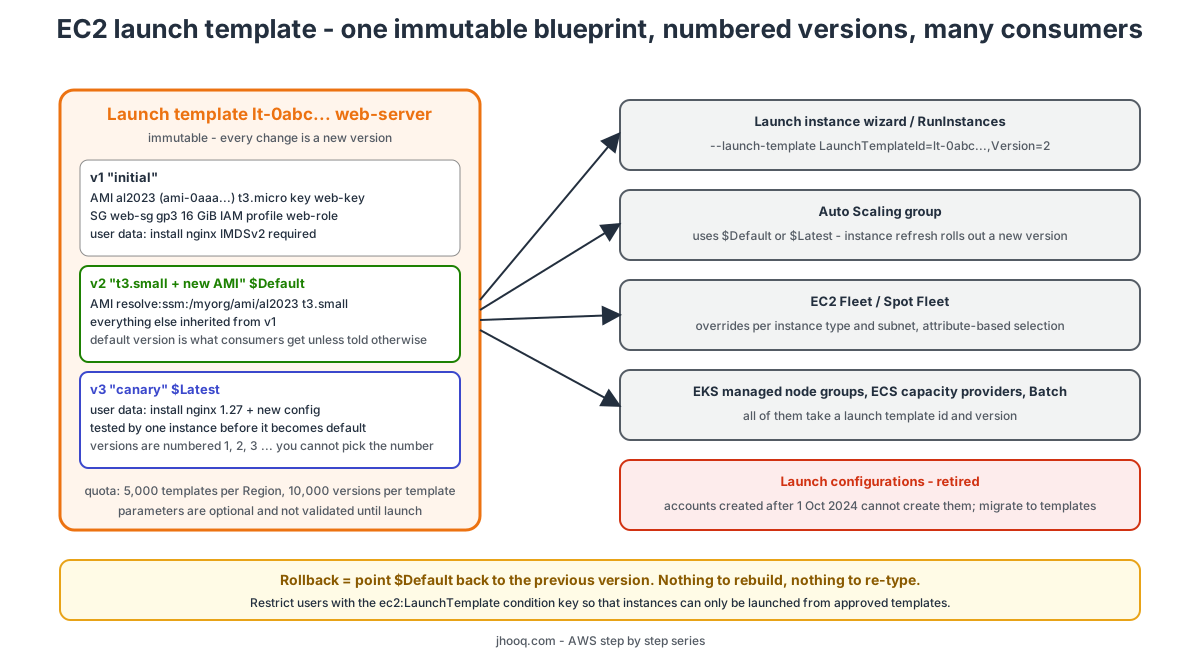
A launch template is a saved set of instance configuration parameters - the AMI, instance type, key pair, network settings, security groups, storage, tags, IAM instance profile, user data, metadata options, purchasing option and about forty other things - stored as a versioned resource (lt-0123...) in a Region. When something launches an instance from the template, the template's values fill in the launch request; anything the template does not specify falls back to the defaults, or to what the caller passes explicitly.
Who consumes it -
- the launch instance wizard and the RunInstances API - Launch instance from template,
- Amazon EC2 Auto Scaling groups - the main customer; an Auto Scaling group points at a template and a version,
- EC2 Fleet and Spot Fleet - with per-instance-type and per-subnet overrides and attribute-based instance type selection,
- EKS managed node groups, ECS capacity providers, AWS Batch compute environments, EMR instance fleets - all of them accept a launch template to customise their instances.
Two things it is not - it is not an image (the AMI is one field inside it), and it is not a running thing (it costs nothing and does nothing until something launches from it).
2. Immutable - versions, the default version, Latest and Default
The design rule that shapes everything else - a launch template is immutable. You never edit a version; you create a new version. From the restrictions page -
- Versions are numbered in creation order - 1, 2, 3. You cannot choose the number, and you cannot reuse one after deleting it.
- Every template has a default version. When a consumer does not specify a version, it gets the default. Creating a new version does not move the default - you move it deliberately (
Set default version), which is what makes versions safe to create. - Two special references -
$Latest(the highest-numbered version, whatever it is) and$Default(the version marked default). Auto Scaling groups can use either;$Defaultgives you a controlled promotion step,$Latestgives you "whatever was created last", which is convenient and dangerous in equal measure. - A new version can be based on any existing version - change one field, keep the rest. This is how a typical history looks: v1 initial, v2 new AMI, v3 bigger instance type, v4 revert to v2's AMI.
- Tags go on the template, not on versions.
- Rollback is a single action - point the default back to the previous version. No rebuilding, no re-typing.
3. Step 1 - Create a launch template field by field
Following the current create a launch template page. EC2 console → Instances → Launch Templates → Create launch template. Every section has a Don't include in launch template option - leaving a field out means "decide at launch time", which is legitimate.
- Launch template name and description - Name
web-server, Template version descriptionv1 - al2023, t3.micro, nginx. Tick Provide guidance to help me set up a template that I can use with EC2 Auto Scaling - it only adds hints and highlights fields Auto Scaling needs. Expand Template tags and addName = web-server(these tag the template itself). - Application and OS Images (Amazon Machine Image) - pick Amazon Linux 2023 (or keep Don't include and supply the AMI at launch). We replace this with a Systems Manager parameter in step 6.
- Instance type -
t3.micro. The alternative, Specify instance type attributes (vCPUs, memory, and let EC2 pick matching types), works only when the template is used by Auto Scaling, EC2 Fleet or Spot Fleet - the launch wizard and RunInstances cannot resolve attributes. The Free Tier note on this screen depends on your account's age - accounts created on or after 15 July 2025 are on the credit-based plan and can uset3.micro,t3.small,t4g.micro,t4g.small,c7i-flex.largeandm7i-flex.large. - Key pair (login) - your existing key pair from Part-4, or Don't include if you use Session Manager.
- Network settings - Subnet - I leave Don't include, because an Auto Scaling group supplies its own subnets and a template pinned to one subnet cannot be used across Availability Zones. Firewall (security groups) - select existing
web-sgfrom Part-16. Advanced network configuration is where you would set Auto-assign public IP and IPv6 per interface. - Configure storage - the AMI's root volume appears as Volume 1 (AMI Root). Set 16 GiB, gp3, Encrypted yes, Delete on termination yes. Add new volume for a data disk if the application needs one - see the EBS post for the type choice.
- Resource tags - these tag the resources created at launch (instances, volumes, network interfaces, Spot requests), not the template. Add
Name = web-serverandEnvironment = devwith Resource types Instances and Volumes - tagging the volumes too is what makes the EBS bill attributable later. - Advanced details - the section that justifies the template -
- Purchasing option - Request Spot Instances if the template is for a Spot workload (Spot post); leave off for a mixed Auto Scaling group, which sets the Spot/On-Demand split itself.
- IAM instance profile -
web-role, the role from Part-3 that lets the instance call AWS APIs without access keys. Note the launcher needsiam:PassRoleon it. - Shutdown behavior Stop, Termination protection off for Auto Scaling (it would block scale-in), Detailed CloudWatch monitoring on if you want 1-minute metrics for scaling.
- Metadata accessible Enabled, Metadata version V2 only (token required), Metadata response hop limit 1 (2 if containers on the instance need IMDS). IMDSv2-only is the current security baseline and the template is the right place to enforce it.
- User data - the boot script, run once on first boot by cloud-init -
1#!/bin/bash
2dnf install -y nginx
3systemctl enable --now nginx
4echo "<h1>web-server $(hostname -f)</h1>" > /usr/share/nginx/html/index.html
- The Summary panel on the right lists everything you included. Create launch template. You get
lt-0123...with Default version 1 and Latest version 1.
4. Step 2 - Launch an instance from the template, with overrides
- Launch Templates → select
web-server→ Actions → Launch instance from template. - Source template version -
1 (Default). - The wizard is now pre-filled from the template, and every field is editable - that is the override model. Pick a subnet (we left it out of the template), optionally change the instance type to
t3.smallfor this one launch. The template is not modified by overrides. - Launch instance. Open the instance's public IP - the nginx page from user data appears.
From the CLI the same thing is run-instances --launch-template LaunchTemplateName=web-server,Version=1 --subnet-id subnet-... (section 12) - the parameters passed on the command line win over the template's values.
5. Step 3 - Create a new version and change the default
Our first change - bigger instance type and a new user data line.
- Launch Templates → select → Actions → Modify template (Create new version).
- Source template version -
1. Template version descriptionv2 - t3.small. - Change Instance type to
t3.small; everything else is inherited. Create template version. - The template now shows Default version 1, Latest version 2. Nothing that uses
$Defaulthas changed yet - test v2 by launching one instance from version 2. - Happy? Actions → Set default version → 2. From this moment every consumer on
$Default- including the Auto Scaling group from Part-10 - getst3.smallfor new launches. Existing instances are untouched; to replace them, start an instance refresh on the Auto Scaling group. - Regret it? Set default version → 1. That is the entire rollback.
You can also delete versions you no longer want (Actions → Delete template version), except the default version. Deleting the template deletes all its versions and does not affect running instances.
6. Step 4 - Clone with a source template
When a second service needs almost the same template, do not start from scratch - Create launch template → expand Source template → Launch template name web-server, Source template version 2, give the new template a name (api-server), change what differs (security group api-sg, different user data), Create launch template. The console copies every field; the two templates are independent afterwards. The docs note this cloning is console-only - with the CLI you use describe-launch-template-versions and feed the LaunchTemplateData back into create-launch-template (section 12).
7. Step 5 - Create a template from a running instance
The reverse direction - you tuned an instance by hand and want its configuration as a template. Instances → select → Actions → Image and templates → Create template from instance - name, description, tags, adjust anything, Create launch template. Two caveats from the docs - the instance's network interface IDs and IP addresses are not included (they are unique to that instance), and the template captures the launch configuration, not the state of the disk. Anything you installed by hand lives on the volume, not in the template - to capture that, create an AMI from the instance and put that AMI in the template.
8. Step 6 - Systems Manager parameter instead of an AMI ID
A hard-coded ami-0abc... in the template goes stale every time the OS vendor publishes a patched image. The fix is to point the template at an AWS Systems Manager Parameter Store parameter that holds the current AMI ID, and update the parameter instead of the template.
- Systems Manager → Parameter Store → Create parameter - Name
/myorg/ami/al2023, Type String, Data typeaws:ec2:image(Parameter Store then validates the value is a real AMI ID in this Region), Valueami-0abc.... Create. - In the launch template version - Application and OS Images → Browse more AMIs → arrow next to the search bar → Specify custom value/Systems Manager parameter, and enter
resolve:ssm:/myorg/ami/al2023. Save, create the version. - From now on each launch resolves the parameter at launch time. Update the parameter to the new AMI, and the template does not change - every Auto Scaling launch and instance refresh picks up the new image.
Formats - resolve:ssm:parameter-name, resolve:ssm:parameter-name:version-number, resolve:ssm:parameter-name:label (for example :prod), and the ARN form for a parameter shared from another account. You can also skip your own parameter entirely and use the public parameters AWS maintains, for example resolve:ssm:/aws/service/ami-amazon-linux-latest/al2023-ami-kernel-default-x86_64 - see calling AMI public parameters.
Limits - only instant EC2 Fleets support SSM-parameter AMIs; maintain and request fleets and Spot Fleets need a literal AMI ID, and so does attribute-based instance type selection. Auto Scaling has its own notes. To see what a version resolves to right now -
1aws ec2 describe-launch-template-versions --launch-template-name web-server \
2  --versions '$Default' --resolve-alias \
3  --query "LaunchTemplateVersions[].LaunchTemplateData.ImageId"
9. Launch templates vs launch configurations
If you learnt Auto Scaling before 2020 you used launch configurations. They are retired - per the launch configurations page, accounts created on or after 1 October 2024 cannot create them, and AWS stopped adding new EC2 features to them years ago. The comparison, so that you understand what you are migrating -
| Launch configuration | Launch template | |
|---|---|---|
| Versioning | none - create a new one and swap it in the group | versions, default version, $Latest / $Default |
| Immutable | yes | yes, by version |
| Multiple instance types, Spot + On-Demand mix | no | yes (mixed instances policy, attribute-based selection) |
| Newer EC2 features - IMDSv2 settings, T-unlimited, Capacity Reservations, Nitro Enclaves, placement, Elastic GPUs retired... | no | yes - every RunInstances parameter |
| Usable outside Auto Scaling | no | wizard, RunInstances, fleets, EKS, ECS, Batch |
| Systems Manager parameter for the AMI | no | yes |
| Status | retired for new accounts | the only way forward |
Migrating is a copy - the Auto Scaling console has Copy to launch template on a launch configuration, and AWS publishes a CloudFormation migration guide for templates that still reference AWS::AutoScaling::LaunchConfiguration.
10. Quotas and restrictions
From the restrictions page -
| Item | Value |
|---|---|
| Launch templates per Region | up to 5,000 (varies by account age and usage; check Service Quotas) |
| Versions per launch template | up to 10,000 |
| Parameters | all optional - but the launch request must end up complete (no AMI in the template means you must pass one at launch) |
| Validation | parameters are not fully validated at creation - a wrong AMI or an unsupported type-plus-placement combination fails at launch, not when you save |
| Tags | on the template; not on versions |
| Version numbers | assigned by AWS, sequential, never chosen by you |
| Price | free - you pay for the instances |
The "not validated" point explains the most common surprise - a template saves fine, and the Auto Scaling group then fails every launch with InvalidAMIID.NotFound or a type/AZ incompatibility. Always launch one instance from a new version by hand before you make it the default.
11. IAM - only launch from approved templates
Because the template is a complete, reviewed description, you can make it the only way to launch - a very effective guardrail. From permissions for launch templates -
- Creating templates needs
ec2:CreateLaunchTemplateandec2:CreateLaunchTemplateVersion; changing the default needsec2:ModifyLaunchTemplate; passing an instance profile needsiam:PassRoleon the role. - Launching from a template is
ec2:RunInstanceson the launch template resource as well as on the instance, image, subnet and so on; the condition keyec2:LaunchTemplatecarries the template ARN. - To force template use, deny
RunInstanceson instances when no template is referenced -
 1{
 2  "Version": "2012-10-17",
 3  "Statement": [
 4    {
 5      "Sid": "AllowLaunchOnlyFromApprovedTemplates",
 6      "Effect": "Allow",
 7      "Action": "ec2:RunInstances",
 8      "Resource": "arn:aws:ec2:eu-central-1:123456789012:launch-template/lt-0123456789abcdef0"
 9    },
10    {
11      "Sid": "DenyLaunchWithoutTemplate",
12      "Effect": "Deny",
13      "Action": "ec2:RunInstances",
14      "Resource": "arn:aws:ec2:eu-central-1:123456789012:instance/*",
15      "Condition": { "Null": { "ec2:LaunchTemplate": "true" } }
16    },
17    {
18      "Sid": "DenyOverridingTheTemplate",
19      "Effect": "Deny",
20      "Action": "ec2:RunInstances",
21      "Resource": "arn:aws:ec2:eu-central-1:123456789012:instance/*",
22      "Condition": { "Bool": { "ec2:IsLaunchTemplateResource": "false" } }
23    }
24  ]
25}
The third statement uses ec2:IsLaunchTemplateResource - it denies launches where a resource (AMI, subnet, security group...) was overridden at launch rather than taken from the template, closing the loophole in step 2. Attach the allow part to developers, the deny part as a Service Control Policy in Organizations if you want it account-wide.
12. The AWS CLI equivalents
 1# the template data as a JSON file - every key is optional
 2cat > web-server.json <<'EOF'
 3{
 4  "ImageId": "resolve:ssm:/myorg/ami/al2023",
 5  "InstanceType": "t3.micro",
 6  "KeyName": "web-key",
 7  "IamInstanceProfile": { "Name": "web-role" },
 8  "SecurityGroupIds": ["sg-0123456789abcdef0"],
 9  "BlockDeviceMappings": [{
10    "DeviceName": "/dev/xvda",
11    "Ebs": { "VolumeSize": 16, "VolumeType": "gp3", "Encrypted": true, "DeleteOnTermination": true }
12  }],
13  "MetadataOptions": { "HttpTokens": "required", "HttpPutResponseHopLimit": 1 },
14  "TagSpecifications": [
15    { "ResourceType": "instance", "Tags": [{ "Key": "Name", "Value": "web-server" }] },
16    { "ResourceType": "volume",   "Tags": [{ "Key": "Name", "Value": "web-server" }] }
17  ],
18  "UserData": "IyEvYmluL2Jhc2gKZG5mIGluc3RhbGwgLXkgbmdpbngKc3lzdGVtY3RsIGVuYWJsZSAtLW5vdyBuZ2lueAo="
19}
20EOF
21# UserData must be base64:  base64 -w0 user-data.sh
22
23# create the template (version 1 becomes the default)
24aws ec2 create-launch-template --launch-template-name web-server \
25  --version-description "v1 - al2023 t3.micro nginx" \
26  --tag-specifications 'ResourceType=launch-template,Tags=[{Key=Name,Value=web-server}]' \
27  --launch-template-data file://web-server.json
28
29# new version based on v1, changing only the instance type
30aws ec2 create-launch-template-version --launch-template-name web-server \
31  --source-version 1 --version-description "v2 - t3.small" \
32  --launch-template-data '{"InstanceType":"t3.small"}'
33
34# list versions, resolve the SSM alias, then promote v2 to default
35aws ec2 describe-launch-template-versions --launch-template-name web-server --resolve-alias \
36  --query "LaunchTemplateVersions[].{v:VersionNumber,default:DefaultVersion,type:LaunchTemplateData.InstanceType,ami:LaunchTemplateData.ImageId}" --output table
37aws ec2 modify-launch-template --launch-template-name web-server --default-version 2
38
39# launch from the template - CLI parameters override template values
40aws ec2 run-instances --launch-template LaunchTemplateName=web-server,Version='$Default' \
41  --subnet-id subnet-0123456789abcdef0 --count 1
42
43# clone a version into a new template (the CLI way to do "source template")
44aws ec2 describe-launch-template-versions --launch-template-name web-server --versions 2 \
45  --query "LaunchTemplateVersions[0].LaunchTemplateData" > api-server.json
46aws ec2 create-launch-template --launch-template-name api-server --launch-template-data file://api-server.json
47
48# template data from a running instance
49aws ec2 get-launch-template-data --instance-id i-0123456789abcdef0 --query LaunchTemplateData > from-instance.json
50
51# delete old versions (not the default), or the whole template
52aws ec2 delete-launch-template-versions --launch-template-name web-server --versions 1
53aws ec2 delete-launch-template --launch-template-name web-server
13. The same thing in Terraform
 1# the current Amazon Linux 2023 AMI via the public SSM parameter
 2data "aws_ssm_parameter" "al2023" {
 3  name = "/aws/service/ami-amazon-linux-latest/al2023-ami-kernel-default-x86_64"
 4}
 5
 6resource "aws_launch_template" "web" {
 7  name                   = "web-server"
 8  description            = "web tier - nginx on AL2023"
 9  image_id               = data.aws_ssm_parameter.al2023.value
10  instance_type          = "t3.micro"
11  key_name               = aws_key_pair.web.key_name
12  vpc_security_group_ids = [aws_security_group.web.id]
13  update_default_version = true          # each apply that changes the template moves $Default to the new version
14
15  iam_instance_profile {
16    name = aws_iam_instance_profile.web.name
17  }
18
19  block_device_mappings {
20    device_name = "/dev/xvda"
21    ebs {
22      volume_size           = 16
23      volume_type           = "gp3"
24      encrypted             = true
25      delete_on_termination = true
26    }
27  }
28
29  metadata_options {
30    http_tokens                 = "required"   # IMDSv2 only
31    http_put_response_hop_limit = 1
32  }
33
34  monitoring {
35    enabled = true
36  }
37
38  user_data = base64encode(<<-EOF
39    #!/bin/bash
40    dnf install -y nginx
41    systemctl enable --now nginx
42    echo "<h1>web-server $(hostname -f)</h1>" > /usr/share/nginx/html/index.html
43  EOF
44  )
45
46  tag_specifications {
47    resource_type = "instance"
48    tags          = { Name = "web-server", Environment = "dev" }
49  }
50
51  tag_specifications {
52    resource_type = "volume"
53    tags          = { Name = "web-server" }
54  }
55
56  tags = { Name = "web-server" }
57}
58
59# the Auto Scaling group follows the template's latest version and rolls instances when it changes
60resource "aws_autoscaling_group" "web" {
61  name                = "web-asg"
62  min_size            = 2
63  max_size            = 6
64  desired_capacity    = 2
65  vpc_zone_identifier = [aws_subnet.private_a.id, aws_subnet.private_b.id]
66  target_group_arns   = [aws_lb_target_group.web.arn]
67  health_check_type   = "ELB"
68
69  launch_template {
70    id      = aws_launch_template.web.id
71    version = aws_launch_template.web.latest_version
72  }
73
74  instance_refresh {
75    strategy = "Rolling"
76    preferences {
77      min_healthy_percentage = 90
78    }
79  }
80
81  tag {
82    key                 = "Name"
83    value               = "web-server"
84    propagate_at_launch = true
85  }
86}
Every change to aws_launch_template creates a new version (Terraform never edits a version - it cannot), update_default_version = true promotes it, and because the group references latest_version, the instance_refresh block replaces the running instances gradually. That is the whole deployment pipeline for a classic EC2 tier. The Auto Scaling side is covered in depth in Part-10 and the Terraform EC2 basics in this post.
14. Troubleshooting
- Auto Scaling launches fail with
InvalidAMIID.NotFoundorUnsupported- the template saved an AMI that does not exist in this Region, or a type/AZ combination that is not available. Templates are not validated at save time; launch one instance manually from the version to see the real error. - "You are not authorized to perform iam:PassRole" - the launcher (you, or the Auto Scaling service-linked role) must be allowed to pass the instance profile's role.
- Changed the template but the Auto Scaling group still launches the old config - the group is on
$Defaultand you created a version without promoting it; or it is on a pinned number. Check the group's Launch template version column. - New version promoted but running instances unchanged - expected; versions affect new launches only. Start an instance refresh.
- Cannot delete the template - it is referenced by an Auto Scaling group, fleet or node group. Find references first.
resolve:ssm:fails in a Spot Fleet or amaintainEC2 Fleet - not supported there; use a literal AMI ID (or let Auto Scaling handle Spot via a mixed instances policy, where it works).- User data did not run - cloud-init runs user data once on the first boot of a fresh instance; a stopped/started instance does not rerun it unless you use the
cloud-configmultipart#cloud-boothooktrick. Check/var/log/cloud-init-output.log. - Instance has no public IP although the subnet assigns one - the template's Advanced network configuration has Auto-assign public IP set to Disable, which overrides the subnet setting.
- Template subnet conflicts with the Auto Scaling group's subnets - do not put a subnet in a template used by Auto Scaling; the group's
vpc_zone_identifiermust win. - Quota error creating versions - you are at 10,000 versions on one template; delete old ones.
15. Conclusion
A launch template is the versioned, immutable definition of an EC2 instance, consumed by the wizard, Auto Scaling, the fleets and the container services alike. Learn the version model - new version, test it, promote it to default, roll back by pointing default back - put the AMI behind a Systems Manager parameter, enforce IMDSv2 and tags in the template, and use IAM so that templates are the only way instances get born. Launch configurations are history; if you still have one, copy it to a template today.
Next - Part-10 on Auto Scaling uses this template to scale a web tier behind an ALB, and the Spot Instances post shows the purchasing option field doing real work. For the Terraform side of the whole EC2 story, see Terraform EC2.
More videos on this topic - the 2024 recording of the same lesson from my Solutions Architect series -
AWS step by step series -
- Part-1 : AWS IAM user - create a user, group, policy, access keys and MFA
- Part-2 : AWS Organizations - multi-account setup, OUs and SCPs
- Part-3 : AWS assume IAM role - trust policy, switch role in console and CLI
- Part-4 : How to launch an EC2 instance - key pair, security group, SSH
- Part-5 : AWS VPC - public and private subnets, Internet Gateway, NAT Gateway, route tables
- Part-8 : EC2 launch template - versions, default version, source template, SSM parameter AMI
- Part-10 : EC2 Auto Scaling - launch template, Auto Scaling group, target tracking, ALB
- Part-11 : AWS WAF - web ACL, managed rules, rate limiting, geo blocking
- Part-12 : AWS VPC Peering - connect two VPCs, routes, security groups, DNS
- Part-13 : AWS Transit Gateway - hub-and-spoke for many VPCs and on-premises
- Part-14 : AWS NAT Gateway deep dive - public vs private, limits, cost, troubleshooting
- Part-15 : Amazon Route 53 - hosted zones, records, alias, routing policies, health checks
- Part-16 : AWS security groups - inbound and outbound rules, stateful, referencing, quotas
- Part-16 : AWS Certificate Manager - free TLS certificates for ALB, CloudFront and API Gateway
- Part-17 : AWS Lambda - function URLs, environment variables and layers
- Part-18 : Network Load Balancer - setup, and ALB vs NLB
- Part-19 : VPC endpoints - gateway and interface endpoints (PrivateLink) instead of NAT
- Part-20 : AWS PrivateLink - publish your own service with an endpoint service and NLB
- Part-20 : Amazon EBS volumes - types, attach, mount, resize, snapshots, encryption
- Part-21 : VPC Flow Logs - CloudWatch Logs, S3, record format, Logs Insights, Athena
- Part-21 : EC2 Spot Instances - pricing, interruptions, mixed instances groups
- Part-24 : AWS Control Tower - landing zone, controls, Account Factory, Identity Center
Networking fundamentals -
- What is a VPC and a subnet? AWS networking in five minutes
- What is CIDR? Calculate IP ranges for VPCs and subnets
- What is NAT? Static NAT, dynamic NAT and PAT explained
More AWS guides -
- What is AWS CloudFormation? Templates, stacks, change sets, drift, StackSets
- Learn AWS S3 - the complete course
- AWS API Gateway - REST API with Lambda, authorizers, Terraform
- AWS Advanced Networking Specialty (ANS-C01) - course companion
- AWS ECS and Fargate - how to deploy a Docker container
- AWS S3 - how to host a static website
- Terraform create EC2 instance on AWS
- Terraform AWS IAM - users, roles and policies
- Terraform and AWS multi-account setup
- Terraform - setting up an ALB and SSL
Posts in this series
- Amazon EBS Volumes Step by Step - Volume Types Compared (gp3, gp2, io2 Block Express, st1, sc1), Create, Attach, Format and Mount a Volume, Resize Without Downtime, Snapshots, Encryption, Multi-Attach, Pricing and Troubleshooting (AWS Part-20)
- Amazon Route 53 Step by Step - Hosted Zones, Record Types, Alias Records, Point a Domain at an ALB, Routing Policies (Weighted, Latency, Failover, Geolocation), Health Checks, Private Zones and Pricing (AWS Part-15)
- AWS Advanced Networking - Free 8-Hour Full Course Companion (VPC, NAT Gateway, Bastion, ALB, NLB, WAF, VPC Peering, Transit Gateway, VPC Endpoints and PrivateLink, Route 53, ACM) with Timestamps and the ANS-C01 Exam Facts
- AWS Assume IAM Role Step by Step - Trust Policy vs Permissions Policy, Switch Role in the Console, aws sts assume-role, CLI Profiles, Cross-Account Access, MFA and External ID (AWS Part-3)
- AWS Certificate Manager (ACM) Step by Step - Request a Free TLS Certificate, DNS Validation with Route 53, Attach It to an ALB HTTPS Listener, Redirect HTTP to HTTPS, CloudFront and API Gateway, Auto-Renewal, Exportable Certificates and ACME (AWS Part-16)
- AWS Control Tower Step by Step - Set Up a Landing Zone, Security OU with Log Archive and Audit Accounts, Controls (Guardrails), Region Deny, IAM Identity Center, Account Factory and Enrolling Existing Accounts (AWS Part-24)
- AWS EC2 Auto Scaling Step by Step - Launch Template, Auto Scaling Group Across Two AZs, Target Tracking Policy, Application Load Balancer, Health Checks and Instance Refresh (AWS Part-10)
- AWS EC2 Launch Template Step by Step - Create a Template, Versions and the Default Version, Source Template, Create From a Running Instance, Systems Manager Parameter Instead of an AMI ID, Launch Templates vs Launch Configurations, IAM Guardrails, CLI and Terraform (AWS Part-8 and Part-17)
- AWS EC2 Spot Instances Step by Step - How Spot Pricing Works, Launch a Spot Instance, Interruptions and the Two-Minute Notice, Rebalance Recommendations, Stop vs Hibernate vs Terminate, Spot in Auto Scaling Mixed Instances Groups, Billing Rules, Best Practices, CLI and Terraform (AWS Part-21)
- AWS IAM User Step by Step - Create a User, User Group, Attach Policies, Access Keys, MFA and Sign-in URL (AWS Part-1)
- AWS Lambda Step by Step - Create a Function, Function URL (HTTPS Endpoint Without API Gateway), Environment Variables, Lambda Layers for Python Dependencies, Versions and Aliases, Limits, Pricing and Errors (AWS Part-17)
- AWS NAT Gateway Deep Dive - How It Works, Public vs Private NAT Gateway, Setup Step by Step, Limits (55,000 Connections, 100 Gbps), CloudWatch Metrics, Cost Optimisation, NAT Instance Comparison and Troubleshooting (AWS Part-14)
- AWS Network Load Balancer Step by Step - Create an NLB with Static IPs, Target Groups, TCP and TLS Listeners, Security Groups, Client IP Preservation, Cross-Zone Load Balancing, and ALB vs NLB Explained (AWS Part-18)
- AWS Organizations Step by Step - Multi-Account Setup, Organizational Units, Service Control Policies (SCPs), Consolidated Billing and Identity Center (AWS Part-2)
- AWS PrivateLink Step by Step - Publish Your Own Service with a VPC Endpoint Service and Network Load Balancer, Allow Consumers, Accept Connections, Private DNS Name, Cross-Account and Cross-Region, Pricing and Troubleshooting (AWS Part-20)
- AWS Security Groups Step by Step - Inbound and Outbound Rules, Stateful Behaviour, Referencing Security Groups, the Three-Tier ALB-Web-DB Pattern, Quotas, Security Group vs Network ACL, CLI and Terraform (AWS Part-16)
- AWS Transit Gateway Step by Step - Connect Many VPCs and On-Premises Through One Hub, VPC Attachments, Transit Gateway Route Tables, Associations and Propagations, Isolation, Peering, Pricing (AWS Part-13)
- AWS VPC Endpoints Step by Step - Gateway Endpoints for S3 and DynamoDB, Interface Endpoints (PrivateLink) for SSM, ECR and Other Services, Private DNS, Endpoint Policies, Security Groups, Cost vs NAT Gateway, and Troubleshooting (AWS Part-19)
- AWS VPC Flow Logs Step by Step - Enable Flow Logs for a VPC, Subnet or Network Interface, Publish to CloudWatch Logs or S3, Read a Flow Log Record Field by Field, Custom Formats, Query with Logs Insights and Athena, Find Rejected Traffic, Pricing and Limitations (AWS Part-21)
- AWS VPC Peering Step by Step - Connect Two VPCs (Same or Different Account and Region), Accept the Request, Add Routes, Security Groups, DNS Resolution, Test with EC2, and the Limits (AWS Part-12)
- AWS VPC Step by Step - Create a VPC with Public and Private Subnets, Internet Gateway, NAT Gateway and Route Tables (and Test It with EC2) (AWS Part-5)
- AWS WAF Step by Step - Create a Web ACL, Attach It to an ALB or API Gateway, AWS Managed Rules, Rate-Based Rules, Geo Blocking, IP Sets, Count Mode and Logging (AWS Part-11)
- How to Launch an EC2 Instance on AWS Step by Step - AMI, Instance Type, Key Pair, Security Group, Connect with SSH or EC2 Instance Connect, Stop vs Terminate (AWS Part-4)
- What is an AWS VPC and a Subnet? Virtual Private Cloud Explained in Five Minutes (Region, Availability Zones, Public vs Private Subnets, Gateways, Route Tables)
- What is AWS CloudFormation? Templates, Stacks and Change Sets Explained, Template Anatomy Section by Section, Create Your First Stack Step by Step, Update With a Change Set, Drift Detection, Nested Stacks and StackSets, Quotas, Pricing, CLI, and CloudFormation vs Terraform
- What is CIDR (Classless Inter-Domain Routing)? How to Calculate IP Ranges for VPCs and Subnets, with Examples (/8, /16, /24, /28, /32)
- What is NAT (Network Address Translation)? How It Works, Static NAT vs Dynamic NAT vs PAT, the Translation Table, and Where NAT Shows Up in AWS
- AWS API Gateway Tutorial - REST API with Lambda Proxy and Non-Proxy Integration, Request Validation, HTTP API vs REST API, Resource Policies, Lambda Authorizers and Terraform
- Learn AWS S3 - The Complete Course (Buckets, Objects, Storage Classes, Lifecycle, Versioning, Security Defaults, Bucket Policies, Static Hosting, CLI and Terraform)
- How to release(delete) Elastic IP from AWS?
- Fix docker login 'error saving credentials: error storing credentials - err: exit status 1' (AWS ECR on macOS, Windows, Linux and WSL)