AWS Control Tower Step by Step - Set Up a Landing Zone, Security OU with Log Archive and Audit Accounts, Controls (Guardrails), Region Deny, IAM Identity Center, Account Factory and Enrolling Existing Accounts (AWS Part-24)
In Part-2 we built a multi-account setup by hand - an organization, OUs, SCPs, a log-archive account, IAM Identity Center - and I ended with "or let Control Tower do it". This Part-24 is that. AWS Control Tower orchestrates Organizations, Service Catalog, IAM Identity Center, CloudTrail and Config to build a landing zone - AWS's prescriptive multi-account layout - in about half an hour, applies controls that keep accounts from drifting away from it, and gives your teams a vending machine for new accounts.
We set up a landing zone from scratch, look at what it created and why, enable controls on an OU, vend an account with Account Factory, and talk about enrolling the accounts you already have. Everything checked against the current Control Tower documentation; the pricing examples are AWS's own.
Table of Content
- What Control Tower is - and what it is not
- What a landing zone contains
- Prerequisites and the home-region decision
- Step 1 - Email addresses for the shared accounts
- Step 2 - Configure and launch the landing zone
- Step 3 - What happens during setup, and the SNS confirmations
- Controls - preventive, detective, proactive; mandatory, strongly recommended, elective
- Step 4 - Enable controls on an OU
- Step 5 - Vend an account with Account Factory
- Account Factory for Terraform (AFT) and customisations
- Enrolling existing accounts and OUs, and drift
- What it costs
- Common Control Tower errors and how to fix them
- Conclusion
1. What Control Tower is - and what it is not
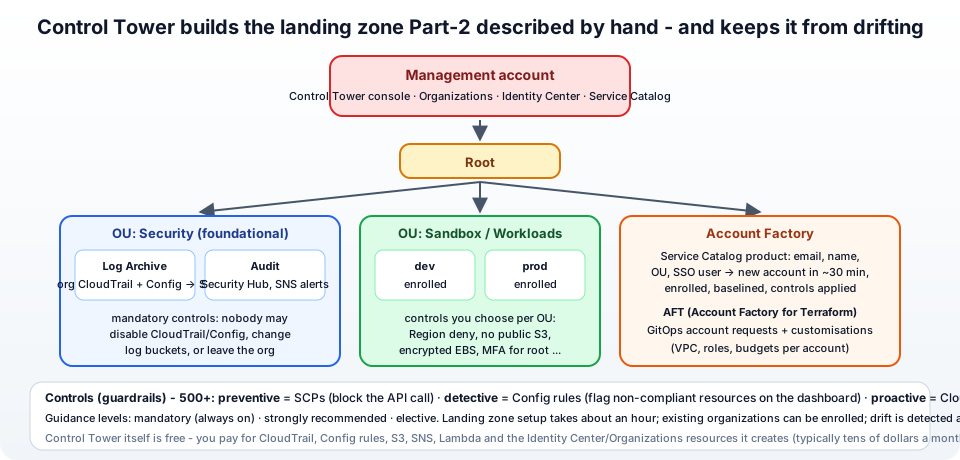
Control Tower is not a new service with its own resources - it is an orchestrator. When you click "Set up landing zone" it creates an organization (or uses yours), OUs, two shared accounts, Identity Center groups and permission sets, an organisation-wide CloudTrail, Config recorders in every governed region and account, SCPs and Config rules - all ordinary resources you could create yourself, as Part-2 showed. What it adds is -
- An opinionated, tested layout - the AWS multi-account strategy baked in, so you do not design it from a blank page.
- Controls with a dashboard - a library of 500+ guardrails you switch on per OU, with compliance status per account.
- Account Factory - new accounts land in the right OU, already enrolled, with the baseline applied, in about half an hour, without an admin touching the console.
- Drift detection - if somebody edits an SCP or moves an account by hand, Control Tower notices and can repair it.
It is not a replacement for understanding Organizations, IAM and SCPs - the controls are SCPs and Config rules, and when something goes wrong you debug them as such. If you have one or two accounts, Part-2 by hand is enough; from a handful upwards, Control Tower pays for itself in the first month.
2. What a landing zone contains
From the features overview and the planning guide, a fresh landing zone is -
- Management account - where you run Control Tower. It stays out of the OUs and is not governed by controls (SCPs never apply to it, Part-2).
- Security OU (the foundational OU) with two shared accounts -
- Log Archive - the organisation CloudTrail and Config logs land in S3 buckets here, with access logging to a second bucket. Nobody works in this account; controls prevent changing the buckets.
- Audit - cross-account read access for security tooling (Security Hub, GuardDuty delegated admin), and the SNS topics that deliver compliance notifications.
- Sandbox OU (the additional OU, optional) - for the accounts you create next.
- IAM Identity Center enabled, with groups (
AWSControlTowerAdmins,AWSSecurityAuditors,AWSLogArchiveAdmins...) and permission sets mapped to the accounts. - CloudTrail - one organisation trail; AWS Config - a recorder and aggregator in every governed region; controls - the mandatory set on everything, strongly recommended ones you choose.
- Region deny - an SCP that blocks API calls outside your governed regions (optional but recommended).
Everything is tagged and versioned as a landing zone version, and you update it from the console when AWS releases a new one.
3. Prerequisites and the home-region decision
From the planning and prerequisites pages -
- A management account - new and empty is best; an existing organization in all features mode can be used (Control Tower then extends it and you enroll existing accounts later, section 11).
- Root MFA on the management account, and a user/role with
AdministratorAccessto run the wizard. - The account must not already have Config recorders / delivery channels in the regions you will govern, and must have room for at least two more accounts in the Organizations quota.
- Two email addresses that are not used by any AWS account yet, for log archive and audit (step 1).
- The home region - the region where you run the wizard. Choose it deliberately - it is where the shared accounts' resources and Control Tower's own infrastructure live, and the docs warn that changing your home Region after you have deployed ... requires decommissioning. Pick the region where most of your workloads and your team are.
Control Tower runs automated pre-launch checks for these when you open the console.
4. Step 1 - Email addresses for the shared accounts
Control Tower will create two accounts and needs a unique root email for each. Use the plus-alias or group trick from Part-2 -
- Log archive:
aws-log-archive@jhooq.com(orrahul+aws-logs@jhooq.com) - Audit:
aws-audit@jhooq.com
The audit address will receive many SNS confirmation emails (section 6), so make it a mailbox people actually read. Both addresses must not belong to an existing AWS account.
5. Step 2 - Configure and launch the landing zone
Open Control Tower in the console, confirm the home region in the top-right, and choose Set up your landing zone (step 2 docs) -
Review pricing and select Regions
- Home Region - shown, read-only now.
- Additional AWS Regions for governance - tick the regions your workloads will use (
eu-west-1,us-east-1...). Controls, Config and CloudTrail are deployed in each; more regions = more Config cost. - Region deny setting - Enabled. This attaches an SCP that denies most actions in every region you did not select. It is the single most effective cost-and-compliance control (no surprise instances in Mumbai) and it is exactly the region-restricting SCP we wrote by hand in Part-2 - except AWS maintains the list of global-service exemptions for you.
Configure organizational units
- Foundational OU - default name
Security. Keep it; the two shared accounts go here. - Additional OU - default name
Sandbox. Keep or rename (Workloads); you can add more OUs later (Prod,NonProd,Infrastructure).
Configure shared accounts
- Log archive account - name
Log Archive, the email from step 1 (or Use an existing account if you already have one). - Audit account - name
Audit, its email. - IAM Identity Center - AWS Control Tower sets up AWS account access with IAM Identity Center (recommended; it creates the groups and permission sets) or Self-managed AWS account access if you already run Identity Center with an external IdP and want to keep control.
- AWS CloudTrail configuration - Enabled: one organisation-level trail delivered to the log archive bucket.
- Log configuration for Amazon S3 - retention for the logs bucket (default 1 year) and the access logs bucket (default 10 years); adjust to your compliance needs.
- KMS encryption - optional customer managed KMS key to encrypt CloudTrail and Config data. Create the key beforehand in the management account with a policy that allows the Control Tower, CloudTrail and Config services; otherwise accept AWS-managed encryption.
Review and set up
- Expand and read the Service permissions - Control Tower will create roles like
AWSControlTowerExecutionin every account - tick I understand the permissions AWS Control Tower will use to administer AWS resources and enforce rules on my behalf, and choose Set up landing zone.
6. Step 3 - What happens during setup, and the SNS confirmations
The review page says it: setup can take about thirty minutes to complete. You can watch the progress bar on the dashboard. In that time Control Tower -
- Creates the organization if needed and the Security and Sandbox OUs.
- Creates the Log Archive and Audit accounts (you will get the "Welcome to AWS" emails) and the
AWSControlTowerExecutionrole in each. - Enables IAM Identity Center, creates the groups and permission sets, and emails the management account's root user an invitation to set a password for the first Identity Center user.
- Creates the organisation CloudTrail, the S3 buckets in Log Archive, Config recorders and aggregators in every governed region, and the mandatory controls.
- Launches the Account Factory product into Service Catalog.
Then the part everyone misses: The email address you provided for the audit account will receive AWS Notification – Subscription Confirmation emails from every AWS Region supported by AWS Control Tower - one per governed region. Click Confirm subscription in each, otherwise the compliance notifications never arrive and the dashboard's alerting is silently broken.
When the dashboard shows the landing zone Available, log in through the Identity Center access portal (the d-xxxxxxxxxx.awsapps.com/start URL in the invitation) and you will see tiles for the management, Log Archive and Audit accounts with AWSAdministratorAccess - that is the Part-2 SSO setup, done for you.
7. Controls - preventive, detective, proactive; mandatory, strongly recommended, elective
A control (the console still says guardrail in places) is a plain-language rule - "Disallow changes to encryption configuration for Amazon S3 buckets" - implemented by one of three mechanisms (controls reference) -
| Behaviour | Implemented as | What it does | Example |
|---|---|---|---|
| Preventive | an SCP on the OU | blocks the API call - the action cannot happen | Disallow deletion of the log archive bucket; Region deny |
| Detective | an AWS Config rule in every account | flags non-compliant resources on the dashboard (does not block) | Detect whether MFA is enabled for the root user; detect public S3 buckets |
| Proactive | a CloudFormation hook | rejects CloudFormation templates that would create non-compliant resources, before deployment | Require EBS volumes in templates to be encrypted |
And three guidance levels -
- Mandatory - always on, cannot be disabled; they protect the landing zone itself (log buckets, CloudTrail, Config, the Control Tower roles).
- Strongly recommended - AWS best practice; you choose per OU. Disallow public read access to S3 buckets, Detect whether EBS volumes are encrypted, Enable MFA for root.
- Elective - common enterprise policies you may or may not want - Disallow actions as a root user, Detect whether unrestricted SSH is allowed, the whole Security Hub and NIST / PCI / CIS framework bundles.
The library is 500+ controls and growing; the reference lists each with its mechanism and the OU it can apply to. A control applies to an OU and therefore to every account in it - the inheritance model from Part-2.
8. Step 4 - Enable controls on an OU
Control Tower → Controls (left menu) → filter by Behavior: Preventive and Guidance: Strongly recommended → open Disallow changes to encryption configuration for Amazon S3 buckets → Enable control → select the Sandbox OU → Enable control. Preventive controls are active within a minute (the SCP is attached); detective controls take longer as Config rules deploy to every account and region.
Three to enable on every workload OU on day one -
- Region deny (if you skipped it in the wizard) - preventive.
- Detect whether public read / write access to Amazon S3 buckets is allowed - detective; the dashboard then shows you every public bucket in every account.
- Detect whether MFA is enabled for AWS IAM users and for the root user - detective.
Under Organization → the OU → Controls you see everything in force; under Account → Compliance the detective findings per account. Test a preventive one: from an account in Sandbox try to delete the organisation trail or change a log bucket's policy and you get the SCP explicit deny from Part-1. Want your own? Controls does not take custom rules, but the OU is an ordinary Organizations OU - attach your own SCPs next to Control Tower's (it marks them as non-Control Tower policies and leaves them alone).
9. Step 5 - Vend an account with Account Factory
Account Factory is a Service Catalog product that creates an account and enrolls it. Control Tower → Account Factory → Create account (or Service Catalog → Products → AWS Control Tower Account Factory → Launch product) -
- Account email - a unique root email (
aws-dev@jhooq.com). - Display name -
dev. - IAM Identity Center user email and name - the person who gets
AWSAdministratorAccessin the new account through the access portal (an existing or new Identity Center user). - Organizational unit -
Sandbox(or any registered OU). - Create account.
Provisioning takes 20-30 minutes: Organizations creates the account, Control Tower deploys the baseline (Config, CloudTrail membership, the execution role), applies the OU's controls, and creates the Identity Center assignment. The dashboard shows it as Enrolled. Compared with Part-2's manual create-account, you got governance for free - and your platform team can give developers permission to launch the product themselves without giving them Organizations rights.
Under Account Factory → Network configuration you can also have every new account receive a VPC with a chosen CIDR and subnets - handy for sandboxes, usually disabled for workload accounts where the network team builds VPCs deliberately (Part-5).
10. Account Factory for Terraform (AFT) and customisations
For teams that want GitOps, Account Factory for Terraform (AFT) adds a pipeline: you describe an account in a Terraform file in a Git repository, a CodePipeline picks it up, calls Account Factory to vend it, and then runs your customisations - global ones for every account (a baseline VPC, budgets, IAM roles, GuardDuty) and account-specific ones. AFT runs in its own account (aft-management) and uses Terraform Cloud or open-source Terraform. It is the right tool once you have more than a few accounts a month or need every account to come with the same infrastructure; the lighter alternative is Customizations for Control Tower (CfCT), which does the same with CloudFormation StackSets. Both are examples of the pattern in Terraform and AWS multi-account setup.
11. Enrolling existing accounts and OUs, and drift
Already have accounts in an organization? Control Tower governs only what you enroll -
- Register an existing OU - Organization → the OU → Register OU. Control Tower applies the mandatory controls and enrolls every account in it (each account needs the
AWSControlTowerExecutionrole with a trust to the management account first - the console tells you). - Enroll a single account - Organization → Enroll account, or move it into a registered OU. Prerequisites: no existing Config recorder in the governed regions (or Control Tower cannot deploy its own), and the execution role.
- Unmanaged accounts stay where they are, outside Control Tower's view.
Drift - Control Tower expects nobody to change its resources by hand. If an SCP is detached, an account moved, a shared account's role changed, the dashboard shows Drifted with the details (drift docs). Most drift is repaired with Re-register OU or Update landing zone; the rule that avoids it is: do account and OU moves through Control Tower, not through the Organizations console.
12. What it costs
From the pricing page: There is no additional charge to use AWS Control Tower. You pay for the services it configures - AWS Config (the dominant item - configuration items recorded and rule evaluations in every account and region), CloudTrail (the first organisation trail's management events are free; data events and extra trails are not), S3 for the logs, SNS, Service Catalog and any VPC resources Account Factory creates. AWS's own examples: a 10-account, single-region organization with few resources ≈ $3.75 a month; 25 accounts across 3 regions ≈ $60 a month; and the warning case - ephemeral workloads that create and destroy many resources can generate hundreds of dollars per account per region in Config recording. Govern only the regions you use, and watch Config costs in accounts that churn resources (CI/CD, autoscaling test environments).
13. Common Control Tower errors and how to fix them
1. Pre-launch check: AWS Config ... must not have an existing configuration recorder or delivery channel - Delete the existing Config recorder/delivery channel in the management account for the governed regions (aws configservice delete-configuration-recorder), or enroll with the existing-Config path the docs describe.
2. The email address ... is already associated with an AWS account - Shared account emails must be unused. New aliases.
3. Setup fails or takes hours - Usually a Service Quota (accounts per organization) or a missing permission in the management account; check the Landing zone settings error and the CloudFormation stacks named AWSControlTowerBP-* in the management account for the failed one.
4. No compliance emails - The SNS subscription confirmations in the audit mailbox were never clicked (section 6).
5. AccessDenied ... explicit deny in a service control policy in a member account - A control (SCP) did its job - often Region deny when you are in the wrong region, or a mandatory control when you try to touch the log bucket. Check the OU's controls.
6. Account Factory fails with ... AWSControlTowerExecution role does not exist / ... account not in a registered OU - Enrolling an existing account needs the execution role created in it first (trusting the management account), and the target OU must be registered.
7. Account shows Drifted - Something was changed outside Control Tower. Read the drift message; Re-register OU fixes SCP and account-move drift; role drift needs the role recreated.
8. Update available banner forever - A new landing zone version. Landing zone settings → Update - it is non-disruptive but reapplies the baseline, so schedule it.
9. Identity Center shows no tiles for the new account - The Account Factory user email did not match an Identity Center user (a new user was created and must accept the invitation), or the permission set assignment is still propagating.
10. Config bill spiked after enabling detective controls - Config records every configuration change in every governed account/region. Reduce governed regions, exclude noisy resource types from recording where the controls allow it, and clean up churny environments.
14. Conclusion
To summarise Part-24 -
- Control Tower is an orchestrator that builds AWS's prescriptive landing zone - Security OU with Log Archive and Audit accounts, Identity Center, organisation CloudTrail and Config, mandatory controls - in about thirty minutes, from a management account you keep empty.
- Choose the home region carefully, pick the governed regions, turn on Region deny, and confirm the SNS subscriptions in the audit mailbox.
- Controls are preventive (SCPs), detective (Config rules) or proactive (CloudFormation hooks), in mandatory, strongly recommended and elective tiers, enabled per OU.
- Account Factory vends enrolled, baselined accounts in half an hour; AFT turns that into a Terraform GitOps pipeline with customisations.
- Enroll existing accounts and OUs, do moves through Control Tower to avoid drift, and keep an eye on Config - the only real cost.
The official references are what is AWS Control Tower, getting started from the console, the controls reference and Account Factory. It closes the loop that Part-2 opened - and if you are building the same thing on Google Cloud, the equivalent is in GCP organization setup with Cloud Identity.
AWS step by step series -
- Part-1 : AWS IAM user - create a user, group, policy, access keys and MFA
- Part-2 : AWS Organizations - multi-account setup, OUs and SCPs
- Part-3 : AWS assume IAM role - trust policy, switch role in console and CLI
- Part-4 : How to launch an EC2 instance - key pair, security group, SSH
- Part-5 : AWS VPC - public and private subnets, Internet Gateway, NAT Gateway, route tables
- Part-8 : EC2 launch template - versions, default version, source template, SSM parameter AMI
- Part-10 : EC2 Auto Scaling - launch template, Auto Scaling group, target tracking, ALB
- Part-11 : AWS WAF - web ACL, managed rules, rate limiting, geo blocking
- Part-12 : AWS VPC Peering - connect two VPCs, routes, security groups, DNS
- Part-13 : AWS Transit Gateway - hub-and-spoke for many VPCs and on-premises
- Part-14 : AWS NAT Gateway deep dive - public vs private, limits, cost, troubleshooting
- Part-15 : Amazon Route 53 - hosted zones, records, alias, routing policies, health checks
- Part-16 : AWS security groups - inbound and outbound rules, stateful, referencing, quotas
- Part-16 : AWS Certificate Manager - free TLS certificates for ALB, CloudFront and API Gateway
- Part-17 : AWS Lambda - function URLs, environment variables and layers
- Part-18 : Network Load Balancer - setup, and ALB vs NLB
- Part-19 : VPC endpoints - gateway and interface endpoints (PrivateLink) instead of NAT
- Part-20 : AWS PrivateLink - publish your own service with an endpoint service and NLB
- Part-20 : Amazon EBS volumes - types, attach, mount, resize, snapshots, encryption
- Part-21 : VPC Flow Logs - CloudWatch Logs, S3, record format, Logs Insights, Athena
- Part-21 : EC2 Spot Instances - pricing, interruptions, mixed instances groups
- Part-24 : AWS Control Tower - landing zone, controls, Account Factory, Identity Center
Networking fundamentals -
- What is a VPC and a subnet? AWS networking in five minutes
- What is CIDR? Calculate IP ranges for VPCs and subnets
- What is NAT? Static NAT, dynamic NAT and PAT explained
More AWS guides -
- What is AWS CloudFormation? Templates, stacks, change sets, drift, StackSets
- Learn AWS S3 - the complete course
- AWS API Gateway - REST API with Lambda, authorizers, Terraform
- AWS Advanced Networking Specialty (ANS-C01) - course companion
- AWS ECS and Fargate - how to deploy a Docker container
- AWS S3 - how to host a static website
- Terraform create EC2 instance on AWS
- Terraform AWS IAM - users, roles and policies
- Terraform and AWS multi-account setup
- Terraform - setting up an ALB and SSL
Posts in this series
- Amazon EBS Volumes Step by Step - Volume Types Compared (gp3, gp2, io2 Block Express, st1, sc1), Create, Attach, Format and Mount a Volume, Resize Without Downtime, Snapshots, Encryption, Multi-Attach, Pricing and Troubleshooting (AWS Part-20)
- Amazon Route 53 Step by Step - Hosted Zones, Record Types, Alias Records, Point a Domain at an ALB, Routing Policies (Weighted, Latency, Failover, Geolocation), Health Checks, Private Zones and Pricing (AWS Part-15)
- AWS Advanced Networking - Free 8-Hour Full Course Companion (VPC, NAT Gateway, Bastion, ALB, NLB, WAF, VPC Peering, Transit Gateway, VPC Endpoints and PrivateLink, Route 53, ACM) with Timestamps and the ANS-C01 Exam Facts
- AWS Assume IAM Role Step by Step - Trust Policy vs Permissions Policy, Switch Role in the Console, aws sts assume-role, CLI Profiles, Cross-Account Access, MFA and External ID (AWS Part-3)
- AWS Certificate Manager (ACM) Step by Step - Request a Free TLS Certificate, DNS Validation with Route 53, Attach It to an ALB HTTPS Listener, Redirect HTTP to HTTPS, CloudFront and API Gateway, Auto-Renewal, Exportable Certificates and ACME (AWS Part-16)
- AWS Control Tower Step by Step - Set Up a Landing Zone, Security OU with Log Archive and Audit Accounts, Controls (Guardrails), Region Deny, IAM Identity Center, Account Factory and Enrolling Existing Accounts (AWS Part-24)
- AWS EC2 Auto Scaling Step by Step - Launch Template, Auto Scaling Group Across Two AZs, Target Tracking Policy, Application Load Balancer, Health Checks and Instance Refresh (AWS Part-10)
- AWS EC2 Launch Template Step by Step - Create a Template, Versions and the Default Version, Source Template, Create From a Running Instance, Systems Manager Parameter Instead of an AMI ID, Launch Templates vs Launch Configurations, IAM Guardrails, CLI and Terraform (AWS Part-8 and Part-17)
- AWS EC2 Spot Instances Step by Step - How Spot Pricing Works, Launch a Spot Instance, Interruptions and the Two-Minute Notice, Rebalance Recommendations, Stop vs Hibernate vs Terminate, Spot in Auto Scaling Mixed Instances Groups, Billing Rules, Best Practices, CLI and Terraform (AWS Part-21)
- AWS IAM User Step by Step - Create a User, User Group, Attach Policies, Access Keys, MFA and Sign-in URL (AWS Part-1)
- AWS Lambda Step by Step - Create a Function, Function URL (HTTPS Endpoint Without API Gateway), Environment Variables, Lambda Layers for Python Dependencies, Versions and Aliases, Limits, Pricing and Errors (AWS Part-17)
- AWS NAT Gateway Deep Dive - How It Works, Public vs Private NAT Gateway, Setup Step by Step, Limits (55,000 Connections, 100 Gbps), CloudWatch Metrics, Cost Optimisation, NAT Instance Comparison and Troubleshooting (AWS Part-14)
- AWS Network Load Balancer Step by Step - Create an NLB with Static IPs, Target Groups, TCP and TLS Listeners, Security Groups, Client IP Preservation, Cross-Zone Load Balancing, and ALB vs NLB Explained (AWS Part-18)
- AWS Organizations Step by Step - Multi-Account Setup, Organizational Units, Service Control Policies (SCPs), Consolidated Billing and Identity Center (AWS Part-2)
- AWS PrivateLink Step by Step - Publish Your Own Service with a VPC Endpoint Service and Network Load Balancer, Allow Consumers, Accept Connections, Private DNS Name, Cross-Account and Cross-Region, Pricing and Troubleshooting (AWS Part-20)
- AWS Security Groups Step by Step - Inbound and Outbound Rules, Stateful Behaviour, Referencing Security Groups, the Three-Tier ALB-Web-DB Pattern, Quotas, Security Group vs Network ACL, CLI and Terraform (AWS Part-16)
- AWS Transit Gateway Step by Step - Connect Many VPCs and On-Premises Through One Hub, VPC Attachments, Transit Gateway Route Tables, Associations and Propagations, Isolation, Peering, Pricing (AWS Part-13)
- AWS VPC Endpoints Step by Step - Gateway Endpoints for S3 and DynamoDB, Interface Endpoints (PrivateLink) for SSM, ECR and Other Services, Private DNS, Endpoint Policies, Security Groups, Cost vs NAT Gateway, and Troubleshooting (AWS Part-19)
- AWS VPC Flow Logs Step by Step - Enable Flow Logs for a VPC, Subnet or Network Interface, Publish to CloudWatch Logs or S3, Read a Flow Log Record Field by Field, Custom Formats, Query with Logs Insights and Athena, Find Rejected Traffic, Pricing and Limitations (AWS Part-21)
- AWS VPC Peering Step by Step - Connect Two VPCs (Same or Different Account and Region), Accept the Request, Add Routes, Security Groups, DNS Resolution, Test with EC2, and the Limits (AWS Part-12)
- AWS VPC Step by Step - Create a VPC with Public and Private Subnets, Internet Gateway, NAT Gateway and Route Tables (and Test It with EC2) (AWS Part-5)
- AWS WAF Step by Step - Create a Web ACL, Attach It to an ALB or API Gateway, AWS Managed Rules, Rate-Based Rules, Geo Blocking, IP Sets, Count Mode and Logging (AWS Part-11)
- How to Launch an EC2 Instance on AWS Step by Step - AMI, Instance Type, Key Pair, Security Group, Connect with SSH or EC2 Instance Connect, Stop vs Terminate (AWS Part-4)
- What is an AWS VPC and a Subnet? Virtual Private Cloud Explained in Five Minutes (Region, Availability Zones, Public vs Private Subnets, Gateways, Route Tables)
- What is AWS CloudFormation? Templates, Stacks and Change Sets Explained, Template Anatomy Section by Section, Create Your First Stack Step by Step, Update With a Change Set, Drift Detection, Nested Stacks and StackSets, Quotas, Pricing, CLI, and CloudFormation vs Terraform
- What is CIDR (Classless Inter-Domain Routing)? How to Calculate IP Ranges for VPCs and Subnets, with Examples (/8, /16, /24, /28, /32)
- What is NAT (Network Address Translation)? How It Works, Static NAT vs Dynamic NAT vs PAT, the Translation Table, and Where NAT Shows Up in AWS
- AWS API Gateway Tutorial - REST API with Lambda Proxy and Non-Proxy Integration, Request Validation, HTTP API vs REST API, Resource Policies, Lambda Authorizers and Terraform
- Learn AWS S3 - The Complete Course (Buckets, Objects, Storage Classes, Lifecycle, Versioning, Security Defaults, Bucket Policies, Static Hosting, CLI and Terraform)
- How to release(delete) Elastic IP from AWS?
- Fix docker login 'error saving credentials: error storing credentials - err: exit status 1' (AWS ECR on macOS, Windows, Linux and WSL)