What is AWS CloudFormation? Templates, Stacks and Change Sets Explained, Template Anatomy Section by Section, Create Your First Stack Step by Step, Update With a Change Set, Drift Detection, Nested Stacks and StackSets, Quotas, Pricing, CLI, and CloudFormation vs Terraform
Most of this blog uses Terraform to build AWS infrastructure, so people ask me regularly - do I still need to know CloudFormation? The answer is yes, for three reasons - it is the native infrastructure-as-code service of AWS and shows up everywhere (Control Tower, Service Catalog, SAM, CDK, the "Launch Stack" buttons in every AWS blog), the AWS certification exams assume you know it, and understanding how it works makes you better at Terraform too, because both solve the same problem in slightly different ways.
So this post is CloudFormation from zero - what it is, how a template becomes a stack, every section of a template with a complete working example, your first stack in the console and the CLI, safe updates with change sets, drift, StackSets, costs, quotas, troubleshooting, and a fair comparison with Terraform at the end. Everything follows the current CloudFormation User Guide.
Table of Content
- What CloudFormation is
- The three concepts - template, stack, change set
- How a template becomes a stack
- Template anatomy - every section explained
- A complete working template - security group and EC2 instance
- Intrinsic functions and pseudo parameters
- Step 1 - Create your first stack in the console
- Step 2 - Update the stack with a change set
- Step 3 - Detect drift
- Step 4 - Delete the stack
- Nested stacks, StackSets, IaC generator, Template studio
- Quotas and pricing
- The AWS CLI equivalents
- Troubleshooting - ROLLBACK_COMPLETE and friends
- CloudFormation vs Terraform
- Conclusion
1. What CloudFormation is
AWS CloudFormation is the AWS service for infrastructure as code - you write a text file (template) that describes the AWS resources you want and their properties, hand it to CloudFormation, and the service creates, updates and deletes those resources for you, in the right order, as one unit (stack). Instead of clicking through the EC2, VPC and RDS consoles and remembering what depends on what, you describe the end state and let the service work out the API calls.
Why that matters, in the words of the docs and in mine -
- Simplify infrastructure management - an Auto Scaling group, a load balancer and a database become one stack you create and delete together.
- Replicate quickly - the same template deploys the same environment in another Region or account, identically.
- Track and control changes - the template is text, so it lives in Git; every change is a diff, a review and a rollback point.
CloudFormation itself is free for AWS resource types - you pay only for the resources it creates (section 12).
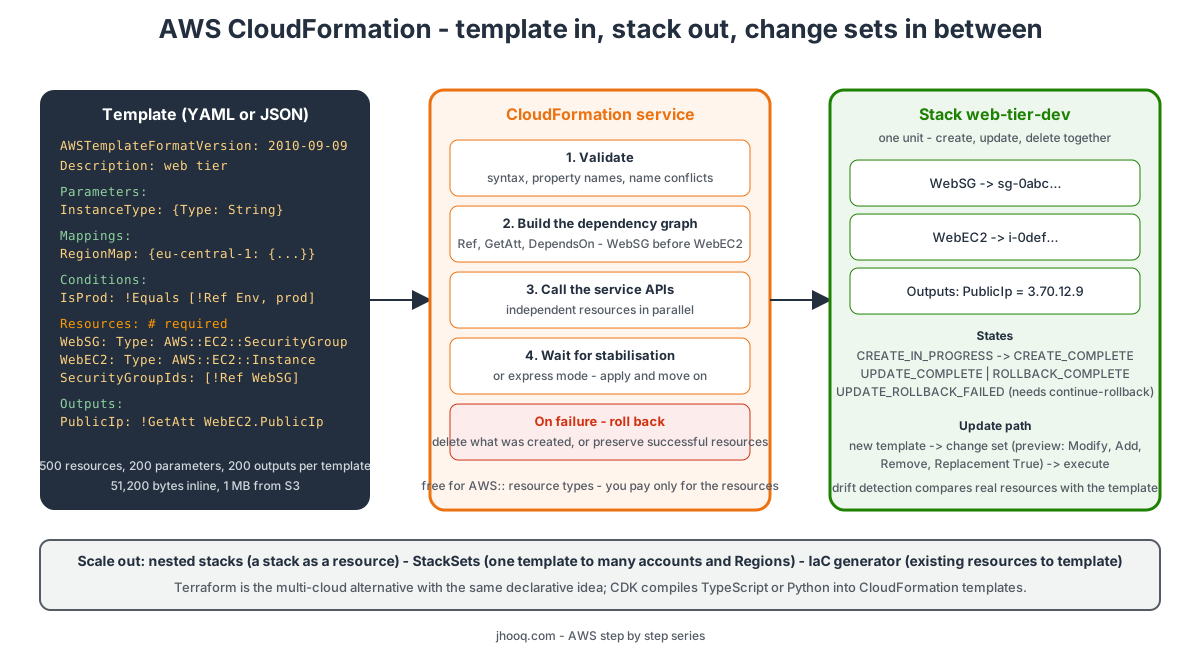
2. The three concepts - template, stack, change set
| Concept | What it is |
|---|---|
| Template | a YAML or JSON text file describing resources and their properties. Any extension - .yaml, .json, .template. YAML is what everyone writes today because it allows comments and the short !Ref syntax. |
| Stack | the running collection of resources created from one template. Create, update and delete happen at the stack level. A stack has a name, a status (CREATE_COMPLETE...), parameters, outputs and events. |
| Change set | a preview of an update - CloudFormation compares the new template or parameters with the current stack and lists what it would add, modify, remove, and - crucially - replace. You review it, then execute it or throw it away. |
The change set is the feature that makes CloudFormation safe in production. The docs give the classic example - rename an RDS instance in the template and CloudFormation creates a new database and deletes the old one; the change set shows Replacement: True before anything happens, so you can plan the backup first.
3. How a template becomes a stack
From how CloudFormation works -
- You write the template and save it locally or in S3. (If you upload a local file, CloudFormation puts it in an S3 bucket it creates in your account, one per Region - which is why a
cf-templates-...bucket appears after your first stack.) - You create a stack, pointing at the template and supplying parameter values.
- CloudFormation runs pre-deployment validation - syntax, property names, resource name conflicts. Fail here and nothing is created.
- It builds the dependency graph from
Ref,Fn::GetAttandDependsOn- the security group is created before the instance that references it. - It makes the service API calls in your account with your permissions (or a stack service role you pass) - independent resources in parallel, dependent ones in order.
- It waits for each resource to stabilise - a database or a NAT gateway takes minutes, which is where most deployment time goes. Express mode returns as soon as the configuration is applied, for faster development loops.
- All good →
CREATE_COMPLETE. Any resource fails → by default CloudFormation rolls back and deletes everything it created, leaving the stack inROLLBACK_COMPLETE. You can instead choose preserve successfully provisioned resources when creating the stack, so a failure leaves the good resources in place for you to fix and retry.
Updates follow the same path through a change set; a failed update rolls back to the last known good state.
4. Template anatomy - every section explained
From template sections. Only Resources is required -
| Section | Required | Purpose |
|---|---|---|
AWSTemplateFormatVersion | no | always 2010-09-09 - the only valid value |
Description | no | up to 1,024 bytes of text shown in the console |
Metadata | no | arbitrary data; AWS::CloudFormation::Interface groups and orders parameters in the console form |
Parameters | no | inputs supplied at create or update time - instance type, environment name, CIDR. Up to 200. Types include String, Number, List<...>, AWS::EC2::KeyPair::KeyName, AWS::SSM::Parameter::Value<...> which pulls the value from Parameter Store |
Rules | no | validate parameter combinations before anything is created |
Mappings | no | lookup tables - RegionMap → eu-central-1 → AMI - read with Fn::FindInMap. Up to 200 |
Conditions | no | booleans built from parameters - IsProd: !Equals [!Ref Env, prod] - used to create a resource or set a property only sometimes |
Transform | no | macros - AWS::Serverless-2016-10-31 turns SAM shorthand into full resources; AWS::Include pulls in snippets from S3 |
Resources | yes | the resources - each with a logical ID (your name), a Type (AWS::EC2::Instance) and Properties. Up to 500 |
Outputs | no | values to show after creation and to export to other stacks (Fn::ImportValue). Up to 200 |
The resource Type namespace tells you who provides it - AWS::* are AWS services (free), Custom::* is your own Lambda-backed resource, and third-party types from the CloudFormation registry (MongoDB::Atlas::Cluster, Datadog::Monitors::Monitor...) are billed per operation.
5. A complete working template - security group and EC2 instance
This template builds what we did by hand in Part-4 and Part-16 - a security group and an instance running nginx - and uses every common section. Save it as web-tier.yaml -
  1AWSTemplateFormatVersion: "2010-09-09"
  2Description: >
  3  jhooq.com - web tier: one EC2 instance with nginx behind a security group.
  4  The AMI comes from the public Systems Manager parameter so the template never goes stale.
  5
  6Metadata:
  7  AWS::CloudFormation::Interface:
  8    ParameterGroups:
  9      - Label: { default: "Network" }
 10        Parameters: [VpcId, SubnetId, AllowedSshCidr]
 11      - Label: { default: "Instance" }
 12        Parameters: [InstanceType, KeyName, Environment]
 13
 14Parameters:
 15  VpcId:
 16    Type: AWS::EC2::VPC::Id
 17    Description: VPC for the security group
 18  SubnetId:
 19    Type: AWS::EC2::Subnet::Id
 20    Description: Public subnet for the instance
 21  AllowedSshCidr:
 22    Type: String
 23    Default: 0.0.0.0/0
 24    AllowedPattern: ^(\d{1,3}\.){3}\d{1,3}/\d{1,2}$
 25    ConstraintDescription: must be a CIDR like 203.0.113.5/32
 26  InstanceType:
 27    Type: String
 28    Default: t3.micro
 29    AllowedValues: [t3.micro, t3.small, t3.medium]
 30  KeyName:
 31    Type: AWS::EC2::KeyPair::KeyName
 32    Description: Existing key pair for SSH
 33  Environment:
 34    Type: String
 35    Default: dev
 36    AllowedValues: [dev, prod]
 37  LatestAmiId:
 38    Type: AWS::SSM::Parameter::Value<AWS::EC2::Image::Id>
 39    Default: /aws/service/ami-amazon-linux-latest/al2023-ami-kernel-default-x86_64
 40
 41Mappings:
 42  EnvConfig:
 43    dev:
 44      VolumeSize: 8
 45      Monitoring: false
 46    prod:
 47      VolumeSize: 20
 48      Monitoring: true
 49
 50Conditions:
 51  IsProd: !Equals [!Ref Environment, prod]
 52
 53Resources:
 54  WebSecurityGroup:
 55    Type: AWS::EC2::SecurityGroup
 56    Properties:
 57      GroupDescription: !Sub "web-sg for ${AWS::StackName}"
 58      VpcId: !Ref VpcId
 59      SecurityGroupIngress:
 60        - IpProtocol: tcp
 61          FromPort: 80
 62          ToPort: 80
 63          CidrIp: 0.0.0.0/0
 64          Description: HTTP from anywhere
 65        - IpProtocol: tcp
 66          FromPort: 22
 67          ToPort: 22
 68          CidrIp: !Ref AllowedSshCidr
 69          Description: SSH from the allowed range
 70      Tags:
 71        - Key: Name
 72          Value: !Sub "${AWS::StackName}-web-sg"
 73
 74  WebInstance:
 75    Type: AWS::EC2::Instance
 76    Properties:
 77      ImageId: !Ref LatestAmiId
 78      InstanceType: !Ref InstanceType
 79      KeyName: !Ref KeyName
 80      SubnetId: !Ref SubnetId
 81      SecurityGroupIds:
 82        - !Ref WebSecurityGroup
 83      Monitoring: !FindInMap [EnvConfig, !Ref Environment, Monitoring]
 84      BlockDeviceMappings:
 85        - DeviceName: /dev/xvda
 86          Ebs:
 87            VolumeType: gp3
 88            VolumeSize: !FindInMap [EnvConfig, !Ref Environment, VolumeSize]
 89            Encrypted: true
 90            DeleteOnTermination: true
 91      UserData:
 92        Fn::Base64: !Sub |
 93          #!/bin/bash
 94          dnf install -y nginx
 95          systemctl enable --now nginx
 96          echo "<h1>${AWS::StackName} - ${Environment} - $(hostname -f)</h1>" > /usr/share/nginx/html/index.html
 97      Tags:
 98        - Key: Name
 99          Value: !Sub "${AWS::StackName}-web"
100        - Key: Environment
101          Value: !Ref Environment
102
103  WebElasticIp:
104    Type: AWS::EC2::EIP
105    Condition: IsProd
106    Properties:
107      InstanceId: !Ref WebInstance
108      Tags:
109        - Key: Name
110          Value: !Sub "${AWS::StackName}-eip"
111
112Outputs:
113  InstanceId:
114    Description: The instance id
115    Value: !Ref WebInstance
116  PublicIp:
117    Description: Public IP of the web server
118    Value: !GetAtt WebInstance.PublicIp
119  WebUrl:
120    Description: Open this in a browser
121    Value: !Sub "http://${WebInstance.PublicDnsName}"
122  SecurityGroupId:
123    Description: Exported for other stacks
124    Value: !Ref WebSecurityGroup
125    Export:
126      Name: !Sub "${AWS::StackName}-WebSecurityGroupId"
Notice what the template does that clicking cannot - the AMI resolves from Parameter Store at deploy time, the prod environment gets a bigger disk, detailed monitoring and an Elastic IP purely from the Environment parameter, and the security group id is exported so another stack can !ImportValue web-tier-dev-WebSecurityGroupId. Every property name comes from the AWS::EC2::Instance and AWS::EC2::SecurityGroup reference pages - the resource type reference is the page you will have open permanently.
6. Intrinsic functions and pseudo parameters
The !Something tags are intrinsic functions - the small built-in language of templates. From the function reference, the ones you use daily -
| Function | Does | Example |
|---|---|---|
!Ref | the value of a parameter, or the primary identifier of a resource (instance id, security group id, bucket name) | !Ref WebSecurityGroup → sg-0abc... |
!GetAtt | another attribute of a resource | !GetAtt WebInstance.PublicIp |
!Sub | string with ${...} substitutions of parameters, resources, attributes and pseudo parameters | !Sub "${AWS::StackName}-web" |
!Join | join a list with a delimiter | !Join [",", [a, b]] |
!Select / !Split | pick an item from a list / split a string | !Select [0, !GetAZs ""] |
!FindInMap | read the Mappings table | !FindInMap [EnvConfig, !Ref Environment, VolumeSize] |
!If, !Equals, !And, !Or, !Not | conditions | !If [IsProd, 20, 8] |
!GetAZs | the Availability Zones of a Region | !GetAZs eu-central-1 |
!ImportValue | an Export from another stack in the same Region | !ImportValue web-tier-dev-WebSecurityGroupId |
!Base64 | base64-encode - required for UserData | Fn::Base64: !Sub ... |
Fn::ForEach | loop - repeat a resource for each item of a list (needs Transform: AWS::LanguageExtensions) | one subnet per AZ |
Pseudo parameters are values CloudFormation knows without you declaring them - AWS::StackName, AWS::Region, AWS::AccountId, AWS::Partition, AWS::URLSuffix, AWS::NoValue (removes a property when used in !If), AWS::NotificationARNs. The pseudo parameter reference has the full list.
One YAML gotcha - you cannot nest two short-form tags on one line (!Base64 !Sub fails). Use the long form for the outer one, as the template above does with Fn::Base64: !Sub |.
7. Step 1 - Create your first stack in the console
Following creating your first stack with our template -
- CloudFormation console → Stacks → Create stack → With new resources (standard).
- Prepare template - Choose an existing template. Template source - Upload a template file →
web-tier.yaml. (The other options are an S3 URL, a Git repository via Git sync, or Build with Template studio - the visual editor, section 11.) Next. - Specify stack details - Stack name
web-tier-dev. The parameters appear in the groups and order theMetadatasection defined - pick the VPC and public subnet from Part-5, your key pair,AllowedSshCidras your IP/32,Environmentdev. Next. - Configure stack options - Tags
Project = jhooq. Permissions - leave empty to run with your own permissions, or pick a service role that CloudFormation assumes instead (the production pattern - developers deploy stacks without holding the permissions themselves). Stack failure options - Roll back all stack resources (default) or Preserve successfully provisioned resources. Advanced - Termination protection on for anything you care about, an SNS topic for notifications, a timeout in minutes. Next. - Review and create - the capabilities acknowledgement appears only if the template creates IAM resources (
CAPABILITY_IAM) or uses macros (CAPABILITY_AUTO_EXPAND). Submit. - The Events tab fills top-down -
CREATE_IN_PROGRESSfor the stack, thenWebSecurityGroup, thenWebInstance(it waited for the group), thenCREATE_COMPLETE. Two to three minutes. - Outputs tab → click WebUrl - the nginx page with the stack name.
Also look at the Resources tab (logical ID → physical ID mapping) and the Template tab (which now offers Open in Template studio, section 11).
8. Step 2 - Update the stack with a change set
Let's make two changes - InstanceType to t3.small and Environment to prod - and see what the change set says before we commit. From update stacks using change sets -
- Stacks → web-tier-dev → Stack actions → Create change set for current stack.
- Use existing template (we are changing only parameters; Replace existing template is for template edits). Next.
- Parameters -
InstanceTypet3.small,Environmentprod. Next → Next → Change set namebigger-and-prod→ Submit. - CloudFormation computes the diff and shows Changes -
| Logical ID | Action | Replacement | Why |
|---|---|---|---|
WebInstance | Modify | Conditional / True | InstanceType is an update with some interruption property (stop-start); the block device mapping size change forces replacement of an EC2 instance |
WebElasticIp | Add | - | the IsProd condition is now true |
WebInstance tags | Modify | False | Environment tag value |
- Replacement True means a new instance is created and the old one deleted - the public IP changes and anything on the root disk is gone. That is the information you came for. Decide - execute (
Execute change set, choosing the failure behaviour), or delete the change set and change the template so that the disk size is not touched. - Execute → the Events tab shows
UPDATE_IN_PROGRESS→UPDATE_COMPLETE_CLEANUP_IN_PROGRESS(deleting the replaced instance) →UPDATE_COMPLETE.
The update behaviours - No interruption, Some interruption, Replacement - are documented per property on each resource reference page, and the change set tells you which applies. A change set does not guarantee success - quotas, permissions and unsupported updates still fail at execution, with rollback to the last good state.
To protect a critical resource from accidental replacement or deletion, add a stack policy (Deny Update:Replace on the logical ID) and a DeletionPolicy: Retain or Snapshot on the resource - see protect stack resources.
9. Step 3 - Detect drift
Someone adds a rule to WebSecurityGroup by hand in the EC2 console. The stack still says UPDATE_COMPLETE, but reality no longer matches the template - that is drift. From detect drift -
- Stacks → web-tier-dev → Stack actions → Detect drift. Wait for the drift status.
- Stack actions → View drift results - the stack is DRIFTED,
WebSecurityGroupis MODIFIED, and the diff view shows the expected property values from the template next to the actual values, with the extra ingress rule highlighted. - Fix it one of two ways - remove the manual change in the EC2 console, or put the rule in the template and update the stack so the template becomes the truth again.
Drift detection is on-demand (or scheduled with an EventBridge rule plus a small Lambda), works for most but not all resource types, and is the thing that makes "nobody changes production by hand" enforceable. CloudFormation never fixes drift by itself - an update that does not touch the drifted property leaves it alone.
10. Step 4 - Delete the stack
Stacks → web-tier-dev → Delete. CloudFormation deletes resources in reverse dependency order - instance, then Elastic IP, then security group - and the stack disappears when DELETE_COMPLETE. Two things that stop a delete -
- Termination protection - turn it off under Stack actions → Edit termination protection first; it exists exactly to make you do that consciously.
- Resources with
DeletionPolicy: Retainare left behind on purpose (the stack still deletes). An S3 bucket that is not empty, or a security group still used by something outside the stack, fails withDELETE_FAILED- fix the dependency and retry, or retain that resource.
11. Nested stacks, StackSets, IaC generator, Template studio
Once the basics work, four features carry you to real scale -
- Nested stacks - a stack as a resource (
AWS::CloudFormation::Stackpointing at a template in S3). The way to get past the 500-resource limit and to reuse a "network module" or "database module" across many parent stacks. The parent's change set shows nested changes too. - StackSets - one template deployed to many accounts and Regions from an administrator account, with automatic deployment to new accounts in an Organizations OU. This is how Control Tower and most security baselines (GuardDuty, Config rules, IAM roles) are rolled out.
- IaC generator - scans the resources that already exist in your account, lets you pick a set, and generates a template for them, which you can then import into a stack. The answer to "we built it by hand, now we want it in code".
- Template studio - the editor in the CloudFormation console that shows the template text next to a live diagram of the resources and their references (
Ref,GetAtt,Sub,DependsOn), validates it, converts YAML ↔ JSON and saves to S3. The text is authoritative - you edit the template, the diagram redraws. Open it from Create stack → Build with Template studio or from any stack's template.
And three honourable mentions - Git sync (a stack that deploys itself from a branch in GitHub, GitLab or CodeCommit), the CloudFormation registry (third-party and private resource types, modules, and Hooks that block non-compliant resources before creation), and cfn-lint, the open-source linter that catches invalid property names and bad !Refs before you ever create a stack - github.com/aws-cloudformation/cfn-lint.
12. Quotas and pricing
From the quotas page -
| Quota | Value | Way around it |
|---|---|---|
| Resources per template | 500 | nested stacks |
| Parameters / Mappings / Outputs per template | 200 each | lists in parameters, nested stacks |
| Parameter value size | 4,096 bytes | split and Fn::Join |
| Template body in a request | 51,200 bytes | upload to S3 (then 1 MB) |
| Stacks per account per Region | 2,000 (adjustable) | delete what you do not need |
| StackSets per administrator account | 1,000 (adjustable) | |
| Stack instances per StackSet | 100,000 (adjustable) | |
| Resources a nested-stack hierarchy may touch in one operation | 2,500 | split the hierarchy |
| Dynamic references per template | 60 | |
Custom resource response, cfn-signal data | 4,096 bytes | put the payload in S3 |
Pricing, from the pricing page - no charge for stacks that use AWS::* (and Alexa::*) resource types; you pay only for the resources. Third-party registry resource types and Hooks are billed per handler operation (create, update, delete, read, list) - the published examples work with $0.0009 per operation after 1,000 free operations a month, and the first 30 seconds of each operation's duration are free, beyond that $0.00008 per second. For the templates in this post the CloudFormation line on your bill is zero.
13. The AWS CLI equivalents
 1STACK=web-tier-dev
 2
 3# lint before you deploy (pip install cfn-lint)
 4cfn-lint web-tier.yaml
 5
 6# validate with the service
 7aws cloudformation validate-template --template-body file://web-tier.yaml
 8
 9# create the stack and wait
10aws cloudformation create-stack --stack-name $STACK \
11  --template-body file://web-tier.yaml \
12  --parameters ParameterKey=VpcId,ParameterValue=vpc-0123456789abcdef0 \
13               ParameterKey=SubnetId,ParameterValue=subnet-0123456789abcdef0 \
14               ParameterKey=KeyName,ParameterValue=web-key \
15               ParameterKey=AllowedSshCidr,ParameterValue=203.0.113.5/32 \
16  --tags Key=Project,Value=jhooq \
17  --enable-termination-protection
18aws cloudformation wait stack-create-complete --stack-name $STACK
19
20# outputs and events
21aws cloudformation describe-stacks --stack-name $STACK --query "Stacks[0].Outputs" --output table
22aws cloudformation describe-stack-events --stack-name $STACK \
23  --query "StackEvents[?ResourceStatus=='CREATE_FAILED'].[LogicalResourceId,ResourceStatusReason]" --output table
24
25# update through a change set - create, inspect, execute
26aws cloudformation create-change-set --stack-name $STACK --change-set-name bigger-and-prod \
27  --use-previous-template \
28  --parameters ParameterKey=VpcId,UsePreviousValue=true ParameterKey=SubnetId,UsePreviousValue=true \
29               ParameterKey=KeyName,UsePreviousValue=true ParameterKey=AllowedSshCidr,UsePreviousValue=true \
30               ParameterKey=InstanceType,ParameterValue=t3.small ParameterKey=Environment,ParameterValue=prod
31aws cloudformation wait change-set-create-complete --stack-name $STACK --change-set-name bigger-and-prod
32aws cloudformation describe-change-set --stack-name $STACK --change-set-name bigger-and-prod \
33  --query "Changes[].ResourceChange.{id:LogicalResourceId,action:Action,replacement:Replacement}" --output table
34aws cloudformation execute-change-set --stack-name $STACK --change-set-name bigger-and-prod
35aws cloudformation wait stack-update-complete --stack-name $STACK
36
37# the one-command alternative used in CI - creates or updates, via a change set under the hood
38aws cloudformation deploy --stack-name $STACK --template-file web-tier.yaml \
39  --parameter-overrides InstanceType=t3.small Environment=prod \
40  --no-fail-on-empty-changeset
41
42# drift
43DRIFT=$(aws cloudformation detect-stack-drift --stack-name $STACK --query StackDriftDetectionId --output text)
44aws cloudformation describe-stack-drift-detection-status --stack-drift-detection-id $DRIFT
45aws cloudformation describe-stack-resource-drifts --stack-name $STACK \
46  --query "StackResourceDrifts[?StackResourceDriftStatus!='IN_SYNC'].[LogicalResourceId,StackResourceDriftStatus]" --output table
47
48# delete
49aws cloudformation update-termination-protection --stack-name $STACK --no-enable-termination-protection
50aws cloudformation delete-stack --stack-name $STACK
51aws cloudformation wait stack-delete-complete --stack-name $STACK
aws cloudformation deploy is the command most pipelines use - idempotent, change-set based, and it uploads large templates to S3 for you with --s3-bucket.
14. Troubleshooting - ROLLBACK_COMPLETE and friends
ROLLBACK_COMPLETEafter the first create - creation failed and everything was rolled back. The stack is now useless and cannot be updated - find the firstCREATE_FAILEDevent, fix the template, delete the stack, create again. (Or create with Preserve successfully provisioned resources to keep the good parts next time.)CREATE_FAILED- "The following resource(s) failed to create" - the reason is in the Events tab on the first failed resource; later failures are usually just cancellations. Typical causes - a wrong property, a quota (VcpuLimitExceeded), a missing permission, an AMI that does not exist in the Region.UPDATE_ROLLBACK_FAILED- the rollback itself failed, usually because someone changed a resource by hand. Use Stack actions → Continue update rollback, skipping the resources that cannot be rolled back, then fix them.- "Template format error: Unresolved resource dependencies" - a
!Refto a logical ID or parameter that does not exist. A typo, or a resource behind aConditionthat is false. - "Requires capabilities: [CAPABILITY_IAM]" - the template creates IAM resources; acknowledge in the console or pass
--capabilities CAPABILITY_IAM(CAPABILITY_NAMED_IAMif they have fixed names). - Stack stuck in
*_IN_PROGRESSfor an hour - a resource is waiting for a signal (cfn-signal,WaitCondition) that never comes, or a resource is slow to stabilise. Check the resource's own service console. - Change set shows Replacement True unexpectedly - the property you changed is Replacement-type for that resource (names, AZs, most immutable identifiers). Check the property's update behaviour in the reference page before executing.
- Export cannot be deleted - "in use by stack X" - another stack imports it. Remove the import first.
- Delete fails on an S3 bucket - buckets must be empty; empty it or set
DeletionPolicy: Retain. - Cannot update a parameter with
NoEcho- you must pass it again;UsePreviousValue=trueworks for all parameters including secrets. Better - read secrets with a dynamic reference{{resolve:secretsmanager:...}}so they never live in parameters.
15. CloudFormation vs Terraform
An honest comparison, since this blog is mostly Terraform -
| CloudFormation | Terraform | |
|---|---|---|
| Clouds | AWS only (plus registry extensions) | AWS, Azure, Google Cloud, Kubernetes, GitHub, 4,000+ providers |
| Language | YAML or JSON templates; CDK compiles TypeScript, Python, Java and others into templates | HCL, with real expressions, loops, modules |
| State | managed by AWS inside the stack - nothing to store, lock or lose | a state file you manage - S3 plus locking, or HCP Terraform |
| Preview | change set | terraform plan - more detailed, shows every attribute |
| Rollback | automatic on failure | none - a failed apply leaves a partial state you fix forward |
| Drift | drift detection, on demand | terraform plan shows drift every run |
| Multi-account rollout | StackSets, native | workspaces, modules, pipelines - you build it |
| New AWS features | usually day one (the service team ships the resource type) | usually days to weeks after (provider release) |
| Modularity | nested stacks, modules in the registry | modules, registries, for_each |
| Cost | free | free (open-source / BSL binary); HCP Terraform has paid tiers |
| Who uses it | AWS-native teams, Control Tower, Service Catalog, SAM, CDK | multi-cloud teams, platform teams, almost every DevOps job post |
My practical advice - learn both. Use Terraform as your primary tool if you touch more than one cloud or already have a Terraform platform (Terraform index, Terraform Associate course); use CloudFormation when you live inside AWS-native tooling, when you need StackSets, or when the thing you are deploying ships as a template. Knowing how CloudFormation handles rollback and change sets also makes you appreciate exactly what Terraform's state file is doing for you.
16. Conclusion
CloudFormation is AWS's native infrastructure as code - a template describes resources, a stack is the running result, and a change set shows you what an update will do before it does it. You now have a complete template that uses parameters, mappings, conditions, outputs and exports, you have created, updated, drift-checked and deleted a stack in the console and the CLI, and you know where nested stacks, StackSets, the IaC generator and Template studio fit. Remember the three habits - lint and validate first, never execute a change set without reading the Replacement column, and turn on termination protection and DeletionPolicy for anything with data.
For the Terraform versions of the same builds see Terraform EC2 and the rest of the Terraform index; for the AWS services this template touches, Part-4 EC2, Part-16 security groups and the launch template post, which is what you would use instead of AWS::EC2::Instance once Auto Scaling enters the picture.
AWS step by step series -
- Part-1 : AWS IAM user - create a user, group, policy, access keys and MFA
- Part-2 : AWS Organizations - multi-account setup, OUs and SCPs
- Part-3 : AWS assume IAM role - trust policy, switch role in console and CLI
- Part-4 : How to launch an EC2 instance - key pair, security group, SSH
- Part-5 : AWS VPC - public and private subnets, Internet Gateway, NAT Gateway, route tables
- Part-8 : EC2 launch template - versions, default version, source template, SSM parameter AMI
- Part-10 : EC2 Auto Scaling - launch template, Auto Scaling group, target tracking, ALB
- Part-11 : AWS WAF - web ACL, managed rules, rate limiting, geo blocking
- Part-12 : AWS VPC Peering - connect two VPCs, routes, security groups, DNS
- Part-13 : AWS Transit Gateway - hub-and-spoke for many VPCs and on-premises
- Part-14 : AWS NAT Gateway deep dive - public vs private, limits, cost, troubleshooting
- Part-15 : Amazon Route 53 - hosted zones, records, alias, routing policies, health checks
- Part-16 : AWS security groups - inbound and outbound rules, stateful, referencing, quotas
- Part-16 : AWS Certificate Manager - free TLS certificates for ALB, CloudFront and API Gateway
- Part-17 : AWS Lambda - function URLs, environment variables and layers
- Part-18 : Network Load Balancer - setup, and ALB vs NLB
- Part-19 : VPC endpoints - gateway and interface endpoints (PrivateLink) instead of NAT
- Part-20 : AWS PrivateLink - publish your own service with an endpoint service and NLB
- Part-20 : Amazon EBS volumes - types, attach, mount, resize, snapshots, encryption
- Part-21 : VPC Flow Logs - CloudWatch Logs, S3, record format, Logs Insights, Athena
- Part-21 : EC2 Spot Instances - pricing, interruptions, mixed instances groups
- Part-24 : AWS Control Tower - landing zone, controls, Account Factory, Identity Center
Networking fundamentals -
- What is a VPC and a subnet? AWS networking in five minutes
- What is CIDR? Calculate IP ranges for VPCs and subnets
- What is NAT? Static NAT, dynamic NAT and PAT explained
More AWS guides -
- What is AWS CloudFormation? Templates, stacks, change sets, drift, StackSets
- Learn AWS S3 - the complete course
- AWS API Gateway - REST API with Lambda, authorizers, Terraform
- AWS Advanced Networking Specialty (ANS-C01) - course companion
- AWS ECS and Fargate - how to deploy a Docker container
- AWS S3 - how to host a static website
- Terraform create EC2 instance on AWS
- Terraform AWS IAM - users, roles and policies
- Terraform and AWS multi-account setup
- Terraform - setting up an ALB and SSL
Posts in this series
- Amazon EBS Volumes Step by Step - Volume Types Compared (gp3, gp2, io2 Block Express, st1, sc1), Create, Attach, Format and Mount a Volume, Resize Without Downtime, Snapshots, Encryption, Multi-Attach, Pricing and Troubleshooting (AWS Part-20)
- Amazon Route 53 Step by Step - Hosted Zones, Record Types, Alias Records, Point a Domain at an ALB, Routing Policies (Weighted, Latency, Failover, Geolocation), Health Checks, Private Zones and Pricing (AWS Part-15)
- AWS Advanced Networking - Free 8-Hour Full Course Companion (VPC, NAT Gateway, Bastion, ALB, NLB, WAF, VPC Peering, Transit Gateway, VPC Endpoints and PrivateLink, Route 53, ACM) with Timestamps and the ANS-C01 Exam Facts
- AWS Assume IAM Role Step by Step - Trust Policy vs Permissions Policy, Switch Role in the Console, aws sts assume-role, CLI Profiles, Cross-Account Access, MFA and External ID (AWS Part-3)
- AWS Certificate Manager (ACM) Step by Step - Request a Free TLS Certificate, DNS Validation with Route 53, Attach It to an ALB HTTPS Listener, Redirect HTTP to HTTPS, CloudFront and API Gateway, Auto-Renewal, Exportable Certificates and ACME (AWS Part-16)
- AWS Control Tower Step by Step - Set Up a Landing Zone, Security OU with Log Archive and Audit Accounts, Controls (Guardrails), Region Deny, IAM Identity Center, Account Factory and Enrolling Existing Accounts (AWS Part-24)
- AWS EC2 Auto Scaling Step by Step - Launch Template, Auto Scaling Group Across Two AZs, Target Tracking Policy, Application Load Balancer, Health Checks and Instance Refresh (AWS Part-10)
- AWS EC2 Launch Template Step by Step - Create a Template, Versions and the Default Version, Source Template, Create From a Running Instance, Systems Manager Parameter Instead of an AMI ID, Launch Templates vs Launch Configurations, IAM Guardrails, CLI and Terraform (AWS Part-8 and Part-17)
- AWS EC2 Spot Instances Step by Step - How Spot Pricing Works, Launch a Spot Instance, Interruptions and the Two-Minute Notice, Rebalance Recommendations, Stop vs Hibernate vs Terminate, Spot in Auto Scaling Mixed Instances Groups, Billing Rules, Best Practices, CLI and Terraform (AWS Part-21)
- AWS IAM User Step by Step - Create a User, User Group, Attach Policies, Access Keys, MFA and Sign-in URL (AWS Part-1)
- AWS Lambda Step by Step - Create a Function, Function URL (HTTPS Endpoint Without API Gateway), Environment Variables, Lambda Layers for Python Dependencies, Versions and Aliases, Limits, Pricing and Errors (AWS Part-17)
- AWS NAT Gateway Deep Dive - How It Works, Public vs Private NAT Gateway, Setup Step by Step, Limits (55,000 Connections, 100 Gbps), CloudWatch Metrics, Cost Optimisation, NAT Instance Comparison and Troubleshooting (AWS Part-14)
- AWS Network Load Balancer Step by Step - Create an NLB with Static IPs, Target Groups, TCP and TLS Listeners, Security Groups, Client IP Preservation, Cross-Zone Load Balancing, and ALB vs NLB Explained (AWS Part-18)
- AWS Organizations Step by Step - Multi-Account Setup, Organizational Units, Service Control Policies (SCPs), Consolidated Billing and Identity Center (AWS Part-2)
- AWS PrivateLink Step by Step - Publish Your Own Service with a VPC Endpoint Service and Network Load Balancer, Allow Consumers, Accept Connections, Private DNS Name, Cross-Account and Cross-Region, Pricing and Troubleshooting (AWS Part-20)
- AWS Security Groups Step by Step - Inbound and Outbound Rules, Stateful Behaviour, Referencing Security Groups, the Three-Tier ALB-Web-DB Pattern, Quotas, Security Group vs Network ACL, CLI and Terraform (AWS Part-16)
- AWS Transit Gateway Step by Step - Connect Many VPCs and On-Premises Through One Hub, VPC Attachments, Transit Gateway Route Tables, Associations and Propagations, Isolation, Peering, Pricing (AWS Part-13)
- AWS VPC Endpoints Step by Step - Gateway Endpoints for S3 and DynamoDB, Interface Endpoints (PrivateLink) for SSM, ECR and Other Services, Private DNS, Endpoint Policies, Security Groups, Cost vs NAT Gateway, and Troubleshooting (AWS Part-19)
- AWS VPC Flow Logs Step by Step - Enable Flow Logs for a VPC, Subnet or Network Interface, Publish to CloudWatch Logs or S3, Read a Flow Log Record Field by Field, Custom Formats, Query with Logs Insights and Athena, Find Rejected Traffic, Pricing and Limitations (AWS Part-21)
- AWS VPC Peering Step by Step - Connect Two VPCs (Same or Different Account and Region), Accept the Request, Add Routes, Security Groups, DNS Resolution, Test with EC2, and the Limits (AWS Part-12)
- AWS VPC Step by Step - Create a VPC with Public and Private Subnets, Internet Gateway, NAT Gateway and Route Tables (and Test It with EC2) (AWS Part-5)
- AWS WAF Step by Step - Create a Web ACL, Attach It to an ALB or API Gateway, AWS Managed Rules, Rate-Based Rules, Geo Blocking, IP Sets, Count Mode and Logging (AWS Part-11)
- How to Launch an EC2 Instance on AWS Step by Step - AMI, Instance Type, Key Pair, Security Group, Connect with SSH or EC2 Instance Connect, Stop vs Terminate (AWS Part-4)
- What is an AWS VPC and a Subnet? Virtual Private Cloud Explained in Five Minutes (Region, Availability Zones, Public vs Private Subnets, Gateways, Route Tables)
- What is AWS CloudFormation? Templates, Stacks and Change Sets Explained, Template Anatomy Section by Section, Create Your First Stack Step by Step, Update With a Change Set, Drift Detection, Nested Stacks and StackSets, Quotas, Pricing, CLI, and CloudFormation vs Terraform
- What is CIDR (Classless Inter-Domain Routing)? How to Calculate IP Ranges for VPCs and Subnets, with Examples (/8, /16, /24, /28, /32)
- What is NAT (Network Address Translation)? How It Works, Static NAT vs Dynamic NAT vs PAT, the Translation Table, and Where NAT Shows Up in AWS
- AWS API Gateway Tutorial - REST API with Lambda Proxy and Non-Proxy Integration, Request Validation, HTTP API vs REST API, Resource Policies, Lambda Authorizers and Terraform
- Learn AWS S3 - The Complete Course (Buckets, Objects, Storage Classes, Lifecycle, Versioning, Security Defaults, Bucket Policies, Static Hosting, CLI and Terraform)
- How to release(delete) Elastic IP from AWS?
- Fix docker login 'error saving credentials: error storing credentials - err: exit status 1' (AWS ECR on macOS, Windows, Linux and WSL)