AWS Cloud WAN Step by Step - Global Network, Core Network Policy, Dev, Prod and Shared Segments, Tag-Based VPC Attachments and Routes Across Three Regions (Part 25)

Part-13 connected VPCs with a Transit Gateway: one hub per region, route tables you write yourself, and peering between regions you also write yourself. This Part-25 is what AWS built on top of that idea: AWS Cloud WAN, where you describe the network you want in one policy document (which regions, which segments, who may talk to whom, how a VPC finds its segment) and AWS deploys and keeps it consistent across every region.
I build it the way I did in the video: one global network, one core network with edges in Frankfurt, Stockholm and Mumbai, three segments called development, production and shared, one VPC per region attached to its segment by a tag, and a ping test at the end that shows dev and prod cannot reach each other while shared reaches both. The recording is 40 minutes; the post has every step, the screens that matter, the same policy as Terraform, and the numbers I did not have time for on camera.
TL;DR
- Cloud WAN is a Transit Gateway in every region you name, pre-peered in a full mesh, driven by one JSON policy. The policy declares
edge-locations,segments(isolated routing domains, like VRFs),segment-actions(which segments share routes) andattachment-policies(rules that put an attachment into a segment, usually from a tag). - In the demo: segments
development,production,shared; a share action fromsharedtodevelopmentandproduction; two attachment policies,environment=developmentandenvironment=production; three VPC attachments, 31.0.0.0/16 (Frankfurt, dev), 41.0.0.0/16 (Stockholm, prod), 51.0.0.0/16 (Mumbai, shared). - The result, measured on camera: from the shared VPC, ping to prod averaged 147 ms and to dev 126 ms with 0% loss; from dev to prod, 5 packets sent, 0 received, 100% packet loss. No security group did that; the segmentation did.
- Two things Cloud WAN does not do for you: it does not add routes to your VPC route tables (you add a route to the remote CIDRs with the core network as target), and an attachment on a segment with
require-attachment-acceptance: truewaits until you click Accept. - Time and money: a core network can take up to 30 minutes to deploy; each core network edge costs $0.50 per hour ($365 per month), each VPC attachment $0.08 per hour in Frankfurt and Stockholm and $0.09 in Mumbai, plus $0.02 per GB processed. The three-region demo is about $1,278 a month if you leave it running, so destroy it.
- The same policy as Terraform (
aws_networkmanager_core_network_policy_document) validates and plans 6 resources with AWS provider 6.69.1; the rendered JSON is in section 10.
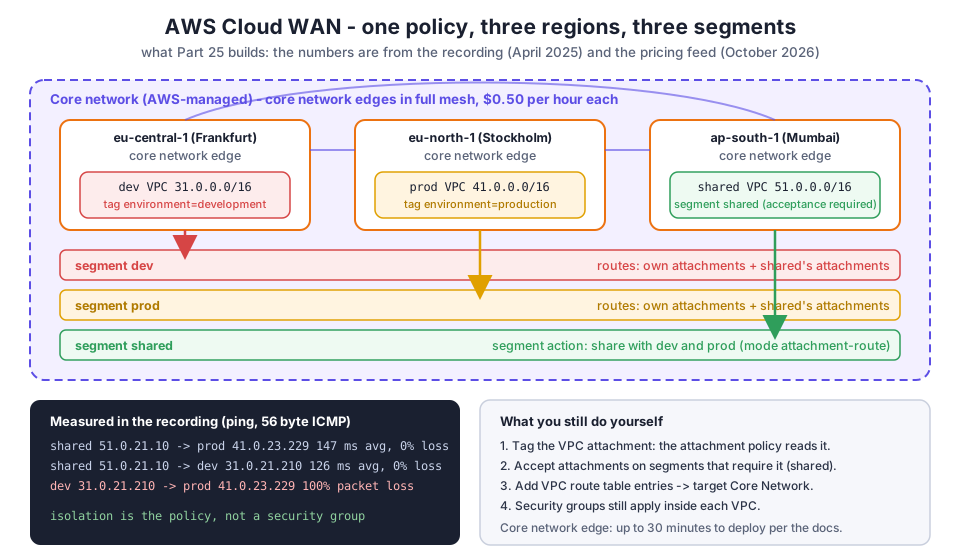
Table of Content
- What Cloud WAN is, and how it differs from Transit Gateway
- The vocabulary - global network, core network, edge, segment, attachment, policy
- Step 1 - The three VPCs and their CIDRs
- Step 2 - Create the global network and the core network
- Step 3 - Policy version 2 - the three segments
- Step 4 - Segment action - share the shared segment
- Step 5 - Attachment policies - a tag decides the segment
- Step 6 - Attach the VPCs and accept the shared one
- Step 7 - Routes - what the core network knows and what your VPC must know
- Step 8 - The test - who can ping whom
- The same policy as Terraform
- What it costs and the limits
- What broke when I ran this
- Conclusion
1. What Cloud WAN is, and how it differs from Transit Gateway
With a Transit Gateway you build the hub yourself: one TGW per region, route tables per environment, propagations and associations per attachment, and inter-region peering with static routes on both sides. It works, I showed it in Part-13, and at three regions and three environments it is already 9 route tables and 6 peering routes that someone has to keep in sync.
Cloud WAN moves that work into a core network policy. You say "edges in these regions", "these segments", "this segment shares with those", "a VPC tagged like this goes here", and AWS creates a core network edge in every region, peers them in a full mesh over the AWS backbone, builds the per-segment routing, and applies the same rules everywhere. The What is AWS Cloud WAN page says the edge "is also known as an AWS Transit Gateway, and it inherits many of the same properties", which is the right mental model: same data plane, declarative control plane.
| Transit Gateway (Part-13) | Cloud WAN (this part) | |
|---|---|---|
| Unit per region | a TGW you create | a core network edge the policy creates |
| Segmentation | TGW route tables, associations, propagations | segments in the policy, global, consistent in every region |
| Cross-region | TGW peering plus static routes per side | automatic full mesh between edges |
| Putting a VPC in an environment | associate to the right route table by hand | attachment-policies: a tag on the attachment |
| Change management | edit resources one by one | policy versions with a change set you review and then execute |
| Price per hour, per region | $0.05 per attachment (TGW) | $0.50 per core network edge plus $0.08 to $0.09 per attachment |
The last row is the honest trade-off. Cloud WAN's edges cost money even with nothing attached. Below about three regions and three environments, a Transit Gateway is cheaper and simpler; above that, the policy pays for itself in things nobody has to remember.
2. The vocabulary - global network, core network, edge, segment, attachment, policy
| Term | What it is | In the demo |
|---|---|---|
| Global network | the container; can hold one core network and registered Transit Gateways | demo-aws-wan |
| Core network | the AWS-managed part: edges, segments, attachments, defined by the policy | one, home Region us-west-2 |
| Core network edge | the per-region router (a managed TGW); one per edge-locations entry | eu-central-1, eu-north-1, ap-south-1 |
| Segment | an isolated routing domain; attachments in the same segment talk, others do not | development, production, shared |
| Segment action | route sharing between segments | shared shares with development and production |
| Attachment | a VPC, VPN, Direct Connect gateway, Connect or TGW route table joined to an edge | three VPC attachments |
| Attachment policy | a rule: condition on tag, account, region or resource ID, action "put in segment X" | environment=development, environment=production |
| Policy version | an immutable JSON document; one is LIVE, a new one is a change set you execute | versions 1, 2 and 3 in the video |
Everything from "segment" down lives in one JSON document; the policy version parameters page lists every key. The console's visual editor writes the same JSON, which is how I built it in the video.
3. Step 1 - The three VPCs and their CIDRs
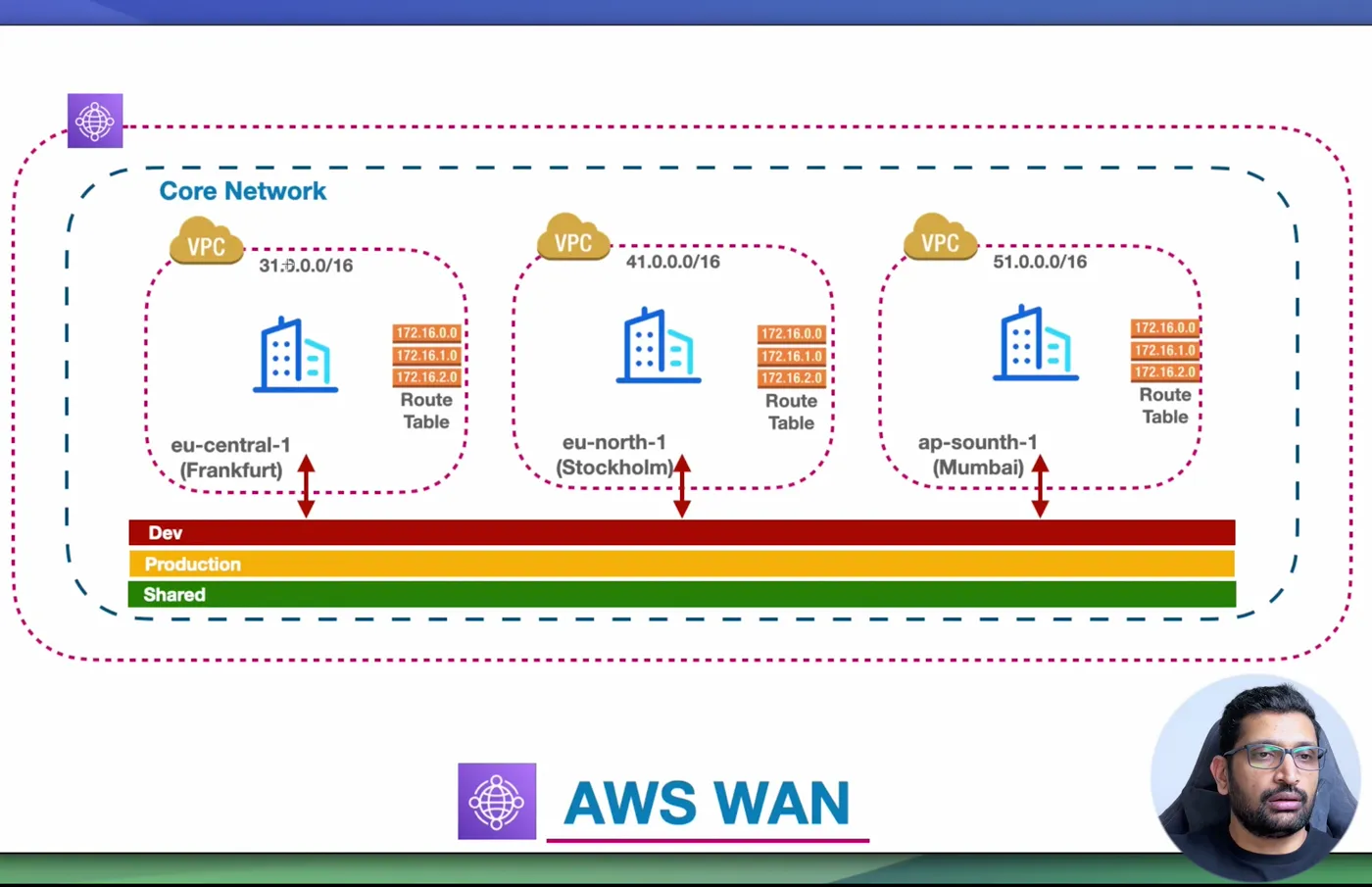
Cloud WAN routes between VPCs by their CIDRs, so the one rule from VPC peering and Transit Gateway still holds: no overlaps. I used three deliberately far-apart ranges, each with three public and three private subnets across three Availability Zones, built the way Part-5 builds a VPC:
| Region | VPC | CIDR | Segment |
|---|---|---|---|
| eu-central-1 (Frankfurt) | dev-euc1-frankfurt-vpc-1 | 31.0.0.0/16 | development |
| eu-north-1 (Stockholm) | prod-eun1-stockholm-vpc-1 | 41.0.0.0/16 | production |
| ap-south-1 (Mumbai) | shared-asiasouth1-mumbai-vpc-1 | 51.0.0.0/16 | shared |
Those are public ranges, which is fine for a lab that never routes them to the internet and clearer on camera than three 10.x blocks. For a real design use RFC 1918 space and check the overlap before you attach anything: I put the demo's three ranges into my VPC Subnet Planner with 31.0.0.0/16 and 41.0.0.0/16 as existing networks, and it lays out the Mumbai VPC's subnets across three zones and confirms there is no overlap with the other two. Change the address to 31.0.0.0 and it flags the collision immediately, which is exactly the check Cloud WAN will not do for you.
4. Step 2 - Create the global network and the core network
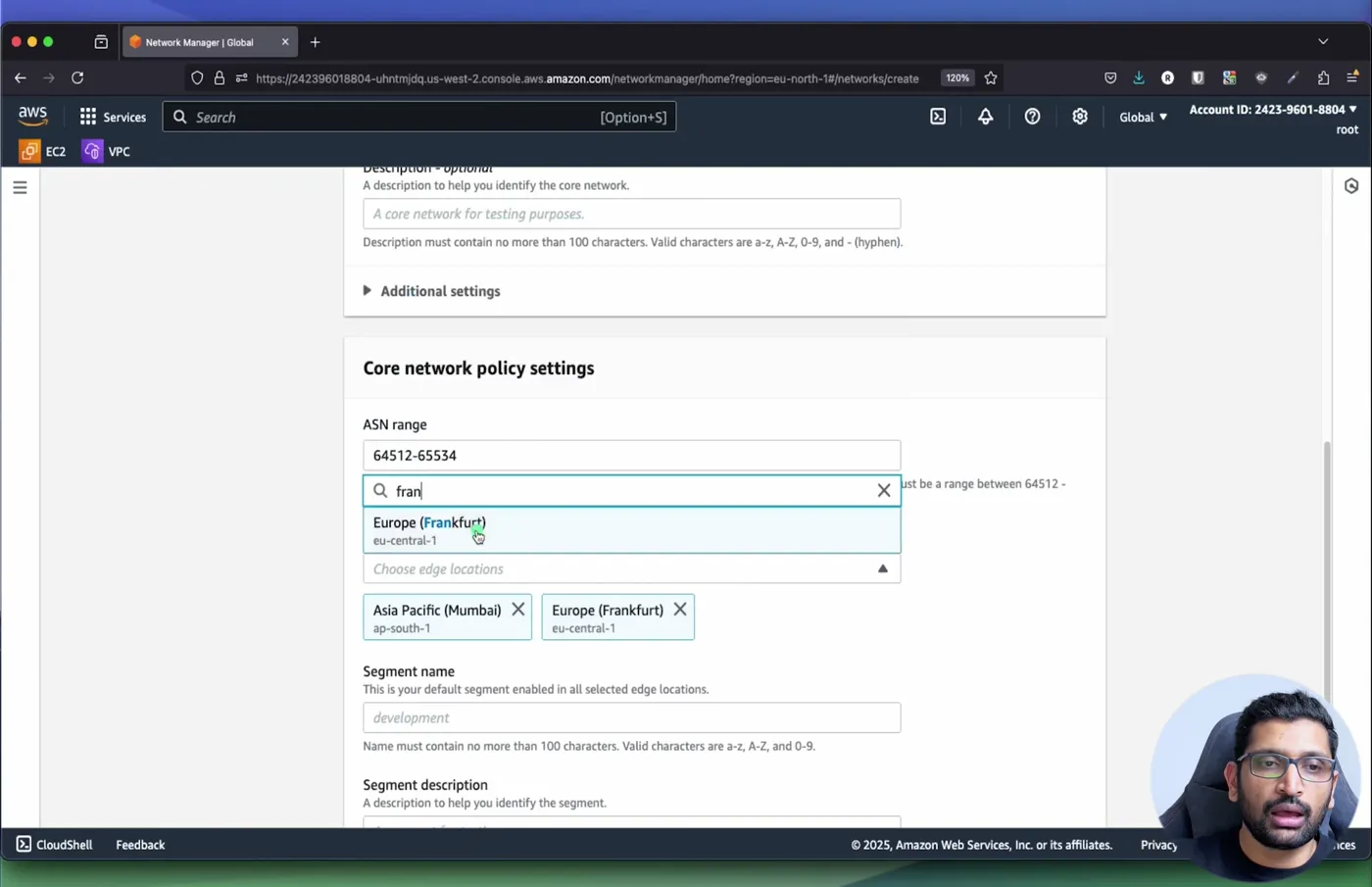
In the Network Manager console (it is global, the region selector shows "Global"), Global networks, Create global network: a name (demo-aws-wan), keep Add core network in your global network ticked, Next. The core network page is where the first policy is born:
- ASN range:
64512-65534. Every core network edge gets a BGP ASN from this range; valid ranges are 64512 to 65534 and 4200000000 to 4294967294. - Edge locations: the regions that get an edge. I picked Asia Pacific (Mumbai), Europe (Frankfurt) and Europe (Stockholm).
- Segment name: the one default segment the wizard creates, enabled in all selected edges. I called it
shared.
Create, and wait. This is the step with the real delay: the quick start says a core network "can sometimes take up to 30 minutes to complete", and until the policy shows LIVE you cannot create attachments or new policy versions. When it is done the dashboard shows the inventory and the geography map with the three edges connected:
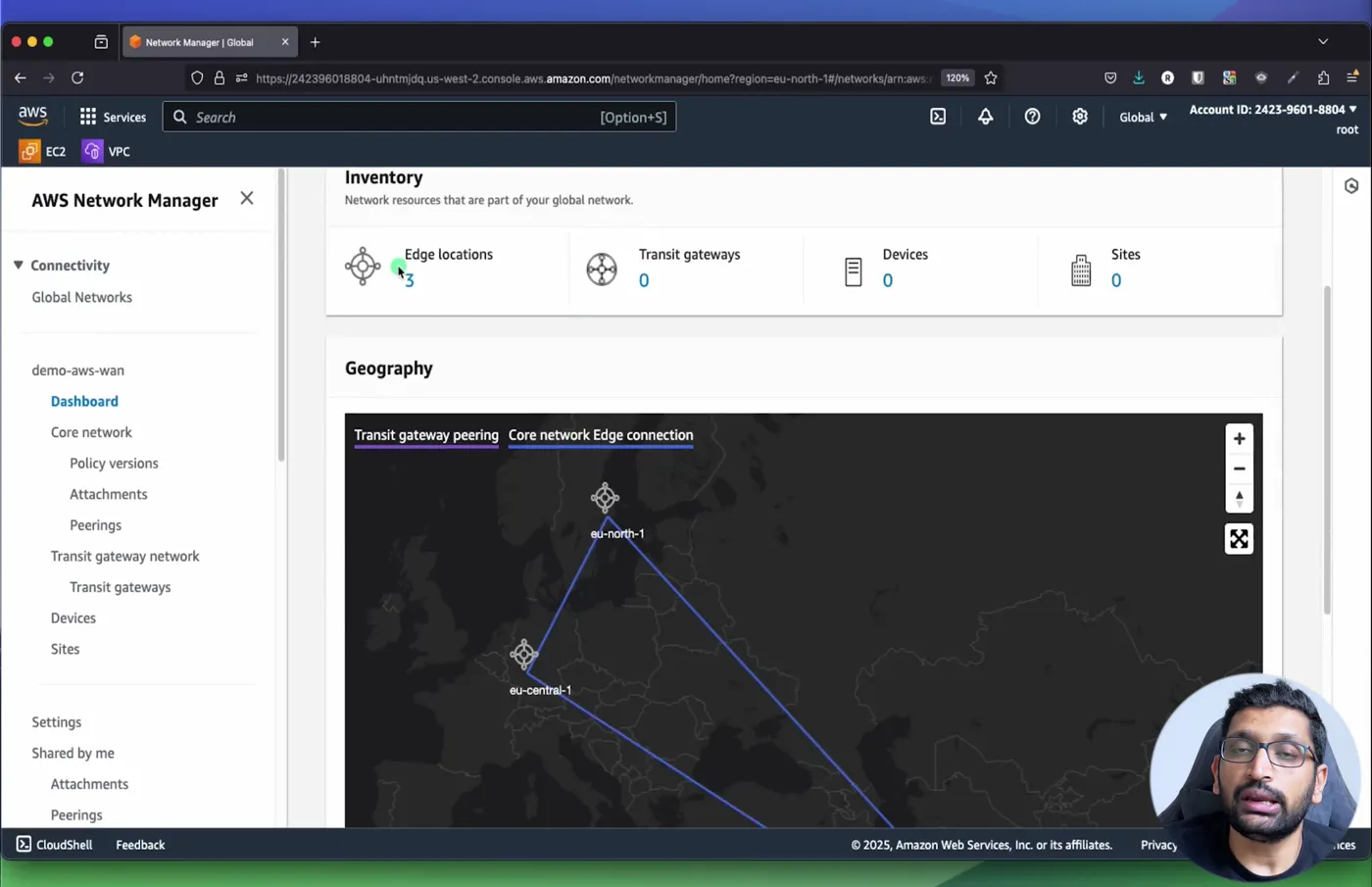
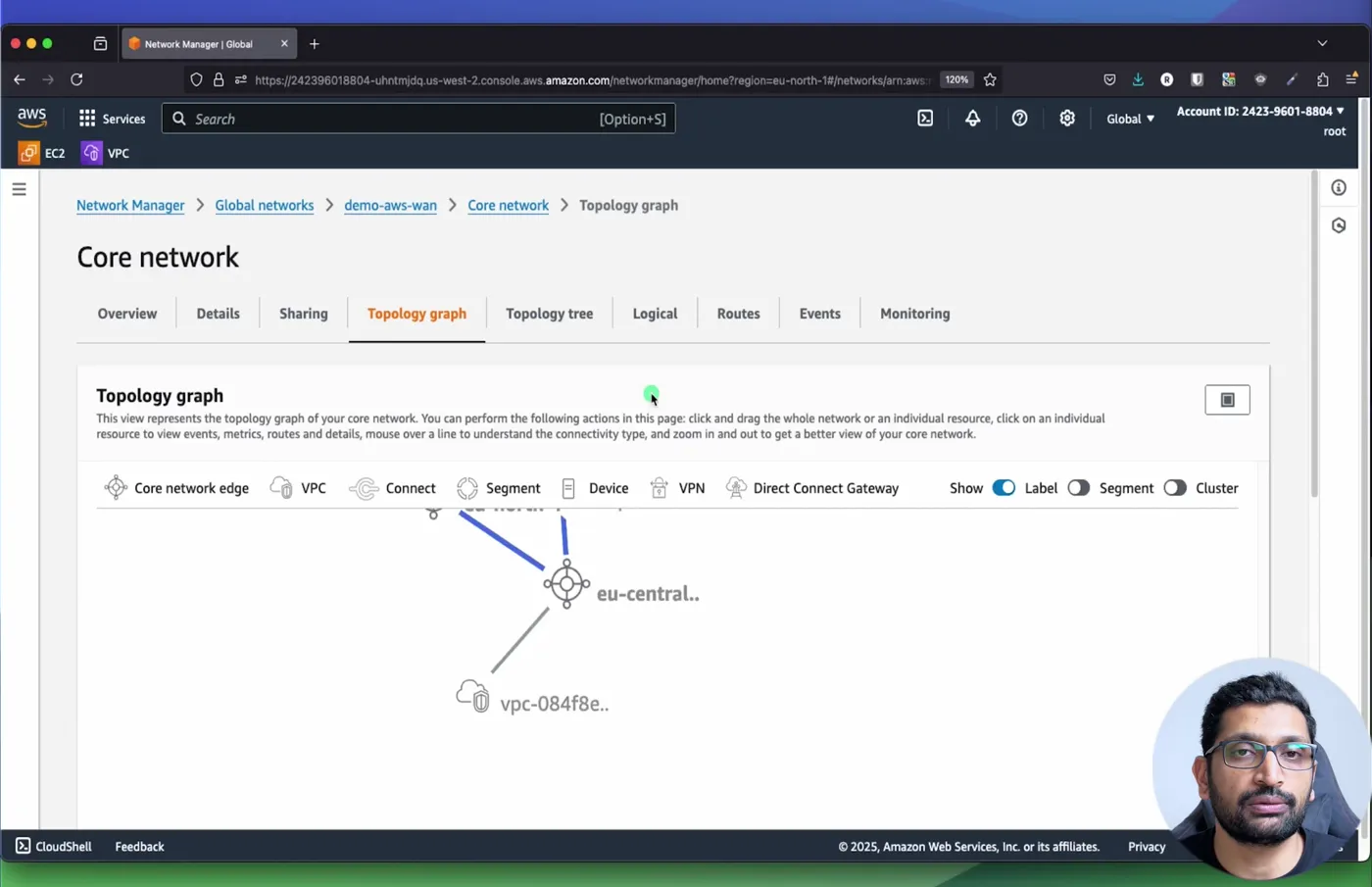
The Topology graph tab draws the same thing as nodes: three edges in a triangle, and later the VPCs hanging off them.
5. Step 3 - Policy version 2 - the three segments
The wizard made one segment. To add the other two: Core network, Policy versions, Create policy version, Visual editor, Segments tab, Create. Two new segments, development and production. The table then shows the three with their two important switches:
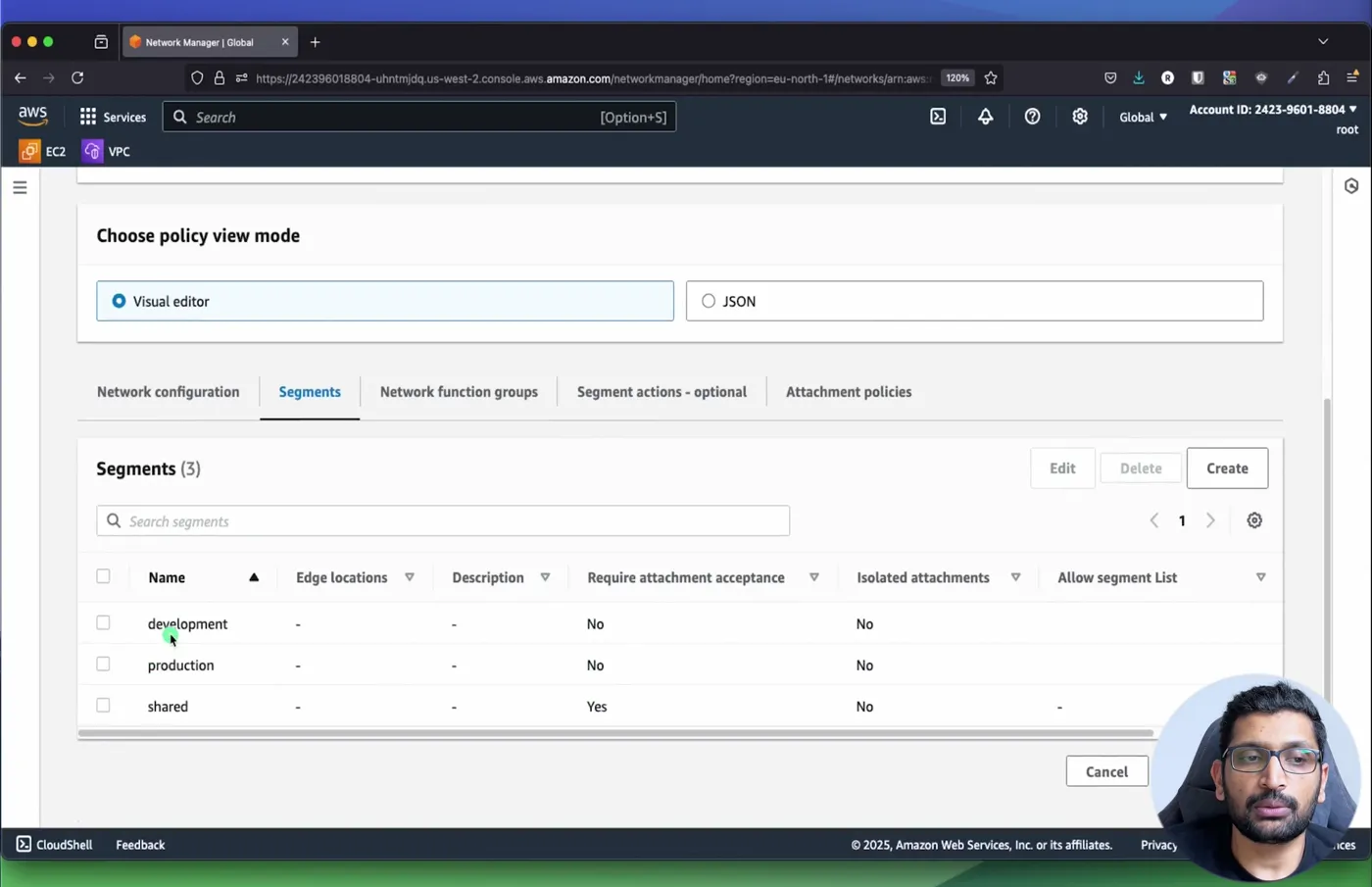
| Segment | Require attachment acceptance | Isolated attachments |
|---|---|---|
| development | No | No |
| production | No | No |
| shared | Yes | No |
Require attachment acceptance means an attachment that lands in this segment sits in Pending acceptance until the core network owner approves it, which is what you want for anything shared or production-like. Isolated attachments goes one step further: attachments in the same segment cannot talk to each other, only to whatever is shared into the segment (branch offices that must reach the data centre but never each other). AWS's own three-stage example sets isolate-attachments: true on dev, test and prod and acceptance on prod; I left isolation off so the two app subnets in one VPC behave normally.
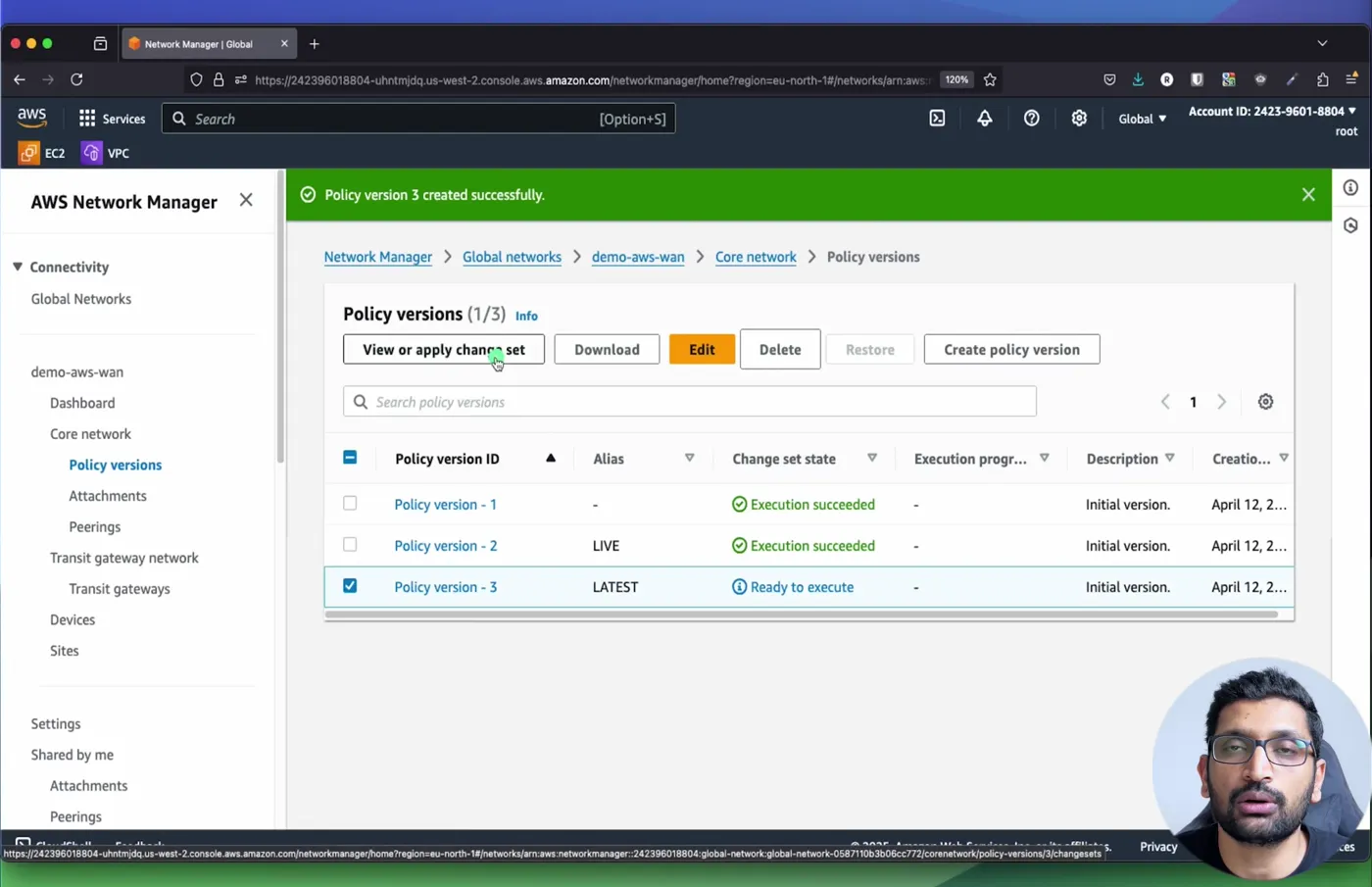
Creating the version does not change anything yet. It creates a change set in state Ready to execute; the diff lists every segment to add. View or apply change set, then Execute, and the version becomes LIVE while the previous one is kept (you can restore it).
6. Step 4 - Segment action - share the shared segment
Three segments with nothing between them is three islands. The Segment actions tab, Sharing, Create: Segment from shared, Segment to Allow selected: development and production. In JSON that is one block:
1"segment-actions": [
2  { "action": "share", "mode": "attachment-route", "segment": "shared", "share-with": ["development", "production"] }
3]
Read it as "the routes of every attachment in shared appear in development and production, and their attachment routes appear in shared". development and production still have no path to each other. mode: attachment-route is the only mode and it has one documented limit worth knowing from the routes page: static routes and routes that were themselves shared in from a third segment are not passed on. Sharing is not transitive.
7. Step 5 - Attachment policies - a tag decides the segment
You can pin an attachment to a segment by resource ID, but that means editing the policy for every new VPC. The scalable way is a tag. Attachment policies, Create, rule number 1, condition logic AND, one condition of type Tag value, operator Equals, key environment, value development, action Segment name development. Then rule 2 for production.
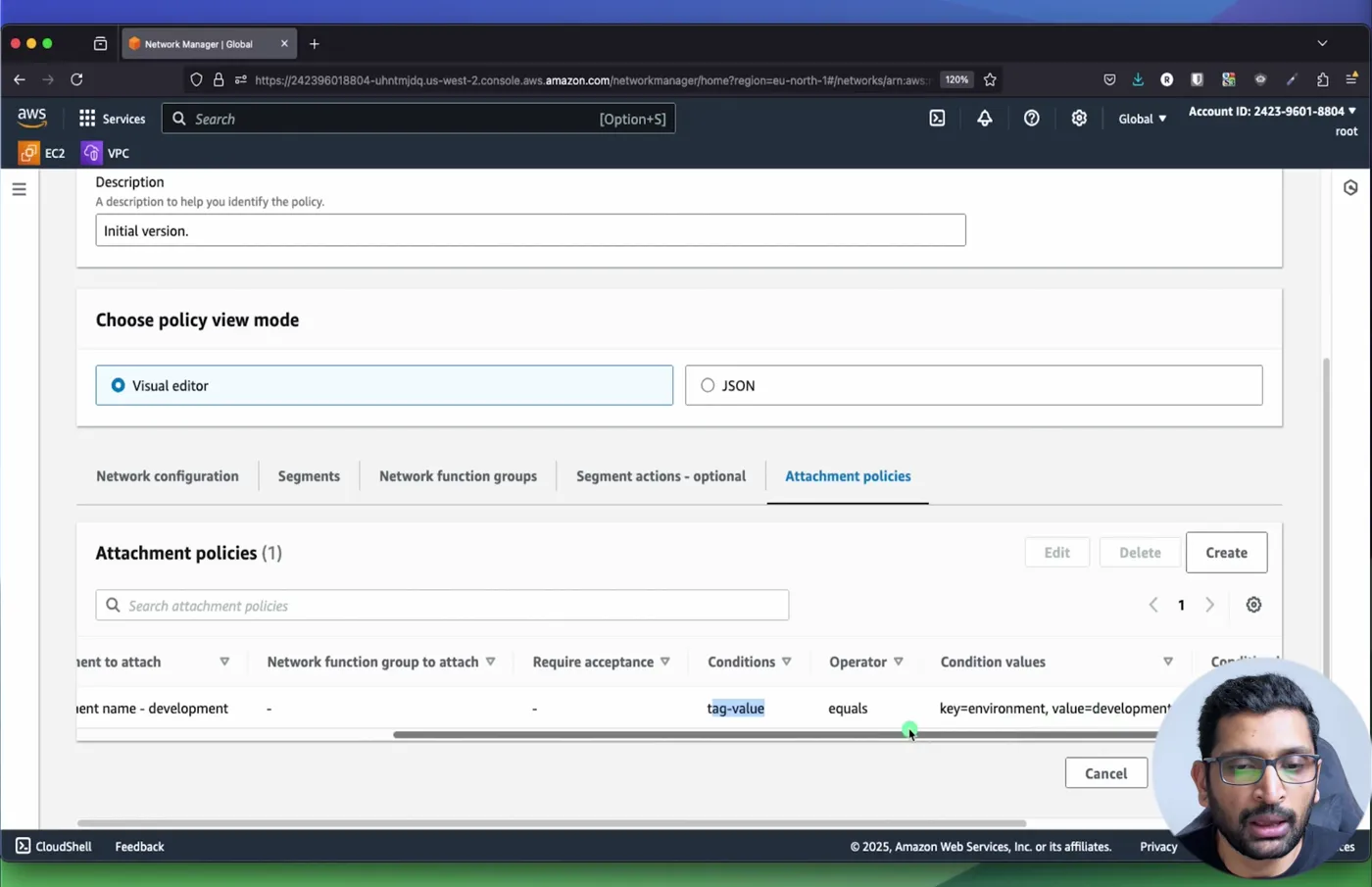
Two details from the dialog: Attachment acceptance options defaults to Inherit segment's acceptance value, so an attachment matched into shared by a rule would still wait for approval; and rules are evaluated in rule-number order, first match wins, so put the specific rules before any catch-all. AWS's example uses a single rule with association-method: tag and tag-value-of-key: Stage, which maps the tag's value straight to a segment of the same name; I show that form in the Terraform in section 11 because it replaces N rules with one.
Create the version (that was version 3 in the video), execute the change set, and the policy is complete. Everything after this is attaching things.
8. Step 6 - Attach the VPCs and accept the shared one
Core network, Attachments, Create attachment: a name, type VPC, the edge location (the region the VPC is in), the VPC, and one subnet per Availability Zone. The subnet choice matters more than it looks: the console says it plainly, "you can only select one subnet per Availability Zone, but all subnets in that Availability Zone can send traffic to the Global network", so pick one in every AZ you use or an AZ silently has no path. Then the tag: environment = development, production or nothing for the shared VPC.
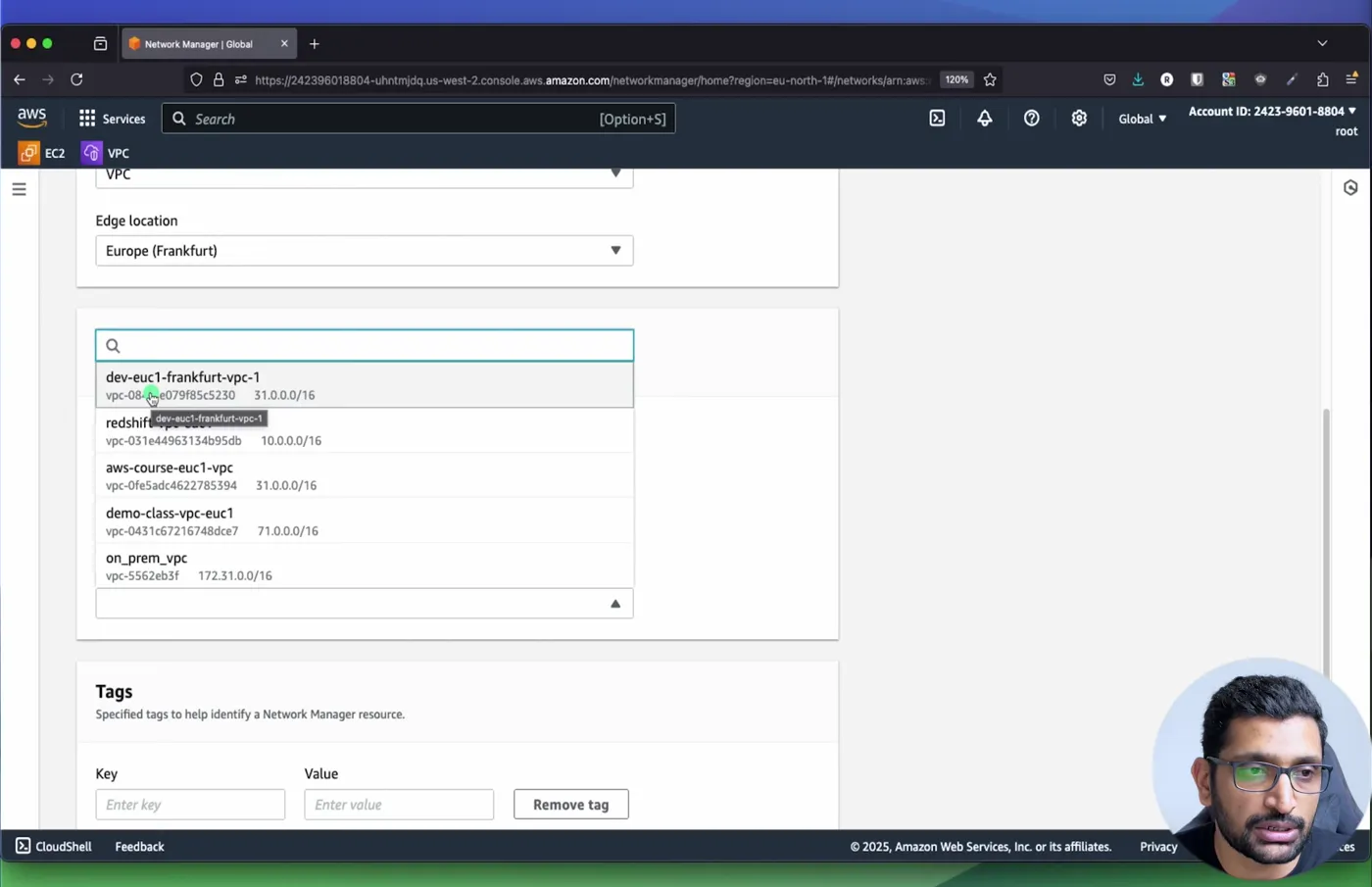
Three attachments later the list shows each VPC on its edge, and the Segment column shows where the attachment policies put them:
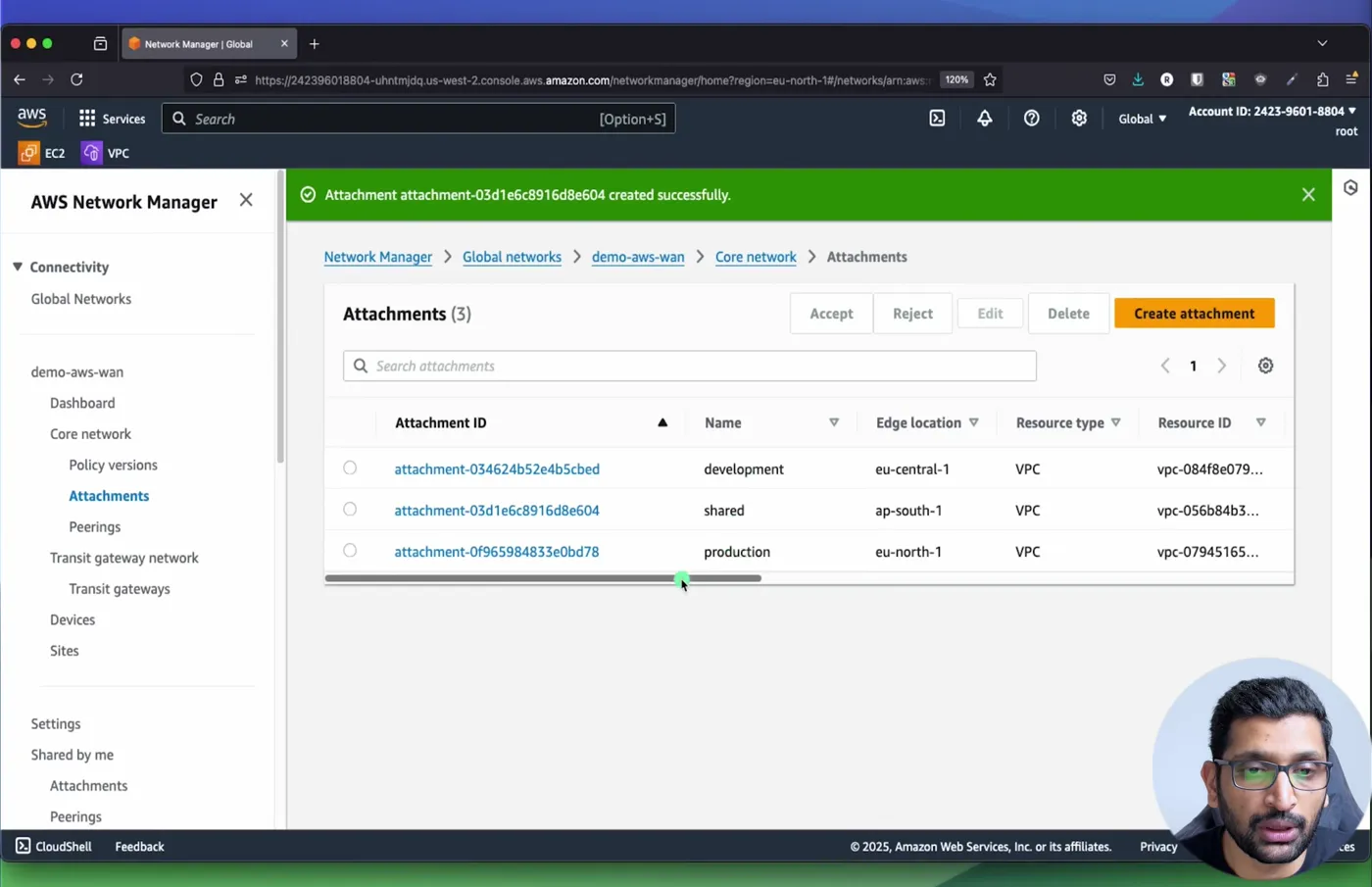
The shared attachment did not go to Available on its own. It sat in Pending attachment acceptance because the segment requires it: select it, Accept. The topology graph then shows the three edges with a VPC node on each.
9. Step 7 - Routes - what the core network knows and what your VPC must know
Two route tables are involved and only one of them is automatic.
The core network's routes are built from the policy. Core network, Routes, filter by segment and edge location: in shared on ap-south-1 you see 51.0.0.0/16 (its own attachment) plus 31.0.0.0/16 and 41.0.0.0/16 (shared in from the other two segments). In development you see 31.0.0.0/16 and 51.0.0.0/16, and no 41.0.0.0/16. That table is the segmentation.
Your VPC route tables are not touched by Cloud WAN. A packet from the dev VPC to 51.0.21.10 has to leave the VPC through the attachment, and the VPC only knows local. So in every route table of every attached VPC, Edit routes, add a destination for the remote range with target Core Network (the dropdown lists it next to Internet Gateway and NAT Gateway, and the value is the core network ARN):
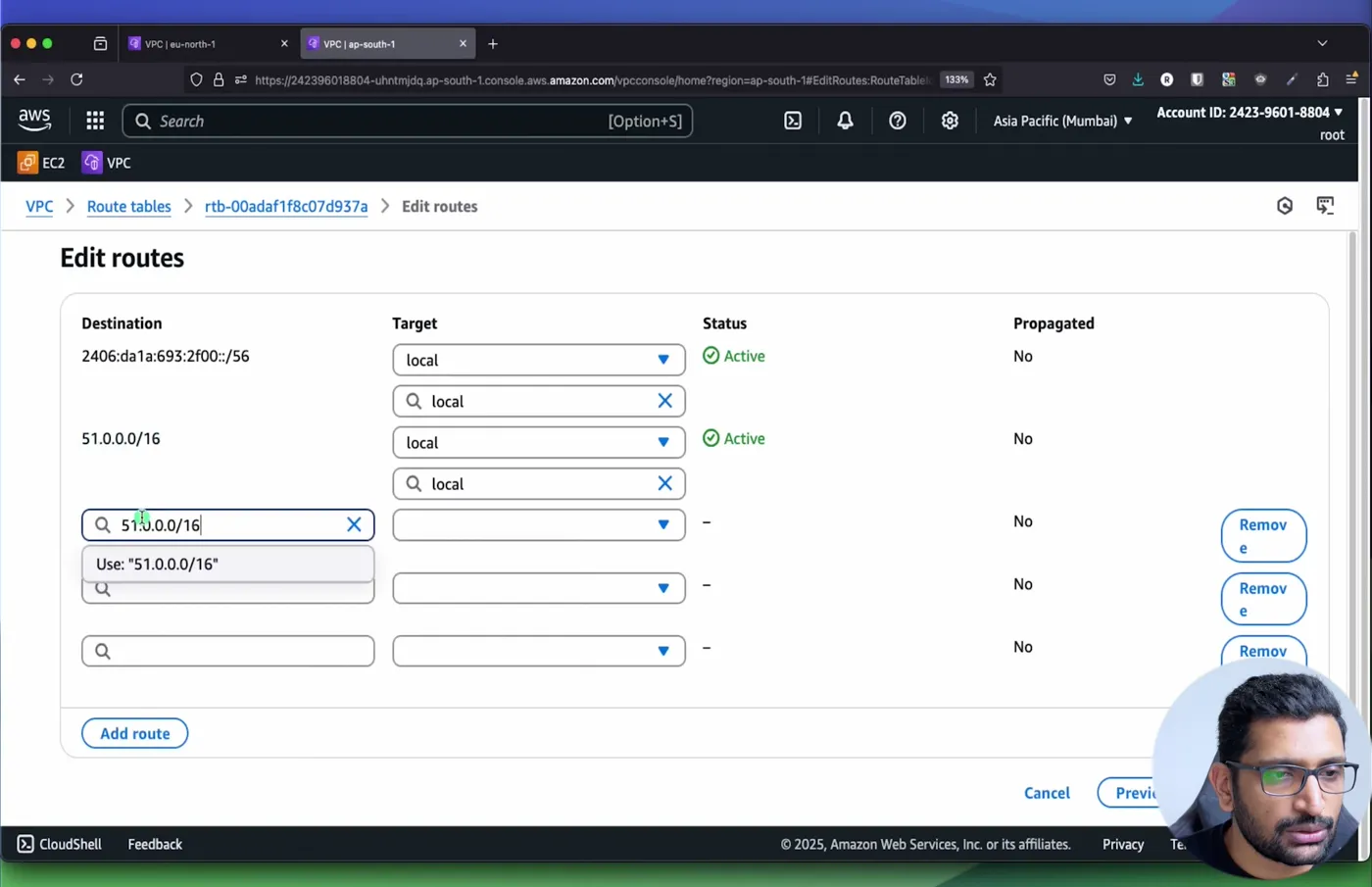
In the video I added summary routes (31.0.0.0/8, 41.0.0.0/8, 51.0.0.0/8) pointing at the core network in the route tables that needed them. A summary works because the VPC's own /16 local route is more specific and wins, and the summary catches every future VPC in that range without another edit. For a production design I would still write the exact remote CIDRs, as the Terraform in section 11 does, so the route table documents the intent.
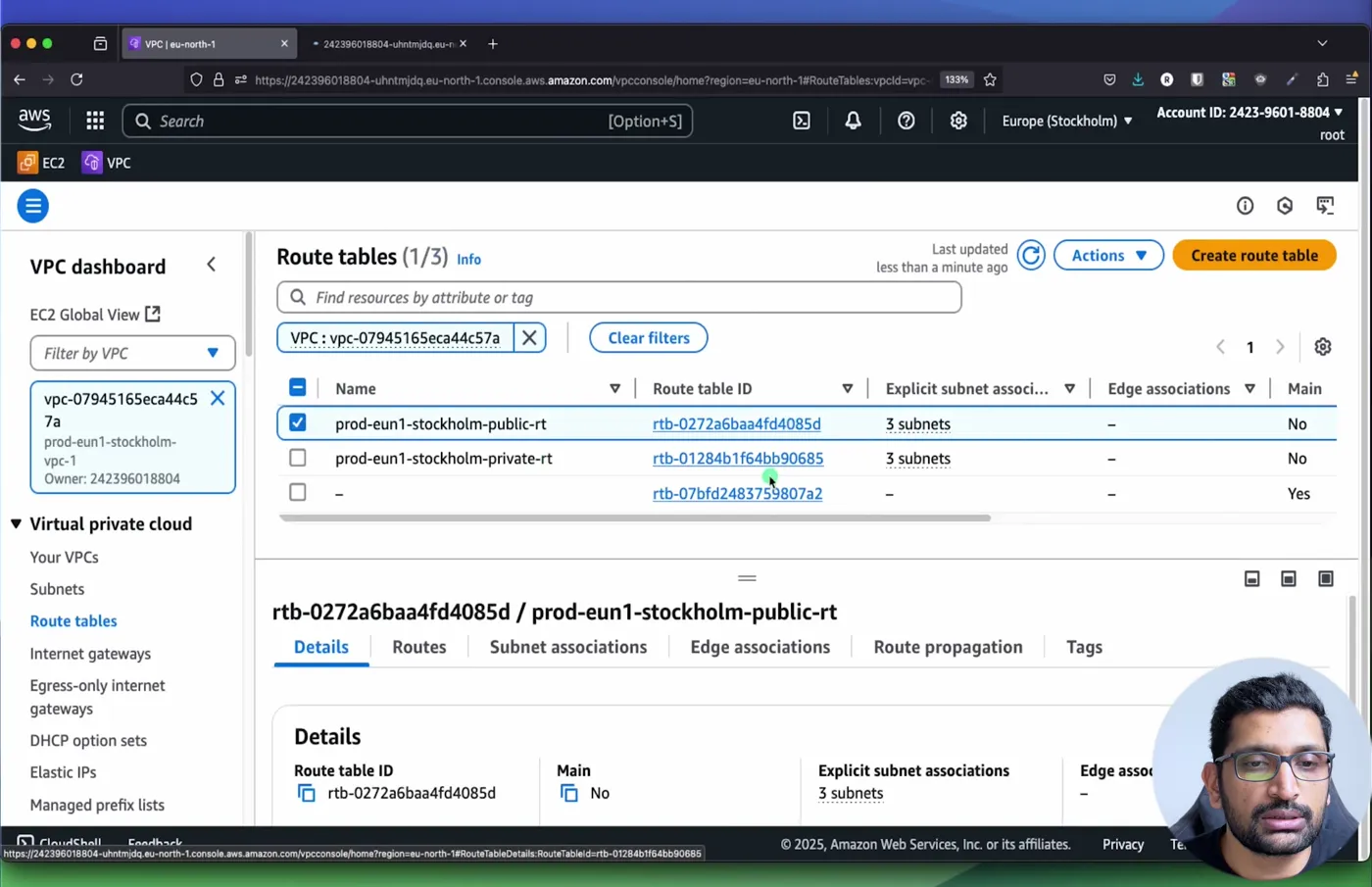
Do this in every route table that has subnets which should talk across the WAN, public and private. The step from Part-5, one route table per tier, is what makes this a two-line change per VPC instead of a hunt.
10. Step 8 - The test - who can ping whom
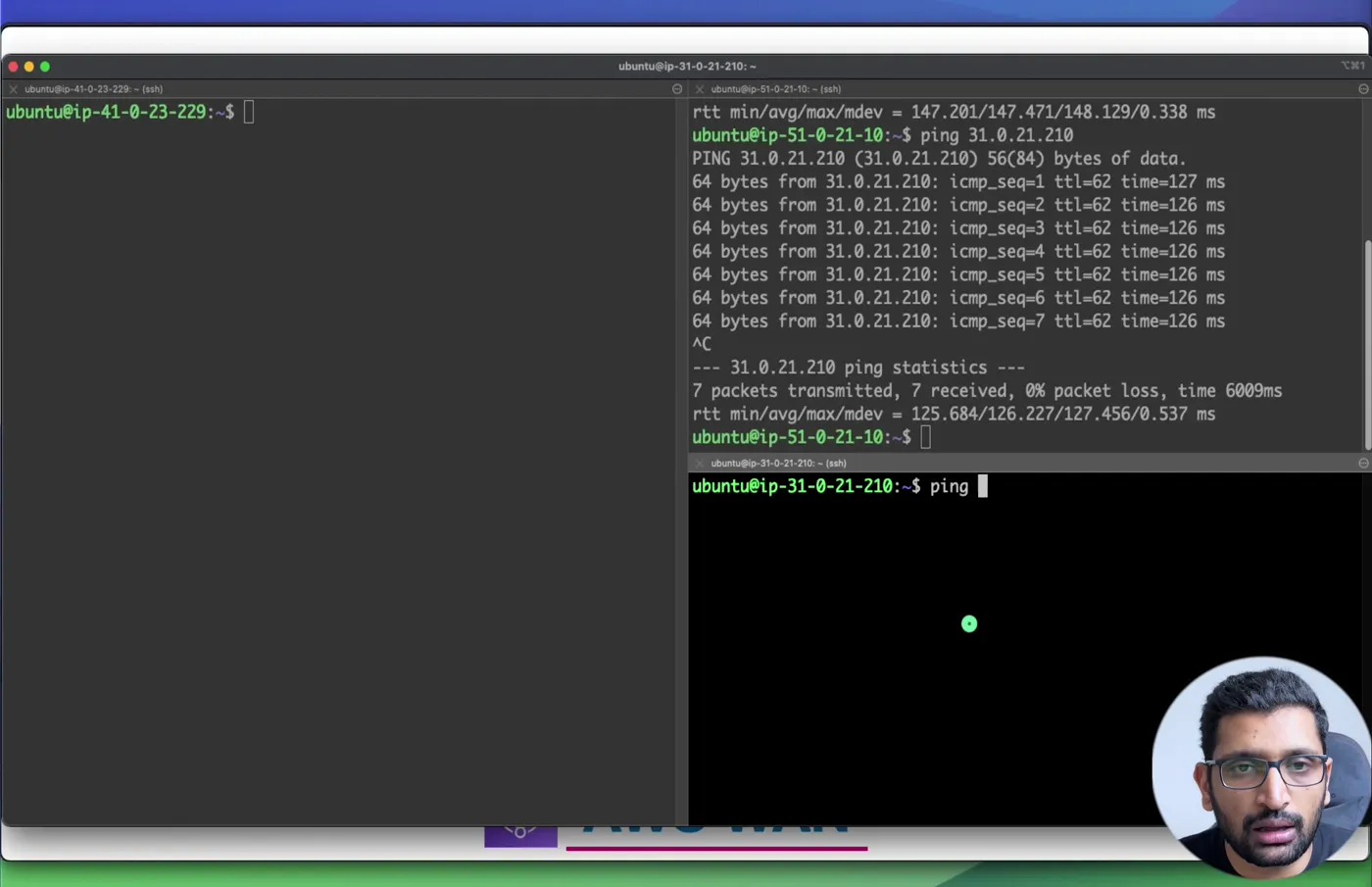
One Ubuntu EC2 instance per VPC, security groups allowing ICMP from the other two ranges, three SSH sessions. From the shared instance in Mumbai (51.0.21.10):
 1ubuntu@ip-51-0-21-10:~$ ping 41.0.23.229
 2PING 41.0.23.229 (41.0.23.229) 56(84) bytes of data.
 364 bytes from 41.0.23.229: icmp_seq=1 ttl=62 time=148 ms
 464 bytes from 41.0.23.229: icmp_seq=2 ttl=62 time=147 ms
 564 bytes from 41.0.23.229: icmp_seq=3 ttl=62 time=147 ms
 6--- 41.0.23.229 ping statistics ---
 75 packets transmitted, 5 received, 0% packet loss, time 4005ms
 8rtt min/avg/max/mdev = 147.201/147.471/148.129/0.338 ms
 9
10ubuntu@ip-51-0-21-10:~$ ping 31.0.21.210
11PING 31.0.21.210 (31.0.21.210) 56(84) bytes of data.
1264 bytes from 31.0.21.210: icmp_seq=1 ttl=62 time=127 ms
1364 bytes from 31.0.21.210: icmp_seq=2 ttl=62 time=126 ms
14--- 31.0.21.210 ping statistics ---
157 packets transmitted, 7 received, 0% packet loss, time 6009ms
16rtt min/avg/max/mdev = 125.684/126.227/127.456/0.537 ms
Mumbai to Stockholm 147 ms, Mumbai to Frankfurt 126 ms, both over the AWS backbone through two core network edges (ttl=62, two hops consumed). Then from the dev instance in Frankfurt to the prod instance in Stockholm:
1ubuntu@ip-31-0-21-210:~$ ping 41.0.23.229
2PING 41.0.23.229 (41.0.23.229) 56(84) bytes of data.
3^C
4--- 41.0.23.229 ping statistics ---
55 packets transmitted, 0 received, 100% packet loss, time 4085ms
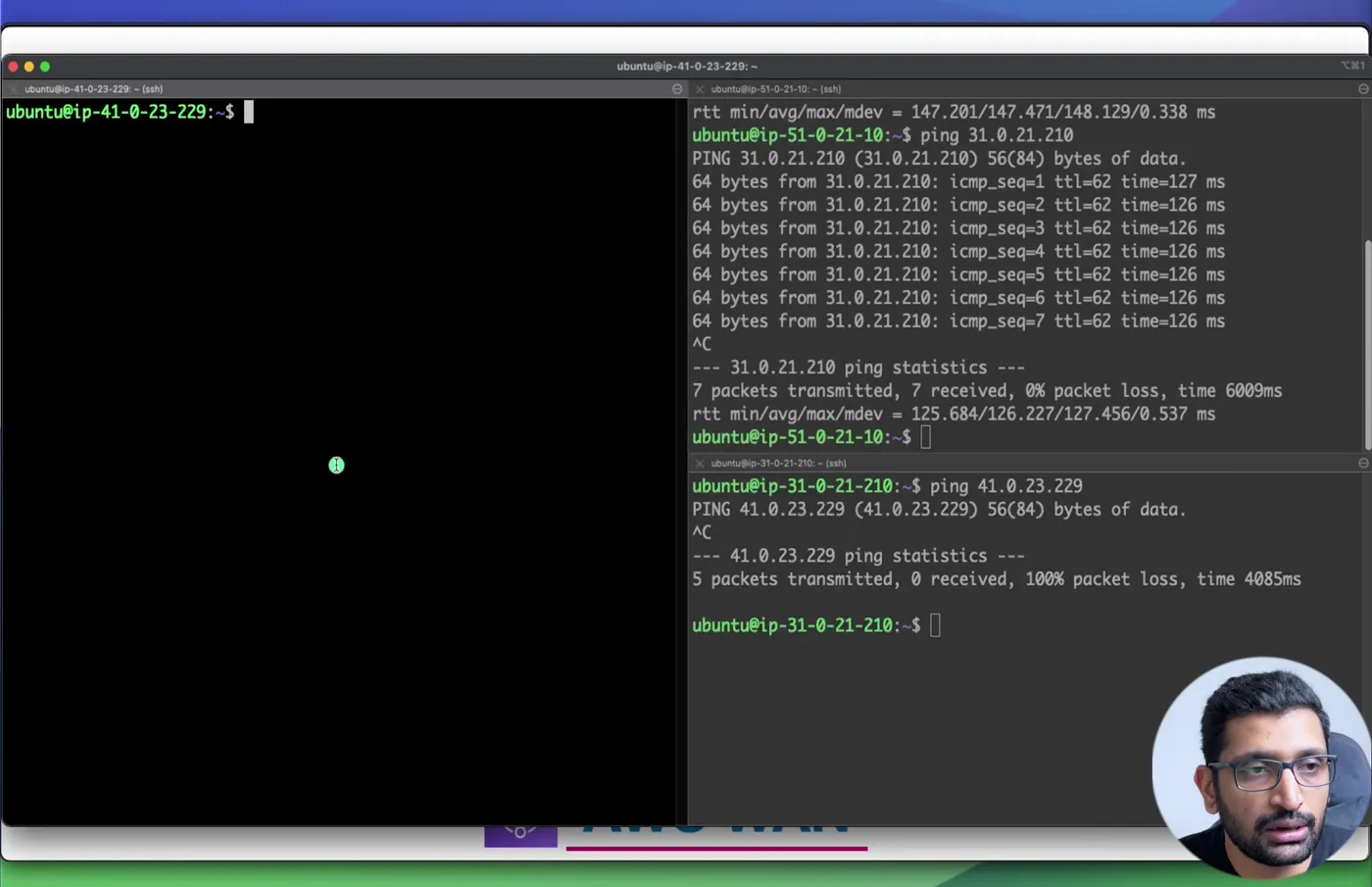
The dev route table has a route for 41.0.0.0/16 towards the core network, the security group on the prod instance allows it, and the packets still go nowhere, because the development segment's route table on the Frankfurt edge does not contain 41.0.0.0/16. That is the difference between isolating with security groups and isolating with segments: the first is a rule someone can loosen in one VPC, the second is a property of the network that no VPC owner can change.
11. The same policy as Terraform
The console's visual editor is good for learning; for anything you will change again, the policy should live in code. The AWS provider has a data source that renders the policy JSON from HCL, so you get validation before a change set exists. This is the demo's policy, with the single-rule tag mapping from AWS's example instead of one rule per environment, and the exact remote routes left to the VPC side:
 1data "aws_networkmanager_core_network_policy_document" "this" {
 2  core_network_configuration {
 3    vpn_ecmp_support = false
 4    asn_ranges       = ["64512-65534"]
 5    dynamic "edge_locations" {
 6      for_each = ["ap-south-1", "eu-central-1", "eu-north-1"]
 7      content { location = edge_locations.value }
 8    }
 9  }
10
11  segments { name = "dev" }
12  segments {
13    name                          = "prod"
14    require_attachment_acceptance = true
15  }
16  segments { name = "shared" }
17
18  segment_actions {
19    action     = "share"
20    mode       = "attachment-route"
21    segment    = "shared"
22    share_with = ["dev", "prod"]
23  }
24
25  attachment_policies {
26    rule_number     = 100
27    condition_logic = "or"
28    conditions {
29      type = "tag-exists"
30      key  = "segment"
31    }
32    action {
33      association_method = "tag"
34      tag_value_of_key   = "segment"
35    }
36  }
37}
38
39resource "aws_networkmanager_global_network" "this" {}
40
41resource "aws_networkmanager_core_network" "this" {
42  global_network_id = aws_networkmanager_global_network.this.id
43}
44
45resource "aws_networkmanager_core_network_policy_attachment" "this" {
46  core_network_id = aws_networkmanager_core_network.this.id
47  policy_document = data.aws_networkmanager_core_network_policy_document.this.json
48}
49
50resource "aws_networkmanager_vpc_attachment" "this" {
51  for_each        = var.vpcs # dev, prod, shared: vpc_arn + one subnet ARN per AZ
52  core_network_id = aws_networkmanager_core_network.this.id
53  vpc_arn         = each.value.vpc_arn
54  subnet_arns     = each.value.subnet_arns
55  tags            = { segment = each.key } # this tag is what rule 100 reads
56}
I ran it on 2026-10-17 with Terraform 1.16.2 and mock credentials, so nothing was created, but the provider validated every block and rendered the policy exactly as Cloud WAN will receive it:
 1$ terraform init
 2- Installing hashicorp/aws v6.69.1...
 3Terraform has been successfully initialized!
 4
 5$ terraform validate
 6Success! The configuration is valid.
 7
 8$ terraform plan
 9  # aws_networkmanager_core_network.this will be created
10  # aws_networkmanager_core_network_policy_attachment.this will be created
11  # aws_networkmanager_global_network.this will be created
12  # aws_networkmanager_vpc_attachment.this["dev"] will be created
13  # aws_networkmanager_vpc_attachment.this["prod"] will be created
14  # aws_networkmanager_vpc_attachment.this["shared"] will be created
15Plan: 6 to add, 0 to change, 0 to destroy.
The rendered document, 1264 bytes, straight from the plan:
 1{
 2  "version": "2021.12",
 3  "core-network-configuration": {
 4    "asn-ranges": ["64512-65534"],
 5    "vpn-ecmp-support": false,
 6    "edge-locations": [{ "location": "ap-south-1" }, { "location": "eu-central-1" }, { "location": "eu-north-1" }],
 7    "dns-support": true,
 8    "security-group-referencing-support": false
 9  },
10  "segments": [
11    { "name": "dev",    "isolate-attachments": false, "require-attachment-acceptance": false },
12    { "name": "prod",   "isolate-attachments": false, "require-attachment-acceptance": true },
13    { "name": "shared", "isolate-attachments": false, "require-attachment-acceptance": false }
14  ],
15  "segment-actions": [
16    { "action": "share", "segment": "shared", "mode": "attachment-route", "share-with": ["prod", "dev"] }
17  ],
18  "attachment-policies": [
19    { "rule-number": 100, "condition-logic": "or",
20      "conditions": [{ "type": "tag-exists", "key": "segment" }],
21      "action": { "association-method": "tag", "tag-value-of-key": "segment" } }
22  ]
23}
The resources are documented at aws_networkmanager_core_network, aws_networkmanager_core_network_policy_document and aws_networkmanager_vpc_attachment. The VPC route table entries are ordinary aws_route resources with core_network_arn as the target, one per remote CIDR, and the VPCs themselves are the module from Terraform modules if you built along with that part.
12. What it costs and the limits
Prices from the AWS pricing feed on 2026-10-17 for the three demo regions:
| Item | Frankfurt (eu-central-1) | Stockholm (eu-north-1) | Mumbai (ap-south-1) |
|---|---|---|---|
| Core network edge, per hour | $0.50 | $0.50 | $0.50 |
| VPC attachment, per hour | $0.08 | $0.08 | $0.09 |
| Data processing, per GB | $0.02 | $0.02 | $0.02 |
For the demo as built, 730 hours a month: three edges are $1,095, three attachments are $182.50, total about $1,278 before a single gigabyte. That is why the video ends with a teardown; a one-hour lab costs about $1.75. For comparison, three Transit Gateways with the same three attachments and two peering attachments each would be in the low tens of dollars. Cloud WAN earns its price when the policy replaces work across many regions and accounts, not at three VPCs. The pricing page has the Connect, VPN and Direct Connect attachment rows.
Limits from the Cloud WAN quotas page:
| Quota | Default | Adjustable |
|---|---|---|
| Global networks per account | 5 | yes |
| Core networks per global network | 1 | no |
| Edges per Region per core network | 1 | no |
| Attachments per core network | 5,000 | yes |
| Core network attachments per VPC | 5 | no |
| Policy versions per core network | 10,000 | yes |
| Size of a core network policy | 1 MB | no |
| Transit gateway peers | 50 | yes |
Two operational facts that are not in the quota table: the home Region, where the dashboards and aggregated data live, is us-west-2 and cannot be changed, and a core network edge deployment can take up to 30 minutes, which also applies when you add a region to edge-locations later.
13. What broke when I ran this
The console build is from my recording of April 2025; the Terraform and the pricing and quota numbers are from 2026-10-17.
1. The shared attachment stayed in Pending acceptance and nothing routed. I had set require-attachment-acceptance on shared in Step 3 and then forgot about it. The attachment list showed it pending, the segment had no routes from it, and the pings from Mumbai failed until I selected the attachment and clicked Accept. If a segment is meant to be shared with everyone, decide deliberately whether a human should approve every join; for a lab, leave it off.
2. The route table editor rejected a half-typed destination. Typing 51.0 and tabbing away gave A valid CIDR block or a prefix list has to be specified. Obvious in hindsight, but it is on camera because the Core Network target can only be chosen after the destination is valid, so a typo looks like the target option is missing.
3. Policy versions are not applied when you create them. Version 3 sat at Ready to execute with LATEST next to it while version 2 was still LIVE. Attachments created in that state were evaluated against version 2's rules. The change set has to be executed explicitly, and the console shows a banner, "policy change set execution started successfully", that takes a while per edge location.
4. The Terraform data source added fields I had not written. The rendered JSON contained dns-support: true, security-group-referencing-support: false and isolate-attachments: false on every segment, and it reordered share-with to ["prod", "dev"]. None of that changes behaviour, but if you compare the rendered document with one downloaded from the console, expect those differences rather than a byte-identical file. The first plan with the AWS provider took 24,620 ms for 6 resources and a second one 7,023 ms, the difference being provider start-up and plugin cache.
14. Conclusion
To summarise Part-25:
- Cloud WAN is a managed Transit Gateway per region, pre-peered in a full mesh, controlled by one JSON policy.
- Segments isolate, segment actions share, attachment policies map a tagged attachment to its segment, and policy versions make every change a reviewed change set.
- The demo's three VPCs in three regions ended with shared reaching dev (126 ms) and prod (147 ms) and dev unable to reach prod at all.
- You still own the VPC route tables (target Core Network) and the Accept button on segments that require it.
- $0.50 per hour per edge, $0.08 to $0.09 per attachment hour, $0.02 per GB, up to 30 minutes to deploy: price it against Transit Gateway before you commit.
Next in the series I go back to the edge of the network with Global Accelerator, and if you are choosing between the two hub designs, Part-13 on Transit Gateway is the one to read side by side with this.
Did this save you a debugging session? Stay in the loop -
- Subscribe on YouTube - every post here has a screen-recorded companion video.
- Code on GitHub - the repositories, Terraform and scripts behind these posts.
AWS step by step series -
- Part-1 : AWS IAM user - create a user, group, policy, access keys and MFA
- Part-2 : AWS Organizations - multi-account setup, OUs and SCPs
- Part-3 : AWS assume IAM role - trust policy, switch role in console and CLI
- Part-4 : How to launch an EC2 instance - key pair, security group, SSH
- Part-5 : AWS VPC - public and private subnets, Internet Gateway, NAT Gateway, route tables
- Part-8 : EC2 launch template - versions, default version, source template, SSM parameter AMI
- Part-10 : EC2 Auto Scaling - launch template, Auto Scaling group, target tracking, ALB
- Part-11 : AWS WAF - web ACL, managed rules, rate limiting, geo blocking
- Part-12 : AWS VPC Peering - connect two VPCs, routes, security groups, DNS
- Part-13 : AWS Transit Gateway - hub-and-spoke for many VPCs and on-premises
- Part-14 : AWS NAT Gateway deep dive - public vs private, limits, cost, troubleshooting
- Part-15 : Amazon Route 53 - hosted zones, records, alias, routing policies, health checks
- Part-16 : AWS security groups - inbound and outbound rules, stateful, referencing, quotas
- Part-16 : AWS Certificate Manager - free TLS certificates for ALB, CloudFront and API Gateway
- Part-17 : AWS Lambda - function URLs, environment variables and layers
- Part-18 : Network Load Balancer - setup, and ALB vs NLB
- Part-19 : VPC endpoints - gateway and interface endpoints (PrivateLink) instead of NAT
- Part-20 : AWS PrivateLink - publish your own service with an endpoint service and NLB
- Part-20 : Amazon EBS volumes - types, attach, mount, resize, snapshots, encryption
- Part-21 : VPC Flow Logs - CloudWatch Logs, S3, record format, Logs Insights, Athena
- Part-21 : EC2 Spot Instances - pricing, interruptions, mixed instances groups
- Part-23 : AWS Global Accelerator - static anycast IPs in front of ALBs in two regions, traffic dials, weights
- Part-24 : AWS Control Tower - landing zone, controls, Account Factory, Identity Center
- Part-25 : AWS Cloud WAN - global network, core network policy, dev/prod/shared segments, tag-based attachments across three regions
Networking fundamentals -
- What is a VPC and a subnet? AWS networking in five minutes
- What is CIDR? Calculate IP ranges for VPCs and subnets
- VPC Subnet Planner - the free tool I use to size the VPC and subnet CIDRs in every part of this series (AWS, Azure, GCP rules built in)
- What is NAT? Static NAT, dynamic NAT and PAT explained
More AWS guides -
- What is AWS CloudFormation? Templates, stacks, change sets, drift, StackSets
- Learn AWS S3 - the complete course
- AWS API Gateway - REST API with Lambda, authorizers, Terraform
- AWS Advanced Networking Specialty (ANS-C01) - course companion
- AWS ECS and Fargate - how to deploy a Docker container
- AWS S3 - how to host a static website
- Terraform create EC2 instance on AWS
- Terraform AWS IAM - users, roles and policies
- Terraform and AWS multi-account setup
- Terraform - setting up an ALB and SSL
Posts in this series
- AWS Cloud WAN Step by Step - Global Network, Core Network Policy, Dev, Prod and Shared Segments, Tag-Based VPC Attachments and Routes Across Three Regions (Part 25)
- AWS Global Accelerator Step by Step - Two Static Anycast IPs in Front of Load Balancers in Two Regions, Listeners, Endpoint Groups, Traffic Dials, Weights, Client IP Preservation and Pricing (Part 23)
- VPC Subnet Planner - a Free Visual Tool to Design AWS, Azure and GCP Networks: Reserved Addresses, Aligned Multi-AZ Subnets, Overlap Check, Design Review and Terraform Export (cidrsubnet) - How I Built It and What Broke
- Amazon EBS Volumes Step by Step - Volume Types Compared (gp3, gp2, io2 Block Express, st1, sc1), Create, Attach, Format and Mount a Volume, Resize Without Downtime, Snapshots, Encryption, Multi-Attach, Pricing and Troubleshooting (AWS Part-20)
- Amazon Route 53 Step by Step - Hosted Zones, Record Types, Alias Records, Point a Domain at an ALB, Routing Policies (Weighted, Latency, Failover, Geolocation), Health Checks, Private Zones and Pricing (AWS Part-15)
- AWS Advanced Networking - Free 8-Hour Full Course Companion (VPC, NAT Gateway, Bastion, ALB, NLB, WAF, VPC Peering, Transit Gateway, VPC Endpoints and PrivateLink, Route 53, ACM) with Timestamps and the ANS-C01 Exam Facts
- AWS Assume IAM Role Step by Step - Trust Policy vs Permissions Policy, Switch Role in the Console, aws sts assume-role, CLI Profiles, Cross-Account Access, MFA and External ID (AWS Part-3)
- AWS Certificate Manager (ACM) Step by Step - Request a Free TLS Certificate, DNS Validation with Route 53, Attach It to an ALB HTTPS Listener, Redirect HTTP to HTTPS, CloudFront and API Gateway, Auto-Renewal, Exportable Certificates and ACME (AWS Part-16)
- AWS Control Tower Step by Step - Set Up a Landing Zone, Security OU with Log Archive and Audit Accounts, Controls (Guardrails), Region Deny, IAM Identity Center, Account Factory and Enrolling Existing Accounts (AWS Part-24)
- AWS EC2 Auto Scaling Step by Step - Launch Template, Auto Scaling Group Across Two AZs, Target Tracking Policy, Application Load Balancer, Health Checks and Instance Refresh (AWS Part-10)
- AWS EC2 Launch Template Step by Step - Create a Template, Versions and the Default Version, Source Template, Create From a Running Instance, Systems Manager Parameter Instead of an AMI ID, Launch Templates vs Launch Configurations, IAM Guardrails, CLI and Terraform (AWS Part-8 and Part-17)
- AWS EC2 Spot Instances Step by Step - How Spot Pricing Works, Launch a Spot Instance, Interruptions and the Two-Minute Notice, Rebalance Recommendations, Stop vs Hibernate vs Terminate, Spot in Auto Scaling Mixed Instances Groups, Billing Rules, Best Practices, CLI and Terraform (AWS Part-21)
- AWS IAM User Step by Step - Create a User, User Group, Attach Policies, Access Keys, MFA and Sign-in URL (AWS Part-1)
- AWS Lambda Step by Step - Create a Function, Function URL (HTTPS Endpoint Without API Gateway), Environment Variables, Lambda Layers for Python Dependencies, Versions and Aliases, Limits, Pricing and Errors (AWS Part-17)
- AWS NAT Gateway Deep Dive - How It Works, Public vs Private NAT Gateway, Setup Step by Step, Limits (55,000 Connections, 100 Gbps), CloudWatch Metrics, Cost Optimisation, NAT Instance Comparison and Troubleshooting (AWS Part-14)
- AWS Network Load Balancer Step by Step - Create an NLB with Static IPs, Target Groups, TCP and TLS Listeners, Security Groups, Client IP Preservation, Cross-Zone Load Balancing, and ALB vs NLB Explained (AWS Part-18)
- AWS Organizations Step by Step - Multi-Account Setup, Organizational Units, Service Control Policies (SCPs), Consolidated Billing and Identity Center (AWS Part-2)
- AWS PrivateLink Step by Step - Publish Your Own Service with a VPC Endpoint Service and Network Load Balancer, Allow Consumers, Accept Connections, Private DNS Name, Cross-Account and Cross-Region, Pricing and Troubleshooting (AWS Part-20)
- AWS Security Groups Step by Step - Inbound and Outbound Rules, Stateful Behaviour, Referencing Security Groups, the Three-Tier ALB-Web-DB Pattern, Quotas, Security Group vs Network ACL, CLI and Terraform (AWS Part-16)
- AWS Transit Gateway Step by Step - Connect Many VPCs and On-Premises Through One Hub, VPC Attachments, Transit Gateway Route Tables, Associations and Propagations, Isolation, Peering, Pricing (AWS Part-13)
- AWS VPC Endpoints Step by Step - Gateway Endpoints for S3 and DynamoDB, Interface Endpoints (PrivateLink) for SSM, ECR and Other Services, Private DNS, Endpoint Policies, Security Groups, Cost vs NAT Gateway, and Troubleshooting (AWS Part-19)
- AWS VPC Flow Logs Step by Step - Enable Flow Logs for a VPC, Subnet or Network Interface, Publish to CloudWatch Logs or S3, Read a Flow Log Record Field by Field, Custom Formats, Query with Logs Insights and Athena, Find Rejected Traffic, Pricing and Limitations (AWS Part-21)
- AWS VPC Peering Step by Step - Connect Two VPCs (Same or Different Account and Region), Accept the Request, Add Routes, Security Groups, DNS Resolution, Test with EC2, and the Limits (AWS Part-12)
- AWS VPC Step by Step - Create a VPC with Public and Private Subnets, Internet Gateway, NAT Gateway and Route Tables (and Test It with EC2) (AWS Part-5)
- AWS WAF Step by Step - Create a Web ACL, Attach It to an ALB or API Gateway, AWS Managed Rules, Rate-Based Rules, Geo Blocking, IP Sets, Count Mode and Logging (AWS Part-11)
- How to Launch an EC2 Instance on AWS Step by Step - AMI, Instance Type, Key Pair, Security Group, Connect with SSH or EC2 Instance Connect, Stop vs Terminate (AWS Part-4)
- What is an AWS VPC and a Subnet? Virtual Private Cloud Explained in Five Minutes (Region, Availability Zones, Public vs Private Subnets, Gateways, Route Tables)
- What is AWS CloudFormation? Templates, Stacks and Change Sets Explained, Template Anatomy Section by Section, Create Your First Stack Step by Step, Update With a Change Set, Drift Detection, Nested Stacks and StackSets, Quotas, Pricing, CLI, and CloudFormation vs Terraform
- What is CIDR (Classless Inter-Domain Routing)? How to Calculate IP Ranges for VPCs and Subnets, with Examples (/8, /16, /24, /28, /32)
- What is NAT (Network Address Translation)? How It Works, Static NAT vs Dynamic NAT vs PAT, the Translation Table, and Where NAT Shows Up in AWS
- AWS API Gateway Tutorial - REST API with Lambda Proxy and Non-Proxy Integration, Request Validation, HTTP API vs REST API, Resource Policies, Lambda Authorizers and Terraform
- Learn AWS S3 - The Complete Course (Buckets, Objects, Storage Classes, Lifecycle, Versioning, Security Defaults, Bucket Policies, Static Hosting, CLI and Terraform)
- How to release(delete) Elastic IP from AWS?
- Fix docker login 'error saving credentials: error storing credentials - err: exit status 1' (AWS ECR on macOS, Windows, Linux and WSL)