AWS Certificate Manager (ACM) Step by Step - Request a Free TLS Certificate, DNS Validation with Route 53, Attach It to an ALB HTTPS Listener, Redirect HTTP to HTTPS, CloudFront and API Gateway, Auto-Renewal, Exportable Certificates and ACME (AWS Part-16)
In Part-15 jhooq.com started pointing at the Application Load Balancer - over plain HTTP. Browsers mark that "Not secure", search engines rank it lower, and nobody should log in over it. The fix on AWS costs nothing: AWS Certificate Manager (ACM) issues publicly trusted TLS certificates for free, validates them through Route 53 in one click, renews them automatically, and attaches them to the ALB, CloudFront and API Gateway without you ever touching a private key.
This is Part-16. Two things changed since I recorded the video in 2023 and both matter: since February 2026 ACM public certificates are valid for 198 days instead of 13 months (the CA/Browser Forum capped public certificates at 200 days from March 2026), and since 2025 ACM can issue exportable public certificates you can use on EC2, on-premises or anywhere else - for a fee. Everything below is checked against the current ACM documentation.
Table of Content
- What ACM is and why the certificates are free
- The rules - regions, names, validity, key algorithms
- Step 1 - Request a public certificate
- Step 2 - Validate ownership with DNS (one click in Route 53)
- Step 3 - Add an HTTPS listener to the ALB
- Step 4 - Redirect HTTP to HTTPS
- Step 5 - Test it
- CloudFront and API Gateway - the us-east-1 rule
- Automatic renewal - how it works and how it fails
- Exportable certificates, ACME, imported certificates and Private CA
- The AWS CLI equivalents
- What it costs
- Common ACM errors and how to fix them
- Conclusion
1. What ACM is and why the certificates are free
A TLS certificate proves to a browser that the server really is jhooq.com and gives you the padlock. Traditionally you paid a certificate authority, uploaded a CSR, got back a file, installed it on every server and set a calendar reminder for the expiry. ACM collapses all of that -
- AWS is a public CA (Amazon Trust Services, trusted by every browser), so ACM issues the certificate itself.
- The private key never leaves AWS - it is generated and stored in ACM, used by the integrated services, and (for non-exportable certificates) nobody, including you, can download it. That is both the security model and the reason it can be free: the certificate can only be used on AWS services that bill you anyway.
- Renewal is automatic as long as the DNS validation record exists.
- Integrated services - Elastic Load Balancing (ALB, NLB), CloudFront, API Gateway, App Runner, Elastic Beanstalk, Cognito custom domains, Amplify, App Mesh, Nitro Enclaves on EC2 and a few more.
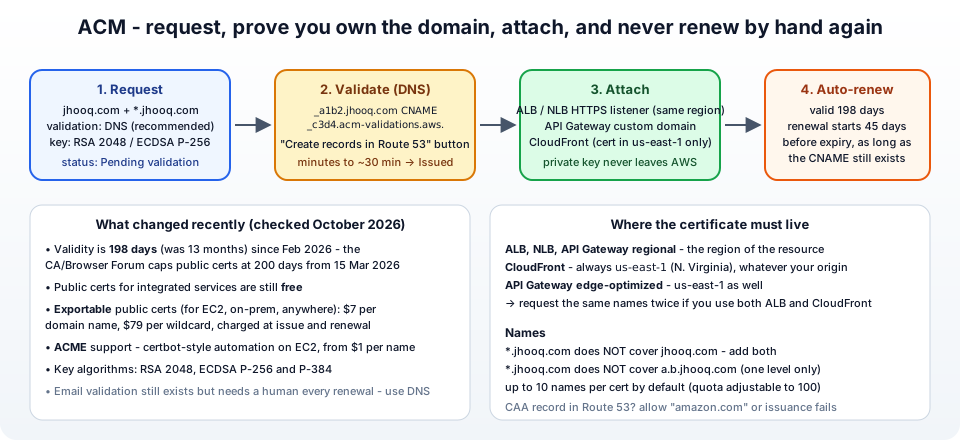
2. The rules - regions, names, validity, key algorithms
Know these before you click, from the public certificates page -
- Region - ACM is regional. A certificate for an ALB, NLB or regional API Gateway must be requested in that resource's region. A certificate for CloudFront (and edge-optimised API Gateway) must be in us-east-1 (N. Virginia), always, wherever your origin is. If you use both, request the same names twice.
- Names - fully qualified domain names; a wildcard
*.jhooq.comcovers one level (www.jhooq.com, notjhooq.comand nota.b.jhooq.com). Put the apex and the wildcard in one certificate. Up to 10 names per certificate by default (adjustable to 100). - Validity - 198 days. ACM starts renewal 45 days before expiry.
- Key algorithm - RSA 2048, ECDSA P-256 or P-384. ECDSA is faster and smaller; RSA 2048 is the safe default for old clients.
- CAA - if your zone has a CAA record, it must allow
amazon.com,amazontrust.com,awstrust.comoramazonaws.com, or issuance fails silently. - Quotas - 2,500 certificates per account, a limited number of new certificates per year per domain (quotas) - do not script request/delete loops.
3. Step 1 - Request a public certificate
Switch to the region of your ALB (eu-central-1). Certificate Manager → Request → Request a public certificate → Next -
- Domain names - Fully qualified domain name
jhooq.com, Add another name to this certificate →*.jhooq.com. (Addwww.jhooq.comexplicitly too if you prefer not to use the wildcard.) - Validation method - DNS validation - recommended. (Email validation sends a mail to
admin@,webmaster@, the WHOIS contacts - and needs a human to click every renewal; use it only if you cannot change DNS.) - Key algorithm - RSA 2048 (or ECDSA P 256).
- Export - leave Disable export unless you need the certificate outside AWS (section 10); exportable certificates are charged.
- Tags, then Request.
The certificate appears with status Pending validation and, under Domains, one CNAME name / CNAME value pair per domain name - the proof-of-ownership records.
4. Step 2 - Validate ownership with DNS (one click in Route 53)
DNS validation means ACM asks you to publish a CNAME like -
1_a1b2c3d4e5.jhooq.com. CNAME _f6g7h8i9j0.acm-validations.aws.
and checks that it resolves. If the zone is in Route 53 in the same account, open the certificate and click Create records in Route 53 → tick the domains → Create records. ACM writes the CNAMEs into the hosted zone. (A wildcard and its apex share one record, so you usually see a single CNAME.)
If DNS lives elsewhere, copy the name and value into that provider - watch for providers that append the zone name automatically (enter only the _a1b2c3d4e5 label) and for the trailing dot.
Validation typically completes within minutes, sometimes up to 30 minutes, occasionally longer while DNS propagates. Status becomes Issued. Verify the record yourself -
1dig +short _a1b2c3d4e5.jhooq.com CNAME
2# _f6g7h8i9j0.acm-validations.aws.
Leave that CNAME in place forever - it is what lets ACM renew the certificate without asking you (section 9).
5. Step 3 - Add an HTTPS listener to the ALB
EC2 → Load Balancers → jhooq-web-alb → Listeners and rules → Add listener (create an HTTPS listener) -
- Protocol : Port - HTTPS : 443.
- Default action - Forward to target groups →
jhooq-web-tg. - Secure listener settings → Security policy - the recommended
ELBSecurityPolicy-TLS13-1-2-2021-06(TLS 1.3 and 1.2, no TLS 1.0/1.1). Pick aFIPSorPFSpolicy only if compliance says so. - Default SSL/TLS server certificate - From ACM → select the
jhooq.comcertificate (it is only listed if it is Issued and in this region). - Add.
Then open Security groups for the ALB and add HTTPS 443 from 0.0.0.0/0 to jhooq-alb-sg - the instances behind it keep talking plain HTTP 80 to the ALB (TLS termination at the load balancer), so nothing changes on the targets. The ALB can hold several certificates (Listener → Certificates → Add) and picks the right one by SNI, which is how one ALB serves many domains.
6. Step 4 - Redirect HTTP to HTTPS
Nobody types https://. Edit the HTTP : 80 listener → Default action → Redirect to URL → Protocol HTTPS, Port 443, Status code 301 - Permanently moved, keep host/path/query. Save. The ALB now answers every http:// request with a redirect before it reaches your instances.
Optionally add HSTS - a response header Strict-Transport-Security: max-age=31536000 from your application (or via a fixed-response/header rule on newer ALB features) tells browsers to never try HTTP again.
7. Step 5 - Test it
 1# the chain, the names and the expiry
 2curl -vI https://jhooq.com/ 2>&1 | grep -E "subject:|issuer:|expire|SSL connection"
 3#  SSL connection using TLSv1.3 / TLS_AES_128_GCM_SHA256
 4#  subject: CN=jhooq.com
 5#  issuer: C=US; O=Amazon; CN=Amazon RSA 2048 M03
 6#  expire date: Apr 26 23:59:59 2027 GMT
 7
 8# the redirect
 9curl -I http://jhooq.com/
10# HTTP/1.1 301 Moved Permanently
11# Location: https://jhooq.com:443/
12
13# the wildcard
14curl -sI https://www.jhooq.com/ | head -1
15
16# full check against every browser's expectations
17openssl s_client -connect jhooq.com:443 -servername jhooq.com </dev/null | openssl x509 -noout -dates -subject -ext subjectAltName
A padlock in the browser, and the SSL Labs test should give an A with the TLS 1.3 policy. The Route 53 alias from Part-15 needs no change - the certificate is on the ALB, DNS only points at it.
8. CloudFront and API Gateway - the us-east-1 rule
CloudFront (this blog's setup - S3 origin behind CloudFront): request the certificate in us-east-1, then in the distribution's General → Settings → Edit add the Alternate domain names (CNAMEs) jhooq.com, www.jhooq.com and pick the Custom SSL certificate from the dropdown (only us-east-1 certificates appear). Security policy TLSv1.2_2021. Then the Route 53 alias record points at the distribution. CloudFront rejects adding an alternate domain while a DNS record for it still points at another distribution - DNS first, then the distribution (a lesson from this blog's own migration).
API Gateway - Custom domain names → Create → domain, Regional endpoint with a certificate from the API's region (or Edge-optimized with a us-east-1 certificate) → then an API mapping to a stage and a Route 53 alias to the API's domain name target. The API Gateway post covers the API itself.
NLB - a TLS listener terminates TLS with the ACM certificate just like the ALB (Part-18).
9. Automatic renewal - how it works and how it fails
Managed renewal - starting 45 days before expiry, ACM re-checks the DNS validation CNAME; if it still resolves, it issues a new certificate and swaps it into every integrated service automatically. No downtime, no action, no ticket. With 198-day certificates that now happens roughly every five months, which is exactly why DNS validation beats email validation (email needs a human each time).
Renewal fails when -
- The validation CNAME was deleted (someone "cleaned up" the hosted zone) - recreate it; ACM retries.
- The DNS zone moved to another provider and the record was not copied.
- A new CAA record forbids Amazon.
- The certificate was email-validated and nobody clicked the renewal mail.
- For imported certificates - ACM never renews those; you re-import.
Watch the DaysToExpiry CloudWatch metric (ACM publishes it per certificate), set an AWS Config rule acm-certificate-expiration-check, or an EventBridge rule on ACM Certificate Approaching Expiration. Status Pending validation on a certificate that was already in use means renewal is stuck - fix the DNS record.
10. Exportable certificates, ACME, imported certificates and Private CA
Four cases where the free integrated certificate is not enough -
- Exportable public certificates - for EC2 instances, containers, on-premises servers or any non-integrated service. Request with Enable export (or via the CLI with
--export ENABLED), then Export gives you the certificate, the chain and the private key encrypted with a passphrase you choose. $7 per domain name and $79 per wildcard, charged at issuance and again at each renewal (so about every 198 days), plus the first 10,000 export API calls per month free. You handle installation and renewal on the server - ACM still issues the renewed certificate, you export again. - ACME - ACM now speaks the ACME protocol, so
certbot,acme.shor Caddy on an EC2 instance can request and renew certificates from ACM automatically, with per-domain pricing starting at $1 per name. The right answer for "certbot but with AWS as the CA". - Import a certificate - bought elsewhere (EV certificates, which ACM does not issue, or an existing wildcard) - paste the body, private key and chain. Free to use on integrated services; ACM does not renew it.
- AWS Private CA - your own internal certificate authority for
*.internalnames, mTLS and IoT; ACM requests private certificates from it the same way. About $400 per CA per month plus per-certificate fees - for organisations, not labs.
11. The AWS CLI equivalents
 1# request (returns the certificate ARN)
 2ARN=$(aws acm request-certificate --domain-name jhooq.com \
 3  --subject-alternative-names "*.jhooq.com" --validation-method DNS \
 4  --key-algorithm RSA_2048 --region eu-central-1 --query CertificateArn --output text)
 5
 6# read the validation CNAME(s)
 7aws acm describe-certificate --certificate-arn "$ARN" \
 8  --query 'Certificate.DomainValidationOptions[].ResourceRecord' --output table
 9
10# create the record in Route 53 (UPSERT the Name/Value pair from above)
11aws route53 change-resource-record-sets --hosted-zone-id Z0123456789 --change-batch '{
12  "Changes": [{ "Action": "UPSERT", "ResourceRecordSet": {
13    "Name": "_a1b2c3d4e5.jhooq.com.", "Type": "CNAME", "TTL": 300,
14    "ResourceRecords": [{ "Value": "_f6g7h8i9j0.acm-validations.aws." }] } }]}'
15
16aws acm wait certificate-validated --certificate-arn "$ARN"
17aws acm describe-certificate --certificate-arn "$ARN" --query 'Certificate.[Status,NotAfter,RenewalEligibility]'
18
19# HTTPS listener on the ALB
20aws elbv2 create-listener --load-balancer-arn "$ALB_ARN" --protocol HTTPS --port 443 \
21  --certificates CertificateArn="$ARN" --ssl-policy ELBSecurityPolicy-TLS13-1-2-2021-06 \
22  --default-actions Type=forward,TargetGroupArn="$TG_ARN"
23
24# HTTP -> HTTPS redirect
25aws elbv2 modify-listener --listener-arn "$HTTP_LISTENER_ARN" \
26  --default-actions 'Type=redirect,RedirectConfig={Protocol=HTTPS,Port=443,StatusCode=HTTP_301}'
Terraform: aws_acm_certificate (with validation_method = "DNS"), aws_route53_record built from domain_validation_options, aws_acm_certificate_validation, aws_lb_listener with certificate_arn - the complete, working version with VPC, ALB and redirect is in Terraform - setting up an ALB and SSL.
12. What it costs
| Price | |
|---|---|
| Public certificates used on integrated services (ALB, NLB, CloudFront, API Gateway ...) | free, including renewals |
| Exportable public certificates | $7 per domain name, $79 per wildcard, at issuance and each renewal |
| ACME-issued certificates | from $1 per name, tiered |
| Imported certificates | free |
| AWS Private CA | about $400 per CA per month plus per-certificate fees |
From the ACM pricing page. The thing you pay for is the service terminating TLS - the ALB hour, the CloudFront requests.
13. Common ACM errors and how to fix them
1. Stuck in Pending validation - The CNAME is missing, in the wrong hosted zone (two zones for the same domain - the one the registrar's NS points to is the one that counts), has the zone name appended twice, or the trailing dot is wrong. dig the exact CNAME name from the certificate details. Also check for a CAA record that excludes Amazon, and that the domain's NS actually point at Route 53 (Part-15).
2. The certificate is not in the ALB / CloudFront dropdown - Wrong region. ALB: same region as the ALB. CloudFront: us-east-1. Also the status must be Issued.
3. NET::ERR_CERT_COMMON_NAME_INVALID / certificate is not valid for this name - The name you typed is not on the certificate - the wildcard does not cover the apex, or a.b.jhooq.com is two levels deep. Re-request with the missing name.
4. ERR_SSL_PROTOCOL_ERROR / connection reset on 443 - No HTTPS listener, or the ALB security group does not allow 443.
5. Browser shows the certificate of a different site - SNI mismatch - the client requested a name the ALB has no certificate for, so it served the default one. Add the certificate to the listener's certificate list.
6. Validation failed / Failed status - Validation did not complete within 72 hours, or CAA blocked it. Request again.
7. Renewal failed / Pending validation on a certificate in use - The validation CNAME was removed. Recreate it (section 9).
8. Mixed content warnings after enabling HTTPS - Your pages load images/scripts over http://. Use relative or https:// URLs; the certificate is fine.
9. LimitExceededException: Cannot issue certificate ... exceeded the yearly limit for the domain - Too many certificates requested for the same domain (automation re-requesting instead of reusing). Reuse the ARN; request a quota increase if genuine.
10. Exported certificate not trusted on my server - You installed the certificate without the chain. Install certificate.pem + certificate_chain.pem (or the combined full chain) and the decrypted key.
14. Conclusion
To summarise Part-16 -
- ACM issues publicly trusted certificates for free, keeps the private key inside AWS, and installs and renews them on ALB, NLB, CloudFront and API Gateway automatically.
- Request in the right region (the resource's region; us-east-1 for CloudFront), include the apex and the wildcard, and validate with DNS - one click when the zone is in Route 53. Never delete the validation CNAME.
- On the ALB, add an HTTPS 443 listener with the TLS 1.3 policy and the ACM certificate, open 443 in the security group, and redirect HTTP to HTTPS.
- Certificates now live 198 days; renewal starts 45 days before expiry and only needs the CNAME to still exist.
- For servers outside the integrated services use exportable certificates ($7 per name) or ACME; import certificates you bought elsewhere; Private CA for internal PKI.
The official references are the ACM User Guide, DNS validation, managed renewal and create an HTTPS listener. Next, we leave servers behind entirely - Part-17, AWS Lambda with function URLs, environment variables and layers.
AWS step by step series -
- Part-1 : AWS IAM user - create a user, group, policy, access keys and MFA
- Part-2 : AWS Organizations - multi-account setup, OUs and SCPs
- Part-3 : AWS assume IAM role - trust policy, switch role in console and CLI
- Part-4 : How to launch an EC2 instance - key pair, security group, SSH
- Part-5 : AWS VPC - public and private subnets, Internet Gateway, NAT Gateway, route tables
- Part-8 : EC2 launch template - versions, default version, source template, SSM parameter AMI
- Part-10 : EC2 Auto Scaling - launch template, Auto Scaling group, target tracking, ALB
- Part-11 : AWS WAF - web ACL, managed rules, rate limiting, geo blocking
- Part-12 : AWS VPC Peering - connect two VPCs, routes, security groups, DNS
- Part-13 : AWS Transit Gateway - hub-and-spoke for many VPCs and on-premises
- Part-14 : AWS NAT Gateway deep dive - public vs private, limits, cost, troubleshooting
- Part-15 : Amazon Route 53 - hosted zones, records, alias, routing policies, health checks
- Part-16 : AWS security groups - inbound and outbound rules, stateful, referencing, quotas
- Part-16 : AWS Certificate Manager - free TLS certificates for ALB, CloudFront and API Gateway
- Part-17 : AWS Lambda - function URLs, environment variables and layers
- Part-18 : Network Load Balancer - setup, and ALB vs NLB
- Part-19 : VPC endpoints - gateway and interface endpoints (PrivateLink) instead of NAT
- Part-20 : AWS PrivateLink - publish your own service with an endpoint service and NLB
- Part-20 : Amazon EBS volumes - types, attach, mount, resize, snapshots, encryption
- Part-21 : VPC Flow Logs - CloudWatch Logs, S3, record format, Logs Insights, Athena
- Part-21 : EC2 Spot Instances - pricing, interruptions, mixed instances groups
- Part-24 : AWS Control Tower - landing zone, controls, Account Factory, Identity Center
Networking fundamentals -
- What is a VPC and a subnet? AWS networking in five minutes
- What is CIDR? Calculate IP ranges for VPCs and subnets
- What is NAT? Static NAT, dynamic NAT and PAT explained
More AWS guides -
- What is AWS CloudFormation? Templates, stacks, change sets, drift, StackSets
- Learn AWS S3 - the complete course
- AWS API Gateway - REST API with Lambda, authorizers, Terraform
- AWS Advanced Networking Specialty (ANS-C01) - course companion
- AWS ECS and Fargate - how to deploy a Docker container
- AWS S3 - how to host a static website
- Terraform create EC2 instance on AWS
- Terraform AWS IAM - users, roles and policies
- Terraform and AWS multi-account setup
- Terraform - setting up an ALB and SSL
Posts in this series
- Amazon EBS Volumes Step by Step - Volume Types Compared (gp3, gp2, io2 Block Express, st1, sc1), Create, Attach, Format and Mount a Volume, Resize Without Downtime, Snapshots, Encryption, Multi-Attach, Pricing and Troubleshooting (AWS Part-20)
- Amazon Route 53 Step by Step - Hosted Zones, Record Types, Alias Records, Point a Domain at an ALB, Routing Policies (Weighted, Latency, Failover, Geolocation), Health Checks, Private Zones and Pricing (AWS Part-15)
- AWS Advanced Networking - Free 8-Hour Full Course Companion (VPC, NAT Gateway, Bastion, ALB, NLB, WAF, VPC Peering, Transit Gateway, VPC Endpoints and PrivateLink, Route 53, ACM) with Timestamps and the ANS-C01 Exam Facts
- AWS Assume IAM Role Step by Step - Trust Policy vs Permissions Policy, Switch Role in the Console, aws sts assume-role, CLI Profiles, Cross-Account Access, MFA and External ID (AWS Part-3)
- AWS Certificate Manager (ACM) Step by Step - Request a Free TLS Certificate, DNS Validation with Route 53, Attach It to an ALB HTTPS Listener, Redirect HTTP to HTTPS, CloudFront and API Gateway, Auto-Renewal, Exportable Certificates and ACME (AWS Part-16)
- AWS Control Tower Step by Step - Set Up a Landing Zone, Security OU with Log Archive and Audit Accounts, Controls (Guardrails), Region Deny, IAM Identity Center, Account Factory and Enrolling Existing Accounts (AWS Part-24)
- AWS EC2 Auto Scaling Step by Step - Launch Template, Auto Scaling Group Across Two AZs, Target Tracking Policy, Application Load Balancer, Health Checks and Instance Refresh (AWS Part-10)
- AWS EC2 Launch Template Step by Step - Create a Template, Versions and the Default Version, Source Template, Create From a Running Instance, Systems Manager Parameter Instead of an AMI ID, Launch Templates vs Launch Configurations, IAM Guardrails, CLI and Terraform (AWS Part-8 and Part-17)
- AWS EC2 Spot Instances Step by Step - How Spot Pricing Works, Launch a Spot Instance, Interruptions and the Two-Minute Notice, Rebalance Recommendations, Stop vs Hibernate vs Terminate, Spot in Auto Scaling Mixed Instances Groups, Billing Rules, Best Practices, CLI and Terraform (AWS Part-21)
- AWS IAM User Step by Step - Create a User, User Group, Attach Policies, Access Keys, MFA and Sign-in URL (AWS Part-1)
- AWS Lambda Step by Step - Create a Function, Function URL (HTTPS Endpoint Without API Gateway), Environment Variables, Lambda Layers for Python Dependencies, Versions and Aliases, Limits, Pricing and Errors (AWS Part-17)
- AWS NAT Gateway Deep Dive - How It Works, Public vs Private NAT Gateway, Setup Step by Step, Limits (55,000 Connections, 100 Gbps), CloudWatch Metrics, Cost Optimisation, NAT Instance Comparison and Troubleshooting (AWS Part-14)
- AWS Network Load Balancer Step by Step - Create an NLB with Static IPs, Target Groups, TCP and TLS Listeners, Security Groups, Client IP Preservation, Cross-Zone Load Balancing, and ALB vs NLB Explained (AWS Part-18)
- AWS Organizations Step by Step - Multi-Account Setup, Organizational Units, Service Control Policies (SCPs), Consolidated Billing and Identity Center (AWS Part-2)
- AWS PrivateLink Step by Step - Publish Your Own Service with a VPC Endpoint Service and Network Load Balancer, Allow Consumers, Accept Connections, Private DNS Name, Cross-Account and Cross-Region, Pricing and Troubleshooting (AWS Part-20)
- AWS Security Groups Step by Step - Inbound and Outbound Rules, Stateful Behaviour, Referencing Security Groups, the Three-Tier ALB-Web-DB Pattern, Quotas, Security Group vs Network ACL, CLI and Terraform (AWS Part-16)
- AWS Transit Gateway Step by Step - Connect Many VPCs and On-Premises Through One Hub, VPC Attachments, Transit Gateway Route Tables, Associations and Propagations, Isolation, Peering, Pricing (AWS Part-13)
- AWS VPC Endpoints Step by Step - Gateway Endpoints for S3 and DynamoDB, Interface Endpoints (PrivateLink) for SSM, ECR and Other Services, Private DNS, Endpoint Policies, Security Groups, Cost vs NAT Gateway, and Troubleshooting (AWS Part-19)
- AWS VPC Flow Logs Step by Step - Enable Flow Logs for a VPC, Subnet or Network Interface, Publish to CloudWatch Logs or S3, Read a Flow Log Record Field by Field, Custom Formats, Query with Logs Insights and Athena, Find Rejected Traffic, Pricing and Limitations (AWS Part-21)
- AWS VPC Peering Step by Step - Connect Two VPCs (Same or Different Account and Region), Accept the Request, Add Routes, Security Groups, DNS Resolution, Test with EC2, and the Limits (AWS Part-12)
- AWS VPC Step by Step - Create a VPC with Public and Private Subnets, Internet Gateway, NAT Gateway and Route Tables (and Test It with EC2) (AWS Part-5)
- AWS WAF Step by Step - Create a Web ACL, Attach It to an ALB or API Gateway, AWS Managed Rules, Rate-Based Rules, Geo Blocking, IP Sets, Count Mode and Logging (AWS Part-11)
- How to Launch an EC2 Instance on AWS Step by Step - AMI, Instance Type, Key Pair, Security Group, Connect with SSH or EC2 Instance Connect, Stop vs Terminate (AWS Part-4)
- What is an AWS VPC and a Subnet? Virtual Private Cloud Explained in Five Minutes (Region, Availability Zones, Public vs Private Subnets, Gateways, Route Tables)
- What is AWS CloudFormation? Templates, Stacks and Change Sets Explained, Template Anatomy Section by Section, Create Your First Stack Step by Step, Update With a Change Set, Drift Detection, Nested Stacks and StackSets, Quotas, Pricing, CLI, and CloudFormation vs Terraform
- What is CIDR (Classless Inter-Domain Routing)? How to Calculate IP Ranges for VPCs and Subnets, with Examples (/8, /16, /24, /28, /32)
- What is NAT (Network Address Translation)? How It Works, Static NAT vs Dynamic NAT vs PAT, the Translation Table, and Where NAT Shows Up in AWS
- AWS API Gateway Tutorial - REST API with Lambda Proxy and Non-Proxy Integration, Request Validation, HTTP API vs REST API, Resource Policies, Lambda Authorizers and Terraform
- Learn AWS S3 - The Complete Course (Buckets, Objects, Storage Classes, Lifecycle, Versioning, Security Defaults, Bucket Policies, Static Hosting, CLI and Terraform)
- How to release(delete) Elastic IP from AWS?
- Fix docker login 'error saving credentials: error storing credentials - err: exit status 1' (AWS ECR on macOS, Windows, Linux and WSL)