AWS Bedrock + Claude + MCP Server - Build a Production AI Agent That Never Holds a Database Password (Teleport, RDS PostgreSQL, Terraform)

Disclosure - this post and the video are sponsored by Teleport. The architecture, the code and the opinions are entirely my own - I built and ran everything shown here myself, and the parts that broke are in here too.
Almost every AI agent demo I see has the same line hidden in a .env file: DB_PASSWORD=.... The agent gets a long-lived, never-expiring database password, often for a super-user, and nobody can say afterwards which query the agent ran. That is fine on a laptop. It is a breach waiting to happen in production, where the "user" typing into your agent might not be you.
So in this post I build it properly. An AI SRE agent runs on Amazon Bedrock with Claude Opus 4.5, reaches a PostgreSQL database on AWS RDS through an MCP server, and investigates a slow-checkout incident by writing its own SQL. The agent never holds a password: Teleport gives it a short-lived certificate, limits it to read-only access on one database, refuses anything else at the proxy, and records every query. All the code is in github.com/rahulwagh/teleport-ai-agent-demo.
TL;DR
- The agent loop is about 40 lines of Python: Bedrock's Converse API returns
stopReason = "tool_use", the agent runs the SQL through the MCP tool, feeds the rows back, and repeats until Claude answers - capped at 12 steps. - The MCP server exposes exactly one tool,
run_read_query. That single seam is where the security goes; the model itself never touches the database. - No password anywhere.
tbot(Teleport Machine ID) holds a certificate valid for 1 hour and renews it every 5 minutes; the app connects to127.0.0.1:5433with no password, and even Teleport's hop to RDS uses a short-lived IAM auth token. - Least privilege is enforced by Teleport, not by string checks: the role allows only
db_names: [opsdb]anddb_users: [readonly_agent]. Asking to connect aspostgresreturnedaccess to db denied. User does not have permissions.- before RDS was touched. - Every query is in the Teleport audit log under the bot's identity, including the denied attempt.
- What it cost me: the
db.t3.microRDS instance costs about $0.40-0.50 per day; the optional public UI (ALB + t3.small) is roughly $31-35 per month, so I destroy it after recording.
Table of Content
- What we are building
- The stack and the request flow
- Step 1 - prove you can call Claude on Bedrock
- Step 2 - the MCP server, one tool
- Step 3 - the agent loop
- Step 4 - the static password pitfall
- Step 5 - a least-privilege Postgres user with RDS IAM auth
- Step 6 - enroll RDS in Teleport and give the agent a role
- Step 7 - tbot, the agent's short-lived identity
- Live demo - the agent investigates the incident
- Escalation denied and the audit trail
- Shipping it with Terraform
- What broke when I ran this
- What it costs
- Static password vs Teleport - the comparison
- Every Teleport link from the video
- Wrap-up
1. What we are building
The incident is planted: a new payment provider, legacy_gateway, was added in the last hour and checkouts through it are crawling. The agent gets one sentence - "Checkout has felt slow in the last hour - investigate" - and has to find that on its own, by querying the orders table.
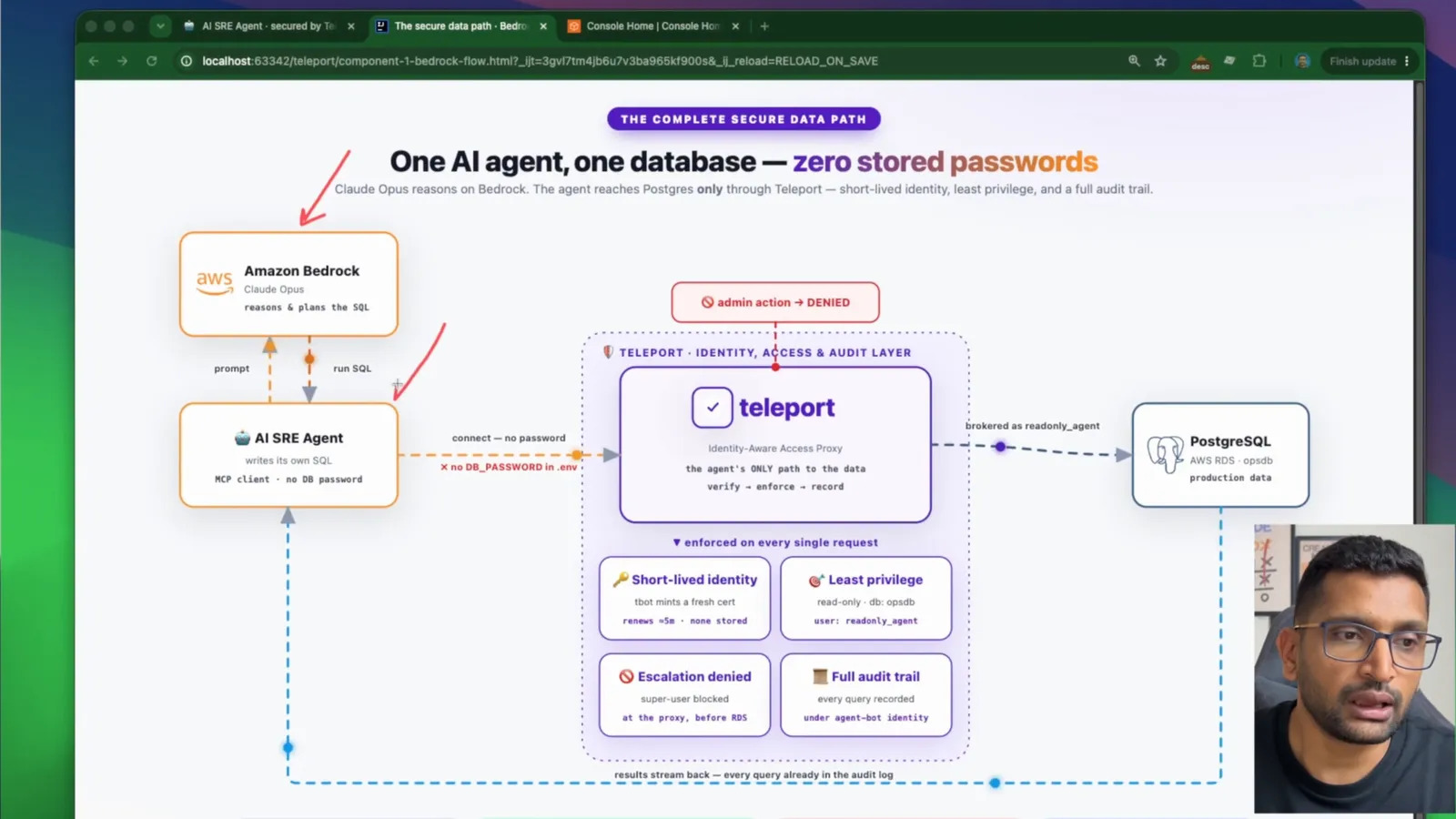
The diagram is the whole idea. Claude on Bedrock only reasons and plans the SQL. The agent connects with no password. Teleport is the only path to the data, and on every request it checks the short-lived identity, enforces least privilege, denies escalation and records the query. PostgreSQL sees the request as readonly_agent.
2. The stack and the request flow
| Layer | What I used | Role in the demo |
|---|---|---|
| Model | Claude Opus 4.5 on Amazon Bedrock (global.anthropic.claude-opus-4-5-20251101-v1:0) | reasons, decides which SQL to run |
| Agent | Python, boto3 Converse API, MCP client (agent_core.py) | the loop: prompt, tool call, result, repeat |
| Tool | MCP server built with FastMCP (mcp_server.py) | one tool, run_read_query |
| Database | RDS PostgreSQL 16, db.t3.micro, ap-south-1, IAM auth on | the "production" opsdb |
| Identity | Teleport Cloud trial, Teleport CLI v18.8.3, Machine ID (tbot) | short-lived cert, RBAC, audit |
| UI | Streamlit (app.py) | chat, live SQL, cert countdown, "Try admin" button |
| Deploy | Terraform: EC2 + ALB + ACM + Route 53 | optional public HTTPS UI |
One question travels like this:
1You type an incident in the chat UI (app.py / Streamlit)
2  -> agent_core.py  -> Amazon Bedrock (Claude)   "run this SQL" (tool_use)
3  -> mcp_server.py  (MCP server, one tool: run_read_query)
4  -> db.py          -> 127.0.0.1:5433  (NO password)
5  -> tbot (Machine ID) -- short-lived cert -->  Teleport Cloud (proxy + RBAC + audit)
6  -> Teleport DB Service -- IAM auth token -->  AWS RDS PostgreSQL
7  <- rows travel back the same path, rendered as a live table in the UI
3. Step 1 - prove you can call Claude on Bedrock
Before any agent, I make one round trip to the model. This is hello_bedrock.py from the repo:
 1import boto3
 2
 3REGION = "ap-south-1"
 4# Newer Claude models on Bedrock require a cross-region *inference profile*,
 5# not the bare model ID.
 6MODEL_ID = "global.anthropic.claude-opus-4-5-20251101-v1:0"
 7
 8client = boto3.client("bedrock-runtime", region_name=REGION)
 9
10def ask(prompt: str) -> str:
11    resp = client.converse(
12        modelId=MODEL_ID,
13        messages=[{"role": "user", "content": [{"text": prompt}]}],
14        inferenceConfig={"maxTokens": 200, "temperature": 0.2},
15    )
16    return resp["output"]["message"]["content"][0]["text"]
Two things here cost me time, and both are in section 13: the global. prefix (an inference profile, not a model ID) and the one-time model access form for Anthropic models, described on AWS's model access page.
4. Step 2 - the MCP server, one tool
The database tool lives in its own process and speaks the Model Context Protocol over stdio. FastMCP turns the type hints and the docstring into the tool schema, so I do not hand-write any JSON:
 1from mcp.server.fastmcp import FastMCP
 2from db import run_read_query as _db_query
 3
 4mcp = FastMCP("orders-db")
 5
 6@mcp.tool()
 7def run_read_query(sql: str) -> str:
 8    """Run a read-only SQL SELECT against the production 'opsdb' Postgres
 9    database and return matching rows as JSON.
10
11    Table 'orders' columns: order_id, customer_email, status
12    (completed|pending_payment|failed), amount_usd, payment_provider
13    (stripe|paypal|legacy_gateway), checkout_duration_ms, created_at (timestamptz).
14    """
15    rows = _db_query(sql)
16    return json.dumps(rows, default=str)
17
18if __name__ == "__main__":
19    mcp.run()
The docstring matters more than it looks: it is all Claude knows about the table. Listing the allowed values of status and payment_provider is what lets the model write a correct GROUP BY payment_provider on its first try.
Why an MCP server and not a plain function? Because this boundary - agent on one side, the only thing that touches data on the other - is exactly the seam you secure. The agent discovers the tool with list_tools() at start-up, so I can add or swap tools without touching the agent.
5. Step 3 - the agent loop
This is the heart of agent_core.py, trimmed to the loop:
 1for _ in range(max_steps):                       # max_steps = 12
 2    resp = bedrock.converse(
 3        modelId=MODEL_ID,
 4        system=SYSTEM,
 5        messages=messages,
 6        toolConfig={"tools": tools},             # MCP tools translated to toolSpec
 7        inferenceConfig={"maxTokens": 1500, "temperature": 0},
 8    )
 9    reply = resp["output"]["message"]
10    messages.append(reply)
11
12    if resp["stopReason"] != "tool_use":         # Claude is done - final diagnosis
13        return
14
15    tool_results = []
16    for block in reply["content"]:
17        if "toolUse" not in block:
18            continue
19        tool_use = block["toolUse"]
20        result = await session.call_tool(tool_use["name"], tool_use["input"])
21        text = "".join(b.text for b in result.content if hasattr(b, "text"))
22        tool_results.append({"toolResult": {
23            "toolUseId": tool_use["toolUseId"],
24            "content": [{"text": text}],
25            "status": "error" if result.isError else "success",
26        }})
27    messages.append({"role": "user", "content": tool_results})
The system prompt tells Claude to form a hypothesis, query to confirm it, iterate, and finish with a root-cause diagnosis "with the numbers that support it". temperature: 0 keeps the investigation repeatable, and the max_steps cap of 12 stops a confused model from looping forever. Passing the MCP tool's JSON schema straight into Bedrock's toolConfig is a three-line translation (to_bedrock_tools() in the repo).
6. Step 4 - the static password pitfall
db.py has two modes, and I deliberately kept the wrong one for the before/after:
1# The wrong way: static master password straight to a public RDS endpoint.
2return psycopg2.connect(
3    host=os.environ["DB_HOST"],
4    port=os.environ.get("DB_PORT", "5432"),
5    dbname=os.environ["DB_NAME"],
6    user=os.environ["DB_USER"],
7    password=os.environ["DB_PASSWORD"],
8    connect_timeout=10,
9)
Everything about this is a problem once an AI is in the loop: the password never expires, it usually belongs to a powerful user, the RDS endpoint has to be reachable, and the database log shows the same user for the agent, your migrations and you. My only guardrail in this mode is a string check that the query starts with select - and string checks are easy to fool.
The Teleport mode is the same function with almost nothing in it:
1# tbot's database-tunnel listens here and owns the (short-lived) identity.
2return psycopg2.connect(
3    host="127.0.0.1",
4    port=os.environ.get("TELEPORT_DB_PORT", "5433"),
5    dbname=os.environ.get("DB_NAME", "opsdb"),
6    user=os.environ.get("TELEPORT_DB_USER", "readonly_agent"),
7    sslmode="disable",   # local hop to tbot; tbot does mTLS upstream
8    connect_timeout=30,  # first connect warms the tunnel/cert (cold start)
9)
No password, no TLS code, no authorization logic in the application. That is the point.
7. Step 5 - a least-privilege Postgres user with RDS IAM auth
On the database side, the agent gets its own user that can do almost nothing. admin_setup.py runs once as the master user. This is the real output from the recording:
 1$ .venv/bin/python admin_setup.py
 2OK: DO $$ BEGIN IF NOT EXISTS (SELECT FROM pg_roles WHERE rolname = 'reado
 3OK: GRANT rds_iam TO readonly_agent;
 4OK: GRANT CONNECT ON DATABASE opsdb TO readonly_agent;
 5OK: GRANT USAGE ON SCHEMA public TO readonly_agent;
 6OK: GRANT SELECT ON public.orders TO readonly_agent;
 7OK: REVOKE CREATE ON SCHEMA public FROM readonly_agent;
 8
 9Grants for readonly_agent:
10   ('readonly_agent', 'SELECT', 'orders')
11rds_iam membership: yes
readonly_agent has no password at all. Membership in rds_iam means RDS accepts a short-lived IAM token for it instead - IAM database authentication has to be switched on for the instance. Its only privilege is SELECT on one table.
8. Step 6 - enroll RDS in Teleport and give the agent a role
I did the enrollment on camera in the Teleport web UI: Connect AWS Account, Enroll RDS Database, Deploy Database Service, Set Up Access, Test Connection. The wizard deployed the Teleport Database Service as a task on Amazon ECS in my account, and that service is the only thing that talks to RDS - using IAM tokens, so no password exists in the Teleport path either. The steps are in Teleport's database access guides.
Then the policy for the agent, teleport/role-agent-db-readonly.yaml:
 1kind: role
 2version: v7
 3metadata:
 4  name: agent-db-readonly
 5spec:
 6  allow:
 7    db_labels:
 8      '*': ['*']             # match any DB resource - the real lock-down is the two lines below
 9    db_names: ["opsdb"]      # only this database
10    db_users: ["readonly_agent"]   # only the read-only Postgres user
11  deny: {}
12  options:
13    max_session_ttl: 1h      # keep the agent's issued certs short-lived
Two layers of least privilege now stack up: Teleport only lets the agent log in as readonly_agent on opsdb, and Postgres only lets readonly_agent read orders.
9. Step 7 - tbot, the agent's short-lived identity
Machine ID gives a non-human workload its own identity. tbot authenticates as the bot agent-bot, keeps a short-lived certificate on disk, and opens local database tunnels. This is the config template from the repo (teleport/tbot.yaml.tmpl, rendered by setup.sh):
 1version: v2
 2proxy_server: __TENANT__:443
 3
 4onboarding:
 5  join_method: token
 6  token: __BOT_TOKEN__
 7
 8storage:
 9  type: directory
10  path: ./teleport/tbot-data    # short-lived identity lives here; gitignored
11
12renewal_interval: 5m
13
14services:
15  - type: database-tunnel
16    listen: tcp://127.0.0.1:5433
17    service: teleport-demo-db
18    database: opsdb
19    username: readonly_agent
20
21  # DENIAL DEMO: same agent identity asking to be the postgres SUPER-USER.
22  - type: database-tunnel
23    listen: tcp://127.0.0.1:5434
24    service: teleport-demo-db
25    database: opsdb
26    username: postgres
The second tunnel exists only to prove the point: same identity, but asking for postgres. The role does not allow it, so Teleport should refuse it - section 11 shows that it does.
With tbot running, the UI's Teleport panel shows the identity and the certificate counting down:
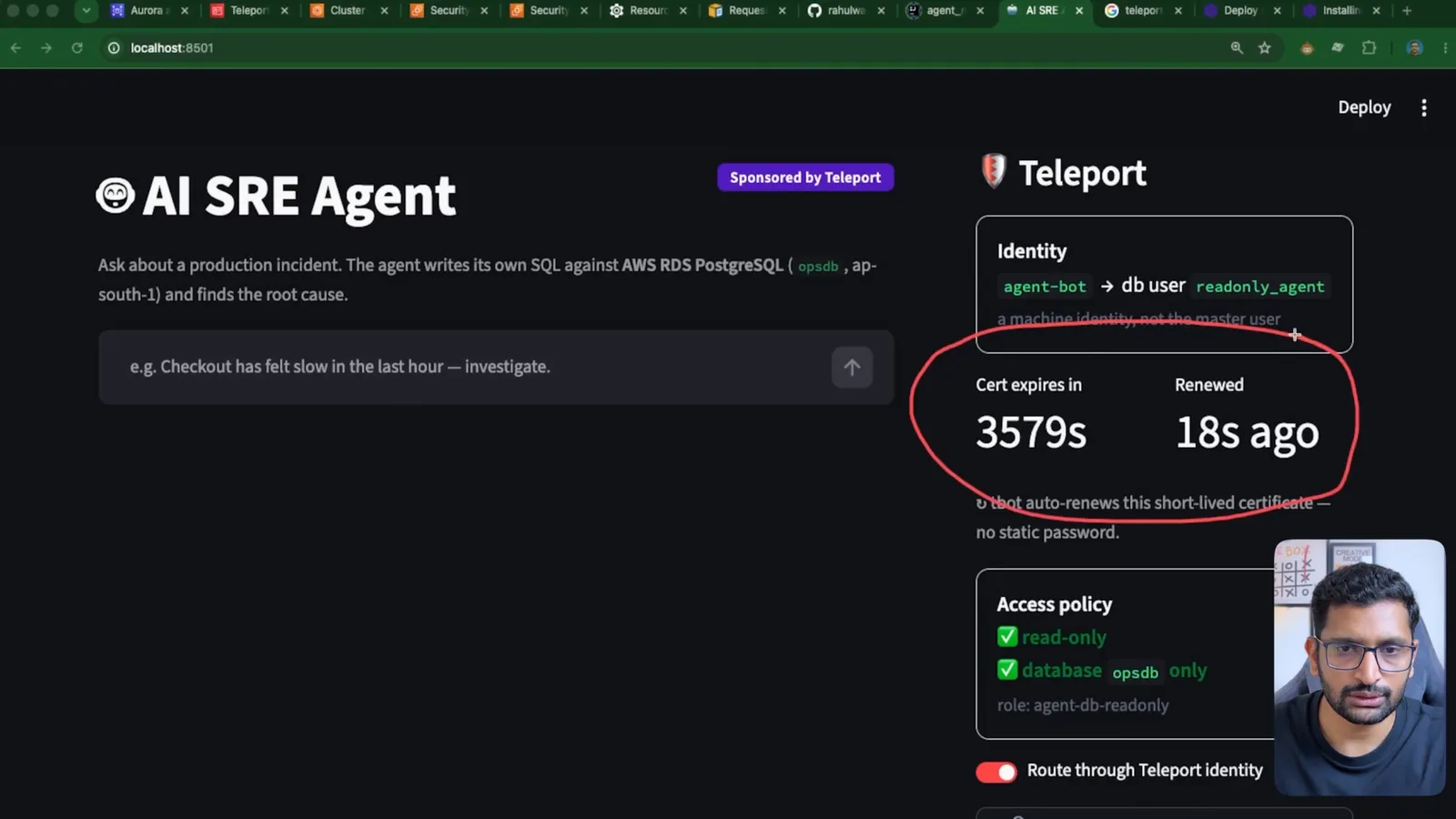
Cert expires in 3579s, Renewed 18s ago - a certificate valid for just under the 1-hour max_session_ttl, refreshed every 5 minutes. If the agent's machine is compromised, the stolen credential is useless within the hour, and removing the bot stops the renewals.
10. Live demo - the agent investigates the incident
The seed data has 40 healthy orders spread over the last 40 hours (stripe and paypal, 150-550 ms checkouts) and 18 orders from the last hour through legacy_gateway that take 8,000-14,000 ms, many stuck in pending_payment. I asked the agent to show me the orders that take a lot of time. It connected to the MCP server, wrote its own SQL, and Teleport carried every query:
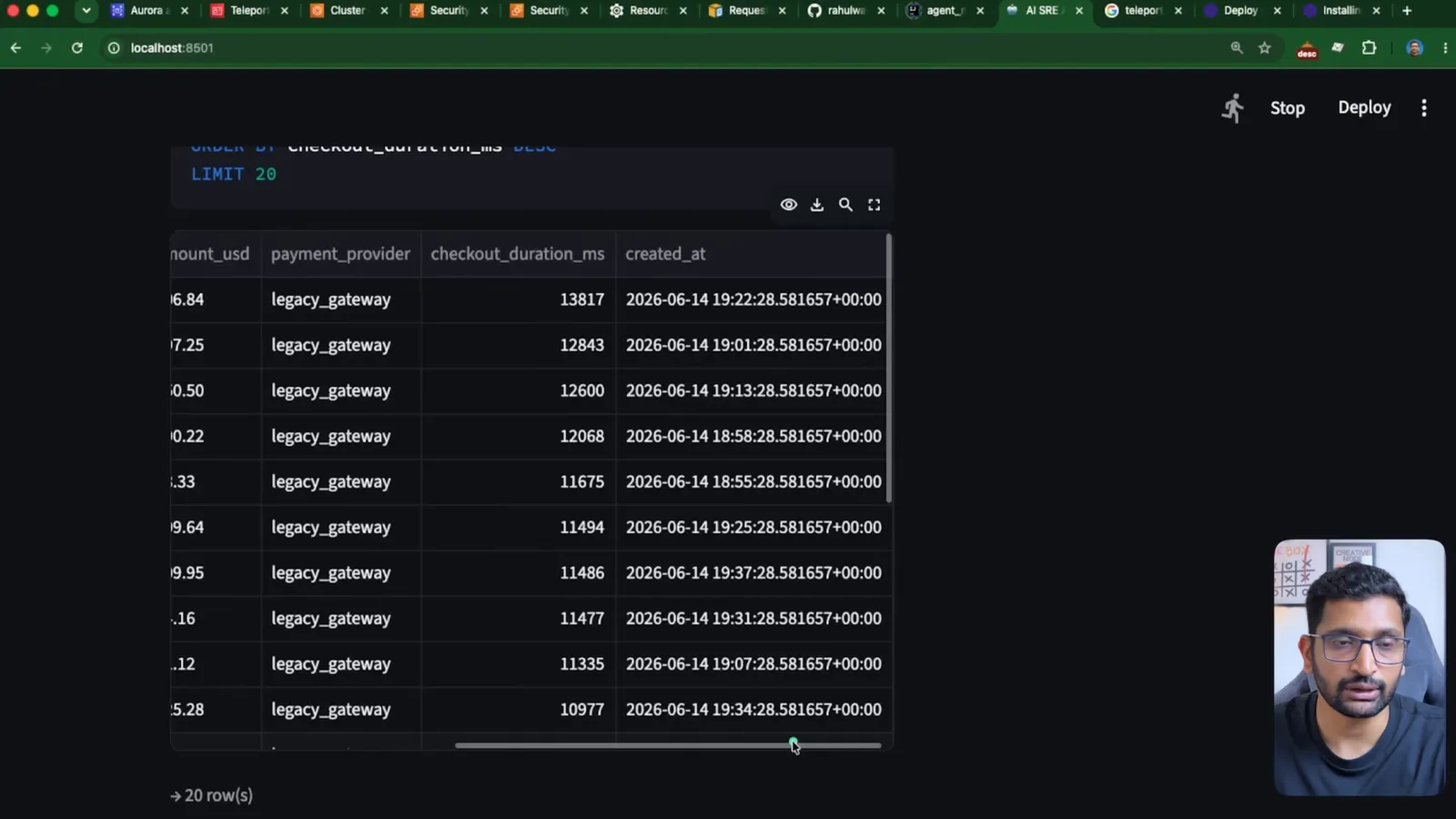
The slowest rows it pulled back, as they appeared on screen:
| payment_provider | checkout_duration_ms | created_at (UTC) |
|---|---|---|
| legacy_gateway | 13817 | 2026-06-14 19:22:28 |
| legacy_gateway | 12843 | 2026-06-14 19:01:28 |
| legacy_gateway | 12600 | 2026-06-14 19:13:28 |
| legacy_gateway | 12068 | 2026-06-14 18:58:28 |
| legacy_gateway | 11675 | 2026-06-14 18:55:28 |
| legacy_gateway | 11494 | 2026-06-14 19:25:28 |
Every one of the slowest checkouts is legacy_gateway, all within the same hour - which is exactly the planted root cause, found by a model that was only told "checkout feels slow". Claude then ran aggregate queries (minimum, average, median and 95th percentile of checkout_duration_ms) to put numbers on it, as the system prompt asks.
11. Escalation denied and the audit trail
The UI has a Try an admin action button that connects through the :5434 tunnel - the same agent-bot identity, asking to be postgres:
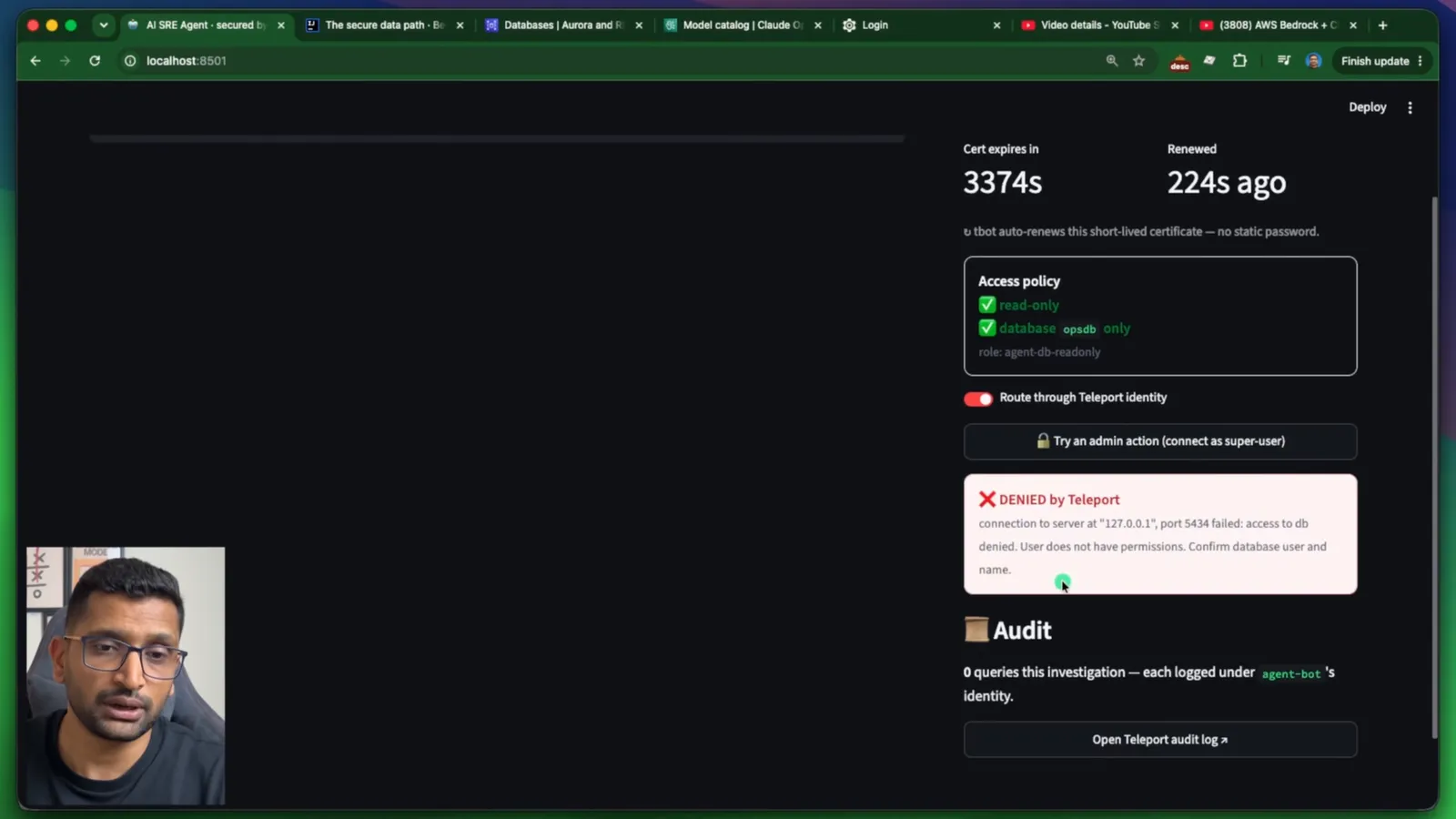
1DENIED by Teleport
2connection to server at "127.0.0.1", port 5434 failed: access to db denied.
3User does not have permissions. Confirm database user and name.
The refusal comes from the Teleport proxy, before the connection reaches RDS. No Postgres permission was even consulted.
Then the audit log in the Teleport web UI. Both the allowed and the denied sessions are there, under the bot's identity:
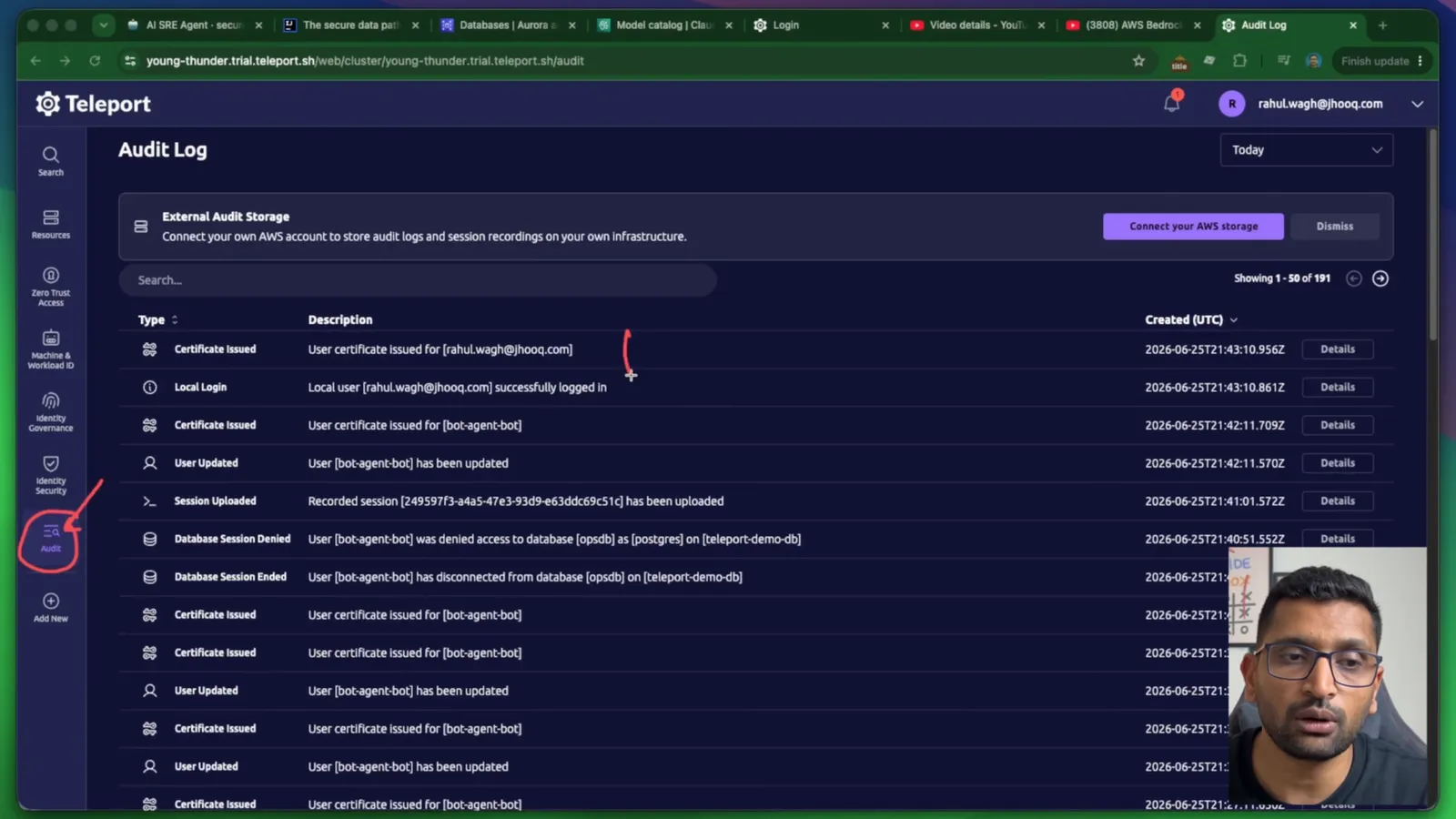
1Certificate Issued       User certificate issued for [bot-agent-bot]
2User Updated             User [bot-agent-bot] has been updated
3Session Uploaded         Recorded session [249597f3-a4a5-47e3-93d9-e63ddc69c51c] has been uploaded
4Database Session Denied  User [bot-agent-bot] was denied access to database [opsdb] as [postgres] on [teleport-demo-db]
5Database Session Ended   User [bot-agent-bot] has disconnected from database [opsdb] on [teleport-demo-db]
The repeating Certificate Issued / User Updated pairs are the 5-minute renewals - a visible heartbeat of the short-lived identity. If someone asks "what did the AI do to production last Tuesday?", this is the answer, tied to one machine identity rather than a shared password.
12. Shipping it with Terraform
For a public demo, the terraform/ folder in the repo puts the Streamlit UI on EC2 behind an ALB with an ACM certificate:
1Internet -HTTPS-> ALB (ACM) -HTTP:8501-> EC2 (Streamlit + tbot) -5433-> tbot -443-> Teleport Cloud -> RDS
The instance joins Teleport with IAM join (no secret token on the box), runs tbot and Streamlit as systemd services, and needs only outbound 443 to Teleport - it still holds no database password. The deploy is two-phase because ACM DNS validation needs the domain delegated to the new Route 53 zone first:
1cp terraform.tfvars.example terraform.tfvars   # set domain_name + subdomain
2terraform init
3terraform apply -target=aws_route53_zone.primary
4terraform output name_servers                  # put these NS records at your registrar
5terraform apply
6terraform output url
The instance needs about 3-4 minutes after boot to install everything. If .tfvars and -target are new to you, variables.tf and terraform.tfvars explains how the example file is loaded, and the network side (public subnets for the ALB, the instance's security group) follows the same pattern as my VPC with public and private subnets post.
13. What broke when I ran this
I built this over several days in June 2026 in ap-south-1, and I kept notes of everything that went wrong. These are the ones worth knowing before you start.
1. Claude rejected the bare model ID. Current Claude models on Bedrock will not run on demand by plain model ID; you must call an inference profile - here global.anthropic.claude-opus-4-5-20251101-v1:0. hello_bedrock.py still carries the hint I wrote for myself: on a ValidationException mentioning on-demand, switch to a profile ID.
2. The model I wanted was gated as "Legacy". Claude Sonnet 4 was blocked because the account had not used it in the last 30 days, so it counted as a legacy model for that account. Opus 4.5, a current model with an active profile in the region, worked.
3. The Anthropic use-case form takes a while. The first time you enable Anthropic models in an account, Bedrock asks for use-case details. After I submitted it, it took about 10-15 minutes before calls stopped failing.
4. My database "went down" every morning. It had not - my home IP had changed overnight, and the RDS security group only allowed port 5432 from my old IP, so every connection timed out. Re-authorizing the new IP fixed it. With the Teleport path this whole class of problem disappears, because only the Teleport Database Service needs to reach RDS.
5. tbot could not find its config. On camera, tbot start failed twice because I ran it from the wrong folder - first from inside teleport/, then from the folder above the project - with a path that is relative to the project folder:
1rahulwagh@Rahuls-MacBook-Pro-2 teleport % tbot start -c ./teleport/tbot.yaml
2ERROR: loading bot config from path ./teleport/tbot.yaml
3        failed to open file: ./teleport/tbot.yaml
4                lstat /Users/rahulwagh/Documents/... (path shortened)
5teleport: no such file or directory
Run it from the demo-ai-agent folder, or pass an absolute path to -c.
6. The UI showed a certificate that had expired 197,269 seconds ago. Before tbot was running, the panel read Cert expires in -197269s - about 55 hours in the past, left over in tbot-data/ from an earlier session - and the agent's first query failed with:
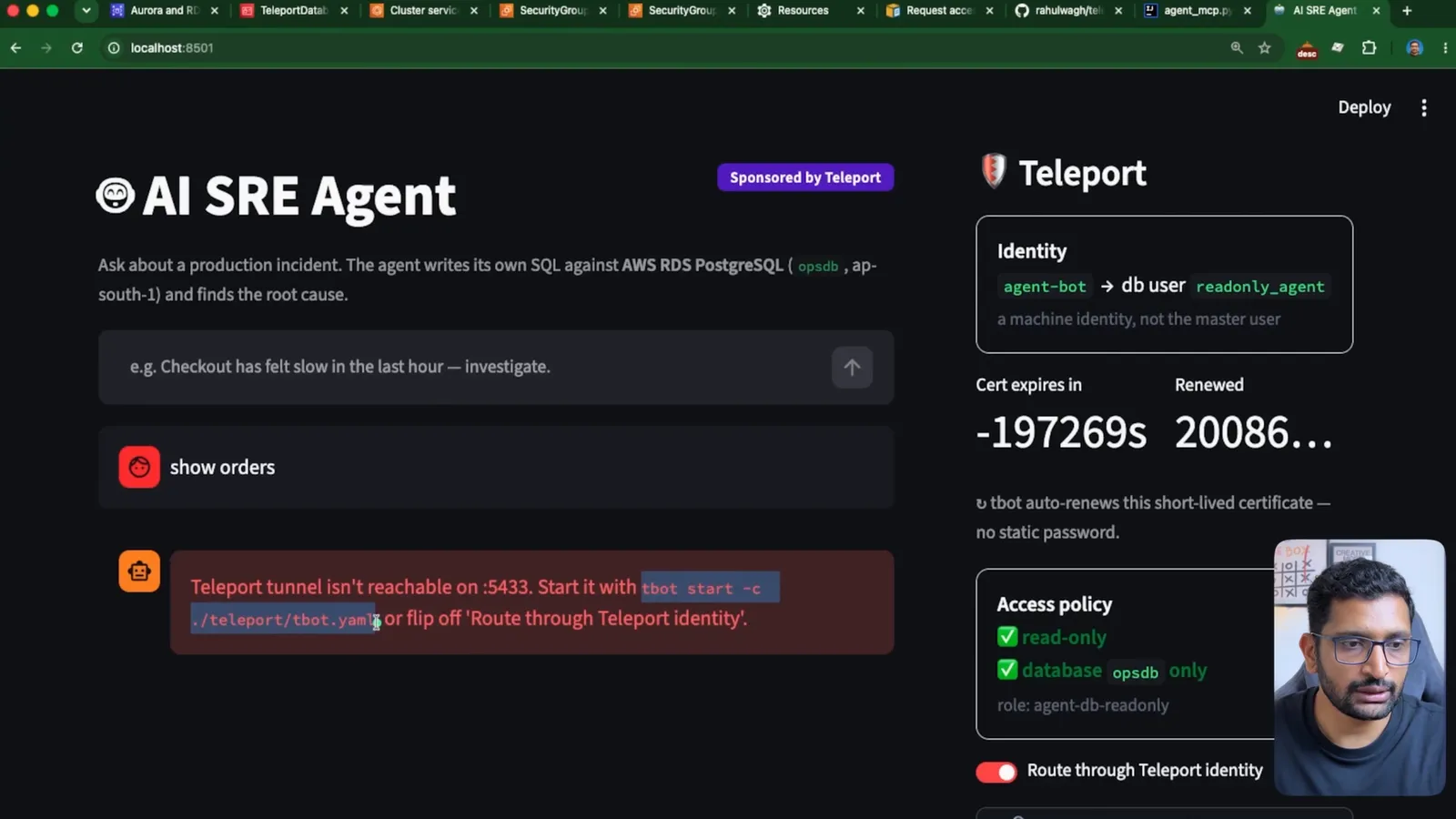
1Teleport tunnel isn't reachable on :5433. Start it with tbot start -c ./teleport/tbot.yaml,
2or flip off 'Route through Teleport identity'.
This is the security model working: an old identity file on disk is worthless. Starting tbot minted a fresh certificate in seconds.
14. What it costs
| Item | Cost | Notes |
|---|---|---|
RDS PostgreSQL db.t3.micro | about $0.40-0.50 per day | my estimate in the build notes; delete it after recording |
| ALB for the public UI | about $16-20 per month | only if you deploy the Terraform UI |
EC2 t3.small for the UI | about $15 per month | same |
| Teleport Cloud | 14-day trial | what I used for the whole build |
| Bedrock (Claude Opus 4.5) | per input/output token | see Amazon Bedrock pricing; an investigation is a handful of short calls |
The RDS and ALB numbers are why my repo notes end with a teardown section. Check current prices on the RDS for PostgreSQL pricing page for your region.
15. Static password vs Teleport - the comparison
Static password in .env | Teleport Machine ID | |
|---|---|---|
| Credential the app holds | long-lived DB password | none - tbot holds a short-lived cert |
| Lifetime | until someone rotates it | 1 hour max, renewed every 5 minutes |
| Who the database sees | a shared user (often the master user) | readonly_agent, through agent-bot |
| Escalation to super-user | possible if the password allows it | denied at the proxy before RDS |
| RDS exposure | endpoint reachable from the app | only the Teleport Database Service connects |
| Audit | Postgres logs, if enabled, under a shared user | every session and denial under the bot identity |
| App code for auth | password handling, TLS settings | none |
16. Every Teleport link from the video
- Teleport sign-up - agentic identity and access control - the link from the full video's description
- Teleport sign-up from the YouTube Short - same page, from the 91-second short version of this video
- The GitHub repository - the repo link from the description (github.com/rahulwagh/teleport-ai-agent-demo)
- Teleport documentation - the starting point I used for
tsh,tctlandtbot
If you are building agents that touch infrastructure, my durable Kubernetes incident agent with human approval is the companion pattern for write actions, and assuming an IAM role in AWS covers the AWS side of short-lived credentials.
17. Wrap-up
The model was never the risky part of this agent - Claude on Bedrock only ever produced SQL text. The risky part is the credential that turns that text into a query on production. To summarise what I built:
- Bedrock Converse plus an MCP client gives you a tool-using agent in about 40 lines; keep the tool surface to one well-described tool.
- Put the security at the MCP-to-database seam, not in the prompt and not in string checks.
- Give the agent its own identity with Teleport Machine ID: a 1-hour certificate renewed every 5 minutes, no password in the app.
- Enforce least privilege twice - Teleport limits who the agent can log in as, Postgres limits what that user can do - and verify it with a denied super-user attempt.
- Use the audit log as the answer to "what did the AI do?".
Did this save you a debugging session? Stay in the loop -
- Subscribe on YouTube - every post here has a screen-recorded companion video.
- Code on GitHub - the repositories, Terraform and scripts behind these posts.
Posts in this series
- AWS Bedrock + Claude + MCP Server - Build a Production AI Agent That Never Holds a Database Password (Teleport, RDS PostgreSQL, Terraform)
- Real-Time DevOps Project - Deploy a Python Flask REST API with MySQL RDS on AWS Using Terraform and Jenkins, Step by Step (Jenkins on EC2 in eu-west-1, App and Database in eu-central-1, ALB, ACM, Route 53, Custom Domain with HTTPS)
- Stop Building Stateless AI Chatbots - Build a Durable Kubernetes Incident Agent with Trigger.dev chat.agent, Next.js, the Vercel AI SDK and Human-in-the-Loop Approvals (OOMKilled Demo on minikube and EKS)
- AI Caught My Cloud Failure Before I Did