AWS API Gateway Tutorial - REST API with Lambda Proxy and Non-Proxy Integration, Request Validation, HTTP API vs REST API, Resource Policies, Lambda Authorizers and Terraform

If you prefer to watch, the whole guide is also a video -
In this article we are going to look at Amazon API Gateway - the AWS service that acts as the "front door" for your backend, whether that backend is a Lambda function, a container on ECS/Fargate, an EC2 instance or another AWS service. If you have ever wanted to put an HTTPS endpoint in front of some code without running a web server, this is the service.
We are going to start with what API Gateway actually does to a request, build a working REST API backed by a Python Lambda function in the console, then go through the parts that matter in a real project - proxy vs non-proxy integration, request validation, HTTP API vs REST API, resource policies, Lambda authorizers - and finish with the same API written in Terraform and the errors everyone runs into. I have updated the console steps to the current API Gateway console (the Create resource / Create method / Deploy API buttons replaced the old Actions menu) and checked every feature claim against the current AWS documentation.
Table of Content
- What is API Gateway? Why and how?
- How a request flows - stages, resources, methods, integrations
- Tutorial - creating your first REST API with Lambda
- Proxy vs non-proxy Lambda integration
- Request validation with a model
- HTTP API vs REST API - which one to pick
- Securing your API - IAM resource policy
- Custom authorization with Lambda authorizers
- The same API in Terraform
- Common API Gateway errors and how to fix them
- Conclusion
1. What is API Gateway? Why and how?
1.1 What is it?
Amazon API Gateway is a fully managed service to create, publish, maintain, monitor and secure APIs at any scale. Think of it as a smart receptionist for your backend services - it accepts the HTTPS call, checks who is calling, applies the rate limit, optionally validates and transforms the request, forwards it to the backend and returns the response. You never run or patch a server for it.
1.2 Why use it?
- Scalability - it scales automatically with incoming traffic, from one call a day to hundreds of thousands a second.
- Security - throttling, API keys, IAM authorization, Cognito and Lambda authorizers, resource policies, WAF integration.
- Decoupling - one stable URL in front of a backend you can swap, version and deploy independently.
- Monitoring - CloudWatch metrics and access logs, X-Ray tracing, out of the box.
- Cost - pay per request, nothing while idle - the natural partner of Lambda.
1.3 How does it work?
API Gateway acts as a reverse proxy. It accepts the API call from the client and routes it to the configured backend - a Lambda function, an HTTP endpoint (ALB, EC2, on-premises), another AWS service (put a file into S3, send a message to SQS, start a Step Function) or a mock response. API Gateway offers three kinds of API - REST APIs (the full-featured original), HTTP APIs (newer, simpler, cheaper) and WebSocket APIs (for two-way, real-time connections). This post is about REST and HTTP APIs.
2. How a request flows - stages, resources, methods, integrations
The vocabulary trips everybody up at first, so here is one request end to end -
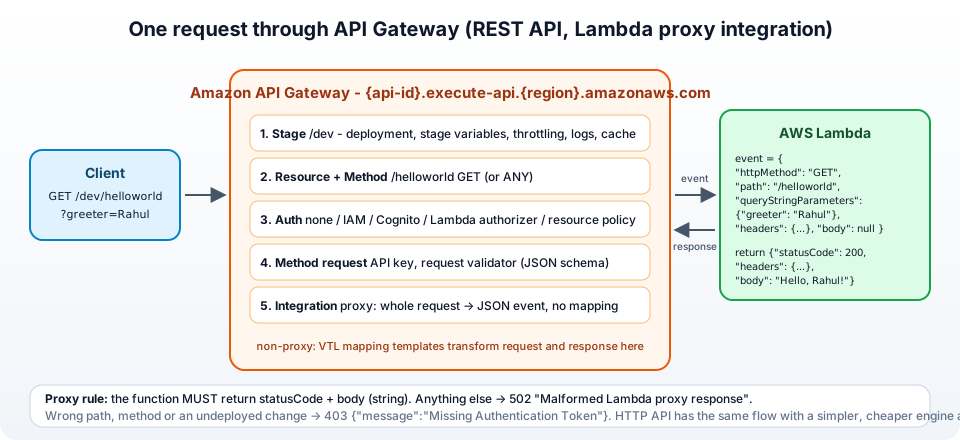
- API - the container, with an ID like
r275xc9bmdthat becomes part of the default URLhttps://{api-id}.execute-api.{region}.amazonaws.com. - Stage - a named deployment of the API (
dev,test,prod), the first path segment of the URL. Throttling limits, caching, logging and stage variables are set per stage. Nothing you configure is live until you deploy it to a stage. - Resource - a path,
/helloworld,/users/{id}.{id}is a path parameter;{proxy+}is a greedy catch-all. - Method - an HTTP verb on a resource -
GET /helloworld, orANYfor all verbs. On a REST API each method has four parts: method request (auth, API key, validation), integration request (mapping to the backend), integration response and method response (mapping back). - Integration - what the method calls - Lambda (proxy or non-proxy), HTTP, AWS service, mock.
The HTTP methods themselves mean what they always mean -
| Method | Description |
|---|---|
| GET | Retrieves data (read-only) |
| POST | Submits data to create resources |
| PUT | Updates or creates a resource |
| DELETE | Removes a resource |
| PATCH | Applies partial updates |
| ANY | API Gateway catch-all, the method is passed to the backend |
3. Tutorial - creating your first REST API with Lambda
Let's build it. The flow follows the official Lambda proxy integration tutorial, with a slightly friendlier function.
Step 1: Create a simple Lambda function
- Open the Lambda console, note the Region (the API must be created in the same one), and choose Create function → Author from scratch.
- Function name -
GetStartedLambdaProxyIntegration. Runtime - the latest Python (3.13 at the time of writing). Keep the architecture default and let Lambda create a new basic execution role. - Choose Create function, then paste this into the code editor and click Deploy -
 1import json
 2
 3def lambda_handler(event, context):
 4    # API Gateway proxy integration hands us the whole HTTP request as `event`
 5    name = "World"
 6    params = event.get("queryStringParameters") or {}
 7    if params.get("name"):
 8        name = params["name"]
 9
10    response_data = {
11        "message": f"Hello, {name}! Your request was successful.",
12        "status": "success",
13        "method": event.get("httpMethod"),
14        "path": event.get("path"),
15    }
16
17    # a proxy integration MUST return this shape
18    return {
19        "statusCode": 200,
20        "headers": {"Content-Type": "application/json"},
21        "body": json.dumps(response_data),
22    }
Step 2: Create a REST API in API Gateway
- Open the API Gateway console and choose Create API. (If it is your first API you land on the introduction page instead - find REST API there.)
- Under REST API choose Build.
- API name -
MyFirstAPI. Keep API endpoint type as Regional and IP address type as IPv4. - Choose Create API.
Step 3: Create a resource and a method
- Choose Create resource. Keep Proxy resource off and Resource path as
/, set Resource name toproxy-demo, leave CORS off, and choose Create resource. - Select the new /proxy-demo resource and choose Create method.
- Method type -
GET(orANYif you want one method for every verb). - Integration type - Lambda function.
- Turn on the Lambda proxy integration toggle - this is the important switch.
- Lambda function - pick the region and type
GetStartedLambdaProxyIntegration. Keep the Default timeout (29 seconds). - Choose Create method. API Gateway adds the resource-based permission that allows it to invoke the function.
Step 4: Deploy your API
- Choose Deploy API.
- Stage - New stage, Stage name -
dev, then Deploy. - Under Stage details copy the Invoke URL -
1https://{api-id}.execute-api.{region}.amazonaws.com/dev
To test it, append the resource and a query string -
1curl "https://{api-id}.execute-api.{region}.amazonaws.com/dev/proxy-demo?name=Rahul"
Sample response:
1{"message": "Hello, Rahul! Your request was successful.", "status": "success", "method": "GET", "path": "/proxy-demo"}
One rule to burn into memory - every change to resources, methods or integrations needs a new deployment (Deploy API again, to the same stage). Forgetting it is the number one cause of the Missing Authentication Token error in section 10.
4. Proxy vs non-proxy Lambda integration
4.1 Lambda proxy integration (the easy way)
With proxy integration, API Gateway passes the entire HTTP request to Lambda as one JSON event - httpMethod, path, pathParameters, queryStringParameters, headers, body, requestContext - and your function does the parsing. In return the function must respond with statusCode, optional headers and a string body. That is the whole contract; there is nothing to configure in API Gateway, which is why the method can evolve without redeploying the API.
1import json
2
3def lambda_handler(event, context):
4    name = (event.get("queryStringParameters") or {}).get("name", "World")
5    return {
6        "statusCode": 200,
7        "headers": {"Content-Type": "application/json"},
8        "body": json.dumps({"message": f"Hello, {name}!"})
9    }
Use this for 90% of cases, and for every new project. Frameworks like AWS Lambda Powertools, FastAPI with Mangum, or Express with serverless-http all expect this event shape.
4.2 Lambda non-proxy integration (the custom way)
With non-proxy (custom) integration, API Gateway shapes the input and output using mapping templates written in VTL (Velocity Template Language). The function receives only what you map, and returns a plain object that you map back to a status code and body. It is more work, but it lets you adapt a legacy function you cannot change, hide fields, or call a non-Lambda backend with a transformed payload.
Mapping template example (integration request, application/json):
1#set($inputRoot = $input.json('$'))
2#set($originalParam = $inputRoot.name)
3#set($prefix = "non_proxy_")
4#if(!$originalParam.startsWith($prefix))
5  #set ($originalParam = $prefix + $originalParam)
6#end
7{
8  "name": "$originalParam"
9}
Lambda function example: - notice there is no statusCode, the function returns business data only
1import json
2
3def lambda_handler(event, context):
4    name = event.get('name', 'World')
5    return {
6        "greeting": f"Hello from non-proxy, {name}!"
7    }
In the console you set this under the method's Integration request → Mapping templates, and you need a matching Integration response that maps the Lambda output (and Lambda errors, matched by regex on the error message) to HTTP status codes. The reference for every $input, $context and $util variable is the mapping template reference. Non-proxy integration is a REST API feature only - HTTP APIs do not have mapping templates.
5. Request validation with a model
Why let a bad request reach your Lambda (and pay for the invocation) when API Gateway can reject it with a 400 first? REST APIs support request validation against a model - a JSON Schema (draft 4) you define once and attach to methods.
5.1 Create a model in API Gateway
Under your API go to Models → Create model, name it RequestModel, content type application/json, and paste -
 1{
 2  "$schema": "http://json-schema.org/draft-04/schema#",
 3  "title": "RequestModel",
 4  "type": "object",
 5  "required": ["name", "email", "mobile-number"],
 6  "properties": {
 7    "name": { "type": "string", "minLength": 1 },
 8    "email": { "type": "string", "format": "email" },
 9    "mobile-number": { "type": "integer", "minimum": 1000000000, "maximum": 9999999999 }
10  },
11  "additionalProperties": false
12}
5.2 Attach it to the method
Open the POST method, Method request → Edit. Set Request validator to Validate body (or Validate body, query string parameters, and headers), and under Request body add content type application/json with model RequestModel. Deploy the API.
Now a request with a missing field or an extra unexpected property is rejected before Lambda runs -
1{"message": "Invalid request body"}
Validators can also require query string parameters and headers that you mark as Required in the method request. (HTTP APIs do not support request validation - another item for the comparison below.)
6. HTTP API vs REST API - which one to pick
In 2019 AWS added HTTP APIs alongside the original REST APIs. They are a separate product with a simpler engine, lower latency and a lower price (AWS quotes up to 71% cheaper per request), but a shorter feature list. The authoritative comparison is the Choose between REST APIs and HTTP APIs page; here is the part that decides it in practice -
| Feature | REST API | HTTP API |
|---|---|---|
| Lambda proxy, HTTP proxy integration | Yes | Yes |
| Private integration (VPC link to ALB/NLB/Cloud Map) | NLB only | ALB, NLB, Cloud Map |
| AWS service integrations (S3, SQS, Step Functions ...) | Yes | SQS, EventBridge, Step Functions, Kinesis, AppConfig only |
| JWT / OIDC authorizer (Cognito, Auth0, Okta ...) | No (Cognito authorizer or Lambda) | Yes, built in |
| IAM authorization, Lambda authorizer | Yes | Yes |
| API keys and usage plans | Yes | No |
| Request validation (models) | Yes | No |
| Request / response mapping templates (VTL) | Yes | No (parameter mapping only) |
| Caching | Yes | No |
| AWS WAF | Yes | No |
| Private (VPC-only) endpoints, resource policies | Yes | No |
| Edge-optimized endpoint (CloudFront) | Yes | No (Regional only) |
| Canary deployments, X-Ray tracing | Yes | No |
| Mutual TLS, custom domains, access logging, CloudWatch metrics | Yes | Yes |
| CORS configuration | Manual (OPTIONS method) | One setting, automatic |
Automatic deployments ($default stage) | No | Yes |
| Price | Higher | Lower |
Verdict - start with an HTTP API when you need a Lambda or HTTP proxy with JWT authentication and nothing from the bold rows. Pick a REST API the moment you need API keys and usage plans (selling access to an API), request validation, caching, WAF, private endpoints or resource policies. Everything else in this post - validation, resource policies, mapping templates - is REST API territory, which is why the tutorial used one.
7. Securing your API - IAM resource policy
A resource policy is an IAM policy attached to the API itself (REST APIs only) that controls who may invoke it - by AWS account, by IAM principal, by source IP range or by VPC endpoint. It is evaluated before any authorizer, which makes it the right tool for "only our office IPs" or "only from this VPC".
Example - block one IP address and allow everyone else -
 1{
 2  "Version": "2012-10-17",
 3  "Statement": [
 4    {
 5      "Effect": "Deny",
 6      "Principal": "*",
 7      "Action": "execute-api:Invoke",
 8      "Resource": "arn:aws:execute-api:eu-central-1:ACCOUNT_ID:API_ID/dev/GET/proxy-demo",
 9      "Condition": {
10        "IpAddress": {
11          "aws:SourceIp": ["94.234.83.13/32"]
12        }
13      }
14    },
15    {
16      "Effect": "Allow",
17      "Principal": "*",
18      "Action": "execute-api:Invoke",
19      "Resource": "arn:aws:execute-api:eu-central-1:ACCOUNT_ID:API_ID/dev/GET/proxy-demo"
20    }
21  ]
22}
Attach it under Resource policy in the API's left menu, replace ACCOUNT_ID and API_ID, and deploy the API again - resource policy changes need a deployment too.
Note - an explicit Deny always overrides an Allow in IAM evaluation, so the order of statements does not matter. For the opposite pattern (allow-list), make the Allow statement conditional on aws:SourceIp and drop the Deny. If you are new to writing IAM policies, Terraform AWS IAM - users, roles and policies has the building blocks.
8. Custom authorization with Lambda authorizers
When you need your own token logic - a legacy session token, an API key stored in DynamoDB, a licence check - a Lambda authorizer runs your function before the backend. (If your tokens are standard JWTs from Cognito, Auth0 or Okta, skip this and use the Cognito authorizer on a REST API or the built-in JWT authorizer on an HTTP API - no code.)
8.1 How it works
- The client sends the request with an
Authorizationheader (a TOKEN authorizer) or any combination of headers, query strings and stage variables (a REQUEST authorizer). - API Gateway invokes the authorizer Lambda with the token and the
methodArnof the method being called. - The authorizer returns an IAM policy document that allows or denies
execute-api:Invokeon that ARN, plus aprincipalIdand an optionalcontextthat is passed on to the backend. - API Gateway caches the result per token (default 300 seconds), then allows or denies the request.
8.2 Authorizer Lambda example
 1import json
 2
 3def generate_policy(principal_id, effect, resource):
 4    return {
 5        "principalId": principal_id,
 6        "policyDocument": {
 7            "Version": "2012-10-17",
 8            "Statement": [{
 9                "Action": "execute-api:Invoke",
10                "Effect": effect,
11                "Resource": resource
12            }]
13        },
14        "context": {"tier": "gold"}   # available to the backend as event.requestContext.authorizer.tier
15    }
16
17def lambda_handler(event, context):
18    token = event.get('authorizationToken', '')
19    method_arn = event['methodArn']
20
21    if token == "Bearer mysecrettoken":
22        return generate_policy("user", "Allow", method_arn)
23    else:
24        return generate_policy("user", "Deny", method_arn)
Create it in Authorizers → Create authorizer (type Lambda, payload Token, token source Authorization), then set it as the Authorization on the method request and deploy. In a real authorizer you would verify a signature or look the token up, and when caching is on, return a policy with Resource set to the whole stage (arn:...:API_ID/dev/*/*) instead of the single method, otherwise the cached policy denies the second endpoint the same user calls. The output format is documented in output from an Amazon API Gateway Lambda authorizer.
9. The same API in Terraform
Clicking through the console is fine for learning; for anything you will keep, define it as code. This is the tutorial API - Lambda function, REST API, /proxy-demo resource, GET method with proxy integration, a deployment and a dev stage - with the AWS provider. It assumes the function code is zipped as lambda.zip, and the credentials come from your environment as explained in Terraform and AWS credentials handling.
  1terraform {
  2  required_providers {
  3    aws = {
  4      source  = "hashicorp/aws"
  5      version = "~> 6.0"
  6    }
  7  }
  8}
  9
 10provider "aws" {
 11  region = "eu-central-1"
 12}
 13
 14# --- Lambda ---------------------------------------------------------------
 15resource "aws_iam_role" "lambda" {
 16  name = "proxy-demo-lambda-role"
 17  assume_role_policy = jsonencode({
 18    Version = "2012-10-17"
 19    Statement = [{
 20      Effect    = "Allow"
 21      Principal = { Service = "lambda.amazonaws.com" }
 22      Action    = "sts:AssumeRole"
 23    }]
 24  })
 25}
 26
 27resource "aws_iam_role_policy_attachment" "lambda_logs" {
 28  role       = aws_iam_role.lambda.name
 29  policy_arn = "arn:aws:iam::aws:policy/service-role/AWSLambdaBasicExecutionRole"
 30}
 31
 32resource "aws_lambda_function" "hello" {
 33  function_name    = "GetStartedLambdaProxyIntegration"
 34  role             = aws_iam_role.lambda.arn
 35  runtime          = "python3.13"
 36  handler          = "lambda_function.lambda_handler"
 37  filename         = "lambda.zip"
 38  source_code_hash = filebase64sha256("lambda.zip")
 39}
 40
 41# --- REST API --------------------------------------------------------------
 42resource "aws_api_gateway_rest_api" "api" {
 43  name = "MyFirstAPI"
 44  endpoint_configuration {
 45    types = ["REGIONAL"]
 46  }
 47}
 48
 49resource "aws_api_gateway_resource" "proxy_demo" {
 50  rest_api_id = aws_api_gateway_rest_api.api.id
 51  parent_id   = aws_api_gateway_rest_api.api.root_resource_id
 52  path_part   = "proxy-demo"
 53}
 54
 55resource "aws_api_gateway_method" "get" {
 56  rest_api_id   = aws_api_gateway_rest_api.api.id
 57  resource_id   = aws_api_gateway_resource.proxy_demo.id
 58  http_method   = "GET"
 59  authorization = "NONE"
 60}
 61
 62# Lambda proxy integration = type AWS_PROXY, and the integration method is always POST
 63resource "aws_api_gateway_integration" "lambda" {
 64  rest_api_id             = aws_api_gateway_rest_api.api.id
 65  resource_id             = aws_api_gateway_resource.proxy_demo.id
 66  http_method             = aws_api_gateway_method.get.http_method
 67  integration_http_method = "POST"
 68  type                    = "AWS_PROXY"
 69  uri                     = aws_lambda_function.hello.invoke_arn
 70}
 71
 72# allow this API (any stage, method, path) to invoke the function
 73resource "aws_lambda_permission" "apigw" {
 74  statement_id  = "AllowAPIGatewayInvoke"
 75  action        = "lambda:InvokeFunction"
 76  function_name = aws_lambda_function.hello.function_name
 77  principal     = "apigateway.amazonaws.com"
 78  source_arn    = "${aws_api_gateway_rest_api.api.execution_arn}/*/*"
 79}
 80
 81# --- Deployment + stage ----------------------------------------------------
 82resource "aws_api_gateway_deployment" "this" {
 83  rest_api_id = aws_api_gateway_rest_api.api.id
 84
 85  # redeploy whenever the API definition changes
 86  triggers = {
 87    redeployment = sha1(jsonencode([
 88      aws_api_gateway_resource.proxy_demo.id,
 89      aws_api_gateway_method.get.id,
 90      aws_api_gateway_integration.lambda.id,
 91    ]))
 92  }
 93
 94  lifecycle {
 95    create_before_destroy = true
 96  }
 97}
 98
 99resource "aws_api_gateway_stage" "dev" {
100  rest_api_id   = aws_api_gateway_rest_api.api.id
101  deployment_id = aws_api_gateway_deployment.this.id
102  stage_name    = "dev"
103}
104
105output "invoke_url" {
106  value = "${aws_api_gateway_stage.dev.invoke_url}/proxy-demo"
107}
1terraform init && terraform apply
2curl "$(terraform output -raw invoke_url)?name=Terraform"
Three things in there that bite people - the integration_http_method is always POST for Lambda regardless of the client method; the aws_lambda_permission is what the console added silently for you; and the triggers on the deployment are how you make Terraform redeploy when the API changes (the console's "Deploy API" button). For an HTTP API the resources are aws_apigatewayv2_api, aws_apigatewayv2_integration, aws_apigatewayv2_route and aws_apigatewayv2_stage, about half the lines. The variables and modules to make this reusable are covered in my Terraform series.
10. Common API Gateway errors and how to fix them
1. {"message":"Missing Authentication Token"} (403) - Despite the wording, this is almost never about authentication. It means no method matched the path and verb - a typo in the path, calling POST on a resource with only GET, hitting the invoke URL without the resource name, or forgetting to deploy after creating the method. Check the path and redeploy.
2. {"message": "Internal server error"} (502) with Execution failed due to configuration error: Malformed Lambda proxy response in the logs - The function did not return the proxy shape - statusCode missing, body not a string (you returned a dict instead of json.dumps(...)), or the function raised an exception. Enable CloudWatch logging on the stage to see it.
3. {"message":"Forbidden"} (403) - A resource policy denies the call, the API is private and you are not coming through the VPC endpoint, or an API key is required and missing (x-api-key header) - the message says Forbidden in all three cases.
4. {"message":"Unauthorized"} (401) - The authorizer rejected or did not receive the token - wrong header name in the authorizer's token source, or the Cognito/JWT token is expired or for a different audience.
5. CORS error in the browser (No 'Access-Control-Allow-Origin' header is present) - On a REST API with proxy integration, your Lambda must return the Access-Control-Allow-Origin header in every response, and an OPTIONS method must exist for preflight (Enable CORS on the resource creates it). On an HTTP API it is one setting under CORS. The details are in enabling CORS for a REST API resource.
6. {"message":"Too Many Requests"} (429) - You hit the account-level limit (10,000 requests per second with a burst of 5,000 by default), a stage throttle, or a usage plan quota. See throttle API requests for better throughput.
7. {"message": "Endpoint request timed out"} (504) - The integration took longer than the integration timeout - 29 seconds by default for REST APIs (raisable on Regional APIs). Make the Lambda faster or go asynchronous (return 202 and process via SQS).
8. Invalid permissions on Lambda function when saving the method - API Gateway could not add the resource-based policy to the function - usually a function in another account or region, or you lack lambda:AddPermission. Add the permission yourself (the aws_lambda_permission from section 9).
9. Changes do not show up - You did not deploy, you deployed to a different stage, or the stage has caching enabled and is serving the old response. Flush the stage cache or deploy again.
11. Conclusion
API Gateway is the piece that turns a function into an API. To summarise -
- A request goes stage → resource → method → authorization → validation → integration, and nothing is live until it is deployed to a stage.
- Lambda proxy integration is the default choice - the whole request as an event,
statusCode+ stringbodyback. Non-proxy with VTL mapping templates is for when API Gateway, not the function, must shape the data. - Request validation with JSON Schema models rejects bad input before it costs you a Lambda invocation.
- HTTP API for simple, cheap Lambda/HTTP proxies with JWT auth; REST API when you need API keys and usage plans, validation, caching, WAF, private endpoints or resource policies.
- Resource policies gate by IP, account or VPC; Lambda authorizers run your own token logic and return an IAM policy; standard JWTs should use the built-in authorizers instead.
- Define it in Terraform - and remember
integration_http_method = "POST", theaws_lambda_permission, and the deploymenttriggers.
The official references are the API Gateway developer guide, the Lambda side of the integration and the pricing page. If your backend is a container rather than a function, the same front door works with a VPC link to the load balancer from AWS ECS and Fargate - how to deploy a Docker container, and the static front end that calls this API belongs on S3 behind CloudFront.
Happy building!