AWS Advanced Networking - Free 8-Hour Full Course Companion (VPC, NAT Gateway, Bastion, ALB, NLB, WAF, VPC Peering, Transit Gateway, VPC Endpoints and PrivateLink, Route 53, ACM) with Timestamps and the ANS-C01 Exam Facts
This is the companion page to my free AWS Advanced Networking full course - eight hours in which one lab environment is built layer by layer, from an empty VPC to a multi-VPC, multi-account network with load balancers, a firewall, private connectivity, DNS and TLS. Every chapter of the video has a detailed written version in the AWS step-by-step series on this site, each re-verified against the current AWS documentation in October 2026. Use the video to watch the build, use the posts for the exact console steps, CLI commands, limits, prices and the "common errors" sections that the video could not fit.
The course was recorded with the AWS Certified Advanced Networking - Specialty (ANS-C01) exam in mind. One important update: AWS has announced that ANS-C01 is retiring, with 31 December 2026 the last day to sit it (certification page). If the certificate is your goal, plan the exam date accordingly; if the knowledge is your goal, nothing changes - this is the networking every AWS engineer needs regardless of the exam.
Table of Content
- How the course is built
- Chapter 1 - VPC essentials (0:01:06)
- Chapter 2 - NAT Gateway (0:36:00)
- Chapter 3 - Bastion host (0:59:36)
- Chapter 4 - Application Load Balancer (1:31:00)
- Chapter 5 - Network Load Balancer (1:57:00)
- Chapter 6 - Web Application Firewall (2:47:00)
- Chapter 7 - VPC peering (3:15:00)
- Chapter 8 - Transit Gateway (3:39:00)
- Chapters 9 and 10 - VPC endpoints and PrivateLink (4:12:00 and 4:45:00)
- Chapter 11 - Route 53 (5:57:00)
- Chapter 12 - SSL/TLS with ACM (7:13:00)
- The ANS-C01 exam - facts, domains, retirement
- What the course does not cover
- Study path
1. How the course is built
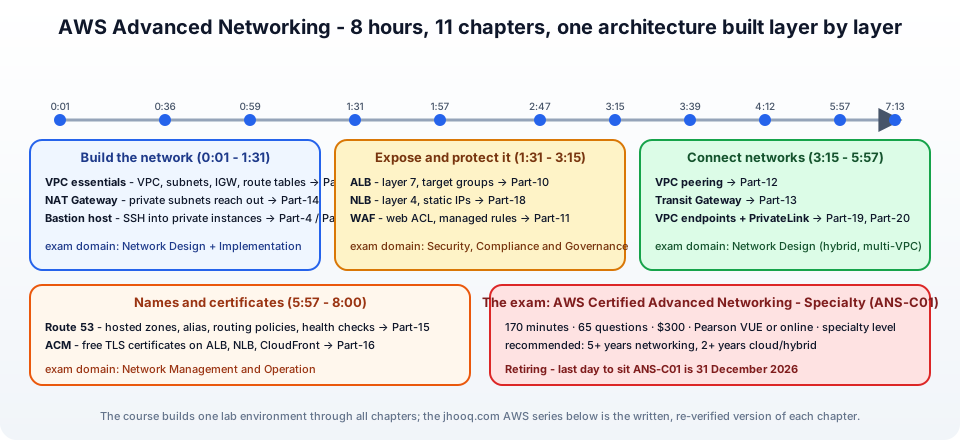
The eight hours follow one architecture -
- Build the network (0:01 - 1:31) - a VPC with public and private subnets, Internet Gateway, route tables, a NAT Gateway, a bastion host.
- Expose and protect it (1:31 - 3:15) - an Application Load Balancer, a Network Load Balancer, and WAF in front.
- Connect networks (3:15 - 5:57) - VPC peering, Transit Gateway, VPC endpoints and PrivateLink.
- Names and certificates (5:57 - 8:00) - Route 53 and ACM.
Each layer uses the previous one, so watch in order. You need an AWS account (the Free plan covers everything except a few dollars of NAT Gateway and load balancer hours - delete them when you stop for the day) and an IAM user or Identity Center login (Part-1).
2. Chapter 1 - VPC essentials (0:01:06)
Builds - a VPC 10.0.0.0/16, two public and two private subnets across two AZs, an Internet Gateway, public and private route tables, and the first EC2 instances to prove which subnet can reach what. The video spends the first half hour here because every later chapter depends on getting this right.
Key ideas - a subnet is public or private only because of its route table; CIDR planning; the five reserved addresses per subnet; 0.0.0.0/0 → igw.
Written version - Part-5: VPC with public and private subnets, Internet Gateway, NAT Gateway and route tables. Background if the vocabulary is new: what is a VPC and a subnet and what is CIDR.
3. Chapter 2 - NAT Gateway (0:36:00)
Builds - a NAT Gateway with an Elastic IP in a public subnet and the private route table pointing 0.0.0.0/0 at it; a private instance runs apt update and curl checkip.amazonaws.com shows the NAT's address.
Key ideas - PAT, outbound-only, one per AZ for HA, the per-hour and per-GB cost, and the free S3/DynamoDB gateway endpoints that keep traffic off it.
Written version - Part-14: NAT Gateway deep dive (limits, metrics, cost optimisation, troubleshooting) and the concept post what is NAT.
4. Chapter 3 - Bastion host (0:59:36)
Builds - a hardened EC2 instance in a public subnet as the only SSH entry point, with a security group that allows port 22 from your IP and private instances that allow SSH only from the bastion's security group; SSH agent forwarding to hop through.
Key ideas - security group references instead of CIDRs, key pairs, and the modern alternatives that remove the bastion entirely - EC2 Instance Connect Endpoint and Session Manager.
Written version - the bastion and app-server test in Part-5, step 7, and the connection methods in Part-4: launch an EC2 instance.
5. Chapter 4 - Application Load Balancer (1:31:00)
Builds - a target group with web instances, an internet-facing ALB across the two public subnets, an HTTP listener, and a test that shows requests alternating between instances; then listener rules by path.
Key ideas - layer 7, listeners and rules, target groups and health checks, cross-zone load balancing, and how an Auto Scaling group registers targets automatically.
Written version - the ALB build inside Part-10: EC2 Auto Scaling, and the Terraform version in setting up an ALB and SSL.
6. Chapter 5 - Network Load Balancer (1:57:00)
Builds - a target group and an NLB with static IPs per AZ, a TCP listener, and the comparison with the ALB - what the NLB does not see, and what it does better.
Key ideas - layer 4, static and Elastic IPs, client IP preservation and its effect on target security groups, cross-zone off by default, security groups only at creation, NLB in front of an ALB.
Written version - Part-18: Network Load Balancer, and ALB vs NLB.
7. Chapter 6 - Web Application Firewall (2:47:00)
Builds - a web ACL associated with the ALB, AWS managed rule groups (Core rule set, SQL injection, known bad inputs), a rate-based rule and a geo rule, then a SQL-injection curl that returns 403.
Key ideas - rules in priority order, Allow/Block/Count/CAPTCHA, WCUs, tuning in Count mode with sampled requests, logging, the $5 + $1 + $0.60 pricing.
Written version - Part-11: AWS WAF.
8. Chapter 7 - VPC peering (3:15:00)
Builds - a second VPC with a non-overlapping CIDR, a peering request and acceptance, routes in both VPCs, security group rules, and a ping across.
Key ideas - no overlapping CIDRs, not transitive, no edge-to-edge routing, DNS resolution over peering, cross-account and cross-region, free apart from data transfer.
Written version - Part-12: VPC peering.
9. Chapter 8 - Transit Gateway (3:39:00)
Builds - a Transit Gateway, VPC attachments for three VPCs with a subnet per AZ, routes in each VPC towards the TGW, the TGW route table with associations and propagations, and the isolation pattern where two spokes reach shared services but not each other.
Key ideas - hub-and-spoke, two layers of routing, associations vs propagations, VPN and Direct Connect attachments, peering between TGWs, RAM sharing, attachment-hour pricing.
Written version - Part-13: Transit Gateway.
10. Chapters 9 and 10 - VPC endpoints and PrivateLink (4:12:00 and 4:45:00)
Builds - the consumer side first: a gateway endpoint for S3 and interface endpoints for Systems Manager so a private instance with no NAT reaches S3 and is managed by Session Manager; then the provider side: an application behind an internal NLB published as an endpoint service, a consumer VPC with an interface endpoint to it, acceptance, and a private DNS name.
Key ideas - gateway vs interface endpoints, private DNS, endpoint policies and aws:sourceVpce, the ECR/SSM endpoint sets, cost vs NAT; endpoint services, allowed principals, acceptance, domain verification, proxy protocol v2, cross-region.
Written versions - Part-19: VPC endpoints and Part-20: PrivateLink endpoint service.
11. Chapter 11 - Route 53 (5:57:00)
Builds - a public hosted zone, moving a domain's name servers to Route 53, alias records to the ALB, and the routing policies - weighted, latency, failover with health checks, geolocation - plus a private hosted zone for internal names.
Key ideas - alias vs CNAME, TTLs, health checks and DNS failover, split-horizon DNS, Resolver endpoints, pricing per zone and per million queries.
Written version - Part-15: Route 53.
12. Chapter 12 - SSL/TLS with ACM (7:13:00)
Builds - a public certificate for the domain and its wildcard, DNS validation with one click in Route 53, an HTTPS listener on the ALB with a modern TLS policy, HTTP-to-HTTPS redirect, and the same certificate on CloudFront (requested in us-east-1).
Key ideas - free certificates with the private key inside AWS, the region rules, automatic renewal via the validation CNAME - and two changes since the video: certificates now last 198 days, and ACM can issue exportable certificates for servers outside AWS.
Written version - Part-16: AWS Certificate Manager.
13. The ANS-C01 exam - facts, domains, retirement
From the official certification page -
| Level | Specialty |
| Length | 170 minutes |
| Questions | 65, multiple choice and multiple response |
| Cost | 300 USD |
| Delivery | Pearson VUE test centre or online proctored |
| Languages | English, Japanese, Korean, Simplified Chinese |
| Recommended experience | 5+ years of networking, 2+ years of cloud and hybrid networking |
| Retirement | the last day to take ANS-C01 is 31 December 2026 |
The exam guide splits the content into four domains - Network Design, Network Implementation, Network Management and Operation, and Network Security, Compliance and Governance. The course covers the implementation and operation of every service in those domains; the exam adds depth on hybrid connectivity (Direct Connect, Site-to-Site VPN, BGP), Cloud WAN, Global Accelerator, Network Firewall, Gateway Load Balancer, IPv6, VPC Flow Logs and Traffic Mirroring and Reachability Analyzer - the topics of section 14. Being a specialty exam, the questions are scenario-based ("a company has overlapping CIDRs and must connect ... which option has the least operational overhead") rather than "what does this flag do".
14. What the course does not cover
The honest list, so you can fill the gaps from the AWS documentation before the exam -
- AWS Direct Connect - dedicated and hosted connections, virtual interfaces (private, public, transit), Direct Connect gateways, LAG, BGP communities, resiliency models.
- Site-to-Site VPN - customer gateways, tunnels, BGP vs static, ECMP over Transit Gateway, accelerated VPN, Client VPN.
- AWS Cloud WAN and Network Manager - the global, policy-driven successor to many-TGW designs.
- Global Accelerator - anycast static IPs in front of regional ALBs/NLBs.
- AWS Network Firewall and Gateway Load Balancer - inspection VPCs, centralised egress with firewalls.
- IPv6 - dual-stack VPCs, egress-only Internet Gateways, NAT64/DNS64, IPv6-only subnets.
- Observability - VPC Flow Logs, Traffic Mirroring, Reachability Analyzer, Network Access Analyzer, CloudWatch network metrics.
- Route 53 Resolver in depth - inbound/outbound endpoints, forwarding rules, DNS Firewall, DNSSEC.
- VPC Lattice and the newer PrivateLink resource and service-network endpoints.
- Networking for containers and Kubernetes - EKS VPC CNI, ECS networking modes.
Flow logs, security groups, launch templates and EBS have their own videos in the series and posts are on the way; Azure's equivalents are in my Azure networking videos.
15. Study path
- Watch the eight hours in four sittings, one part per sitting, and build along in your own account; destroy NAT Gateways, load balancers and Transit Gateway attachments at the end of each sitting (they bill per hour).
- Read the matching post after each chapter for the limits, prices, CLI commands and errors - that is where exam-style detail lives.
- Fill the gaps from section 14 with the AWS documentation - Direct Connect and Site-to-Site VPN deserve a weekend each.
- Practise the three recurring exam patterns: overlapping CIDRs (PrivateLink or private NAT), centralised egress and inspection (Transit Gateway plus Network Firewall), and hybrid DNS (Resolver endpoints).
- Book before the retirement date if you want ANS-C01 on your profile.
The whole written series is listed below, starting with Part-1: IAM, and the AWS networking product pages are at aws.amazon.com/products/networking.
More videos on this topic - the course update video, the dynamic routing demo (AWS and Google Cloud site-to-site VPN with high-availability VPN), and default routing vs static routing -
AWS step by step series -
- Part-1 : AWS IAM user - create a user, group, policy, access keys and MFA
- Part-2 : AWS Organizations - multi-account setup, OUs and SCPs
- Part-3 : AWS assume IAM role - trust policy, switch role in console and CLI
- Part-4 : How to launch an EC2 instance - key pair, security group, SSH
- Part-5 : AWS VPC - public and private subnets, Internet Gateway, NAT Gateway, route tables
- Part-8 : EC2 launch template - versions, default version, source template, SSM parameter AMI
- Part-10 : EC2 Auto Scaling - launch template, Auto Scaling group, target tracking, ALB
- Part-11 : AWS WAF - web ACL, managed rules, rate limiting, geo blocking
- Part-12 : AWS VPC Peering - connect two VPCs, routes, security groups, DNS
- Part-13 : AWS Transit Gateway - hub-and-spoke for many VPCs and on-premises
- Part-14 : AWS NAT Gateway deep dive - public vs private, limits, cost, troubleshooting
- Part-15 : Amazon Route 53 - hosted zones, records, alias, routing policies, health checks
- Part-16 : AWS security groups - inbound and outbound rules, stateful, referencing, quotas
- Part-16 : AWS Certificate Manager - free TLS certificates for ALB, CloudFront and API Gateway
- Part-17 : AWS Lambda - function URLs, environment variables and layers
- Part-18 : Network Load Balancer - setup, and ALB vs NLB
- Part-19 : VPC endpoints - gateway and interface endpoints (PrivateLink) instead of NAT
- Part-20 : AWS PrivateLink - publish your own service with an endpoint service and NLB
- Part-20 : Amazon EBS volumes - types, attach, mount, resize, snapshots, encryption
- Part-21 : VPC Flow Logs - CloudWatch Logs, S3, record format, Logs Insights, Athena
- Part-21 : EC2 Spot Instances - pricing, interruptions, mixed instances groups
- Part-24 : AWS Control Tower - landing zone, controls, Account Factory, Identity Center
Networking fundamentals -
- What is a VPC and a subnet? AWS networking in five minutes
- What is CIDR? Calculate IP ranges for VPCs and subnets
- What is NAT? Static NAT, dynamic NAT and PAT explained
More AWS guides -
- What is AWS CloudFormation? Templates, stacks, change sets, drift, StackSets
- Learn AWS S3 - the complete course
- AWS API Gateway - REST API with Lambda, authorizers, Terraform
- AWS Advanced Networking Specialty (ANS-C01) - course companion
- AWS ECS and Fargate - how to deploy a Docker container
- AWS S3 - how to host a static website
- Terraform create EC2 instance on AWS
- Terraform AWS IAM - users, roles and policies
- Terraform and AWS multi-account setup
- Terraform - setting up an ALB and SSL
Posts in this series
- Amazon EBS Volumes Step by Step - Volume Types Compared (gp3, gp2, io2 Block Express, st1, sc1), Create, Attach, Format and Mount a Volume, Resize Without Downtime, Snapshots, Encryption, Multi-Attach, Pricing and Troubleshooting (AWS Part-20)
- Amazon Route 53 Step by Step - Hosted Zones, Record Types, Alias Records, Point a Domain at an ALB, Routing Policies (Weighted, Latency, Failover, Geolocation), Health Checks, Private Zones and Pricing (AWS Part-15)
- AWS Advanced Networking - Free 8-Hour Full Course Companion (VPC, NAT Gateway, Bastion, ALB, NLB, WAF, VPC Peering, Transit Gateway, VPC Endpoints and PrivateLink, Route 53, ACM) with Timestamps and the ANS-C01 Exam Facts
- AWS Assume IAM Role Step by Step - Trust Policy vs Permissions Policy, Switch Role in the Console, aws sts assume-role, CLI Profiles, Cross-Account Access, MFA and External ID (AWS Part-3)
- AWS Certificate Manager (ACM) Step by Step - Request a Free TLS Certificate, DNS Validation with Route 53, Attach It to an ALB HTTPS Listener, Redirect HTTP to HTTPS, CloudFront and API Gateway, Auto-Renewal, Exportable Certificates and ACME (AWS Part-16)
- AWS Control Tower Step by Step - Set Up a Landing Zone, Security OU with Log Archive and Audit Accounts, Controls (Guardrails), Region Deny, IAM Identity Center, Account Factory and Enrolling Existing Accounts (AWS Part-24)
- AWS EC2 Auto Scaling Step by Step - Launch Template, Auto Scaling Group Across Two AZs, Target Tracking Policy, Application Load Balancer, Health Checks and Instance Refresh (AWS Part-10)
- AWS EC2 Launch Template Step by Step - Create a Template, Versions and the Default Version, Source Template, Create From a Running Instance, Systems Manager Parameter Instead of an AMI ID, Launch Templates vs Launch Configurations, IAM Guardrails, CLI and Terraform (AWS Part-8 and Part-17)
- AWS EC2 Spot Instances Step by Step - How Spot Pricing Works, Launch a Spot Instance, Interruptions and the Two-Minute Notice, Rebalance Recommendations, Stop vs Hibernate vs Terminate, Spot in Auto Scaling Mixed Instances Groups, Billing Rules, Best Practices, CLI and Terraform (AWS Part-21)
- AWS IAM User Step by Step - Create a User, User Group, Attach Policies, Access Keys, MFA and Sign-in URL (AWS Part-1)
- AWS Lambda Step by Step - Create a Function, Function URL (HTTPS Endpoint Without API Gateway), Environment Variables, Lambda Layers for Python Dependencies, Versions and Aliases, Limits, Pricing and Errors (AWS Part-17)
- AWS NAT Gateway Deep Dive - How It Works, Public vs Private NAT Gateway, Setup Step by Step, Limits (55,000 Connections, 100 Gbps), CloudWatch Metrics, Cost Optimisation, NAT Instance Comparison and Troubleshooting (AWS Part-14)
- AWS Network Load Balancer Step by Step - Create an NLB with Static IPs, Target Groups, TCP and TLS Listeners, Security Groups, Client IP Preservation, Cross-Zone Load Balancing, and ALB vs NLB Explained (AWS Part-18)
- AWS Organizations Step by Step - Multi-Account Setup, Organizational Units, Service Control Policies (SCPs), Consolidated Billing and Identity Center (AWS Part-2)
- AWS PrivateLink Step by Step - Publish Your Own Service with a VPC Endpoint Service and Network Load Balancer, Allow Consumers, Accept Connections, Private DNS Name, Cross-Account and Cross-Region, Pricing and Troubleshooting (AWS Part-20)
- AWS Security Groups Step by Step - Inbound and Outbound Rules, Stateful Behaviour, Referencing Security Groups, the Three-Tier ALB-Web-DB Pattern, Quotas, Security Group vs Network ACL, CLI and Terraform (AWS Part-16)
- AWS Transit Gateway Step by Step - Connect Many VPCs and On-Premises Through One Hub, VPC Attachments, Transit Gateway Route Tables, Associations and Propagations, Isolation, Peering, Pricing (AWS Part-13)
- AWS VPC Endpoints Step by Step - Gateway Endpoints for S3 and DynamoDB, Interface Endpoints (PrivateLink) for SSM, ECR and Other Services, Private DNS, Endpoint Policies, Security Groups, Cost vs NAT Gateway, and Troubleshooting (AWS Part-19)
- AWS VPC Flow Logs Step by Step - Enable Flow Logs for a VPC, Subnet or Network Interface, Publish to CloudWatch Logs or S3, Read a Flow Log Record Field by Field, Custom Formats, Query with Logs Insights and Athena, Find Rejected Traffic, Pricing and Limitations (AWS Part-21)
- AWS VPC Peering Step by Step - Connect Two VPCs (Same or Different Account and Region), Accept the Request, Add Routes, Security Groups, DNS Resolution, Test with EC2, and the Limits (AWS Part-12)
- AWS VPC Step by Step - Create a VPC with Public and Private Subnets, Internet Gateway, NAT Gateway and Route Tables (and Test It with EC2) (AWS Part-5)
- AWS WAF Step by Step - Create a Web ACL, Attach It to an ALB or API Gateway, AWS Managed Rules, Rate-Based Rules, Geo Blocking, IP Sets, Count Mode and Logging (AWS Part-11)
- How to Launch an EC2 Instance on AWS Step by Step - AMI, Instance Type, Key Pair, Security Group, Connect with SSH or EC2 Instance Connect, Stop vs Terminate (AWS Part-4)
- What is an AWS VPC and a Subnet? Virtual Private Cloud Explained in Five Minutes (Region, Availability Zones, Public vs Private Subnets, Gateways, Route Tables)
- What is AWS CloudFormation? Templates, Stacks and Change Sets Explained, Template Anatomy Section by Section, Create Your First Stack Step by Step, Update With a Change Set, Drift Detection, Nested Stacks and StackSets, Quotas, Pricing, CLI, and CloudFormation vs Terraform
- What is CIDR (Classless Inter-Domain Routing)? How to Calculate IP Ranges for VPCs and Subnets, with Examples (/8, /16, /24, /28, /32)
- What is NAT (Network Address Translation)? How It Works, Static NAT vs Dynamic NAT vs PAT, the Translation Table, and Where NAT Shows Up in AWS
- AWS API Gateway Tutorial - REST API with Lambda Proxy and Non-Proxy Integration, Request Validation, HTTP API vs REST API, Resource Policies, Lambda Authorizers and Terraform
- Learn AWS S3 - The Complete Course (Buckets, Objects, Storage Classes, Lifecycle, Versioning, Security Defaults, Bucket Policies, Static Hosting, CLI and Terraform)
- How to release(delete) Elastic IP from AWS?
- Fix docker login 'error saving credentials: error storing credentials - err: exit status 1' (AWS ECR on macOS, Windows, Linux and WSL)