Ansible Handlers Explained - notify, listen, flush_handlers, Handler Order and Real-World Examples

Introduction
Welcome to another Ansible blog post! Today we'll dive deep into Ansible Handlers. Before we jump straight into the demo, let's lay a solid foundation by understanding the 'what' and 'when' of Ansible Handlers - and especially the when, because that is where almost every handler bug comes from.
Table of Content
- What Are Ansible Handlers?
- Setting Up the Ansible Handler
- Setting up the Ansible tasks
- When do handlers actually run? (and meta: flush_handlers)
- Multiple Ansible Handlers using the listen keyword
- Ansible Handler order - the real rules
- Handlers in roles and include files
- What happens when a task fails - force_handlers
- Common mistakes - why my handler never runs
- Conclusion & Key Takeaways
1. What Are Ansible Handlers?
Imagine you're managing a website and wish to update its content. You employ an Ansible Playbook to copy the refreshed HTML file onto the server.
But there's a catch. Every time you update the configuration of your application server, you must restart or reload it to see the change. And if your playbook has ten tasks which each change something, you do not want ten restarts - you want one, at the end, and only if something actually changed.
How can you streamline this process? - The answer is Ansible Handlers.

A handler is a task with two special properties -
- It runs only when notified by another task, and a task only notifies when it reports
changed. Run the playbook a second time with nothing to change, and the handler does not run. - It runs once per play, however many tasks notified it. Ten changed config files still mean one restart.
Here is the whole lifecycle in one picture - tasks notify during the play, the notifications are deduplicated, and the handlers run at the end -
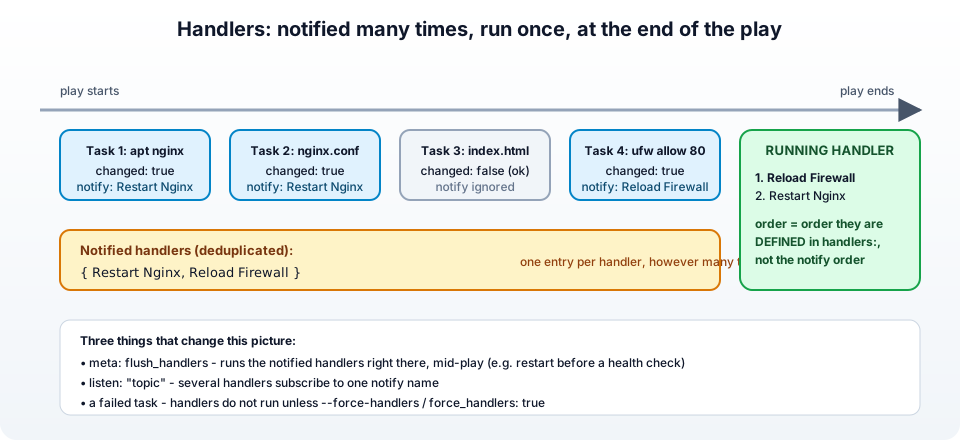
With Ansible Handlers, you can:
- Copy the updated HTML or config onto your application server.
- Automatically restart or reload the server once, after all the updates, and only when something changed.
2. Setting Up the Ansible Handler
The aim of the handler for this blog post is to restart the nginx server. Handlers live in a handlers: section of the play (or in handlers/main.yml of a role) and look exactly like tasks -
Here is the GitHub project link - Ansible Handlers
 1---
 2- name: Example Ansible playbook for Handlers
 3  hosts: all
 4  become: yes
 5  remote_user: ubuntu
 6  roles:
 7    - handlers
 8
 9  # Ansible Handler: this will restart the Nginx server, but only when notified
10  handlers:
11    - name: Restart Nginx
12      ansible.builtin.service:
13        name: nginx
14        state: restarted
The handler's name is what tasks will notify. Keep it unique within the play - two handlers with the same name shadow each other.
Restart vs reload - for nginx (and most servers) a
reloadapplies a new config without dropping connections, arestartkills and starts the process. Preferstate: reloadedfor config changes and keeprestartedfor upgrades or binary changes. Many of my roles have both handlers.
3. Setting up the Ansible tasks
In the previous step we defined the handler, now let's create the tasks for -
- Installing the Nginx application server
- Updating the website content
- Calling the handler with
notify
3.1. Installing the Nginx Application Server:
The initial task installs the Nginx server -
1---
2# Step-1 : Install Nginx
3- name: Update apt cache and install Nginx
4  ansible.builtin.apt:
5    name: nginx
6    state: latest
7    update_cache: yes
3.2. Updating Website Content:
The playbook then copies the HTML file (which you want to update) to the application server -
 1---
 2# Step-1 : Install Nginx
 3- name: Update apt cache and install Nginx
 4  ansible.builtin.apt:
 5    name: nginx
 6    state: latest
 7    update_cache: yes
 8
 9# Step-2: Copy index.html
10- name: index.html copy
11  ansible.builtin.template:
12    src: index.html
13    dest: /usr/share/nginx/html/index.html
3.3. Calling the Ansible handler with notify:
The key here is the notify attribute. After copying the content, I've set it to notify the handler named 'Restart Nginx'. When this task reports changed (the file content differs from what is on the server), Ansible records that the handler should run -
 1# Step-1 : Install Nginx
 2- name: Update apt cache and install Nginx
 3  ansible.builtin.apt:
 4    name: nginx
 5    state: latest
 6    update_cache: yes
 7
 8# Step-2: Copy index.html
 9- name: index.html copy
10  ansible.builtin.template:
11    src: index.html
12    dest: /usr/share/nginx/html/index.html
13
14# Step-3: Update the content on the website and restart the server
15- name: updated.html copy
16  ansible.builtin.template:
17    src: updated.html
18    dest: /usr/share/nginx/html/index.html
19  notify:
20    - Restart Nginx
Run it twice and watch the difference -
 1# first run - the template changed, the handler runs
 2TASK [updated.html copy] *******************************************************
 3changed: [35.204.184.224]
 4
 5RUNNING HANDLER [Restart Nginx] ************************************************
 6changed: [35.204.184.224]
 7
 8# second run - nothing changed, the handler is not even mentioned
 9TASK [updated.html copy] *******************************************************
10ok: [35.204.184.224]
That RUNNING HANDLER line appears after the last task, not right after the template task - which brings us to the most important section of this post.
4. When do handlers actually run? (and meta: flush_handlers)
By default, handlers run at the end of each section of the play - after all pre_tasks, after all roles and tasks, and after all post_tasks. The Ansible docs put it in one line - "By default, handlers run after all the tasks in a particular play have been completed." They do not run immediately after the task which notified them.
That is usually what you want (one restart after all the config changes). But sometimes you need the handler to run in the middle of the play - for example, restart nginx now, because the next task is a health check against it. For that there is meta: flush_handlers -
 1- name: Configure and verify nginx
 2  hosts: webservers
 3  become: yes
 4  tasks:
 5    - name: Deploy nginx.conf
 6      ansible.builtin.template:
 7        src: nginx.conf.j2
 8        dest: /etc/nginx/nginx.conf
 9      notify: Reload Nginx
10
11    - name: Run the notified handlers right now
12      ansible.builtin.meta: flush_handlers
13
14    - name: Verify nginx answers on port 80
15      ansible.builtin.uri:
16        url: http://localhost/
17        status_code: 200
18
19  handlers:
20    - name: Reload Nginx
21      ansible.builtin.service:
22        name: nginx
23        state: reloaded
"The meta: flush_handlers task triggers any handlers that have been notified at that point in the play." After a flush, the handler can be notified again by later tasks and will run again at the next flush or at the end of the play.
Two more timing facts which surprise people -
- Handlers run on the hosts that notified them, not on every host. If only
web-02had a changed config, onlyweb-02restarts. (This combines nicely with--limit.) - Handlers ignore tags. If you run
--tags config, the tasks taggedconfigrun and their handlers run too, even though the handlers carry no tag.
5. Multiple Ansible Handlers using the listen keyword
Here is a neat feature that's often overlooked - the listen keyword, which lets a single notify trigger multiple handlers.
Imagine you're running a web server and a cache service. Whenever you update the web server's configuration, both the web server and the cache service need to restart. Instead of listing both handler names in every task's notify, give the handlers a shared topic to listen on -
 1---
 2- name: Ansible multiple handlers with listen
 3  hosts: webservers
 4  become: yes
 5  tasks:
 6    - name: Ensure the web server configuration is updated
 7      ansible.builtin.copy:
 8        src: files/config.conf
 9        dest: /etc/webserver/config.conf
10      notify: "Restart Necessary Services"
11
12  handlers:
13    - name: Gracefully restart the web server
14      ansible.builtin.service:
15        name: webserver
16        state: restarted
17      listen: "Restart Necessary Services"
18
19    - name: And, don't forget the cache service!
20      ansible.builtin.service:
21        name: cacheservice
22        state: restarted
23      listen: "Restart Necessary Services"
Here's the magic: when the configuration task reports changed, it notifies the topic Restart Necessary Services. Every handler listening to that topic is queued. The docs say it directly - "Notifying the restart web services topic results in executing all handlers listening to that topic."
Why this is better than listing two names in notify -
- The task does not need to know how many handlers exist. Add a third service next month and only the handlers file changes.
- Roles can expose a stable topic name (
restart web stack) while renaming their internal handlers freely. - A handler can have both a
nameand alisten, and even listen to several topics (listenaccepts a list).
One limitation from the docs - listen topics cannot contain templates, so listen: "restart {{ service_name }}" does not work.
6. Ansible Handler order - the real rules
This is where I have to correct something I wrote in the first version of this post. I claimed that the order of names in notify controls the order in which the handlers run. It does not. The rule, straight from the Ansible documentation, is -
"Handlers are executed in the order they are defined in the handlers section."
Not the order in which they were notified, not the order in the notify list. So if you need "clear the cache, then restart the app", the only thing that matters is that the cache handler is defined above the restart handler -
 1---
 2- hosts: app_servers
 3  become: yes
 4  tasks:
 5    - name: Deploy the application
 6      ansible.builtin.copy:
 7        src: files/app/
 8        dest: /opt/app/
 9      notify:
10        - Restart App       # listed first here...
11        - Clear Cache       # ...but order here is irrelevant
12
13  handlers:
14    # defined first => runs first
15    - name: Clear Cache
16      ansible.builtin.command: /opt/app/bin/clear_cache.sh
17
18    # defined second => runs second
19    - name: Restart App
20      ansible.builtin.service:
21        name: my_app_service
22        state: restarted
Output -
1RUNNING HANDLER [Clear Cache] **************************************************
2changed: [app-01]
3
4RUNNING HANDLER [Restart App] **************************************************
5changed: [app-01]
The same rule applies with listen - handlers listening to a topic run in the order they are defined, not the order the topics were notified. And when handlers come from several roles, the roles' handlers are appended in the order the roles are listed in the play (see the next section).
If you have a hard ordering requirement between two steps, the most robust option is to make the second handler run after a meta: flush_handlers, or simply to put both actions in one handler (a handler can be a block, or a single shell script).
7. Handlers in roles and include files
Roles - a role's handlers live in roles/<role>/handlers/main.yml, and tasks in the role notify them by name. What is less known is that role handlers are global to the play - the docs state "Handlers from roles are not just contained in their roles but rather inserted into the global scope." A task in the playbook, or in another role, can notify them too. To avoid name clashes between roles, notify with the role prefix -
1- name: Deploy site config
2  ansible.builtin.template:
3    src: site.conf.j2
4    dest: /etc/nginx/conf.d/site.conf
5  notify: "nginx : Reload Nginx"      # role name : handler name
This is the structure I use in all my roles, and I have described the full layout in Ansible roles, inventory, hosts and tasks.
Include files - you can notify an include_tasks file as if it were a handler, and "all tasks from within the include" run. The reverse is not possible: a handler defined inside a dynamic include cannot be notified. With a static import_tasks in the handlers section, the imported handlers become normal, individually notifiable handlers. Handlers also cannot use include_role or import_role.
8. What happens when a task fails - force_handlers
If a task fails on a host before the end of the play, Ansible stops processing that host and its notified handlers are not run. That can leave nginx running with a new config file on disk but the old config in memory - a confusing state the next morning.
If you would rather have the handlers run anyway, enable force_handlers on the play, on the command line, or in ansible.cfg -
1- hosts: webservers
2  force_handlers: true
1ansible-playbook site.yml --force-handlers
1# ansible.cfg
2[defaults]
3force_handlers = True
Note that this covers task failures. If the play aborts because of an unreachable host, handlers on that host still cannot run, for obvious reasons.
9. Common mistakes - why my handler never runs
1. The task did not report changed. The number one cause. command and shell always report changed (so they always notify), while copy, template, apt, lineinfile only report changed when something differs. If you need to control it, use changed_when -
1- name: Check whether a migration is needed
2  ansible.builtin.command: /opt/app/bin/migrate --dry-run
3  register: migrate
4  changed_when: "'pending' in migrate.stdout"
5  notify: Run migrations
2. Typo in the handler name. notify: restart nginx versus name: Restart Nginx - names are case-sensitive. Since ansible-core 2.x, notifying a handler that does not exist fails the play with The requested handler 'restart nginx' was not found in either the main handlers list nor in the listening handlers list, which at least makes it visible.
3. The handler is in the wrong play. Handlers are per play. A task in play 1 cannot notify a handler defined in play 2.
4. You expected it to run immediately. It runs at the end of the section. Use meta: flush_handlers (Section 4).
5. A task failed afterwards and the handler was skipped. Use --force-handlers (Section 8).
6. --check mode. In check mode handlers are notified by tasks that would change, and the handlers themselves run in check mode too, so a service: restarted handler shows changed without restarting anything. That is the expected behaviour.
7. The handler runs on every run. Your notifying task is a command/shell without creates: or changed_when. Fix the task, not the handler.
8. The handler failed with Could not find the requested service nginx. The handler ran before the package was installed, usually because the install task is in a later play or role. Order the roles correctly, or notify from the install task.
9. notify in a block. Allowed - every task inside a block can notify. The block keyword itself cannot carry notify.
If nginx itself refuses to start after the handler, that is a config problem, not a handler problem - I have covered the usual suspects in Ansible Apache failed to start, and the same checks apply to nginx.
10. Conclusion & Key Takeaways
Ansible Handlers are the right way to do "restart the service if, and only if, its configuration changed" - the pattern behind almost every production role.
- A handler runs only when a task that
notifys it reports changed, and runs once per play however often it was notified. - Handlers run at the end of the play section - use
meta: flush_handlersto run them earlier. listenlets one notify trigger many handlers, which keeps tasks decoupled from handler names.- Handlers run in the order they are defined, not the order they are notified.
- Role handlers are global to the play - notify them as
role : handlerto avoid clashes. - Add
force_handlersif you cannot afford a half-applied config after a failed task.
The complete reference is the Ansible handlers documentation, and if you want to see the whole playbook from this post running end to end, watch the video above or clone the example repository. Do you have similar dependencies in your playbooks? Then handlers are the tool you need.